B2B Order Management System: A Complete Guide for Merchants
You run a successful DTC store on Shopify Plus. Orders flow through checkout, inventory updates are familiar, and your support team knows what “normal” looks like. Then a regional retailer sends a purchase order for 500 units. The buyer expects negotiated pricing, a purchase order number, approval against credit terms, delivery to a specific warehouse, and possibly several shipments. Your consumer checkout wasn't built to manage that complexity.
A B2B order management system gives you the operating layer between the buyer's order and the systems that price, reserve, fulfill, invoice, and support it. The important question isn't which platform has the longest feature list. It's whether your design keeps data synchronized and gives people a controlled way to handle exceptions when something goes wrong.
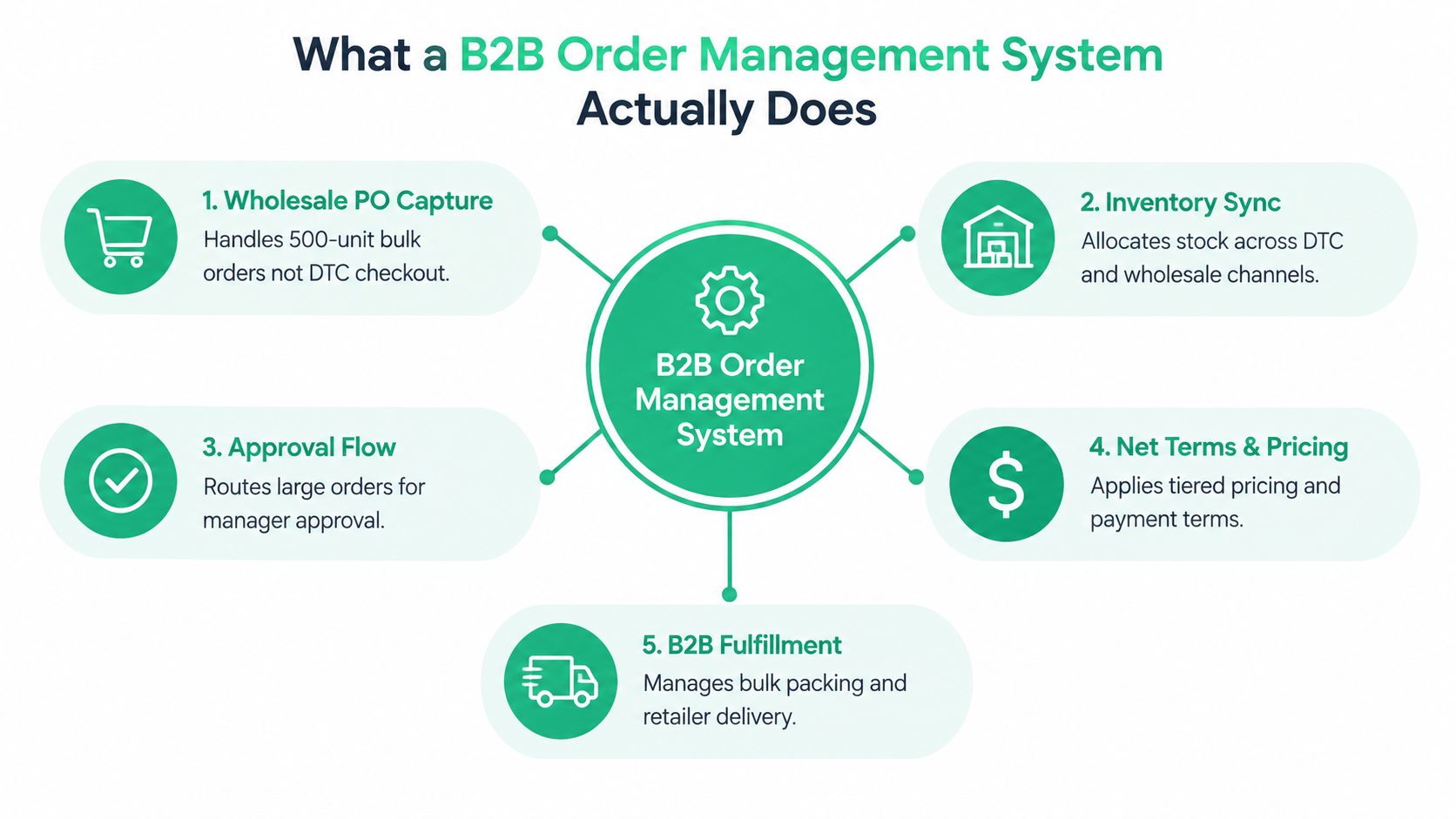
What a B2B Order Management System Actually Does
A B2B OMS receives orders from multiple channels, checks whether each order can be accepted, commits inventory, applies commercial rules, coordinates fulfillment, and tracks the order through completion or return. It's closer to an air-traffic controller than a shopping cart. The cart captures demand, while the OMS decides what should happen next.
For a Shopify Plus merchant adding wholesale, the distinction becomes obvious as soon as the first large PO arrives. A DTC order usually has one shopper, one price, immediate payment, one delivery address, and a straightforward shipment. A wholesale order may use a customer-specific price list, minimum order quantities, net terms, a purchase order number, approval limits, several ship-to locations, and split delivery dates.
A B2B OMS should own the order state, inventory commitment, and orchestration rules. It may delegate payment processing to a payment provider, tax calculation to a tax engine, warehouse execution to a WMS, and accounting or receivables to an ERP. Delegation isn't a weakness. It's often the safer design, provided every system agrees on the order's current state.
The four jobs that matter
A useful way to evaluate an OMS is to ask whether it handles four operational jobs well:
- Capture: Can it accept orders from Shopify, a buyer portal, EDI, email, or a sales representative without forcing someone to rekey every line?
- Route: Can it choose the right warehouse, 3PL, or drop-ship partner using stock, geography, service level, and margin rules?
- Fulfill: Can it coordinate reservations, backorders, split shipments, shipment confirmations, and invoices?
- Resolve: Can it expose failed validations, address problems, inventory conflicts, returns, and payment exceptions in a queue someone can act on?
The last job is where many implementations fall short. An order that works perfectly is easy to demonstrate. The test is what happens when the buyer's price is outdated, the requested quantity exceeds available stock, the address fails validation, or the warehouse ships only part of the order.
Before choosing an application, map the actual order journey and identify which system writes each status. Resources such as order management apps for ecommerce operations can help you understand the wider application set, but your process map should drive the purchase, not the other way around.
The broader OMS category varies considerably because it includes software, services, cloud deployments, and multichannel workflows. One market overview cites a global OMS value of about $3.8 billion in 2025, with a projection of $9.1 billion by 2034 and a 10.2% CAGR, while another summary estimates the narrower B2B order management software market at $2.95 billion in 2023 and $3.17 billion by 2030. The difference, documented in the buyers guide to order management systems, shows why you should define your operational scope before comparing vendors.
The Core Order Workflow from Capture to Returns
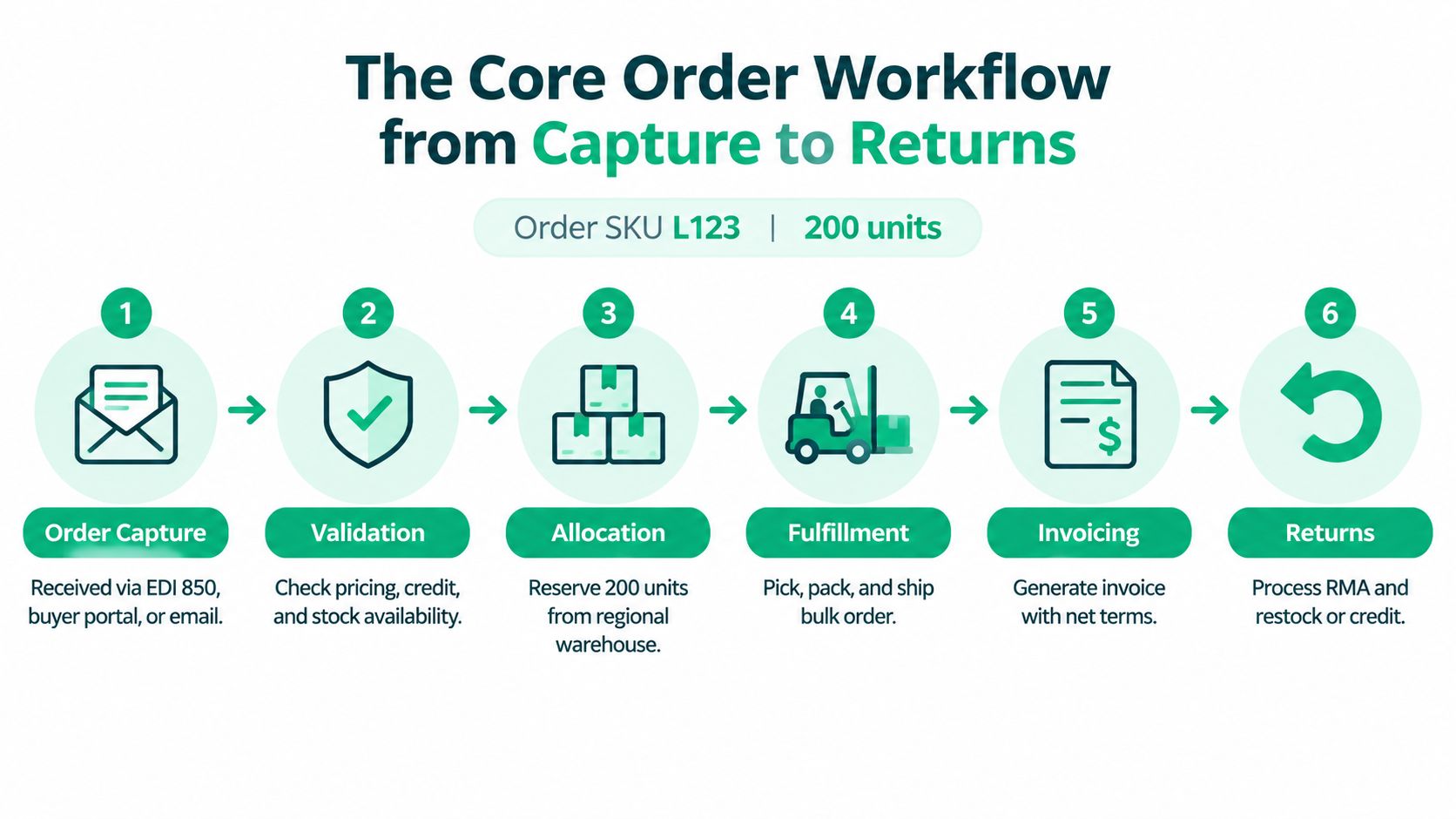
Take a wholesale order for 200 units of SKU L123. A regional buyer might submit it through an EDI 850 transaction, a buyer portal, an emailed PDF, or a sales representative entering the PO on the buyer's behalf. The OMS should create one normalized order record regardless of the intake channel.
At capture, the system resolves the buyer's account, contract price, quantity rules, requested ship date, and ship-to location. It shouldn't treat an email order as a second-class workflow. The same validation and status model should apply whether the buyer uses EDI or a rep uses an assisted-order screen.
Six stages that keep the order traceable
Capture creates the record. The OMS records the buyer, line items, negotiated price, requested dates, PO number, and destination. It should preserve the original source so support staff can trace how the order entered the business.
Validation checks whether the order is acceptable. The system checks credit status, contract pricing, minimum quantities, inventory availability, tax exemption information, and ship-to data. Address-quality controls deserve special attention because late corrections can create fulfillment and carrier problems. Digital Commerce 360's analysis of bad address data recommends autocomplete and real-time validation, along with support for global formats and synchronization across customer and fulfillment systems.
Allocation reserves supply. If the regional warehouse has enough L123 units, the OMS reserves them for this buyer rather than showing the same stock as freely available to another channel. If supply is short, the system should offer a backorder, alternate location, or split shipment according to the buyer's agreement.
Routing selects the execution path. Rules may send the order to a warehouse near the destination, a 3PL with the correct capability, or a drop-shipper. The decision can consider region, available stock, promised date, service level, and commercial constraints.
Fulfillment and invoicing update the lifecycle. The warehouse picks and packs the bulk order, then sends shipment confirmation or an advance shipping notice. The OMS records partial and complete shipment states, while the ERP or finance workflow issues the invoice under the agreed payment terms. For finance and operations teams connecting these steps, automated O2C for finance leaders offers useful context on linking order, billing, and cash processes.
Returns close the loop. A return request should generate an RMA, identify the relevant shipment and line item, and route the goods for restocking, refurbishment, or scrap. The system then records the disposition and triggers the appropriate credit memo or adjustment.
Each transition matters because “shipped” in the OMS, “invoiced” in the ERP, and “delivered” at the carrier shouldn't become three contradictory stories. Reliable B2B order management depends on a shared status model and a clear recovery path for every failed handoff.
Integrations, Automation, and Security Behind the Scenes
Integrations are the reliability layer of a B2B OMS. Shopify Plus can remain the commerce and catalog core, while the OMS coordinates the order and exchanges data with the ERP, WMS, 3PL, CRM, PIM, EDI translator, tax engine, and payment-term service.
The design question isn't whether a connector exists. Ask which system owns the data, how changes are reconciled, and what happens when an API call fails. An ERP may own the item master and accounts receivable. A PIM may own product descriptions and attributes. The WMS owns pick and pack execution. The OMS should consume those records without creating competing versions that staff must reconcile manually.
Match the sync pattern to the data
Use real-time APIs where stale information creates immediate commercial risk, such as contract pricing, inventory availability, and credit status. Use near-real-time event flows for order acceptance, allocation, shipment, and cancellation updates. Batch processing can still be appropriate for reconciliation, reporting, and controlled financial exports.
This separation prevents a common error: treating every data type as if it needs the same timing. A nightly catalog update may be acceptable. A delayed inventory reservation during a wholesale buying window may not be.
Automation should also be narrow enough to audit. Examples include:
- Approval rules: Automatically approve orders that fall within a buyer's credit and value permissions, while sending exceptions to a manager.
- Routing rules: Send low-margin or regionally complex POs to a preferred 3PL instead of relying on individual judgment.
- Data checks: Flag duplicate SKUs, mismatched units of measure, missing PO numbers, or conflicting ship-to records.
- Inventory actions: Trigger replenishment workflows when committed stock crosses the safety threshold defined by your planning team.
These controls only work when the underlying data is consistent. Guidance on how to prevent siloed data with SigOS is relevant because fragmented systems often create the very status mismatches and re-entry work an OMS is meant to remove. You can also review the practical benefits of system integration before deciding which connections deserve priority.
Security should follow the order's risk
B2B teams need SSO, role-based permissions, audit trails, careful PII handling, and a clear understanding of SOC 2 responsibilities. A buyer should see the accounts, prices, and orders they're authorized to access. A sales representative may need customer visibility without access to finance administration. Operations users may need to change allocations but not alter credit policy.
Define PCI boundaries too. The payment processor should handle payment data wherever possible, while the OMS passes the required payment status rather than storing sensitive card details. The ERP, OMS, and commerce platform should each have explicit responsibilities for financial records, customer information, and operational changes.
Benefits and KPIs That Show OMS Is Working
A wholesale order arrives with a contract price, a customer-specific ship-to address, and inventory shared with DTC orders. If a coordinator rekeys those details across several systems, the order may look accepted while allocation or invoicing waits. An OMS earns its place by reducing that hidden work and making exceptions visible to operations and finance.
Start with the problems those teams already measure: processing time, order accuracy, manual intervention, and cash flow. Manual entry can take about 11 minutes per order, while AI-assisted workflows can reduce entry to 3 minutes and reach touchless processing for 67% of orders in high-performing setups, according to TEJAS Software's OMS best-practice benchmarks. The same benchmark reports error rates falling from 9% to under 1% in those setups. Treat these figures as reference points, not promises. Your baseline depends on order complexity, data quality, integrations, and the exceptions your team still handles.
Measure the lever, not just the outcome
Order processing speed should cover acknowledgement, validation, allocation, picking, packing, and shipment. A fast capture step does not improve the customer experience if a spreadsheet still controls allocation.
Order accuracy asks whether the buyer receives the correct item, quantity, price, and destination. The cited benchmarks describe 99.0% to 99.5% as solid accuracy and 99.5% to 99.9% as a leader-level target. Use the lower range as a diagnostic floor, then set a target that reflects the cost of wholesale errors, such as chargebacks, reshipments, or damaged account trust.
Exception rate shows how many orders need human intervention. Count the reason codes, not only the total. A falling total may conceal recurring address, credit, inventory, or pricing problems when staff close cases without consistent categorization.
Cash-cycle measures, including DSO, depend on complete order and invoice data reaching finance. An OMS can improve that handoff, but it cannot correct weak credit policy, disputed invoices, or collection practices on its own.
| KPI | OMS lever | Benchmark direction | Review cadence |
|---|---|---|---|
| Order cycle time | Faster capture, validation, allocation, and fulfillment routing | Move toward under 24 hours for leader-level cycle time, compared with 24 to 48 hours as common | Weekly during the first quarter, then monthly |
| Order accuracy | Contract-price resolution, inventory rules, address validation, and fewer manual entries | Solid performance is 99.0% to 99.5%; leaders target 99.5% to 99.9% | Weekly during the first quarter, then monthly |
| Perfect order rate | Consistent routing, complete shipment execution, and accurate documentation | Around 90% is acceptable; 95% or higher signals top performance | Weekly during the first quarter, then monthly |
| Exception rate | Automated approvals, validation queues, and reason-code reporting | Reduce avoidable manual intervention without hiding unresolved issues | Weekly during the first quarter, then monthly |
| Cash-cycle performance | Complete order, shipment, and invoice data passed to finance | Improve directionally, while separating OMS effects from credit and collections policy | Monthly |
Capture time, acknowledgement speed, and visible queue volume often improve first. Accuracy and perfect order rate take longer because teams must correct master data, routing rules, and warehouse habits. Cash-cycle measures usually lag further, since invoices and payment behavior follow the complete order lifecycle. Review the metrics together: speed without accuracy moves errors downstream.
Choosing an OMS Approach for Shopify and Shopify Plus
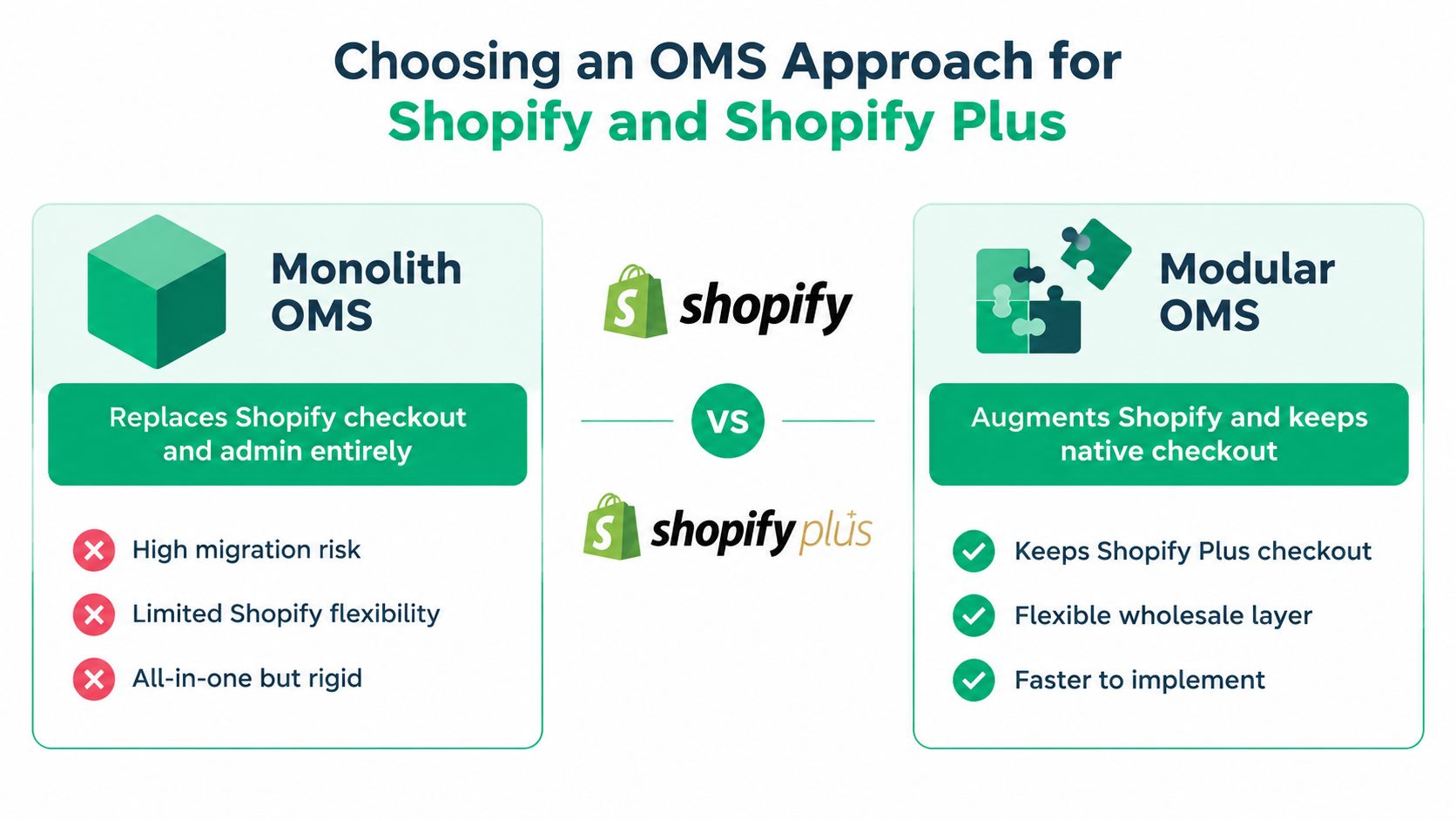
Shopify Plus merchants usually face two architectural paths. A monolith OMS replaces much of the existing commerce and administration experience. A modular OMS keeps Shopify Plus in place and adds specialized capabilities around it.
The monolith's advantage is consolidation. One vendor may provide a unified data model, contract, and support relationship. The trade-off is migration risk. You may need to move away from Shopify's order graph, storefront workflows, native checkout, and app ecosystem, even though those systems already support your DTC business.
A modular architecture preserves the Shopify investment. Shopify Plus can remain the catalog, storefront, checkout, and customer-facing commerce layer, while a B2B layer handles company accounts, negotiated pricing, terms, and wholesale ordering. A dedicated OMS can then manage routing and fulfillment, while post-purchase applications handle specific customer-service workflows.
Compare the trade-offs directly
| Approach | Strength | Cost or risk | Appropriate use |
|---|---|---|---|
| Monolith OMS | Unified data and one primary platform | Migration effort, reduced Shopify flexibility, and a larger change program | A business rebuilding its commerce stack from the ground up |
| Modular OMS | Keeps Shopify Plus checkout and extends existing workflows | More integration ownership and possible status-reconciliation work | A Shopify Plus merchant adding wholesale to an established DTC operation |
A modular approach isn't automatically simple. Each added system needs a clear owner, event contract, retry strategy, and reconciliation report. Without those controls, “best of breed” can become a collection of disconnected tools.
For most Shopify Plus merchants already invested in DTC, modular is the sensible default. Add the capability that solves the current bottleneck, then expand only when the data and exception model can support it. Tools such as SelfServe fit this model as post-purchase augmentation for order edits, cancellations, returns, reorders, and related customer-service workflows. They shouldn't be treated as a replacement for an OMS.
Review Shopify Plus order management with this distinction in mind. The right question isn't whether one tool can claim to manage every order. It's which system should own each decision and how the systems recover when a decision changes.
Selecting and Implementing Your B2B OMS
Start with a scorecard, not vendor demos. Your evaluation should reflect the orders your team processes, including net terms, tiered pricing, PO capture, quote-to-order, multi-warehouse routing, approval chains, and ERP integration depth. Add Shopify compatibility, EDI support, exception queues, returns, permissions, reporting, and the ability to expose a useful audit trail.
Weight the criteria according to operational risk. If wholesale pricing errors create disputes, pricing and contract resolution deserve more weight than a polished buyer portal. If your business relies on regional warehouses, allocation and split-shipment logic should carry more weight than a generic automation catalog.
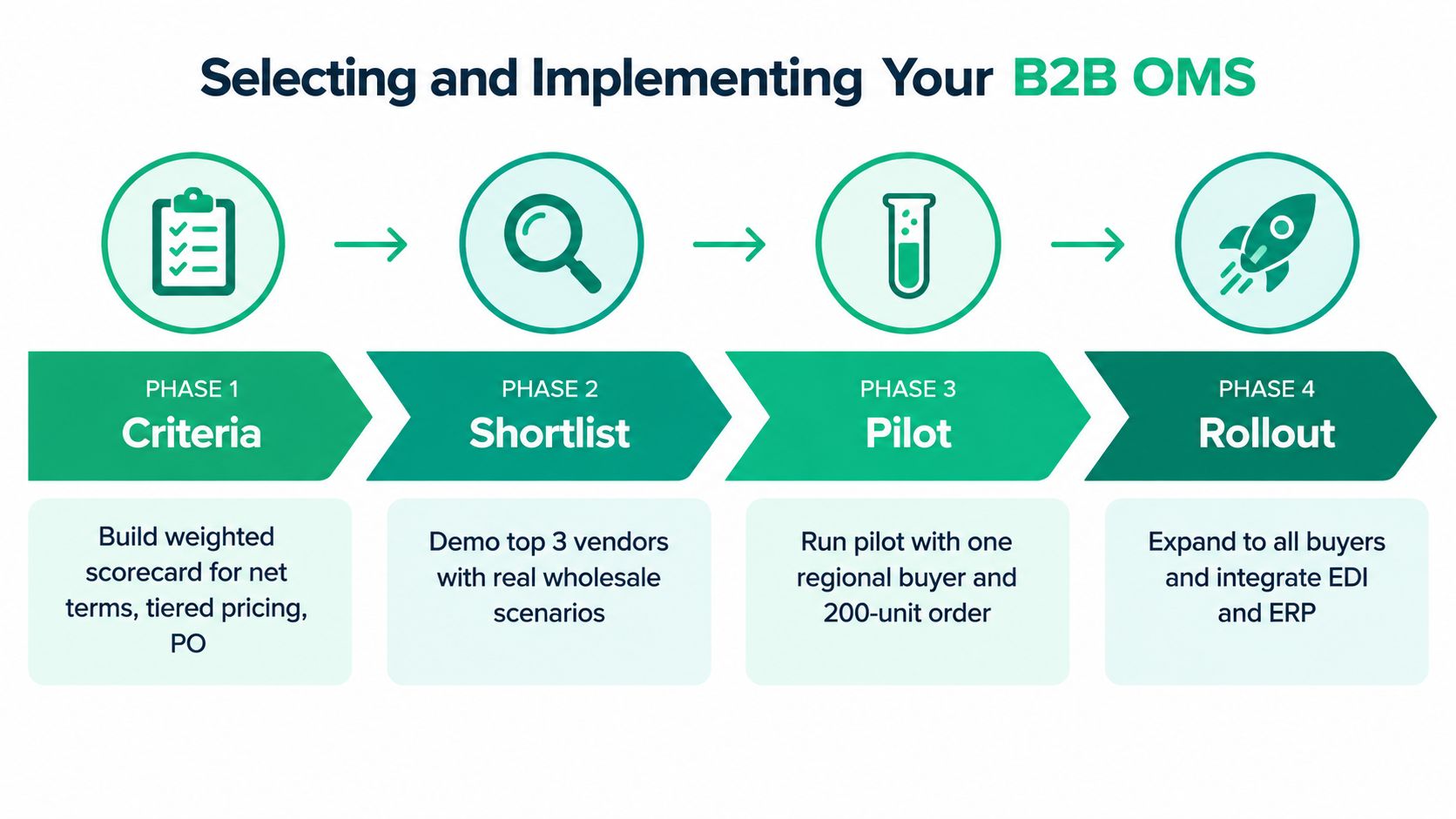
Use four controlled phases
Phase one, criteria. Build the weighted scorecard, define required integrations, and document the buyer scenarios every vendor must demonstrate. Include one clean order and several difficult orders, such as a partial allocation, failed address, approval hold, and return.
Phase two, shortlist. Narrow the field to three vendors using the same scorecard. Request written responses to integration and recovery questions, then ask each vendor to demonstrate your real order rather than a sanitized sample. Verify how the system logs failed messages, retries updates, and reconciles mismatched statuses.
Phase three, pilot. Run one customer segment or region for a controlled pilot. The supplied implementation plan calls for 60 to 90 days for this stage, giving the team enough time to observe ordinary orders and exceptions. Set a baseline for the KPIs above and document an exit criterion before the pilot starts.
Phase four, rollout. Expand by customer group, warehouse, or region. Train customer service and operations teams on exception queues, permissions, and escalation rules. Keep a 30-day stabilization window after each wave so you can fix mapping, notification, and workflow problems before adding more volume.
Plan around operational reality
B2B OMS projects typically run six to nine months end to end, so plan master-data cleanup, integration testing, training, and cutover work well ahead of peak season. That timeline can compress or expand based on scope, but ignoring the work outside the software is how launches become unstable.
Before go-live, test failed messages, canceled lines, backorders, split shipments, tax exemptions, address corrections, credit holds, returns, and invoice adjustments. A system that handles the happy path but leaves staff without a recovery process isn't ready.
Common Mistakes and Quick Answers for B2B OMS Buyers
The most expensive mistakes usually happen before the first order enters the new system.
- Treating B2B as DTC with larger quantities: A bulk cart doesn't solve negotiated pricing, approvals, credit, POs, or split delivery. Model the commercial workflow, not just the quantity.
- Underestimating EDI and approval chains: EDI mapping and buyer authorization can determine whether an order is accepted at all. Test the actual trading-partner documents and approval conditions.
- Skipping credit and tax logic: An order that looks valid in Shopify may still violate a credit limit or lack the right exemption data. Validate these conditions before allocation.
- Leaving returns until launch: Without RMA, disposition, and credit rules, the first return becomes a manual side process. Design the reverse flow alongside fulfillment.
- Automating every exception: Automation should remove repetitive decisions, not hide uncertainty. Route ambiguous pricing, inventory, and address cases to people with context.
- Neglecting admin training: Teams need to know which system to update, how to interpret statuses, and when to escalate. A clean interface won't replace operating discipline.
- Choosing a monolith by default: If Shopify Plus already runs your DTC business, replacing it may create more migration risk than value. Consider modular augmentation first.
Short FAQ
How long does implementation take?
A full B2B OMS project typically takes six to nine months, while a controlled pilot is commonly planned for 60 to 90 days. Scope, data readiness, integrations, and trading-partner requirements can change the timeline.
Does Shopify Plus need a separate OMS?
Not always. Shopify Plus can support the commerce layer, while a dedicated OMS becomes useful when cross-system routing, allocation, fulfillment, and exception handling exceed the capabilities of your existing tools.
What does an OMS cost?
There isn't one reliable figure. Costs depend on order complexity, users, integrations, warehouses, trading partners, implementation services, and whether you add a standalone OMS or augment the current stack. Compare total ownership and operational risk, not subscription price alone.
How should we evaluate ROI within 90 days of go-live?
Compare the pilot group with its documented baseline. Review acknowledgement time, order accuracy, perfect order rate, exception volume, manual touches, shipment timeliness, credit adjustments, and invoice handoff quality. Separate improvements caused by the OMS from changes in staffing, volume, pricing, or warehouse policy.
SelfServe gives Shopify and Shopify Plus merchants a customer-facing way to manage permitted post-purchase edits, shipping details, cancellations, returns, and reorders without turning every exception into a support ticket. If you're building a modular B2B order workflow, visit SelfServe to see how a focused post-purchase layer can complement your OMS and keep merchant-controlled rules in place.