Shopify Plus Order Management Guide for High Volume Stores
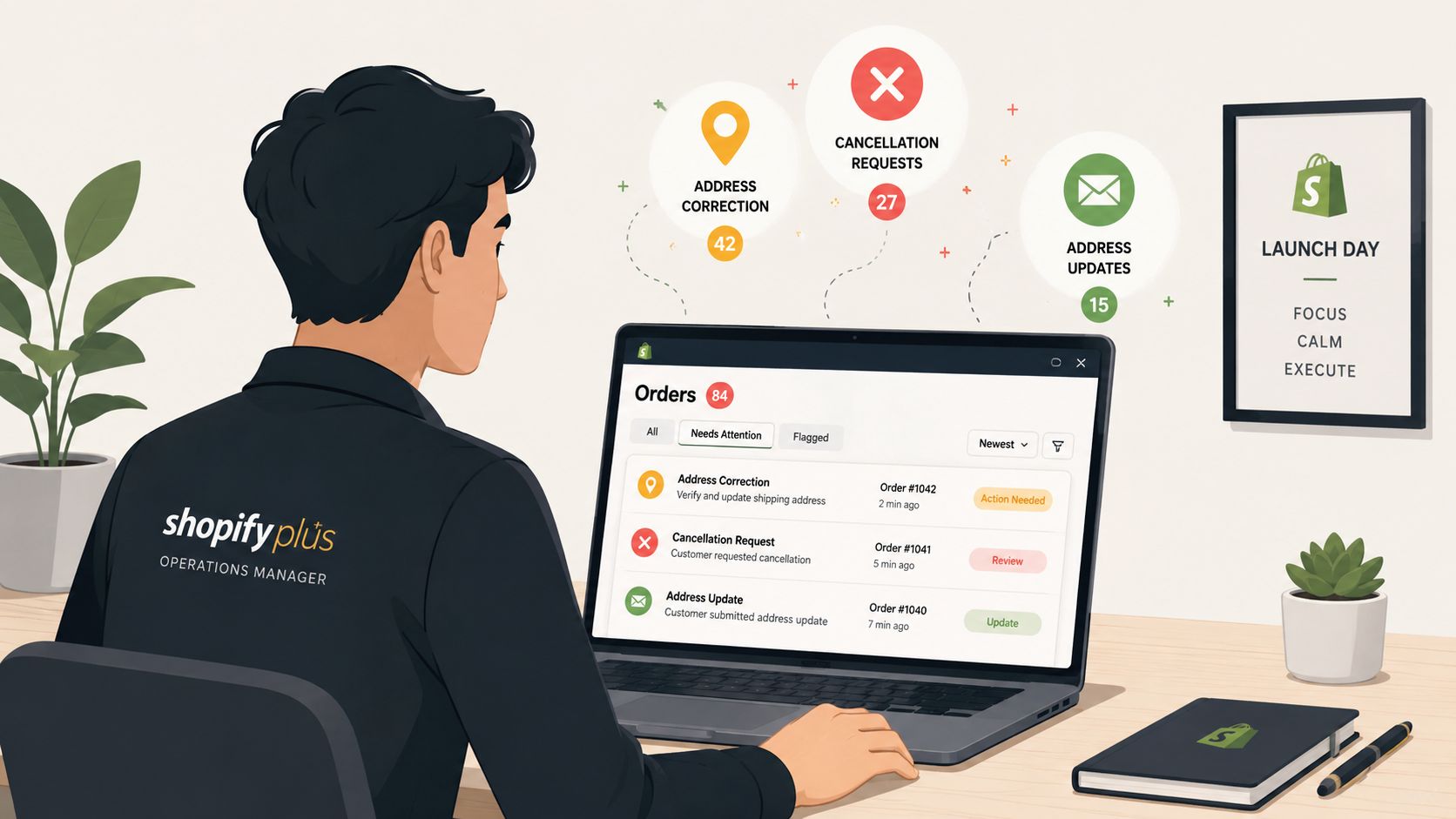
A product launch goes live, orders arrive quickly, and the warehouse starts picking before the support queue fills with urgent requests. A customer needs to correct an apartment number. Another wants to swap a size. Someone else asks for a cancellation after payment but before fulfillment. Meanwhile, inventory is moving between locations, and the operations team is trying to decide which requests can be approved without creating a refund, fraud, or shipping problem.
That's the reality behind Shopify Plus order management at scale. It isn't only about shipping labels or checking whether an order is fulfilled. It's the control system for what happens after checkout, including edits, cancellations, holds, routing, returns, refunds, customer communication, and the audit trail that lets teams understand who changed what.
Shopify's order timeline records cancellations, address edits, fulfillment changes, and notes with timestamps and user attribution, as Shopify Community guidance explains. That visibility helps, but high-volume merchants still need deliberate workflows around it. Shopify's native model centers on order-level event tracking, rather than a separate customer-facing order-management layer.
This guide builds the operating model step by step. You'll see how the order lifecycle works, where Shopify Plus provides control, where native tools stop, how to structure post-purchase workflows, and how routing and integrations fit together. The central question is simple: how much flexibility can you offer customers without weakening fulfillment, inventory, pricing, or fraud controls?
Introduction to Shopify Plus Order Management at Scale
A high-volume store can lose control without any single dramatic failure. One address correction may be harmless. A steady stream of manual corrections, untracked holds, duplicate refunds, and warehouse exceptions creates a much larger operational problem.
The support team sees one version of the order. The warehouse sees another. Finance is watching payment adjustments, while the customer expects a clear answer immediately. If those teams don't share reliable status information, the business pays through avoidable handling, delayed fulfillment, incorrect shipments, and frustrated customers.
Order management is the connective tissue between the sale and the outcome. Payment capture starts the process, but it doesn't finish it. A complete workflow needs to account for inventory allocation, fulfillment location, customer changes, cancellation decisions, shipment tracking, returns, refunds, and internal notes.
Shopify Plus serves merchants with complex, high-volume operations. A 2025 ecommerce statistics compilation reported 72,910 businesses using Shopify Plus, including 39,046 in the United States, while a separate early 2026 industry roundup estimated more than 40,000 enterprise merchants worldwide and approximately 55,964 Shopify Plus domains. These figures appear in Capital One Shopping's Shopify statistics research, but the operational lesson matters more than any single count. Plus merchants are more likely to manage multiple fulfillment locations, international markets, B2B requirements, and post-purchase exceptions.
Operating principle: A customer should be able to fix a safe mistake quickly, while the business should require review for changes that affect money, inventory, or fulfillment commitments.
That balance shapes every useful Shopify Plus order management design. You don't give customers unrestricted access to orders. You define what they can change, when they can change it, and which requests require staff approval.
The rest of the system then supports those decisions. Tags identify risk and priority. Automation moves orders into the right queue. Routing sends inventory to an appropriate location. Timelines preserve accountability. Integrations connect Shopify to the warehouse, ERP, 3PL, shipping, and analytics systems that keep the operation moving.
How Shopify Plus Order Management Really Works
A customer notices the wrong delivery address minutes after checkout. Another wants to swap a product before picking starts. A third order has already been split across locations. Shopify Plus order management coordinates these requests after purchase, so teams can protect revenue and avoid sending every exception to support.
The order lifecycle works like air traffic control: checkout is the runway, Shopify is part of the control tower, fulfillment locations are airports, and each post-purchase request can alter the planned route.
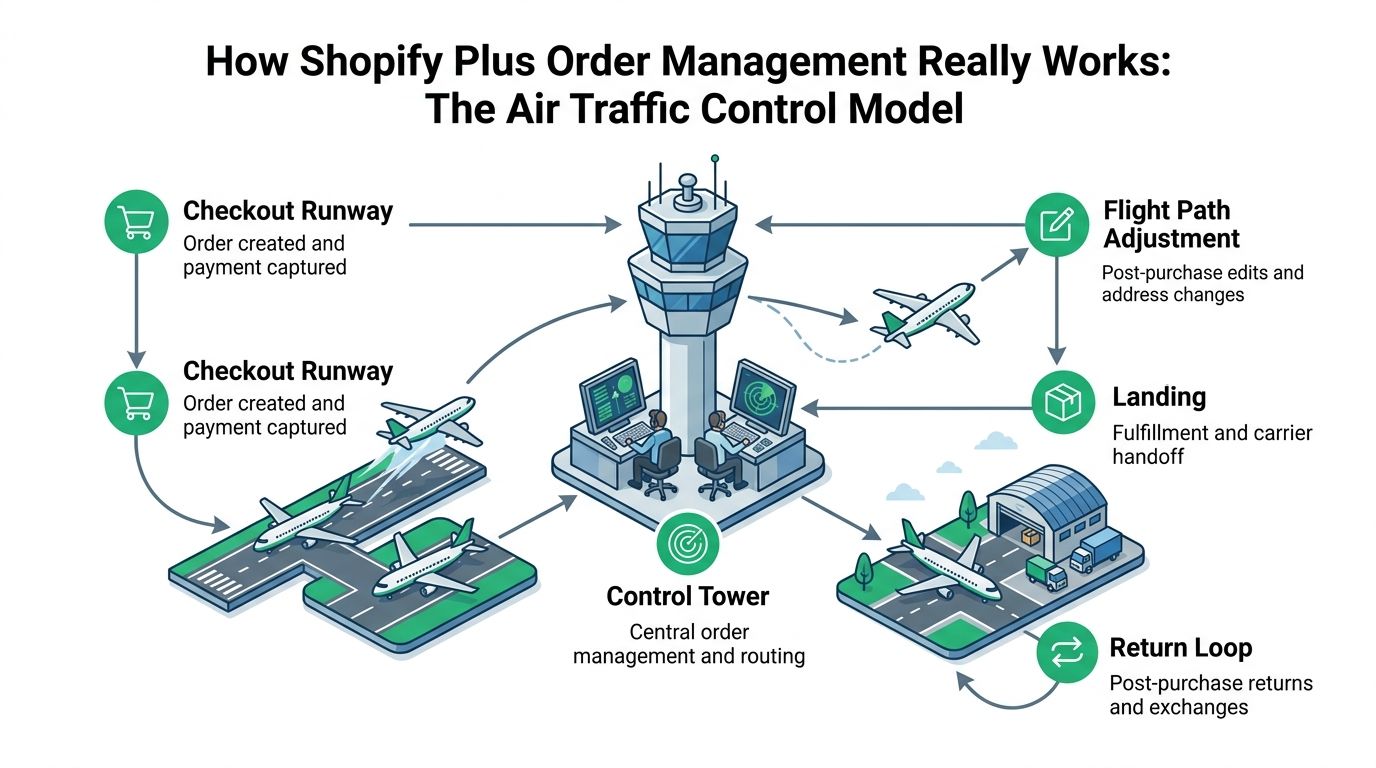
The order lifecycle in five movements
Checkout creates the order. The customer submits the cart, payment is processed, and the store records the order. The business has made an initial promise about products, price, and delivery.
The control layer evaluates the order. Inventory, location rules, customer type, shipping destination, and operational tags influence what happens next. Shopify Plus also supports advanced orchestration for complex routing scenarios.
The customer or team requests a change. An address correction may be low risk before picking begins. A product swap can affect price and inventory. A cancellation may require a payment reversal and a check on whether fulfillment has started. Self-service edits can resolve safe requests quickly, while tagging automation can send higher-risk changes to review.
Fulfillment completes the physical movement. A location picks, packs, and hands the shipment to a carrier. After that point, many edits cost more or require a return process.
The order enters the return loop when necessary. Returns, exchanges, refunds, notes, tags, and customer communication remain part of the same lifecycle. Treating them as post-purchase controls keeps teams focused on the customer outcome, not only the initial shipment.
Shopify's order timeline records cancellations, address changes, fulfillment updates, and notes, with timestamps and user attribution. It works as an operational flight log, helping teams review who changed an order and when. Because the historical API model has not provided a complete direct edit-history feed, merchants have relied on admin timelines, activity reports, exports, and custom webhook logic for auditability.
Where distributed operations enter
A distributed order network may include stores, warehouses, and 3PL partners. Shopify's guidance on distributed order management describes Plus options for advanced order routing through rule-based logic and APIs.
The practical question is not just which location is closest. The location must have the right inventory, capability, service level, and capacity to fulfill the order without unnecessary splits or delays. A post-purchase edit can change that decision, so editing rules and routing rules should work together. This shared control system reduces support handoffs while helping preserve inventory, payment, and fulfillment commitments.
Core Features and Native Limitations You Must Know
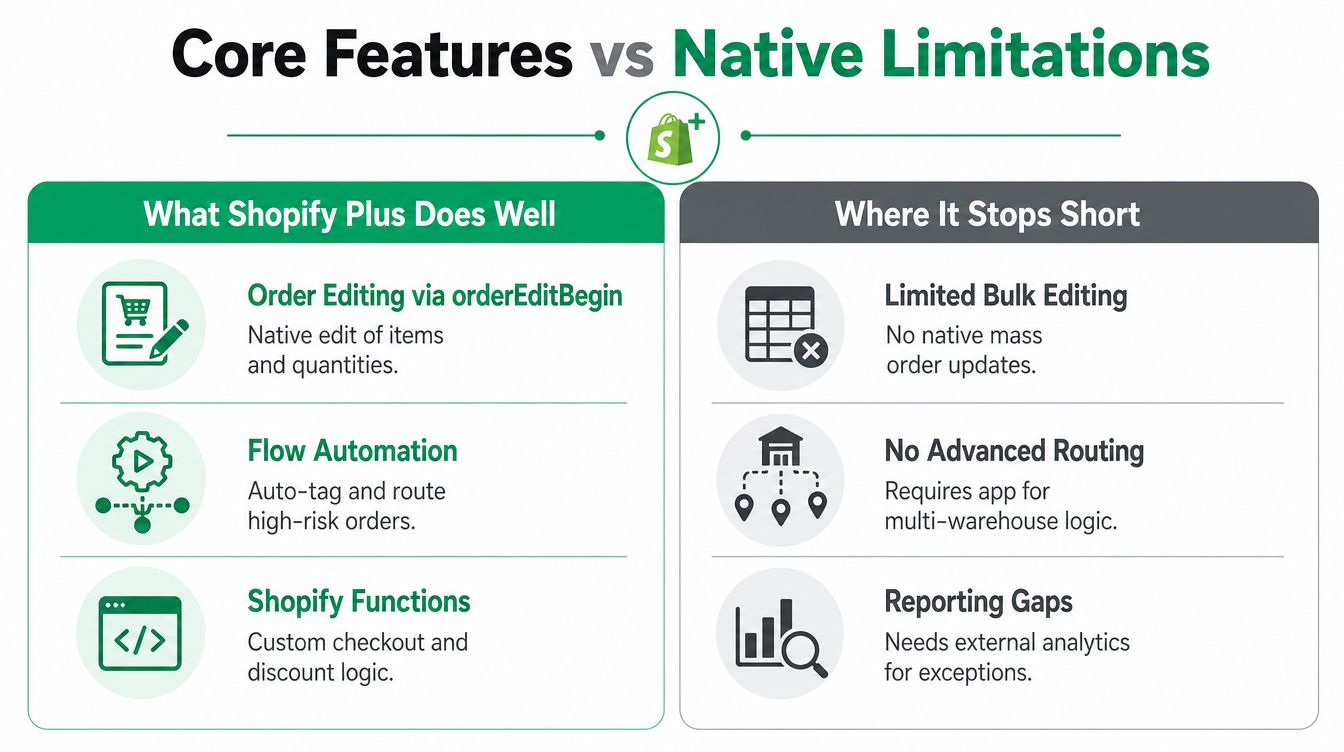
A customer changes an order after checkout, while the warehouse is preparing it and payment data still needs to stay accurate. Shopify Plus can coordinate that change through native GraphQL workflows, but the workflow is primarily an operations control layer. A complete post-purchase system also needs customer-facing access, automation, and routing decisions.
The native process begins with orderEditBegin, which creates a CalculatedOrder object. An app can then propose line-item quantity changes, add or remove variants, apply discounts, modify shipping lines, or add custom line items, subject to Shopify's supported operations. The Shopify order-editing documentation for developers explains this sequence and its related controls.
What the native workflow handles well
This model suits trained staff and operations applications that need controlled changes. The application calculates the proposed order first, applies approved modifications, and then coordinates payment or fulfillment actions. That separation works like a checkpoint: the team can review the new order state before downstream systems act on it.
Production apps require the write_order_edits scope. The orders/edited webhook supplies an event for downstream systems, including internal automation, reporting, and fulfillment coordination. Access is limited by default to the last 60 days of orders, so historical workflows need a deliberate design rather than assuming every order is immediately available. The developer reference documents both the scope and this access window.
These capabilities are useful for staff-led corrections, controlled approvals, and integrations that already have a clear order-state model. They do not, by themselves, give shoppers a safe place to request or approve routine changes.
Where native tools stop short
Shopify's native administration supports viewing, editing, refunds, and cancellations through staff workflows. That approach is manageable when request volume is low and the team can respond before fulfillment advances. At higher volume, address corrections and variant changes become recurring tickets, tying support capacity to operational timing.
The missing layer is customer-facing control. A shopper may need to correct an address, change a variant, or cancel an unfulfilled order, while the merchant still needs permission checks, inventory validation, payment handling, and a clear cutoff. Shopify Plus provides the underlying order-editing operations, but the merchant must add an app, build custom logic, or keep each request with staff.
Tagging and routing also determine whether an edit becomes useful automation or another manual handoff. A changed order can trigger an internal tag, notify the appropriate warehouse, and support distributed fulfillment decisions, provided those rules are implemented in connected systems. In that sense, order management acts as a post-purchase control system. Self-service handles eligible requests, tags carry the new state, and routing directs work without losing revenue or fulfillment context.
Use this decision rule:
- Use native tools when staff handle changes, the catalog is straightforward, and fulfillment exceptions are limited.
- Add apps or custom logic when customers need controlled self-service, multiple teams must receive synchronized events, or tagging and approval rules extend beyond admin actions.
- Add an OMS or orchestration layer when Shopify, the ERP, WMS, 3PL, and multiple sales channels need a shared order state.
For customer-facing editing, compare SelfServe's order-editing feature with custom development and other Shopify apps. Check permissions, edit windows, payment handling, inventory synchronization, tagging, language support, and approval controls before choosing an approach.
High Volume Workflows for Edits Cancellations and Fulfillment
Operational teams don't need more isolated features. They need a connected sequence that prevents one decision from breaking the next stage.
Start with the edit window
Define the moment at which customers can make changes and the moment at which fulfillment locks the order. The window may close when picking starts, when a label is created, or when a specific fulfillment state is reached. The right trigger depends on your warehouse process, but it must be clear to both the customer and the support team.
Limit the change types separately:
- Address corrections can often remain available before fulfillment lock, with real-time validation and fraud review for material changes.
- Variant swaps should check inventory and price differences before confirmation.
- Quantity increases need inventory and payment approval.
- Quantity reductions may require a partial refund or payment adjustment.
- Restricted products should bypass self-service and enter a manual queue.
A product restriction is not an inconvenience. It's a control that prevents customers from altering items with special handling, allocation, personalization, or compliance requirements.
Treat cancellations as a decision queue
A cancellation request should show the team whether fulfillment has started, whether payment has been captured, and whether inventory has been allocated. Unfulfilled orders can often move through a faster approval path. Orders already in motion need a different response, such as intercepting shipment or initiating a return.
Use tags to distinguish cancellation requested, manual review, refund pending, and fulfillment locked. The labels should describe the next action, not merely the customer's message.
Connect returns to fulfillment reality
Returns are part of order management because they change inventory, payment status, and customer expectations. Define who approves the return, where the product goes, when inventory can be restocked, and when the refund is issued.
For physical operations, storage design can affect how quickly teams locate returned goods and prepare outbound orders. Merchants assessing warehouse capacity may find vertical storage for ecommerce fulfillment useful when reviewing space and handling constraints.
Automate the handoffs
Automation should move work to the right owner. For example, an address edit can add a review tag, notify the fulfillment team, and pause release until the team confirms the change. A backorder can receive a customer-communication tag and route to an exception queue rather than remaining in a normal fulfillment batch.
Control rule: Automate status movement, not judgment. Let software identify and route exceptions, while people approve changes that affect fraud, margin, or irreversible fulfillment steps.
Partial edits require especially careful handling. If one line is available and another is backordered, the customer needs a clear choice about whether to remove the unavailable item, wait, or accept separate fulfillment. The system should preserve the original order context while making the financial and inventory consequences visible.
Integrations That Extend Order Management Beyond Shopify
Shopify Plus can act as the storefront and an important operational system of record, but complex merchants often need connected systems for warehouse execution, finance, routing, address validation, and customer self-service.
The best integration path depends on where the operational truth lives. A 3PL may own shipment status. An ERP may own financial reconciliation. Shopify may own the customer-facing order experience. The integration should make those roles explicit instead of allowing every platform to overwrite the others.
| Integration Type | Best For | Trade Offs |
|---|---|---|
| 3PL and WMS connection | Outsourced fulfillment, warehouse execution, shipment tracking | Faster operational handoff, but exceptions need clear ownership |
| ERP connection | Finance, purchasing, inventory valuation, B2B processes | Stronger back-office control, with more mapping and implementation work |
| Custom APIs and webhooks | Unique routing, approval, or exception logic | Maximum flexibility, but ongoing maintenance sits with the merchant |
| Address validation | International shipping and customer-led address corrections | Cleaner delivery data, but validation rules need review for edge cases |
| Post-purchase editing app | Self-service changes, cancellations, and customer communication | Faster deployment, with careful permission and payment testing required |
| Dedicated OMS | Multi-channel, multi-location, and complex orchestration | Centralized control, but a larger implementation and governance effort |
Choosing build versus buy
Native automation is usually the simplest choice for tags, notifications, and straightforward queues. Custom APIs make sense when a merchant has unusual fulfillment logic or a back-office system that cannot be replaced.
A dedicated app becomes more practical when the problem is narrow but customer-facing, such as address corrections or controlled item changes. A full OMS becomes more appropriate when the merchant must coordinate Shopify with multiple warehouses, 3PLs, sales channels, and financial systems.
International stores should test multilingual customer experiences and address validation before launch. Google Maps autocomplete can help customers enter deliverable addresses, but the merchant still needs rules for regions, apartment formats, restricted destinations, and fraud review.
For implementation partners, merchants can review Refact's Shopify expertise when they need help mapping platform architecture, custom work, and operational integrations.
The Shopify 3PL integration guide is also relevant when a merchant must coordinate post-purchase changes with an external fulfillment partner. The key test is whether an approved edit reaches the warehouse before the warehouse acts on the old order state.
KPIs and Operational Best Practices With Real Examples
A mature operation measures order management as a system, not as a collection of isolated tickets. The most useful dashboard connects customer requests to fulfillment outcomes and financial consequences.
Track the following signals consistently:
- Edit request rate: Shows how often customers need to change orders after checkout.
- Cancellation rate: Separates customer-driven cancellations from inventory or fulfillment failures.
- Fulfillment accuracy: Reveals whether approved changes reach pick and pack correctly.
- Time to ship: Helps identify whether holds and approvals are slowing the operation.
- Return rate: Can expose product, routing, address, or expectation problems.
- Support tickets per 100 orders: Shows whether self-service and automation are removing repetitive work.
The numbers only become useful when teams segment them. An overall edit rate may look stable while address-related requests rise for one country, variant changes cluster around one product, or cancellations increase after a particular campaign.
A practical operating example
A DTC brand notices that support agents spend much of the morning handling address corrections from newly placed orders. The team creates a defined pre-fulfillment window, validates addresses during the change, and applies an internal review tag when the destination changes materially.
The warehouse receives a clear hold state instead of an informal support note. Support can then focus on exceptions, while customers resolve routine corrections without waiting for an agent. The team reviews the results weekly by request type, approval outcome, fulfillment stage, and destination market.
A second example involves post-purchase merchandising. A customer visits the order-status experience and adds a relevant product to the existing order. That action needs more than an upsell display. The system must check inventory, update the order, recalculate payment or shipping when needed, and ensure fulfillment receives the revised state.
Operational reporting should connect those events. SelfServe's operations reporting guidance can help teams think about the fields and decisions that belong in a recurring review.
Weekly review question: Which customer requests could be safely automated, and which exceptions are still reaching the team because the rules are unclear?
Don't optimize only for fewer tickets. A lower ticket count isn't a success if customers receive incorrect refunds or warehouses pick outdated orders. Review customer effort, financial accuracy, fulfillment performance, and exception quality together.
Implementation Checklist and Migration Tips for Shopify Plus
A successful Shopify Plus order-management rollout starts with process decisions, not app installation. Write down the order states your teams use today, then identify where each state is stored and who can change it.
Build the control layer first
- Define permissions: Decide which customers, support agents, warehouse users, and administrators can make or approve changes.
- Set edit windows: Tie the cutoff to a real operational event, such as fulfillment release or picking.
- Restrict products: Exclude personalized, regulated, allocated, or otherwise sensitive items from automatic editing.
- Create actionable tags: Use tags for queue ownership, approval status, fulfillment holds, and exception type.
- Validate addresses: Test domestic and international formats, apartment details, destination restrictions, and fraud review paths.
- Map routing rules: Document location priority, inventory requirements, split-shipment behavior, and backorder handling.
- Test integrations: Confirm that Shopify, the ERP, WMS, 3PL, payment systems, and customer notifications agree after an edit.
- Prepare language support: Review the customer experience in every market where the store operates.
- Measure before launch: Capture your current edit requests, cancellations, returns, fulfillment exceptions, and support workload so you can compare the new workflow.
Migration requires special care. Don't migrate only the storefront and assume open orders will resolve themselves. Establish how existing orders, payment adjustments, fulfillment holds, returns, customer notes, tags, and historical records will move or remain accessible.
Run test orders through ordinary and difficult paths. Include an address edit before fulfillment, a variant swap with a price difference, a cancellation after payment, a partial backorder, a return after delivery, and a request that must be rejected. Ask the warehouse and finance teams to verify the result in their own systems.
During the first operating period, review exceptions daily. Tighten permissions when a rule exposes risk, widen self-service only after the fulfillment team confirms the handoff is reliable, and keep a manual queue for cases that automation can't safely resolve.
The strongest Plus operations treat post-purchase flexibility as a designed capability. Customers get fast answers, teams get clear control, and the business protects the order after the checkout button has been pressed.
SelfServe gives Shopify and Shopify Plus merchants a customer-facing way to manage permitted post-purchase edits, address changes, product changes, and cancellations within defined rules, while supporting tagging, address validation, multilingual experiences, and selected upsell flows. Visit SelfServe to evaluate whether its controlled self-service workflow fits your order-management and support operations.