How to Change Shipping Address on Any Order
You typed the street right and still got the apartment wrong. Or the office moved on Friday, the package shipped on Saturday, and now the tracking page is moving while your message to support sits unanswered. Gift orders create the same panic, because a familiar old address can turn into a delivery problem the moment checkout closes.
The fix depends less on the typo itself and more on where the package is right now. Major carriers treat an address change as a post-shipment delivery-management task, not a simple order edit, which is why UPS routes you through Change My Delivery and FedEx uses Manage Delivery before delivery is complete (UPS delivery change workflow). On the retail side, some stores only allow a brief edit window before fulfillment starts, and that window can close fast, as Costco's 60-minute rule shows (Costco shipping address change policy).
Once you treat shipping fixes as a stage-by-stage decision, the whole process gets easier. Sometimes you can still edit the order. Sometimes the merchant has to intervene. Sometimes only the carrier can reroute the parcel. For a fast way to confirm the right address before you touch anything else, use this address lookup tool and then work from the package's actual status, not from hope.
The Moment It Hits You Got the Address Wrong
The panic is rarely about a dramatic mistake. It's usually a small one. A buyer enters Apartment 2B instead of 12B, a commuter changes jobs the morning after ordering lunchroom supplies, or a gift ships to a parent's old house because the saved address looked familiar at checkout.
Why the stage matters more than the typo
The order status is the fork in the road. If the order is still unshipped, the merchant may be able to edit it, or you may still have a platform-level change window. Once a label exists or the package is in motion, the question shifts from “Can I change the order?” to “Who can intercept the parcel?”
Practical rule: If the order confirmation just arrived, move immediately. If tracking has already updated, stop looking for the store edit button and check the carrier path instead.
That's why most bad address outcomes fall into five stages: unshipped, label created, in transit, out for delivery, and delivered. The party who can help changes at each step. Early on, the shopper may still fix it. Midstream, the merchant is the gatekeeper. After handoff, the carrier becomes the only realistic route.
The mistake many customers make is treating every order like an editable cart. It isn't. Amazon makes that distinction clear by limiting address changes to the order details page while the option still exists, and by noting that the saved default address doesn't retroactively rewrite an already placed order (Amazon order address edit workflow). That same logic shows up everywhere else in ecommerce, especially when fulfillment has already started.
A good mental model is simple. First ask whether the order is still sitting with the merchant. Then ask whether a label has already been printed. Only after that should you decide whether to contact support, request an intercept, or prepare for return and reship.
Mapping the Address Change by Order Stage
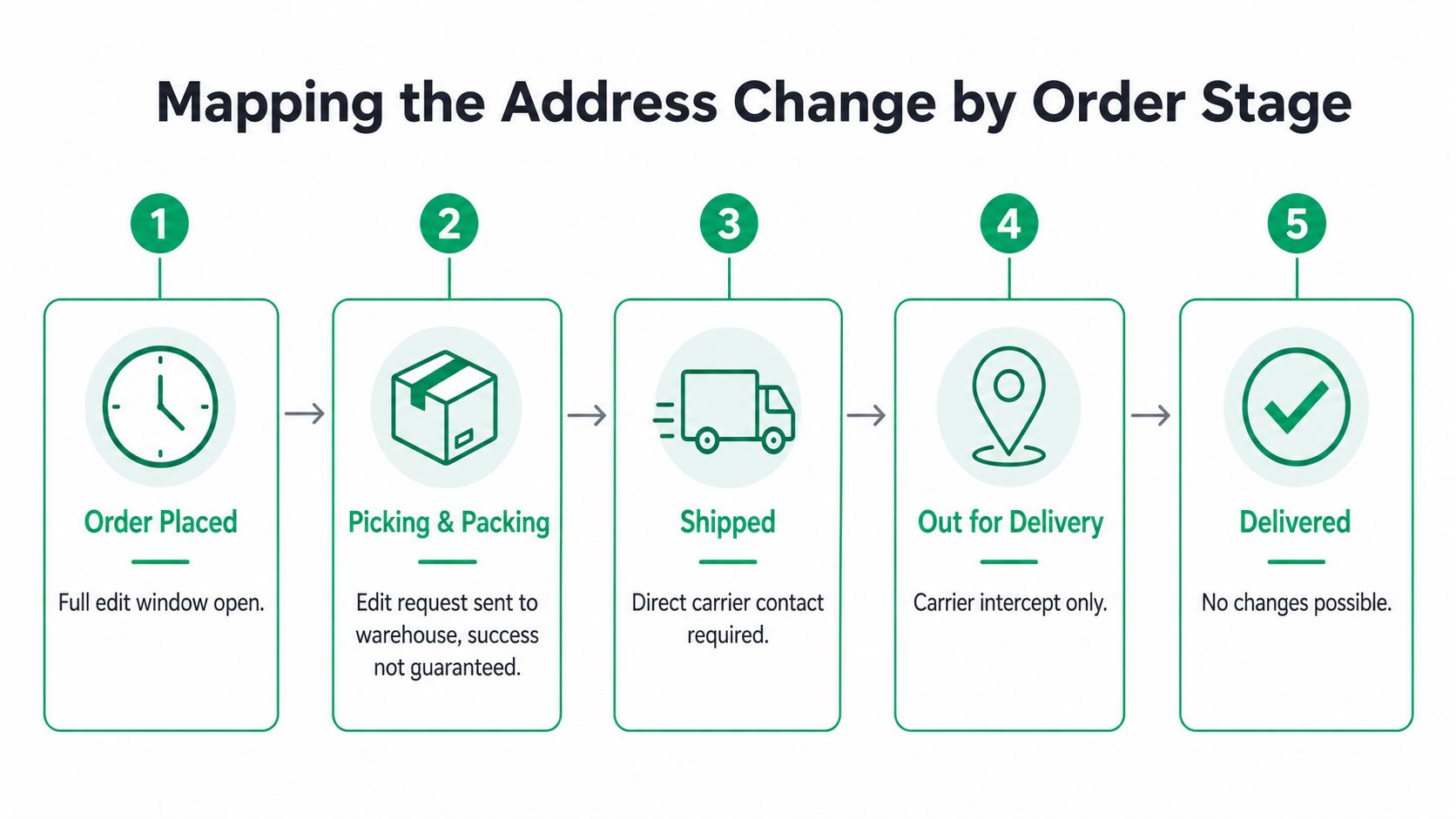
Unshipped and still editable
This is the calmest window. If the merchant hasn't pushed the order into fulfillment, a corrected address may still be possible through the store's order editor or support channel. That's where you want to be if the mistake is just a typo or unit number.
The best result here is a clean merchant-side update with no label waste and no delivery delay. If the store's system already locked the order, the fallback is usually cancel and reorder, which is annoying but safer than forcing a bad shipment.
Label created, then the rules tighten
Once the warehouse has picked the order or generated a label, the merchant's flexibility drops fast. Some systems will still allow a manual correction, but success is no longer guaranteed. If the package is already tied to a carrier manifest, the wrong address may be baked into the shipment.
At that point, the most realistic move is to get the merchant involved immediately so they can decide whether to void the label, stop the pick, or advise a carrier request. The longer the delay, the more likely the parcel leaves the building before the fix lands.
In transit, out for delivery, and delivered
After handoff, the carrier owns the parcel. UPS and FedEx both frame address correction as a delivery-management action, not a store edit. UPS says customers can log in, select a package, and use Change My Delivery to redirect or return the package, while FedEx routes changes through tracking and Manage Delivery, with the warning that an edit may change the delivery date (UPS delivery change workflow, FedEx delivery management workflow).
Out for delivery is the narrowest window. A reroute may be blocked, and the parcel may instead move to a pickup attempt or return path. Once delivered, the operational problem is usually no longer a change request. It becomes a return-and-reship conversation.
The hardest truth is that each stage carries a different delay risk. A clean merchant edit is quickest. A carrier intercept can work, but it adds process and uncertainty. After delivery, you're usually recovering from the mistake rather than correcting it.
The same logic shows up across marketplaces and stores, including high-volume platforms where fulfillment controls close fast. If you want a broader view of how these systems differ, compare Shopify WooCommerce BigCommerce as a useful way to think about how much editing power a merchant controls once checkout ends.
Shopify and store-specific edits
Shopify itself doesn't give shoppers a universal post-checkout address-edit button. In practice, the merchant's installed workflow decides what happens. That's why one store may let customers self-edit through an order link while another sends every fix to support.
Amazon and eBay
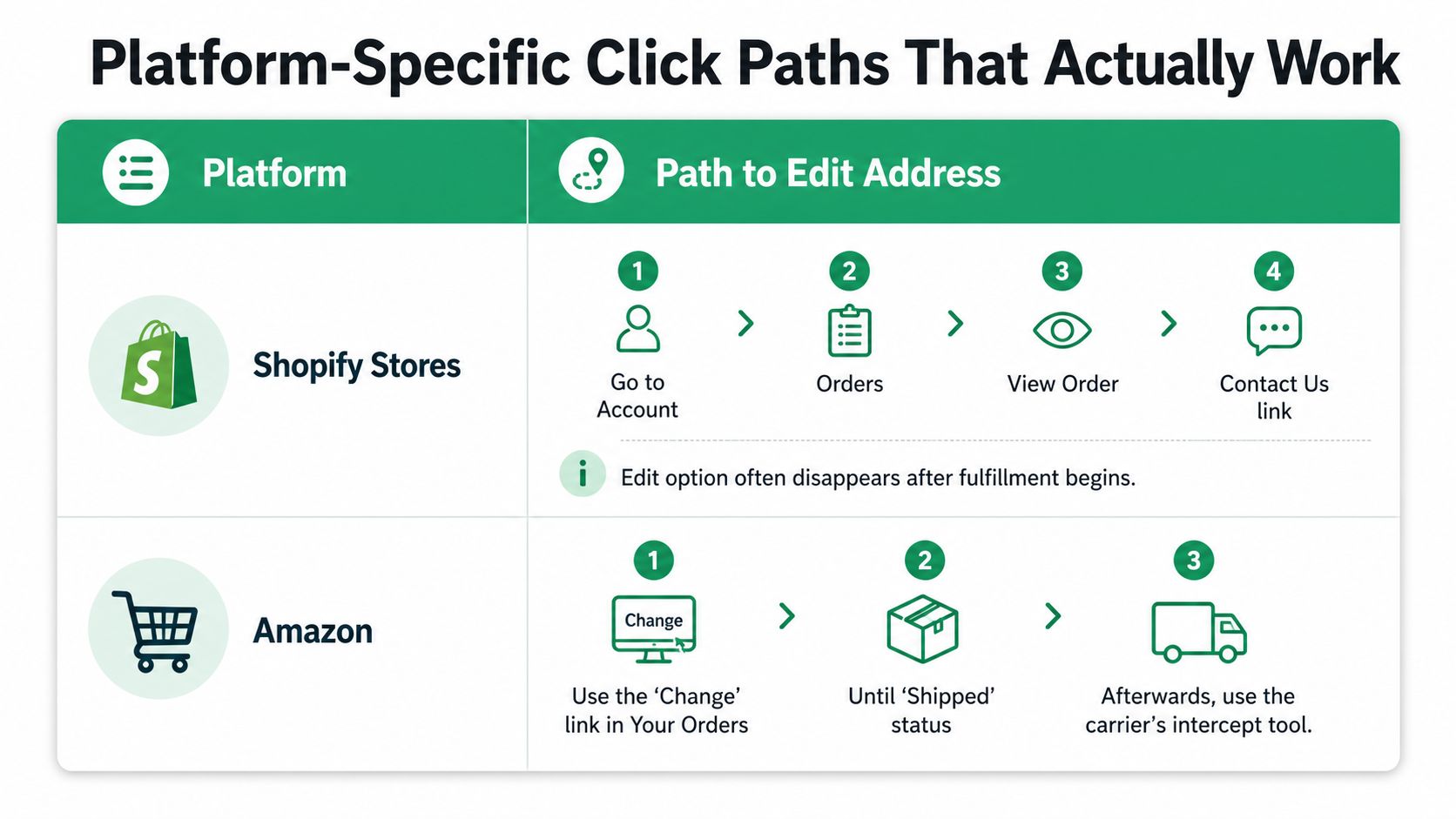
Amazon routes you through Your Orders, then View order details, then Change under the shipping address if the option is still available. On eBay, you can update an account address under Addresses, save it as primary, or override it at checkout in the Ship to section (Amazon order address edit workflow, eBay delivery address settings). The key difference is that eBay separates account-level address management from checkout-level delivery selection.
Costco and the short window problem
Costco's rule is blunt. A shipping address can be changed only within 60 minutes of placing the order (Costco shipping address change policy). That's a good example of how quickly major systems lock the address to protect fulfillment accuracy.
Platform-Specific Click Paths That Actually Work
Start with the platform you bought from
The clicks are different everywhere, and that's where people waste time. On Amazon, open Your Orders, choose View order details, then use Change under the shipping address if the option is still live (Amazon order address edit workflow). On eBay, go to account settings, open Addresses, then Add a new address or Edit an existing one, or change the Ship to address at checkout (eBay delivery address settings).
Costco is simpler but stricter. If you're within its short window, the order can still be adjusted, but once that window closes, the edit path is gone (Costco shipping address change policy). That's the opposite of a marketplace like eBay, where account and checkout layers both matter.
Shopify stores depend on the merchant's setup
With Shopify-powered stores, the customer usually can't assume a built-in edit button exists. Some merchants install a post-purchase edit widget, some route requests through support, and some only allow cancel-and-reorder once fulfillment starts. The practical click path is often whatever the merchant put in the confirmation email or order status page.
Etsy and similar marketplaces
Etsy follows the same general rule as most marketplaces. The account address and the active order are not the same thing, and the change path depends on whether the seller has already started fulfillment. If the order is already moving, you're usually back in carrier territory rather than store territory.
The one rule that keeps people out of trouble
Change the account address first, then verify the order-level address, then confirm the final checkout screen. That sequence matters on eBay and on any store that reuses saved addresses. If you skip the second check, the old address can survive in the order even after you “fixed” your profile.
For merchants comparing how much control they want over post-purchase edits, the product choice matters too. If you're evaluating workflow tools, it helps to look at systems that combine address editing with validation and order tagging, such as the address and contact editing features available in a purpose-built post-purchase app.
When the Carrier Becomes the Only Option
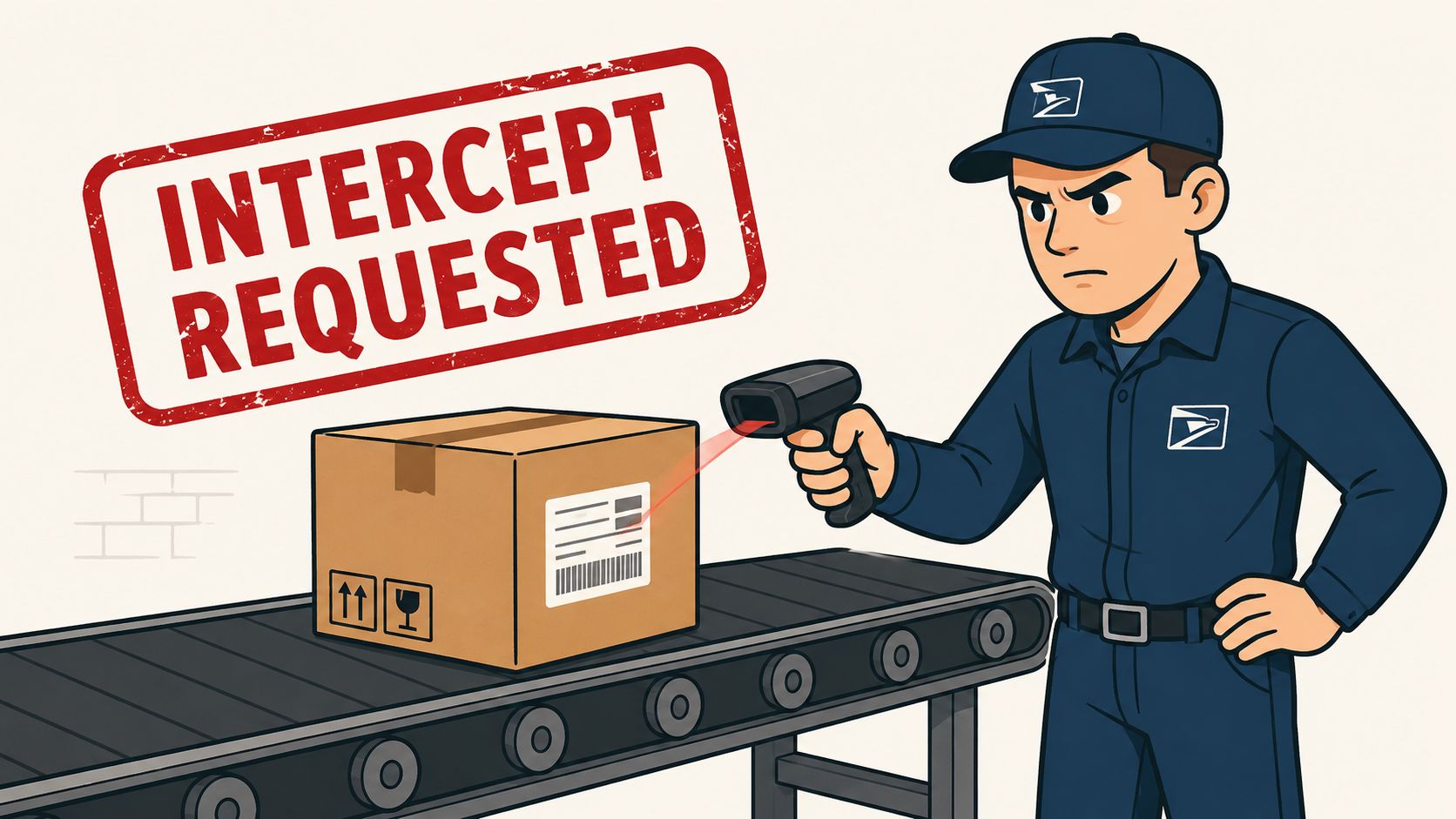
Once a label is in the carrier network, the merchant can't usually rewrite the parcel by hand. The carrier has to intervene. UPS describes this as a delivery change request with identity verification, including a one-time passcode, and FedEx uses a tracking-based delivery-management flow that can alter the delivery date (UPS delivery change workflow, FedEx delivery management workflow).
If the parcel is already in motion, ask whether the carrier can redirect it, not whether the store can “just update” it.
That distinction matters because the outcome isn't always a new address. Sometimes the carrier can hold the parcel for pickup. Sometimes it can be redirected. Sometimes the only legal move is return to sender. DHL, USPS, UPS, and FedEx all operate with service rules that depend on shipment type, timing, and identity checks, so a request can be accepted on one parcel and rejected on another.
This is also where international gift shipments get messy. A shopper may think the fix is a simple typo correction, but cross-border handling can add more constraints, especially once customs and last-mile routing are involved. For a practical view of how those handoffs affect delivery, see OnlineGifts.us international delivery, which is a good reminder that carrier control becomes more rigid once the package crosses service boundaries.
The right move depends on timing. If the package is merely labeled, the merchant may still be able to stop it. If it's already moving, file the carrier request and ask the merchant to back it up if needed. If it's out for delivery, expect the carrier to narrow the options even further. If it's delivered, the decision usually shifts to return and reship, not reroute.
Why Merchants Should Stop Treating Address Edits as Support Tickets
A bad address is not a small support issue. It's a fulfillment risk, a tracking problem, and often a second-order revenue hit when the customer needs a replacement. Every manual back-and-forth adds work for the agent, the warehouse, and the person who has to reconcile the order after the fact.
A self-service edit window handles that better than a ticket queue because it can enforce rules in real time. The merchant can require identity re-verification, validate the new address before saving it, and hard-stop edits once picking begins. That's safer than letting a support agent approve corrections from a crowded inbox after hours.
The controls that matter
A useful edit window is not just a text field. It should sit behind guardrails that reflect how your operation ships.
- Identity check before edit: Reconfirm the customer before letting them alter a destination.
- Address validation on save: Catch typos, missing unit numbers, and non-deliverable formats before they become labels.
- Order tagging: Mark edited orders so downstream systems and 3PLs don't miss the change.
- Manual override path: Keep a supervisor path for edge cases that deserve human review.
- Hard cutoff tied to fulfillment: Let the warehouse clock, not a generic customer request, define when editing closes.
The fraud objection usually comes up first, and it's valid. A loose edit flow can create more problems than it solves. The answer isn't to ban edits, it's to limit them tightly and log every change. That gives operations a cleaner audit trail than a buried support email ever will.
Merchants also worry about ERP and shipping sync. That concern is real. If the address changes after the label is created but before the packer sees it, your system has to broadcast that update clearly or the order will split across tools. A self-service window is only useful if it's connected to the rest of the stack.
DIY Versus a Purpose-Built Edit App
For Shopify and Shopify Plus teams, the build-versus-buy question comes down to control. A DIY flow can work if you already have strong engineering support and a narrow use case. A purpose-built app is usually easier when you need address validation, localized UX, and post-purchase editing without rebuilding the same logic every quarter.
| Criterion | DIY with Shopify Functions | SelfServe |
|---|---|---|
| Setup time | Requires development, testing, and maintenance | Installs from the Shopify App Store |
| Address validation | Must be built and maintained separately | Includes real-time Google Maps validation |
| Fraud controls | Custom logic required | Merchant-configurable permissions and edit windows |
| Multilingual support | Needs custom implementation | Multilingual widget that adapts to shopper language |
| Upsells | Separate post-purchase build | Built-in upsell modules on Thank You and Order Status pages |
The DIY route is flexible, but it rarely arrives with all the edge cases solved. You still need a checkout extension, a coordinate catcher or equivalent validation layer, and ongoing upkeep when Shopify behavior changes. That's manageable for a technical team, but it's not light work.
A purpose-built app such as SelfServe can cover the edit window, validation, order tagging, and post-purchase add-ons in one place. It's the kind of setup that makes sense when you want shoppers to fix shipping details without creating a support ticket, while still giving the merchant control over what can change and when.
The decision is usually operational, not philosophical. If your team wants total custom logic and has the bandwidth to maintain it, build. If you want a live edit flow with fewer moving parts, buy. For merchants who need a reference point on what a dedicated editing module can include, the address and contact editing features are a useful baseline to compare against an internal build.
Putting It All Together
Check the order status first, then choose the right actor, shopper, merchant, or carrier. Document the request, because once a package enters a carrier network, the history matters. For merchants, define a clear edit window, validate the new address, and tag edited orders so fulfillment stays aligned with the change.
If you run a Shopify store, treat post-purchase editing as part of the experience, not a support afterthought. The stores that handle it well reduce avoidable tickets and recover more orders without sending customers into a cancel-and-reorder loop.
SelfServe gives Shopify merchants a controlled way to let customers edit shipping details after purchase, with address validation, multilingual handling, and order tagging built into the flow. If you want fewer address-related support tickets and a cleaner fix path for the orders that can still be saved, visit SelfServe and see how it fits your post-purchase process.