Address Lookup Tool: A Guide for Shopify Stores in 2026
You see the symptom before you see the cause. A customer emails support because tracking hasn't updated. Your warehouse says the order already shipped. The carrier eventually marks it undeliverable, and the issue turns out to be small: one wrong digit in the house number, an apartment field left off, or a postal code that doesn't match the city.
That kind of mistake looks minor on the order screen. In operations, it isn't. One bad address can trigger a replacement shipment, a refund request, a support thread, and a customer who now doubts your delivery promises.
An address lookup tool helps prevent that chain reaction. For Shopify stores, it matters at checkout, but that's only half the story. The bigger win comes when address accuracy carries through the full ecommerce journey, including the order status page, customer accounts, and the period after purchase when shoppers realize they made a mistake and want to fix it themselves.
What Is an Address Lookup Tool Anyway
An address lookup tool is spell-check for physical addresses. A shopper starts typing, the tool suggests real addresses, and the system converts that messy input into a structured, deliverable format.
That sounds simple, but the job is bigger than autocomplete. A good tool parses abbreviations, separates house number from street name, checks postal formatting, and validates the result against an authoritative dataset. Instead of accepting whatever a customer types into a free-text field, it guides them toward a usable address before the order enters your fulfillment flow.
What it does in practice
At the point of entry, the tool usually handles a few tasks at once:
- Autocomplete suggestions: It predicts likely matches as the customer types.
- Validation: It checks whether the address appears deliverable and properly formatted.
- Standardization: It returns fields in a format carriers and internal systems can use.
- Geocoding support: Some tools also attach coordinates, which helps with routing, fraud review, or service-area checks.
For a busy Shopify merchant, the practical value is straightforward. Fewer manual corrections. Fewer failed deliveries. Less time spent by support chasing customers for address clarifications.
Practical rule: If your checkout still relies on fully manual address entry, you're asking customers to do precise logistics work with no guardrails.
Why this exists at all
Address standardization isn't new. The systems behind modern lookup tools trace back to the UK's Uniform Penny Post in 1840 and the U.S. ZIP code system in 1963, both of which standardized address formats for efficient delivery and laid the groundwork for today's digital validation services that manage over 150 million U.S. addresses according to this historical overview.
That history matters because it explains a common misconception. An address lookup tool isn't just a nice UX enhancement. It sits on top of a long-established logistics problem: carriers need addresses to be structured, standardized, and interpretable by machines.
For Shopify stores, that makes it foundational infrastructure. It improves checkout, yes. But its real value shows up later, when your fulfillment team, your carriers, and your support agents all depend on address data being right the first time.
The Hidden Costs of Inaccurate Address Data
Bad addresses rarely show up as one line item on a profit and loss statement. They spread across shipping spend, support workload, and repeat purchase risk.
Research cited by IPLocate's historical lookup page estimates that 15–20% of online orders contain minor address inaccuracies. The same source notes that proper address validation can reduce shipping errors by 30–50%, that over 60% of large international retailers in North America and Europe use these tools, and that failure-to-deliver rates can drop below 2% when lookup tools are properly deployed.
Where the cost actually lands
The first hit is operational. Your team pays for return handling, exception management, and address correction work that shouldn't exist. Even when the package is eventually delivered, someone had to intervene.
The second hit lands in support. Customers don't write in saying, “My address data quality failed.” They ask where their order is, why tracking stalled, or why a replacement hasn't moved. Your agents then investigate across Shopify, carrier dashboards, and fulfillment notes.
There's also a customer retention problem. A delivery issue is one of the fastest ways to turn a good acquisition into a weak first impression. If you also run retail locations or local delivery, clean address data can support broader location accuracy efforts. That's part of why many brands also work on assets that boost local Google Maps rankings, since address consistency affects how customers find and trust a business across channels.
Why prevention beats cleanup
A lot of merchants accept address errors as unavoidable. They aren't. They're often a direct result of giving customers too much room to type unstructured information into a critical field.
Three patterns usually create the mess:
- Free-text checkout fields: Customers enter shorthand, omit unit numbers, or use local naming conventions your systems don't parse well.
- No post-purchase correction path: A shopper notices the mistake after paying, then opens a ticket because there's no self-serve fix.
- Disconnected ops workflows: Support, fulfillment, and carriers each see a different version of the address problem.
If you want a useful benchmark for how expensive returns and exception handling can become, this breakdown of the cost of returns for ecommerce brands is worth reading. Address mistakes aren't the only cause of returns, but they create the same kind of avoidable operational drag.
The cheapest address issue is the one a customer never gets to submit.
For most Shopify stores, that's the ROI case. An address lookup tool doesn't just improve form completion. It removes preventable work from the rest of the order lifecycle.
Essential Features of a Modern Address Lookup Tool
Not every address app is doing address validation. Some tools only autocomplete. Some clean formatting after the fact. Some are strong in one country and shaky in others. For ecommerce, the useful tools combine speed, validation, structure, and flexibility.
Autocomplete that reduces friction
The first feature to look for is type-ahead autocomplete. Customers shouldn't need to enter every field from scratch if the system can identify a likely match after a few keystrokes.
That matters for two reasons. It shortens checkout time, and it reduces typo opportunities before they happen. Strong autocomplete also helps with mobile usability, where address entry gets worse fast once a customer has to switch keyboards, retype a city name, or manually fix autocorrect errors.
A practical implementation should feel invisible. Suggestions need to appear quickly, be easy to select, and map cleanly into Shopify address fields without awkward formatting.
Validation that tells you something useful
Autocomplete alone isn't enough. A modern tool also needs real-time validation against maintained address data so your store can distinguish between a plausible-looking address and a deliverable one.
For merchants, the key output isn't just the corrected address. It's the metadata around it. You want to know whether the result is valid, partially valid, or risky enough to flag for review. That's especially helpful if your team needs different rules for standard shipping, high-value orders, or restricted destinations.
If you want a deeper technical walkthrough of how these systems work with mapping data and structured formatting, this guide to Google Maps address validation for ecommerce is a useful companion.
International support that handles real complexity
Global stores need more than U.S.-style form logic. According to the U.S. National Address Database overview, an effective address lookup API for global merchants must coalesce over 200 country formats, maintain high coverage of non-urban addresses, and expose validation metadata so merchants can automate routing decisions and reduce post-purchase adjustment tickets.
That's not a minor requirement. Rural India, parts of Latin America, and other markets often use addressing schemes that don't fit the simple “street, city, state, ZIP” model many Shopify themes assume.
Look for support in these areas:
- Country-specific field structures: Province, prefecture, district, locality, and postal code fields should adapt to local conventions.
- Non-urban coverage: The tool should still return useful results where addressing is less standardized.
- Multilingual handling: Shoppers should be able to interact with address entry in a way that fits their language and locale.
A tool that works perfectly for U.S. suburbs can still fail badly for cross-border ecommerce.
Geocoding and downstream usefulness
The best tools don't stop at form entry. They produce structured address components that downstream systems can use for carrier labels, tax logic, delivery promises, and internal review workflows.
That's where the operational value compounds. If the output is clean at capture, every team after checkout inherits less uncertainty.
How to Implement Address Validation on Your Shopify Store
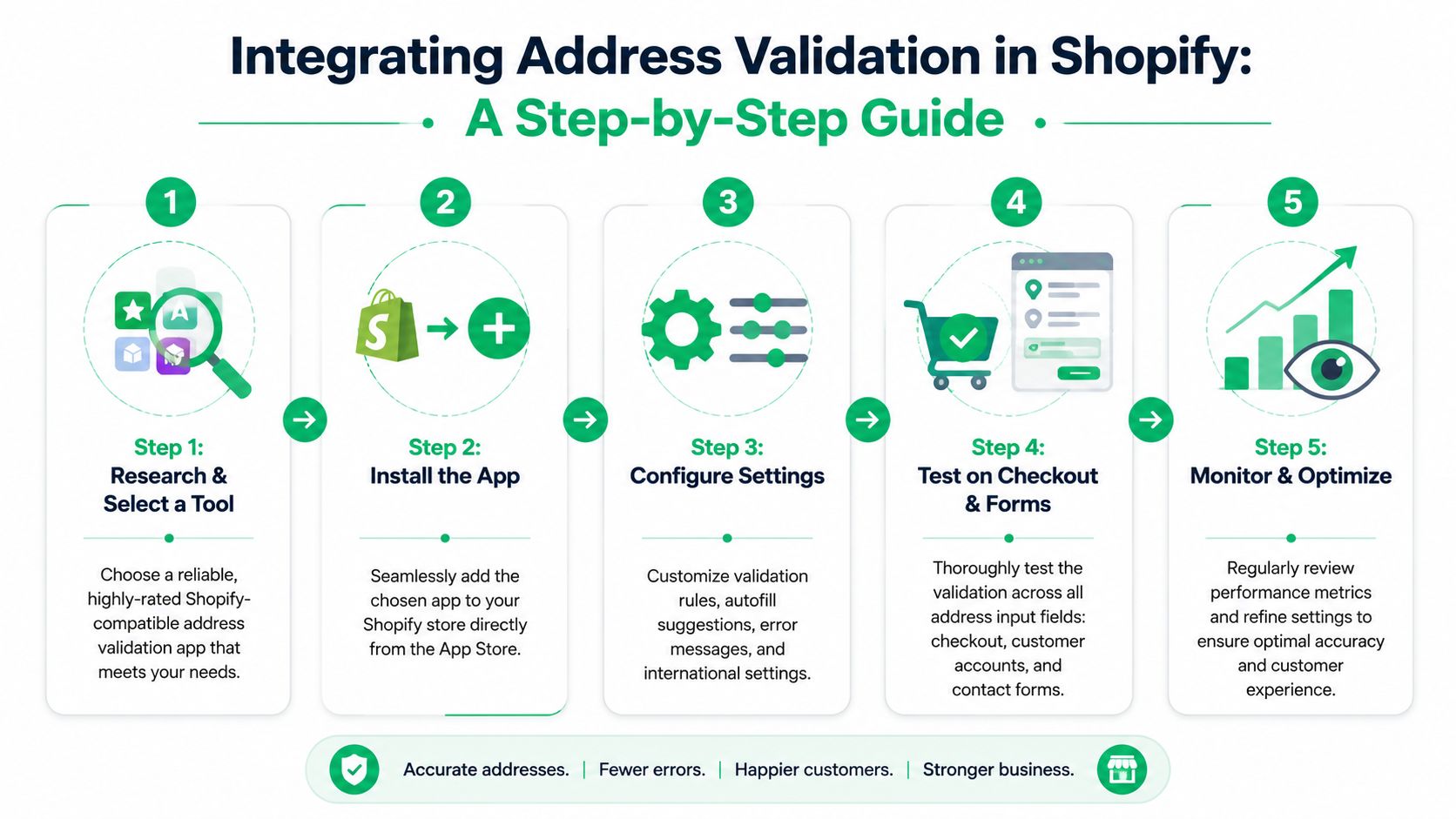
The obvious place to add an address lookup tool is checkout. That's still the right starting point, but it's not the whole system. High-volume stores get the biggest payoff when they treat address validation as an end-to-end workflow, not a single field enhancement.
A simple rollout plan helps.
Start at the highest-risk entry points
Begin with the forms where bad data enters most often:
- Checkout address fields: This is the first control point and still the most important.
- Customer account saved addresses: Returning customers reuse old data. That means mistakes can persist unless you validate updates.
- Manual support edits: If agents override addresses, give them the same validation layer so they don't introduce new errors.
When you configure the tool, decide what should happen with uncertain results. Some stores allow the customer to proceed with a warning. Others block submission until the address is corrected. The right choice depends on your order profile, carrier mix, and support capacity.
Don't stop at checkout
The most overlooked implementation point is post-purchase. Customers often notice an address mistake only after they've paid. If your store gives them no structured way to fix it, they contact support. If support misses the timing window, fulfillment ships to the wrong place.
That's why post-purchase address editing matters. On Shopify, the order status page and related customer touchpoints can become a controlled correction layer instead of a support bottleneck. This guide on how to change a shipping address on Shopify shows the operational side of that process and where merchants usually run into friction.
Before rolling out broadly, watch a live implementation example:
Build rules around fulfillment timing
A post-purchase edit flow only works if it respects operations. The most practical setups define:
- Editable windows: Customers can change addresses only before a fulfillment milestone.
- Field restrictions: Some stores allow apartment changes but lock country changes or postal region changes.
- Approval paths: Higher-risk edits can route to staff review instead of updating automatically.
If you let customers edit addresses after purchase, tie that permission to fulfillment status, not just elapsed time.
That approach gives customers flexibility without creating warehouse confusion. It also reduces the support tickets that start with “I entered the wrong address” and end with a preventable reshipment.
Choosing the Right Address Lookup Tool A Checklist
A good address lookup tool should feel fast for customers and boring for operations. If your team still talks about it after launch, it's usually because something is off: suggestions are slow, international formatting is unreliable, or validation flags are too vague to act on.
The easiest way to evaluate tools is to judge them against real store workflows, not feature lists.
The non-negotiables
Benchmark studies summarized by Loqate's address lookup glossary show that validated, autocomplete-assisted forms can reduce erroneous address fields by up to 70% compared with free-text entry. The same source notes that integrators typically target sub-200ms response times and 99.9%+ uptime so checkout doesn't feel delayed.
Those targets are useful because they reveal the trade-off. Strong validation that slows down checkout can hurt conversion. Fast suggestions with weak deliverability logic can create downstream fulfillment problems. You need both.
Address Lookup Tool Selection Checklist
| Criterion | What to Look For | Why It Matters |
|---|---|---|
| Accuracy and data source | Postal authority support, maintained datasets, clear validation outcomes | Bad reference data produces confident-looking wrong answers |
| Speed and reliability | Responsive autocomplete, stable API performance, graceful fallback behavior | Customers abandon clunky forms and agents lose trust in slow tools |
| International coverage | Support for country-specific fields, multilingual handling, non-urban address logic | Global brands need more than a U.S.-centric address schema |
| Shopify fit | Clean integration with checkout, customer accounts, and post-purchase flows | A tool that only fixes one touchpoint leaves gaps elsewhere |
| Validation metadata | Deliverable status, confidence signals, structured components | Ops teams need rules, not just suggestions |
| Customization | Theme compatibility, branded form behavior, configurable prompts | The tool should fit your store experience, not fight it |
| Boundary and dataset updates | Frequent refreshes, visible handling of postal and municipal changes | Address rules can drift without anyone noticing |
| Privacy and compliance | Clear data handling policies and merchant controls | Address data is customer data and should be treated that way |
| Pricing model | Per-lookup, usage-based, or bundled pricing matched to order volume | Cheap tools can get expensive if pricing doesn't match your traffic |
Questions merchants should ask before buying
Ask vendors what happens when the address is incomplete but likely correct. Ask how they handle edge cases in rural and cross-border orders. Ask whether validation results can trigger business rules inside your operations workflow.
Also ask how they maintain data freshness. That question gets skipped too often. Postal regions, municipal boundaries, and serviceability rules change. If the provider can't explain update cadence or change handling clearly, assume your team will end up dealing with silent failures later.
If you're still evaluating your store stack more broadly, especially for regional operations, this guide to choosing an ecommerce platform in Australia is useful context because address handling, checkout flexibility, and app ecosystem strength are tied together more than many merchants expect.
A final litmus test is simple. The right tool should reduce support dependence, not just improve form polish. If it can't support the full order lifecycle, it's probably solving only part of the problem.
Frequently Asked Questions About Address Tools
Will an address lookup tool slow down my Shopify store
It shouldn't, if it's implemented well. The risk isn't the existence of the tool. The risk is poor integration, weak caching, or a provider whose API performance isn't production-ready. In practice, the best tools feel instant during typing and don't add visible friction to the form.
What's the difference between address validation and address verification
Merchants often use the terms interchangeably, but the practical distinction is this: validation checks whether an address is formatted and structured correctly against reference data, while verification is often used more broadly to mean confirming that the destination is real or deliverable in an operational sense.
For ecommerce, you usually want both outcomes. You want the format corrected, and you want enough confidence to decide whether the order should flow straight to fulfillment or get reviewed.
How do these tools handle PO boxes and military addresses
That depends on the provider and the carrier rules you work with. A strong tool should recognize those address types and preserve the fields needed for proper delivery. The bigger operational question is whether your shipping methods allow them. Validation helps capture them correctly, but your fulfillment rules still need to determine whether you can ship to them.
What about changing ZIP codes or municipal boundaries
This is one of the most underappreciated issues in address data. As the Consumer Financial Protection Bureau's rural or underserved tool notes, many public lookup tools rely on periodically updated data, which creates time lags after municipal boundary or postal code changes. That can affect shipping eligibility and tax calculations when historical records no longer line up with current reference layers.
For merchants, the takeaway is practical: don't treat address validation as a one-time setup. Ask how your provider handles ongoing updates, and audit any rules tied to location eligibility or tax treatment.
Should customers be allowed to edit their shipping address after purchase
Usually yes, but with controls. Give them a clear window before fulfillment locks the order, and decide which fields can update automatically versus which ones need review. The goal is to prevent support tickets and shipment failures without introducing warehouse errors.
If your team wants to reduce address-related tickets after checkout, not just during checkout, SelfServe is worth a look. It gives Shopify merchants a controlled way to let customers update shipping details in the post-purchase flow, with real-time address validation, multilingual support, and rules that keep operations in control.