How to Refund Shipping on Shopify: A Complete 2026 Guide
A customer writes in at 8:12 a.m. Their package arrived late, they paid for express shipping, and they want that shipping charge back. Another ticket lands a few minutes later. This one is messier: the warehouse split the order, one parcel went out on time, the other didn't, and support isn't sure whether to refund all shipping or just part of it.
That's usually how shipping refunds show up in real stores. Not as a clean accounting task, but as a judgment call sitting between CX, fulfillment, finance, and policy. If you're looking up how to refund shipping on Shopify, you probably don't need another shallow walkthrough. You need the playbook for deciding when to refund it, how to process it correctly, and how to keep the exception from turning into a habit.
Why Shipping Refunds Are a Necessary Evil
Shipping refunds sit in that annoying category of work that nobody wants, but every serious store needs to handle well. The customer sees a broken promise. Your support team sees another manual task. Your finance team sees a line item that needs to reconcile cleanly. All three are right.
A shipping refund usually falls into one of a few buckets. The order arrived later than the service level the customer paid for. A fulfillment issue forced a service downgrade. A package was lost or damaged and you're making the customer whole. Or you're issuing a goodwill credit because arguing over shipping is more expensive than closing the ticket well.
Why the decision matters
The mistake I see most often is treating every shipping complaint like a button-click exercise. That leads to inconsistent refunds, over-refunds, and support agents improvising policy in the inbox. A better approach is to decide first whether the customer is owed a shipping refund, then process it.
A useful internal standard is this:
- Service failure means the customer paid for a level of delivery they didn't receive.
- Merchant-caused friction means your team made a preventable error, such as shipping the wrong service or delaying dispatch.
- Goodwill exception means the refund is a retention decision, not a strict liability decision.
Shipping refunds aren't just small concessions. They signal whether your brand keeps its delivery promises when something goes wrong.
For high-volume stores, these cases stack up fast. The support burden is only part of the problem. The bigger issue is that every ad hoc refund decision creates policy drift. If you want to understand how those small exceptions add up operationally, this breakdown of the cost of returns for ecommerce brands is worth reading alongside your refund process.
What works and what doesn't
What works is a simple rule set your agents can apply without escalation on every ticket. What doesn't work is telling support to “use judgment” without guardrails. They will. But each person will use different judgment.
A solid baseline policy usually answers these questions:
| Question | Why it matters |
|---|---|
| Was the promised shipping service actually missed? | Determines whether the refund is owed or discretionary |
| Is the refund full or partial? | Prevents giving back more than the issue warrants |
| Does the customer keep the order? | Distinguishes a shipping-only issue from a broader refund |
| Who approves exceptions? | Keeps larger concessions from spreading informally |
That's the difference between a shipping refund process and a shipping refund habit.
The Standard Shipping Refund Process in Shopify
When the refund decision is made, Shopify gives you a straightforward path inside the order. The catch is that shipping refunds are operationally simple but still manual in practice, so your team needs to know exactly where to look and what to change.
The core workflow in Shopify Admin
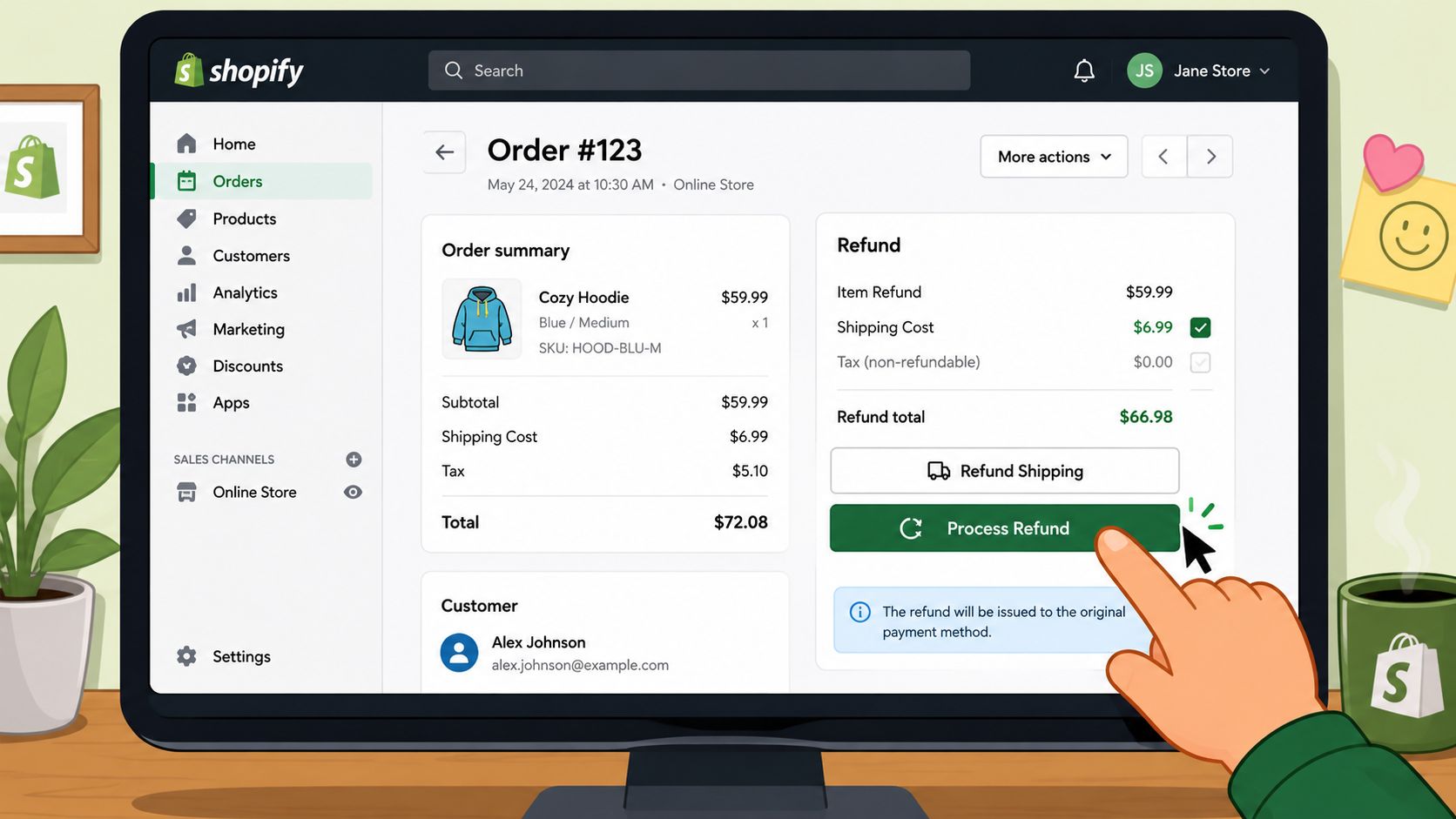
In Shopify Admin, shipping can be refunded as part of the standard order refund flow. Open the order, click Refund, then in the Refund shipping section select the shipping line and enter the amount to return. Shopify also supports choosing a refund method such as Original payment, Store credit, or Original payment & store credit, and the default customer notification is enabled unless you deselect it, as outlined in Shopify's guide to creating returns and refunds.
Here's the path most ops teams follow:
- Open the customer's order in Shopify Admin.
- Click Refund.
- Review item quantities first, even if you're only refunding shipping. This helps avoid accidental item refunds.
- Go to Refund shipping.
- Select the relevant shipping line.
- Enter the amount you want to refund.
- Original payment
- Store credit
- Original payment & store credit
- Decide whether the customer should receive the notification email.
- Confirm the refund.
- Late express shipment for missed premium service
- Shipping downgrade credit when express was paid but standard was used
- Goodwill shipping adjustment when you're preserving the relationship
- Carrier issue pending claim when you refund first and recover later
- What did the customer pay for shipping?
- What shipping promise appeared at checkout?
- Was the issue caused by carrier performance, warehouse execution, or a customer change?
- Is this a reimbursement, a partial service adjustment, or goodwill?
- Does finance need a tag for later reporting?
- Support owns the customer decision
- Ops owns refund accuracy
- Finance owns payout verification
- Decide what the customer needs now.
- Issue the customer refund or replacement based on your policy.
- Gather shipment records, tracking history, and damage evidence.
- File the carrier claim through the appropriate channel.
- Reconcile any carrier reimbursement separately from the customer case.
- Wrong address entered at checkout
- Customer wants to change delivery details after ordering
- Support has to cancel and recreate an order
- Manual edits create pricing or shipping mismatches
- A rushed team member picks the wrong fix
UI checkpoint: The field that matters for this task is Refund shipping, not the item refund quantity fields above it.
That's the clean version. In live stores, the hard part usually isn't the mechanics. It's choosing the right amount and making sure your agent doesn't accidentally refund products at the same time.
Why teams still trip over it
Historical data from Shopify's refund processing ecosystem shows that shipping cost differences are almost never refunded automatically by the platform. Instead, they usually require a manual partial refund intervention by the merchant. The verified data states that approximately 98% of shipping refund cases involve manually opening the order, clicking Refund, and entering a specific amount.
That tracks with what operations teams see day to day. If the customer should get back only part of the shipping charge, Shopify won't infer your intent from the ticket. Someone has to do the math and enter it.
If your team handles a lot of these, it helps to standardize the language used in internal notes. For example:
A practical companion process is documenting when to choose cash back versus store credit. If you want a broader operational reference for customer repayment flows, this guide on issuing a refund on Shopify is a useful add-on for your team SOPs.
A short visual walkthrough also helps when training new agents:
A simple rule for agents
Don't let support decide the amount from memory or from what the label cost in your shipping tool. Refund the customer based on the charge they paid and the service issue they experienced. Those are not always the same thing.
That one rule prevents a surprising number of avoidable errors.
Handling Complex and Partial Shipping Refunds
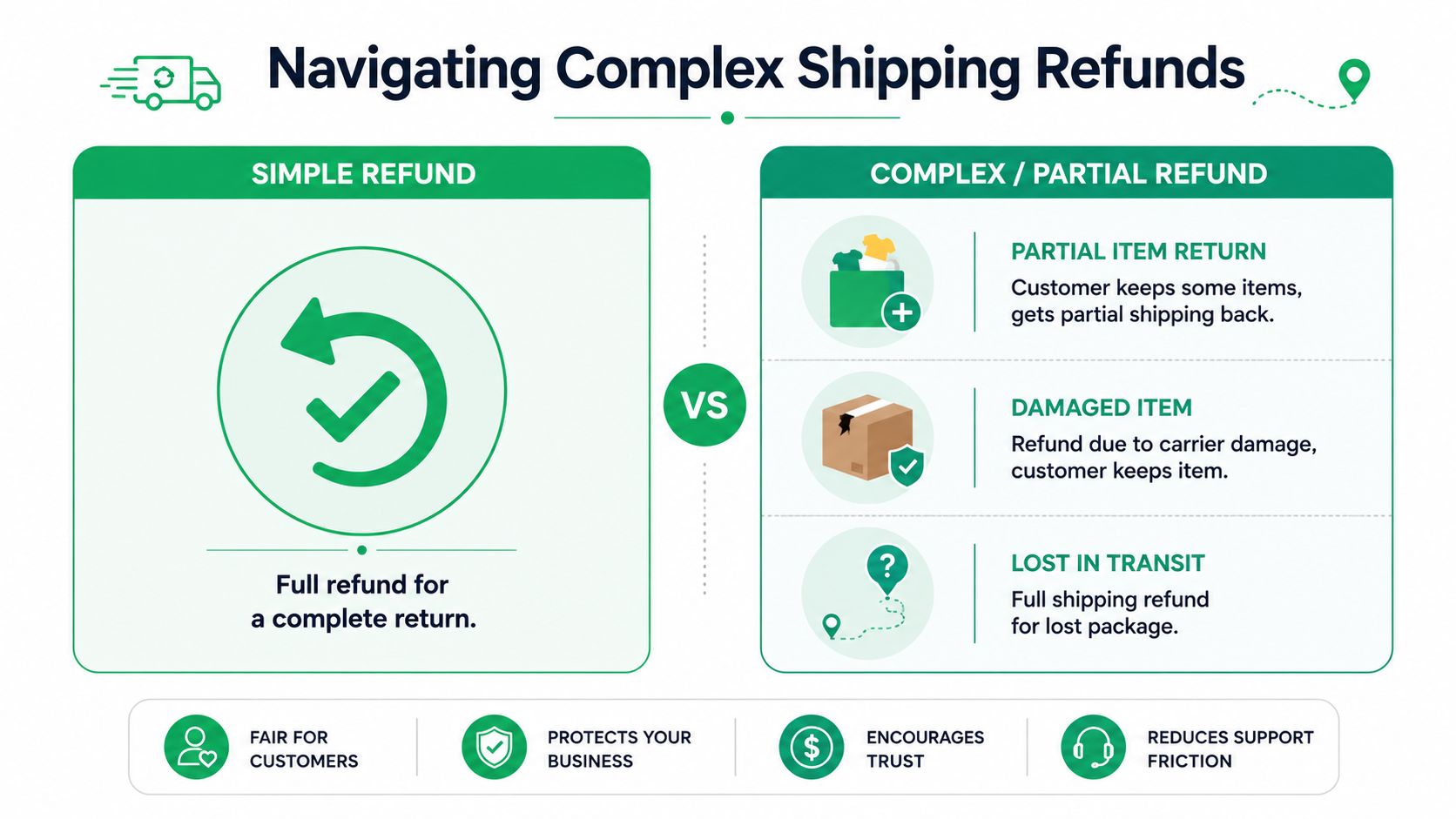
Most confusion starts when the refund amount isn't obvious. The customer isn't returning the full order. The package was split. A shipping promotion changed the economics. Someone edited the order after checkout. The basic Shopify flow still works, but the decision logic gets trickier.
When the amount isn't obvious
Shopify's refund documentation leaves a real gap around shipping differences that need to be calculated manually, especially after rate adjustments, post-purchase edits, or carrier disputes. Shopify acknowledges the underlying workflow in its refunding orders documentation, but the operational burden still sits with the merchant.
That's why teams need a decision framework, not just instructions.
Use this table when the request isn't a full, obvious shipping refund:
| Scenario | Refund approach | Internal rule |
|---|---|---|
| Customer paid for faster shipping but got slower service | Partial refund | Refund the difference tied to the missed service level |
| Order split across multiple shipments | Partial or no refund | Refund only if the split caused a service failure or extra friction |
| Discount affected shipping | Case by case | Refund based on what the customer actually paid, not the nominal shipping rate |
| Post-purchase order edit changed shipping economics | Partial refund | Recalculate manually from the revised order reality |
| Carrier dispute or damage | Shipping refund or goodwill | Decide customer remedy first, then seek recovery separately |
Mini-scenarios that trip teams up
A common one: the customer paid for priority shipping, but the warehouse shipped standard because inventory moved locations. The customer received the order, so this isn't a product refund. It's a service-level refund. Your agent should refund only the shipping difference, not the full order and not necessarily the full shipping charge.
Another one: part of the order ships from one location, the rest from another. The customer complains that the second parcel arrived later. If your checkout promise covered a delivery window that the order still met overall, a refund may be goodwill rather than obligation. If the split itself caused the missed service level, refunding part of shipping is often the cleaner decision.
Don't tie the refund to your warehouse inconvenience. Tie it to the customer promise you failed to meet.
Then there's the discount problem. If the customer used a free shipping promo or a blended promotion that changed the shipping charge, support shouldn't refund an imagined shipping value. Refund what the customer paid for shipping. If that amount is reduced by the promotion, the ceiling is reduced too.
How to standardize complex cases
For stores with multiple agents, I'd document these review questions directly in the macros or helpdesk sidebar:
That keeps your team from over-refunding out of speed or under-refunding out of caution. Both create problems. One hits margin immediately. The other comes back as repeat contacts, poor sentiment, and manual escalations.
Financial Reconciliation and Payment Gateway Nuances
The customer-facing refund is only half the job. The other half is making sure finance can trace what happened, especially when shipping refunds start piling up across different payment methods and order structures.
Why reconciliation gets messy fast
Shipping refunds are easy to miss in payout reviews because they're small compared with item refunds and often processed as exceptions. If your team uses Shopify Payments in some markets and third-party gateways in others, reporting can feel uneven unless your refund reasons are disciplined.
The key operational habit is matching each shipping refund to a clear cause code. Late delivery. Service downgrade. Goodwill. Carrier issue. Without that, finance gets a stack of shipping adjustments with no usable pattern behind them.
For stores with custom reporting or Shopify Plus workflows, there's an important technical development to know. On July 18, 2024, Shopify implemented a critical API milestone ensuring that all Admin GraphQL API versions return accurate refund data specifically for orders containing multiple shipping lines. The update mandates that shipping refunds are explicitly included in the order refund connection, which improves financial reconciliation for complex orders.
What that means in practice
If your operation has multi-carrier shipments, split shipments, or international orders with more than one shipping line, this matters because refund reporting is more reliable than it used to be. Teams pulling refund data through Admin GraphQL can now review shipping adjustments with more confidence when reconciling order-level financial activity.
Operations rule: Refunds aren't complete when support closes the ticket. They're complete when finance can explain them without opening the ticket again.
This is also where process discipline beats heroics. Don't rely on one analyst to “know what happened” on weird orders. Make support and ops tag shipping refunds in a way finance can group later. If your team is rebuilding that reporting layer, this primer on how to gain financial clarity with Suby is a practical companion read.
For a merchant-side view of how these exceptions fit into broader order accounting, this guide to financial reconciliation for ecommerce operations is useful for turning refund cleanup into a repeatable back-office process.
Gateway differences to watch
Even when the workflow looks identical in Shopify Admin, your downstream records may differ depending on payment setup. That's why I'd avoid teaching agents to think “refund issued equals case finished.” A better standard is:
That division keeps everyone from assuming someone else checked the numbers.
How to Refund Shipping Labels and Manage Carrier Claims
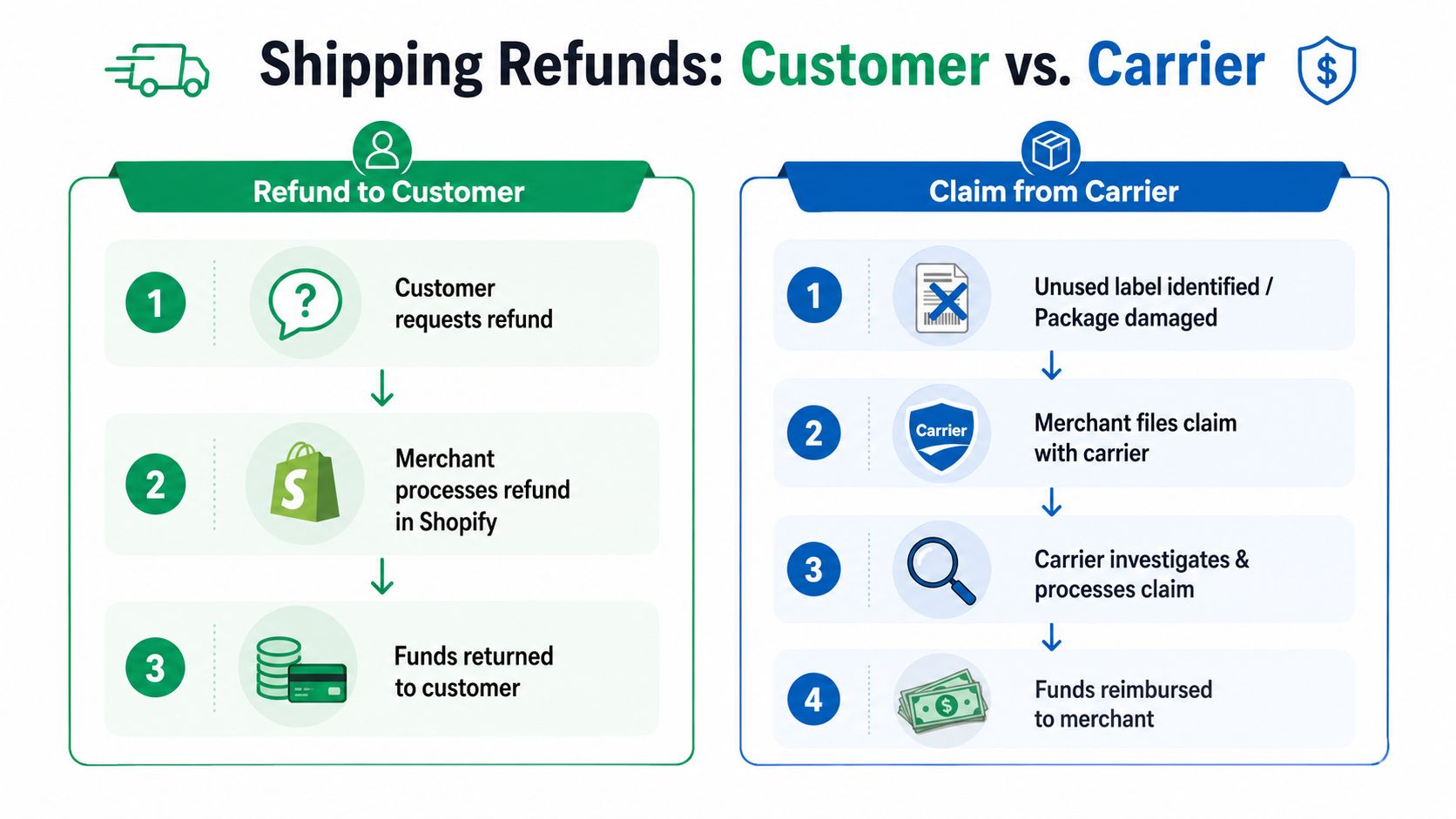
A customer shipping refund and a carrier reimbursement are not the same thing. One sends money back to the shopper. The other tries to recover your shipping cost from the carrier or from an unused label. Stores blur these together all the time, and that creates bad accounting.
Customer refund versus label recovery
If you charged a customer for shipping and need to compensate them, that happens inside the order refund flow in Shopify. If you bought a shipping label that was never used, you're dealing with a merchant cost recovery process instead.
Those should be tracked separately in your internal notes. Otherwise, finance can't tell whether money went back to the customer, came back from a carrier, or both.
A cleaner operating routine
For unused labels, the first step is operational review. Confirm the label wasn't used and wasn't scanned into the carrier network. Then void it through the shipping workflow your team uses in Shopify Shipping. If the label is eligible, the credit should flow back to the merchant side rather than to the customer.
For damaged or lost packages, treat the customer remedy and the carrier claim as parallel workstreams:
Refund the customer based on the experience they had. File the claim based on the evidence you can prove.
That order matters. Waiting on the carrier before helping the customer usually creates a support problem that costs more than the shipment itself.
From Reactive Refunds to Proactive Customer Workflows
The strongest shipping refund process is still reactive. It starts after something has already gone wrong. That's useful, but it's not where the biggest operational wins come from.
Historical refund data in Shopify's ecosystem shows that shipping cost differences are rarely refunded automatically. The verified data states that approximately 98% of shipping refund cases involve a merchant manually opening the order, clicking Refund, and entering a specific amount. That's a reminder that shipping refunds remain a hands-on task in most stores.
The better question to ask
Instead of only tightening the refund SOP, ask which tickets create shipping refunds in the first place. In many stores, the trigger isn't a carrier failure. It's a preventable post-purchase issue:
Those aren't refund problems first. They're workflow problems first.
What prevention looks like in practice
The operational move is to give customers a controlled way to fix low-risk post-purchase issues before those mistakes turn into canceled shipments, manual order edits, or service failures. If a shopper can correct a shipping detail early, your team avoids the chain reaction that often ends with a partial shipping refund and three internal handoffs.
That doesn't replace refund policy. You still need the playbook for late deliveries, missed service levels, and genuine fulfillment mistakes. But it does reduce the volume of tickets that should never have become shipping exceptions in the first place.
A good complement to that thinking is this guide to better e-commerce shipping, especially if you're trying to tighten the broader post-purchase experience rather than just improve one refund workflow.
The strategic shift
If you're managing a high-volume Shopify store, the goal isn't just learning how to refund shipping on Shopify correctly. It's shrinking the number of times your team has to do it. That means fewer manual calculations, fewer inbox debates over who approved what, and fewer preventable customer frustrations.
The stores that handle this well do two things at once. They keep a sharp refund SOP for exceptions, and they remove avoidable reasons for those exceptions to happen.
If you want to reduce shipping-related tickets before they become refunds, SelfServe helps customers make approved post-purchase changes themselves while your team keeps control over timing, permissions, and workflows. It's a practical way to cut manual support work and clean up one of the messiest parts of Shopify operations.