A Modern Guide to Handling a Refund on Shopify

Let's be real—processing refunds is just part of the game when you're running a Shopify store. But if you're only seeing it as a necessary evil, you're missing a massive opportunity. A refund isn't just a transaction; it's a critical customer touchpoint that can either sink your reputation or build surprising loyalty. A clunky, slow, or confusing refund experience is a surefire way to frustrate customers, leading to a cascade of bad reviews and support tickets you really don't have time for.
Why Your Shopify Refund Process Matters More Than Ever
Returns are simply an unavoidable part of ecommerce. It happens. A product doesn't quite match the photos, or maybe the customer just had a change of heart. Whatever the reason, the scale of this has exploded.
The latest numbers show that ecommerce return rates have shot up to an average of 16.9%, more than doubling over the last few years. Think about that—for every 100 products you ship out, nearly 17 are likely coming back your way. For many store owners, each one of those returns eats up anywhere from 20% to 65% of the item's original price. And get this: a shocking 65% of all refunds are still processed manually, which means your support team is spending a huge amount of time on a repetitive task. You can discover more insights about the rising costs of ecommerce returns and how to get them under control.
This operational headache is made worse by sky-high customer expectations. A generous and simple return policy is a make-or-break factor for 76% of shoppers when they're deciding where to buy. A bad experience doesn't just cost you a single sale; it can cost you a customer for life.
Reframing Refunds as a Competitive Advantage
Instead of dreading refund requests, I encourage merchants to see them as a moment of truth for their brand. It's your chance to show up with fantastic customer service and turn a potential negative into a genuine positive.
When you nail your refund workflow, you can accomplish a few key things:
- Build Customer Trust: A smooth, no-hassle process proves you stand behind your products. It tells customers you value them, which makes them far more likely to come back.
- Reduce Support Team Burden: When the process is crystal clear, you dramatically cut down on all those "Where's my refund?" emails and phone calls.
- Protect Your Bottom Line: A smart system can be designed to gently encourage exchanges or store credit over straight cash refunds, helping you hold onto that revenue.
By treating every refund on Shopify with care and efficiency, you're not just managing a transaction—you're investing in your brand's long-term reputation and customer loyalty.
Ultimately, the goal isn't just to issue a refund but to figure out why it happened. Was it a sizing issue? A confusing product photo? A shipping problem? Every return is a piece of feedback, a clue to improving your products, your marketing, and your entire operation. It turns a cost center into a source of priceless business intelligence.
A Practical Guide to Shopify Refunds
Handling a refund on Shopify is a daily reality for any store owner. While the process seems straightforward, the little details can make a huge difference, especially when you're dealing with partial returns, shipping costs, or tricky inventory updates. Nailing this workflow is key to keeping your books clean and your customers happy.
Let's dive into a super common situation: a customer buys a few things but needs to send one back. You don't want to refund the whole order, just the one item.
Processing a Partial Refund
First things first, pull up the order in your Shopify admin and hit the Refund button. This takes you to the main refund screen where you can get granular with the details. Instead of refunding the total amount, you can pinpoint exactly which item is coming back and how many.
Imagine a customer bought two of the same t-shirt but wants to return one. You'd simply find that t-shirt in the order list and change the quantity from '2' to '1'. Shopify is smart enough to do the math for you, automatically adjusting the subtotal and any associated tax for that single item.
Here’s a look at that refund screen. You can see how you can adjust quantities and amounts for each product.
This line-item control is fantastic because it keeps the rest of the order intact, ensuring your sales reports stay accurate.
Dealing With Shipping and Restocking
After you've set the product quantity, you've got a couple more choices. One of the big ones is whether or not to refund the shipping cost. As a rule of thumb, if the customer is only returning part of their order, you typically don't refund the original shipping fee. The cost was still there to get the other items to them, so you can just leave the "Refund shipping" field at $0.
Next up is the Restock item checkbox. This is a small but critical step.
- Is the item pristine and ready to be sold again? If yes, check this box. Shopify will automatically add it back to your available inventory count.
- Is the item damaged, used, or otherwise unsellable? Leave the box unchecked. This prevents you from accidentally shipping a faulty product to the next person.
A classic mistake I see merchants make is forgetting to restock items properly. It seems minor, but it completely throws off your inventory levels, which can lead to overselling and some very unhappy customers later on. My advice? Make it a conscious habit to check or uncheck that box on every single return.
Finally, there’s a spot to add a "Reason for refund." It's optional, but I highly recommend using it. This field is a goldmine. Tracking reasons like "doesn't fit" or "item not as described" can help you identify patterns, fix product listings, or even improve your product design. If you’re also navigating the logistics of getting the item back, you might want to look into creating a FedEx return label to make things easier on everyone.
Once you’ve double-checked the item quantity, restock status, and the final dollar amount, go ahead and click the "Refund" button. Shopify takes care of the rest, sending the money back to the customer's original payment method and officially updating the order.
Managing Complex Refund Scenarios
While most refunds are pretty straightforward, you’ll inevitably run into situations that aren’t so simple. These tricky cases, like dealing with an expired credit card or navigating the quirks of different payment gateways, can quickly become a headache for your support team if you don't have a clear plan.
A classic issue is when a customer's original payment method is no longer valid. If someone paid with a credit card that has since expired or been canceled, a standard refund through Shopify will probably fail. The money almost always has to go back to the original source.
In these situations, your hands are often tied by the payment processor's rules. You can't just send the money to a different card. The best approach is to get in touch with the customer, explain what's happening, and explore other options like issuing a gift card or store credit.
Navigating Different Payment Gateways
The gateway a customer used at checkout really changes how a refund works. Each one has its own timeline and fee structure, which can easily catch merchants off guard.
- Shopify Payments: Generally, refunds are simple and take about 5-10 business days to show up on a customer's statement. You'll just see the refund amount get deducted from your next payout.
- PayPal: Known for its speed, PayPal refunds often hit the customer’s account within 1-3 business days. One thing to remember is you might need to log into your PayPal business account directly to handle specific disputes or refund details.
- Klarna or Afterpay: When you're dealing with "Buy Now, Pay Later" services, you’re actually refunding the provider, not the customer directly. The provider then has to adjust the customer's payment plan, which can sometimes lead to confusion. Clear communication with the customer is everything here.
This decision tree gives you a good visual for the first choices you'll make when a refund request comes in.
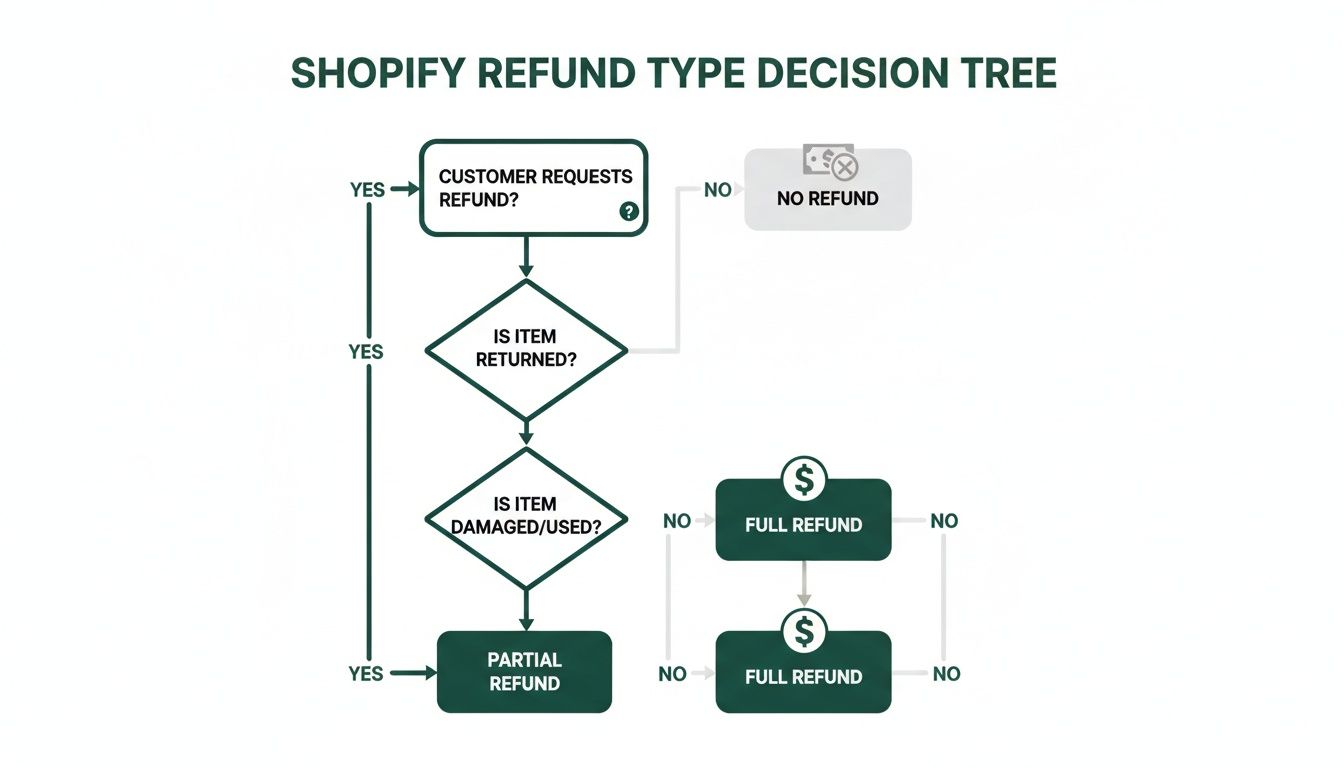
As you can see, the first thing to figure out is whether you're dealing with a full order return or just a few items from it.
Strategic Alternatives to Cash Refunds
Instead of immediately giving cash back, think about offering store credit or a digital gift card. This is a fantastic way to hold onto that revenue and encourage another purchase down the road. In fact, a customer who accepts store credit is 50% more likely to buy from you again.
A great little trick is to offer a slight bonus on store credit—say, 110% of the original purchase value. This can nudge customers to choose that option, effectively turning a potential loss into a future sale.
For any refund that's out of the ordinary, meticulous documentation is your best friend. Add detailed notes to the Shopify order timeline explaining exactly how the refund was handled. This not only keeps your financial records accurate but also ensures your whole team follows a consistent process. Of course, managing the physical return of these items is just as important; you can find some great advice on the best reverse logistics companies to partner with for a smoother workflow.
Automating Refunds to Lighten Your Workload
Let's be honest: processing refunds manually is a drag. It eats up hours your support team could be spending on literally anything else. As your store grows, this operational headache only gets worse. This is exactly where automation steps in, transforming a tedious, reactive task into a seamless part of your customer experience.
The real goal isn't just to get better at handling a refund on Shopify. It's to solve the customer's root problem before they even think about asking for a refund. Making that shift from manual hand-holding to customer empowerment is the secret to an efficient post-purchase flow.
Give Customers Control with Self-Service Options
So many returns and refunds start with simple, fixable mistakes. A customer types in the wrong shipping address, picks the wrong size, or realizes five minutes later they forgot to add something to their cart. Without a self-service option, every one of these small slip-ups becomes a support ticket, a canceled order, or a guaranteed return.
Think about it from the customer's side. They realize they fat-fingered their apartment number right after hitting "Buy." Instead of sending a frantic email and hoping someone sees it in time, what if they could just fix it themselves, instantly? That’s the magic of a good customer portal.
Letting shoppers manage their own post-purchase edits isn't just a nice-to-have feature; it's a problem-prevention strategy. You'll see fewer costly errors, eliminate unnecessary shipments, and turn a customer's moment of panic into a genuinely positive brand interaction.
The best part is that you're in control. These tools let you set specific, customizable rules. You decide what can be changed and for how long. For instance, you could allow address edits for the first two hours post-purchase, right before your fulfillment team gets to work.
How Automation Directly Cuts Your Refund Rate
The payoff from a smart automation system goes way beyond fixing typos. A well-thought-out self-service experience can make a real dent in your refund numbers and take a massive load off your team.
Here’s how:
- Catch Bad Addresses: Integrated tools can validate addresses in real-time, catching errors on the spot and drastically cutting down on "return to sender" packages.
- Offer Smart Upsells: Instead of a customer canceling their order just to add one more item, you can prompt them with upsell opportunities right on the order status page. This not only stops a potential refund but can even bump up your average order value.
- Allow Easy Order Edits: Letting a customer swap a size or color on their own is a game-changer. It completely sidesteps the whole process of them returning the wrong item and you shipping a new one.
This proactive approach doesn't just lower the number of refund requests—it completely changes the post-purchase experience. Customers feel more in control, which boosts satisfaction, and your support team can finally breathe.
To get a better handle on this, you can learn more about building an effective self-service customer portal that puts control back in your shoppers' hands. Ultimately, automation is about building a smarter, more resilient business that saves time and holds onto revenue.
Crafting a Clear and Effective Refund Policy
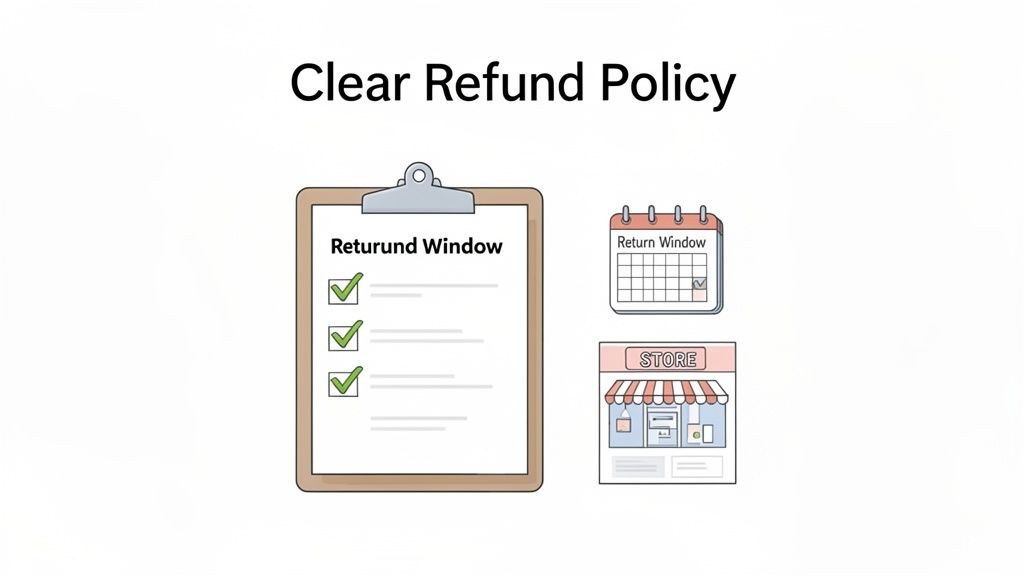
Long before a customer even thinks about asking for their money back, your refund policy is doing the heavy lifting. Think of it as your first line of defense—it sets expectations, builds trust, and can be the difference between a happy customer and a support headache.
A vague or hidden policy is a recipe for disaster. If customers are left guessing, they'll either get frustrated or assume the worst. The goal here isn't to just slap some generic legal text on a page. It's about creating a policy that’s fair to your shoppers and sustainable for your business.
A well-crafted refund policy is more than just a legal document; it's a reflection of your brand's commitment to customer service. It builds trust by showing shoppers you stand behind your products and have a clear process if things don't work out.
The key is clarity. Any ambiguity around who pays for return shipping or the condition an item needs to be in will come back to bite you. And don't bury it—make sure your policy is easy to find when customers need it most.
Key Components of a Strong Refund Policy
Your policy should preemptively answer all the common questions a customer might have. Get ahead of the confusion by making these elements crystal clear.
Here's what every solid refund policy needs:
- Return Window: Be specific. Is it 30 days from the purchase date or the delivery date? The distinction matters.
- Item Condition: Define what "eligible for return" actually means. For example, "Items must be unworn, with original tags still attached, and in their original packaging."
- Return Shipping Costs: Spell out who foots the bill. Do you provide free return labels, or is the customer responsible for postage? There’s no single right answer, but you must have an answer.
- Excluded Items: Clearly list anything that is final sale. This often includes custom-made products, digital downloads, or hygiene-sensitive items.
Strategic Placement for Maximum Visibility
What good is a great policy if no one ever sees it? Placement is everything. You want to surface this information at the moments a customer is most likely to be thinking about it.
Here are a few high-impact spots to link to your policy:
- Product Pages: A simple link near the "Add to Cart" button can give a hesitant buyer the confidence they need to make a purchase.
- Checkout: Adding a checkbox where customers must acknowledge they’ve read the terms can save you from "I didn't know" disputes later on.
- Order Confirmation Emails: Put the policy right in their inbox after they buy. They'll have it on hand if they need it, reinforcing that you’re transparent.
And remember, a smart policy can do more than just manage returns—it can help you keep revenue. Instead of making a cash refund on Shopify the only option, try offering store credit as a compelling alternative. A little bonus, like offering 110% of the order value in store credit, can be a great incentive to keep that money in your business and encourage them to come back and shop again.
Answering Your Top Shopify Refund Questions
Even with the process laid out, you're bound to run into some specific, tricky refund situations. Knowing the answers ahead of time can save you from scrambling through help docs while a customer is waiting. Let's tackle some of the most common questions merchants ask.
Can I Refund an Archived Order on Shopify?
Yes, you definitely can, but there's a quick preliminary step. Shopify tucks away completed orders to keep your main dashboard clean, so you'll need to unarchive it first.
Just head to your Orders page, click into the "Archived" view, and find the order in question. Open it up, scroll all the way to the bottom, and you'll see an Unarchive button. Once you click that, the order pops right back into your active list, ready for you to process the refund like any other.
How Long Do Shopify Refunds Take to Reach Customers?
This one is almost entirely up to the customer's bank. For any refund processed through Shopify Payments on a credit card, the standard waiting time is 5-10 business days. It's a smart move to mention this timeline to your customers right away to manage their expectations and cut down on those "Where's my money?" emails.
You can confirm for a customer that the refund has been sent from your end, but you have zero control over how fast their bank posts it. Clearly communicating that 5-10 business day window builds trust and saves your support team a lot of headaches.
What if My Balance Is Too Low to Cover a Refund?
This is a totally normal scenario, especially for businesses with seasonal sales or uneven cash flow. If your Shopify Payments balance can't cover the refund amount, Shopify will typically debit the difference directly from the bank account you have on file. This is the standard procedure for merchants in places like the US, Canada, and Australia. For other regions, the refund might sit in a "pending" status until you make more sales and your balance is topped up.
Does Shopify Refund Its Transaction Fees?
This is a big one: No, Shopify does not refund the credit card transaction fees when you process a customer refund. That fee covers the cost of the original transaction, and it's not returned to you even if the sale is undone. It’s a small but important detail to factor into your accounting.
Since you're eating that fee on every single return, it’s another great reason to push for exchanges or offer store credit instead of a straight cash refund. Doing so helps you hold onto the revenue and avoid losing money on processing fees for a sale that didn't stick.
Stop losing time to manual post-purchase edits and reduce your refund rate. With SelfServe, you can empower customers to fix their own shipping details, add products to their order, and cancel when needed—all within rules you control. Install SelfServe today and start your 30-day free trial.