Sentiment Analysis Guide for Smarter Post-Purchase CX

Your post-purchase inbox fills up the same way every busy afternoon. A customer wants to change an address, another wants to know where the parcel is, and a third is upset because a discount prompt appeared after checkout but before the delivery update they were waiting for. If your team is reading each message one by one, the loudest complaints tend to win attention, while the messages that signal real operational risk sit in the queue too long.
Sentiment analysis gives that text a first pass, so a small CX team can tell the difference between a routine question, a frustrated buyer, and a message that needs immediate escalation. That matters in the days after checkout, when address edits, tracking updates, return questions, and upsell prompts can all shape whether a customer keeps buying from you or opens a ticket. For a merchant comparing automation layers, it can help to compare AI-powered service platforms before deciding where text analysis fits in the stack.
Why Post-Purchase Teams Need Sentiment Analysis Now
The hard part of post-purchase support isn't finding messages, it's choosing which ones deserve human attention first. A Shopify Plus control room can look calm on the surface, while behind it, order-status complaints, return requests, and failed address edits pile up faster than agents can reply. Sentiment analysis becomes the filter that turns that stream of text into a priority signal.
The post-purchase moment is emotionally dense
Right after checkout, customers are looking for reassurance. They want the order confirmed, the tracking page to load, the shipping address to be correct, and any issue to be resolved without a back-and-forth. If a delivery exception appears, or an edit window closes before they act, the language in their message often shifts from neutral to frustrated very quickly.
That's why post-purchase text is different from general brand chatter. It's tied directly to money, timing, and trust. A negative tone in a review can be useful, but a negative tone in a delayed order thread usually signals an operational problem that needs a faster response.
Why a text filter matters for a small team
Most merchants don't have unlimited agents sitting in a queue. They need to know which message is just a status check and which one is likely to turn into a cancellation, a chargeback, or a public complaint. A sentiment layer helps the team separate those before the inbox turns into noise.
Practical rule: If a message mentions a failed change, a missed deadline, or repeated uncertainty, treat the tone as a routing signal, not just a label.
This is also where tooling research helps. If you're comparing support automation stacks, the resource on AI analytics for WhatsApp support shows how conversational text can be monitored in a practical customer-service setting, which is the same basic problem merchants face across email, chat, and order-status flows.
What Sentiment Analysis Does
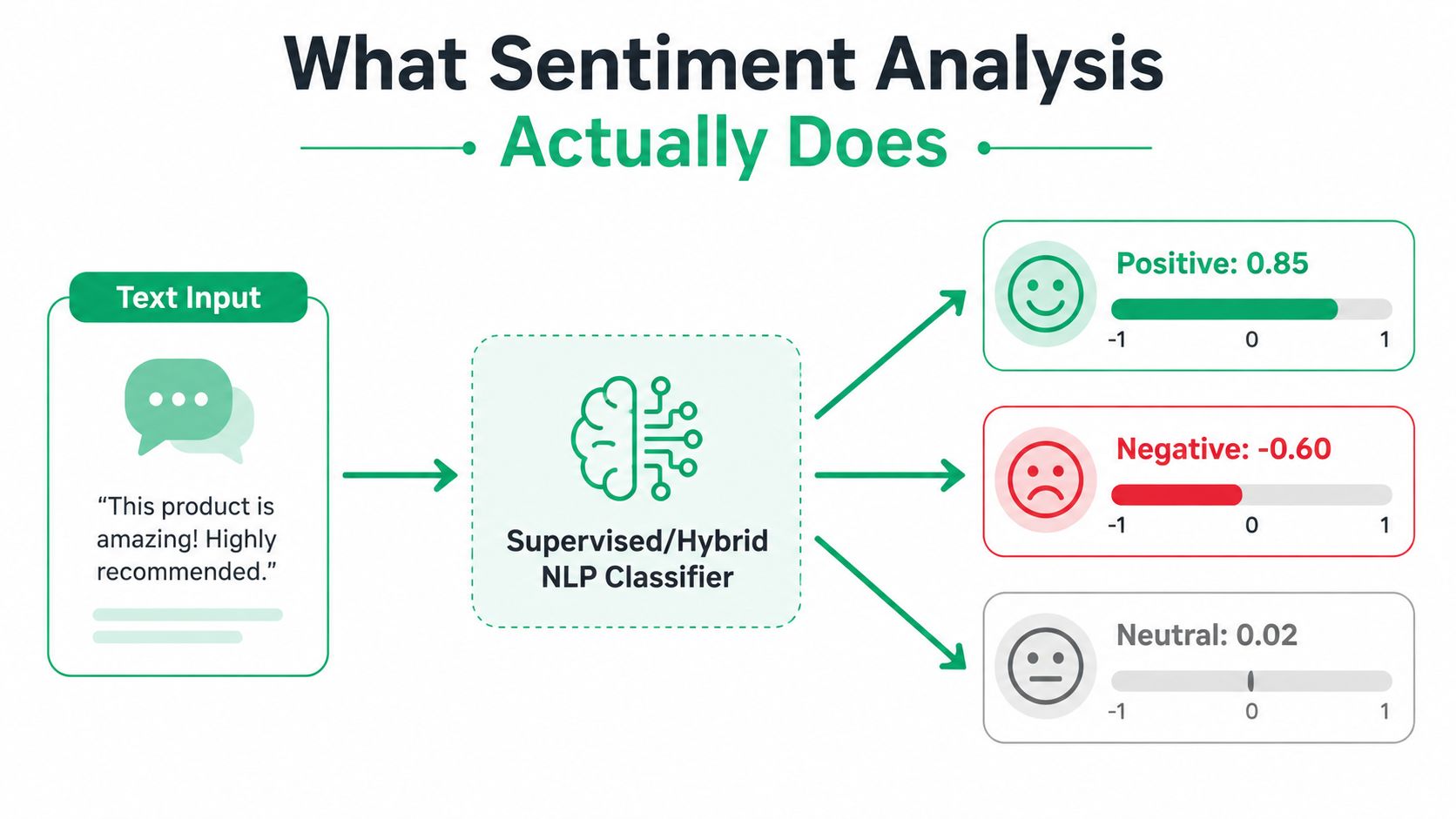
At the simplest level, sentiment analysis reads text and assigns it a category such as positive, negative, or neutral. Many systems also add a polarity score, so a message can be ranked by intensity instead of only by label. That matters because two negative messages do not always call for the same response.
Using a Tone Thermometer for Severity
A plain label is useful, but it can hide severity. “The package arrived late” and “I've been waiting three weeks and no one's answering” are both negative, yet they should not sit in the same follow-up queue. A score-based system works like a tone thermometer, the reading shows how heated the message is, not just whether it is warm or cold.
That score supports triage. A moderate complaint about packaging can wait for a later review, while a high-intensity complaint about a missed delivery needs immediate routing. For merchants handling large volumes of order updates, that difference changes how quickly the team protects revenue and trust.
The basic pipeline behind the label
Most production systems follow a familiar sequence. They tokenize the text, which means they split it into smaller units, then lemmatize it so words are reduced to their base forms. After that, the system extracts features and maps them to a sentiment label through a supervised or hybrid classifier.
The output is useful because it turns messy customer language into something a support or CX team can act on quickly. On the merchant side, that often means feeding text from support tickets, review forms, and order-update pages into the same scoring flow, then using the result to separate routine questions from messages that need faster handling.
If you are using a shared inbox or a chat layer, AI analytics for WhatsApp support shows how this kind of classification can be applied to live customer messages.
Three Approaches Compared
Sentiment analysis isn't one technique, it's a family of approaches that trade simplicity, flexibility, and accuracy against each other. A merchant evaluating vendors should think about it the way they'd think about shipping options. The cheapest method can be fine for a simple use case, but it's not always the one you want when volume and language variety start to climb.
| Sentiment analysis approaches at a glance | ||||
|---|---|---|---|---|
| Approach | How it works | Strengths | Limitations | Best fit for |
| Lexicon-based | Uses a dictionary of positive and negative words | Easy to explain, fast to deploy, low cost | Struggles with sarcasm, context, and mixed messages | Small catalogs, light feedback streams, simple monitoring |
| Classical machine learning | Learns patterns from labeled examples, often with models like Naive Bayes or SVM | Better contextual fit than word lists, works without huge compute needs | Needs labeled data and model maintenance | Growing stores with recurring ticket themes |
| Deep learning | Uses neural models and transformers to learn richer language patterns | Strongest performance on complex text, better at nuanced phrasing | More compute, more tuning, more operational care | Large merchants, multilingual traffic, high-volume support |
Lexicon methods are the easiest to explain
A lexicon system is basically a word list with rules. If the text contains words like “great,” “broken,” or “refund,” the model leans in a direction based on those terms. That makes it transparent, which is useful when a merchant wants to understand why a message was flagged.
The downside is obvious once you look at real post-purchase language. Customers are not tidy writers. They use irony, shorthand, emoji, and layered complaints, and word lists don't handle that well.
Classical ML and deep learning solve different problems
Classical machine learning learns from examples, so it can catch patterns that simple dictionaries miss. If your team has tagged a set of return tickets, a model can learn what frustration looks like in your brand's language. It's a solid middle ground for merchants who have data but don't want a heavy engineering lift.
Deep learning goes further. It handles broader context and is better suited to complex text, which is why it's often the choice for bigger operations with diverse language input and higher traffic. The tradeoff is that you need more care in training, testing, and monitoring.
Decision shortcut: If your team is still manually reading most tickets, start simple. If your support queue is already large and multilingual, deeper models start to make more sense.
Aspect-Based and Emotion Detection
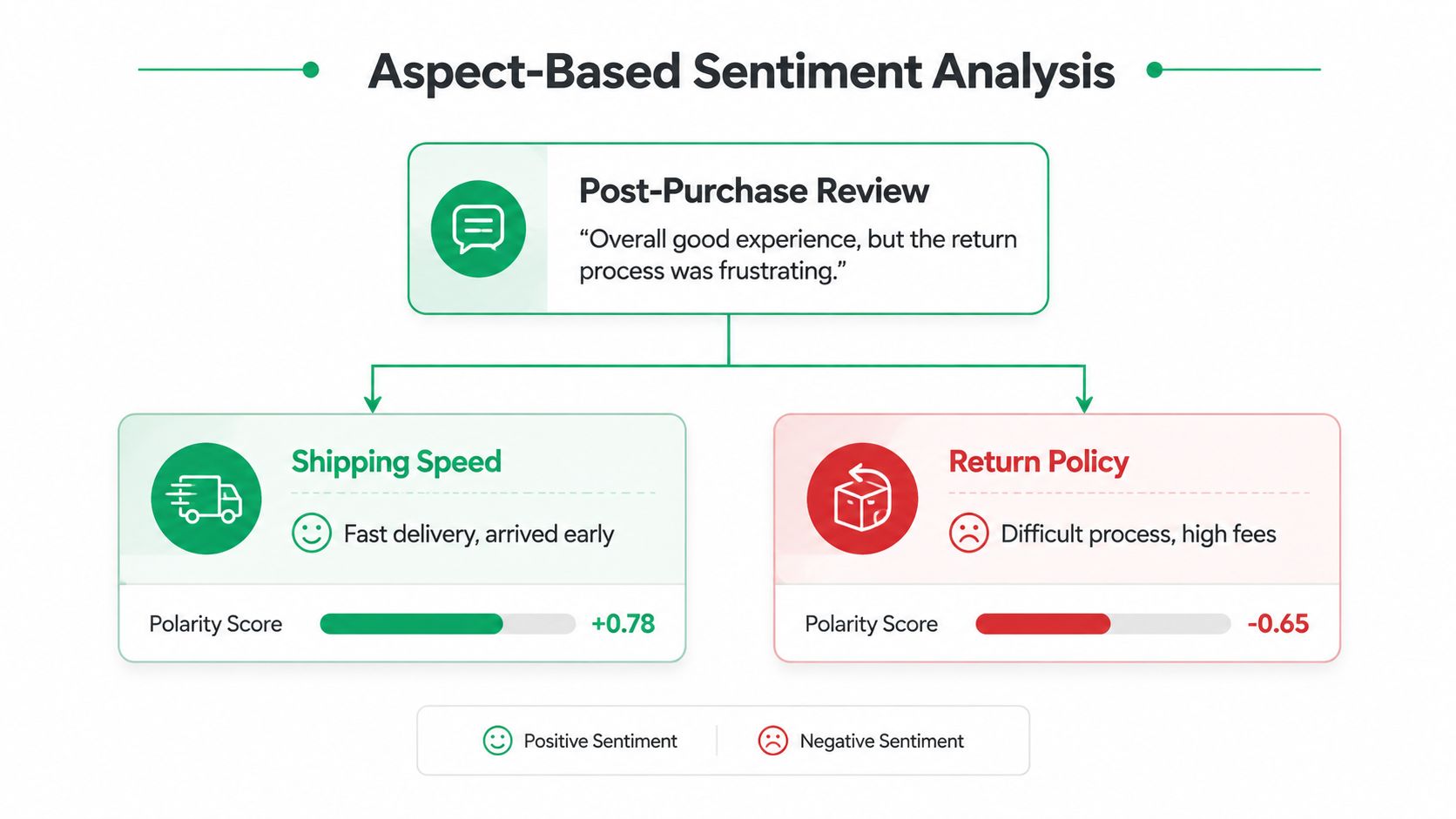
A customer can praise your shipping speed and still be angry about your return policy in the same message. A single positive or negative label flattens that nuance, which is exactly why aspect-based sentiment analysis matters for ecommerce teams that need to know what's broken, not just whether the customer is unhappy.
One review can contain more than one truth
Take a post-purchase review that says the parcel arrived early, but the return process was confusing and expensive. A basic sentiment label might call the message mixed or negative. That's not wrong, but it's not decision-ready either.
ABSA breaks the text into aspects, such as shipping speed, return policy, support, or pricing. That means one part of the message can be positive while another is negative, and your team can route each issue to the right owner. Operations teams can fix the return flow, while marketing keeps the shipping win in view.
Emotion detection adds the intensity layer
Emotion detection looks beyond polarity and asks what the customer feels. Frustration, delight, confusion, and relief can lead to different workflows even when the overall sentiment label is the same. A confused shopper may need clarification, while an angry shopper may need a human reply immediately.
That distinction matters when you're using text signals to trigger action. Broad sentiment tells you whether the message leans positive or negative. Aspects tell you where the issue sits, and emotions tell you how forcefully the customer is reacting.
Useful mental model: labels tell you what, aspects tell you where, and emotions tell you how strongly.
Metrics, Benchmarks, and How to Read Vendor Claims
A vendor can say a sentiment model is “accurate” and still leave you with the wrong tool for your support workflow. The number alone doesn't tell you whether happy customers are being pushed into review queues or whether urgent complaints are slipping past your team. That's why merchants should read model claims as operational questions, not just technical bragging.
Accuracy is the start, not the finish line
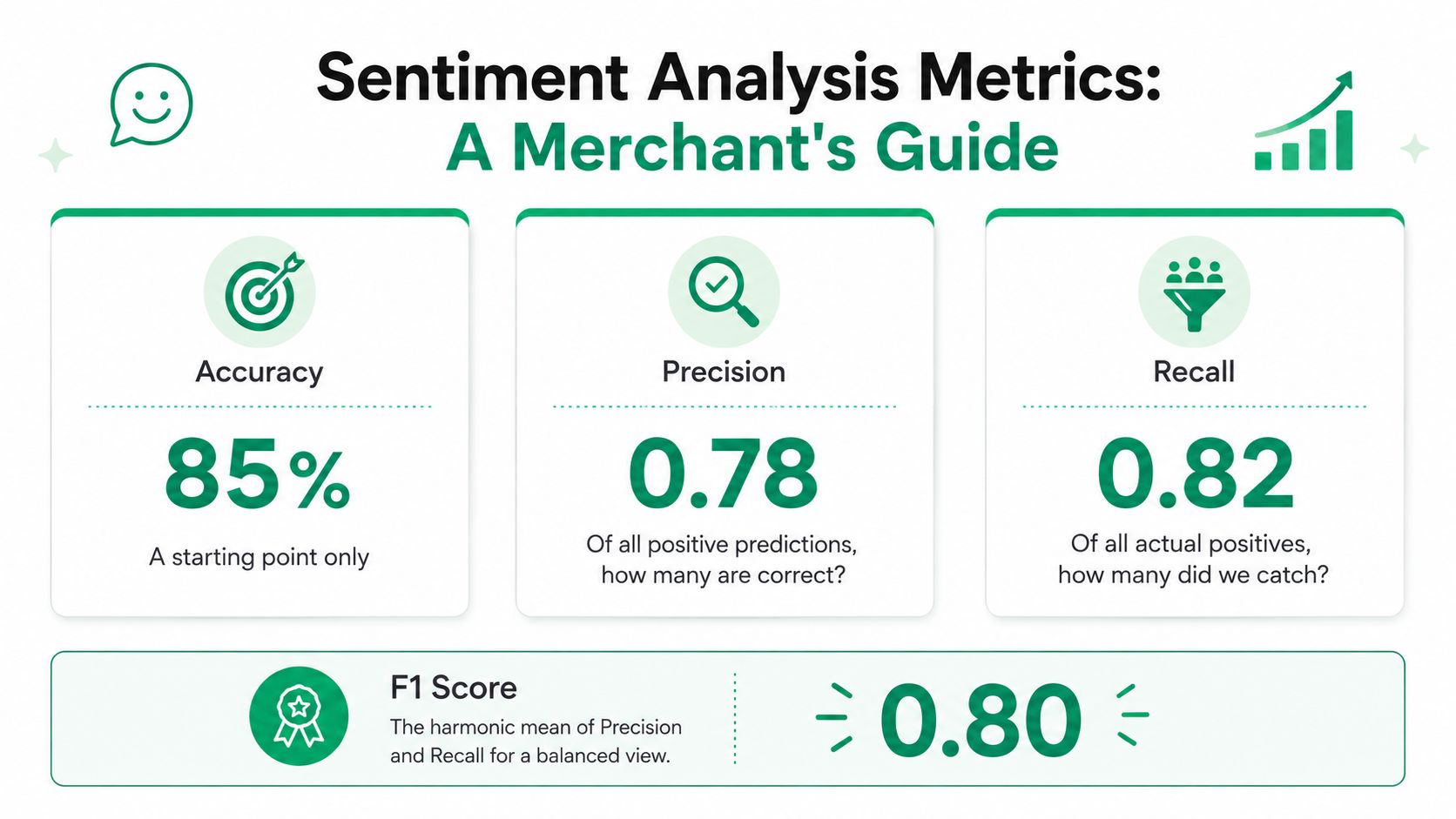
The benchmark summaries in the brief show that AI sentiment models are commonly cited at 85% to 90% accuracy, while trained human analysts are cited at 78% to 82% inter-rater agreement on standard tests, and the SST-2 binary task is reported at 96.5% accuracy. A multilingual ticket dataset covering 10 languages is cited at 79.1% accuracy. Those figures show technical progress, but they don't tell you whether the model is useful in your exact post-purchase flow. The benchmark discussion is most helpful when you use it to compare model behavior, not just raw score.
Ask for the metrics that match your queue
Precision tells you how often a positive or negative prediction is correct. Recall tells you how many real positives or negatives the model caught. F1 balances the two, which is useful when you want one score that reflects tradeoffs instead of chasing a single headline number.
A merchant should also ask how the vendor handles false positives. If a model tags too many neutral tracking questions as negative, agents waste time on messages that don't need escalation. If it misses true complaints, the workflow fails at the exact moment it should protect the customer.
Vendor check: Ask for test results on your own support text, not just public benchmarks.
For a CX team that also tracks satisfaction and resolution metrics, the internal reference on customer satisfaction metrics to track is a useful companion, because sentiment scores only matter when they connect to downstream service outcomes.
If you want a quick mental shortcut, compare any vendor claim against three questions, did they test on text like yours, did they report precision and recall, and did they show failure cases instead of only best-case examples? If the answer is no, the number is marketing, not proof.
A useful companion resource is the BeyondComments tool roundup, which can help buyers see how different products position themselves before a procurement conversation.
Multilingual and Real-Time Considerations
A post-purchase sentiment system has to work fast enough to matter and broadly enough to cover the languages your shoppers use. A delay that seems small in a dashboard can still mean a missed cancellation window, a missed upsell prompt, or a support message that arrives too late to change the outcome. For live commerce, timing is part of the model, not just the deployment.
Real-time means the text arrives when the customer still cares
Sentiment is most useful when it can act on live events, not old ones. A shopper who is editing an address, reading a tracking page, or responding to an order-status prompt is still in the decision moment. If the model waits too long, the signal loses value.
That's why real-time sentiment pipelines need low-latency preprocessing and inference. They should score review text, ticket text, or chat text while the customer is still active, so routing and follow-up happen before frustration hardens into churn.
Multilingual coverage changes the economics
A multilingual model lets one system cover more of your customer base without building separate tools for every language. The brief's benchmark summary cites 79.1% accuracy on a multilingual ticket dataset covering 10 languages, which is a good reminder that multilingual performance is possible, but not identical to single-language performance. That gap matters when you're evaluating global rollout plans.
The practical test is simple. If your storefront or widget adapts to the shopper's language, the surrounding sentiment layer needs to recognize that same mix of languages and still produce reliable outputs. Otherwise, the automation works in one market and falls apart in another.
A readiness checklist for live use
Before you treat a sentiment system as post-purchase ready, check four things.
- Latency: Does the score arrive fast enough to affect routing or upsell timing?
- Language coverage: Does it handle the languages your customers use?
- Stream input: Can it read live support, review, and order-status text?
- Actionability: Can the output trigger a workflow, not just a dashboard chart?
If a tool passes those checks, it's closer to being an operational system than a research demo.
Bias, Privacy, and Failure Modes You Cannot Ignore
A high accuracy score can still hide a bad experience for a subgroup of customers. That's the uncomfortable part of sentiment analysis, and it's why merchant teams need to inspect failure modes before they let a model influence real shoppers. If the system misreads sarcasm, reclaimed language, or identity-related mentions, the output can distort who gets helped first and whose frustration gets missed.

Bias audits belong in the buying process
The brief includes a 2023 study in Nature Human Behaviour that found evidence of bias against several marginalized queer identities across six popular sentiment tools, including models from major vendors, and recommended bias audits and sanity checks before deployment. That doesn't mean sentiment analysis should be avoided. It means the model should be tested on the language patterns your own customers use, not just on aggregate benchmark text.
A practical audit doesn't need to be academic. Feed the model examples of sarcastic praise, complaint-heavy returns, and identity-related language, then compare predictions with human review. If the outputs swing wildly by subgroup or phrasing style, the system needs more work before it goes live.
Privacy issues show up as soon as customer text leaves your inbox
Customer messages often contain names, addresses, order numbers, and other personal data. If you pass that text to a third-party API, you need a plan for redaction and minimization before it leaves your environment. That's especially important in support flows where the same message can contain both sentiment and sensitive information.
A simple rule helps here, remove what the model doesn't need. Keep only the text required for classification, and avoid storing unnecessary identifiers in downstream analytics. The internal guide on customer data protection is a useful reminder that service automation and privacy should move together, not separately.
If a vendor can't explain how they handle bias testing and text minimization, they're not ready for live post-purchase traffic.
A short checklist you can hand to any vendor is this, test for sarcasm, test for identity-related language, show your redaction flow, and provide failure-case examples. If those answers are thin, the deployment risk is real.
Practical Applications for Ecommerce and SelfServe Workflows
The strongest use of sentiment analysis in ecommerce isn't a dashboard. It's a routing layer that decides what happens next in the post-purchase journey. Once the model tags the message, the workflow can respond with support, escalation, or a sales prompt that fits the shopper's mood.
Negative sentiment should change the next action
If a shopper shows frustration on the Thank You page or Order Status page, the system can suppress a pushy upsell and instead surface a support nudge, a cancellation path, or a clearer self-service option. If the text shows repeated failure around address validation, the ticket should move into a manual review queue instead of sending the customer through another automated loop.
That logic matters because it protects both service quality and revenue. The support team spends less time re-reading the same issue, and the customer gets a response that matches the tone of the moment. In that sense, sentiment analysis becomes a decision layer, not just an analysis layer.
Positive sentiment can support a different kind of timing
The opposite case matters too. If the tone is positive, the customer may be more open to a relevant upsell or cross-sell prompt after checkout, especially when the offer is tightly connected to the original order. The right model doesn't just prevent bad outreach, it helps merchants choose the right moment for good outreach.
That's where the post-purchase stack becomes more efficient. A positive delivery update, a smooth edit flow, or a successful support interaction can all create a better window for an additional offer than a generic interruption would. Sentiment helps the merchant respect the moment.
A merchant view of where the signal lives
Think of the workflow in three places.
- Order friction: failed edits, address problems, delivery exceptions.
- Support routing: negative or urgent text goes to a human faster.
- Revenue timing: positive experiences can open the door to a relevant offer.
The operational upside is already visible in industry reporting that links AI sentiment analysis to 20% to 30% reductions in average handle time and about 15% improvements in first-contact resolution for support teams using it, which is why the method has moved from analysis into execution. For a merchant comparing post-purchase infrastructure, the guide on self-service customer portal design shows how service and order management can be structured around that same logic.
If your CX lead and merchandising lead can agree on where sentiment triggers support, where it triggers escalation, and where it triggers an upsell, you've got a system that respects both the customer's mood and the store's economics.
SelfServe helps merchants turn post-purchase friction into a cleaner customer experience, with order editing, multilingual workflows, real-time address validation, and upsell opportunities built into the moments that matter most. If you're mapping sentiment analysis to the Thank You page, the Order Status page, or support routing, visit SelfServe to see how those workflows can work together in one post-purchase layer.