10 Localization Best Practices for Ecommerce in 2026
Your first international order comes in. It feels like validation. Then the follow-up arrives: the package couldn't be delivered, the address didn't validate cleanly, the customer didn't understand the shipment update, and support is now translating screenshots to figure out what went wrong.
That's the moment most ecommerce teams realize global expansion isn't the same as global readiness. Shipping to another country is easy compared with making the entire buying and post-purchase experience feel local. Language, layout, payment expectations, address rules, legal notices, delivery dates, and support flows all have to work together. If even one of those breaks, the customer feels friction fast.
The business case is straightforward. RWS notes that 76% of consumers prefer to buy products with information in their native language. That's why smart teams don't treat localization as a cosmetic translation pass. They prioritize the storefront, checkout-adjacent content, and post-purchase touchpoints in the markets most likely to matter first.
For Shopify brands, that usually means fixing the messy operational layer, not just translating product pages. Order edits, shipping updates, address entry, return messaging, and upsell prompts create just as much trust as homepage copy. If you're also rethinking discoverability while you expand, this breakdown of AEO vs GEO strategies is worth reading alongside your localization plan.
Here's the working checklist that separates brands that scale internationally from brands that create multilingual confusion.
1. Language-Specific UI/UX Adaptation
Localization starts before copy. It starts in the interface.
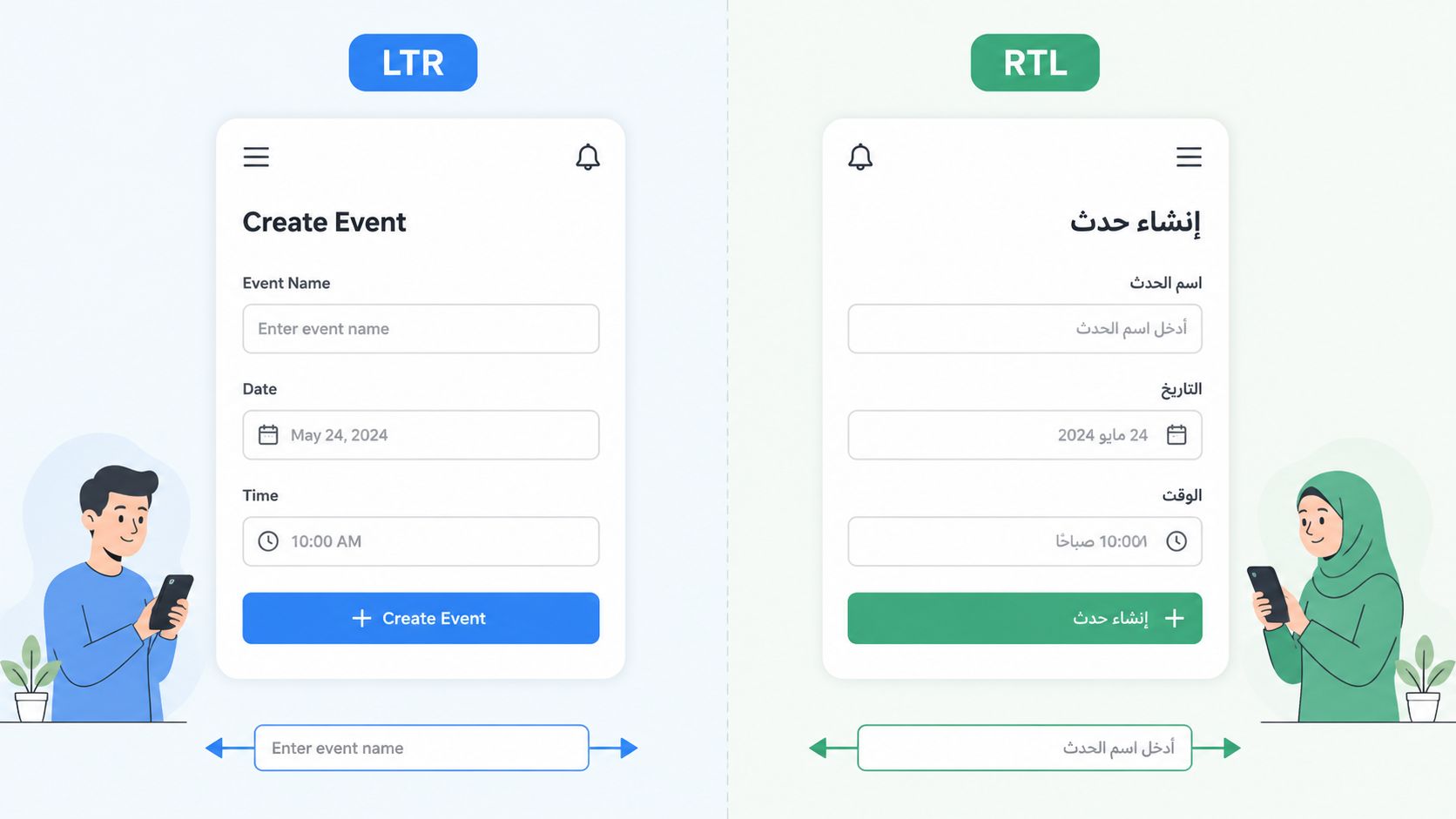
A translated storefront still fails if buttons clip, forms assume left-to-right reading, or mobile layouts break when text expands. Ecommerce teams run into this constantly with account pages, order tracking, address forms, and post-purchase widgets. The translation may be correct, but the experience still feels foreign.
To avoid that, build your UI so language can change without forcing redesign work every time a new market launches.
Build flexible layouts, not English-first layouts
Engineering teams that do this well separate language content from application logic, use translation keys, and make formatting locale-aware from the start. SimpleLocalize's guidance on software localization best practices also recommends storing timestamps in UTC and converting them only at display time, plus testing for pluralization, right-to-left layouts, and text expansion before release.
That matters in ecommerce because order-editing interfaces are full of fragile elements. Address fields, shipping options, and urgency messages break easily when the UI was designed around short English labels.
A few patterns work reliably:
- Use CSS and layout rules that can flex: Don't hardcode button widths or field positions.
- Design for expansion: German, Arabic, and other languages can force longer labels and wrapped text.
- Mirror layouts for RTL languages: Navigation, progress flows, and icon placement often need more than translated strings.
- Localize microcopy in context: “Save,” “Edit,” and “Continue” can carry different meanings depending on the workflow.
Practical rule: If a customer can edit an order in one language but can't understand a field label, you haven't localized the feature. You've translated part of it.
Later-stage QA should include native-speaker review on actual devices, not just string review in a spreadsheet.
A quick visual walkthrough helps teams catch issues they miss in staging:
2. Comprehensive Language Detection and Fallback Strategy
Nothing undermines trust faster than a storefront that starts in one language, switches to another in checkout, and then sends post-purchase emails in a third.
Automatic language detection helps, but bad detection creates its own mess. Browser locale, geolocation, Shopify store settings, and customer preference can all point in different directions. If you don't define precedence, your localization logic turns into guesswork.
Choose a clear order of precedence
The safest rule is simple. Customer preference should win. If a shopper chooses French, don't keep forcing German because their device or IP suggests otherwise.
A practical stack looks like this:
- Honor explicit user choice first: Store the preference in the customer profile or session.
- Use account and order context second: This matters for post-purchase pages where the customer may revisit from another device.
- Use browser and geolocation as a default, not a command: They're useful for first load, not final authority.
- Always give shoppers a manual override: Footer selectors, account settings, or a visible language switcher prevent dead ends.
Stripe, PayPal, and many SaaS tools do this well because their flows can't afford confusion in payment or account management steps. The same standard applies to order tracking, address edits, and support portals.
Build fallbacks that fail gracefully
You don't need perfect coverage on day one. You do need a fallback strategy that never exposes broken content.
When a translation doesn't exist, show the default language consistently and log the gap. Don't mix translated navigation with untranslated body copy. Don't show placeholder keys. Don't let transactional actions depend on strings that haven't been reviewed.
A reliable fallback is better than partial localization that looks broken.
For post-purchase experiences, store language at both the customer and order level when possible. That protects the experience when guest buyers return through email links or tracking pages. It also prevents support teams from guessing which language should be used when resolving delivery or edit issues.
3. Localized Content and Copy Tone Adaptation
Literal translation is where a lot of ecommerce localization efforts stall. The words are technically correct, but the tone feels off, too aggressive, too vague, or not at all native to the way people buy in that market.
This shows up everywhere. Product detail pages feel stiff. Upsell messages sound pushy. Help text becomes formal when the brand is supposed to feel conversational. The result isn't always obvious in analytics at first, but customers feel it.
Translate intent, not just text
Tone adaptation matters because buying behavior is shaped by local expectations. A sharp “Add this now” prompt might work in one market and feel rude in another. A playful line on an order status page may read as careless when a delayed shipment already has the customer worried.
That's why key commerce copy should be rewritten by native copywriters or reviewers, not just pushed through translation workflows. Prioritize:
- Calls to action: These directly influence conversion and upsell acceptance.
- Support and reassurance copy: Shipping updates, return instructions, and order-change messaging need clarity more than brand flourish.
- Promotional framing: Value, urgency, exclusivity, and convenience don't land the same way everywhere.
- Holiday and seasonal references: They should match the market's calendar and cultural context.
If you're localizing lead capture and on-site conversion prompts too, this guide on how to make your popups multilingual is a useful companion to your broader copy workflow.
Create market-specific tone rules
A short tone guide per market saves a lot of revision cycles. It doesn't need to be elaborate. It just needs to answer practical questions. Should the brand sound formal or casual? Direct or consultative? Premium or accessible? Is humor acceptable in post-purchase messaging?
I've seen teams waste time revising the same strings because nobody defined tone before translation started. Once you set those rules, translators, copywriters, lifecycle marketers, and support teams stop pulling in different directions.
For post-purchase upsells, this matters more than people think. The customer has already paid. The message now needs to feel helpful, timely, and local, not like a generic cross-sell dropped into every language.
4. Regional Payment and Currency Localization
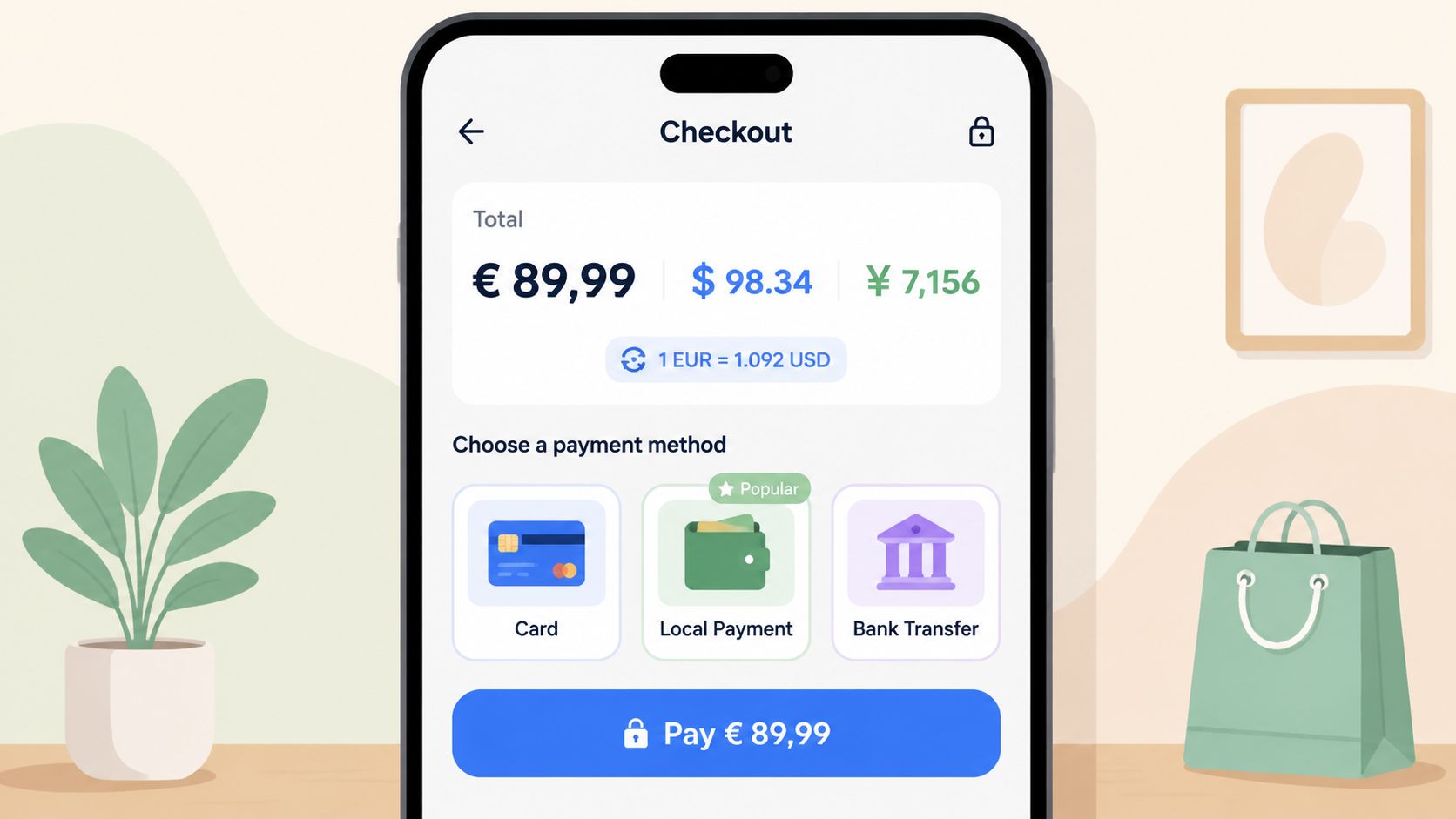
Currency conversion alone doesn't localize checkout. Customers care about whether the price looks familiar, the payment method feels normal, and the final amount matches what they expected earlier in the funnel.
A lot of international stores get this wrong by localizing the storefront but leaving payment experience half-finished. The shopper browses in local language, sees a currency switch late, reaches checkout, and suddenly faces a payment method they don't trust.
Show local pricing early and keep it consistent
If your market strategy includes local currencies, show them before checkout. Product pages, carts, order-edit pages, and post-purchase upsells should all stay aligned. Customers notice fast when a thank-you page upsell appears in a currency different from what they just paid.
For Shopify merchants, this becomes especially important in post-purchase order modification flows. If a customer adds an item after checkout or approves a shipping-related change, the pricing needs to feel predictable and local.
Here's the operational rule set I'd use:
- Display local currency as early as possible: Don't wait until the final payment step.
- Match payment methods to the region: Availability often matters more than cosmetic localization.
- Keep taxes, duties, and fees understandable: Even when full landed-cost logic is complex, ambiguity hurts trust.
- Align post-purchase charges with the same currency logic: Order edits and upsells shouldn't feel like a separate system.
Localize money formatting too
Software localization guidance consistently treats locale-aware formatting as baseline engineering, not optional polish. Acclaro highlights UTF-8, flexible text modules, avoidance of hard-coded formatting, and local-language support as part of localization-ready design, while citing CSA Research's finding that 80% of users won't buy software without local-language support.
The ecommerce takeaway is simple. Localizing payments isn't only about checkout completion. It also affects trust during order changes, refund visibility, and any upsell shown after purchase.
5. Address Format and Validation Localization
Global expansion often gets expensive fast.
Address formats vary by country, customers use local conventions, and autofill doesn't always behave the way your form expects. When your validation logic assumes a US-style address structure, international orders start failing in ways that support teams can't fix quickly.
Design forms around local address reality
The form itself needs localization. Country-specific field order, labels, examples, and validation rules should adapt once the customer chooses a destination.
That means changing more than placeholder text. Some markets need region or prefecture logic. Some rely heavily on postal code formatting. Some customers use romanized addresses, while others expect local script support. If your order-edit flow ignores that, post-purchase corrections become a support burden.
Google Maps autocomplete can help, but it isn't enough on its own. Teams still need country-aware validation rules, clear manual override paths, and examples that match local expectations. If you're evaluating this specifically for Shopify operations, SelfServe's guide to Google Maps address validation is a practical place to start.
Don't over-validate
Many teams think stricter validation means better deliverability. Often it just means more false negatives.
Use validation to guide users, not trap them. When autocomplete misses a valid address, let the customer complete the form manually. When a field is optional in one market, don't force it because another market requires it. And when an address is edited after purchase, show the customer exactly what changed.
The cheapest support ticket is the one your address form prevents without blocking a legitimate order.
This is one of the most important localization best practices for post-purchase flows because the cost of a bad address usually shows up after revenue is booked. That's when it turns into reshipments, delays, refund requests, and preventable frustration.
6. Compliance and Legal Localization Strategy
A translated privacy policy isn't a compliance strategy.
Legal localization gets messy because every team assumes someone else owns it. Marketing handles content, ecommerce handles storefront settings, legal reviews contracts, and support deals with the customer fallout. If those pieces aren't coordinated, your localized experience can still violate local requirements or create avoidable risk.
Localize the legal experience, not just the document
Customers encounter compliance through interactions, not PDFs. Cookie consent, return rights, tax display, privacy notices, subscription disclosures, and data handling choices all shape whether the store feels credible in a market.
That means legal localization has to include:
- Region-specific policies and notices: Privacy, returns, and data rights can't be one-size-fits-all.
- Consent management by market: Especially where tracking, cookies, or marketing opt-ins differ.
- Tax and fee presentation: The checkout and post-purchase experience should match local expectations.
- Data workflow documentation: Teams need to know how customer edits, cancellation requests, and address changes are processed.
For Shopify merchants expanding internationally, tax settings are part of this operational layer. SelfServe's article on Shopify tax settings explained is useful because tax configuration often affects what customers see before and after purchase.
Review workflows, not only copy
Post-purchase tools deserve special attention here. If customers can edit shipping details, change contact information, or submit cancellation requests, you're handling personal data in a workflow that may trigger regional obligations around access, retention, or auditability.
Teams often focus on checkout compliance and ignore everything after the sale. That's a mistake. Order management screens, self-service portals, and customer-facing edit windows all need the same level of legal review as the storefront itself.
The goal isn't legal perfection on day one. It's to avoid launching into a market with translated UX and unlocalized obligations.
7. Localized Customer Support and Help Documentation
You can tell how mature a localization program is by looking at support, not the homepage.
A lot of brands translate product pages, maybe checkout, and then hand international customers an English-only help center. That creates two problems at once. Customers can't solve issues themselves, and support agents spend time rewriting the same answers manually.
Localize the moments people need help most
You don't need to translate every help article immediately. Start with the flows most likely to generate tickets:
- Order changes and address edits
- Shipping status and delivery delays
- Returns, cancellations, and refunds
- Payment issues and duplicate charges
- Account access and order lookup
For SelfServe-style post-purchase workflows, that usually means short help articles, visual walkthroughs, and support snippets embedded directly in the customer portal. Such a strong self-service customer portal can reduce avoidable tickets because customers can fix common issues without contacting support.
Make support content usable, not merely translated
The strongest support localization programs write for resolution speed. They use plain language, screenshots, short videos, and examples that match local formats for addresses, dates, and currencies.
Blend's guidance on localization quality is useful here because it pushes teams to measure quality beyond translation accuracy. Signals like first-time quality, error rates, reviewer satisfaction, and automated checks for untranslated strings or inconsistent placeholders matter in support content just as much as they do in product UI.
If your help center answers the question but the customer still opens a ticket, the documentation didn't do its job.
Good support localization also feeds the rest of the business. Repeated questions by language or region often reveal broken UX, not weak documentation.
8. Date, Time, and Timezone Localization
Delivery promises fall apart when time handling is sloppy.
Customers don't care that your backend stores timestamps one way and your app displays them another. They care that “edit before 5:00” means their local 5:00, not the warehouse timezone, not the merchant's timezone, and not an unlabeled system default.
Store globally, display locally
This is one of the clearest technical localization best practices in commerce. Keep times in UTC internally, then convert them at display time for the relevant locale and timezone. That prevents errors when orders move across systems, support teams work in different regions, or daylight saving shifts hit.
The customer-facing side still needs care:
- Show local date formats: Don't force one market's format onto another.
- Label timezones when timing matters: Edit windows, delivery cutoffs, and appointment-style delivery estimates need clarity.
- Test DST edge cases: Promotions, shipping promises, and order lock windows often break around clock changes.
- Keep merchant and customer views distinct: Internal operations can use one timezone, but customer communication should use theirs whenever possible.
Treat post-purchase timing as a trust issue
This is especially important in order editing. If a customer sees “You can update your shipping address until 6:00 PM” but doesn't know which timezone that refers to, the experience is already unreliable.
Google Calendar and similar products have trained users to expect automatic timezone conversion. Ecommerce should meet the same standard. Delivery windows, processing cutoffs, subscription renewals, and support response expectations all need local formatting to feel dependable.
When in doubt, over-communicate the timing context. Customers forgive narrow windows more easily than ambiguous ones.
9. Product Catalog and Inventory Localization
Not every market should see the same catalog.
That sounds obvious, but a lot of stores still push identical product listings, recommendation logic, and upsell offers everywhere, then wonder why international conversion or post-purchase add-ons underperform. Catalog localization is about relevance as much as translation.
Match product presentation to local availability
Your localized storefront shouldn't promote items that can't ship to that region, violate local restrictions, or require fulfillment workarounds your team can't support. The same goes for bundles, gifts, samples, and post-purchase offers.
Operationally, that means tying localization to merchandising rules:
- Limit products by region: Don't let a translated PDP create demand for unavailable inventory.
- Adapt descriptions for local context: Use local terminology, sizing, ingredients, materials, or use-case framing when needed.
- Localize recommendation logic: A post-purchase upsell should reflect what's available in that market.
- Review imagery market by market: Sometimes the issue isn't translation. It's context, packaging, or visual assumptions.
Make post-purchase upsells region aware
This is one of the easiest misses in international ecommerce. Teams localize the storefront, then use one default upsell module globally. The customer buys in one market and gets offered a product that isn't stocked locally, isn't priced appropriately, or doesn't fit local preferences.
That's more than a merchandising mistake. It makes the brand feel disconnected from the customer's market.
Good localization means your order status page, thank-you page, and follow-up offers behave like a local storefront extension. If inventory visibility, pricing, and product restrictions aren't localized there too, you'll create support issues after the sale instead of value after the sale.
10. Measurement, Analytics, and Reporting Localization
If you don't measure localization at the market level, you're mostly measuring activity.
Translation volume, language count, and publishing speed are easy to track. They're also weak indicators of whether localization is helping the business. The better approach is to evaluate each market like an operating environment with its own funnel behavior, support patterns, and revenue outcomes.
Track business impact by locale
The most useful localization dashboards answer practical questions. Did localized PDP copy improve conversion in that market? Did local-language order editing reduce support demand? Did region-specific upsells raise average order value after purchase? Which locales are still leaking customers at address entry or payment selection?
Industry guidance increasingly frames localization as a measurable revenue lever. Expandin cites revenue by market, conversion rate by locale, bounce rate, time on site, customer satisfaction, and market share as useful KPIs, and notes that full localization can drive about a 70% conversion-rate increase and 20-30% revenue growth.
That kind of measurement discipline is what keeps localization from becoming a content cost center.
Build reporting that local teams can actually use
Reporting itself needs localization too. Dashboard labels, exported files, date formats, and currency views should match the operator using them. A merchant team in one region may want local currency reporting, while a central team compares normalized performance across markets.
If you're testing localization changes, keep it controlled. This guide to A/B testing best practices is helpful for structuring experiments cleanly so teams can compare localized and non-localized experiences without muddy conclusions.
Don't ask whether localization is working in general. Ask which locale, which step, and which customer action improved after the change.
That's where the best decisions come from. Not from translation completion reports, but from operational evidence.
Top 10 Localization Best Practices Comparison
| Item | Implementation Complexity 🔄 | Resource Requirements 💡 | Expected Outcomes 📊 | Ideal Use Cases ⚡ | Key Advantages ⭐ |
|---|---|---|---|---|---|
| Language-Specific UI/UX Adaptation | High, layout, RTL/LTR, responsive templates | UX designers, frontend engineers, QA, native testers | Increased adoption, conversions; fewer UI-related tickets | Launching in RTL/expansive languages; address & checkout flows | Better UX, trust, conversion uplift |
| Comprehensive Language Detection & Fallback Strategy | Moderate, multi-layer detection + fallbacks | Engineers, translation assets, logging/analytics | Seamless first-time experience; reduced onboarding friction | Global audiences with mixed locales; self-serve widgets | Automatic correct-language delivery; lower support |
| Localized Content & Copy Tone Adaptation | Medium–High, tone guidelines + testing | Native copywriters, market researchers, localization leads | Higher engagement and market-specific conversion rates | Marketing, upsells, user messaging by region | Cultural resonance; stronger brand affinity |
| Regional Payment & Currency Localization | High, multiple processors, compliance work | Payments engineers, legal/finance, local partners | Lower checkout abandonment; improved revenue capture | International commerce with diverse payment habits | Local payment trust; higher conversion & revenue |
| Address Format & Validation Localization | High, country-specific rules & integrations | Address DB providers, geospatial services, dev/QA | Fewer delivery failures; improved fulfillment accuracy | Shipping-heavy services; post-purchase address edits | Accurate deliveries; reduced logistics support |
| Compliance & Legal Localization Strategy | High, legal reviews, region-specific controls | Local counsel, compliance engineers, CMP tooling | Reduced legal risk; market authorization in regulated regions | EU/UK/regulated markets; data-sensitive operations | Legal protection; customer trust and compliance |
| Localized Customer Support & Help Documentation | Medium, multilingual content + channels | Multilingual support staff, content creators, video/localization | Higher CSAT; reduced ticket volume via self-service | Scaling support internationally; complex product support | Better customer satisfaction; community building |
| Date, Time, & Timezone Localization | Low–Medium, timezone logic and formats | Devs, timezone DB updates, UX for displays | Clear scheduling; fewer missed delivery windows | Order management, delivery ETA display, booking flows | Eliminates timing confusion; reliable scheduling |
| Product Catalog & Inventory Localization | Medium–High, regional SKUs & rules | Merchants, catalog managers, ops, regional compliance | Relevant product visibility; fewer oversells | Multi-region catalogs with variant/regulatory differences | Region-appropriate assortment; optimized conversions |
| Measurement, Analytics & Reporting Localization | Medium, multi-currency metrics & localized KPIs | Data engineers, analysts, localized dashboards | Actionable regional insights; better decision-making | Regional performance tracking; growth optimization | Region-specific metrics; clearer business insights |
From Checklist to Competitive Advantage
The biggest mistake brands make with localization is treating it like a publishing task. Translate the storefront. Add a language selector. Launch a few market pages. Move on. That may get you into a market, but it won't make the experience feel local enough to earn trust consistently.
The stores that do this well think operationally. They ask whether a customer can browse, buy, edit, pay, understand delivery timing, fix an address, and resolve a problem without friction in their own language and local conventions. That's a much higher bar than translation, but it's also where the business impact shows up. Better trust in address entry means fewer delivery issues. Better post-purchase messaging means fewer confused replies to support. Better regional upsells mean more relevant add-on revenue instead of ignored offers.
That's also why post-purchase deserves more attention than it usually gets. Many teams spend heavily on acquisition and storefront optimization, then leave the customer alone with an order confirmation page, generic tracking updates, and an English-only support flow. From the customer's perspective, that's not a minor gap. It's the moment where confidence either grows or drops. If they need to change a shipping detail, confirm a delivery date, or add something to the order, the experience has to stay local.
The good news is you don't need to localize everything at once. In practice, the strongest rollout plans are staged. Start with the markets most likely to matter commercially. Then localize the parts of the journey that carry the most operational risk and the highest trust value. For many Shopify brands, that means storefront basics first, then checkout-adjacent communication, then post-purchase workflows like address editing, order changes, tracking updates, and support documentation.
Teams should also be honest about trade-offs. Full market-by-market perfection is expensive. But there's a big difference between strategic prioritization and shipping a half-localized experience that creates confusion. A stable fallback language, region-aware address handling, clear time formatting, and translated help content for core tasks will usually outperform a broader but inconsistent rollout.
This is where tooling matters. If your post-purchase layer is still manual, localization gets harder because every exception turns into a support ticket. A purpose-built workflow can remove a lot of that pain by adapting language automatically, validating addresses in real time, and letting customers make approved changes without waiting for an agent. That's not just operational efficiency. It's a better international customer experience.
Start with a simple audit. Review your current journey from the perspective of an international customer who has already paid. Can they understand what happens next? Can they correct a bad address? Can they see dates and times clearly? Can they accept an upsell that's relevant to their region? Can they find help in their language when something goes wrong?
Pick one weak point and fix it properly. Then move to the next. That's how localization best practices become a competitive advantage instead of a backlog category. Over time, each localized improvement compounds into a store that feels more trustworthy, easier to operate, and much harder for competitors to match.
If you want to make post-purchase localization easier, SelfServe is built for exactly that layer of the customer journey. It gives Shopify merchants multilingual order editing, real-time Google Maps address validation, localized upsell opportunities on Thank You and Order Status pages, and configurable controls over what customers can change and when. For high-volume and international stores, that means fewer support tickets, smoother operations, and a post-purchase experience that feels local instead of patched together.