Permission Based Access Control for Ecommerce Teams

A support agent opens the wrong order, changes the shipping address, and the customer's replacement never arrives. Another teammate has access to refund tools, but not the right guardrails, so a simple correction turns into a payment issue, a ticket escalation, and a manual cleanup across finance and support. That's usually the moment teams realize access control isn't an abstract security topic, it's a daily operations problem.
Permission based access control gives you a cleaner answer than broad admin access or overloaded roles. Instead of handing someone a large bundle of rights, you grant specific actions on specific resources, like read, edit, approve, export, or cancel, and only where the job requires it. That matches the long-standing least-privilege model described in Microsoft's access control guidance, where permissions are the atomic unit of authorization rather than broad default access (Microsoft access control documentation).
For ecommerce teams, this matters most after checkout, when orders are still changing hands between customers, support, fulfillment, and systems. The better the control at that stage, the fewer accidental edits, the fewer risky escalations, and the less chance that a customer sees or changes data they shouldn't. It also shapes how you handle customer data protection in the broader workflow, especially when support, shipping, and identity are all connected through one stack. If you're mapping that broader risk surface, customer data protection is worth reading alongside the authorization model.
Why Permission Based Access Control Matters for Ecommerce
The fastest way to feel the problem is to watch a support queue during peak volume. One agent needs to update a shipping address, another needs to cancel an order, and a third is trying to confirm whether a discount can be applied to a post-purchase upsell. If all three have the same broad access, mistakes don't stay small. A single wrong click can expose customer information, alter the wrong order, or trigger an approval chain that no one notices until the shipment is already in motion.
Permission based access control is the structure that keeps those actions separate. NIST's authorization model treats permissions as the specific rights needed to perform authorized tasks, not as broad access buckets, and that maps well to ecommerce operations where “support access” is too vague to be useful (Microsoft access control documentation). IBM's RBAC overview describes the same underlying idea, roles are bundles of permissions, not permission itself, which is helpful when you need a clean management layer, but it can still be too coarse for post-purchase work (IBM RBAC overview).
Where ecommerce feels the pain
Post-purchase workflows are full of small but sensitive decisions. Shipping edits affect delivery, payment changes affect fraud exposure, and order modifications can affect fulfillment timing. If support agents, warehouse coordinators, and app integrations all share access with no boundary, the operational team ends up doing manual reviews to compensate for a weak permission model.
Practical rule: if a person can change money, address, and product data with the same credential, the permission model is already too broad.
That's why permission based access control is more than an IT checkbox. It gives ecommerce leaders a way to say, this person can correct a destination, but not touch payment details, or this team can approve a refund, but not edit line items. That distinction reduces escalations and keeps the audit trail readable when a customer disputes an order later.
The model also matters because ecommerce teams aren't static. Merchants bring in seasonal staff, agencies, and support partners, while automation tools and middleware keep growing around them. The operational challenge isn't just assigning access, it's keeping each permission tied to a real job function as the business changes.
How PBAC Compares to RBAC and ABAC
Teams usually start with role-based access control because it is easy to explain and easy to audit. Admin, editor, support, manager, those labels map cleanly to job functions, and IBM's RBAC model separates permission assignment from user assignment so larger organizations can manage access at scale (IBM RBAC overview). That approach works well when duties stay stable. It breaks down faster when the same person needs different rights depending on whether they are handling a refund, a fulfillment delay, or a post-purchase edit.
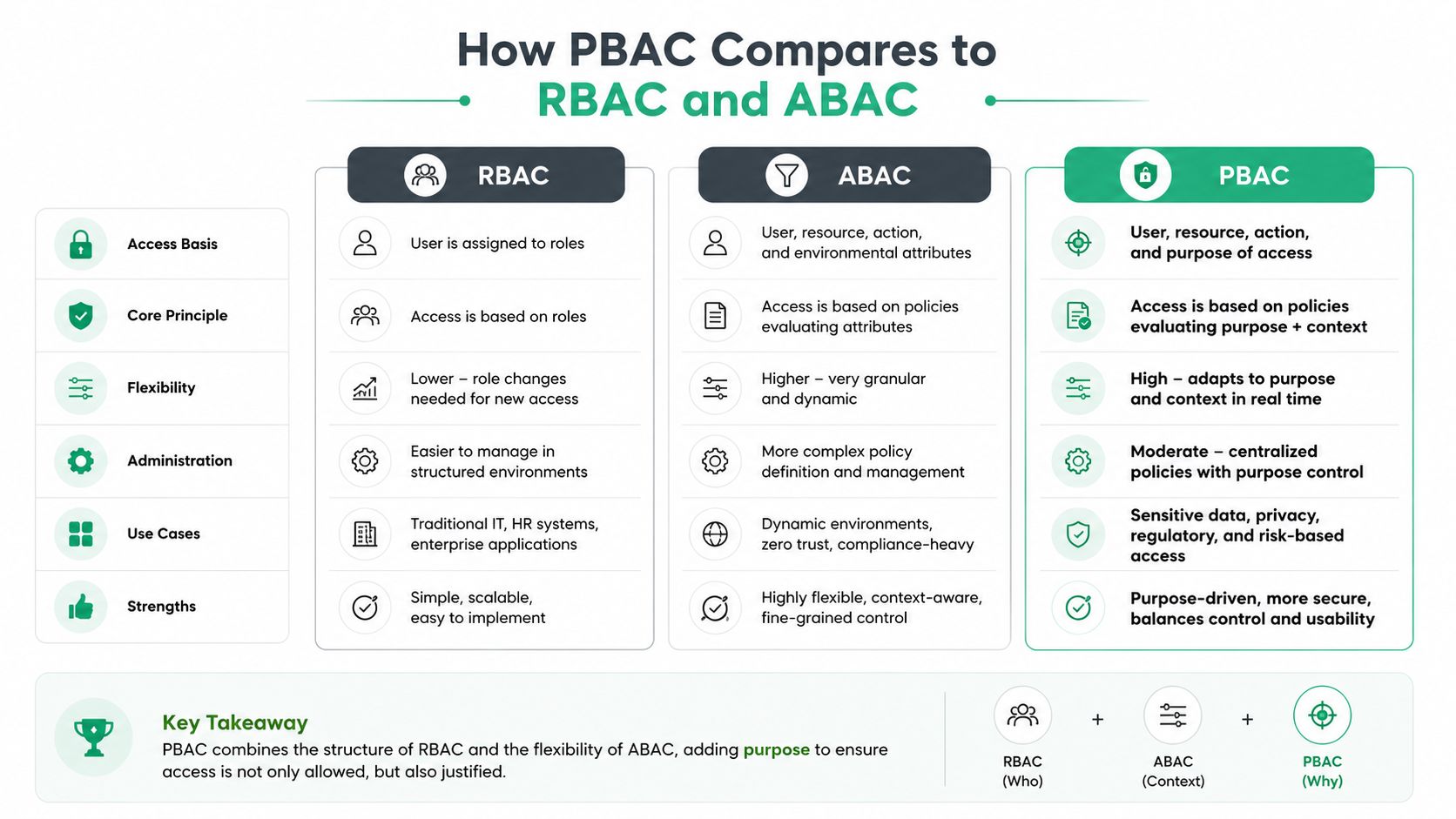
Permission based access control goes one level deeper. PBAC assigns permissions directly as resource-operation tuples, so the policy can say read this object, update that field, or delete only under this condition. That fits ecommerce systems better when a support rep needs to change a shipping address on one order but not on another, or when an app should add an upsell product without touching payment instruments (PBAC glossary).
In post-purchase workflows, that difference is not theoretical. Order editing, address corrections, refund handling, and upsell logic all carry different risk, and a single broad role tends to blur those lines. PBAC keeps the permission tied to the action itself, which makes it easier to separate harmless edits from changes that affect money, fulfillment, or fraud review. That also gives operations teams a cleaner way to map access to the actual step being performed, instead of guessing from a job title.
The practical difference in ecommerce
ABAC, or attribute-based access control, adds context. NIST defines ABAC as access decisions based on attributes of the subject, object, operation, and environment, which makes it useful when the decision depends on time, location, or the condition of the request (NIST ABAC guide). That flexibility is powerful, but it also takes more policy design and more review if your team is still firming up the basics. In a support queue, that can mean a rep can edit one order only if the order is still open, the request comes from an approved channel, and the requester belongs to the right team.
| Dimension | PBAC | RBAC | ABAC |
|---|---|---|---|
| Granularity | Specific action on a specific resource | Permission bundled into a role | Policy evaluated from attributes and context |
| Administrative overhead | Moderate, can rise if not governed well | Lower at first, then can bloat with edge cases | Higher, because policy logic is more complex |
| Scalability | Strong when permissions map cleanly to operations | Strong for stable job families | Strong for dynamic, conditional decisions |
| Fit for post-purchase workflows | Very strong | Useful, but often too coarse | Strong when access depends on time, status, or environment |
What to choose
PBAC is usually the best place to start when you need precise control over ecommerce actions. RBAC still helps as a management layer, especially for teams that want simple defaults and easy onboarding. ABAC becomes useful when access must change based on order status, location, or other runtime conditions.
The mistake is treating these models as competing camps. Mature systems often layer them. Roles give structure, permissions give precision, and attributes add context when the workflow demands it. That is also why support playbooks and access policy reviews should be written together, not in separate silos, which is a point we cover in our customer service standard operating procedures.
Core Design Principles of Permission Based Access Control
A strong permission model starts with least privilege, but ecommerce teams need to turn that principle into actual policy language. A support agent doesn't need blanket order-edit rights. They may need to update an address, but not payment details, and they may need that right only for orders still awaiting fulfillment. That's where the model becomes operational rather than theoretical.
NIST's access-control guidance frames permissions as explicit and reviewable, and Microsoft's documentation follows the same logic across Windows environments through permissions, inheritance, and auditing (Microsoft access control documentation). IBM's role model reinforces the same foundation, roles should represent distinct bundles of privileges rather than vague access labels (IBM RBAC overview).

Three design choices that keep policies sane
Separation of duties keeps one person from owning the whole sensitive path. If a teammate can initiate a refund, approve it, and reconcile it, you've removed the control that should catch mistakes. Split those actions across roles or approval paths so no one has unchecked authority.
Explicit deny rules are useful when a broad permission would otherwise leak into an unsafe path. If a support workflow allows edits, deny payment-field changes even when the user has general order access. That prevents inheritance from widening access over time.
Auditable permissions make review possible. If you can't tell who can do what, you can't recertify access when a role changes. That's the point where permission based access control starts to break down in real operations.
A permission policy is only as good as the review process behind it. If no one revisits stale access, least privilege becomes a label instead of a control.
The ecommerce version of this is easy to picture. Allowing address edits within a defined post-purchase window is safer than permanent edit rights. Restricting changes to validated destinations is safer than trusting whatever the user types. Keeping a centralized policy model also avoids the mess of scattered one-off app settings that nobody can trace later. For teams documenting the operating side of those rules, customer service standard operating procedures is a useful companion reference.
Avoiding Role Explosion and Privilege Creep
The hidden failure mode in permission based access control is not usually the policy language. It's the drift. Teams start by creating clear roles, then a seasonal exception appears, then an agency partner needs partial access, then someone adds a temporary “support-plus-refunds” role, and suddenly the permission catalog is a pile of overlapping exceptions nobody wants to touch.
That's role explosion, and it makes audits painful. A company can end up with too many narrow roles, each one almost right for a particular edge case, or too few roles, which pushes everyone toward over-permissioning. Security practitioners who work with access governance call out the need to audit existing permissions, define roles around real work, and review them regularly because the model becomes fragile when it stops matching how teams operate (resolution.de on PBAC governance).
The bigger risk is privilege creep
Privilege creep happens when people keep permissions after they move teams, take on temporary tasks, or inherit access during a launch. In ecommerce, that's common. A support lead covers fulfillment for a week, a contractor helps during BFCM, or a merchant adds agency access for troubleshooting and forgets to remove it later. Over time, the person keeps everything.
Quarterly permission audits are a practical control point, and some guidance recommends at least twice-yearly full reviews to reduce permission creep (resolution.de on PBAC governance). The exact cadence depends on how fast your team changes, but the principle doesn't. Access should expire, be recertified, or be explicitly renewed.
What works in practice
- Review by job function: Compare actual daily work against the permissions attached to the role.
- Track exceptions separately: Temporary access should have an owner, a reason, and an end date.
- Revoke on role change: If someone moves from support to operations, start from a clean slate instead of carrying the old bundle forward.
- Watch third-party access: Agencies and apps often accumulate access faster than internal users do.
The contrarian takeaway is simple. PBAC isn't automatically safer than broader models if governance is weak. Without recertification and exception handling, a precise model can still drift into a false sense of security, just with more paperwork attached.
Implementing PBAC in Post-Purchase Ecommerce Workflows
Post-purchase ecommerce is where access control stops being theoretical. A customer wants an address change, a support rep needs to fix a typo, or a shopper wants to add an upsell item after checkout. Those actions all touch different data types, and the safest workflow is to let each action stand on its own permission, not on a single broad “manage orders” right.
That's also where context starts to matter. Time-bound edits, fulfillment status, and product restrictions all change what should be allowed. The AWS guidance on strong authorization for knowledge base access shows the same pattern in another environment, validate access against the authoritative source before releasing data, rather than assuming a downstream layer is enough (AWS security blog on strong authorization). Ecommerce teams can apply the same mindset to post-purchase actions.
Where granular control pays off
A practical setup lets merchants define exactly what can be changed. Shipping and contact details can be open under controlled rules, while payment methods stay locked down. Time windows can close access once an order enters fulfillment, and product rules can limit which upsell items are eligible after purchase.
If you're evaluating a customer-facing self-service layer, the pattern described in Vanta features and pricing is a useful external reference for understanding how access controls, trust messaging, and operational discipline are usually packaged in security-conscious software buying decisions. The important lesson isn't the vendor itself. It's that buyers now expect access policies to be visible, specific, and auditable.
The ecommerce-specific layer
Self-service order editing works best when the permission model is tied to the order state, not just the user. An order still waiting for fulfillment can tolerate certain edits. Once picking starts, the same change can break warehouse operations. Upsell modules on Thank You and Order Status pages should follow the same logic, only allow products or collections that fit the merchant's rules, and keep restricted items out of the flow.
- Define allowed fields: Let customers change contact details, but keep payment-sensitive fields locked.
- Tie edits to order state: Use fulfillment stage, not just login status, to decide access.
- Restrict upsells by product rules: Don't offer every SKU on the post-purchase page.
- Localize the experience: If your storefront is multilingual, the permissioned workflow should still feel consistent across languages.
For merchants building that kind of self-service layer, self-service customer portal is a helpful planning reference.
Dynamic Authorization and Context-Aware Access Policies
Static permissions work until the situation changes. Then they start to feel blunt. A support manager who normally has approval rights may need emergency access for one customer issue, or a merchant may want edits allowed only from a trusted device during business hours. That's where dynamic authorization extends permission based access control into context-aware policy.
NIST's ABAC model is the clearest formal description of this approach, because it evaluates subject, object, operation, and environment together (NIST ABAC guide). That makes it a better fit for temporary elevation, break-glass workflows, and conditional approval paths than a fixed role assignment alone. The point is not to replace permissions, it's to make them responsive to real conditions.
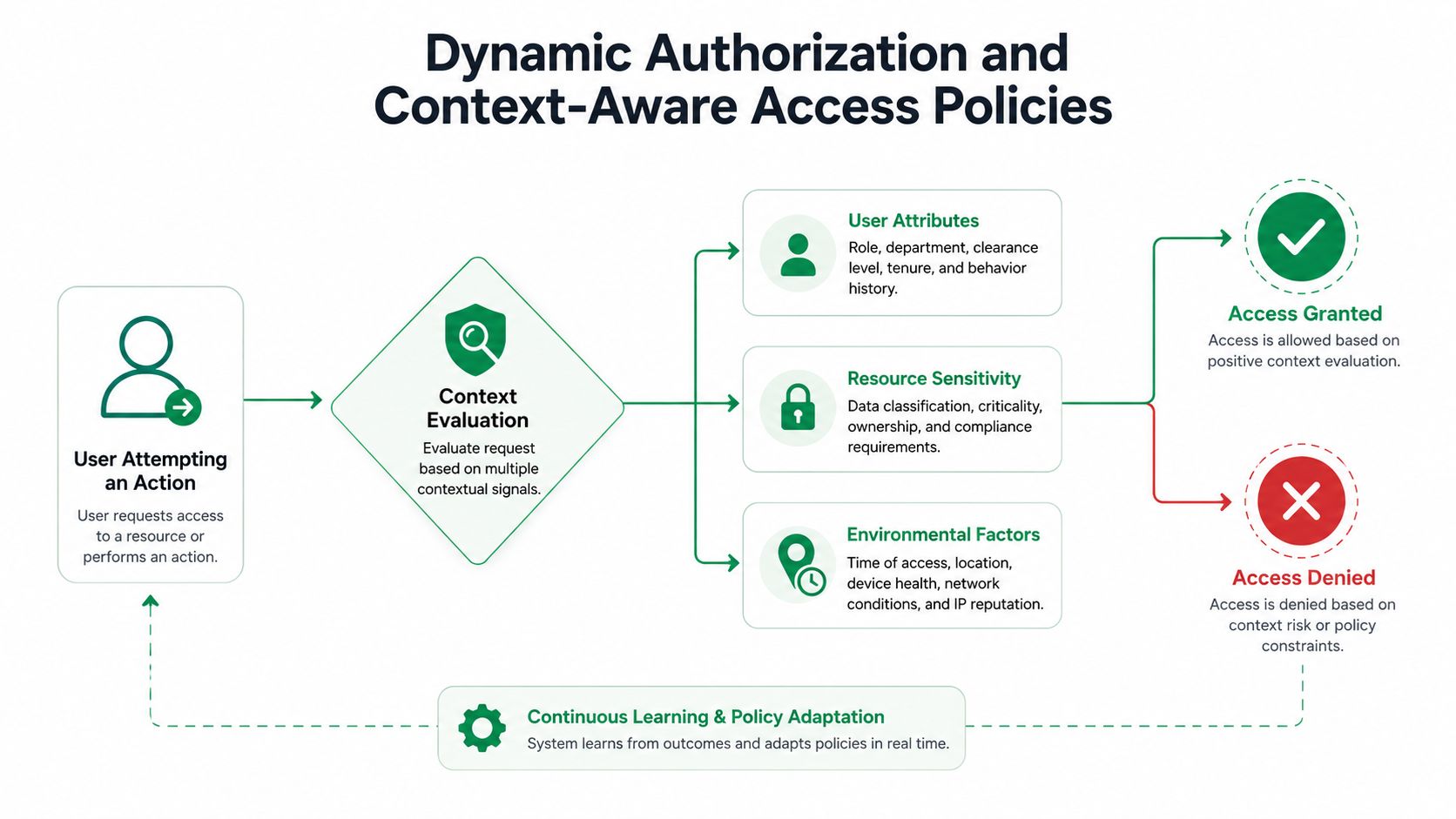
The new challenge for ecommerce is that context changes fast. International merchants serve different time zones and markets, campaigns create short-lived access needs, and post-purchase workflows can change minute by minute once fulfillment starts. Static roles can't express all of that cleanly without turning into a tangle of exceptions.
The right pattern is to make temporary access explicit and revocable. Break-glass access should expire after the task is done. Context checks should consider the order state, the requester, and the environment before approving a sensitive action. That keeps the model flexible without turning it into open-ended privilege.
Dynamic policy is only useful if revocation is automatic. If elevated access outlives the incident, the control failed.
Your Permission Based Access Control Implementation Checklist
A good rollout starts with an inventory, not a policy template. List who can currently edit orders, process refunds, issue approvals, or manage app settings, then compare that to what each job requires. That gap tells you where the over-permissioned paths are hiding.

Phase 1 Audit and design
Start by mapping access to real work. A support rep who only handles address corrections should not inherit payment or cancellation rights by default. Keep exceptions in a separate queue so they don't become permanent.
Phase 2 Configuration and testing
Configure the narrowest workable permission set in Shopify and any connected apps. Then test post-purchase workflows end to end, especially order edits, upsells, cancellations, and approvals. If an API token or third-party integration can bypass the UI, treat that as part of the same permission surface, not an edge case.
Phase 3 Deployment and maintenance
Set a review cadence and make someone accountable for recertification. If a team member changes roles, remove stale access before granting the new set. Keep a record of exceptions, because the fastest way to lose control is to rely on memory.
- Audit all roles: Find overlapping bundles before they become unmanageable.
- Test support workflows: Verify that agents can complete their tasks without touching unrelated data.
- Review third-party access: Check apps, APIs, and agency accounts, not just internal users.
- Handle exceptions formally: Temporary access should have a reason, an owner, and an expiry.
The goal isn't perfect rigidity. It's a permission model that matches how your ecommerce operation runs, survives seasonal change, and still gives you a clean answer when someone asks who could change what.
If you want to make post-purchase access safer without slowing your support team down, SelfServe gives Shopify merchants a practical way to control customer edits, upsells, and approval flows while keeping the operational guardrails tight. Visit SelfServe to see how granular permissions can fit into your ecommerce workflow without turning every exception into a manual process.