Google Maps Address Validation: A Guide for Ecommerce

The email usually lands at the worst time. A package is out for delivery, the customer is waiting, support is already underwater, and then the carrier marks it undeliverable. The cause isn't dramatic. It's often a missing apartment number, a mistyped street number, or a checkout form that let a customer breeze through with an address that looked fine on screen but wasn't complete enough for the last mile.
That's the part too many teams underestimate. Address problems rarely show up as a clean “bad address” flag. They show up as WISMO tickets, reships, carrier exceptions, warehouse confusion, and angry replies from customers who think your brand messed up their order. In practice, the shipping problem starts much earlier, when the wrong address gets accepted into your system as if it were good enough.
Google Maps Address Validation can help. But if you use it like a magic stamp that says “deliverable,” you'll still lose orders to the same edge cases. The better way is to treat it as a decision tool. It can improve the quality of address data, surface ambiguity before fulfillment, and help your team decide when to accept, prompt, hold, or review.
The High Cost of a Simple Typo
A customer enters “221B Baker St” instead of their actual house number. Another skips the apartment field because they assume the carrier will call. Someone else uses autofill and submits an old address they haven't lived at for months. All three orders look normal when they hit your OMS.
Then the cleanup starts.
Your support team gets the first message. The warehouse sees a label that technically prints. The carrier attempts delivery and fails. If the parcel comes back, someone has to receive it, inspect it, update the order, contact the customer, and decide whether to reship, refund, or restock. If the order doesn't come back cleanly, finance gets involved too.
Where the damage actually shows up
The visible cost is shipping. The hidden cost is operational drag.
- Support load rises: Agents spend time on address corrections, reship requests, and “where is my package” conversations.
- Fulfillment gets interrupted: Teams pause orders, reprint labels, and coordinate exceptions with 3PLs or carriers.
- Customer trust drops: Even when you fix the problem, the customer remembers that their order didn't arrive as promised.
For a practical breakdown of how shipping mistakes ripple through ecommerce operations, this guide on shipping for e-commerce is worth reviewing alongside your own exception workflows.
Bad address data doesn't stay in checkout. It spreads into support, fulfillment, finance, and retention.
That's why Google Maps Address Validation matters. Not because it's a nice technical add-on, but because it gives operators a way to catch preventable mistakes before they become downstream work. Used well, it acts like a quality gate between what the customer typed and what your business is willing to ship against.
What Is Google Maps Address Validation
Most merchants first encounter Google address tools through autocomplete. A customer starts typing, Google suggests options, and the form fills faster. That's useful, but it's only half the job.
Google Maps Address Validation is the backend verification layer. Google describes the product as designed to parse unstructured addresses, correct common errors, infer missing components, and enrich results with geocode and postal-service data. Google positions it for checkout flows to improve delivery success by distinguishing confirmed, corrected, and inferred parts of an address, drawing on data from more than 250 countries and territories in its broader location ecosystem, according to the Google Maps Platform Address Validation product page.
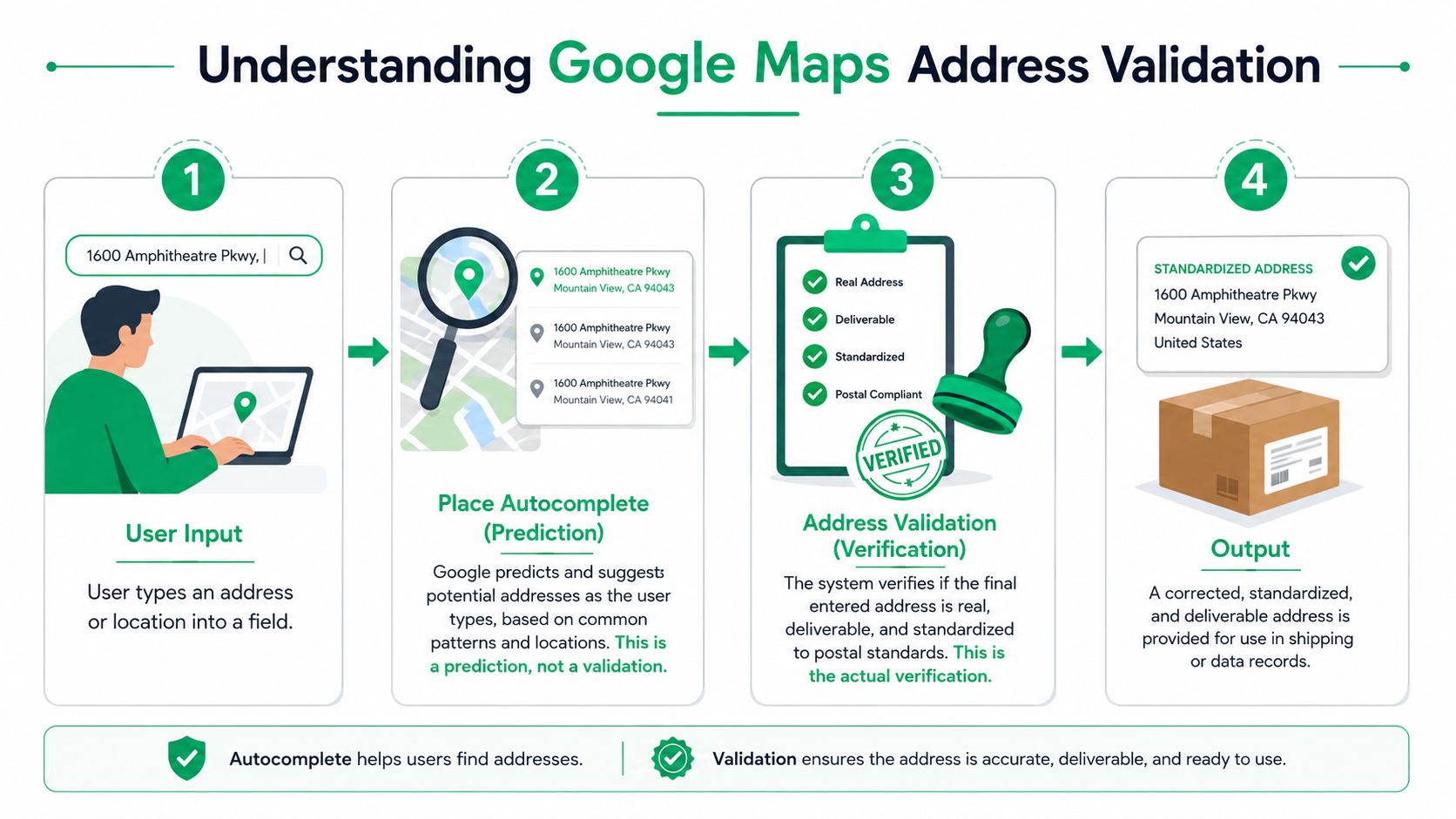
Autocomplete predicts, validation verifies
A simple way to understand it:
| Tool | What it does | What it doesn't do |
|---|---|---|
| Place Autocomplete | Suggests likely addresses while a customer types | Doesn't serve as the final operational check |
| Address Validation | Evaluates the final address string and returns signals about what was confirmed, corrected, or inferred | Doesn't guarantee a successful delivery in every scenario |
Autocomplete is like a helpful friend finishing your sentence. Address validation is closer to a postal clerk reviewing whether the address makes sense as a real destination.
That distinction matters because many checkout teams stop too early. They add autocomplete, see fewer typing errors, and assume the problem is solved. It isn't. Customers can still choose the wrong suggested address, omit an essential unit detail, or submit an address that looks standardized but still isn't complete enough for fulfillment.
What comes back from the API
When merchants use Google Maps Address Validation properly, they're not just looking for a cleaned-up address line. They're looking for signals.
The useful outputs are things like:
- Confirmed parts: Components Google can verify with confidence.
- Corrected parts: Obvious input issues that can be normalized.
- Inferred parts: Missing details Google can add based on surrounding data.
- Extra context: Geocode and, in the U.S., postal-service data.
Operational takeaway: Treat the API response as a structured review of the address, not a cosmetic formatting pass.
That's its core value. It helps merchants separate “customer typed something plausible” from “system has enough confidence to use this in a shipping workflow.”
Why Accurate Addresses Are an Ecommerce Superpower
Clean address data improves more than delivery accuracy. It tightens the whole operation.
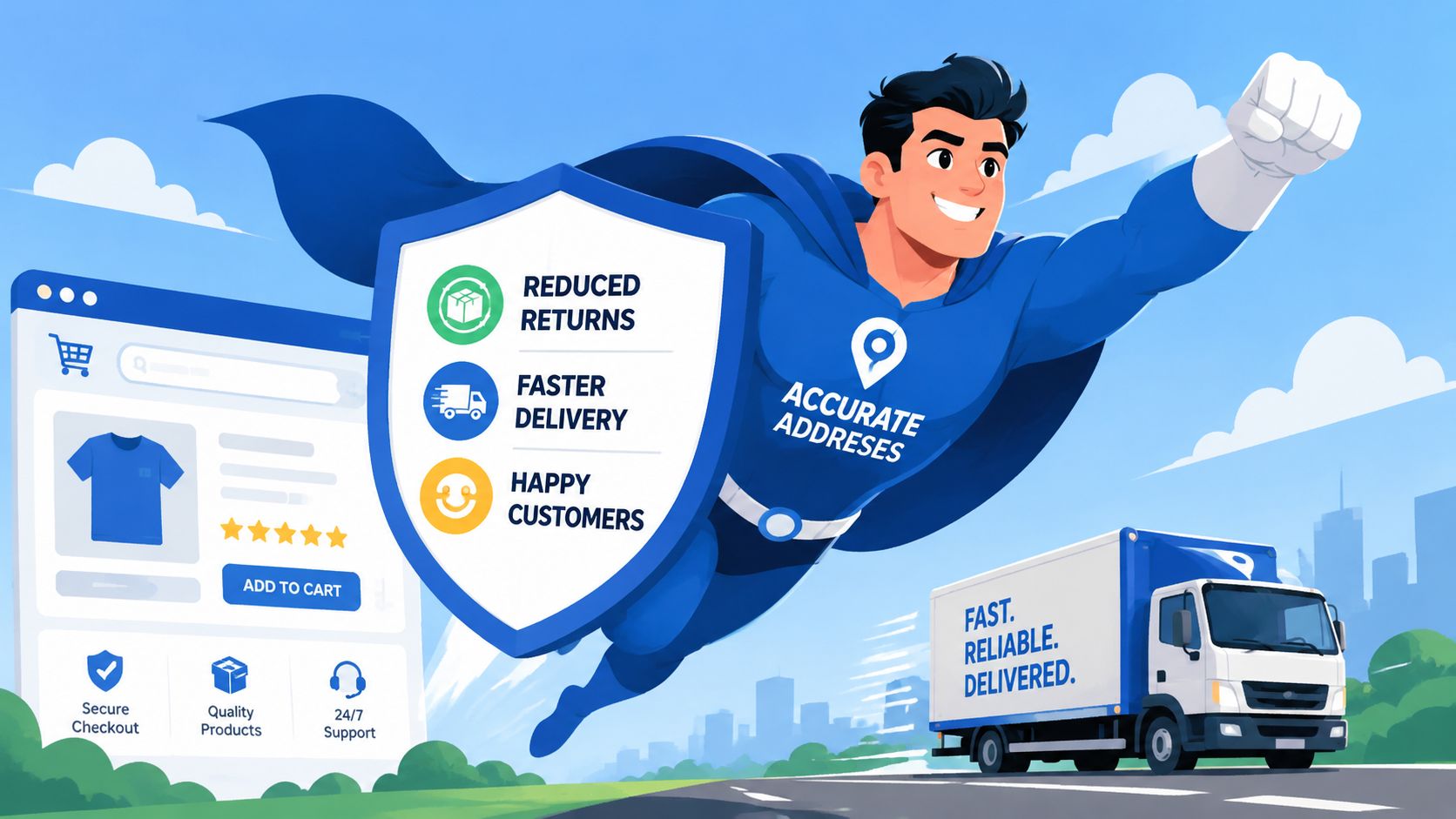
When operations teams talk about growth, they usually focus on conversion, merchandising, and acquisition. Address quality sounds smaller by comparison. In practice, it's one of those boring systems that protects margin, customer experience, and internal capacity all at once.
It cuts avoidable operational work
Every bad address creates follow-up work that your team didn't plan for. Some of it appears immediately, like a customer contacting support to fix a typo. Some of it appears later, like a failed handoff to a carrier or a warehouse team flagging a suspicious label.
The benefit of validation isn't only that you stop some errors at checkout. It's that you reduce how often humans need to intervene after the order is already in motion.
- Fewer preventable support tickets: Agents spend less time correcting addresses that should have been caught upstream.
- Cleaner fulfillment queues: Orders move with fewer manual holds and fewer “please verify” notes.
- Better exception handling: When something is wrong, the system can surface a specific issue instead of forcing a support agent to guess.
It protects conversion without lowering standards
Strict checkout forms can hurt conversion if they force customers through clumsy validation logic. Good address validation does the opposite. It helps you keep the form fast while applying scrutiny at the moments that matter.
The strongest implementations don't block everyone. They only interrupt the orders that need a second look.
If your team is also working on discoverability and acquisition efficiency, it helps to connect operational experience with broader commerce strategy. This resource on how to win AI search for retailers is useful for thinking about visibility and customer acquisition in parallel with checkout quality.
It improves the customer experience after the sale
Customers don't think in terms of address parsing. They think in terms of whether the package arrived where and when they expected.
That's why accurate address handling feels invisible when it works and painfully obvious when it doesn't. The customer doesn't give your team credit for “validated input.” They give you credit for a smooth delivery and a support experience that never had to happen.
A short walkthrough of the broader delivery angle helps make that point concrete:
Teams that treat address data as a customer experience input, not just a database field, usually make better checkout decisions.
Validation vs Deliverability Reading the API Signals
Teams often get tripped up. They see the phrase “address validation” and assume it means the system can tell them, with certainty, whether the package will arrive.
That's not what the API does.
Google's documentation makes an important distinction. The Address Validation API can standardize addresses, infer missing components, and help determine whether an address refers to a real place, but some returned components can still remain unconfirmed. That means an address can come back looking valid while still containing ambiguity, as described in the Google Address Validation API overview.
Why a validated address can still fail
A classic ecommerce example is a multi-unit building. The street, city, and postal code may all look right. The customer even selected a suggested address in checkout. But if the apartment or suite detail is missing, the last mile still breaks.
The API improves predictability. It does not guarantee successful delivery.
That difference is the one operations managers need to build around. If your rules only ask, “Did the system validate this?”, you'll approve orders that still need attention. If your rules ask, “Which parts were confirmed, which were corrected, and which were left ambiguous?”, you can route orders much more intelligently.
A practical decision framework
The most useful way to read the signals is to tie them to actions.
| Signal pattern | What it means operationally | Best response |
|---|---|---|
| Mostly confirmed | The address is likely usable with low friction | Accept and proceed |
| Corrected or inferred components | The system improved the address, but the customer may need visibility into the change | Show the standardized version and ask for confirmation when risk is meaningful |
| Unconfirmed component present | Some part of the address still carries ambiguity | Prompt, hold, or review based on order value, destination type, and fulfillment timing |
That framework keeps the conversation practical. You're not debating API semantics. You're deciding what your business should do with the level of confidence returned.
When to accept, prompt, or hold
Use the API output to create business rules that fit your operation.
- Accept immediately: Low-risk orders where the key destination details are clear and no critical component remains ambiguous.
- Prompt the customer: Cases where the address is close, but a corrected or inferred detail should be acknowledged before shipment.
- Flag for manual review: Orders with missing subpremise-style details, conflicting information, or signals that leave the fulfillment team guessing.
If the address still requires human interpretation, don't pretend automation solved it.
The teams that get the most value from Google Maps Address Validation are usually the ones that resist over-automation. They use the system to reduce ambiguity, then they decide where human review still belongs. That's especially important for apartments, office parks, rural addresses, and any destination where “close enough” can still turn into a failed handoff.
Implementing Address Validation The Right Way
A lot of weak implementations fail for a simple reason. The team adds validation logic, sees it work in testing, and assumes it will hold up under real traffic, messy inputs, and international addresses.
It won't unless you design for the ugly parts.
Google's Address Validation API has a documented throughput ceiling of 100 addresses per second or 6,000 per minute, which makes capacity planning a real engineering concern for high-volume merchants, according to this Smarty analysis of Google address parsing and standardization.
Build the flow in the right order
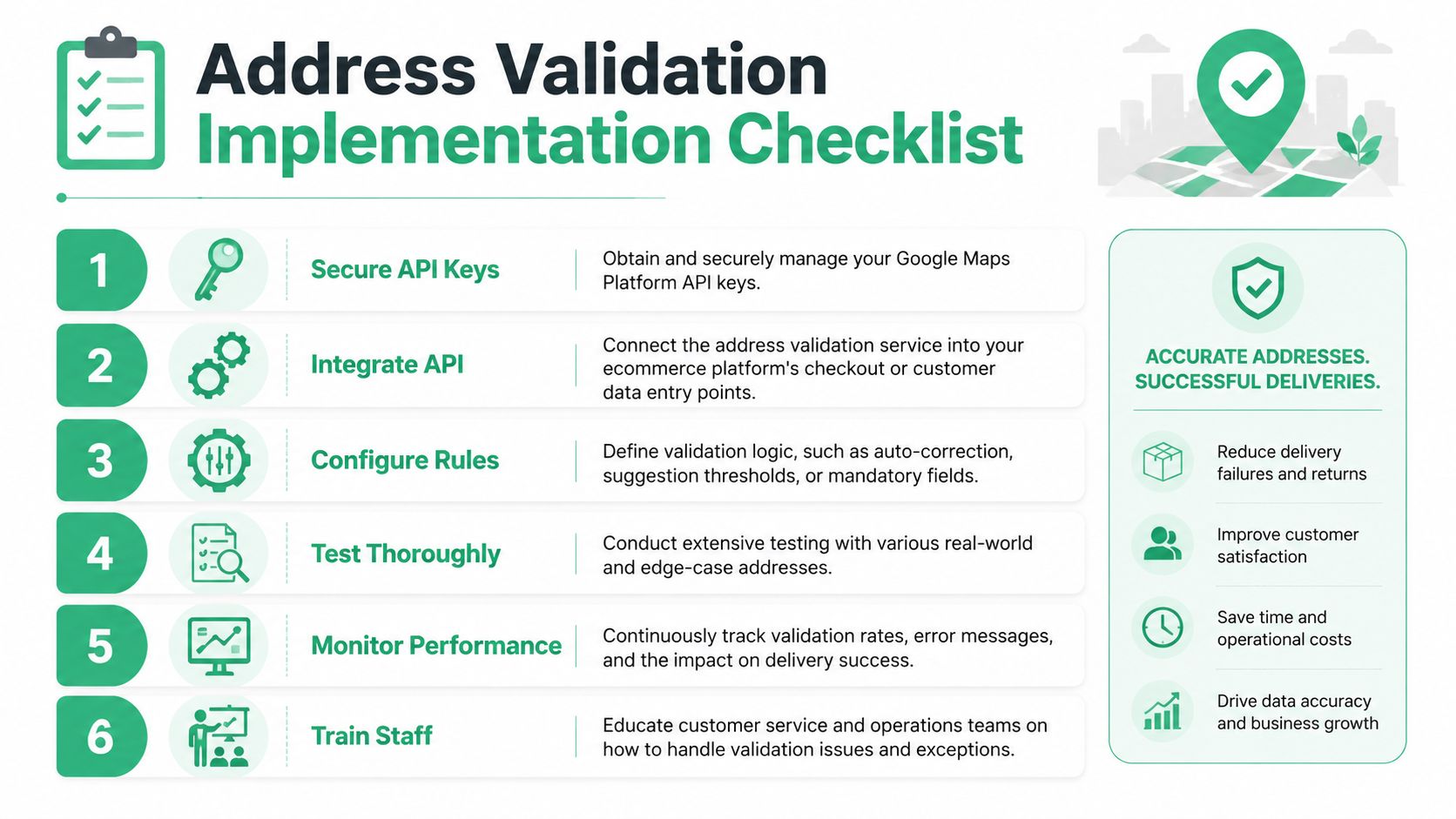
The cleanest pattern is simple. Let the customer get help during entry, then validate the final address in the backend before you trust it operationally.
That usually means:
- Use autocomplete up front to reduce typing mistakes.
- Run address validation on the submitted address before it enters fulfillment logic.
- Apply decision rules based on the returned signals.
- Store both the original and standardized versions when your team needs an audit trail.
If you're comparing tooling options, this overview of an address validation tool is useful for thinking through where validation belongs in the full workflow, not just the checkout field.
Plan for rate limits and traffic spikes
Implementations often break in production. Validation isn't just a checkout feature. It may also run during account creation, customer service edits, fraud review, and bulk data cleanup. Put all of that together and the throughput ceiling starts to matter.
If your business runs launches, flash sales, or big campaign drops, design for burst handling from day one.
- Queue requests: Don't assume every validation has to happen synchronously in the same millisecond.
- Use asynchronous fallback paths: If validation is delayed, preserve the order and route it for follow-up instead of hard-failing the checkout.
- Separate customer-facing and back-office traffic: Bulk hygiene jobs shouldn't compete with live checkout requests.
Decide what happens when validation fails
A resilient implementation doesn't just define the happy path. It defines the fallback.
Create answers for these scenarios before launch:
| Failure mode | Bad response | Better response |
|---|---|---|
| API timeout | Block checkout with a generic error | Accept order, mark for review, and notify internal systems |
| Ambiguous result | Auto-approve anyway | Prompt for confirmation or route to manual review |
| Unsupported market behavior | Force one global rule | Apply country-specific logic and local exceptions |
Practical rule: Never let address validation become the reason checkout goes down.
Train the humans too
Customer support and ops teams need to know what the signals mean. If they see “corrected,” “inferred,” or “unconfirmed” in an internal tool, they should know whether to contact the customer, update the order, or leave it alone.
The best technical setup still fails if the warehouse, support desk, and ecommerce team interpret the same output differently.
Putting Validation to Work on Shopify and SelfServe
On Shopify, the question usually isn't whether address validation is useful. It's where to apply it and how much complexity your team wants to own.
At a high level, merchants have two routes. One is the build-it-yourself path, where your developers wire Google Maps services into checkout-related flows, customer account experiences, or internal order tools. The other is the app-led path, where a specialized workflow handles the operational use case with less custom engineering.
The DIY route on Shopify
Custom implementation can make sense if you have unusual rules, deep internal systems, or a large engineering team. For example, some brands want address validation tied directly into fraud review, warehouse routing, or custom post-purchase portals.
If you need implementation help at that layer, working with a partner that offers Shopify development services can be useful when your requirements go beyond a lightweight app install.
The trade-off is ownership. Your team has to maintain the integration, interpret validation responses, handle edge cases, and keep the post-purchase experience aligned with how orders flow through Shopify, your OMS, and your fulfillment stack.
The post-purchase opportunity most merchants miss
A lot of address issues are discovered after checkout, not during it. The customer notices a typo in the confirmation email. Support receives a message minutes later asking to fix the shipping address. The warehouse hasn't picked the order yet, but someone now has to intervene manually.
That's where post-purchase editing becomes more valuable than teams expect. Instead of forcing every correction through support, merchants can let customers update shipping details within controlled windows, with validation applied as part of the edit flow.
For merchants evaluating that workflow specifically, this guide to Shopify address verification lays out the post-purchase angle clearly.
Why this matters operationally
The operational win isn't just cleaner data. It's fewer internal touchpoints.
When customers can correct their own address safely, your team avoids the slow chain of ticket creation, agent review, order lookup, edit approval, and fulfillment coordination. That's especially helpful for high-volume stores where support isn't struggling with one giant issue, but with a steady stream of small preventable exceptions.
Put differently, Google Maps Address Validation gets more valuable when it's paired with the part of the customer journey where address mistakes are discovered.
Pricing Privacy and Global Coverage Considerations
Before adopting any address tool, operators usually ask three practical questions. What will this cost us, how sensitive is the data flow, and will it work in the countries we ship to?
On pricing, the main operational point is simple. Google Maps Platform works on usage-based billing, so merchants should model validation requests as part of checkout, account changes, support edits, and any bulk cleanup jobs. Don't estimate based only on storefront traffic. Estimate based on every workflow that could call the service.
On privacy, address validation should be treated like any other customer-data workflow. Review how customer address information moves through your systems, who can access standardized results, and where data is stored or logged internally. The biggest privacy mistakes usually happen in your implementation choices, not in the abstract idea of using validation.
Global doesn't mean identical coverage
Realistic expectations are essential. Google's broader map data ecosystem spans more than 250 countries and territories, but the Address Validation API's specific feature set and quality have historically been available in a smaller subset. Reports cited in a Google Maps Platform webinar vary from 27 countries to just over 40 countries, which means international merchants need to test market by market rather than assume uniform performance everywhere, as noted in this Google Maps Platform webinar.
That matters because “supported globally” and “works equally well for my shipping footprint” are not the same thing.
What smart international teams do
- Test by priority market: Validate the countries that matter most to revenue and support volume first.
- Use fallback rules: Don't force the same validation policy across markets with different addressing norms.
- Set internal expectations: Your team should know which countries get strong automated handling and which still need more human review.
If you remember one thing, make it this: Google Maps Address Validation is a strong tool for improving address quality, but it isn't a universal guarantee layer. The merchants who get the best results use it as part of a broader operating model that includes prompts, exceptions, review paths, and post-purchase correction options.
If your Shopify team wants to reduce address-related support tickets without handing full control to support agents, SelfServe is worth a close look. It gives customers a controlled way to update shipping details after purchase, uses Google Maps-powered validation to catch bad inputs, and helps ops teams prevent small address mistakes from turning into failed deliveries and manual work.