Order Change Management Guide for Shopify Plus Merchants
A Shopify merchant reported that 1.3% of orders required some form of modification in a historically slow month, while order editing had already handled 6,443 customer support tickets since launch. Separately, an e-commerce support benchmark found that 40% of tickets are order-related, covering tracking, changes, and cancellations, and that e-commerce teams average 550 tickets per agent per month, the highest across industries. (Shopify merchant and support benchmark data)
Those figures change the way operations leaders should view post-purchase edits. Order changes aren't an occasional courtesy handled by a helpful agent. They're a recurring fulfillment workflow that touches inventory, payments, warehouse execution, carrier handoff, refunds, and customer trust. The central question isn't whether your support team can edit an order. It's whether the order is still in a state where the requested change can be applied safely.
Why Order Change Management Matters for High-Volume Stores
A merchant reported that 1.3% of orders required some form of modification in a historically slow month, and that order editing had already handled 6,443 customer support tickets since launch. A separate support benchmark found that 40% of tickets are order-related, including tracking, changes, and cancellations. (Shopify merchant and support benchmark data)
Those figures point to an operational issue, not merely a support feature. Each requested edit must be evaluated against the order's fulfillment state, the remaining edit window, the inventory record, and the payment outcome. A change that preserves revenue before allocation can become a refund, reshipment, or cancellation after carrier handoff.
The practice covers address corrections, quantity changes, variant swaps, shipping upgrades, cancellations, and carefully controlled additions to an existing order. The workflow must capture the request, validate its effect, approve it where needed, and apply the same state across Shopify Plus, the warehouse, payment systems, and the carrier.
A customer changing a shipping address immediately after checkout creates a different risk from the same request after a label has been created. Before allocation, the system may validate the address and recalculate shipping. During picking, the warehouse may already be working from allocated inventory. After carrier handoff, the available options can narrow to interception, return to sender, or a new shipment.
That distinction places ownership with fulfillment operations. Support can receive the request and explain the policy, but the system should determine whether the order remains safe to edit.
The cost of treating edits as exceptions
Address corrections show the exposure clearly. Shipping research places address issues at about 2.1% of e-commerce parcels, while Shippo-referenced analysis reports that 30% of shipments can be marked undeliverable because of insufficient addresses, 28% because the address doesn't exist, and 26% because the recipient is unknown. (Address error and delivery research from Shippo-referenced analysis)
An address edit completed before fulfillment can prevent a reshipment, a return-to-origin event, and a difficult support conversation. The same request handled after fulfillment may require carrier intervention or a replacement shipment, turning a recoverable order into a logistics expense.
Unmanaged edits also create less visible leakage:
- Inventory leakage: a replacement variant may not be reserved when the original is released.
- Payment friction: a higher-value change may require additional capture, while a lower-value change may require a partial refund.
- Fulfillment errors: warehouse and carrier systems can receive conflicting order states.
- Customer experience drag: the shopper repeats the same information across chat, email, and phone.
Build the operating model before the interface
Start with a state map. Define what “checkout confirmed,” “allocated,” “pick in progress,” “label created,” “in transit,” and “delivered” mean in your Shopify Plus and 3PL environment. Attach permitted mutations and validation rules to each state, then record the exact cutoff that closes the edit window.
The interface comes later. A self-service page cannot protect margin if it lets a customer change an item after the warehouse has packed it. Successful rollout also requires the same discipline used in software team change adoption: assign ownership, document operating rules, and make exceptions visible instead of informal.
Your customer-facing policy should explain the value of customer self-service in plain language. Tell shoppers what they can change, until when, and what happens after fulfillment begins. Clear boundaries reduce avoidable escalation while giving operations a defensible basis for rejecting late requests.
The Business Impact and KPIs That Prove It Works
A finance-ready order change program connects fulfillment-state decisions to money. The question is not only how many tickets disappear. It is whether an edit completed inside the valid window retains revenue, avoids a reship, reduces handling time, or prevents a cancellation without creating a new warehouse exception.
Support volume provides the starting point. If 40% of tickets are order-related, as the benchmark cited earlier reports, a controlled editing window addresses a substantial operational category. (Order-related support benchmark) The business case then depends on eligibility and timing. An address correction completed before allocation can remove agent work and downstream cost. The same request after label creation may require carrier intervention, a replacement, or a return.
Revenue recovery needs careful accounting. Count orders retained after a requested change, approved additions, substitutions, and the payment or refund outcome for each edit. Keep these outcomes separate. A higher revised order is not automatically incremental revenue, and a retained order is not necessarily revenue recovered if it would have shipped unchanged. Finance should be able to trace each result from request through fulfillment.
Build a KPI map finance can audit
Logistics reporting should expose preventable work rather than reward raw edit volume. Review address corrections completed before the cutoff, reshipments avoided, return-to-origin events, fulfillment exceptions, and refund leakage as a share of gross merchandise value. Address errors are a known source of parcel cost, so validation deserves a distinct view instead of being buried inside total edit requests, as noted earlier.
Customer experience measures add context. Capture satisfaction after a completed edit, escalation after a rejected request, and repeat purchasing among customers who used self-service. Read these results with stock and shipment exceptions. A high completion rate can conceal poor control if edits reach the warehouse after picking begins.
The scorecard should therefore answer four financial questions:
| Business outcome | Evidence to review | Decision it supports |
|---|---|---|
| Lower support cost | Order-related contacts, agent handling time, and self-service outcomes | Whether the edit window covers enough demand to justify automation |
| Revenue retained | Cancellations prevented, approved additions, substitutions, and refund results | Whether a broader window recovers more value than it creates payment risk |
| Fulfillment cost avoided | Pre-cutoff corrections, reships, returns to origin, and carrier interventions | Whether validation and state controls protect margin |
| Customer value protected | Post-edit satisfaction, rejection escalations, and repeat purchasing | Whether policy clarity improves the experience without weakening controls |
Set targets only after establishing a baseline by fulfillment state. A request completed before allocation should not be compared directly with one submitted during picking. Segment results by edit type, payment outcome, and cutoff distance, then review the trade-off between recovered revenue and fulfillment exceptions. This keeps the program focused on operational value rather than a high self-service completion rate alone.
The End-to-End Order Change Workflow
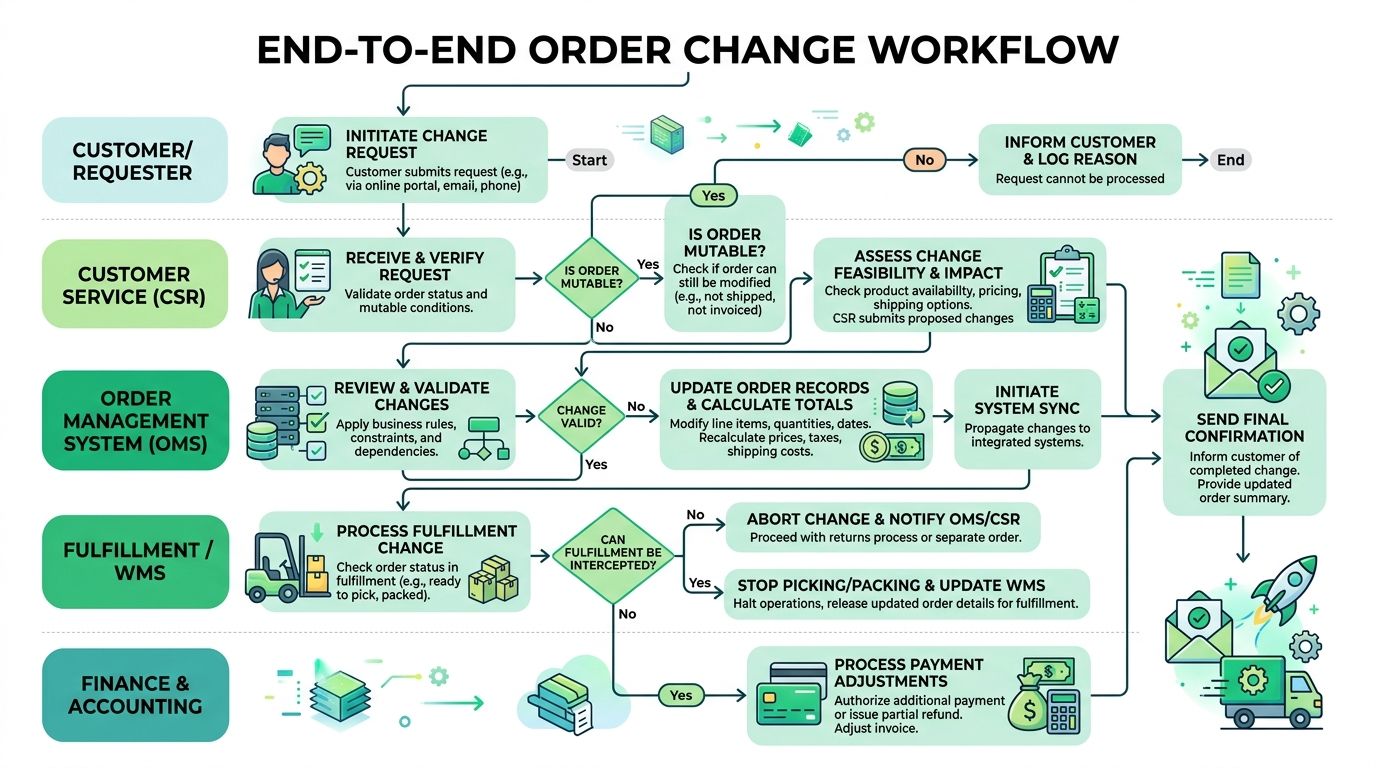
An order change workflow should behave like a state machine. Each state exposes a controlled set of mutations, and every mutation triggers the validations required to protect payment, inventory, and fulfillment integrity.
Map the order states
Checkout confirmed, payment captured: This is the broadest edit window. Permit address, contact, quantity, variant, shipping, and cancellation changes when payment and fraud checks allow them. Product additions can also be offered here, but the system must recalculate totals and make the payment outcome explicit.
Order created, inventory allocated, fulfillment unstarted: This remains the prime window for high-volume stores. Permit edits only after a stock re-check and allocation review. If a variant swap releases one item and reserves another, the workflow needs to commit both actions as one transaction or reject the request.
Pick and pack in progress: Restrict changes sharply. Address correction may still be possible if the warehouse and carrier cutoffs haven't passed, but product edits can create a mismatch between the pick list and the physical parcel.
Label created or carrier handoff completed: Self-service product edits should close. The remaining paths are carrier interception, return to sender, a replacement order, or a formal return process.
Delivered: Treat the request as an exchange, return, warranty, or support case. It no longer belongs in the pre-fulfillment edit workflow.
Connect permissions to fulfillment reality
Permissions determine who can act. Customers can handle low-risk changes through authenticated self-service, while customer service associates can review exceptions and override approved rules. Validation should cover inventory, shipping method eligibility, address quality, payment state, fraud signals, and whether the edit would split fulfillment.
The fulfillment model matters too. Teams reviewing fulfillment decisions for retailers should align those decisions with the edit policy, especially when multiple warehouses or 3PLs are involved. A merchant operating several fulfillment nodes can't safely treat a product swap as a simple line-item replacement.
The objective isn't to keep the window open as long as possible. It's to keep it open while the order can still change without corrupting downstream state. A self-service order editing workflow should show the shopper only the fields that are valid for the current state, then close cleanly when the fulfillment system takes control.
Core Policy Levers Every Merchant Needs to Configure
Five policy levers determine whether order change management protects operations or creates new exceptions: permissions, edit windows, validation, upsells, and cancellation flows. They aren't independent settings. Shortening the edit window, for example, reduces fulfillment risk but increases the number of requests that arrive after closure, so permissions and fallback queues must compensate.
Set permissions before adding convenience
Decide who can edit each field. Customers may be allowed to correct a shipping address or change a size after one-time-password verification. Customer service associates may handle payment-sensitive changes, restricted products, and orders with fraud signals. Some stores should permit both groups, but with different limits and audit records.
Then define the edit window against fulfillment state, not a generic “before shipment” promise. Shopify explains that edits can be made before fulfillment and may generate updated invoices, while practical workflows also depend on payment status and whether an order is partially fulfilled. (Shopify guidance on editing orders)
Treat validation as a layered control
Validation should run in sequence:
- State validation: confirm the order is still eligible.
- Inventory validation: check available stock and reservation rules.
- Shipping validation: verify address, service level, destination, and cutoff.
- Payment validation: determine whether to capture a difference or issue a refund.
- Risk validation: route suspicious or restricted orders to review.
Address validation deserves special treatment. One implementation pattern validates on both the Thank You page and the Order Status page, allowing the customer to accept a correction without contacting support. For international orders, postal-authority-backed verification can be more reliable than crowdsourced geocoding alone, with one source claiming Experian-based verification can provide up to 5x greater accuracy than Google Maps for international addresses. (Post-checkout address correction implementation guidance)
Add commercial logic without hiding operational risk
Upsells work only when the revised order can still fulfill cleanly. Recommend compatible products, respect inventory reservations, and show the exact payment difference or refund before confirmation. Margin should guide recommendations, but fulfillment feasibility must be the first filter.
Cancellation requires separate branches for fully cancellable, allocated, partially fulfilled, and shipped orders. Each branch needs a clear refund rule, restock action, tag, and owner.
| Policy Lever | Fulfillment State It Governs | Primary Trade-off |
|---|---|---|
| Permissions | Who can mutate which fields | Convenience versus fraud and control |
| Edit windows | Pre-allocation through carrier handoff | More recovery opportunity versus state risk |
| Validation | Inventory, address, payment, and shipping | Conversion friction versus clean execution |
| Upsells | Eligible edits before fulfillment | Revenue recovery versus added fulfillment complexity |
| Cancellation flows | Unfulfilled, allocated, partial, and shipped orders | Faster refunds versus stock and payment accuracy |
Configure the levers in sequence: permissions first, windows second, validation third, upsells fourth, cancellations fifth. That order forces the commercial layer to operate inside rules the fulfillment team can support.
A Practical Implementation Walkthrough
Consider a high-volume apparel merchant processing 8,000+ orders per day during a BFCM promotion. The merchant has a 48-hour edit window, but the warehouse can't safely accept every product change once an order enters a pick wave. The implementation therefore starts with a state-aware policy, not a broad promise that every order can be edited.
The first configuration allows authenticated customers to edit eligible orders during the pre-pick window. Once the order reaches pick and pack, new requests route to customer service associates. The customer sees the available fields on the Order Status page, the cutoff message, and the payment or refund consequence before confirming. The admin shows the original request, the approved mutation, the timestamp, and the resulting fulfillment state.
Configure rules that protect the warehouse
The merchant blocks swaps across collections because those products follow different fulfillment and merchandising rules. A net increase over $25 requires payment re-capture. The workflow also rejects an edit that would turn a single-line order into shipments from multiple locations.
Those rules should produce visible outcomes rather than generic errors. A successful request receives an edit-applied tag. A stock failure receives an edit-inventory-blocked tag. A payment review receives an edit-payment-review tag, and a split-location rejection receives an edit-fulfillment-blocked tag. Customer service can then filter queues by action instead of reading every conversation from scratch.
The upsell module uses the edited product type as its input. A customer changing a shirt size sees compatible accessories or related products, prioritized by margin and inventory availability. The recommendation appears only after the requested edit passes core validation, so the merchant doesn't encourage an addition that makes the order impossible to fulfill.
Keep cancellation separate
Cancellation shouldn't be hidden inside the edit form. The merchant creates separate logic for an unallocated order, an allocated order, and an order with a fulfilled line. Unallocated cancellations can trigger a standard refund and no-restock outcome. Allocated cancellations can trigger a restock tag and a refund review, while partially fulfilled orders expose only the unshipped portion.
The customer-facing modal explains that the edit window is tied to warehouse activity, not just the passage of time. The admin records the order state before and after the request, the validation results, the payment action, and the tag that determines the next operational queue. That audit trail is what makes the workflow usable during peak volume.
Handling Cutoffs, Partial Fulfillment, and Edge Cases
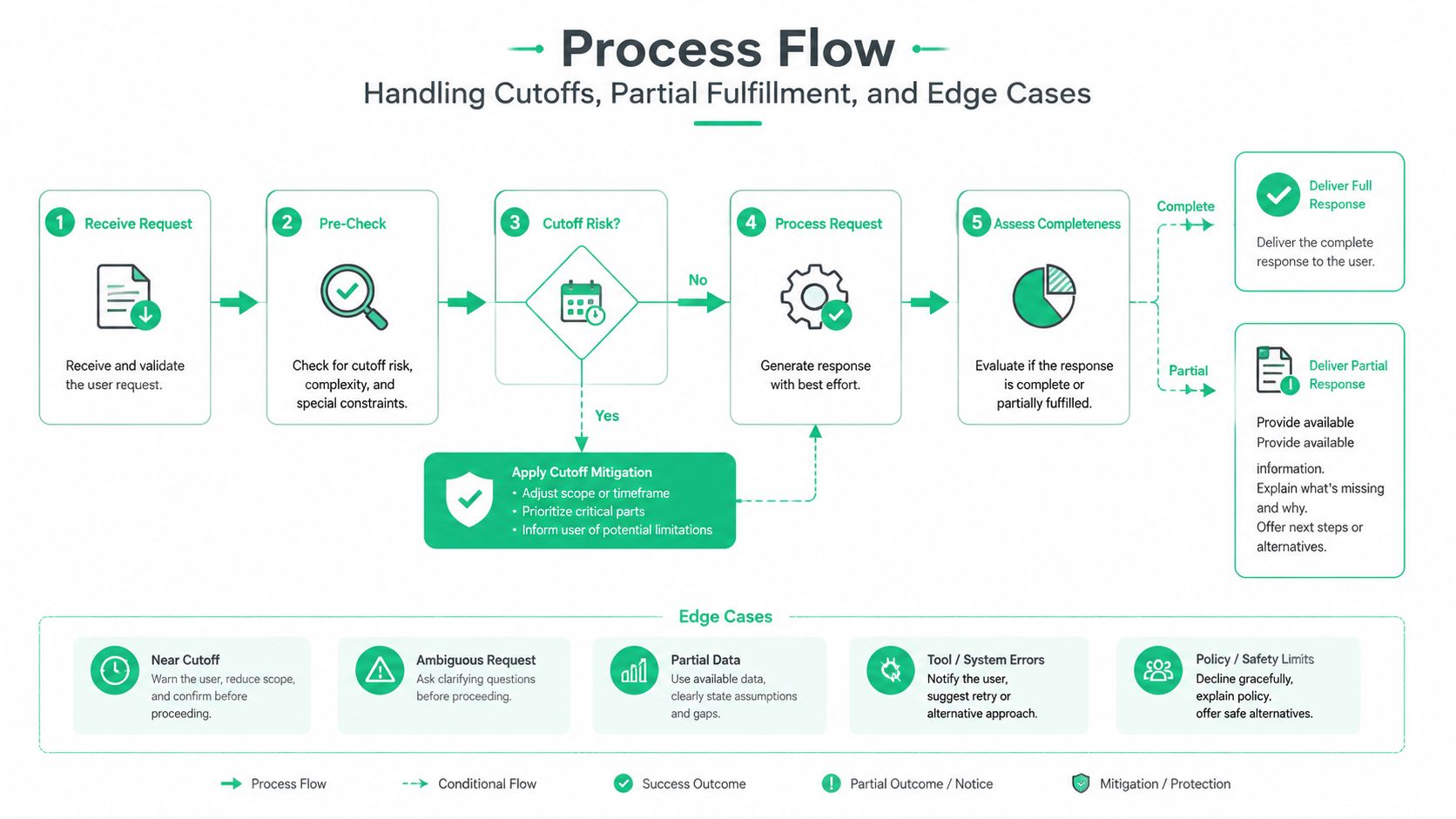
Cutoff failures usually happen between eligibility and submission. A customer may open the editor before allocation, change a line, then submit after the warehouse has locked it. The workflow must evaluate fulfillment state again at commit time. A generic error sends the shopper to support and hides whether the lost order value came from stock, timing, payment, or routing.
Make closure an explicit state
Use a distinct edit window closed state tied to the latest fulfillment event, not only to a clock. Show the current order status, explain why the request cannot be applied, and offer an authenticated support route with the order number, requested change, and validation result prefilled. Preserve the attempted edit as an event. It shows where the edit window and warehouse process diverged.
Requests arriving after allocation but before the next warehouse wave can enter a review queue. Assign an owner, compare each request with the actual cutoff, and set an expiry rule. Without those controls, the queue becomes another inbox and agents lose the timing context needed to recover revenue.
Validation outcomes require separate actions:
- Hard blocks: An undeliverable address, unavailable replacement SKU, or failed payment action stops the mutation. Address errors affect about 2.1% of parcels, as discussed above, but the workflow still needs to identify the exact blocking field and next action.
- Soft warnings: A service change may delay delivery, alter dispatch conditions, or change shipment grouping. Let the customer confirm only when the consequence is acceptable and the fulfillment system can support it.
- Review routes: Fraud flags, high-risk destinations, and payment mismatches move to an authenticated agent workflow. Keep the order unchanged until review completes.
Model partial fulfillment by line
If one shipment has left the distribution center while another remains unfulfilled, expose only the unshipped lines for editing. Display locked and eligible lines separately, and validate inventory against the remaining fulfillment state. A full-order form can invite changes to merchandise the store no longer controls.
Subscription orders need recurring-order rules. Mixed-cart B2B and DTC orders may require different approval and tax handling. Pre-orders shipping with in-stock items need explicit shipment grouping. Fraud-flagged orders remain in review even when the customer is still inside the edit window.
Operational rule: Every failure path creates a tag, queue item, or event assigned to a named team.
Useful tags include edit-window-closed, edit-partial-fulfillment, edit-address-blocked, edit-fraud-review, and edit-support-required. These tags connect the requested change to the next operational action and show whether a policy protects fulfillment or merely frustrates customers.
Measuring Success and Optimizing Over Time
Analytics should connect customer intent with fulfillment outcomes. The weekly question is practical: did the workflow recover revenue while the order remained controllable, or did it create work after the warehouse state had changed?
Build one weekly operating view
Pull order tags, fulfillment status, payment outcomes, refund outcomes, and ticket categories into one dashboard. The dashboard should show the six measures defined in the analytics framework, rather than creating a second KPI taxonomy. Use the Order editing KPI framework as the reference for that measurement model.
Add operating context around each result: fulfillment state, edit-window timing, request type, SKU or variant, and whether the change increased or reduced order value. A completion result means little if it came from edits that reached the warehouse too late. A lower completion result may be acceptable when the policy blocks changes after pick, payment capture, or shipment allocation.
Use the following table as a starting structure. These ranges are guardrails, not universal benchmarks. Establish a store baseline, then adjust policy when results show a consistent trade-off between customer convenience, revenue recovery, and fulfillment safety.
| Operating view | What to examine | Healthy direction | Review trigger |
|---|---|---|---|
| Demand and access | Whether requests and eligible orders follow expected seasonal and policy patterns | Stable alignment with customer demand | Sudden movement after a policy or UX release |
| Workflow outcome | Whether eligible requests finish without validation, payment, or integration friction | Improvement by fulfillment state and request type | Persistent drop in completion or repeated rejection reasons |
| Revenue result | Whether edited orders add value without creating refund-heavy changes | Positive contribution where additions are safe | Sustained negative movement or frequent refunds |
| Contact burden | Whether edit-related contacts fall as self-service adoption grows | Downward trend after rollout and policy tuning | Increase after window or validation changes |
| Fulfillment safety | Whether applied changes create warehouse, carrier, or shipment exceptions | Low and stable exception volume | Any sustained rise after extending the edit window |
Review the dashboard weekly. Run controlled experiments monthly, changing one lever at a time. Test window length by fulfillment state, product recommendations by margin and availability, or confirmation copy that explains payment and shipment consequences. Record the release date and affected cohort so the result can be separated from seasonality, inventory changes, and carrier disruption.
Use qualitative review to find hidden failure modes
Numbers will not expose every edge case. Read escalated tickets, rejected-edit reasons, and warehouse exception notes together. If agents repeatedly override one validation rule, the rule may be stricter than the actual fulfillment risk. If warehouse staff repeatedly correct the same address or shipment grouping issue, move that validation earlier, while the order is still controllable.
An operations reporting workflow keeps those findings connected to tags, fulfillment events, owners, and weekly decisions instead of leaving them in disconnected exports. Assign every recurring issue to a named team and record the policy change, expected effect, and review date.
A useful review asks three questions: which requests were blocked too late, which approved edits failed to propagate, and which changes recovered revenue without adding downstream work? The answers should shape the next configuration. Mature programs surface common address and variant problems while the edit window is open, then reserve human review for fraud, payment, inventory, or shipment decisions that require judgment.
The operating standard is direct: accept a change while the fulfillment state supports it, close the window before risk rises, and preserve the event trail for the next decision.
SelfServe provides Shopify and Shopify Plus teams with a configurable post-purchase portal for address, product, quantity, and cancellation changes, with merchant-defined windows, validation, tagging, and upsell controls. To connect those controls to a fulfillment-state strategy, visit SelfServe and review the available workflow options.