Address Standardization Guide for Shopify Plus Merchants

A customer emails support five minutes after placing a $140 order. They've spotted a typo in the shipping address, but the order is already moving through fulfillment. The address reads “123 Main St, Apt 2,” with no ZIP code. If the carrier can't resolve it, the parcel may be marked undeliverable, the customer may request a refund, and your team may absorb the cost of a replacement shipment.
That situation is why address standardization belongs in the post-purchase workflow, not only at checkout. Customers enter addresses in different formats, omit apartment details, use local abbreviations, and sometimes change delivery information after ordering. Shopify Plus merchants need a process that can recognize, clean, validate, and safely update those records before a label is created.
What Address Standardization Means for Ecommerce
A customer updates an order after checkout and types, “123 main street apartment 2.” Your fulfillment system may receive the same destination as “123 Main St, #2” or “123 MAIN ST APT 2.” A person can recognize these versions, while software needs the address broken into consistent fields before it can support label creation, delivery, or an order edit.
Address standardization converts customer-entered text into a structured record. The process includes several related jobs:
- Parsing identifies the street, building number, unit, city, region, postal code, and country.
- Normalization applies consistent abbreviations, spacing, capitalization, and character handling.
- Validation checks the destination country's postal rules and compares the address with available reference data.
- Enrichment adds routing or location details when the source system supports them.
Each job answers a different question. Parsing finds the components. Normalization makes their presentation consistent. Validation checks whether the address is usable. Enrichment can fill in supporting details. Neat formatting alone does not prove that a street exists, and a valid street does not confirm that an apartment number was supplied.
Practical rule: Treat the customer's original address as input, not as a final fulfillment record.
For Shopify Plus merchants, the post-purchase order-editing flow is where these distinctions become practical. A buyer may catch a missing unit number, correct a typo, or request a different delivery address before fulfillment begins. A post-purchase address lookup tool can provide real-time suggestions during that correction, allowing the customer to choose a structured address instead of sending an ambiguous message to support.
That workflow also clarifies the role of checkout autocomplete. Autocomplete can reduce typing mistakes, but it cannot handle every change made after an order is placed. Post-purchase validation gives the merchant another point to check the record before the corrected order reaches fulfillment.
The international data-quality framework ISO 19160-3:2020, published on 26 February 2020, defines six dimensions: completeness, logical consistency, positional accuracy, temporal quality, thematic accuracy, and usability. For an ecommerce operator, those dimensions become one operational test: can every system understand, match, update, and use the address reliably from order creation through delivery?
Why Bad Addresses Hurt Your Shopify Store
A bad address creates work in several places at once. The warehouse may print a label that a carrier can't use, support may need to contact the buyer, finance may process a refund, and the customer may lose confidence in the store. The original checkout error becomes an operational incident.
The cost appears before the parcel leaves
Missing unit information is a common problem in multi-unit buildings. A street address can be real while still being insufficient for the specific customer. A postal code can also be mistyped, incompatible with the city, or formatted incorrectly for the destination country.
Carrier systems may reject an ambiguous address, apply additional handling requirements, or return the parcel. International orders face a wider set of failure points because postal authorities don't share one universal format. A validator built only around U.S. assumptions can treat a legitimate overseas address as malformed.
Failed delivery multiplies the work
A delivery exception rarely stays inside the carrier dashboard. Someone must investigate the reason, contact the customer, update the order, check whether fulfillment has started, and decide whether to relabel or reship. If the parcel returns, the team may also need to reconcile inventory and answer a refund request.
That makes address quality a controllable operations issue rather than a minor data-cleaning task. The merchant can catch some errors before fulfillment, especially when customers have a clear way to edit their order and choose a validated address.
Support handles preventable corrections
Agents often receive messages such as “Please add apartment 4B” or “I entered the wrong ZIP code.” Manual correction is slow because the agent must determine whether the change is safe, confirm the intended destination, and make sure the warehouse receives the updated record.
A real-time correction flow shifts the simple part of that work to the customer. Support still handles exceptions, but agents aren't forced to manually interpret every variation of a street name or unit designator.
Customer trust is part of the calculation
A late or undelivered order changes how a shopper evaluates the entire brand. Even when the customer entered the mistake, a confusing correction process can make the merchant appear unresponsive. Clear post-purchase editing gives the buyer a direct path to fix the issue while the order is still actionable.
| Impact Area | What Goes Wrong | Merchant Cost |
|---|---|---|
| Deliverability | The carrier can't confidently identify the destination or unit | Relabeling, carrier handling, or a returned parcel |
| Returns and redelivery | The order needs a replacement shipment or refund review | Shipping expense, inventory handling, and payment operations |
| Support workload | Agents manually interpret and update address corrections | More tickets and less time for complex customer issues |
| Customer retention | The order arrives late, goes back, or never reaches the buyer | Lower confidence in the store and weaker repeat-purchase potential |
The strongest business case comes from connecting address errors to these outcomes in your own records. Don't measure clean addresses as an isolated data project. Measure whether fewer address problems reach fulfillment, support, and the carrier exception queue.
The Four Stages of Address Standardization
A useful pipeline follows the order in which the data becomes understandable. The common stages are parsing, normalization, validation, and enrichment. Teams sometimes use “standardization” as an umbrella term for the whole process, while normalization is only one part of it.
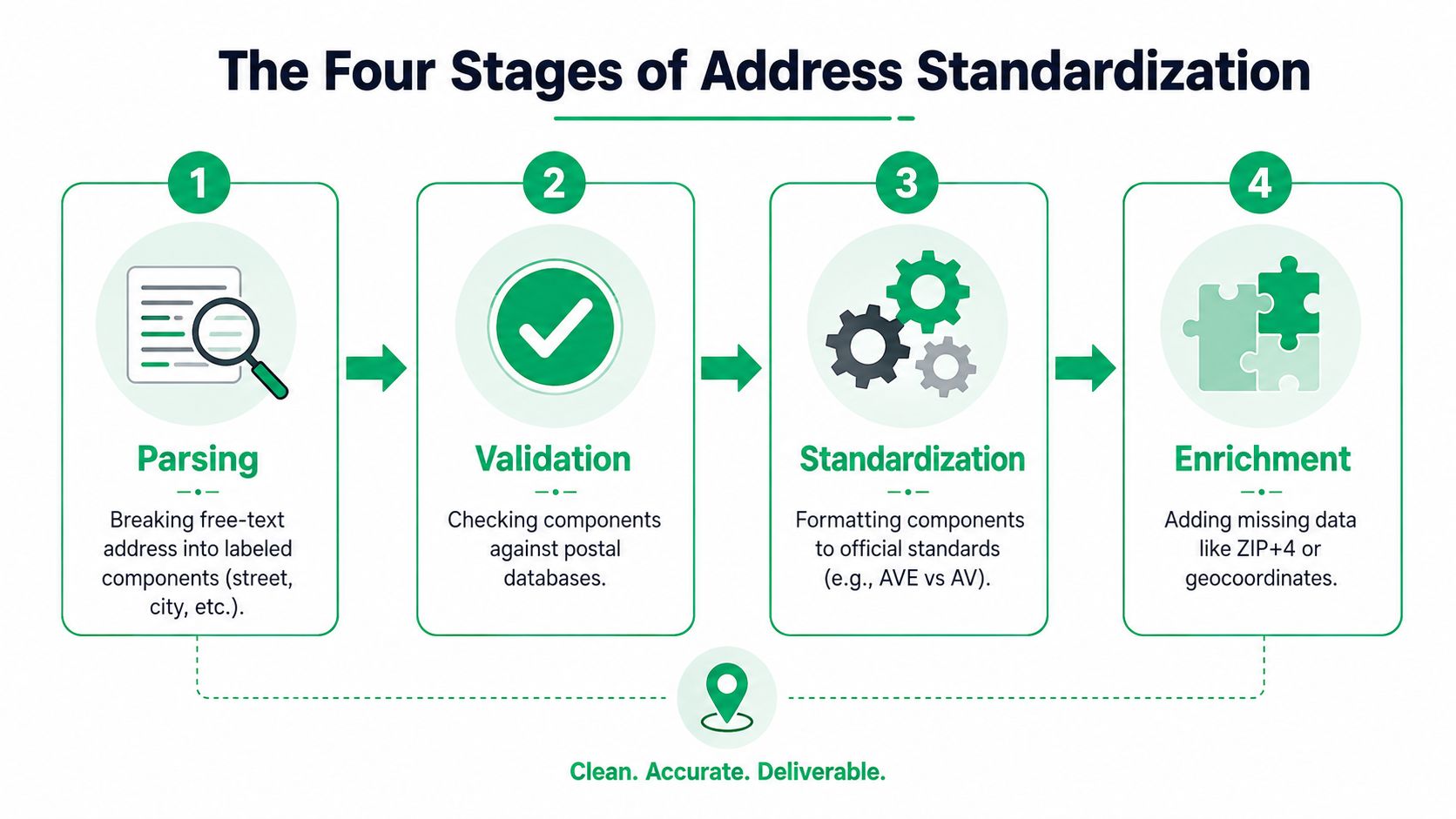
Parsing gives each piece a role
Customers don't enter addresses in a predictable sequence. One buyer may use separate fields. Another may type “Flat 2, 123 Main Street, London.” Someone else may put the apartment number after a comma or include a building name before the street.
Parsing breaks that input into labeled fields, such as:
- Delivery point: building number, street name, and street suffix
- Secondary location: apartment, suite, flat, unit, or floor
- Locality: city, town, district, or postal town
- Administrative area: state, province, prefecture, or region
- Postal identifier: ZIP code or postcode
- Country: the rule set that determines how the rest should be interpreted
Without parsing, a system may compare the entire string as one block and miss the fact that a unit number is absent or in the wrong place.
Normalization makes equivalent values consistent
Normalization changes the representation without changing the intended destination. It may remove extra spaces, apply recognized street abbreviations, standardize region codes, or handle alternate character forms.
That work needs restraint. A shortened street type can create ambiguity in some locations, so the system should preserve authoritative detail wherever possible. The cleanest-looking output isn't automatically the safest output.
Validation checks the destination
Validation compares the structured address with relevant postal or geographic reference data. It can identify whether the street and locality align, whether a postal code follows local conventions, and whether the selected address is suitable for the intended delivery workflow.
Validation shouldn't invent a unit number or replace the customer's destination. If the result is uncertain, show the customer a suggestion and ask them to confirm it.
Enrichment adds operational context
After the address has been understood and checked, enrichment can add information that downstream systems need. Depending on the service and country, that may include geocoordinates, delivery-point details, or carrier routing information.
The sequence matters. If you validate before parsing, the system may compare badly organized text and return unreliable matches. If you enrich before normalization, you risk attaching new information to an inconsistent or incorrect record. Parse first, normalize the components, validate the result, then enrich only when the added data is relevant and supported.
Customer-facing rule: Suggest a corrected address, but let the buyer confirm the destination before you update the order.
International Address Rules Shopify Merchants Overlook
A U.S. address usually trains merchants to expect a street, city, state, and ZIP code in a familiar order. That pattern breaks as soon as a Shopify Plus brand ships internationally. Country-specific postal systems may place the locality before the region, use different administrative fields, or require an alphanumeric postcode.
The USPS address-quality guidance is useful for U.S. operations, but it can't serve as the complete rulebook for a global storefront. International merchants need country-aware logic and local postal reference files. Modern address systems may support 250+ countries and territories, a capability that matters when a brand sells across many markets rather than only within the United States.
The same field doesn't mean the same thing everywhere
Canada commonly uses a province rather than a U.S.-style state structure, and its postal identifier combines letters and numbers. A U.S.-only validator may reject that value because it expects digits.
The United Kingdom introduces distinctions such as the post town and dependent locality. A form that insists every address include a state field can force customers to enter irrelevant information or place local details in the wrong box.
Germany's Postleitzahl follows a country-specific numeric pattern, while Japanese addresses use a hierarchy that moves through prefecture, city, district, and block information. Australia also requires merchants to distinguish between street delivery and mailbox-based delivery details.
| Country | Postal Code Format | State or Province Field | Common Pitfall for U.S. Validators |
|---|---|---|---|
| Canada | Alphanumeric postal code with local spacing conventions | Province is relevant, but U.S. state logic doesn't apply | Rejecting letters or expecting a numeric ZIP |
| United Kingdom | Alphanumeric postcode | A state field may be unnecessary | Treating post town and locality structure as a U.S. city-state pair |
| Germany | Country-specific numeric Postleitzahl | Region handling differs from U.S. states | Applying U.S. ZIP rules or expecting the same field order |
| Japan | Postal code paired with a multi-level locality hierarchy | Prefecture replaces the U.S. state concept | Flattening prefecture, city, district, and block data into one line |
| Australia | Local postal conventions for street and mailbox delivery | State or territory logic is country-specific | Confusing delivery type or applying U.S. abbreviations |
Character sets can change the workflow
International orders may contain Latin, Cyrillic, Japanese, or other writing systems. Transliteration can help a downstream carrier or warehouse, but it can also remove distinctions if applied carelessly. Keep the customer's original value where it supports customer service, and store the validated, destination-appropriate representation separately when your systems allow it.
For a deeper operational view, review this guide to international address validation. The key principle is simple: select the destination country before interpreting the address, not after a U.S.-centric parser has already marked it invalid.
How to Add Address Standardization to Shopify
Shopify merchants typically choose among three implementation paths. The right option depends on where errors appear, how much engineering capacity the team has, and whether customers can correct an order after checkout.
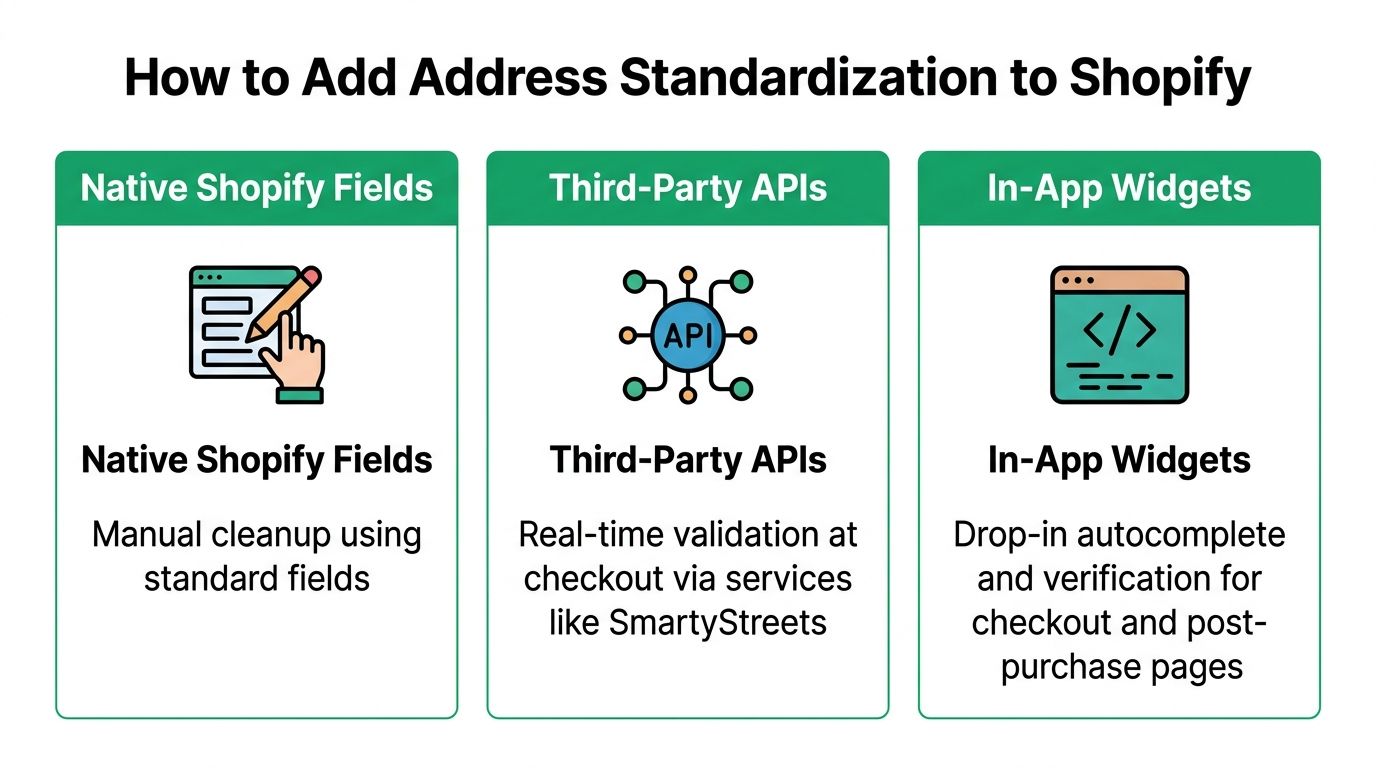
Native Shopify fields
Native fields give you a predictable structure at checkout. They're easy to maintain and don't require a separate validation provider, but they mostly capture what the customer enters. If the buyer omits a unit number or enters an invalid postal value, your team may not discover the issue until after the order exists.
This approach fits a merchant with limited address complexity, a narrow delivery footprint, and enough internal capacity to review exceptions manually. It becomes less effective when orders move quickly or customers regularly request changes after payment.
Third-party APIs
An address API can validate input in real time at checkout or when an order is edited. It can parse components, return suggestions, and provide a structured result for shipping systems. This route offers flexibility, but your team must manage credentials, request handling, error states, service limits, country coverage, and ongoing integration maintenance.
APIs make sense when you have developers available and need validation embedded across multiple channels, such as checkout, customer accounts, call-center tools, and warehouse workflows. They're less attractive if the immediate problem is a post-purchase support queue that needs a usable interface rather than a custom engineering project.
In-app widgets
An in-app widget places the correction experience inside the merchant's existing customer journey. SelfServe can let shoppers edit shipping details during a merchant-defined window, use Google Maps-powered address autocomplete and validation, and return structured address information to the order workflow. Its address and contact editing feature is designed for the post-purchase stage, where a customer can fix a detail before fulfillment rather than emailing support.
A practical widget-based flow looks like this:
- Install the app and confirm that the order-status experience matches your theme.
- Choose supported countries and define the address fields customers may change.
- Set the editing window so updates are allowed only while the order can still be acted on safely.
- Enable live suggestions on the order-editing page, requiring customer confirmation before saving.
- Connect the updated order to your fulfillment and label process, with an exception path for uncertain results.
| Option | Implementation Effort | Customer Experience | Best Fit |
|---|---|---|---|
| Native fields | Low | Checkout capture with limited correction support | Simple delivery operations |
| Third-party API | Medium to high | Custom real-time validation across chosen surfaces | Engineering-led, multi-system workflows |
| In-app widget | Low to medium | Guided self-service correction after purchase | Merchants reducing post-purchase support work |
Don't choose a tool because it validates the most fields. Choose the path that places a reliable correction step where your errors occur.
Metrics That Prove Your Address Data Is Improving
Address standardization should change an operational outcome you can observe. Start with a baseline before enabling a new validation or editing flow, then compare the same measures afterward. A useful baseline period should represent normal order volume and support behavior rather than a particularly quiet or promotional period.
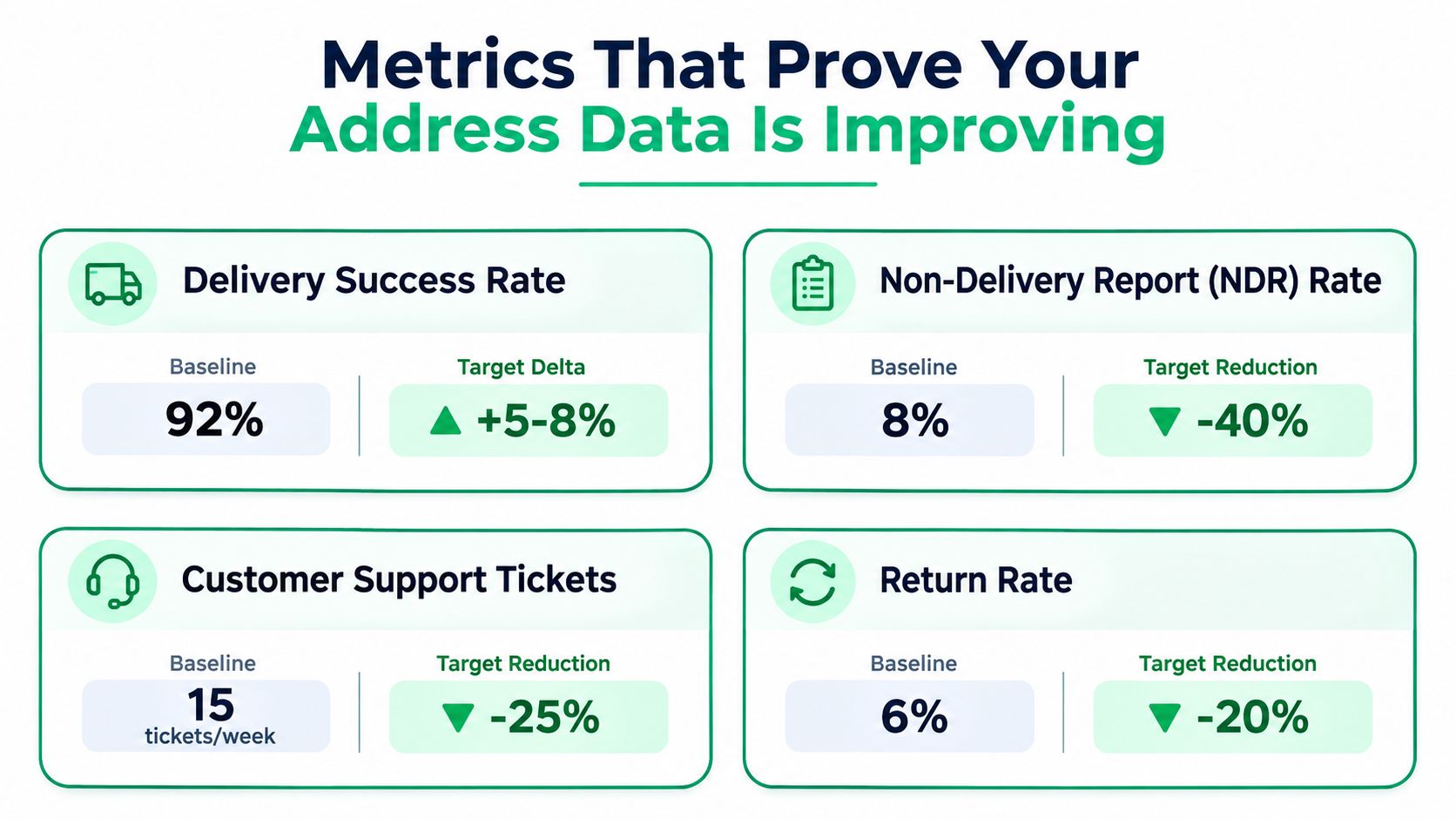
Track delivery and carrier outcomes
Your primary delivery measure is first-attempt delivery success, calculated as parcels delivered on the first attempt divided by total shipped. Pair it with the return-to-sender rate and carrier exception codes that identify address-related failures.
Carrier dashboards usually hold the delivery and exception data. Export it by order or tracking number so operations can separate address issues from weather, customer absence, damage, or other causes.
Connect support activity to orders
Count address-related support tickets and express the result relative to order volume, such as tickets per 1,000 orders. Your helpdesk should tag requests for missing apartment details, incorrect postal codes, destination changes, and carrier address exceptions consistently.
Also track address-edit frequency during the post-purchase window. A higher edit rate isn't automatically bad. It may show that customers have found a useful correction path. The more important question is whether those edits happen early enough to prevent fulfillment problems.
Watch process friction
Useful secondary signals include:
- Validation pass rate: The share of orders accepted without manual intervention.
- Order-to-fulfillment time: Whether address review delays warehouse release.
- Exception resolution time: How long an address issue remains open.
- Manual correction share: How often an agent, rather than the customer, edits the record.
Avoid vanity measures such as total addresses checked. A growing validation count doesn't prove that delivery improved or support workload declined. Tie every dashboard view to a carrier, fulfillment, customer-service, or financial outcome.
Practical Steps to Roll Out Address Standardization
Start with an audit of recent orders. Review address edits, non-delivery reports, carrier exceptions, and support tickets linked to incorrect or incomplete data. Use the findings to decide whether the first intervention belongs at checkout, on the post-purchase order page, or in both places.
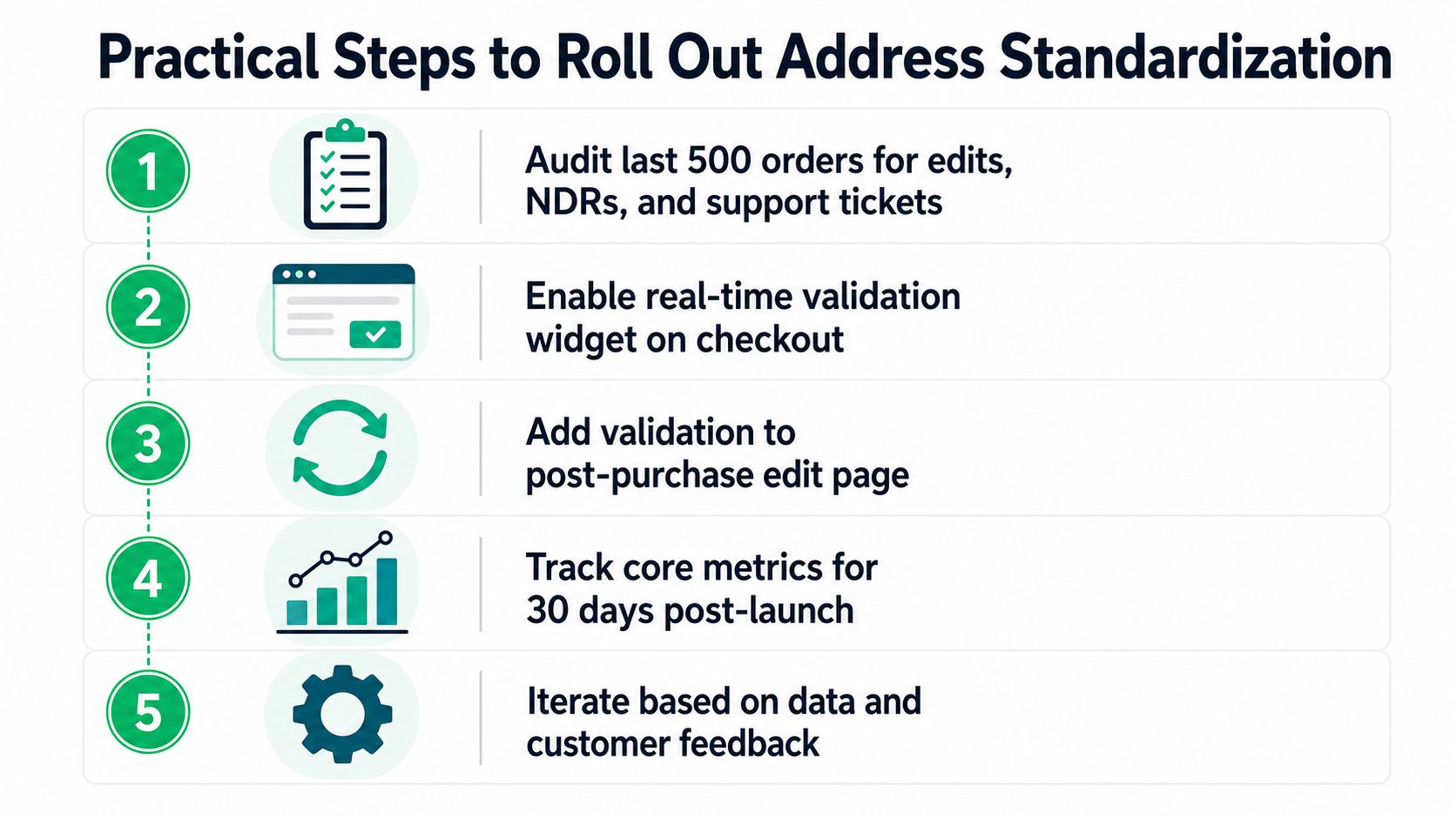
A practical rollout checklist:
- Create a baseline: Record delivery success, address-related tickets, returns, and manual edits before launch.
- Add customer-facing validation: Let shoppers select a structured suggestion during checkout and after purchase.
- Validate at order creation: Use a server-side check so downstream systems don't rely only on browser behavior.
- Review historical records: Flag recurring address patterns and correct them with customer confirmation.
- Audit the workflow: Compare results after implementation, then adjust country rules, permissions, and escalation paths.
Train support agents to confirm the intended destination, update the order, and revalidate before a new label is produced. Don't rewrite an address without verification, don't force cross-border customers into U.S.-only fields, and don't allow edits after the fulfillment cutoff without a clear approval path.
Set a recurring review for address-related exceptions and compare delivery and support results with the pre-launch baseline. The process is working when customers can correct ordinary mistakes themselves, agents receive fewer avoidable requests, and fulfillment gets a destination record that matches the rules of the country receiving the parcel.
SelfServe gives Shopify and Shopify Plus merchants a post-purchase way to let customers edit shipping details with real-time address autocomplete and validation before fulfillment. Visit SelfServe to add guided address correction to your order-status flow and reduce the manual work created by incomplete or mistyped delivery information.