How to Build Customer Satisfaction Surveys for Shopify
Your support inbox is getting louder, repeat purchases have stopped moving, and the Shopify dashboard isn't telling you why. Some customers are waiting on a delayed parcel, others can't update an address, and a smaller group is perfectly happy but receives the same generic post-purchase email as everyone else. Without structured feedback, those customers look identical in your reports.
Satisfaction surveys give you a way to separate operational friction from genuine loyalty. The value doesn't come from collecting another score. It comes from asking one relevant question at the right moment, connecting the response to an order or customer record, and changing what happens next.
What Customer Satisfaction Surveys Do for a Shopify Store
A Shopify store needs feedback that operators can act on. A broad email blast might produce a handful of ratings, but it rarely tells you whether dissatisfaction came from delivery, checkout, product quality, or support. A properly instrumented program turns each response into a usable signal attached to a customer, order, product, fulfillment path, or support interaction.
Three metrics cover most practical use cases:
- CSAT shows whether a customer was satisfied with a specific event, such as receiving an order or resolving a ticket.
- NPS shows relationship-level loyalty and whether a customer is willing to recommend the brand.
- CES shows how much effort a customer needed to complete a task or solve a problem.
Those metrics map to three outcomes Shopify operators care about. Lower support volume comes from identifying difficult self-service, address, return, and delivery processes. Higher repeat purchase potential comes from distinguishing promoters and passive customers from people who need recovery. Stronger AOV comes from showing relevant offers to customers who have already signaled confidence, rather than presenting the same upsell to every shopper.
Build a feedback loop, not a campaign
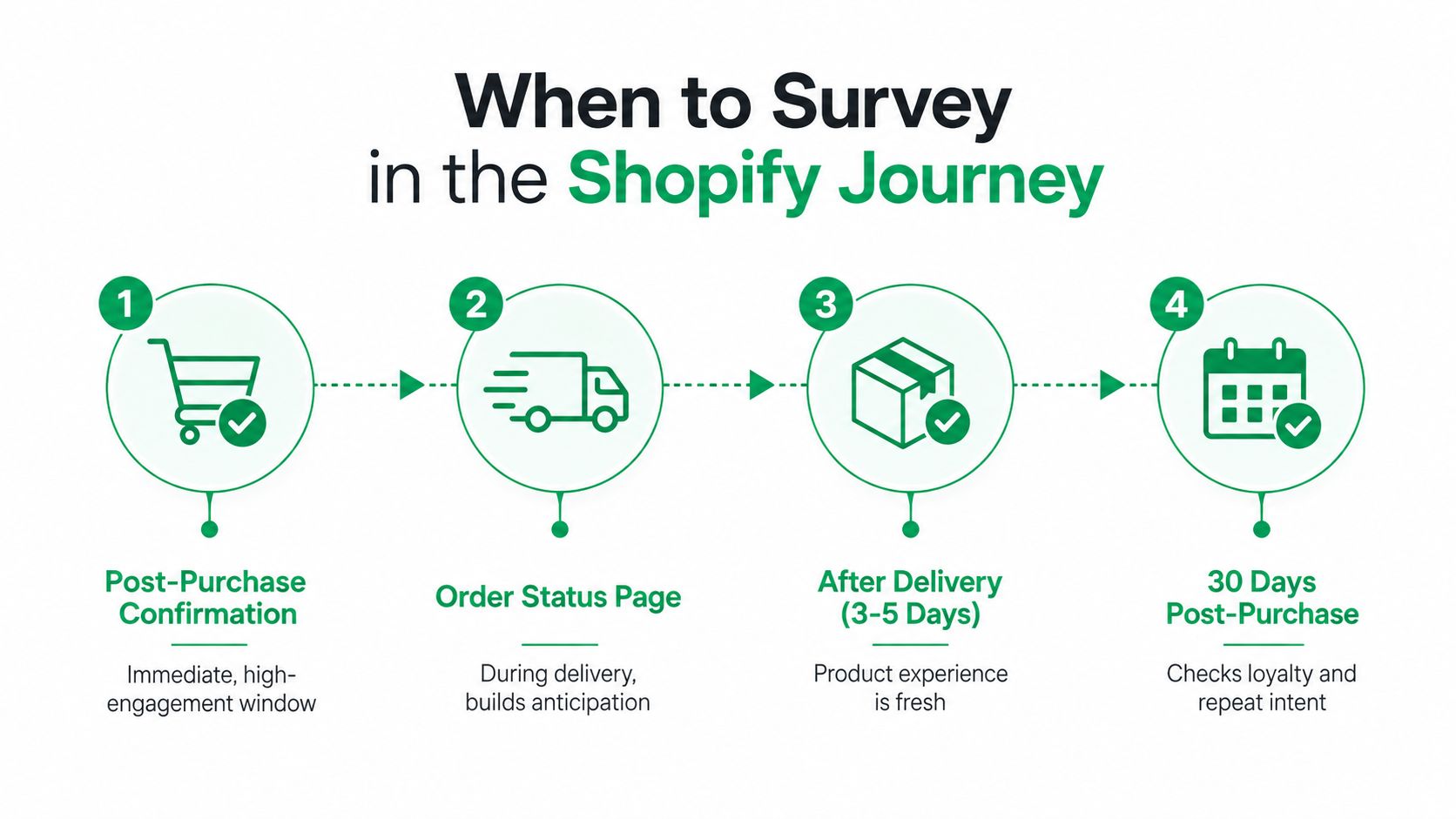
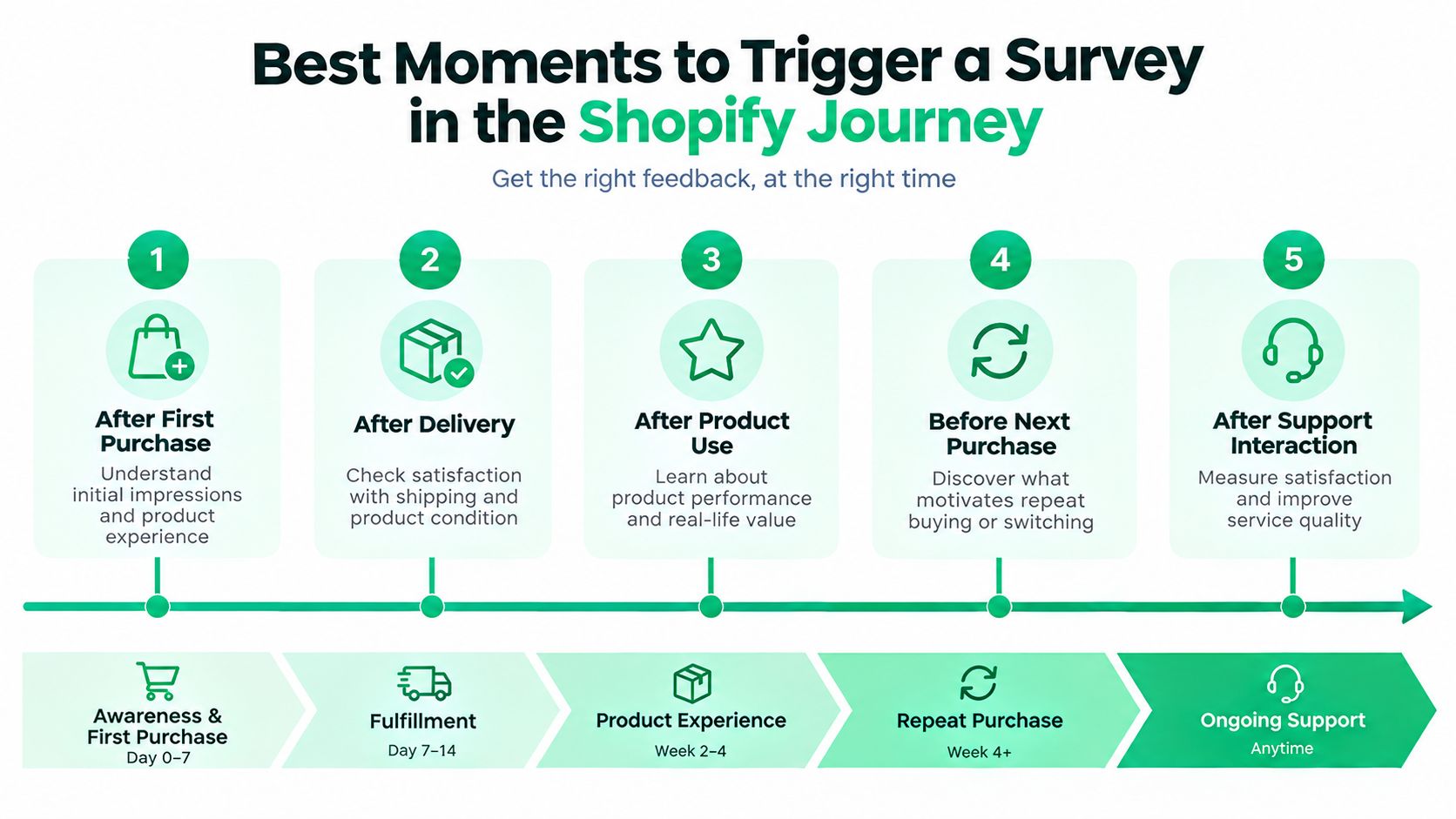
Start with the customer journey. A post-purchase confirmation, order status page, delivered-order message, support-ticket close, and later loyalty check each create a different research opportunity. The question should match the event. Asking whether a customer would recommend your brand immediately after an address correction won't tell you the same thing as asking whether the correction was easy.
Use the response to trigger a next action:
- Record the answer against the customer and order.
- Capture the reason with a short optional text field or selectable driver.
- Tag the record according to the response and the event.
- Route the tag to support, retention, merchandising, or operations.
- Measure the business outcome after the workflow runs.
Practical rule: A survey metric is useful only when somebody owns the action attached to it.
Survey history supports this operational view. In healthcare, standardized satisfaction tracking developed into a formal comparison system through programs such as HCAHPS, which used a standardized 27-question post-discharge survey. The AMA Journal of Ethics history of patient satisfaction measurement describes how standardized measurement made satisfaction comparable across institutions. For Shopify, the lesson is simpler: consistent questions and consistent timing matter more than a one-off score.
Choosing Between CSAT, NPS, and CES
Most stores don't need all three metrics in every message. Each one answers a different management question, and combining them carelessly creates survey fatigue without improving diagnosis.
| Metric | What it measures | Best Shopify moment | Predicts |
|---|---|---|---|
| CSAT | Satisfaction with a specific interaction or outcome | After delivery, support resolution, or an order edit | Immediate experience quality |
| NPS | Relationship-level willingness to recommend | A later post-purchase loyalty check | Advocacy and relationship strength |
| CES | Effort required to complete a task | After self-service, checkout help, returns, or support | Friction and avoidable contact |
CSAT belongs close to the event
Use CSAT when you need to evaluate something concrete. “How satisfied are you with the delivery of your order?” is useful after delivery. “How satisfied are you with the help you received?” belongs after a support conversation. The response can point to a specific team or workflow, which makes CSAT the most practical metric for day-to-day quality control.
CSAT won't tell you whether a customer is loyal to the brand overall. A shopper can be satisfied with one delivery and still be unlikely to buy again, so don't use this score as a substitute for retention analysis.
NPS is a relationship measure
NPS asks, “How likely are you to recommend us to a friend or colleague?” Customers respond on a 0 to 10 scale, then fall into promoters, passives, or detractors based on their score. The SelfServe guide to customer satisfaction metrics provides useful context on treating CSAT as a point-of-transaction measure and connecting survey responses to specific modules or events.
For ecommerce, send NPS after the customer has had enough time to experience the product and service. Use the follow-up answer to learn why the customer chose that rating. NPS is valuable for segmentation, but it becomes a vanity metric if the team only watches the aggregate number and never contacts detractors or develops promoters.
CES finds the work hiding in your ticket queue
CES measures how easy or difficult an experience was. Ask it after a customer edits an address, resolves a delivery issue, completes a return, or gets help from support. A high-effort experience often points to confusing instructions, missing order controls, or a process that forces customers to contact an agent.
If your immediate bottleneck is support volume, choose CES. If it's delivery or support quality, choose CSAT. If it's repeat purchase intent and advocacy, choose NPS. When you need one metric first, pick the one closest to the operational problem you're trying to fix.
Question Templates That Actually Get Responses
A good survey asks one main question and gives the customer a clear reason to answer. Keep the wording tied to a single event, identify the object being rated, and avoid making the customer reconstruct the entire order history.
Copy-ready questions for common Shopify moments
For a delivery experience, use:
“How satisfied are you with the delivery of your order?”
For a product experience after the customer has used the item, ask:
“How satisfied are you with the product you received?”
For support:
“How satisfied are you with the help you received from our support team?”
For a self-service action:
“How easy was it to update your order details?”
For relationship-level feedback:
“How likely are you to recommend [store name] to a friend or colleague?”
The scale should fit the metric. A 1 to 5 CSAT scale is fast and familiar. A 0 to 10 NPS scale is required for the standard NPS calculation. CES can use a simple ease scale, such as very difficult through very easy. Stars work well for visual simplicity, while text labels should remain visible so customers don't have to guess what each end means.
Add one reason question
The score tells you where to look. The reason tells you what to change.
Use a conditional follow-up:
“What is the main reason for your rating?”
Offer practical choices such as delivery reliability, product quality, checkout, returns, communication, address changes, or support. Add an optional field:
“What could we have done better?”
Don't ask “How satisfied are you with the product and delivery?” That's double-barreled. You won't know which part drove the response. Leading questions such as “How much did you love your order?” create pressure to answer positively and weaken the data.
Run a pre-send wording check
- One subject per question: Separate delivery from product quality.
- Plain language: Remove internal terms such as fulfillment exception or post-purchase flow.
- Balanced options: Give positive, neutral, and negative choices.
- Visible labels: Explain the endpoints and any unusual scale.
- Relevant timing: Ask while the experience is still easy to recall.
- Actionable follow-up: Make the reason categories match an owner in your business.
Survey design affects response quality. A meta-analysis of 210 patient satisfaction studies found higher response rates for face-to-face approaches than mail-based approaches, and it also identified question wording, interview mode, and response-scale structure as factors that can shift results. The International Journal for Quality in Health Care review is healthcare-focused, but the design lesson applies directly to ecommerce: the channel and wording influence who answers and how they answer.
Best Moments to Trigger a Survey in the Shopify Journey
Survey timing determines whether the answer reflects a recent interaction or a general impression. Tie each question to an action the customer has just completed, and keep the survey secondary to the transaction.
Post-purchase confirmation
The confirmation page and email already receive attention because customers check order details there. Ask one short CSAT question about the ordering experience, or ask what nearly stopped the purchase if checkout friction is under review. Product quality belongs later, after delivery.
An upsell widget creates another useful checkpoint. If the customer accepts an additional product on the confirmation page, ask whether the offer was relevant, provided the question does not interrupt the purchase flow. Keep the survey beneath the order action, never between the customer and completion.
Order status page
The order status page can capture feedback on tracking clarity and order-detail management. It is also a practical checkpoint for customers who need to correct a shipping address or contact detail before fulfillment.
A post-purchase editing widget can prevent avoidable complaints before they become survey responses. Let customers edit eligible details within a defined window, validate the address, and then ask whether the correction was easy. If the customer could not make the change, route the response to operations. It measures the editing experience, not general brand sentiment.
After delivery
Send a product or delivery CSAT after the parcel arrives and the customer has had a reasonable opportunity to inspect the order. Suppress the message immediately after a known fulfillment delay, or separate carrier feedback from product feedback with a reason field. Otherwise, one poor delivery experience can obscure whether the product and store communication worked well.
Support close and later loyalty check
After a support ticket closes, CES usually produces a more actionable answer than NPS. Ask whether the customer received the needed help and how easy it was to resolve the issue. Send low scores to a human for recovery rather than placing those customers directly into a promotional flow.
Use a later message to measure repeat intent with NPS or a purchase-oriented question. Set the interval around product usage and replenishment behavior instead of applying one schedule to every store. An audience engagement mapping process can document which audience receives each question, through which Shopify touchpoint, and what decision the answer supports.
Response rate and diagnostic depth trade places. Short, event-specific SMS questions can reach more customers, while longer NPS or multi-question flows add context but create more friction. Keep the first question focused, then show an optional reason field only when the answer needs operational follow-up. That structure protects completion while still identifying whether the issue belongs to fulfillment, an upsell offer, order editing, or support.
The best trigger is the moment when Shopify has a clear event and the customer has a reason to pay attention. Confirmation, order editing, delivery, and support closure each provide that context without adding another tool or interrupting the purchase path.
Setting Up Surveys, Tags, and Workflows in Shopify
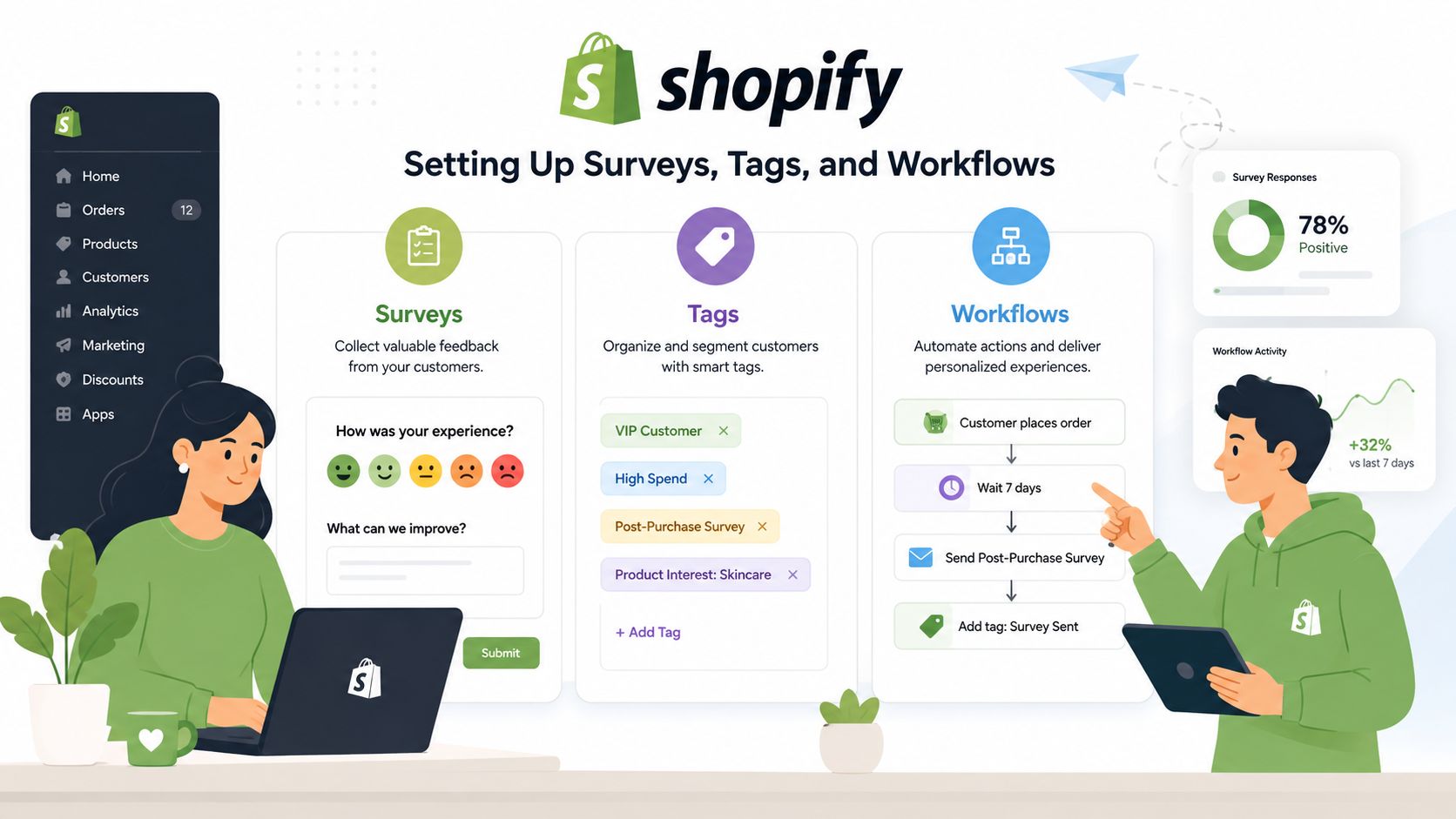
Start with the tool already connected to your customer data. Shopify Email can handle simple post-purchase messages, while Klaviyo or a dedicated survey app can capture responses, branch by answer, and write attributes back to the customer profile. The important setup decision isn't the brand of survey tool. It's whether the answer can trigger a real Shopify workflow.
Connect the response to the right record
Pass the order ID, customer ID, product, fulfillment status, country, and relevant event into the survey link or app. Without that context, a low score becomes a manual research task. With it, the support team can see whether the response followed a late shipment, an address edit, a particular SKU, or a specific carrier route.
Create tags with clear meanings:
- CSAT delivery low: Delivery dissatisfaction requiring operational review.
- CES order edit high effort: Possible self-service or permissions problem.
- NPS promoter: Eligible for advocacy or relevant cross-sell testing.
- NPS detractor: Requires recovery review before promotional messaging.
Use Shopify Flow to apply customer or order tags, add internal notes, and route events into Klaviyo segments. The Shopify Flow app guide is relevant when you need to connect survey outcomes with downstream actions rather than leaving responses in a separate dashboard.
Build recovery before promotion
A detractor shouldn't enter the same automation as a promoter. Create a manual cancellation or recovery queue for responses tied to a possible order problem, especially when the customer has indicated high effort or unresolved friction. Give an agent an approval step before canceling, refunding, replacing, or sending a save offer.
For international stores, deliver the survey and widget in the shopper's language. Keep translated labels short, and test the question, scale, confirmation message, and follow-up options together. A translated headline with untranslated answer choices still creates friction.
Test the workflow, not just the copy
Choose one variable at a time. Split customers by order value, traffic source, shipping country, or product category, then compare the same primary metric and downstream outcomes across variants. Test a shorter question against a longer one, or an order-status-page prompt against an email prompt.
Track CSAT, repeat purchase rate, AOV, response rate, ticket creation, and recovery completion. Don't declare a winner because one variant collected more answers. A survey that produces more responses but no operational change is weaker than a smaller, cleaner signal that reduces avoidable work.
Turning Survey Results Into Revenue and Fewer Tickets
The survey becomes commercially useful when the response changes the customer's next experience. A promoter tag can enable a relevant product recommendation on the Thank You or Order Status page. A detractor tag can start a personal recovery message before the customer opens another ticket. A high-effort score can identify the fulfillment path that creates unnecessary contact.
Use promoter responses carefully. The goal isn't to bombard happy customers with offers. It is to present a curated add-on related to the item they just bought, then compare the result with untargeted traffic using the same measurement window and audience rules. The survey acts as a segmentation layer for AOV, not as a sales message disguised as research.
Revenue test: Don't ask whether a survey “worked.” Ask whether the tagged customer took a profitable next action without increasing support demand.
A detractor workflow needs more discipline. Tag the response, show the reason to the assigned agent, and define the permitted remedy. If the complaint involves an address, delivery, or order change, route it to the relevant queue rather than issuing a generic discount. The revenue analytics guide can help connect these customer signals with order and merchandising performance.
A worked operating pattern
Consider a Shopify Plus brand that receives a low satisfaction response after a difficult order change. The customer also reports high effort. The workflow applies a detractor and high-effort tag, places the order in a manual cancellation queue, and sends the case to an agent for approval.
The agent checks fulfillment status, confirms whether cancellation is still possible, and chooses the correct recovery action. If the order can be edited, the customer gets a clear confirmation. If it cannot, the agent explains the constraint and offers the appropriate resolution. The store then measures whether the customer creates another ticket, accepts a replacement or recovery path, and purchases again.
That pattern protects two forms of value at once. It reduces repeat contacts by fixing the specific source of effort, and it preserves the relationship by making the customer feel heard before a chargeback or public complaint becomes the next event. The score itself is not the outcome. The completed workflow is.
Common Mistakes and a Quick Optimization Checklist
The costliest survey programs measure activity instead of usable insight. They send before the customer has experienced delivery, ask repeatedly, celebrate NPS without assigning an owner, and treat nonresponse as random.
Define the denominator before comparing channels. For email, use successfully delivered messages. For web prompts, count unique users who saw the prompt rather than total site traffic. A distorted denominator can make response performance appear weaker or stronger than it is.
Use this operating checklist
- Match timing to experience: Ask about product quality after delivery, not before.
- Control cadence: Suppress customers who recently answered unless the new event matters operationally.
- Keep the primary question short: Add detail only when the answer will change a workflow.
- Monitor skew: Compare responses by product, country, channel, and customer type.
- Review within a defined window: Assign an owner to each recurring theme.
- Close the loop: Record the change and check whether tickets, repeat orders, or AOV moved afterward.
Start with one event, such as delivery or support close. Connect each response to Shopify tags, then create separate promoter, passive, and detractor paths. Use post-purchase editing and upsell widgets as controlled trigger points: an order-change interaction can prompt feedback about effort, while a Thank You or Order Status offer can ask about satisfaction without adding another tool or interrupting checkout. Test one timing or wording change, review segment results, and expand only when the team can act on the findings.
SelfServe gives Shopify merchants post-purchase editing, address validation, multilingual widgets, order tagging, manual cancellation queues, approval flows, and upsell modules on Thank You and Order Status pages. Use SelfServe to connect feedback with order changes, support recovery, and relevant offers.