How to Choose an Order Management System for Small Business

Orders are coming in from Shopify, maybe Amazon, maybe a retail pop-up too. One customer wants to fix a typo in their address. Another wants to swap a size before fulfillment. Your support inbox fills with “Where is my order?” and “Can I change this?” while someone on the team updates stock in a spreadsheet that was already outdated this morning.
That's the point where growth stops feeling clean.
Most small brands don't hit trouble because demand is weak. They hit trouble because the order flow between checkout and delivery is held together by manual work. One person exports orders. Another copies tracking links. Someone checks warehouse stock in one tab and storefront inventory in another. The business is selling, but operations are improvising.
A good order management system for small business fixes more than fulfillment speed. It gives the business a control layer for what happens after the sale, when customers still need visibility, flexibility, and answers. That post-purchase window is where support costs rise or loyalty deepens. If your OMS strategy ignores that part, you're only solving half the problem.
Growing Pains The Tipping Point for Your Business
A founder I've seen many times in this stage usually says some version of the same thing: “Sales are up, but everything behind the scenes feels worse.”
At first, manual order handling works well enough. You can check Shopify, spot low inventory, send updates by email, and catch the occasional mistake before it becomes expensive. Then volume climbs. Orders come from more than one channel. A warehouse partner enters the picture. Customers expect fast updates and easy changes after checkout.
That's when the cracks show.
What the tipping point looks like
The symptoms are operational, but they show up as customer experience problems:
- Inventory goes out of sync: a product sells on one channel while another channel still shows it as available.
- Orders stall in handoffs: support, ops, and fulfillment all have partial information.
- Post-purchase edits become chaotic: changing an address or updating a shipping method requires manual intervention.
- Tracking communication turns reactive: customers ask first, your team answers later.
None of this means the business is failing. It means the business has outgrown the process.
The spreadsheet usually isn't the real problem. The real problem is that nobody trusts it anymore.
Why this stage is so costly
Small teams feel this most sharply because the same people wear multiple hats. The person answering support may also be releasing orders to a 3PL. The operations lead may also be reconciling stock and reviewing fraud holds. Every avoidable touch adds friction.
A lot of owners start shopping for software at this point and focus only on inventory sync. That matters, but it's too narrow. If your system can capture orders cleanly but can't support edits, reroutes, status visibility, and self-service after purchase, your team still becomes the glue holding the process together.
That's the tipping point. Not when orders increase, but when manual order work starts dictating how the business runs.
What Is an Order Management System Really
An order management system is the air traffic controller of your operation. Orders are the planes. Inventory, fulfillment locations, shipping methods, support requests, and returns are all trying to land at the same time. Without a controller, everything still moves, but the risk of delays, collisions, and bad decisions rises fast.

The real job of an OMS
At a practical level, an OMS centralizes the full order lifecycle. The broader shift in the market came when ecommerce platforms started acting as lightweight order hubs for smaller merchants. For example, Shopify's commerce stack and POS can keep simple inventory in sync across online and in-person sales while capturing orders and tracking fulfillment status in one place, which reflects the move away from spreadsheets toward integrated processing, as described in MRPeasy's review of order management software.
That centralization matters because disconnected tools create hidden rework. A team might have one system for storefront orders, another for shipping, another for returns, and an inbox for every exception. The OMS is supposed to reduce that fragmentation.
Where small businesses get confused
Many merchants hear “OMS” and assume they need enterprise software. Usually they don't. They need a system that can do four things reliably:
- Capture orders from the channels they use
- Keep inventory and fulfillment status accurate
- Route work cleanly between teams and systems
- Support customer communication after checkout
If you sell a specialized catalog with product variants, bundles, or serialized items, inventory structure matters even more. That's why niche operational guides like this jewelry inventory management system can be useful. They show how category-specific complexity affects order flow long before the package ships.
Practical rule: If your team still has to ask, “Which system should I trust for this order?” you don't yet have a real OMS setup.
Why the post-purchase piece belongs here
A lot of buying guides stop at order capture and warehouse routing. In day-to-day operations, that's incomplete. The customer experience after payment is where order data gets tested. Address corrections, item changes, delivery expectations, tracking visibility, returns, and support contacts all depend on whether your order system can act as a reliable control center.
That's why the best order management system for small business isn't just a dashboard. It's an operating layer that keeps the business coordinated after the sale, when errors become expensive and customer patience gets thinner.
Core OMS Features Your Business Cannot Ignore
Feature lists are usually too shallow. They tell you what the software has, not what the feature prevents. The better way to evaluate an OMS is to ask which operational failure each feature removes.
In one 2026 roundup, tools for small businesses included Jotform, QuickBooks Commerce, Zoho Inventory, ShipStation, and OrderMS. That same roundup noted that Jotform offered over 1,800 free order form templates and 36 payment processor integrations, while Zoho Inventory included shipment tracking, purchase orders, back orders, drop shipments, and multi-warehouse management. The point isn't that every business needs those exact tools. The point is that modern OMS expectations now include real-time sync, fulfillment support, and workflow depth, as outlined in Jotform's overview of order management software.
Inventory sync that actually prevents pain
Inventory sync is the first thing most merchants ask about, and for good reason. If stock isn't current across channels, every downstream process breaks.
What works:
- Channel-aware sync: Shopify, marketplaces, POS, and warehouse systems all update from one dependable source.
- Reservation logic: stock gets committed when an order enters a valid state, not after someone checks it manually.
- Location visibility: you can tell what's available at each warehouse or fulfillment node.
What doesn't:
- A system that updates eventually, but not fast enough to avoid overselling.
- An order inbox that shows sales but doesn't control allocation.
- Inventory tools that don't reflect post-purchase edits or cancellations cleanly.
If you're tightening this part of the stack, this guide on an inventory management app for small business is a useful companion because it focuses on the inventory layer that supports order flow.
Fulfillment automation that reduces handoffs
A healthy OMS should move orders from paid to fulfilled with fewer human decisions. That includes routing, shipping status updates, and exception handling.
Look for:
- Multi-warehouse support
- Shipment tracking
- Back order handling
- Drop ship support when relevant
- Return workflows that don't live in email
These aren't “nice to have” once volume rises. They determine whether your ops team works from rules or from memory.
Customer communication and finance handoff
Post-purchase communication gets dismissed as a support function, but it's an operations function too. A customer who can see status clearly is less likely to contact support. A customer who can't gets your team involved in work the system should handle.
You also need the OMS to sit cleanly next to accounting and billing workflows. Orders, refunds, partial captures, and adjustments affect financial reconciliation. If you want a stronger view of that side, you can discover renn billing software insights for a practical look at how billing workflows connect to the broader back office.
Good OMS design removes avoidable questions before the customer asks them.
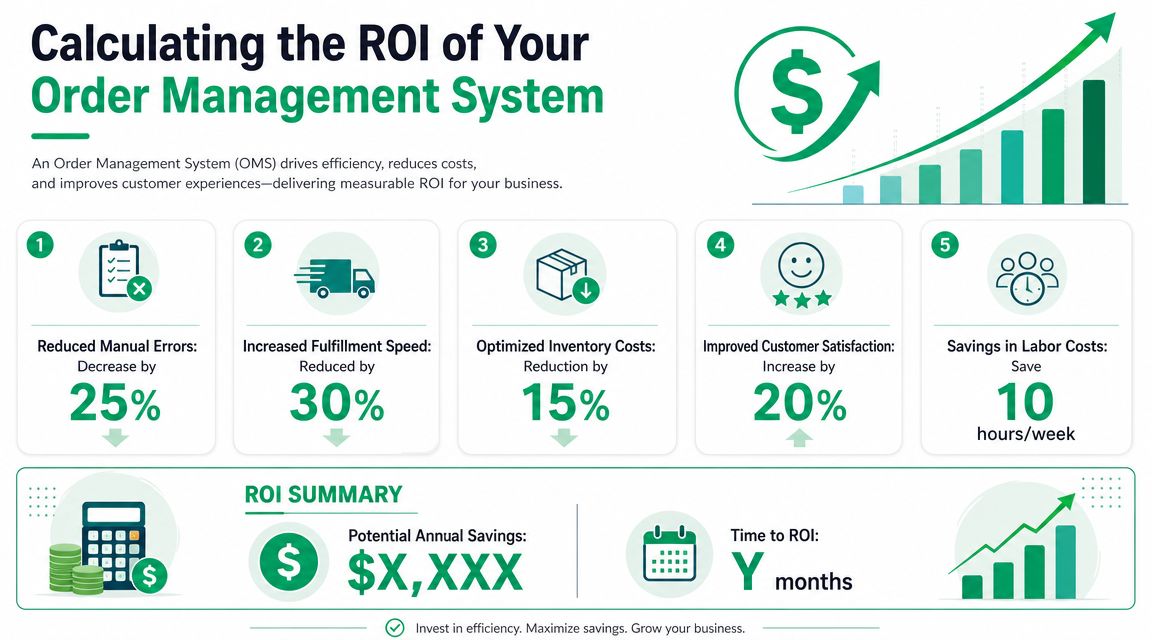
Calculating the ROI of Your Order Management System
Most merchants make the ROI case too vaguely. “We'll be more efficient” doesn't help when you're deciding whether to add software, change workflows, and train a team.
A better approach is to split ROI into two buckets: labor removed and revenue protected or expanded.
Start with labor removed
Manual work is the easiest place to find value. Track the tasks your team repeats every day:
- Order review: checking tags, payment state, and fulfillment readiness
- Inventory correction: fixing mismatches between channels
- Tracking replies: answering status questions that automation should handle
- Post-purchase changes: editing addresses, holds, or notes manually
- Returns coordination: translating customer requests into warehouse actions
Estimate hours saved weekly. Then compare that against subscription cost, onboarding effort, and any integration work. You don't need fake precision. You need honest operational visibility.
For a broader look at how merchants approach this category, this breakdown of ecommerce order management software is helpful when mapping software capability to actual workflow savings.
Then measure revenue protection
The second bucket matters just as much. A better OMS can protect revenue when it reduces oversells, catches routing mistakes earlier, and keeps post-purchase friction from pushing customers away.
In practical terms, ROI often shows up as:
- fewer canceled orders caused by preventable errors
- faster fulfillment decisions
- cleaner handoff to warehouse teams
- more confidence offering flexible post-purchase options
This video gives a useful visual explanation of how operators think about the order flow and where system value shows up:
A simple ROI framework
Use a basic model:
| ROI area | What to measure | What good looks like |
|---|---|---|
| Labor | Hours spent on manual order tasks | Fewer repetitive touches |
| Accuracy | Frequency of order corrections | Less rework across support and ops |
| Fulfillment | Time from order to release | More orders moving without intervention |
| Support | Volume of post-purchase questions | Customers finding answers on their own |
| Retention | Repeat purchase confidence | Fewer frustrating delivery experiences |
The strongest ROI cases usually come from one simple truth. When your team stops babysitting orders, they can work on exceptions that need judgment.
Your Actionable Buyer's Checklist
Buying an OMS without mapping your current mess is how teams end up with expensive software and the same old manual work. The shortlist should come after the audit, not before it.
Step one is to audit the order journey
Follow a single order from checkout to delivery. Then follow a return, an address change, and a cancellation request. Most merchants discover the same issue: the “main system” isn't where the actual work happens. This actual work lives in Slack threads, inboxes, warehouse notes, and admin-side fixes.
Document:
- Where orders enter
- Who approves or reviews them
- Where stock gets validated
- How fulfillment location is chosen
- What happens when a customer wants a change after purchase
That last point matters more than most vendor demos suggest.
Step two is to define non-negotiables
You don't need every feature. You need the right constraints. For many Shopify merchants, the actual essential requirements are things like 3PL compatibility, usable automation, role permissions, and the ability to handle exceptions without developer involvement.
One overlooked area is international readiness. Existing sources often mention dashboards and sync, but they don't go deep on multilingual workflows or address handling across countries. That gap matters because address quality causes real delivery problems, and cross-border merchants need localized capture and workflow support, as explained in Goods Order Inventory's discussion of order management software for small business.
Step three is to interrogate the demo
Don't ask vendors to “show the platform.” Ask them to walk through your ugly scenarios.
| Evaluation Area | Key Questions to Ask | Why It Matters |
|---|---|---|
| Order exceptions | How do you handle address changes, item swaps, and holds after checkout? | Exceptions reveal whether the system reduces support work or creates more of it |
| Inventory logic | When is stock reserved, adjusted, and released? | Prevents overselling and confusion across channels |
| Fulfillment routing | Can the system choose between locations based on rules? | Routing affects speed, cost, and manual work |
| International support | How do you handle multilingual workflows and address normalization across countries? | Cross-border operations break when local formats are forced into generic forms |
| Team permissions | What can support edit without risking fulfillment errors? | Protects operations while enabling customer service |
| Reporting | Can I see where orders get stuck? | You need visibility into bottlenecks, not just order counts |
Ask for the hard workflows first. Every system looks good on the happy path.
Step four is to test future fit
A lightweight system can be the right choice now. But make sure it won't collapse when you add channels, warehouses, or more post-purchase flexibility. Scalability isn't just volume. It's the ability to support more operational nuance without rebuilding the stack.
A Simple Implementation Roadmap for Shopify Merchants
Implementation usually fails when merchants treat it like an app install instead of an operating change. Shopify makes it easier to connect tools, but the value comes from workflow design.

Phase one is clean setup
Start with the data and the rules.
That means checking SKUs, fulfillment locations, order tags, shipping methods, and customer notification triggers before you automate anything. If the underlying catalog or routing logic is messy, the OMS will just scale the mess.
A useful starting point is reviewing the range of order management apps so you can separate checkout widgets, shipping tools, and true OMS layers before you configure your stack.
Phase two is fulfillment control
An OMS's operational meaning stems from its capabilities. Microsoft describes an OMS as software that automates tracking sales, orders, inventory, and fulfillment, and says it should provide a consolidated inventory view, route orders to the next suitable warehouse, and select the best shipping options. This control layer is particularly beneficial for Shopify merchants, as it validates stock, reserves it, and routes each order without manual allocation. That's what makes same-day edits, re-routing, and post-purchase changes possible without constant rework, as outlined in Microsoft's OMS explanation.
Translate that into setup tasks:
- Create routing rules based on inventory, region, and shipping constraints
- Define order states so support and ops know when changes are still safe
- Connect carrier and warehouse data so tracking and fulfillment status stay visible
Phase three is post-purchase enablement
This is the part too many teams skip.
A modern Shopify setup should support controlled flexibility after checkout. Customers want to correct addresses, update contact details, check status, and sometimes add to an order. If every one of those actions requires a ticket, the OMS isn't doing enough.
Focus on:
- Editable windows for safe changes before fulfillment locks
- Permission logic so support can act without breaking warehouse flow
- Localized customer experience if you sell in multiple markets
- Clear event triggers for notifications when something changes
The post-purchase experience should run on rules, not goodwill from your support team.
Phase four is live monitoring
Once the system is live, watch exceptions, not just throughput. Look for where orders still need manual touches, where customers still contact support, and where warehouse teams override the system.
That feedback tells you whether the OMS is acting like a real control layer or just a prettier dashboard.
Common Pitfalls to Avoid and Your Next Steps
The most common OMS mistake isn't buying the wrong software. It's expecting software to fix a process nobody has defined.
Pitfall one is buying too much system
Small teams often choose a platform built for complexity they don't have yet. The result is slow adoption, confusing permissions, and workarounds that put everyone back in spreadsheets.
The better move is to buy for your next stage, not your fantasy org chart.
Pitfall two is ignoring post-purchase reality
A lot of merchants pick tools based on order import, inventory sync, and shipping labels alone. Then support gets buried in address edits, change requests, and order-status questions because the customer experience after checkout wasn't part of the decision.
If the system can't reduce those touches, it won't feel like a win internally.
Pitfall three is weak team training
Ops knows one part of the flow. Support knows another. Warehouse partners know a third. If each group understands only its own screen, exceptions pile up fast.
Train people on the full lifecycle, especially what they can change, when they can change it, and when an order should be escalated.
Pitfall four is trusting the happy path
Every demo handles the clean scenario well. Real operations live in edge cases. Split shipments, back orders, bad addresses, order merges, fraud review, and last-minute customer changes are where systems prove themselves.
Test those before launch. Not after.
Two next steps usually create momentum fast:
- Audit one week of order exceptions and count how many required manual intervention.
- Book one serious demo with a Shopify-friendly OMS and ask them to show your hardest post-purchase workflows, not their homepage features.
An order management system for small business should do more than keep orders organized. It should reduce avoidable support work, protect fulfillment accuracy, and give customers a smoother experience after they buy.
If your Shopify team wants to reduce support workload while giving customers controlled post-purchase flexibility, SelfServe is worth a look. It helps merchants enable customer self-service for order edits, supports multilingual experiences, validates addresses in real time, and adds post-purchase upsell options without giving up operational control.