What Is Post Purchase Upsell? 2026 Guide
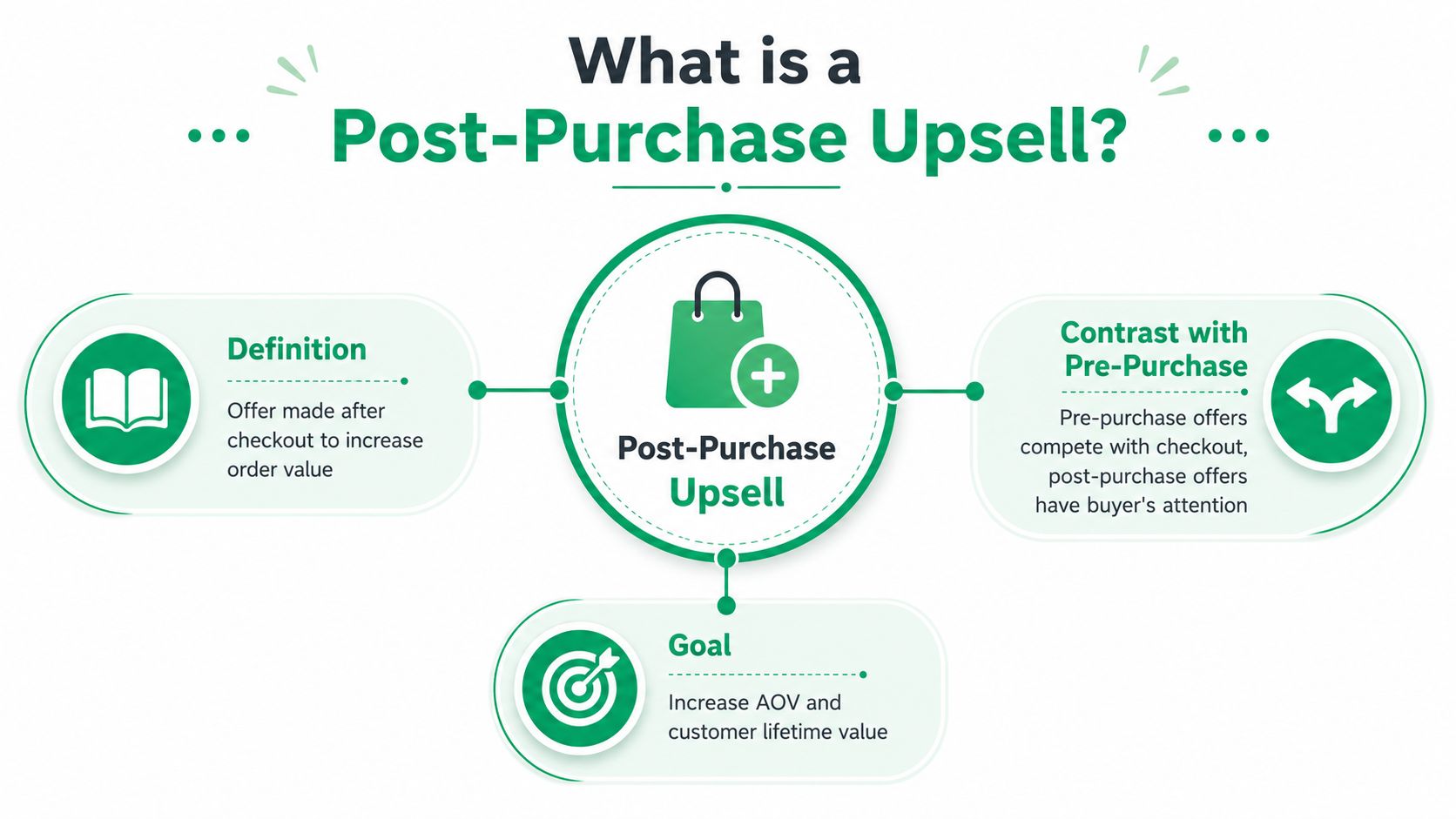
A post-purchase upsell is an offer shown after checkout, when the buyer has already paid and can accept with one click. In practice, that offer typically converts at 3%–8%, with well-optimized flows reaching 10%–15% or higher in some cases.
If you've ever watched a customer place an order, land on the confirmation page, and then disappear before you had a chance to increase basket size, you already know why timing changes everything. After payment clears, the conversation is no longer about persuading someone to buy, it's about adding the right thing without breaking momentum.
What a Post-Purchase Upsell Actually Is
A customer checks out, sees the order confirmation, and gets one more relevant offer before they move on with their day. That's the cleanest way to think about what is post purchase upsell in real e-commerce terms. It's not a pop-up interrupting a cart, and it's not a product card competing with the checkout button.
The distinction matters because the buyer is already committed. A post-purchase offer comes after the original transaction, usually on the thank-you page or order confirmation page, when abandonment risk on the first order is already gone. Industry guidance treats that timing as strategically different from pre-purchase or cart upsells, because the merchant is monetizing an existing buyer without paying acquisition cost again, which is why this channel is usually framed as an AOV lift play rather than a demand-gen play. The benchmark range in the brief is 3%–8% on average, with 10%–15% or higher when the offer is well optimized. That's why a small conversion rate can still matter.
Why the buyer's state changes the game
Pre-purchase offers ask for attention before trust is secured. Post-purchase offers work after the main decision has been made, so the buyer is evaluating relevance instead of deciding whether to buy at all. That's why a useful offer can feel like help, while a rushed offer feels like clutter.
For practical idea generation, Quikly's roundup of worthwhile post-purchase upsell ideas is a solid place to compare offer shapes before you build anything.
Practical rule: if the offer would feel too aggressive before checkout, it usually still feels too aggressive after checkout unless it's tightly tied to the original purchase.
How the Offer Flow Actually Works
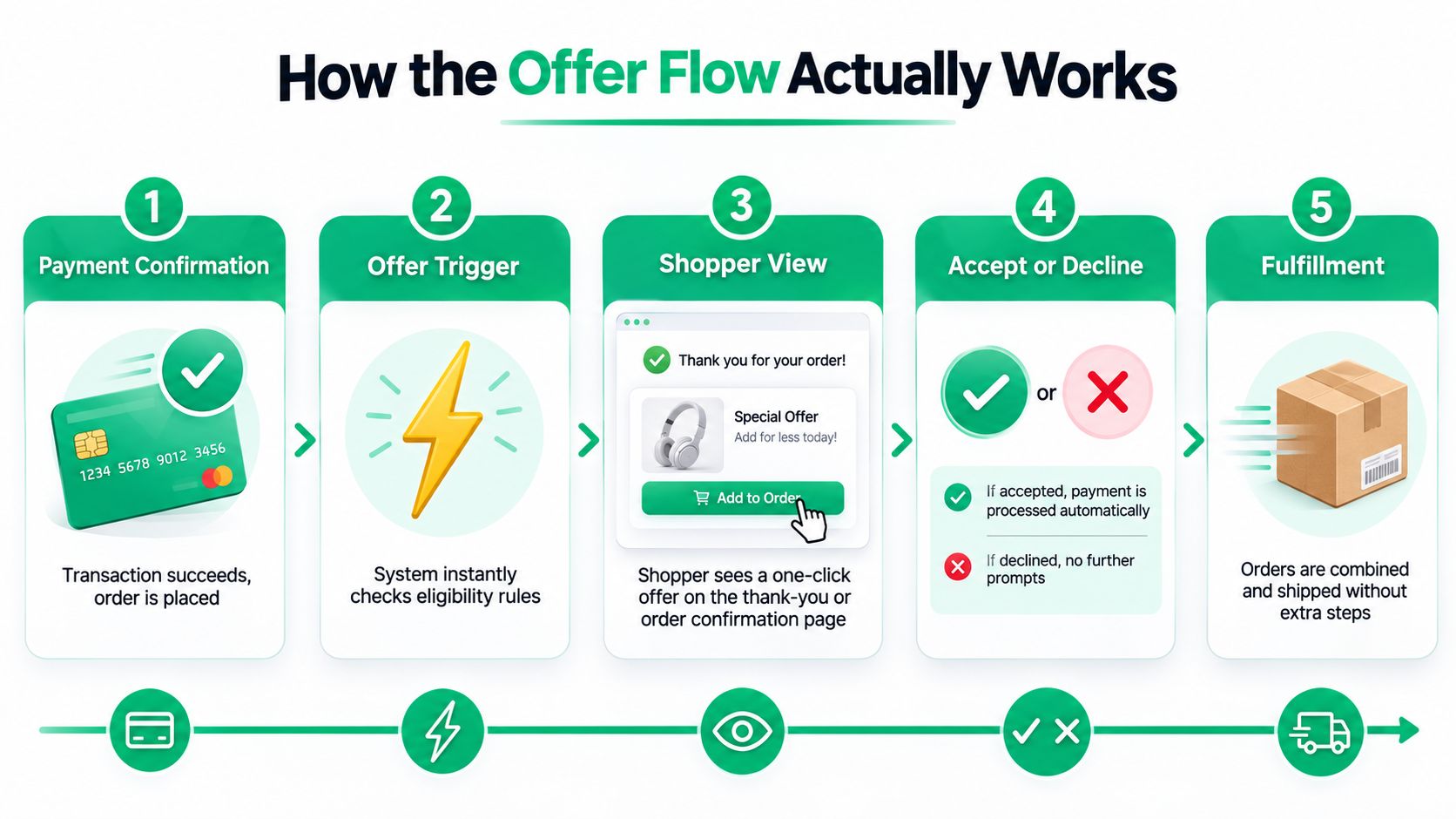
A post-purchase upsell lives or dies on sequence. The merchant confirms payment, the system checks whether the order qualifies, the shopper sees a single add-on offer, and an acceptance updates the order before the thank-you experience fully settles. Shopify's UX guidance for post-purchase offers is built around preserving purchase momentum and making acceptance frictionless, which is the entire point of the flow (Shopify's UX guidance for post-purchase product offers).
The best flows are almost boring in the right way. The shopper doesn't re-enter shipping or payment details, which is the part that keeps the interaction from feeling like a second checkout. Industry guidance also notes that post-purchase offers can happen before the thank-you page renders, which is a small technical detail with big operational consequences because the accepted item isn't just a revenue event, it can alter the final order state.
The handoff points that matter
The first handoff is payment confirmation. If the transaction fails, there is no upsell moment. The second is eligibility logic, which decides whether the shopper should see a specific offer at all.
The third is the acceptance moment. If the add-on is accepted, the platform processes it automatically and folds it into the order. If it's declined, the smartest systems get out of the way and let the shopper continue.
The fourth is fulfillment logic. Once the order changes, ops has to know whether the add-on affects shipping groups, packaging, taxes, or cancellation handling. A flow that looks smooth on screen can still create headaches downstream if the business has not mapped the order-state side effects.
The Business Case and the KPIs That Matter
The cleanest way to judge a post-purchase upsell is by three numbers, take rate, AOV lift, and the revenue generated per buyer. Industry benchmark reporting in the brief says well-targeted offers often see 8%–15% acceptance rates and can raise average order value by 10%–20% (Parah Group benchmark summary). Another Shopify merchant analysis reports a 4.7% average one-click post-purchase take rate across 40,000+ merchants, a 5.6% AOV uplift, and 28.3% conversion among the top 5% of offers. Those numbers are useful because they show the baseline is often modest, but still commercially meaningful.
That's also why the metric conversation has to be honest. A flow with a lower take rate can still outperform a flashier one if the offer is relevant, the margin is healthy, and the traffic base is large enough. If you're evaluating the channel through a ROAS lens, UFO Performance Marketing's ROAS insights are a useful reminder that return metrics only make sense when you know what incremental revenue cost to earn. Post-purchase is different because the buyer is already on the ledger.
Operational lens: a good upsell is not the one with the prettiest CTR. It's the one that adds measurable revenue without creating support work that erases the gain.
| KPI | How It Is Calculated | Typical Range |
|---|---|---|
| Take Rate | Accepted offers divided by offers shown | 3%–8% average, 10%–15% or higher when optimized, with benchmark examples at 8%–15% |
| AOV Lift | Average order value with upsell minus baseline AOV | 5.6% in one merchant benchmark, 10%–20% in another summary |
| Incremental Revenue per Buyer | Value added from accepted offers across buyers | Depends on traffic, relevance, and offer price |
For a deeper comparison of conversion benchmarks, the internal guide on upsell conversion rates is worth reading alongside your own order data.
Common Offer Types and What They Look Like in Practice
A post-purchase upsell works best when the offer feels like the natural next decision, not a random extra ask. The actual mechanics are simple, but the merchant logic behind each offer type is different.
The add-on that completes the order
A shopper buys skincare, and the upsell presents a matching cleanser, travel size, or refill. In food, beverage, or other repeat categories, the same pattern often becomes a reorder convenience play. The buyer gets a clean yes-or-no choice, and the merchant captures more value from the same order intent.
The protection plan that reduces hesitation
For electronics, furniture, and other higher-consideration goods, protection plans often make more sense than another product. The buyer is already mentally in ownership mode, so a warranty or coverage add-on can feel like risk reduction rather than upselling. That's why these offers tend to fit durable goods better than fast consumables.
The subscription or reorder convenience offer
Some stores use the post-purchase moment to convert a single order into a recurring relationship. That can work well when the product is naturally replenishable, but it should be handled carefully because the commitment is different from a one-time add-on. The merchant gains predictability, while the buyer gets convenience, but only if the cadence matches actual usage.
Each of these patterns solves a different job. The bundle-style add-on is about completion, the protection plan is about confidence, and the subscription offer is about continuity. If the product and the offer shape don't match, the page can still look polished and still underperform.
Best Practices and Common Pitfalls
Many teams talk about creative first and process second. That usually produces a nice-looking page and a messy backend.
The strongest guidance in the brief cuts against the usual “more offers is better” mindset. One industry guide says close-to-cart offers convert 3–5x better than generic ones, which means relevance and timing beat volume when the buyer is already in motion (Zipify's general guidance). More broadly, the post-purchase offer should feel specific to the order that just happened, not like a warehouse sale dressed up as personalization.
What actually works
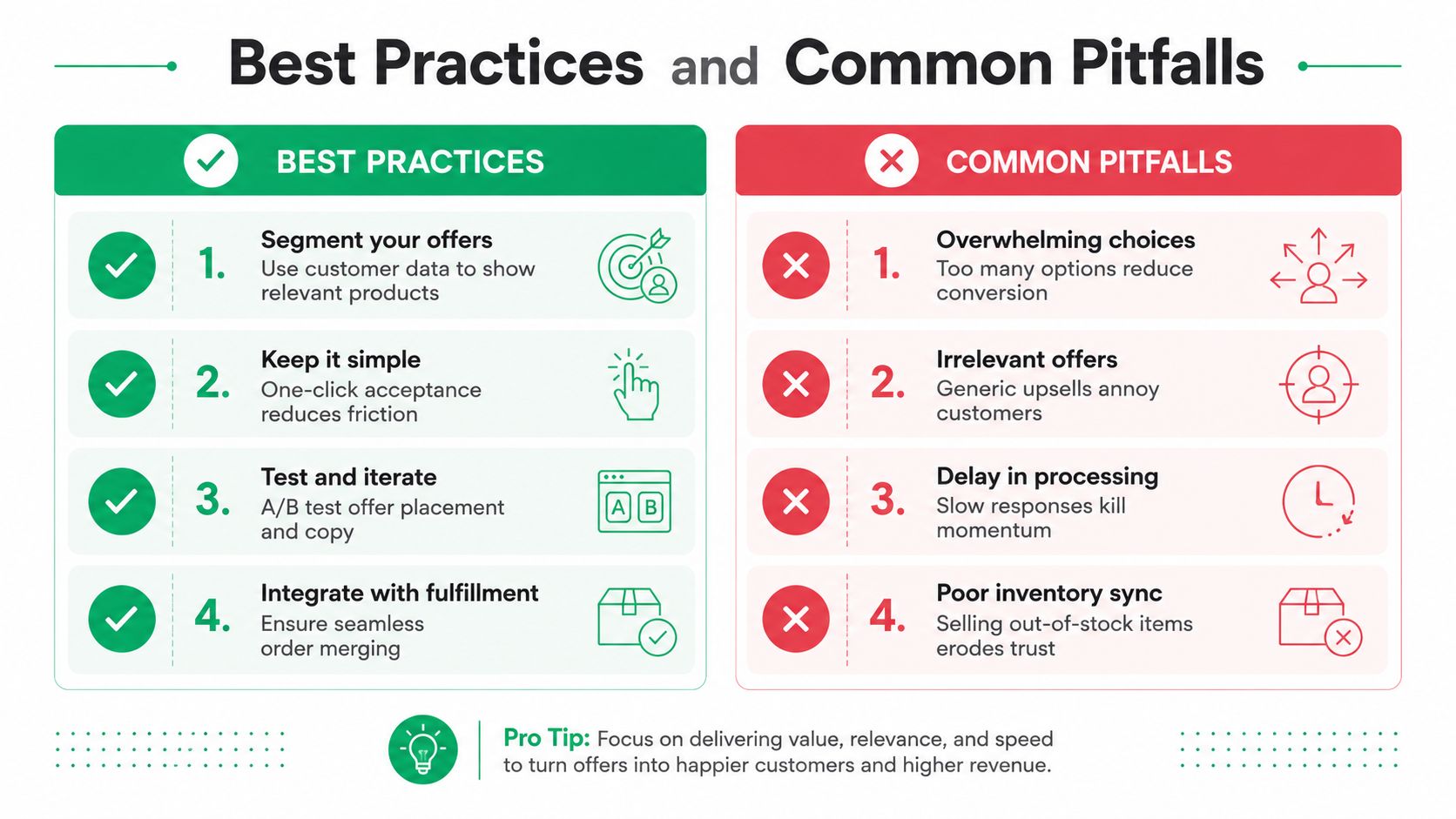
Segment your offers. Use what the buyer just purchased, not a generic catalog.
Keep it simple. One relevant choice beats three decent ones because the customer is still in a checkout mindset.
Integrate with fulfillment. If the accepted add-on changes packaging, tax treatment, or cancellation handling, ops needs a defined path.
Test placement carefully. Timing can change how the offer feels on mobile and how it lands in analytics.
Where teams usually trip
Overwhelming choices lower acceptance because they force the shopper back into decision mode. Irrelevant offers make the brand look inattentive. Delay in processing kills momentum. Poor inventory sync creates trust issues when an offer is accepted but stock isn't there.
If the accepted upsell creates a manual exception every time, the flow isn't optimized, it's outsourced to your support team.
The operational trap is the hidden one. Accepted post-purchase offers can affect fulfillment, inventory, tax, and cancellation logic, so the backend has to be thought through before launch, not after the first support ticket lands.
Beyond the Thank-You Page and the Omnichannel Upsell Surface
The thank-you page is useful, but treating it as the only post-purchase surface leaves money on the table. Modern post-purchase strategy stretches across order notifications, tracking pages, email, WhatsApp, SMS, and return flows, which turns the upsell from a single-page tactic into a lifecycle workflow (Outvio's post-purchase upsell optimization guide).
That shift matters because each surface signals a different kind of intent. The thank-you page catches the immediate post-checkout moment, while an order status page or shipment tracking page reaches a customer who has already moved into anticipation mode. A delivery follow-up can support a different offer entirely, especially if the product naturally pairs with a second item.
Sequencing without burning goodwill
The cleanest sequence is usually not “ask everywhere.” It's “ask where the context fits.” A customer who just placed an order may accept a simple add-on, while a customer checking delivery status may be more open to a complementary product that deepens the original purchase.
If you're designing those surfaces, the internal guide on thank-you page design is a useful companion because the first screen still sets the tone for everything that follows. The more fragmented the channel mix gets, the more important unified tagging and order tracking become.
The revenue opportunity is bigger when the upsell follows the customer journey instead of freezing at the thank-you page.
Implementation Options on Shopify and Where SelfServe Fits
On Shopify, the choice is not whether to do post-purchase upsells. It's how much control you need after the offer is accepted.
Native Shopify Checkout Extensibility is a good fit when the scope is narrow and the main goal is a simple post-checkout offer inside the platform's framework. Third-party upsell apps usually focus harder on revenue, with less attention to what happens after the accept button gets clicked. Then there are tools that combine upsells with order editing, which matters when the same customer might also need to adjust shipping details or correct an order before fulfillment.
One useful benchmark when you're evaluating the broader app stack is Yassine Malti's roundup of Shopify automation and SEO apps, since upsell tools rarely live in isolation. The more orders, locales, and fulfillment rules you have, the more integration and tagging start to matter.
A practical decision framework
If you only need a minimal offer, native tooling can be enough. If the only goal is incremental revenue, a pure upsell app may be the leanest path. If you need upsells plus editable order workflows, multilingual behavior, and downstream coordination with 3PL or ERP systems, a combined workflow tool makes more sense.
SelfServe is one option in that category. It adds post-purchase upsell blocks on the Thank You and Order Status pages and pairs them with order editing controls, automated tagging, multilingual behavior, and higher-tier integrations, so the upsell lives inside a broader post-purchase operations flow rather than sitting off to the side. For a buyer, that means one experience. For the merchant, it means fewer handoffs.
The related internal guide on best Shopify apps can help if you're comparing the broader stack rather than only the upsell layer.
Measuring Post-Purchase Upsell Performance and Next Steps
A launch without measurement turns into a guess fast. The first week after rollout should focus on whether the offer is being shown to the right orders, whether buyers are accepting it, and whether the backend is handling accepted orders cleanly.
Start with offer-level take rate, not just total revenue. Then segment AOV lift by traffic source so you can see whether paid, organic, returning, or email-acquired buyers behave differently. Tag accepted upsells on the order itself, because downstream cohort analysis is the only way to connect the upsell to later behavior without hand-waving.
A simple launch checklist
Define one offer. Start with the single product or add-on that has the clearest fit.
Set one KPI. Pick take rate or AOV lift as the primary success measure.
Ship on one surface. Launch on the thank-you page before expanding into tracking pages or messaging channels.
Watch support volume. If tickets rise, the flow may be creating hidden friction.
Check order state changes. Confirm that fulfillment, tax, and cancellation paths still behave correctly.
You do not need a sprawling upsell system on day one. You need one relevant offer, one reliable surface, and one clean measurement path. Once that is stable, expansion into additional surfaces and more nuanced offers becomes much easier to manage.
If you want a post-purchase flow that does more than add revenue, SelfServe is built to combine upsells with order editing, multilingual customer experiences, and controlled post-purchase workflows on Shopify. Visit SelfServe to see how the same post-checkout moment can reduce support work and add incremental order value without turning the experience into a second checkout.