Customer Journey Personalization for Shopify Plus
Most advice about customer journey personalization stops at the cart. That's the problem. For high-volume Shopify Plus brands, the operational advantage usually shows up after checkout, when customers need to edit an address, fix an order, understand shipping, or handle a problem without waiting on support.
That matters because customers don't mentally “finish” at purchase. McKinsey's widely cited benchmark says 71% of consumers expect personalized interactions and 76% get frustrated when they don't get them, which makes personalization a baseline expectation, not a nice extra (McKinsey benchmark summary). On a busy storefront, the post-purchase phase is where generic flows create the most avoidable friction, and where well-designed self-service can cut work from support while keeping revenue in play.
Why Most Personalization Programs Stop Too Early
Most ecommerce teams still treat personalization like a merchandising layer. They tune homepage modules, swap in product recommendations, and send cart abandonment emails, then call it done. That's a narrow view of the customer journey, and it leaves the highest-friction moments untouched.
The hard truth is that the expensive tickets often begin after the order is placed. Address corrections, shipping updates, item swaps, and order changes all trigger support contacts when merchants don't give customers a controlled way to do the work themselves. A personalization program that stops at checkout is really a pre-purchase campaign program with better targeting.
The post-purchase gap is where operations get involved
The strongest ecommerce operators I've worked with don't frame personalization as a marketing trick. They treat it as a service layer that carries context forward, so a customer who just bought can still get relevant next steps, relevant offers, and relevant self-service options. That shift changes the workload for support, fulfillment, and retention teams at the same time.
Practical rule: if a customer can safely complete a task without an agent, personalize the path and let them do it.
That's why the neglected post-purchase phase deserves more attention than another recommendation widget. It includes order edits, shipping changes, service recovery, and follow-on offers that are directly tied to operational cost and repeat revenue. For a deeper framework on where customer journey optimization usually breaks down, this customer journey optimization guide is a useful companion.
The Business Case for Full-Lifecycle Personalization
The business case gets clearer once personalization is treated as operating infrastructure, not as a creative layer. Contentful reports that the customer experience and personalization software industry is projected to reach $11.6 billion by 2026, up from $7.6 billion in 2021, and says marketers are allocating about 40% of their budgets to personalization, nearly double the 22% allocated in 2023 (Contentful personalization statistics). That spending pattern shows where leadership teams are placing real budget pressure.
The commercial logic is even sharper on the revenue side. McKinsey found that fast-growing companies generate 40% more revenue from personalization than slower-growing competitors, and the same data set says 71% of consumers expect personalized interactions while 76% get frustrated when they do not get them (McKinsey on personalization). Only 24% of firms effectively invest in omnichannel personalization, so the gap is execution, not intent.
Why the budget follows the customer, not the channel
A full-lifecycle view changes how merchants justify spend inside the business. Instead of defending a homepage module by click-through rate alone, leaders can ask whether personalization reduces avoidable support work, improves order completion, and makes post-purchase communication more useful. For Shopify Plus merchants, that matters because every extra ticket, manual edit, and follow-up email sits against the same headcount and tooling budget.
It also changes where the return shows up. The highest-ROI work is often post-purchase, where customers need order edits, shipping updates, multilingual self-service, and recovery flows that prevent a support contact before it starts. That is the part many teams underinvest in, because the attribution is less flashy than a recommendation engine but the operational savings are easier to feel in the queue.
For brands looking at broader planning, this full-funnel strategy for Amazon brands is a useful reference point because it makes the same structural case, growth comes from coordinating stages, not optimizing one surface in isolation.
Personalization earns budget when it removes friction that operations teams already pay for.
That is the leadership takeaway. Merchants do not need a prettier journey map. They need a personalization system that lowers support load, preserves context across touchpoints, and creates more chances to recover revenue after the sale.
Data Sources and Architecture for Real-Time Personalization
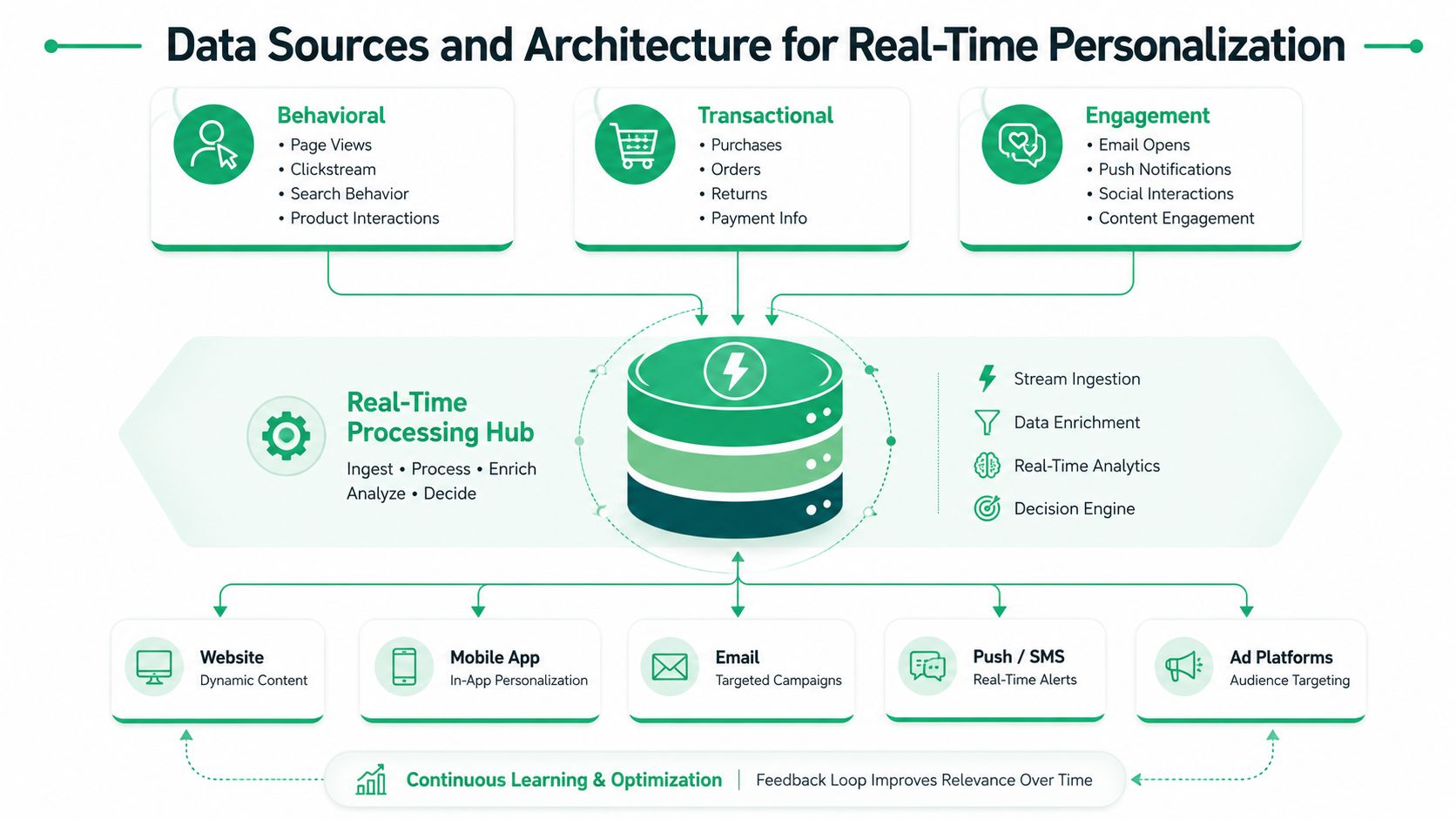
Real-time personalization only works when the inputs are fresh enough to change the next step. The source material from Voxwise on real-time personalization architecture describes a setup built around live behavioral, transactional, and engagement data, and that is the right standard for high-volume Shopify merchants. If the data lands in batches, the experience is already behind the customer's intent.
What data deserves priority
The strongest signals usually show intent, not identity. Repeated visits to high-friction pages, product-page dwell time, abandoned carts, prior purchase patterns, and support interactions tell you more than static demographics because they show what the customer is trying to do right now (Calis Beauty Supply on data-driven personalization). In practice, that means the stack should capture page-level behavior, order events, email engagement, app activity, and service requests as they happen.
For multilingual self-service, the data model needs to do more than track language preference. It should connect locale, device, order status, and help-center behavior so a customer in one market can get the right content without opening a ticket, which is why localization best practices for global merchants matter inside the architecture, not just in the copy layer. That matters even more when support volume spikes and the same question shows up in multiple languages.
What the architecture has to do
A working setup usually needs event streaming, a processing layer, and instant segment updates. In the architecture described by Voxwise on real-time personalization architecture, Kafka handles streaming, Flink or Dataflow handles rule evaluation, and Redis or Memcached handles fast segment refreshes. That combination matters because personalization decisions lose value when the system cannot react at the moment of intent.
Operational rule: if an event cannot trigger a decision within the same customer session, it is probably too slow for journey personalization.
For Shopify Plus teams, the practical test is simple. Ask whether your data model can combine browse behavior, order status, communication history, and help-center activity without forcing each team to work from a different version of the truth. If the answer is no, the personalization layer will keep falling back to generic experiences, even if the front end looks advanced.
The win is not collecting more data. It is turning the right signals into timely decisions that change what the customer sees, can do, or is offered next. On the post-purchase side, that often means routing the right order update, self-service path, or multilingual help article before a customer ever reaches support.
Personalization Tactics Across the Customer Lifecycle
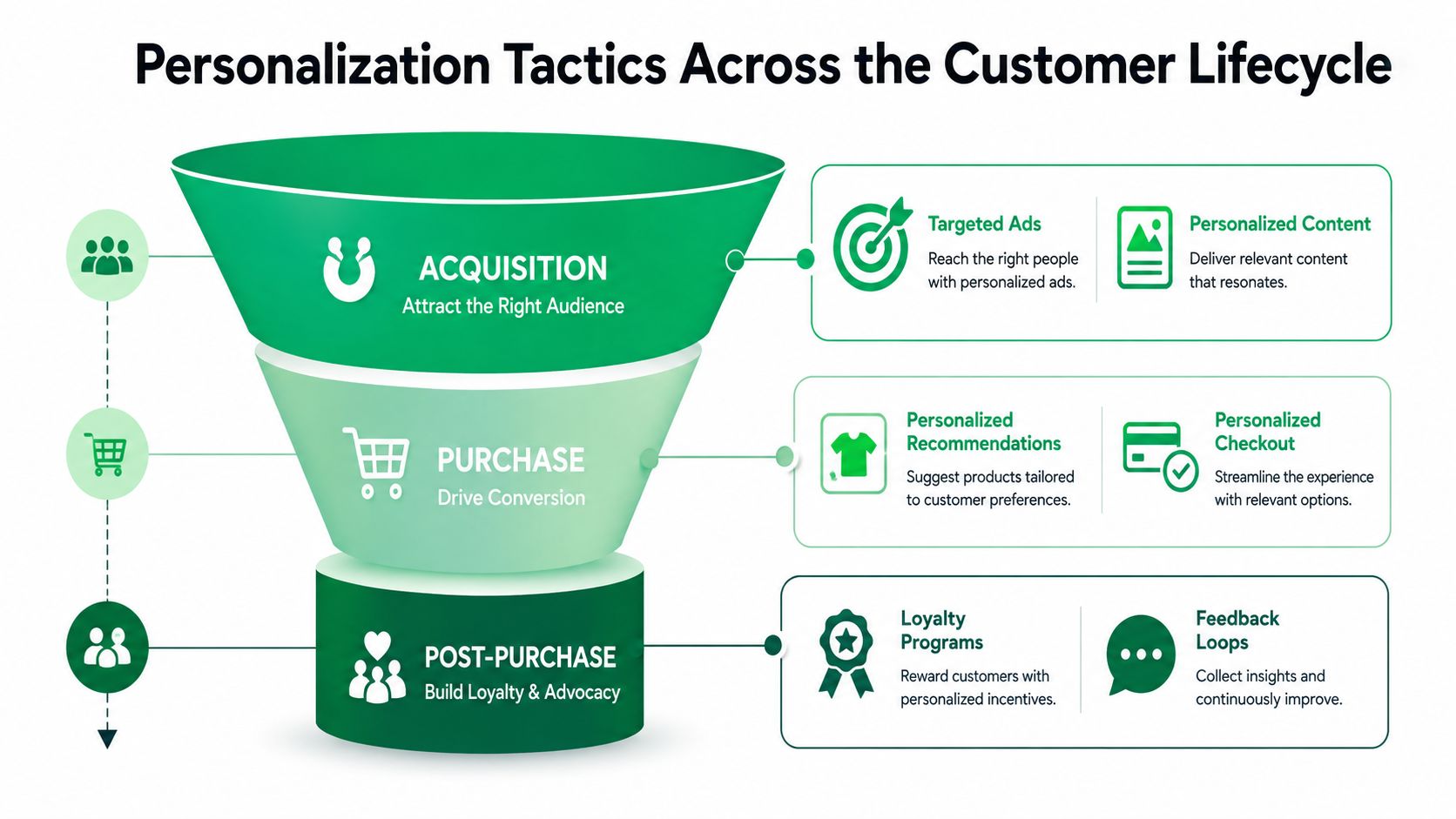
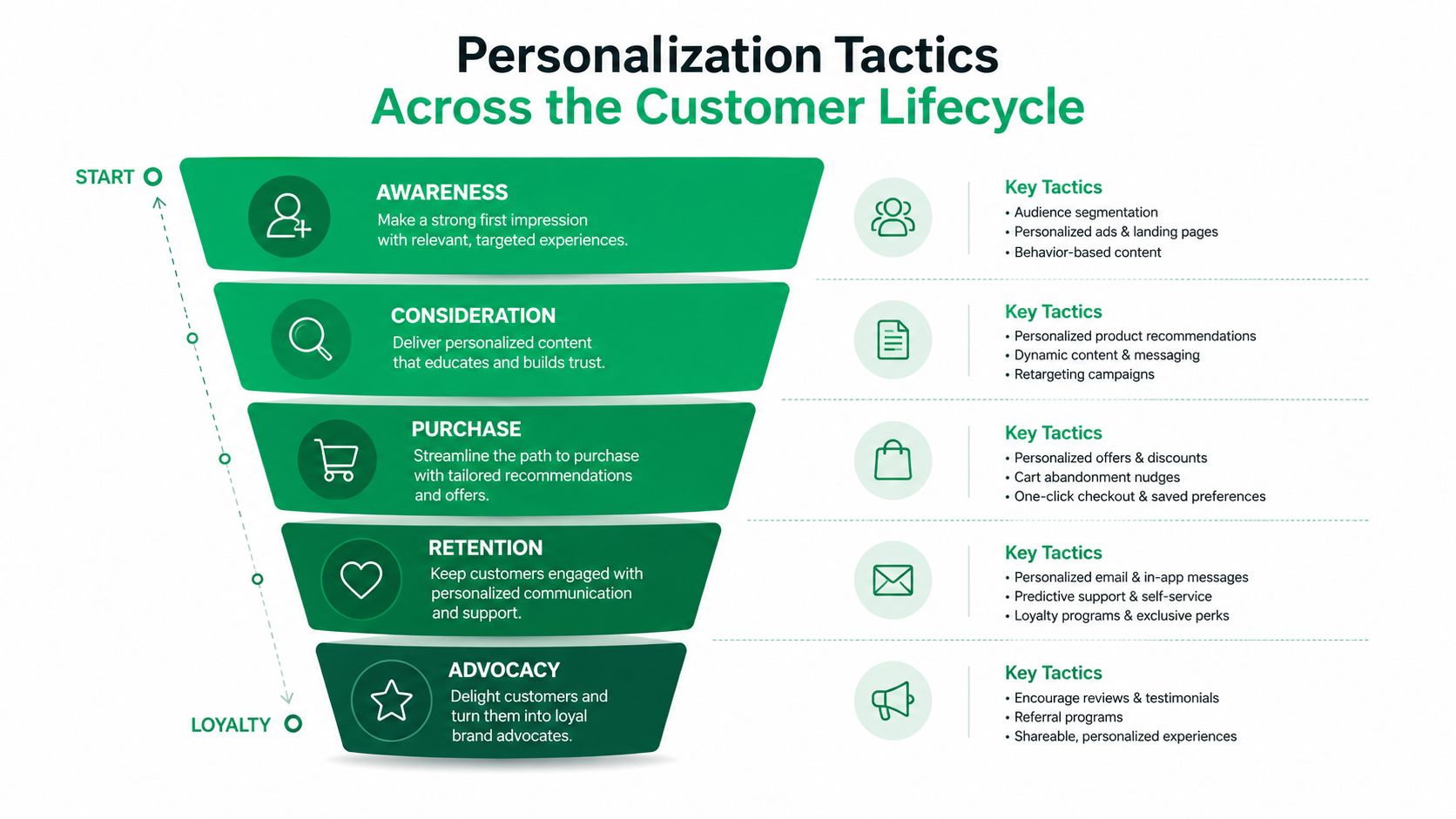
A useful personalization program doesn't use the same tactic everywhere. Acquisition, checkout, and post-purchase each call for different signals and different levels of control. The mistake I see most often is teams pushing recommendation logic into places where the customer needs clarity, not more choice.
Acquisition works best when the landing page matches intent
At the top of the funnel, personalization should make the first click feel relevant. That can mean adapting landing page content to the ad promise, showing social proof that matches the visitor's market, or changing copy for returning visitors who already know the category. The job here is not to overwhelm buyers with dynamic content, it's to remove the mismatch between what they expected and what they landed on.
Purchase needs the least friction, not the most persuasion
During checkout, the best personalization is usually operational. Saved preferences, cleaner address handling, and payment options that fit the customer's pattern can reduce drop-off without adding clutter. Engineering discipline matters, because the checkout flow should feel faster and safer, not more clever.
Post-purchase is where the merchant can still change the outcome
After the order is placed, strong personalization can surface relevant upsells, status updates, and order-specific actions that don't require a support ticket. That's the stage where context is richest and customer patience is lowest. A merchant who gives a buyer a precise, permissioned action inside the order flow is doing better personalization than a brand that only recommends another product before checkout.
For a product-level view of how recommendation logic fits into this lifecycle, the product recommendation engine guide is a useful companion, especially if you're separating pure merchandising from operational self-service.
The main trade-off is control versus convenience. The more sensitive the action, the more you want rules, permissions, and guardrails. The more routine the action, the more you should let the customer complete it without friction.
Post-Purchase Personalization and Multilingual Self-Service
This is the part most guides skip, and it's where high-volume merchants can get the cleanest payoff. Post-purchase personalization is not just a thank-you email or a one-time cross-sell. It's permissioned self-service, service recovery, and contextual upsell logic delivered after payment, when the merchant still has room to improve the experience.
The value is obvious in operations terms. When customers can edit allowed details, resolve simple issues, or access follow-on offers without opening a ticket, support teams spend less time on repetitive work. When those same actions are presented in the shopper's language, the experience becomes usable for global buyers instead of only the customers who are most comfortable in the store's default language.
Self-service only works when it respects trust
Multilingual personalization is not just translation. It has to account for how people understand instructions, what they're allowed to change, and how much control they're comfortable exercising after purchase. The 2024 paper on personalized journeys for underserved communities argues that effective personalization depends on extensive data collection, advanced analytics, and collaboration with community stakeholders to build trust and co-create solutions (WJARR paper on underserved communities). That's a much better lens than treating language as a cosmetic setting.
If the customer can't understand the rule, the rule isn't personalized.
For Shopify Plus merchants, this shows up in small but consequential ways. A shipping address edit window, an order swap flow, or a post-purchase upsell should all be clear, localized, and constrained by merchant-defined permissions. That's also where a tool like SelfServe fits naturally, since it provides post-purchase order editing, multilingual self-service, and order-status upsells inside a controlled workflow.
The underserved audience question is practical, not abstract
Global and underserved audiences don't just need translated UI. They need journey controls that reflect local trust expectations, support access, and different levels of comfort with self-management. If a merchant makes post-purchase changes too hard to find, too hard to understand, or too risky to use, the result is more tickets and less loyalty.
The best post-purchase personalization therefore does two things at once. It lowers operational load by moving simple actions into self-service, and it increases relevance by making those actions understandable in the customer's language and context.
Implementation Roadmap for Shopify Plus Merchants
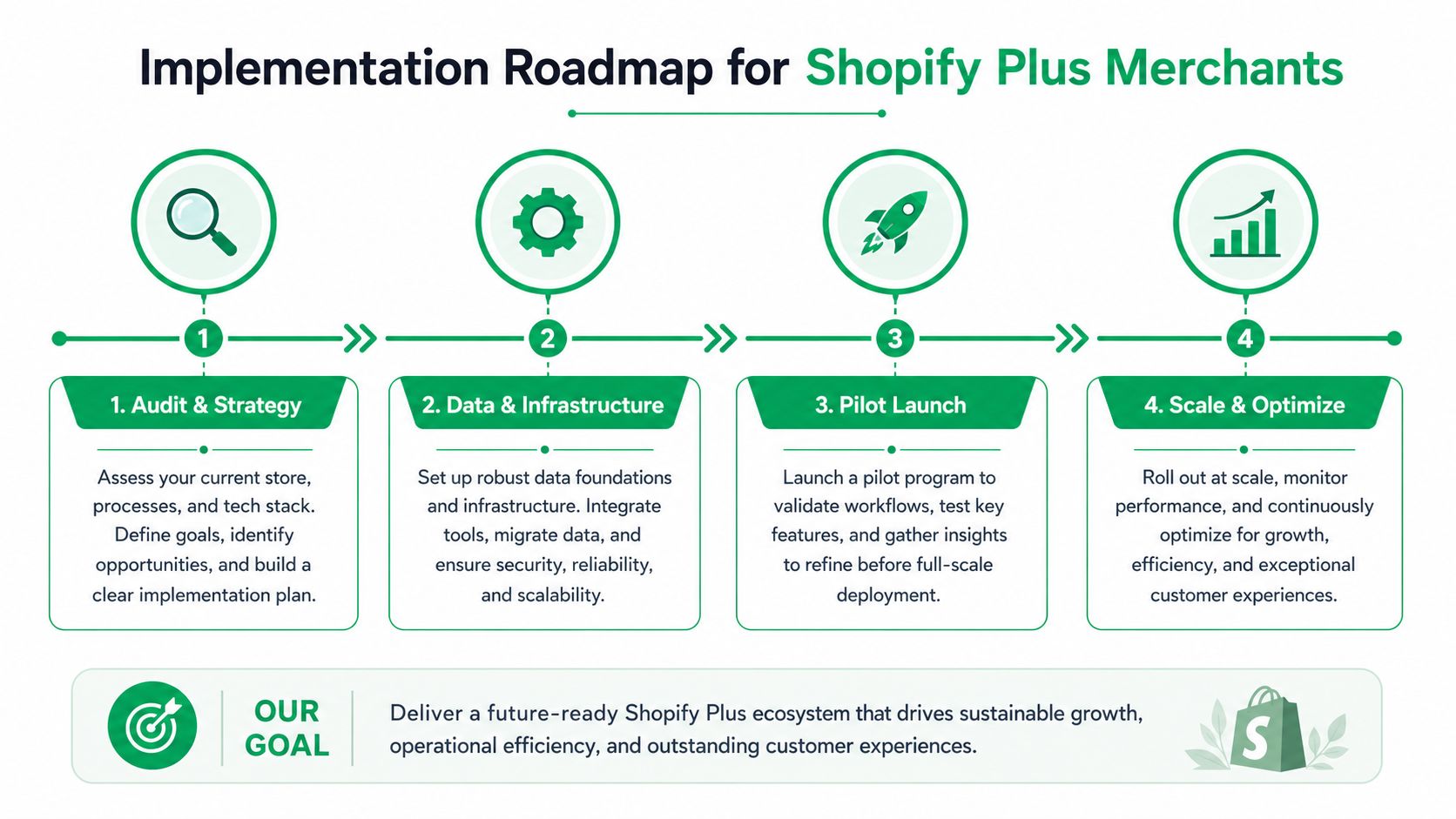
A sensible rollout starts with the part of the journey that already generates the most manual work. For most merchants, that means post-purchase self-service and contextual upsells first, then data unification, then orchestration across channels. Trying to solve everything at once usually creates integration debt before the first result lands.
Phase 1 audit the friction
Start by listing the customer actions that currently require an agent but shouldn't. Address edits, order changes, shipping questions, and simple upsell opportunities are usually the first candidates. The output of this phase should be a short list of tasks that can move to controlled self-service without touching fulfillment risk.
Phase 2 connect the data that matters
Next, connect the systems that hold order status, customer identity, and communication history. Many Shopify Plus stacks get messy here, especially when fulfillment runs through a 3PL and finance or inventory lives in an ERP. If your platform partner can't reconcile those systems cleanly, personalization will keep breaking at the handoff points.
Phase 3 pilot one controlled flow
Launch a narrow use case before you expand the journey. A common first pilot is post-purchase address correction or a limited item swap flow, because it shows whether the permissions, messaging, and downstream syncs all work together. The pilot should prove that customers can complete the action without creating a support backlog or an ops exception pile.
Phase 4 scale the orchestration
After the pilot, expand into multilingual self-service, order-status upsells, and smarter follow-up rules. That's when journey personalization starts to behave like an operating system instead of a set of disconnected campaigns. Teams that reach this phase usually need tighter governance, clearer product restrictions, and better coordination with fulfillment.
The main implementation mistake is going broad before you've proven the workflow. Shopify Plus merchants get better results by fixing one high-volume friction point, then expanding only after the data and handoffs are stable.
KPIs and a Practical Personalization Audit Checklist
The wrong metrics will make a weak personalization program look healthy. Email opens, generic clicks, and surface-level engagement are not enough. The numbers that matter are the ones tied to operational load, customer effort, and revenue recovered after the order is placed.
Measure the work personalization removes, not just the attention it attracts. That means tracking support ticket deflection rate, post-purchase upsell conversion, address correction volume, and customer effort score. If those metrics improve while order accuracy and customer trust stay intact, the program is doing real work.
Quick audit checklist
- Map post-purchase tasks: identify which changes still require an agent.
- Review language coverage: check whether customers can complete key actions in their own language.
- Inspect permission rules: confirm that edit windows, product restrictions, and approval flows are explicit.
- Test data handoffs: make sure order changes sync cleanly with fulfillment, ERP, and 3PL systems.
- Check action visibility: verify that the customer sees the next best action without hunting through emails or help articles.
- Audit follow-on offers: look at whether upsells are contextually tied to the order, not just attached to the thank-you page.
A good personalization audit finds where customers still have to ask for help.
Use that checklist before you add more rules or more channels. If the basics aren't working, extra segmentation just makes the experience harder to maintain. If the basics are solid, personalization becomes a durable operations lever instead of another marketing expense.
If your Shopify Plus team wants post-purchase personalization that reduces support load, SelfServe is built for that gap. It gives customers multilingual self-service for order edits, controlled change windows, and embedded upsells while keeping merchants in charge of permissions and workflow rules. Visit SelfServe to see how it fits into a high-volume ecommerce stack.