Performance Optimization Playbook for Shopify Stores
Amazon reported that every 100 milliseconds of additional latency cost about 1% in sales, while Walmart found that improving page load time by 1 second increased conversions by 2%. Those findings, summarized in large-scale website performance research, explain why performance optimization belongs in a Shopify Plus revenue plan, not just a developer backlog.
The usual speed conversation ends at the storefront. That misses the moments after payment, when shoppers try to add an item, correct an address, edit an order, or understand what happens next. A fast product page paired with a sluggish upsell widget or unresponsive order-editing flow still creates friction, abandoned intent, and avoidable support work.
Why Performance Optimization Directly Impacts Revenue
Latency affects revenue in two ways. It can stop a shopper before checkout, and it can weaken the post-purchase experience after the order has already been placed. Merchants often measure only the first problem because storefront tools make it visible. The second problem lives across widgets, APIs, validation services, and order-management workflows, so it rarely appears in a conventional theme audit.
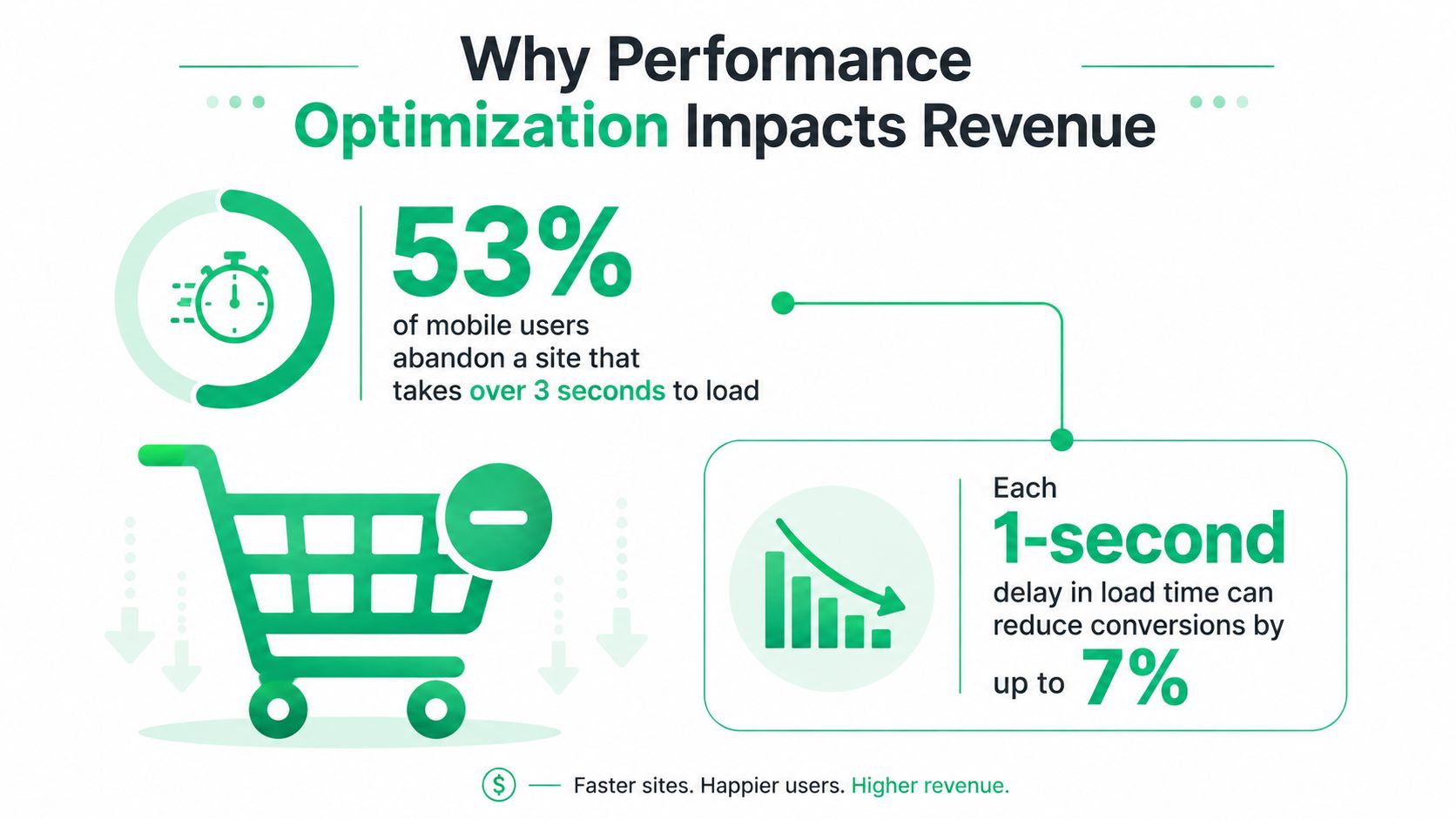
Google's mobile research established a practical benchmark that remains useful for ecommerce teams. 53% of mobile visitors abandon a site that takes longer than 3 seconds to load, and 47% of consumers expect a page to load in 2 seconds or less, according to the published summary of Google's mobile speed research. Mobile shoppers are especially exposed to the consequences of heavy themes, slow third-party scripts, and unstable layouts because they often browse on variable networks and smaller devices.
The storefront is only the first revenue moment
A speed audit may report strong landing-page metrics while a customer waits for an upsell module to render on the Thank You page. The shopper has already converted, but the merchant still has an opportunity to increase order value. If the offer appears late, shifts the page, or fails after a slow request, the store loses incremental revenue without recording a traditional checkout abandonment.
Order editing creates a similar issue. A customer who notices a wrong size, missing item, or incorrect shipping detail needs a clear, responsive path to correct it. If the interface takes too long to confirm permissions or retrieve order data, the customer may contact support instead. That creates handling work and delays resolution, even though the original order could have been corrected through a self-service flow.
Practical rule: Treat every customer action that can change revenue, fulfillment accuracy, or support demand as a performance journey.
Why milliseconds deserve executive attention
The business case becomes clearer when latency is translated into operational outcomes. A delay can reduce traffic retention before purchase, suppress a post-purchase offer, increase uncertainty during an order edit, or cause an address correction to fail. Each event affects a different KPI, so one global Lighthouse score can't represent the full commercial experience.
Industry summaries also report that a 1-second page-load delay can reduce conversions by 7%, as documented in the same website speed performance reference. The important lesson isn't that every store will experience the identical result. It's that performance has a measurable relationship with buyer behavior, and high-volume merchants should evaluate improvements against revenue and support outcomes rather than chase a perfect audit score.
Performance optimization therefore means removing friction from the journeys that matter most. Product discovery, cart interaction, checkout handoff, upsell acceptance, order editing, and address validation deserve separate attention because each has a different failure cost.
Auditing Your Shopify Store Performance Baseline
Start with a baseline that reflects how customers use the store. A single desktop Lighthouse run can identify useful lab problems, but it can't tell you how mobile shoppers experience the site in the field or whether a post-purchase API becomes slow under real conditions.
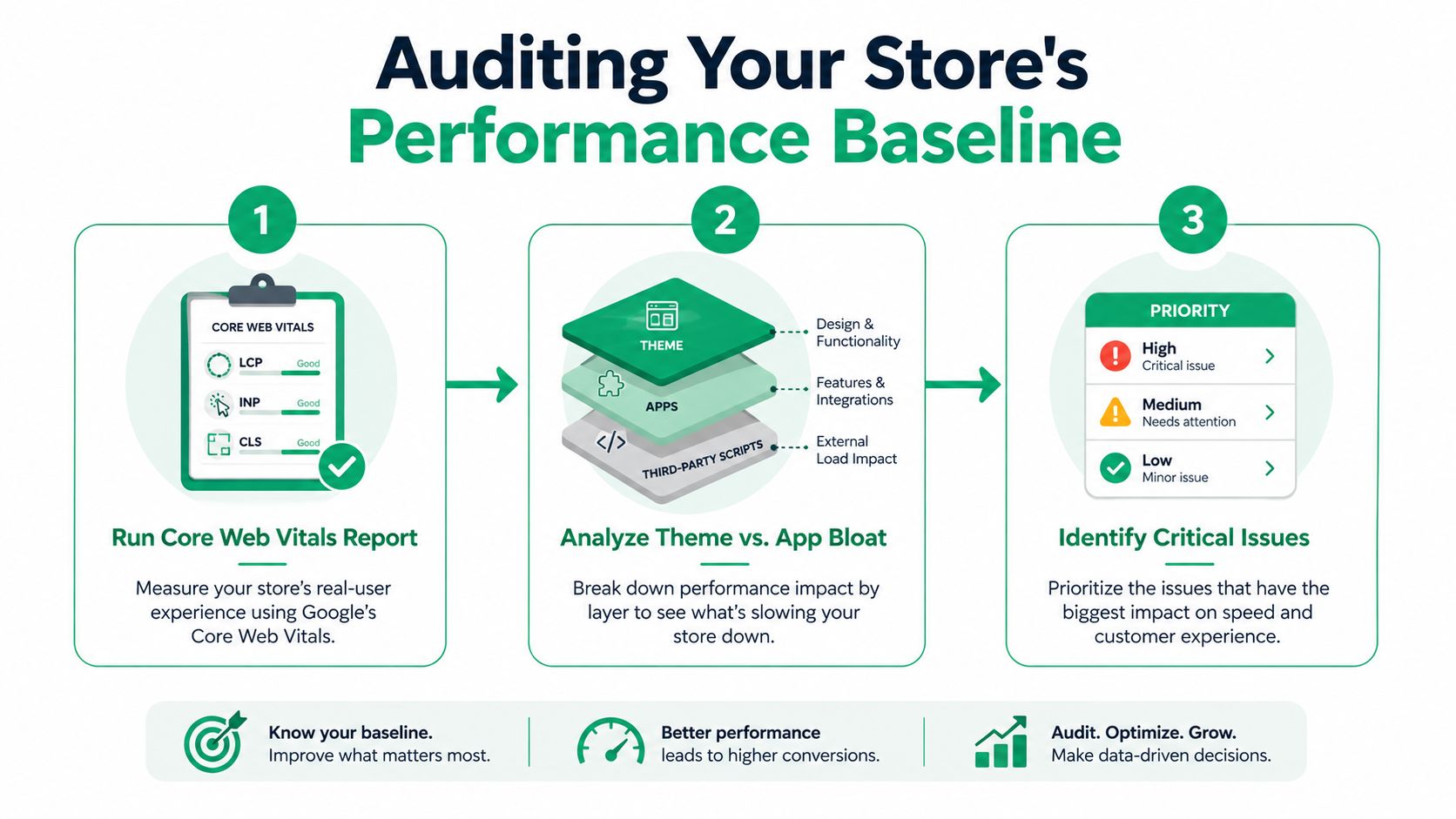
Google's Core Web Vitals guidance recommends evaluating LCP, INP, CLS, and TTFB, with results considered at the 75th percentile and segmented by mobile and desktop. That percentile is more useful than an average because averages can hide the slow tail, the shoppers who wait longest and are most likely to experience broken interactions.
Build the baseline in layers
Use a repeatable test plan rather than collecting screenshots from whichever device is convenient.
Map the journeys. Record the homepage, collection, product, cart, checkout handoff, Thank You page, Order Status page, and order-editing flow. Include actions such as opening filters, selecting variants, applying discounts, accepting an upsell, editing a quantity, and validating an address.
Run lab tests. Use PageSpeed Insights and Chrome DevTools to inspect request waterfalls, JavaScript execution, layout shifts, long tasks, image loading, and third-party activity. Save the same URLs and test conditions so later comparisons remain meaningful.
Compare field data. PageSpeed Insights combines lab information with real-world data, and its Chrome User Experience Report data comes from real users. Use that evidence to identify whether a lab improvement reaches customers outside the test environment.
Separate ownership. Mark each issue as theme, app, platform, network, or backend workflow. A large script in the theme needs a different owner and remedy than a slow address-validation request.
The Shopify performance audit guide can help organize the storefront cleanup, while continuous optimization for MD TECH TEAM sites provides useful context on maintaining a controlled benchmarking process.
Test representative conditions
The website performance benchmarking guidance from Catchpoint recommends defining business-linked metrics, establishing a baseline, testing across devices and network conditions, and comparing synthetic measurements with real-user data. It also cautions against generalizing from a single browser or device.
For Shopify Plus teams, the baseline should answer practical questions:
| Area | Measure |
|---|---|
| Storefront | LCP, INP, CLS, TTFB, page weight, and request count |
| Cart and checkout | Interaction response, errors, and handoff completion |
| Post-purchase | Widget render time, API response time, and action completion |
| Operations | Address-validation failures, order-edit abandonment, and support contacts |
Use the browser's Performance panel to find the exact task blocking interaction, not just the script with the largest file size. A small event handler can create more frustration than a larger deferred asset if it runs at the wrong moment.
Fixing Theme and App Performance Bottlenecks
Theme and app work should follow the evidence from the baseline. The fastest-looking fix isn't always the most valuable one, and removing a feature that drives qualified purchases can damage the business more than a modest performance cost.
Start with the critical rendering path
Large hero images, uncompressed product media, unused CSS, and JavaScript that executes before the shopper can see or use the page are common sources of delay. Serve responsive image variants, reserve image dimensions to prevent layout movement, preload only critical assets, and defer scripts that support below-the-fold behavior.
Don't preload every important-looking image. Preloading too much competes for bandwidth and can delay the main content. Likewise, bundling every script into one large file may reduce request overhead while increasing parse and execution work. The right choice depends on the page template and the device segment showing the weakest field performance.
Shopify's theme architecture gives merchants useful control, but the platform doesn't make every app script harmless. Review app embeds, pixels, chat tools, review libraries, personalization code, and tracking tags. Disable unused embeds, remove abandoned snippets, and confirm that an app loads only where its feature appears.
The practical trade-off: A conversion-supporting feature can justify its cost, but it should load conditionally and after the shopper reaches the interaction that needs it.
Evaluate apps by behavior, not reputation
Create a simple app inventory with four columns: feature, pages loaded, blocking behavior, and business outcome. Then test each candidate with the app enabled and disabled in a controlled environment. Look for main-thread tasks, additional requests, duplicate libraries, synchronous third-party calls, and scripts that continue running after the shopper has left the relevant component.
Lazy loading helps when a widget sits below the fold or belongs to a later interaction. It doesn't help if the customer needs the component immediately after checkout and the widget appears only after a visibly long delay. In that case, prioritize the request, reduce its payload, cache stable configuration, and render a useful shell before the dynamic content arrives.
Vendor conversations should be concrete. Ask whether the app supports conditional loading, asynchronous initialization, event-based activation, regional endpoints, and removal of unused libraries. If a vendor can't explain when its code runs or what happens when its API is slow, the integration deserves scrutiny before it becomes a permanent dependency.
Rank fixes by user and commercial impact
Fixes that usually deserve early attention include blocking scripts on high-traffic templates, oversized above-the-fold media, repeated third-party libraries, and handlers that delay cart or variant interactions. Deeper bundling work, architectural changes, and app replacement can deliver value, but they need stronger evidence because they consume development capacity and may introduce regression risk.
Measure each change against the original journey. A lower JavaScript payload matters less if INP remains poor because an event handler still blocks the tap. A better product-page score matters less than a reliable add-to-cart action if the cart flow remains slow. Performance optimization works when the customer notices the improvement, not when the audit merely changes color.
Optimizing Post-Purchase Workflows and SelfServe Configuration
Post-purchase performance needs its own instrumentation. The Thank You page, Order Status page, upsell module, order-editing interface, and address-validation flow often depend on services outside the theme. A storefront report won't explain why a shopper waits for an order lookup or why an address autocomplete feels delayed.
Make upsells appear at the right moment
An upsell widget should load in relation to the customer's decision, not as a large bundle that competes with the initial confirmation experience. Render the page's essential order information first, then initialize the offer when the relevant container is available. Keep the first visual state stable, use fixed dimensions, and avoid replacing a blank area with a late layout shift.
The offer also needs a fast failure path. If product or inventory data can't be retrieved promptly, show the confirmation experience without holding the order details hostage. A delayed upsell is a missed opportunity, but a delayed confirmation creates anxiety and can generate support contacts.
Use product restrictions and curated collections to keep the offer logic focused. Narrower eligibility rules can reduce unnecessary product lookups and make the widget easier to reason about. Test the complete action, including accepting the offer, updating the order, tagging it, and displaying the revised state.
Reduce order-editing and validation friction
Order editing combines permissions, order retrieval, customer identity, product availability, pricing, and fulfillment constraints. The interface should establish what the customer can change before making multiple requests. Cache safe, short-lived order context where appropriate, and avoid refetching unchanged data after every field interaction.
Address validation deserves the same care. Real-time Google Maps validation and autocomplete can prevent delivery errors, but calling the service on every keystroke creates needless latency and cost. Trigger validation after meaningful input, debounce requests, retain the selected place data, and return clear inline feedback when the service is unavailable. The customer should still understand how to proceed without staring at a spinner.
Configure permissions for speed and clarity
A permission window that fits the merchant's fulfillment process reduces both unnecessary requests and confusing edge cases. Make the editable fields explicit, keep unavailable actions visually clear, and confirm changes immediately before backend synchronization completes. If approval is required, show the request state rather than leaving the shopper uncertain whether the action succeeded.
Multilingual widgets add another performance consideration. Load the language resources needed for the shopper instead of shipping every translation into the initial payload. Keep translated labels available for the first render, and defer nonessential content until the interaction requires it.
Measure time to usable post-purchase interaction, not only page load. Track when the order summary becomes readable, when the edit control responds, when address suggestions appear, when an upsell becomes actionable, and whether the customer completes the action. Connect failures and delays to support tickets so the team can prioritize the workflows that create the greatest operational burden.
Connecting Performance Metrics to Business KPIs
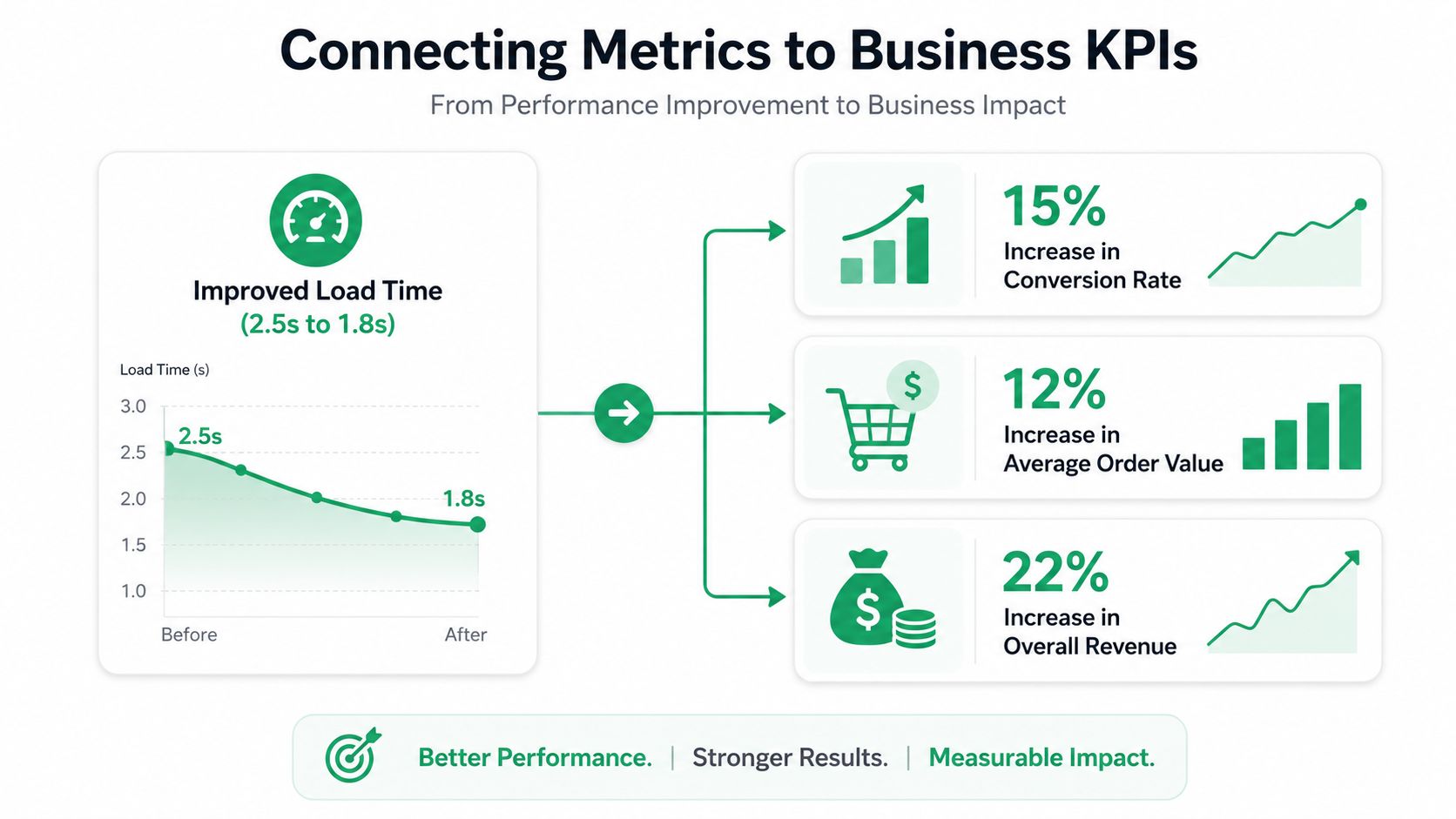
A performance dashboard should explain which customer journey improved and what changed commercially. Core Web Vitals provide a useful health signal, but executives need a view that connects technical movement with conversion, order value, retention, and service demand.
Start by defining a performance-to-business map:
- Product and collection pages: Compare field performance by device with product views, add-to-cart activity, and checkout starts.
- Cart and checkout handoff: Pair interaction latency and errors with completed checkouts and payment retries.
- Thank You and Order Status pages: Connect widget readiness with upsell views, accepted offers, and revised order value.
- Order editing: Track time to interactive, successful edits, abandoned edits, and contacts about changes.
- Address validation: Compare validation failures and completion time with correction requests and delivery-related support.
Don't report a single store-wide average. Segment by page template, device, geography, traffic source, and journey stage. A change that helps mobile product pages may have no effect on desktop post-purchase flows, while a backend improvement may benefit order editing without changing LCP at all.
The Core Web Vitals measurement guidance supports percentile-based analysis because averages can conceal the slowest users. For business reporting, retain the same discipline. Show the distribution of experience and identify the customer group affected by the change.
Prove causation carefully
Use controlled rollouts or A/B tests when the change can be isolated. Keep merchandising, pricing, promotion, and traffic conditions visible in the test record. For post-purchase work, test widget initialization, permission settings, or validation behavior while tracking completion and support outcomes, rather than assuming a faster script caused a revenue change.
A useful executive summary has four lines:
- Problem: Which journey was slow or unreliable?
- Intervention: What code, app, configuration, or API behavior changed?
- User result: Which percentile, interaction, or completion measure moved?
- Business result: What happened to conversion, order value, or support demand?
The SelfServe performance measurement resource offers additional guidance for structuring this type of analysis. The central principle is simple: prioritize the fix with the strongest expected business effect, even when another issue looks worse in a technical audit.
Establishing Ongoing Monitoring and Testing Cadence
Performance regresses when teams add features without checking the customer journeys those features touch. A new review widget, analytics tag, localization file, or post-purchase integration can change execution timing even when the storefront still looks correct.
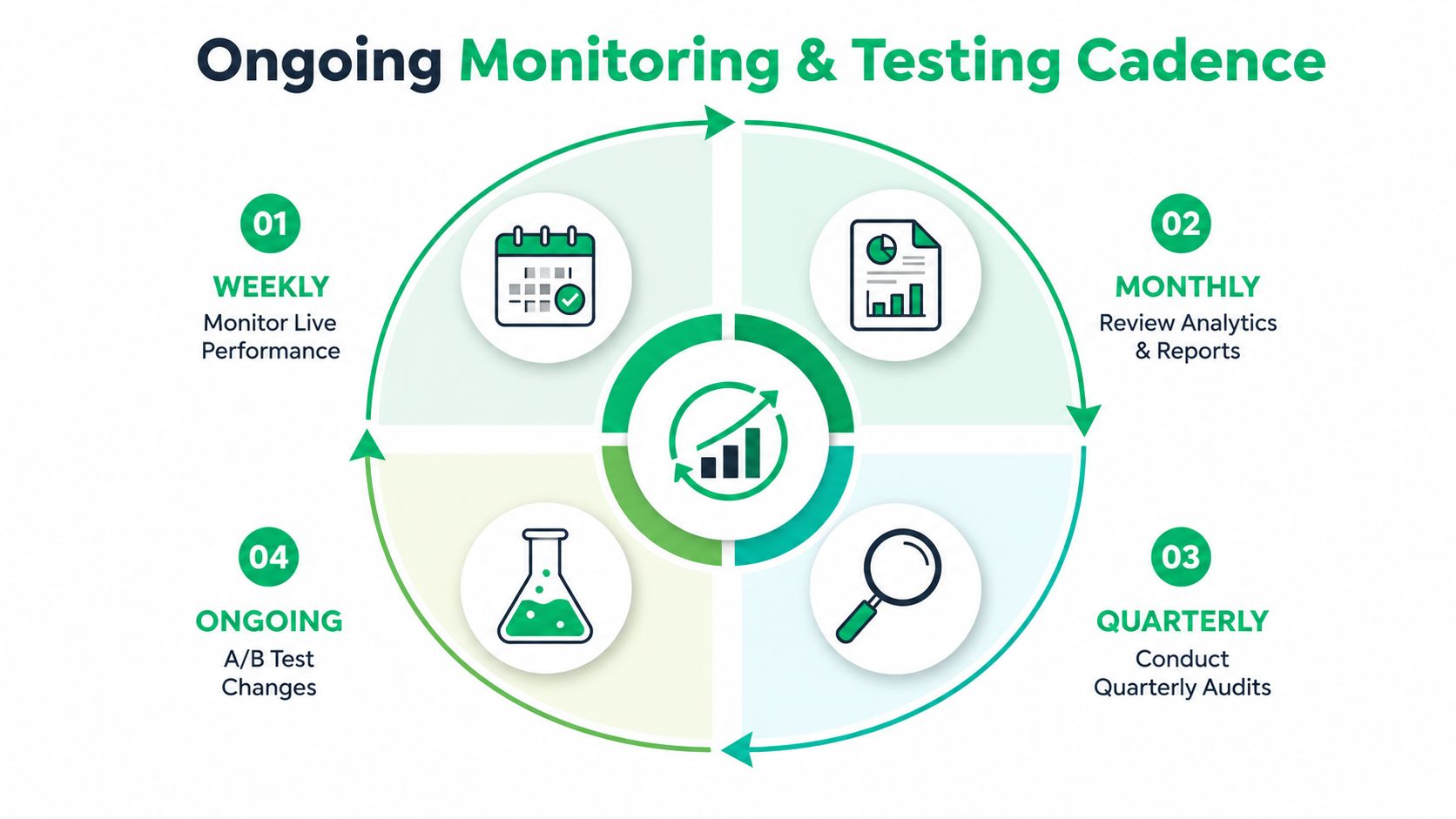
Use a recurring operating rhythm
Weekly, review real-user performance and error logs for the most important templates and post-purchase actions. Watch for sudden movement in LCP, INP, CLS, TTFB, widget readiness, validation failures, and order-edit completion.
Monthly, compare analytics with the performance baseline. Investigate changes in add-to-cart behavior, checkout completion, upsell acceptance, order corrections, and support contacts. A technical regression that doesn't yet affect revenue still deserves attention if it affects a critical journey.
Quarterly, repeat the full audit across representative devices, browsers, network conditions, theme versions, and app configurations. Review dependencies with vendors and remove features that no longer justify their cost.
Before every release, test the affected templates and workflows in a production-like environment. Set performance budgets for JavaScript, media, requests, and interaction timing, then require an explicit decision when a feature exceeds its budget. The budget isn't a ban on functionality. It forces the team to state the commercial value of the added weight.
Use app performance monitoring guidance to formalize checks around third-party behavior. Alert on sustained degradation rather than one noisy observation, and route alerts to the team that can remove a script, correct an integration, or roll back a release.
A useful escalation rule: Investigate when a key journey misses its established baseline. Escalate when the regression persists across representative users or coincides with conversion, fulfillment, or support deterioration.
Performance optimization becomes durable when measurement is part of delivery, not a cleanup task after launch. Keep the baseline, business outcome, owner, and rollback plan attached to every major change.
SelfServe helps Shopify merchants make post-purchase actions faster and more controlled, with configurable order editing, multilingual widgets, Google Maps address validation, and upsell modules for Thank You and Order Status pages. Visit SelfServe to see how a focused post-purchase layer can reduce support friction while creating more opportunities to increase order value.