Address Validation API: A Practical Guide for Ecommerce

A shopper reaches the final step of checkout, enters an apartment number in the wrong field, and gets a red validation message instead of a useful correction. The address may be perfectly deliverable, but the form treats an unfamiliar format as an error. The customer leaves, the cart expires or clears, and the support team later deals with an order that never existed.
That failure looks like a data-quality problem in a dashboard. In practice, it's a checkout conversion and post-purchase orchestration problem. An address validation API should parse messy input, standardize it, compare it with authoritative reference data, return structured signals, and help your product decide whether to fix, confirm, or accept the address. It shouldn't answer yes or no.
For Shopify Plus and high-volume DTC stores, the implementation details matter. Checkout extensibility determines where validation can be introduced without creating an awkward detour, while checkout extensibility by Presidio provides useful context for thinking about that surface. Teams also need to distinguish address autocomplete from final validation, as explained in this guide to Google Maps address autocomplete.
The Moment a Checkout Breaks
A customer has a $400 order in the cart. They type Apt 5B into Street Address Line 1 because that's where their phone's keyboard places the cursor. The checkout expects the unit in Line 2, or expects a prefix such as Unit rather than Apt. Instead of suggesting a corrected structure, the form rejects the entry.
The shopper tries again. A fraud system or checkout session rule now treats the retry as suspicious, the cart is cleared, and the customer returns 90 seconds later to find the order gone. The store may never learn that the address was valid. Analytics records an abandoned checkout, support sees no ticket, and fulfillment receives nothing to investigate.
That's the failure mode an address validation API is meant to prevent, but many teams connect it at the wrong point. They run a hard check after the customer submits the form, then block any response that isn't a perfect match. The API becomes another error screen instead of a decision service.
Validation is more than formatting
A serious service parses the submitted text into components, reassigns fields, standardizes local conventions, fills missing information when possible, and matches the result against reference data. Google describes its Address Validation API as a service that validates address components, standardizes an address for mailing, determines the best known geocode, and can infer missing information where the response supports it. Its response can include a structured address, component-level validation status, precision information, and postal-services metadata. Google's Address Validation API overview documents that broader model.
The product question is therefore conditional: what should happen when confidence is high, partial, or poor? Fix obvious formatting, ask the shopper to confirm a plausible correction, and let carefully bounded ambiguity proceed when blocking would create more friction than protection.
How Address Validation APIs Actually Work
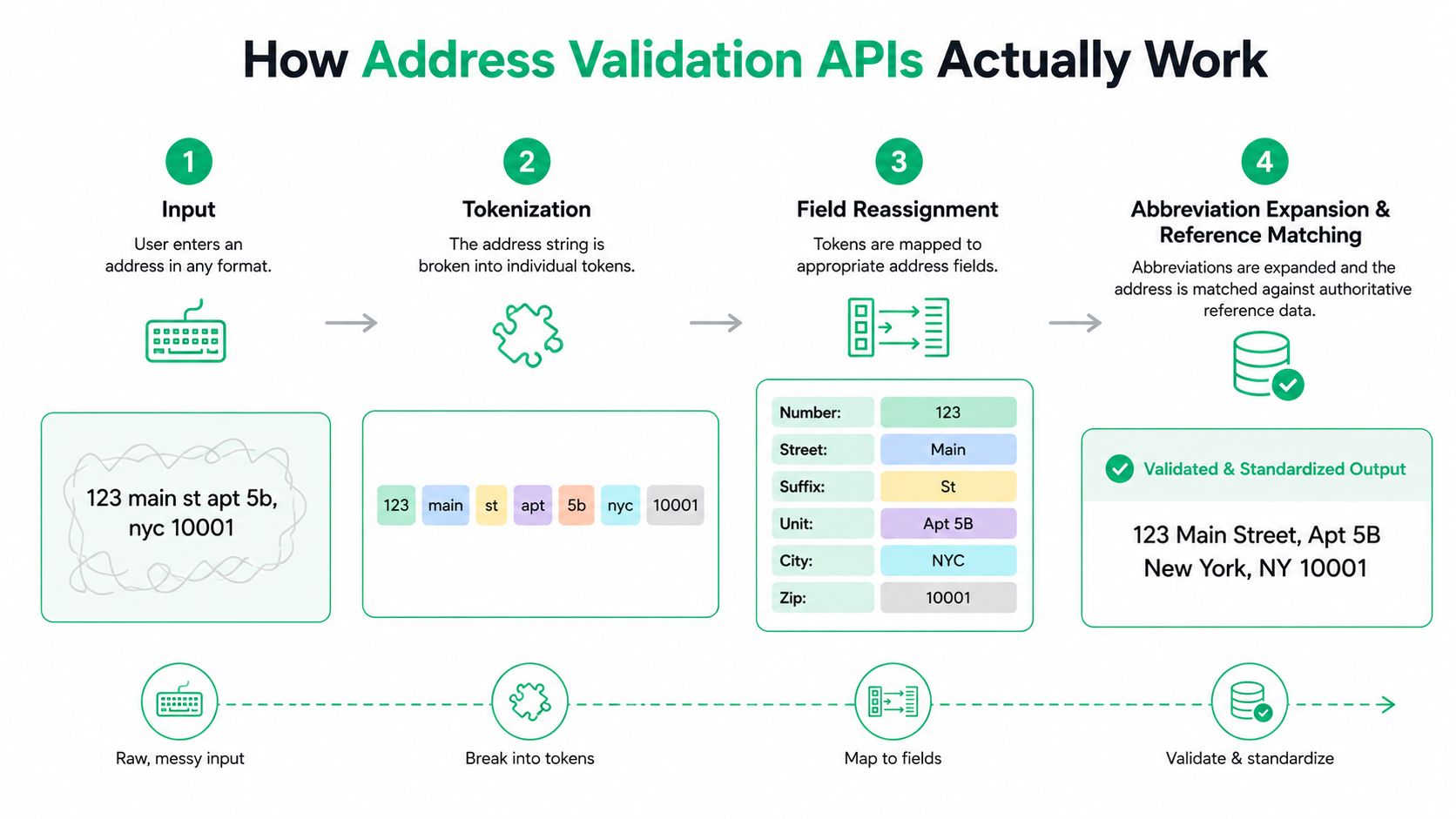
A submitted string such as 123 main st apt 5b, nyc 10001 contains useful information, but not in a form that shipping, billing, CRM, or tax systems can reliably consume. The API's job is to turn that unstructured input into a structured postal record.
The processing pipeline
Tokenization separates the input. The service identifies likely tokens such as
123,main,st,apt,5b,nyc, and10001. It also removes surrounding noise, normalizes casing, and identifies punctuation that shouldn't influence matching.Field reassignment gives each token a role. The engine maps
123to a street number,mainto a street name,stto a suffix,apt 5bto a secondary unit,nycto a locality, and10001to a postal code. A good parser can recover meaning even when customers put components in unexpected fields.Standardization applies postal conventions. In the United States, USPS Publication 28 defines what makes an address complete for matching against current ZIP+4 and City State files, and it specifies standard abbreviations for standardized addresses. The USPS Publication 28 address standards are the foundation for normalizing street suffixes, directional indicators, and secondary unit designators before reference matching.
Reference matching tests the result. The standardized components are compared with authoritative reference data. The response may return a complete mailing address, component-level statuses, geocode information, and delivery-related metadata where available.
A weak service may only check whether a postal code exists. That doesn't prove that the street number is real, that the unit is present, or that the full combination can receive mail. Stronger systems can detect obvious spelling or transposition issues, but their correction behavior still varies.
Practical rule: Evaluate parsing against anonymized, messy production input. Synthetic examples rarely contain the apartment conventions, local abbreviations, copied punctuation, and multilingual variations that expose real defects.
The same principle applies to adjacent data-cleaning workflows. If your stack already includes tools that verify emails, treat address validation as another structured enrichment step, not as a cosmetic form feature. A real-time address validation workflow should preserve the original entry, the normalized result, and the decision taken by the checkout.
Data Sources, Formats, and International Coverage
One global endpoint doesn't guarantee one global interpretation. Address validation depends on the reference datasets, postal rules, language handling, and delivery conventions available for each market.
A U.S.-trained implementation tends to assume a street number, street name, locality, and ZIP code arranged in a familiar order. That assumption breaks quickly. German addresses can include delivery constructs such as Packstation and Postfiliale. Japanese addresses move from larger administrative areas down to smaller blocks and building details. Brazilian addresses use the CEP as a major routing anchor and follow conventions that don't map neatly to American field layouts.
The API may support many countries, but your application still needs country-aware display, storage, and exception policies. Google's documentation also describes region-specific metadata and coverage changes, which means “global” should be tested market by market rather than accepted as a single capability claim.
Regional comparison
| Region | Canonical Data Source | Address Format | Common Edge Cases |
|---|---|---|---|
| United States | USPS reference data and Publication 28 conventions | Street number, street name, locality, state, ZIP or ZIP+4, with secondary unit details | Missing apartment data, directional prefixes, rural routes, PO boxes, military addresses |
| Germany | National postal reference data and local delivery conventions | Street and house number, postal code, locality, with market-specific delivery options | Packstation, Postfiliale, apartment and building conventions, locality formatting |
| Japan | Japanese postal and administrative reference data | Prefecture and municipality through block, building, and unit details | Missing prefecture, non-Latin input, block and building order, transliteration |
| Brazil | Brazilian postal reference data centered on CEP | Locality and street information arranged according to Brazilian conventions | CEP mismatches, neighborhood fields, house and unit details, ordering differences |
A U.S.-only validator can return false negatives abroad because it expects the wrong fields, or false confidence because it recognizes a postal code without understanding the delivery structure. That's why international implementations need locale-aware forms, country-specific required fields, and a way to retain the provider's structured components without forcing every market into an American schema.
Map discovery and postal validation also solve different problems. Teams considering ways to scrape Google Maps data without API should separate place discovery from deliverability verification. A map listing can identify a location, but it doesn't automatically establish that a customer's shipping address is complete, current, or accepted by the intended carrier.
Reading the Response Beyond Yes or No
The most valuable validation response is rarely a single boolean. It tells the application which part is trustworthy, which part is uncertain, and what action fits the uncertainty.
For U.S. and Puerto Rico addresses, Google can return USPS deliverability signals through uspsData. Its documented DPV confirmation codes distinguish a fully deliverable primary address from problems involving a secondary unit. A Y means the address is fully deliverable, S means the sub-premise is unconfirmed, D means the sub-premise is missing, and N or an empty result indicates that the primary address is invalid. The Google Address Validation reference defines those response values.
Response signals and product behavior
| Code or Field | Meaning | Recommended Action |
|---|---|---|
Y | The address is fully deliverable | Store the standardized result and continue |
S | The secondary unit is unconfirmed | Ask the shopper to confirm the unit or accept with a controlled warning |
D | A secondary unit is missing | Request apartment, suite, or unit information when delivery requires it |
N or empty DPV result | The primary address is invalid | Show correction guidance and prevent label creation until resolved |
| Component validation status | Individual fields may be confirmed, inferred, replaced, or unresolved | Highlight only the fields that need customer attention |
| Geocode and precision | The service's best-known geographic result and its precision | Use for delivery zones, store logic, or review thresholds, not as proof of deliverability |
Google's API can also return a geocode, address precision, and postal-service metadata where available. Those fields support operational decisions such as assigning a delivery zone or selecting a store, but latitude and longitude shouldn't substitute for postal confirmation. A point on a map can be geographically plausible while the unit or delivery route remains unresolved.
LACSLink and SuiteLink-style enrichment can matter when a postal record has changed or secondary-unit information needs recovery, but the implementation should depend on the provider's actual response fields and coverage. Don't build a workflow around a signal your chosen provider doesn't return.
A hard failure means the primary location can't be matched or delivered as submitted. A soft correction means the service has a plausible standardized interpretation. Your checkout should treat those cases differently instead of blocking both with the same message.
Designing Checkout Around Validation Uncertainty
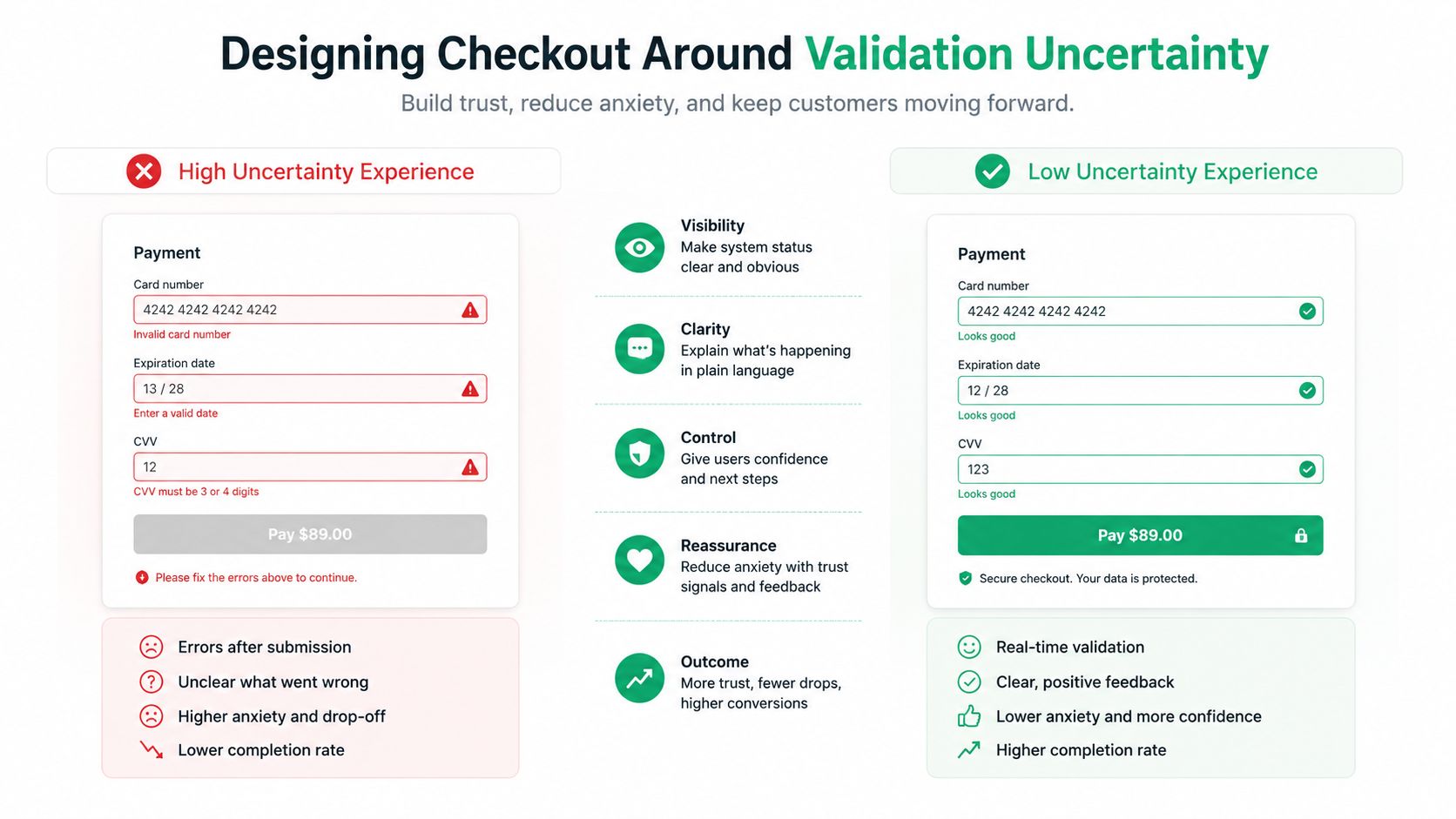
Validation belongs in the UX layer as much as in the integration layer. The customer doesn't care that your parser found an unresolved component. They need to know whether to fix something, confirm a suggestion, or continue.
Google's guidance separates outcomes into Fix, Confirm, and Accept, with newer action-oriented fields such as possibleNextAction and hasSpellCorrectedComponents. That framing is useful because it turns a technical response into a product policy.
Fix
Use Fix when the service has strong evidence that the customer made a formatting or spelling mistake and the correction doesn't change the intended destination. Expanding a standard abbreviation, normalizing casing, or moving a clearly identified unit into the correct structured field can happen automatically, provided the customer can still see the final address before payment.
Confirm
Use Confirm when the API has a plausible alternative but the shopper's intent matters. Show the submitted address alongside the standardized suggestion, explain what changed, and require one deliberate tap. This works well for a likely street correction, a recognized locality variant, or an apartment detail that needs confirmation.
Accept
Use Accept when the address is unusual but not clearly invalid, especially in markets where local formatting differs from the assumptions built into your form. Store the provider response and mark the order for an appropriate operational review rather than presenting an unexplained hard stop.
Checkout policy should reflect risk, not parser anxiety.
Blanket rejection creates a quiet conversion tax. It can block international addresses, non-standard apartment descriptors, rural routes, and newly established locations that a carrier may still handle. Silent correction creates the opposite risk when the system changes a house number, unit, or locality without the customer noticing.
The right interface keeps the shopper moving while making material uncertainty visible. That often means validating at a deliberate interaction point, presenting a concise suggestion, and reserving blocking behavior for primary-address failures, missing required units, or carrier-specific constraints.
Real-Time vs Batch and Client-Side vs Server-Side
Real-time validation and batch cleansing solve different operational problems. Real-time checks protect the current checkout, while batch jobs clean customer, order, and CRM records that already exist. Treating one as a replacement for the other leaves a gap.
A checkout call gives immediate feedback but introduces latency and usage cost at the point where the customer is most sensitive to delay. A batch process can handle legacy records more efficiently and avoid adding another synchronous step, but it can't help a shopper correct an address before submitting an order.
Integration patterns
| Pattern | Latency | Cost Profile | Best Fit |
|---|---|---|---|
| Real-time server-side validation | Adds a controlled request during checkout or order submission | Usage follows customer activity and retry behavior | Shopify Plus checkout services, headless commerce, high-value orders |
| Scheduled batch cleansing | No checkout delay | More predictable for large datasets and recurring maintenance | CRM records, saved addresses, dormant customers, pre-peak cleanup |
| Client-side validation | Immediate browser feedback | Can create exposed usage and duplicated calls if poorly controlled | Lightweight suggestions where a secure intermediary still handles final validation |
| Server-side final validation | Occurs before order or label creation | Easier to govern, log, retry, and rate-limit | Production order workflows and shipping integrations |
| Hybrid validation | Fast local checks followed by selective API calls | Balances user experience with request control | High-volume stores with conditional triggers |
Client-side calls can reduce a round trip between the browser and your application, but they create credential exposure and make centralized rate control harder. Server-side calls keep provider credentials out of browser code and give engineering teams control over timeouts, retries, fallbacks, idempotency, and logging.
Google documents a default rate limit of 6000 queries per minute in its Address Validation API FAQ, alongside session pricing with Autocomplete (New). That makes request design relevant for busy storefronts, particularly when autocomplete, address edits, retries, and order submission all call related services. The Google Address Validation FAQ is the appropriate place to verify current limits and pricing behavior before launch.
For Shopify Plus, validate the final address in a server-controlled workflow before fulfillment or label creation. For a headless storefront, keep the browser experience responsive but send the authoritative decision through your backend. For a high-volume store, schedule batch cleansing for old records and reserve synchronous validation for moments that can change delivery, conversion, or fraud exposure.
Conditional Validation to Cut Latency and API Cost
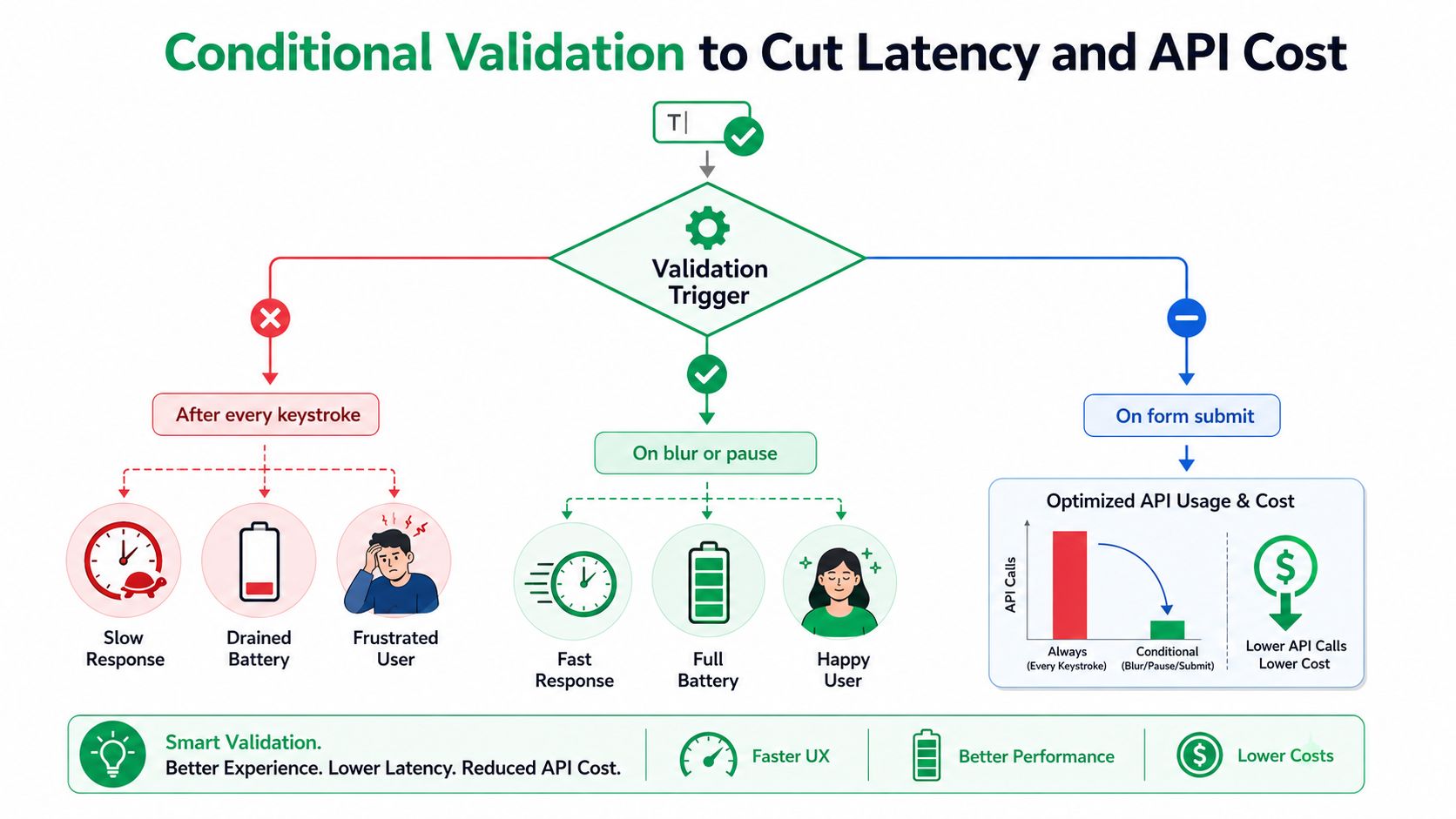
More validation isn't automatically better. Calling an address service after every keystroke consumes requests, introduces ambiguous suggestions while the customer is still typing, and can make a mobile checkout feel unstable.
A better pattern uses conditional triggers. Run inexpensive local checks first, then call the API when the shopper pauses, leaves the address field, selects a suggestion, chooses a shipping method, submits the order, or triggers a risk condition.
A practical decision sequence
- Start locally: Check required fields, obvious length problems, supported country values, and basic postal-code shape without making an external request.
- Validate on intent: Call the API after blur, a meaningful pause, a selected autocomplete result, or form submission. Don't treat every keystroke as a finished address.
- Escalate selectively: Run deeper validation at order submission, shipping-method selection, or when the response indicates a missing unit, undeliverable primary address, or courier constraint.
- Cache carefully: Cache successful results using a normalized address hash, but give the cache a defined lifetime because postal data and delivery conditions can change.
- Fail gracefully: Set timeouts, use bounded retries with jitter, add a circuit breaker, and provide a fallback that lets checkout continue when the provider is unavailable.
- Review asynchronously: Queue ambiguous cases for operations or customer support instead of forcing every uncertain address into a synchronous blocker.
Track p50 and p95 validation latency, correction acceptance, validation failure rate, downstream delivery exceptions, and API cost per completed checkout. Request volume alone can make a system look efficient while hiding a costly effect on conversion or fulfillment.
The target isn't maximum validation. It's the lowest-cost decision that prevents a failed delivery without interrupting a legitimate purchase.
This approach also reduces duplicate work when an address is edited after purchase. If the normalized address hasn't changed, the order-edit flow can reuse a recent result within its defined freshness window. If a customer changes the unit, postal code, or country, the system should treat it as a new validation event.
The Post-Purchase Loop and Implementation Checklist
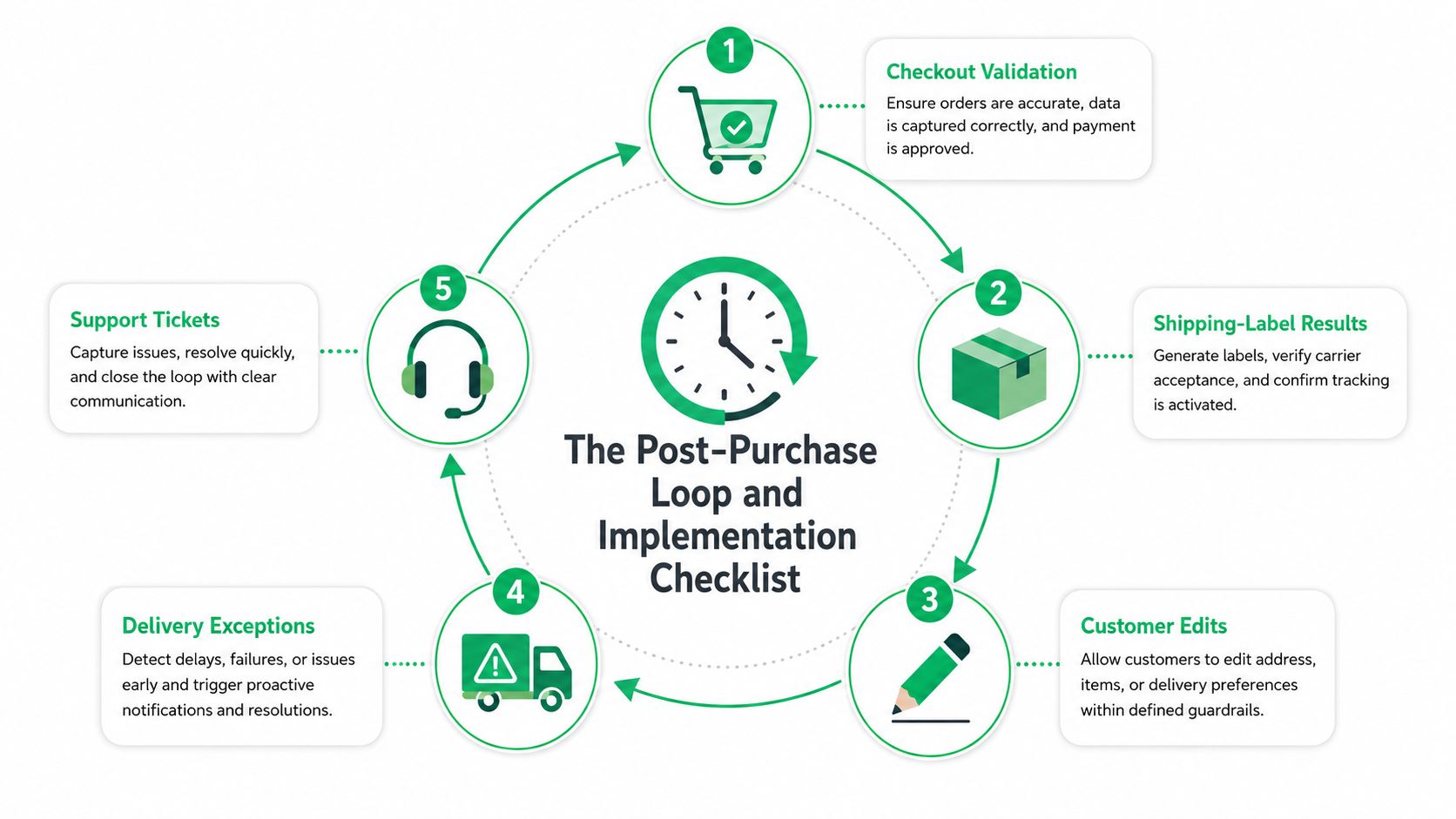
The address problem continues after the order is placed. A customer may notice a missing apartment number, a warehouse may reject a shipping label, or a carrier may return an exception that the checkout never detected. A useful system connects those events instead of treating checkout validation as the final record.
SelfServe is one Shopify option for this post-purchase stage. It lets shoppers edit shipping and contact details within merchant-defined windows, uses Google Maps-powered autocomplete and validation in the order-edit workflow, and gives merchants control over what changes can be submitted.
Close the feedback loop
When a carrier or fulfillment partner reports an undeliverable address, record the normalized address, the customer's original input, the provider's suggestions, the validation result, the carrier error, and the final resolution. Keeping both original and corrected values lets engineering distinguish customer-entry problems from parser mistakes and carrier-specific limitations.
A production rollout should define:
- Authoritative fields: Decide which components drive fulfillment, billing, tax, fraud review, and CRM matching.
- Country behavior: Specify supported markets, locale rules, transliteration, display language, and required fields by region.
- Failure handling: Document timeout, retry, provider-outage, and fallback behavior before the first traffic spike.
- Data controls: Log request IDs and response codes without retaining unnecessary personal data, and keep provider credentials on the server.
- Order safety: Use idempotency for order-time validation so retries don't create conflicting updates.
- Test coverage: Include apartments, units, rural routes, PO boxes, military addresses, newly developed locations, non-Latin input, mobile checkout, and high-value orders.
- Operational review: Compare conversion, accepted corrections, support contacts, address-related delivery failures, and cost per accepted order during a controlled pilot.
Review false positives and missed addresses by region and courier. Revisit Fix, Confirm, and Accept thresholds regularly, especially after adding a new market or fulfillment partner.
The strongest implementation treats validation, label creation, customer edits, delivery exceptions, and support tickets as one address-quality loop. That gives merchants a way to improve checkout without pretending that every postal edge case can be resolved before payment.
SelfServe helps Shopify and Shopify Plus merchants manage validated post-purchase address edits, multilingual order changes, and controlled customer self-service without sending every request to support. Visit SelfServe to connect address validation with order editing, operational permissions, and a smoother post-purchase workflow.