Real Time Address Validation: The Shopify Merchant Playbook
On a busy Shopify Plus day, the order volume looks healthy until the carrier exception report lands in Slack. A wave of tickets follows, each one some version of the same story, the customer typed the wrong apartment, the building number was incomplete, or the address got “fixed” after payment and slipped through anyway. Real time address validation is what catches those errors while the shopper is still in the flow, and, just as important, when they come back later to edit the shipping details after checkout.
That shift matters because the bad address is no longer only a checkout problem. It's a post-purchase operations problem, a 3PL handoff problem, and a support load problem. If you only validate at the first form, you're protecting the cart, but you're not protecting the order lifecycle.
Why Real Time Address Validation Matters for Modern Shopify Stores
A merchant can run a strong day of sales and still end up with a weak fulfillment week. The pattern usually shows up after the labels print, when the warehouse sees mismatched unit numbers, the carrier returns a package, and support starts chasing down the same typo across emails, chat, and order notes. That's why real time address validation has become less of a checkout add-on and more of an operational control point.
The problem doesn't end at checkout
Validation at capture time helps, but it's not enough if your store lets shoppers edit shipping details after payment. In a Shopify environment, that edit might happen on the order status page, through a self-serve portal, or through a CX agent making a manual correction. If the new address isn't revalidated, you've just moved the same risk to a later stage in the order lifecycle.
Practical rule: if a shopper can still change the address, the validation layer needs to stay alive too.
That's especially important for multilingual shoppers and international flows. A good system doesn't just catch obvious typos, it also standardizes inputs so the warehouse and the carrier are working from the same structured data. Without that, the customer thinks they updated the address, while the fulfillment system may still be holding a format that won't route cleanly.
Why post-purchase discipline changes the economics
A bad address is more expensive once the order is paid. At that point, you're not trying to save the cart, you're trying to avoid a failed delivery, a reshipment cycle, and a support back-and-forth. Real time address validation gives you a chance to correct the problem before it turns into a warehouse exception or a 3PL escalation.
This is also where merchant controls matter. A good operations team doesn't block every change. It defines which edits are allowed, when they're allowed, and which ones need a new validation pass before the order can move forward. That's the difference between a checkout widget and a real post-purchase discipline.
How Real Time Address Validation Actually Works
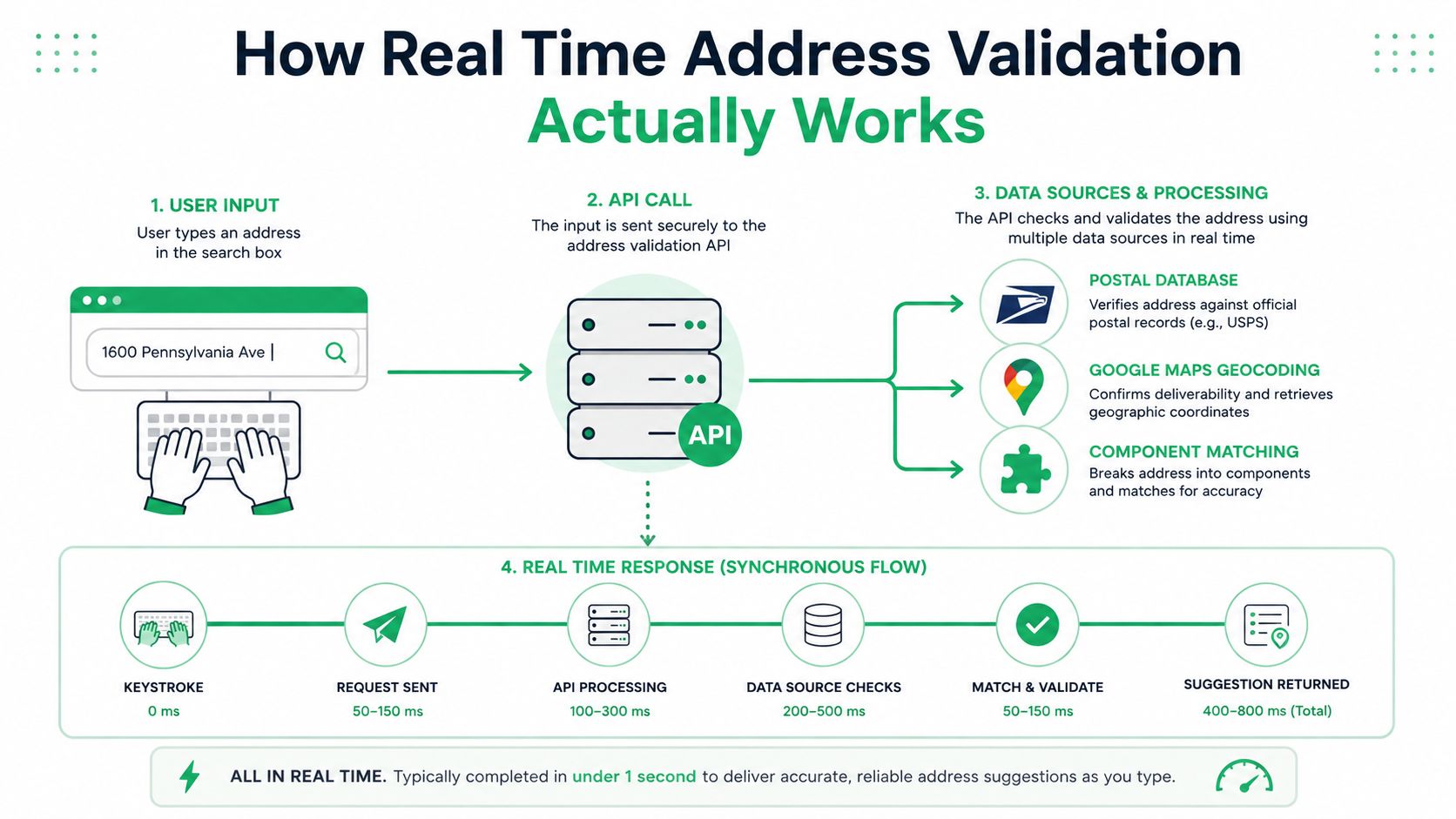
The working model is simple. The shopper starts typing, the store makes a synchronous API call during address entry or checkout, and the service returns a structured answer fast enough to avoid breaking the flow. Smarty's published performance targets show why speed matters at scale, with its U.S. Street Address API listing a 99.98% uptime SLA and 99.98% of responses within 500 ms over a five-minute period, while its international endpoints are designed for high throughput across global checkout flows (Smarty Ludicrous Speed).
What the API is actually doing
Behind the scenes, the service is comparing the shopper's input against postal and location data, then splitting the address into components. Google's Address Validation API says it validates components, standardizes the address for mailing, and identifies the best known latitude and longitude coordinates, with response fields such as verdict, address, geocode, metadata, and uspsData available for downstream logic (Google Address Validation overview).
That response is the merchant's decision layer. A verdict tells you whether the address looks usable. Component-level results show what's missing or suspicious. Geocode can help with downstream routing or serviceability checks. And mailing standardization matters because the warehouse, the carrier, and the customer all need the same canonical version.
A validation ping shouldn't just say “good” or “bad.” It should tell your checkout logic what to do next.
For a developer, the flow is usually: autocomplete suggestion, validation request, component analysis, then a decision about whether the shopper should see a suggestion, a prompt, or no interruption. On mobile, that response needs to land quickly. If it drags, checkout feels broken, and shoppers abandon the field instead of finishing it.
What to tell your developer
Use a synchronous validation call at the point of capture, not a nightly cleanup job. Keep the logic narrow. Ask whether the address is complete, whether it resolves to a real premise, and whether the shopper should be prompted before the order can move forward. That keeps validation useful without turning every form field into a roadblock.
For a concrete implementation pattern, see the internal walkthrough on Google Maps address validation in Shopify workflows.
Measurable Benefits for High-Volume Merchants
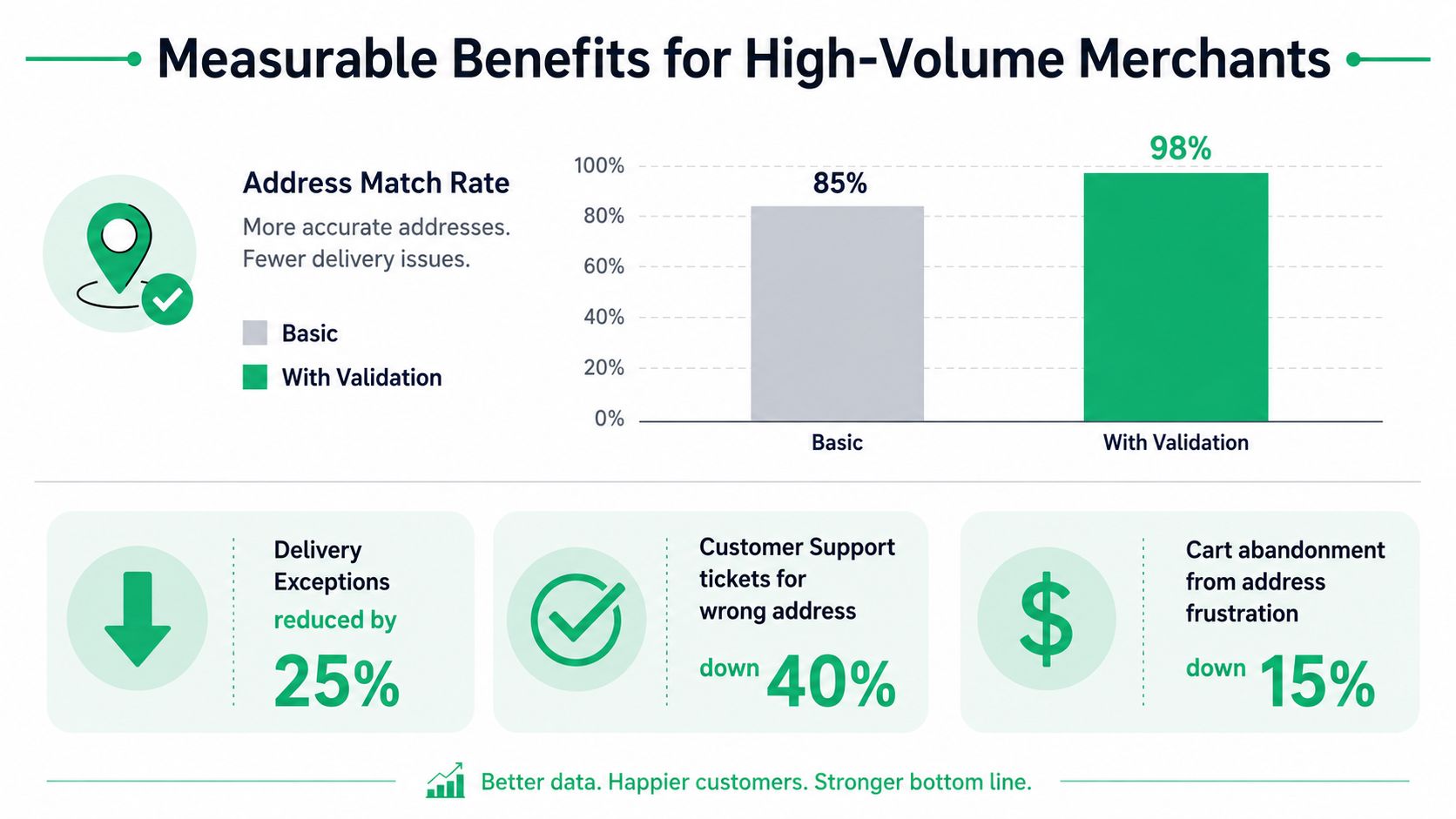
The commercial value shows up in cleaner matches, fewer failed deliveries, and less time spent fixing bad records after the order is already in motion. Loqate reports that real-time address verification delivers, on average, a 7% better match rate globally, an 8% uplift in established markets, and up to a 19% uplift in developing countries (Loqate address verification). That matters because the underlying issue is not abstract. One industry analysis cited 9.4% of a sample of 500 orders with address problems, and the same analysis put failed delivery costs at roughly $20 to $30 per package in reshipping, customer service, and lost revenue.
Where the savings actually come from
The most obvious gain is fewer delivery exceptions. The less visible gain is fewer repeated interventions from ops, support, and fulfillment. When validation catches a missing apartment, a wrong ZIP code, or a malformed street name before the order leaves checkout, the support team stops acting like a cleanup crew.
That effect reaches the warehouse too. Better address data improves shipping rate shopping, carrier selection, and 3PL handoff quality. If your routing logic depends on clean destination data, validation is upstream insurance.
The same logic applies after payment. A shopper who edits an address in self-serve order management can create a new failure point if the updated value is never checked again. A checkout API call and a post-purchase edit should use the same trust signals, because the cost of a bad address after purchase is no longer an abandoned cart, it is a failed delivery. For a practical implementation pattern, see Shopify address verification in post-purchase workflows.
Why the lift compounds
A small improvement in address quality does not stay small when it touches every order. If one in ten orders has a problem, even a modest drop in error leakage changes the shape of the post-purchase workload. Support sees fewer WISMO contacts, fulfillment sees fewer replacement shipments, and ops sees fewer manual interventions.
The CX benefit is just as real. Support teams spend less time on avoidable address cases, so they can focus on issues that need human judgment. Cleaner address data also makes reporting easier to trust, which matters when finance, ops, and fulfillment all need the same record of truth.
Implementation on Shopify and Shopify Plus
There are three integration paths that hold up in a Shopify stack. The first is a checkout extensibility app block that validates as the shopper types. The second is a server-side proxy that rechecks addresses from order webhooks or admin events. The third is a post-purchase widget on the order status page that validates edits before they hit fulfillment. The right mix depends on how much control you need over the checkout surface and how much editing you allow after payment.
The patterns that work in production
Checkout extensibility is the cleanest place to stop bad data early, but it has to stay light. Inline autocomplete dropdowns help, especially when they reduce typing on mobile. Theme app embeds can be useful for older storefront setups, but they don't offer the same clean operational boundary as checkout-native logic.
Post-purchase editing is where many merchants miss the second chance. If a shopper changes a shipping address after payment, the system should revalidate that new value before the order moves any closer to the warehouse. A good implementation also supports permission windows, so a shopper can only edit when the business is still able to act on the change.
Operational rule: validate again any time the address changes, not just the first time it's entered.
The same logic can be paired with order tagging, manual approval queues, and fulfillment rules. That's useful when an address change happens late in the cycle or when a risk flag should route the order to a human instead of straight to the label printer.
For a practical walkthrough of the order-status-page flow, the Shopify address verification guide shows how merchants connect validation to post-purchase edits.
Performance details that matter
High-volume stores should cache high-confidence lookups when the same address appears repeatedly, especially during flash sales. They should also keep an eye on batching or queueing logic if traffic spikes, so the checkout experience doesn't stall when orders stack up. The rule is simple, use validation to reduce downstream pain, but don't let the validation call become the new bottleneck.
SelfServe is one option that ties address and contact editing to real time validation inside post-purchase flows, with multilingual support and controls over what shoppers can change. It's not the only pattern, but it's a concrete example of how validation can extend beyond checkout.
When to Interrupt the Shopper and When to Stay Out of the Way
The hardest part of address validation isn't the API call. It's deciding when to let the shopper keep going. Google's guidance gives useful signals for that decision, including validationGranularity, confirmationLevel, and missingComponentTypes, plus examples that show how the recommended action changes when city, street number, or subpremise data is missing (Google fix address examples).
A workable decision tree
If the address is complete and the granularity lands at PREMISE or SUB_PREMISE, that's usually the cleanest path. When there are no inferred, spell-corrected, replaced, or unexpected components, Google treats the address as high-confidence deliverable in its high-volume pattern (Google high-volume address validation). In that case, don't interrupt the shopper just to make the form feel stricter than it needs to be.
When the address is ambiguous, ask for confirmation instead of hard-blocking. A missing city or postal code often belongs in that middle ground. The shopper probably knows the address, but the form doesn't yet have enough evidence to trust it without a prompt.
Three common cases
- Missing city or postal code. Prompt for completion. The address may still be recoverable, but the record isn't ready to ship as-is.
- Missing subpremise. Confirm with the shopper if the building is valid but the unit is unclear. This is the kind of error that often hides in apartment-heavy markets.
- Missing street number. Treat it as higher risk. If the system can't resolve a premise, a hard block is often safer than a silent accept.
The useful idea here is risk tolerance. A low-value domestic order can often absorb a softer prompt. A cross-border order or a high-value shipment usually deserves a stricter gate because the cost of a miss is bigger and the recovery path is slower.
Don't use validation to prove the form is strict. Use it to make the next action obvious.
Extending Validation to Post-Purchase Address Edits
Most validation stacks stop at checkout, which leaves a hole exactly where merchants often need help. Customers do change their minds after payment, and they expect the shipping address to be editable without another support ticket. That edit window needs the same trust checks as the original form, or a clean checkout can still turn into a bad delivery.
Why the second validation pass matters
A post-purchase edit is not just a convenience layer. It's a control point between payment and fulfillment. If the shopper updates the destination, the system should revalidate that edit before it reaches shipping logic, label generation, or a 3PL export.
That's where a merchant-defined permission window matters. Some changes should stay open only until fulfillment starts. Others should route to an approval queue. The point is to keep control while still removing avoidable friction for the customer.
What a post-purchase flow should protect
- Shipping edits: Recheck the address before accepting the change.
- Contact edits: Keep phone and email changes aligned with the order record.
- Language handling: Let shoppers interact in their own language without losing the structured address logic underneath.
- Operational guardrails: Block or queue changes once the order is too far along to be safely edited.
SelfServe is one example of this approach in practice, with editable shipping and contact details, multilingual widgets, and order-status-page flows designed to keep the merchant in control. The value isn't just convenience, it's preventing a new bad address from slipping in after the order is already paid. For a closer look at the post-purchase edit path, see the Shopify shipping address change guide.
The operational payoff is simple. You keep the customer self-sufficient, but you don't let self-service bypass the same validation standards you used at checkout.
ROI in Practice and Troubleshooting Common Issues
A clean ROI worksheet starts with order volume, then applies the address problem rate, then layers the failed delivery cost range on top. From there, the key question is how many bad addresses you can stop before fulfillment. Even without perfect precision, the direction is clear, the fewer failed shipments you have to recover, the faster the system pays for itself.
| ROI Inputs for Real Time Address Validation | ||
|---|---|---|
| Input | Example Value | Notes |
| Annual order volume | Your store volume | Start with actual paid orders |
| Address problem rate | Address problem rate from industry analysis | Use the rate your team has actually observed or can defend |
| Failed delivery cost per package | Failed delivery cost range from industry analysis | Includes reshipping, support, and lost revenue |
| Validation coverage | Your implemented share | Use the flows you actually validate |
| Post-purchase edit rate | Your edit volume | Include order-status-page changes |
The math changes once you include post-purchase edits. A checkout-only setup catches errors before payment, but it misses the addresses shoppers fix after the order is placed. Those edits still hit label creation, warehouse pick lists, and 3PL exports if the validation step is not repeated.
Common issues that need real fixes
Autocomplete lag on mobile usually means the interface is doing too much before the shopper finishes typing. Keep the interaction light, and do not turn the dropdown into a spinner farm. International mismatches are a different problem, often caused by local postal formats not lining up neatly with carrier expectations, so the validation layer needs country-aware logic instead of one global rule.
Permission windows are another edge case. If a shopper edits an address after fulfillment starts, the system should not treat the order as editable. That change should either be blocked or sent to manual review, depending on the business rule.
Implementation note: if the address changes post-purchase, tag the order immediately so downstream teams can see it without opening every record.
What to instrument
Track delivery exception rate, support tickets tagged with address issues, and the performance of orders that received post-purchase upsells. If you also measure how often validation prompts appear versus how often shoppers accept the suggested correction, you'll learn where the friction lives. That gives ops and CX a shared dashboard instead of separate hunches.
Frequently Asked Questions
What's the difference between address validation and address verification? Validation checks whether the address is structured and standard enough to use. Verification goes further and asks whether it maps to a real deliverable location. In practice, merchants usually want both in the same workflow.
How does this work for international orders with non-Latin scripts? The validation layer should accept the shopper's local input, then normalize it into the format needed for shipping and routing. The key is to preserve meaning while standardizing the record for downstream systems.
Will this hurt checkout conversion? It can if the form is slow or too aggressive. The safer pattern is fast autocomplete, soft prompts for ambiguous entries, and hard blocks only when the address can't be trusted.
How do permission windows work for post-purchase edits on Shopify Plus? You define when the shopper can still change the address and when the order becomes locked or needs review. That keeps self-service useful without letting late changes slip past fulfillment controls.
If you're wiring address validation into checkout, order editing, and fulfillment handoffs, SelfServe gives you a way to keep those checks in one post-purchase workflow. It combines editable shipping and contact details with real-time address validation and merchant control over when changes are allowed. If that's the gap you're trying to close, visit SelfServe and see how it fits your Shopify operations.