Shopify Workflow Automation: A Practical Guide for 2026
A product launch goes live, and the support queue fills before the first warehouse wave is complete. Customers want to change an address, remove an item, cancel an order, or ask why tracking hasn't moved. Meanwhile, an operations coordinator is opening order records, copying details between systems, messaging fulfillment, and trying not to create a second problem while fixing the first.
That's the practical starting point for Shopify workflow automation. It isn't a collection of clever shortcuts. It's the operating layer that determines whether your team can absorb order volume without adding manual handling to every exception. Shopify's ecosystem now includes more than 6.9 million merchants and over 13,000 apps, according to an industry summary from MESA's Shopify automation statistics. At that scale, small improvements in order handling, support routing, and post-purchase communication compound across a large merchant base.
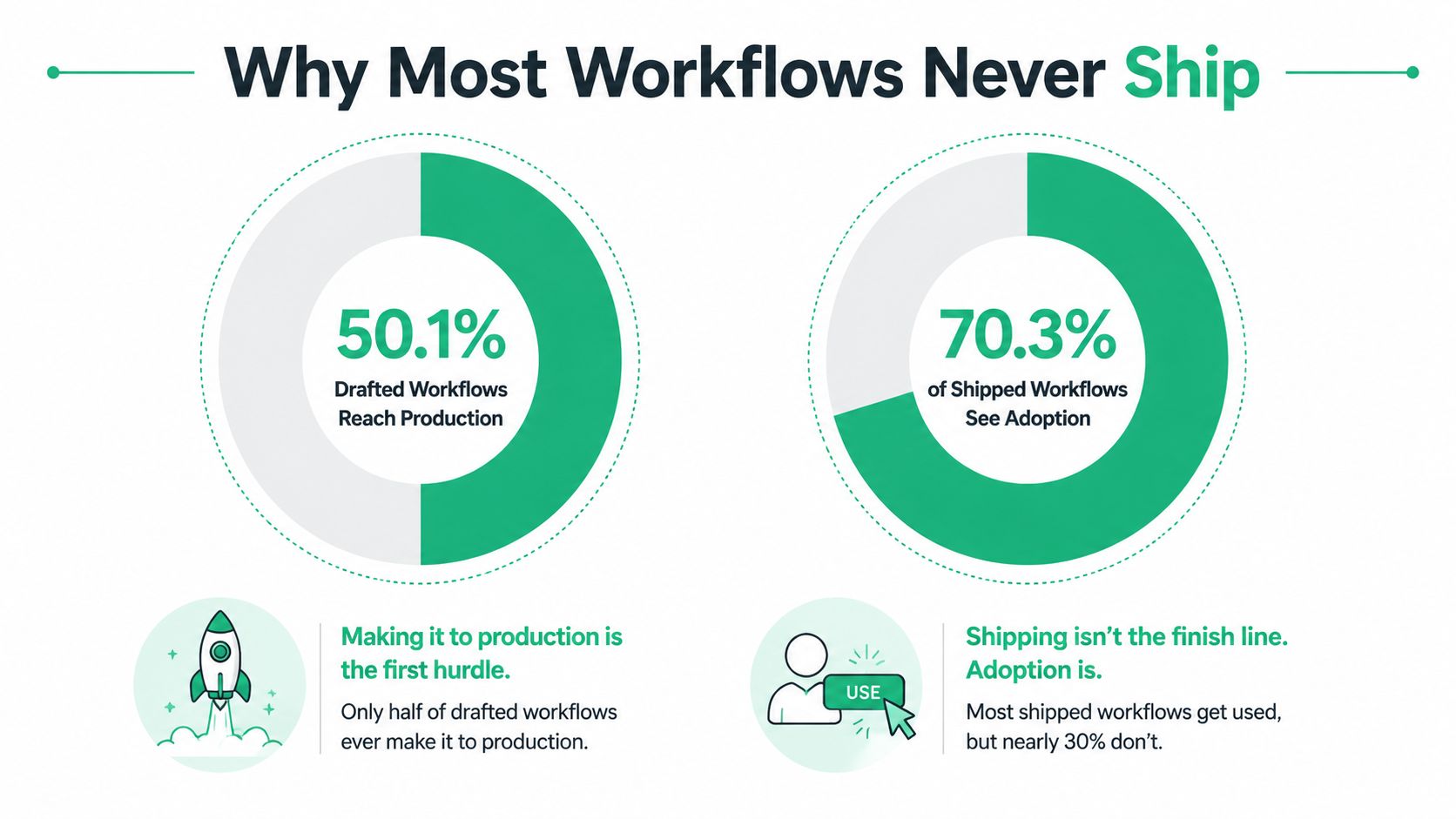
The harder problem isn't knowing that automation exists. In a Q1 2026 sample of 1,374 Shopify merchant workflows, only 50.1% reached production, while workflows containing an AI step shipped at a 70.3% rate (MESA's workflow automation benchmark). That gap changes the conversation. The question isn't only how to build a workflow. It's how to activate, govern, measure, and maintain one.
What Shopify Workflow Automation Actually Means in 2026
A launch-day address change can touch support, fulfillment, and customer communications within minutes. Support must confirm whether the order has been released, the warehouse may need a hold signal, and the customer needs confirmation after the change is safe. If each handoff relies on someone noticing the request, copying details accurately, and acting before fulfillment starts, the process will eventually break.
Shopify workflow automation turns that chain of manual decisions into defined rules, triggers, conditions, actions, and integrations. The workflow may run in Shopify Flow, a specialized app, an external automation platform, or custom code. The platform matters less than the operating result: an order, customer, inventory record, or notification moves through a known lifecycle with fewer manual interventions.
Treat the process as a set of operational states. Shopify's order-processing guidance describes a sequence in which an order is placed, payment is captured, the order is fulfilled, and the completed order is archived (Shopify's order management guidance). Automation is most reliable when it manages these repeatable transitions and sends exceptions to a named owner.
Automation is infrastructure, not decoration
Notification workflows are a sensible starting point because they are easy to test and carry limited operational risk. They do not remove the bottleneck if employees still inspect every order and decide what happens next.
Higher-value workflows change the process itself:
- Order handling: Route, hold, tag, or update orders before fulfillment.
- Customer self-service: Let shoppers complete eligible changes without opening a support ticket.
- Fulfillment coordination: Send structured signals to an OMS, WMS, or 3PL.
- Customer communication: Confirm changes, explain delays, and reduce avoidable “where is my order” contacts.
- Commercial follow-up: Present relevant offers after purchase without forcing another checkout.
Shopify's Messaging app also reports automation reach, sessions, orders, conversion rate, and sales (Shopify automation guidance). Those measures connect workflow performance to both operating cost and revenue. A workflow can reduce support effort, protect fulfillment speed, or influence a later purchase.
The production gap makes governance part of the work. In the referenced Q1 2026 sample, only 50.1% of Shopify merchant workflows reached production, compared with a 70.3% production rate for workflows containing an AI step. The useful question is not whether AI belongs in every workflow. It is whether the team can define ownership, test failure paths, and keep the workflow active after launch.
Operational rule: Automate the decision that repeats, then keep the exception visible to a person.
Start with work that already repeats, especially requests that create support tickets or fulfillment exceptions. Define the allowed states, the responsible team, and the fallback before activating the workflow. Post-purchase automation for ecommerce provides a practical view of how customer-facing operations can connect to the same system. A green “active” label is not proof of impact. Ticket deflection, exception volume, and successful handoffs are.
How Shopify Flow Thinks in Triggers, Conditions, and Actions
Shopify Flow uses a deterministic trigger, condition, action model. An event starts the workflow, conditions decide whether it should continue, and actions change store data or notify another system. Shopify documents Flow as its native workflow automation layer, with manual runs also available from areas such as Orders, Draft orders, Products, and Customers (Shopify Flow documentation).
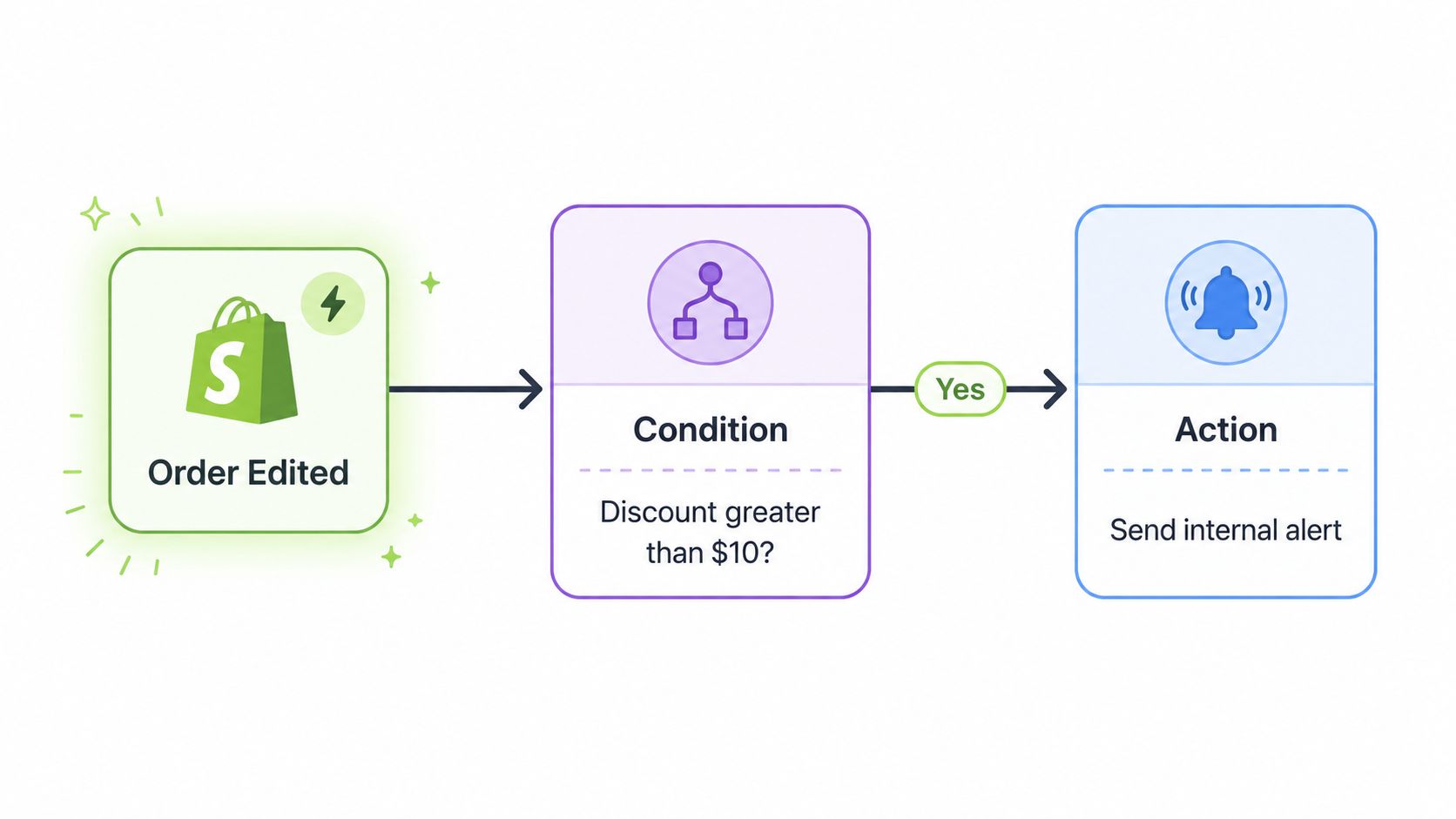
Take an order-risk workflow. The trigger could be Order created, Order paid, Order fulfilled, or Order risk analyzed. The trigger determines when Shopify evaluates the logic. It doesn't ask an employee to check a queue on a schedule. The event starts the run.
A concrete order example
Suppose the goal is to hold suspicious orders for review before a warehouse releases them.
- Trigger: Order risk analyzed.
- Condition: Risk level is high, and the shipping country belongs to the markets your fraud team reviews manually.
- Action: Add a review tag, send an internal email, and notify the operations channel in Slack.
The condition block is where most workflow quality lives. A broad trigger with a vague condition can create noise, while an overly narrow condition might miss the cases you intended to catch. Use fields that exist reliably in the event payload, and test each branch with realistic order data.
Flow actions can update tags, send notifications, and connect to external services. If the required destination isn't available as a native action, you'll typically need a connector such as Slack, Gmail, or an HTTP request to a third-party endpoint. That's where webhook automation for ecommerce becomes useful, particularly when an order event needs to reach a system outside Shopify.
Flow is a strong fit for operational routing, but it isn't a universal checkout engine. If the logic must change checkout behavior, discounts, delivery customizations, or other developer-shaped surfaces, Shopify Functions or custom development may be more appropriate. Use Flow to coordinate events after the relevant data exists. Use code where the decision must occur inside the buying experience itself.
The Workflows High-Volume Stores Run Most Often
The highest-return automations usually follow the order state machine instead of following an app vendor's feature menu. The sequence begins with order creation and payment, moves into fulfillment, and ends with delivery, returns, and retention. Each workflow below should have a clear trigger, condition, action, and metric.
| Workflow | Typical Trigger | Sample Condition | Action | Metric It Moves |
|---|---|---|---|---|
| Order edits and address changes | Customer submits an eligible change | Order isn't released to fulfillment | Update or hold the order, tag the change, notify the relevant team | Support tickets deflected |
| Customer tagging | Order created, return completed, or customer threshold reached | First purchase, return event, or defined customer value rule | Apply a structured customer tag | Segmentation and routing accuracy |
| Fulfillment routing | Order paid or fulfillment status changes | Warehouse zone, product type, or risk status matches a rule | Route to the correct location or fulfillment partner | Time to fulfillment |
| Returns authorization | Return request created | SKU or product category meets a return policy rule | Approve, hold, or route the return for review | Manual return handling |
| Post-purchase notifications | Order edit, fulfillment delay, or shipment confirmation | A relevant status or exception exists | Send customer or internal notification | WISMO contacts and response workload |
| Upsell and cross-sell | Thank-you page, order status view, or shipment confirmation | Customer qualifies for a relevant offer | Present a curated add-on or collection | Average order value |
Order edits come first
Address changes and cancellations are difficult because timing matters. A valid request before fulfillment may be safe to execute, while the same request after a warehouse handoff may require a manual intervention or a cancellation queue. The workflow should check order state before it promises an outcome.
Customer tagging is less visible but foundational. A first-purchase tag, return-related tag, or lifecycle tag gives downstream systems a stable signal for segmentation, service routing, and reporting. Tags need naming conventions, ownership, and retirement rules. Otherwise, they become an unreliable second database.
Fulfillment and returns need guardrails
Routing by warehouse zone or product type can reduce the number of decisions a coordinator makes each morning. Risk-based routing can protect the fulfillment team from releasing orders that need review. Returns authorization should also distinguish routine cases from products that require margin or policy review.
Post-purchase communication has a direct support connection. If a customer receives a clear confirmation after an order edit or delay, they're less likely to ask whether the change was processed. For broader conversion patterns, Quikly's guide to Shopify automation workflows for conversions provides useful context on how automated messages can support the customer journey.
Upsells belong after the operational basics. A one-click offer on a thank-you or order-status experience can add commercial value, but it shouldn't distract the team from unresolved address changes, fulfillment holds, or broken notifications. The table-stakes layer is reliable order movement first, revenue expansion second. More practical examples are collected in Shopify Flow examples.
Native Tools, Apps, and When Each One Earns Its Place
The build-versus-buy decision should start with operational complexity, not a feature comparison. Shopify Flow is usually enough for tagging, internal alerts, basic routing, and straightforward post-purchase logic. A dedicated app earns its place when customers need a branded interface, permissions, validation, or a change process that Flow alone can't present cleanly.
| Scenario | Shopify Flow | Dedicated App | Custom Build |
|---|---|---|---|
| Apply tags after an order event | Strong fit | Usually unnecessary | Excessive |
| Notify support about a risk or exception | Strong fit | Useful if the app owns the event | Appropriate for unusual routing |
| Customer-facing address editing | Limited interface control | Strong fit | Needed for unique permissions |
| Returns with branded customer steps | Basic routing only | Strong fit | Useful for complex policy logic |
| Checkout, discount, or delivery customization | Not the right layer | Depends on app capability | Strong fit |
| OMS, WMS, or 3PL coordination | Suitable with connectors | Suitable when the app owns the integration | Appropriate for bespoke orchestration |
When native automation is enough
Choose Flow when the team can express the requirement as a stable event and a small set of conditions. “When an order is paid, add a tag if the product belongs to a specific collection” is a clean Flow problem. So is notifying an internal channel when inventory or fulfillment status requires attention.
Flow also keeps the logic visible to operations users. That helps with review and handoff, especially when a workflow doesn't need a customer-facing experience.
When an app pays for itself
Use a dedicated app when the customer needs to initiate and understand the action. Address editing, cancellation requests, and returns involve permissions, timing windows, validation, status messaging, and exceptions. Those functions need more than a back-office trigger.
SelfServe is one example of this post-purchase layer. It lets shoppers manage permitted order changes within merchant-defined controls, supports address validation, can apply order tags, and can expose upsell modules on post-purchase pages. Treat it as a customer-facing component that can feed structured events into the wider Shopify workflow rather than as a replacement for every automation.
Customer support teams evaluating broader automation can also compare these patterns with autonomous customer support for ecommerce, particularly where conversation handling and workflow execution overlap.
When custom code is honest
Custom development is justified when the rule is unique, compliance-sensitive, or impossible to represent safely through existing connectors and apps. It also makes sense when several systems need a shared source of truth and the operational consequences of a missed event are high.
Don't build custom code merely because a Flow canvas feels unfamiliar. Code adds deployment, monitoring, ownership, and maintenance obligations. Buy the customer-facing surface when it already solves the difficult parts. Build only where the business rule genuinely requires it.
Implementing Automation Without Creating a New Bottleneck
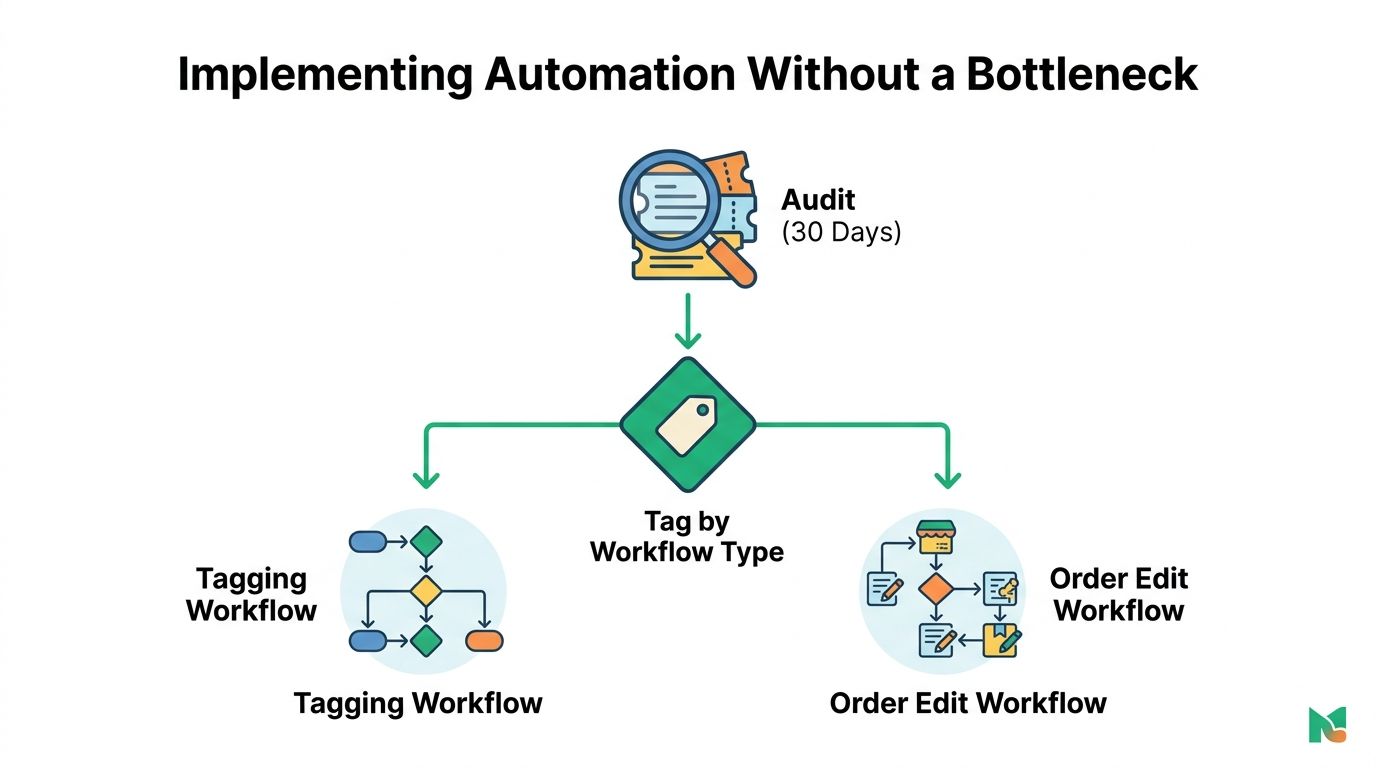
Treat rollout as an operations migration. An active workflow changes who handles work, when a customer receives a message, and what fulfillment sees. If you launch without a baseline, you won't know whether the automation removed work or just moved it somewhere less visible.
Start with the work already costing time
Pull the last 30 days of support tickets and fulfillment exceptions into a working sheet or reporting view. Tag each item by intent, such as address change, cancellation, delivery status, return request, payment issue, or inventory exception. Then compare those intents with the manual steps your team performs in Shopify and connected systems.
The first workflow should map to a frequent, repeatable problem with a clear safe boundary. Order edits are often a strong candidate because the workflow can check whether fulfillment has started before allowing a change or routing it for approval.
Run a one-week pilot on one high-volume flow. Record the number of eligible requests, completed requests, agent touches, failed runs, duplicate notifications, and fulfillment exceptions. Don't expand because the workflow looks elegant. Expand after the before-and-after data shows that the process is safer and faster.
Give every flow an owner
Assign one person to each production workflow. That owner doesn't need to build every change, but they should know what the flow does, which systems it touches, what tags it creates, and what breaks when an upstream field changes.
Use a weekly review during the pilot, then establish a regular governance cadence. Watch for three predictable failures:
- Test-order contamination: A test order triggers real notifications or fulfillment actions.
- Duplicate processing: An app and Flow respond to the same event and send conflicting updates.
- Fulfillment races: A customer edit arrives while the warehouse is already packing, creating split shipments or inconsistent records.
Practical rule: Measure shipped workflows and clean handoffs, not the number of canvases your team has created.
Success is measured by shipping reliability. A workflow that saves clicks but creates fulfillment exceptions isn't an improvement. Keep the pilot narrow, make the rollback path obvious, and require operational signoff before expanding to more products, markets, or fulfillment partners.
Why Most Workflows Never Actually Ship
A draft can look complete in Flow while the operation around it remains undefined. A trigger, condition, and action do not assign ownership, settle exception handling, or prove that a tag is reliable. The workflow ships only when the team can run it safely against real product, market, payment, and fulfillment combinations.
A benchmark of 1,374 merchant workflows found that 50.1% reached production, while workflows with an AI step shipped at a 70.3% rate. The comparison is useful as a production-gap signal, not as a promise that AI fixes governance or guarantees adoption. It points to the hard problem: activation depends on decisions, testing, and maintenance after the canvas is built.
Activation is an operating problem
Flows stall when a condition is vague, an approval has no owner, or a risky action cannot be tested without affecting customers. Required tags may be inconsistent. An integration change can also invalidate a previously working rule. A test order may pass while a real order exposes a payment, inventory, market, or fulfillment edge case.
Create an automation registry for each production flow. Record:
- Business purpose: The process problem the workflow solves.
- Owner: The person responsible for review and incident response.
- Inputs: Trigger, fields, tags, and connected systems.
- Actions: Changes made and notifications sent.
- Exceptions: Cases routed to a human queue.
- Last review: Latest validation date and test result.
- Kill switch: Documented steps to pause or deactivate the flow.
Review the registry on a quarterly cadence, and after changes to checkout, theme, ERP, OMS, WMS, 3PL, or connected apps. Remove flows without a current business purpose. A smaller set of understood automations is easier to support than a large library that staff avoid touching.
The cited benchmark makes the production gap visible. Ideas are not the constraint. The constraint is converting an editor draft into a maintained process with clear activation criteria, accountable ownership, and a safe response when the rule stops matching reality.
Measuring the KPIs That Prove Automation Worked
A workflow needs a measurement plan before activation. Otherwise, teams tend to report run counts, completed actions, or app dashboards that don't answer the executive question: did this reduce avoidable work, improve order movement, or create incremental revenue?
Build a dashboard around five metrics. Compare a defined pre-automation baseline with a comparable post-launch segment. Keep customer intent, product type, market, fulfillment method, and order state visible in the analysis.
| KPI | Definition | Data Source | Pass Threshold |
|---|---|---|---|
| Ticket deflection | Eligible contacts that never require an agent | Support platform matched to order and intent data | A sustained reduction in the targeted intent without a rise in exceptions |
| Edit completion rate | Customer-initiated edits resolved without agent intervention | App events reconciled with Shopify order records | Completed changes match the final order state |
| Time to fulfillment | Time from order creation to label or fulfillment milestone | Shopify and shipping or warehouse records | Faster or more consistent handling for the pilot segment |
| AOV lift | Revenue per order for exposed customers compared with a control group | Shopify order data and experiment assignment | A repeatable difference not explained by organic mix changes |
| Tagging accuracy | Correct tags confirmed against the underlying order or customer facts | Shopify records plus manual validation sample | High agreement between tag and source data |
Measure deflection, not activity
For self-service order editing, edit completion is useful but incomplete. The stronger support measure is whether the customer's request ever becomes an agent ticket. Order Editing's support guidance highlights this distinction: the business impact is ticket avoidance, not merely completed edits.
Match support conversations to order IDs and intent categories. Exclude duplicate contacts, agent-created follow-ups, and conversations that began for another reason. If the app reports an edit as complete, reconcile that event against the actual order state. A successful-looking app event is not proof that the warehouse received the correct instruction.
Avoid attribution traps
Upsell measurement needs a control or comparison group. A customer who buys more after an automation may have been exposed to another campaign, a seasonal offer, or a different product mix. Don't attribute the full order value to a post-purchase flow without separating exposure from other influences.
Marketing attribution also belongs in the same discipline. Teams reviewing how automation interacts with paid acquisition can use Shopify ad spend attribution guidance as a reference point, but the workflow dashboard should still connect customer actions to the final Shopify order record.
A 90-Day Starting Plan and Best Practices to Carry Forward
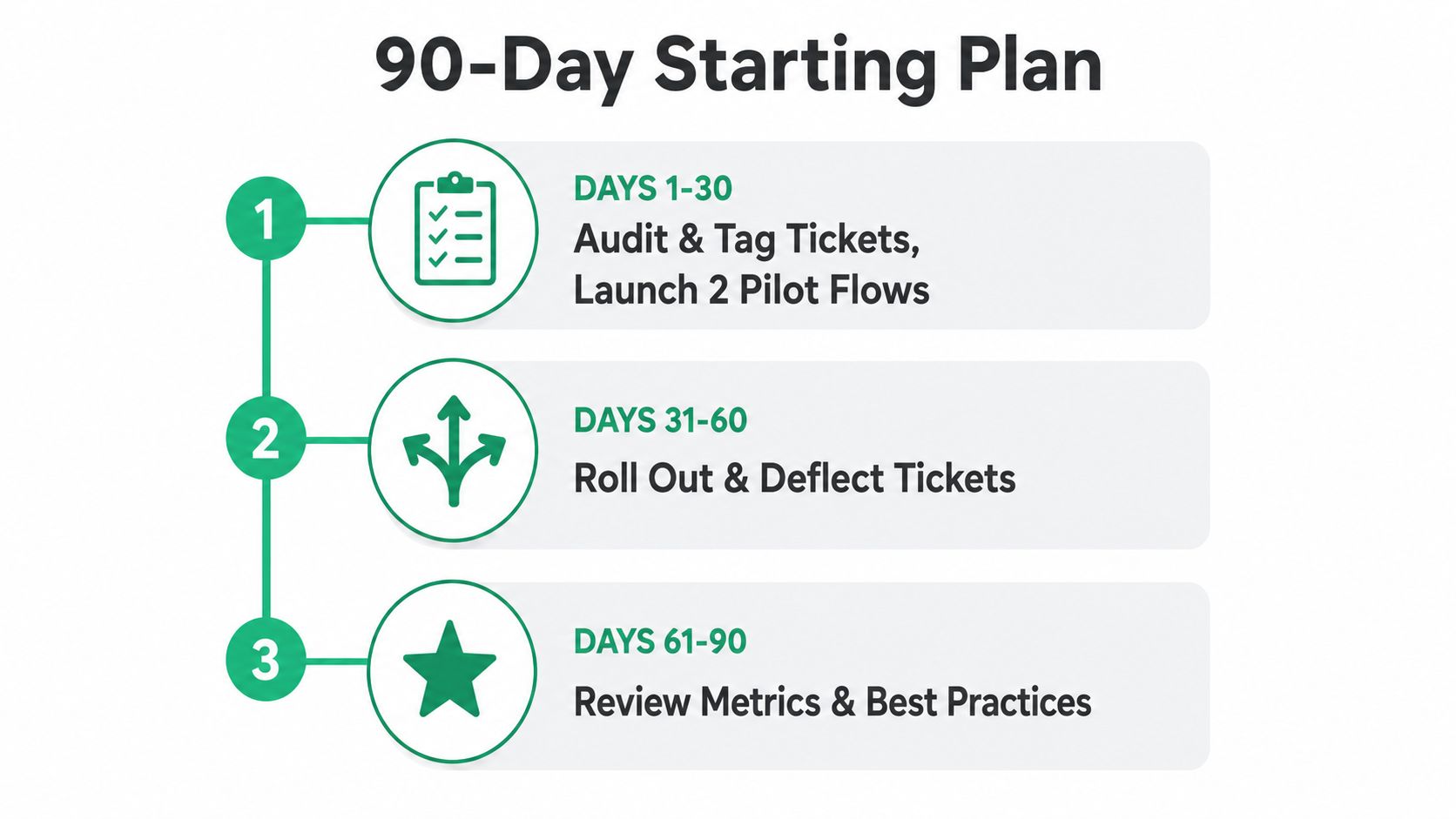
Automation should earn its next workflow. Give the team time to establish a baseline, ship a narrow pilot, and set ownership before the library expands. The plan below keeps activation, governance, and ticket-deflection measurement together.
Days 1 to 30, audit and pilot
Export support tickets and fulfillment exceptions from the previous 30 days. Tag each record by customer intent and operational cause. Select two pilots: one customer or order tagging workflow, and one order-edit workflow with clear eligibility rules.
Before activation, record ticket volume for the target intent, agent touches, edit outcomes, fulfillment timing, and exceptions. Assign an owner, define the rollback procedure, and decide how ticket deflection will be measured. A completed app event matters only if the order and support records show that manual intervention was avoided.
Days 31 to 60, expand carefully
Release the pilots to the agreed segment after reviewing early results. Reconcile app events with Shopify records and support conversations, then scope a third workflow around the highest-volume return reason from the audit.
Add a workflow only when its triggering event is stable, its action is safe, and its measurement method is clear. A request from another team is not enough. This gate protects the queue from automations that create exceptions faster than they remove tickets.
Days 61 to 90, govern and improve
Create an automation registry, schedule quarterly reviews, and set sunset rules for flows that lose performance or ownership. Test an AI-assisted workflow only when it has a defined production objective and human review. The benchmark's 70.3% shipping rate for workflows containing an AI step is a reference point, not a target to copy blindly (MESA's benchmark analysis). The broader production gap also matters: AI-assisted workflows shipped more often than non-AI workflows, but activation still requires a safe operating boundary.
Carry these practices into the operating standard:
- Instrument before activation: Establish the baseline before the first production run.
- Treat tags as data contracts: Define who creates, consumes, reviews, and retires each tag.
- Prefer governed simplicity: One dependable workflow is more valuable than several fragile ones.
- Review system changes: Recheck automations after checkout, theme, app, API, or 3PL changes.
- Keep exceptions human: Route uncertain cases to a visible queue instead of forcing a risky action.
On Monday morning, start with the ticket export, not the Flow editor. Find the repeated request your team already pays people to handle. Define the safe boundary, name the owner, and decide how you will prove that the customer or warehouse no longer needs the same manual intervention.
SelfServe gives Shopify merchants a controlled post-purchase layer for eligible address and order changes, customer-facing self-service, automatic tagging, and post-purchase upsell experiences that can feed broader Shopify workflow automation. Visit SelfServe to review the available workflow options and start a 30-day free trial.