Address Validation Google: The Complete Guide for Merchants

About 6.5% of all mail is undeliverable as addressed, so address validation isn't just a formatting feature. Google's Address Validation API helps merchants standardize addresses, infer missing information, determine whether an address represents a real place, and identify the best known geocode before fulfillment.
A bad address can turn a completed checkout into a returned parcel, a support conversation, a refund, or a reshipment. For Shopify merchants, the practical question isn't whether an address looks correct in a form. It's whether the address is complete, plausible, deliverable, and tied to the right physical location before the order reaches a carrier.
Why Google Address Validation Matters for Your Store
A checkout can accept a filled address that still fails in practice. A shopper may mistype the street, omit an apartment number, or choose the wrong locality from browser autofill. The warehouse prints the label, the carrier attempts delivery, and the parcel returns. The order was paid, yet it creates extra handling, support work, and pressure on the customer relationship.
That is the problem address validation Google tools are designed to reduce. Google's Address Validation API documentation describes a service that checks address components, standardizes them for mailing, infers missing information, determines whether the address represents a real place, and returns the best known geocode. Each function addresses a different failure point before fulfillment.

The operational leak starts at entry
Independent ecommerce and logistics reporting cites U.S. Postal Service data showing that about 6.5% of all mail is undeliverable as addressed. A separate address verification market report cites research indicating that as much as 20% of customer data becomes inaccurate each year, while poor data quality costs organizations an average of $12.9 million annually. These figures describe broad data-quality problems, not a guaranteed loss for every store. They still show why address quality belongs in the order workflow.
Google's stack provides three connected layers:
- Autocomplete helps shoppers select a recognized address rather than enter every component manually.
- Validation checks the completed address, flags missing or questionable information, and returns standardized components.
- Geocoding attaches a location that mapping, routing, and delivery systems can use.
The correction window can remain open after payment. A merchant may let a shopper confirm or safely correct the shipping details before fulfillment, reducing the chance of a carrier exception without sending the issue to support. The strongest workflow therefore combines capture, validation, and visual confirmation. It is a three-step system across checkout and controlled post-purchase handling, not a single setting that ends when the order is submitted.
The Three Core Components Explained Simply
Think of shipping as a conversation with three different specialists. The first helps the shopper state the address clearly. The second checks whether the finished statement makes sense. The third places that address on a map so delivery systems can work with a location rather than text alone.
First comes the helpful postal clerk
Autocomplete behaves like a postal clerk who recognizes the street name as the customer types and offers likely complete addresses. The shopper chooses a suggestion instead of typing the street, locality, region, and postal code from memory. That reduces ambiguity at the point where the error begins.
In Google's product ecosystem, this role is handled by Places Autocomplete, including the newer Places Autocomplete experience. It's an interactive input tool. It suggests possibilities quickly, but a suggestion alone isn't the same as a final deliverability decision. Merchants can explore the distinction further in this guide to address validation APIs.
Then the address inspector checks the details
Validation is the back-office inspector. It reviews the completed address, checks its components, standardizes the result, and can identify missing or questionable details. Google states that its Address Validation API can determine whether an address is a real place, infer missing information, and determine the best known geocode.
That makes validation different from autocomplete. Autocomplete helps the shopper choose an option while typing. Validation examines the completed address in the context of an order. A missing unit number, an inconsistent postal code, or an address that can't be confidently matched should trigger a useful correction prompt rather than becoming a fulfillment problem.
Finally, the map pin placer identifies the location
Geocoding converts an address into geographic coordinates and a formatted location. In the package analogy, it drops a pin on the appropriate building or delivery area so a map, routing service, or fulfillment process can work with a physical position.
The three components solve different error categories:
- Autocomplete reduces typing and selection errors.
- Validation checks completeness, plausibility, and standardization.
- Geocoding connects the accepted address to a mappable location.

Using one layer without the others leaves a gap. A polished suggestion can still be incomplete, and a validated text address can still benefit from visual confirmation before fulfillment.
How Google's Checkout Flow Actually Works
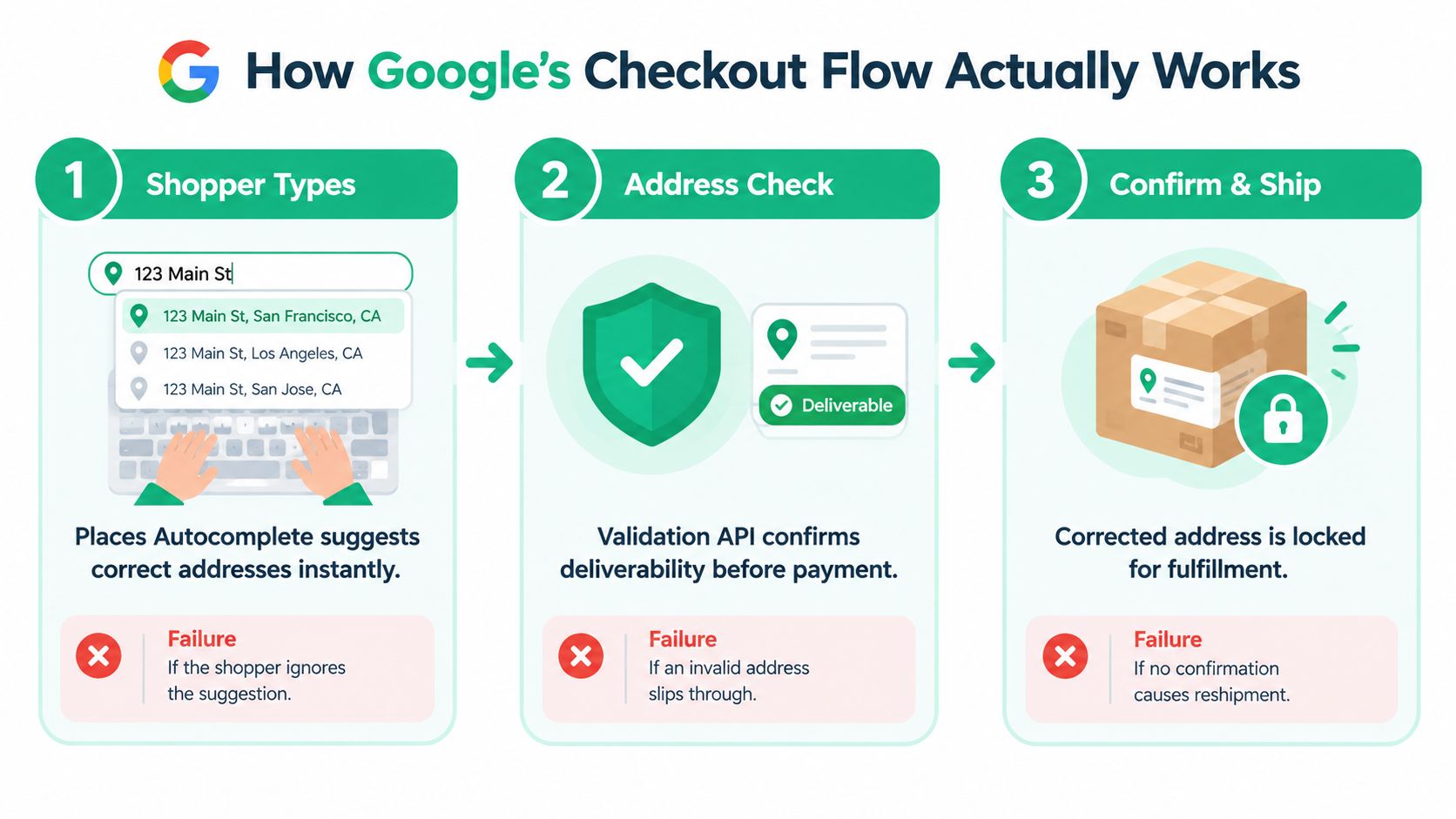
Google recommends a three-step ecommerce pattern: capture the address with Place Autocomplete, validate it with the Address Validation API, then show the location on a map. The sequence matters because each stage answers a different question.
Step one captures a usable address
As the shopper types, Places Autocomplete presents recognized address suggestions. The customer selects one, and the storefront can populate structured components instead of relying on a free-typed string. Google's address autocomplete guidance covers this capture stage in more detail.
If a merchant skips autocomplete, the shopper must manually construct the address. That creates more opportunities for spelling mistakes, mismatched localities, missing postal information, or inconsistent formatting. Autocomplete improves the input, but it doesn't certify that the final address is ready for delivery.
Step two validates the completed record
Once the address is complete, the storefront sends it to the Address Validation API. The response can help the merchant determine whether the address is confirmed, unconfirmed, or associated with multiple matches, and it can return standardized information and correction prompts.
The customer should see the correction while the order is still editable. A clear message such as “Please confirm your apartment or unit number” is more useful than a generic checkout error. Skipping validation lets questionable addresses move into payment and fulfillment, where the correction becomes harder and more expensive to manage.
Step three confirms the physical location
The final stage displays the location on a map. The shopper can confirm that the pin belongs to the intended building or delivery point, while the merchant gains a geographic representation for downstream processes. Google's ecommerce checkout address validation architecture presents this capture, validation, and map-confirmation combination as a complete workflow rather than a single switch.
Geocoding can support rate calculations, delivery routing, service-area checks, or internal review, but it shouldn't replace validation. Merchants optimizing the broader checkout experience can also review this resource on how to boost conversions with CartBoss. In Shopify, the same three-stage logic can extend from the checkout form into post-purchase address correction before the order is routed to a carrier.
What Bad Addresses Actually Cost in Numbers
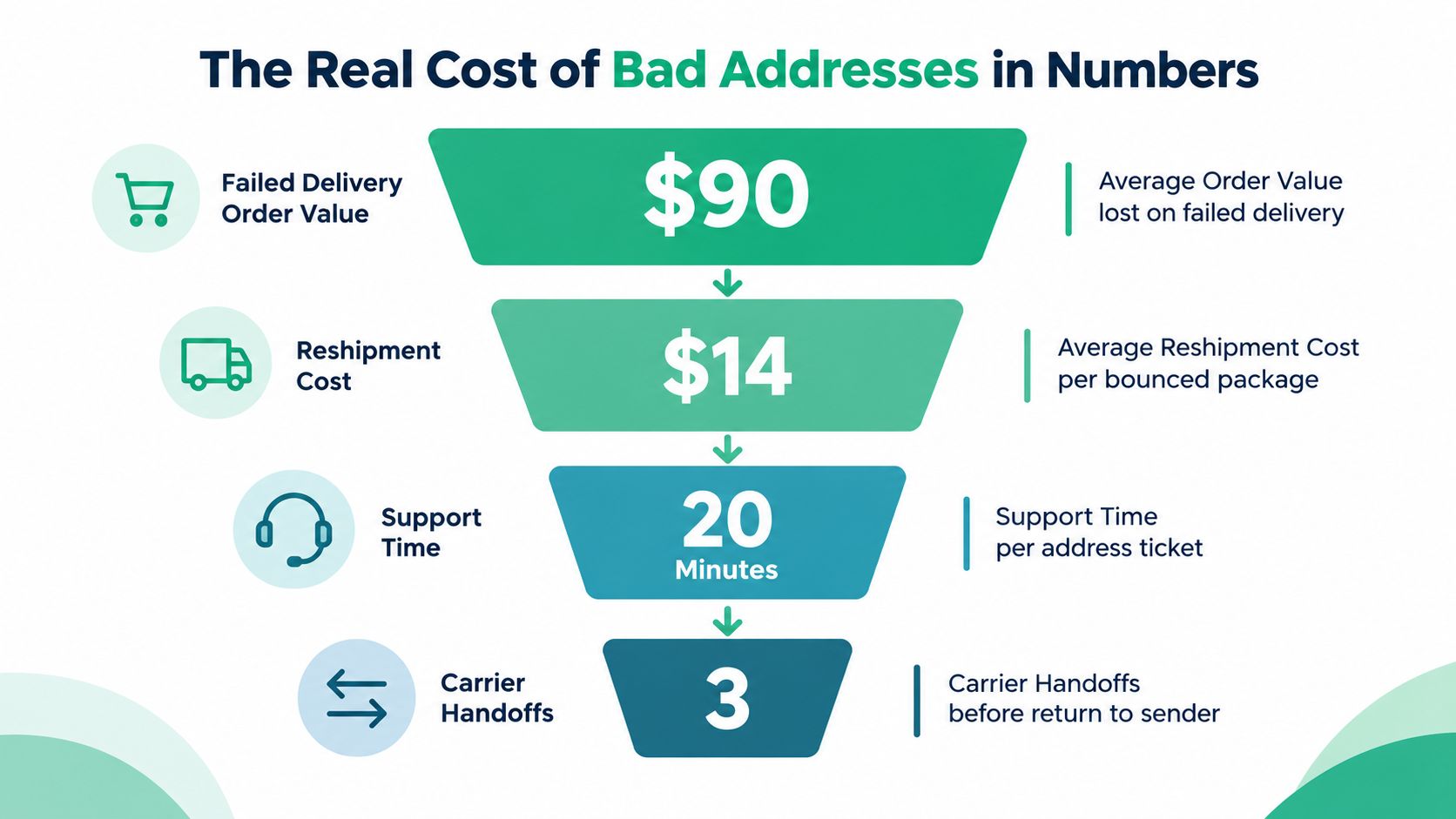
Address errors rarely remain confined to one field. A shopper might enter the wrong street number, omit a unit, or select a locality that looks valid but does not match the carrier's delivery record. The parcel can then face a delay, return, clarification request, or delivery exception that pulls warehouse and support staff into the correction.
Industry reporting has linked address errors to up to 41% of failed deliveries on the first attempt. Treat that figure as a directional benchmark, not a forecast for your store. Your actual exposure depends on order volume, address mix, carrier coverage, and how quickly customers can correct details after purchase.
How the loss appears in an operation
| Metric | Typical Merchant Impact |
|---|---|
| Undeliverable mail | A broad benchmark of about 6.5% of all mail, cited from U.S. Postal Service data |
| Inaccurate customer data | Research discussed earlier says as much as 20% of customer data becomes inaccurate each year |
| Failed first delivery | Address errors contribute to up to 41% of first-attempt delivery failures |
| Organizational data-quality cost | The cited research places average annual cost at $12.9 million |
A modest error rate can still create a substantial queue. If 2% of parcels contain address issues, the stated rate produces 200 problematic shipments per 10,000 orders. That arithmetic excludes returns, carrier holds, refunds, support contacts, and the time spent correcting records. A post-purchase correction prompt can capture some of these issues before fulfillment hands the order to a carrier.
Connect each loss to a control
Autocomplete reduces typing and helps shoppers select a structured address. Validation checks the submitted components and flags uncertainty before the order is finalized. Geocoding supplies latitude and longitude when a routing, service-area, or internal location workflow needs more than a text string.
The three controls work at different points in the process. Capture improves the initial entry, validation tests whether the address is usable, and visual confirmation helps the customer spot a misplaced building or delivery point. Post-purchase correction adds another opportunity to recover revenue before the order is routed.
Validation cannot guarantee that every carrier will accept every parcel. New buildings, rural locations, unsupported regions, and missing apartment details may still require manual review. Track correction rates, validation failures, carrier returns, fulfillment overrides, and repeat-purchase behavior before and after launch. Those measures show whether the workflow reduces operational loss, rather than merely generating API activity.
Address Validation Google Inside Shopify Stores
Shopify merchants generally choose between an app-based implementation and a custom Google Maps Platform integration. The app route is faster to test, but the merchant must inspect exactly where the app changes address fields. Some tools may affect checkout, while others work only on customer accounts, cart pages, or post-purchase screens.
Compare the implementation paths
| Store Type | Implementation Path | Primary Benefit |
|---|---|---|
| Standard Shopify store | Install a compatible address app | Faster deployment with less engineering work |
| Shopify Plus or custom storefront | Build a Google Maps Platform workflow | Greater control over fields, prompts, and data handling |
| Self-managed post-purchase flow | Add validation to order-edit screens | Gives customers a controlled opportunity to correct shipping details |
| International merchant | Combine suggestions, validation, and map confirmation | Handles variation in address formats and locality names |
A custom workflow usually starts with a restricted Google Maps Platform key, the Places JavaScript API for autocomplete, and an Address Validation API call after the shopper selects or submits a complete address. The application should preserve the customer's original entry, show the standardized result clearly, and replace stored fields only after the shopper confirms the correction.
Post-purchase is a separate control point
A customer may notice a mistake immediately after placing an order. A controlled editing window can let that shopper add a missing unit number, correct a street typo, or confirm a map pin before fulfillment. It can also help surface conflicts, such as a post office box paired with a delivery method that requires a street location.
For merchants building their own customer-service process, an ecommerce customer service integration can help connect address corrections with support workflows. SelfServe is one option for Shopify merchants that want customers to manage permitted post-purchase changes while validating a shipping-address update with Google Maps.
Don't block every uncertain result. Provide a manual-review path, make prompts accessible, support unsupported locations gracefully, and explain why the shopper needs to confirm an address. Merchants considering the Shopify-specific setup can review this address autocomplete Shopify guide before choosing between an app and custom development.
Pricing, Billing, and Privacy Considerations
Google Maps Platform usage normally requires an active billing account, and supported services are billed according to their applicable SKUs. Google also provides a recurring monthly credit that can offset qualifying usage, but merchants shouldn't treat that credit as a universal free tier. Rates and product terms can change, so confirm the current details in the official Google Maps Platform pricing calculator before approving a budget.
Autocomplete, Place Details, Address Validation, and Geocoding can create separate billable usage. Repeated calls, poorly managed sessions, or enabling related products without monitoring can increase spend.
Build a usage model before launch
Estimate the operational events that will generate calls:
- Autocomplete sessions: Count address-entry sessions and use session tokens where the implementation supports them.
- Validation calls: Decide whether validation occurs after selection, on submission, or during a post-purchase edit.
- Geocoding requests: Call geocoding only when the workflow needs coordinates or map confirmation.
- Monitoring and limits: Set quota controls, spend alerts, and rules that prevent accidental request loops.
Google's Address Validation documentation publishes a 6,000 queries per minute rate limit and describes coverage across countries and regions, which supports planning for high-volume workflows in major markets. Merchants should still verify the current limits and coverage for their specific account and destinations.
Privacy deserves equal attention. Autocomplete sends address fragments to Google as shoppers type, while validation and geocoding may transmit a complete location. Publish a clear checkout notice, connect the process to the merchant privacy policy, identify Google as a service provider where appropriate, and avoid adding order details or unnecessary personal information to address requests.
Restrict keys by website, application, and API. Rotate credentials, monitor usage, and retain address data only for operational needs. Regional privacy and disclosure requirements vary, so review current obligations rather than copying a generic notice. For comparison, teams evaluating operational software often also examine the cost of an AI moderation platform, but address-validation budgeting should remain tied to Maps Platform usage and the merchant's own request volume.
Best Practices Before and After Launch
Treat address validation as production infrastructure. A plugin may install quickly, but the workflow still touches checkout conversion, customer data, fulfillment, carrier handoff, and support escalation.
Complete these checks before release
- Restrict the API key. Limit access by application, website, and enabled API rather than leaving a general credential exposed.
- Enable only required services. Start with Places and Address Validation, then add geocoding only when the customer or fulfillment flow needs it.
- Test representative addresses. Include apartments, post office boxes, rural locations, international formats, and non-Latin scripts. Google's documentation describes country and region coverage, but a merchant still needs to test the destinations it serves.
- Review the customer message. Make correction prompts understandable, keyboard-accessible, and usable with assistive technology.
- Define the fallback. If the API is unavailable, checkout should offer manual entry or review rather than stall indefinitely.
Operational rule: Never replace a customer's original address silently. Show the normalized version, explain the difference, and request confirmation before saving it.
Monitor what happens after launch
Track the full correction path, not just successful API responses. Useful operational measures include the share of shoppers who accept a suggestion, validation failures, customer corrections, manual overrides, carrier returns, and support contacts caused by address issues.
Google publishes a 6,000 queries per minute rate limit for the Address Validation API in its documentation. That limit is a capacity boundary, not a reason to fire validation requests on every keystroke. Use sensible triggers, session handling, quotas, and spend alerts so the application validates at the right moment.
Review results by destination and address type. A workflow that performs well for domestic street addresses may need different prompts for apartment buildings, new developments, or international formats. Document who reviews uncertain addresses and how fulfillment pauses or proceeds when the response isn't conclusive.
Putting It All Together for Your Business
Address validation is delivery infrastructure because it protects the handoff between a customer's intent and a carrier's physical destination. The complete system has three distinct jobs:
- Capture the address with autocomplete so the shopper starts from a recognized option.
- Validate the completed record so missing, inconsistent, or questionable components receive attention before fulfillment.
- Confirm the location visually so the shopper and merchant can catch a result that points to the wrong building or place.
Each layer removes a different failure mode. Autocomplete reduces manual typing. The Address Validation API checks whether the address is plausible, complete, standardized, and associated with a real place. The map view gives the customer a final opportunity to confirm the physical destination.
Google's documentation also positions Address Validation alongside Places data, which matters for international ecommerce. Address structures, locality names, and deliverability rules vary across countries and regions, so a global merchant needs more than a simple string formatter.
The post-purchase workflow deserves the same attention as checkout. Customers often recognize an error after payment, and a controlled correction window can let them fix shipping details while the order is still operationally flexible. Apply the same verified-address record to fulfillment, returns, customer accounts, and B2B ordering where appropriate.
Track the results as a recurring operations process. Review correction and exception dashboards, inspect destination-specific failures, and update fallback rules as your catalog and markets change. The goal isn't to reject more orders. It's to give legitimate customers a clear path to a complete, deliverable address before a preventable mistake becomes a carrier problem.
SelfServe gives Shopify merchants a controlled post-purchase flow for permitted order and shipping-detail changes, including Google Maps address validation before an updated address is accepted. Visit SelfServe to see how you can add address correction to your order-status workflow and reduce avoidable fulfillment support.