Process Optimization for Ecommerce Post-Purchase Success
A customer changes apartments after placing an order. The warehouse is preparing the package, the support inbox is filling with address-change requests, and the fulfillment team is checking spreadsheets to decide which edits are still safe. Meanwhile, a shopper who would have added another product after purchase sees no relevant offer, and an operations manager spends the afternoon coordinating exceptions instead of improving the workflow.
This pattern is common in growing ecommerce businesses. Post-purchase process optimization isn't about making employees work faster inside a flawed system. It's about removing unnecessary handoffs, giving customers safe control over simple requests, and creating clear rules for the cases that still need human judgment.
Introduction to Post-Purchase Challenges
A direct-to-consumer brand can have a polished storefront and still lose time after checkout. Customers may notice a wrong apartment number, want to update a phone number, ask whether an order can be canceled, or request a return before the package leaves the warehouse. Each request looks small, but the work behind it may involve support, operations, fulfillment, finance, and a shipping system.
Consider an operations manager opening the inbox on a busy morning. Several tickets concern mismatched addresses. Others ask for order edits that agents must compare against fulfillment status. A few customers have already contacted the team more than once because the first response didn't resolve the issue. The business pays for every manual review, while customers experience uncertainty at the moment they most want reassurance.
The same workflow can also hide missed revenue. After checkout, shoppers may still want a complementary product, but the brand has no structured way to present it without creating another order or asking support to intervene.
Process optimization gives teams a method for separating routine work from genuine exceptions. Instead of treating every request as a fresh investigation, the team documents the current path, removes avoidable friction, automates predictable decisions, and measures whether the new path works.
Understanding the Key Concepts
Think of a post-purchase workflow as a factory assembly line. A product moves from station to station, and each station has a job. If one station pauses, requires repeated inspection, or sends the product backward, the entire line slows down. Ecommerce operations work the same way, except the “product” is an order and the stations may be a checkout platform, support queue, warehouse system, carrier portal, and finance tool.
Process optimization means examining that journey and improving how work moves through it. Lean's modern formulation became globally influential during the 1980s and 1990s. John Krafcik introduced the term “Lean” in 1988, while James P. Womack and Daniel T. Jones later distilled Lean Thinking into five principles in 1996, define customer value, map the value stream, create continuous flow, establish pull, and pursue perfection. Their work also argues that about nine out of ten steps in many processes are wasteful, which explains Lean's influence across manufacturing and service operations (history of Lean management).
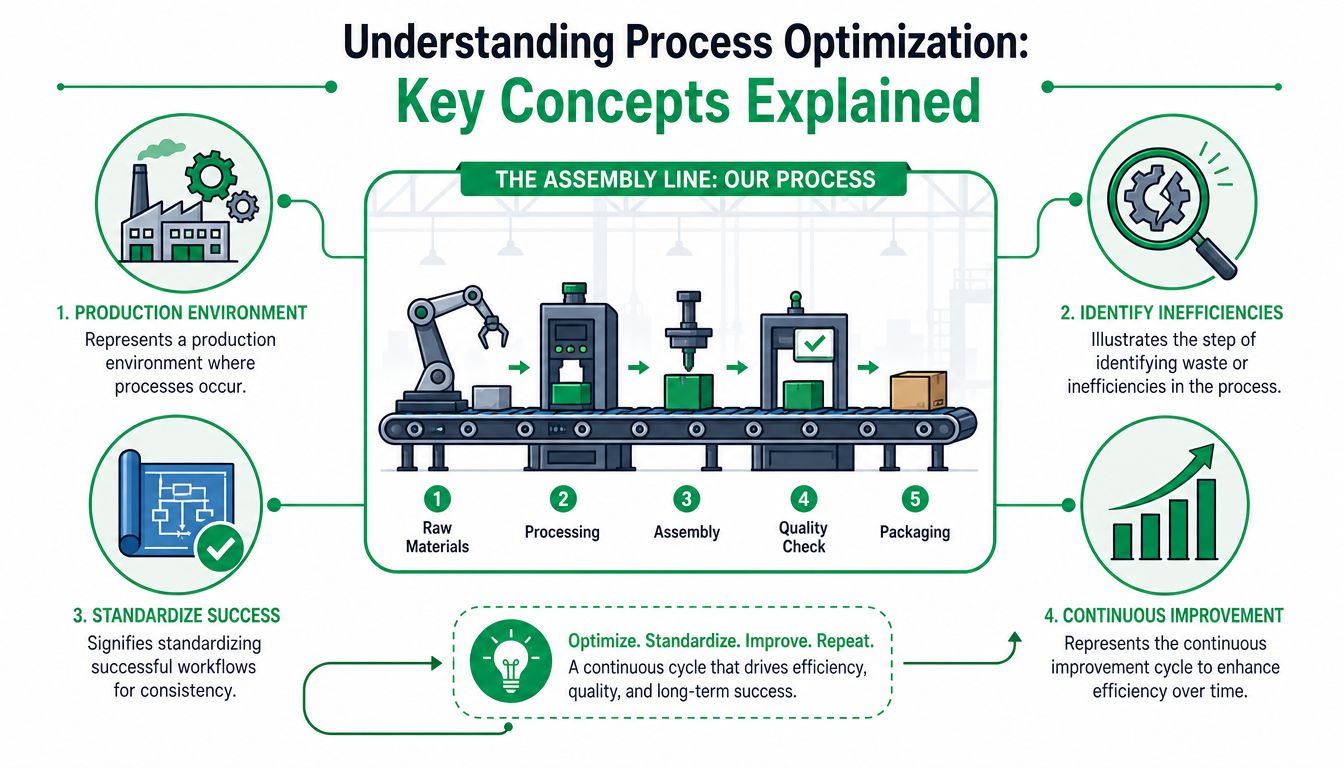
Four terms that make workflows easier to see
- Value stream: The complete route from a customer request to its resolution. For an address change, it might include the customer message, identity check, order lookup, edit approval, carrier update, warehouse notification, and customer confirmation.
- Cycle time: How long the request takes from start to finish. A request that waits in three queues has a longer cycle time than one resolved through a customer-facing form.
- Bottleneck: The stage that limits the pace of the whole workflow. If only one employee can approve order cancellations, that approval queue may control the speed of every related request.
- Standardization: A documented and repeatable way to handle common work. A rule can specify which edits customers may make, during what window, and what happens when fulfillment has already started.
The key distinction is between activity and value. Copying an order number from one system to another may feel productive, but it doesn't improve the customer's outcome. A clear edit form, automated tagging, and a defined exception queue may remove that effort while preserving control. For broader context on solving e-commerce operational challenges, consider how automation connects routine work across the business instead of optimizing one isolated task.
Why Process Optimization Matters for Ecommerce
A shopper submits an address change after ordering. An agent searches the order, checks the customer's identity, contacts the warehouse, updates the carrier, and sends a confirmation. Every handoff adds time and another place for an error to enter. Post-purchase optimization connects these steps so the team can protect cost, speed, and quality at the same time.
Industry summaries report that Lean manufacturing techniques can reduce operational costs by 20–30% within two years and improve operational efficiency by 15–25% (process improvement statistics). These figures come from manufacturing-focused summaries, not ecommerce forecasts. They still illustrate why process improvement should be managed as an operating discipline, rather than treated as a one-time software installation.
Translate operational gains into customer outcomes
A shorter handling path can reduce status-check tickets. A standard edit rule can stop agents from making different promises. Address validation can help fulfillment teams avoid incomplete destinations. The internal KPI matters because it changes what the customer sees, waits for, or pays.
Start with the complete chain:
- Remove avoidable work. Locate duplicate order lookups, repeated questions, and manual routing.
- Protect accuracy. Add validation and approval rules where a wrong change could affect fulfillment or finances.
- Measure the complete result. Compare resolution time with rework, repeat contacts, cancellations, and customer outcomes.
Practical rule: A faster workflow is not an improvement if it simply sends errors downstream. Measure speed and quality together.
Quality management offers another reference point. Industry summaries cite process-improvement benchmarks that include cycle-time reductions of 40–60%, first-time-right improvements of 35–45%, and resource-utilization gains of 25–35% (process improvement benchmarks). These figures are not promises for a Shopify store. They give ecommerce teams a reason to establish a baseline, test one workflow change, and verify its effect with their own data.
For retention teams, operational friction belongs in the customer experience review. Reliable post-purchase service can support the broader work of keeping customers engaged. The guide on insights for reducing SaaS churn provides a related perspective on that connection.
Frameworks and KPIs for Optimization
Different frameworks answer different questions. Lean asks where value is lost. Six Sigma asks why variation and defects occur. PDCA creates a repeatable loop for testing and refining a change. Ecommerce teams don't need to adopt every label. They need a shared method that fits the maturity of their data and the risk of the workflow.
Lean has a particularly useful history for post-purchase work. Its five principles move from customer value to the value stream, flow, pull, and continuous improvement. The historical account linked earlier also emphasizes that many process steps may be wasteful, which gives teams permission to challenge steps that exist only because “that's how we've always done it.”
Six Sigma is helpful when the same request produces inconsistent outcomes. For example, two agents may interpret an order-edit policy differently, or one warehouse may receive complete notifications while another receives partial information. The framework's value comes from defining the defect, examining its causes, and reducing variation through controlled changes.
PDCA works well for an operational experiment. The team plans a change, tries it, checks the results, and acts on what it learned. A monthly KPI review can use this loop without turning every improvement into a large transformation project.
Framework and KPI comparison
| Framework | Key principles | Sample KPI |
|---|---|---|
| Lean | Define value, map the value stream, remove waste, improve flow, establish pull | Average resolution time, queue age, number of handoffs |
| Six Sigma | Define defects, analyze variation, control recurring causes | First-time-right rate, rework rate, exception frequency |
| PDCA | Plan a change, execute it, check evidence, standardize or revise | Change adoption, KPI trend after release, customer follow-up rate |
The metrics should reflect the customer journey, not only the support team's workload. Useful measures include average resolution time, self-service completion, repeat contact rate, first-time-right handling, address correction frequency, cancellation exceptions, and revenue from post-purchase offers. For a broader view of measurement discipline, teams can review Headline Marketing's benchmarking insights.
Your KPI definitions also need a clear denominator and time boundary. “Tickets reduced” is ambiguous unless the team specifies which ticket category, which period, and whether order volume changed. A practical reference for selecting operational measures is SelfServe's operational efficiency metrics guide.
Practical Roadmap for Optimizing Workflows
A useful roadmap begins with the workflow customers and employees follow, not the workflow shown in an old process document. The difference matters because execution contains workarounds, delays, and exceptions that formal models often miss.
Phase one, map the current process
Choose one high-volume post-purchase journey, such as a shipping-address change. Walk through it with support, operations, fulfillment, and anyone responsible for refunds or cancellations. Record each action, system, owner, waiting point, decision rule, and customer notification.
Use real examples rather than idealized descriptions. Ask:
- Where does the request begin? Chat, email, account page, or a form?
- Who touches it next? An agent, warehouse coordinator, or automated rule?
- What information gets copied? Order number, address, fulfillment status, or customer identity?
- Where can the request fail? Missing data, a closed edit window, or an unavailable carrier update?
- How does the customer learn the result? Automatic confirmation, agent reply, or no message?
This map is your “as-is” view. Don't redesign it yet. First make the hidden work visible.
Phase two, identify bottlenecks and waste
Look for queues, duplicated checks, unnecessary approvals, and back-and-forth communication. A bottleneck isn't always the slowest individual task. It may be a decision that forces every request to wait for one person or one system.
Group the findings into three categories:
- Routine work that can follow a rule, such as changing a phone number within a permitted window.
- Work that needs validation, such as replacing a shipping address.
- Exceptions requiring judgment, such as an edit after fulfillment has started.
Then compare the map with execution evidence. Recent BPM coverage identifies employee access to process knowledge at the point of work as an underserved issue, and emphasizes that improvement initiatives increasingly need execution-level evidence rather than assumptions (BPM trends and process knowledge).
Phase three, implement targeted improvements
Start with the smallest change that addresses the largest constraint. This might be a self-service widget for permitted edits, address autocomplete, automatic order tags, or a cancellation queue that routes risky cases for approval. Define permissions before launch. Specify what customers can change, when they can change it, and what happens when the request falls outside the rule.
A Shopify team assessing automation options can also review this guide to Shopify workflow automation for ideas about connecting customer actions with operational routing.
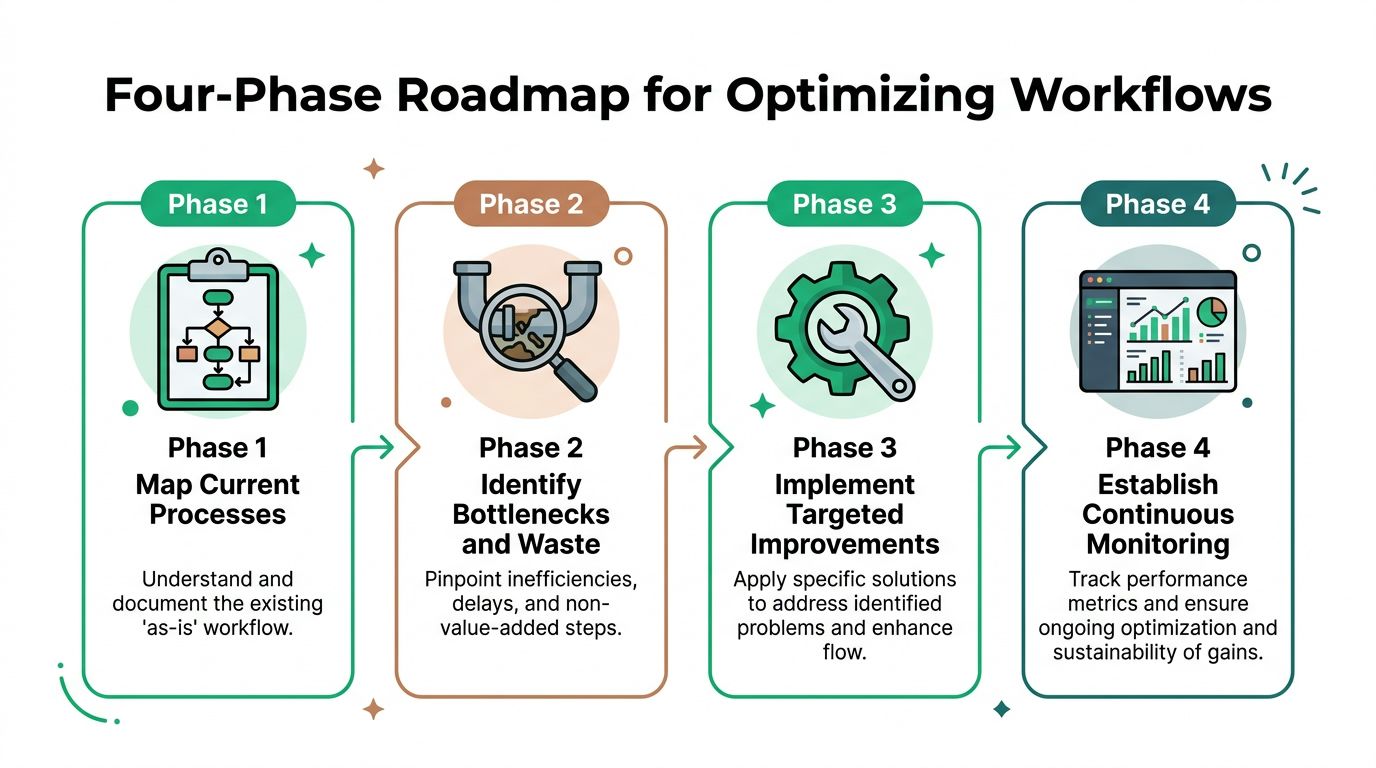
Phase four, establish continuous monitoring
Assign an owner for the workflow and review the KPI set on a regular schedule. Compare the new path with the original baseline, then segment results by request type, market, fulfillment status, and exception reason where the data supports it.
Don't stop at a dashboard. Ask agents whether customers are using the new path correctly. Check whether warehouse notifications contain enough detail. Review failed edits and repeat contacts, then turn recurring exceptions into a policy update, validation rule, or training improvement.
The benchmark evidence also shows why controlled testing matters. A workflow automation study reported average execution time falling from 185.35 seconds manually to 1.23 seconds through automation, roughly a 151× improvement, while observed errors fell from 5% to 0% (controlled workflow automation study). The lesson isn't that every ecommerce workflow will achieve the same result. It's that teams should measure time and errors under defined workloads instead of assuming that a faster step creates a better end-to-end process.
Tactics to Reduce Tickets and Lift AOV
The strongest post-purchase tactics give customers more control without giving up merchant safeguards. Each tactic should have a clear permission, a defined time window, and a fallback route for exceptions.
Validate addresses before the warehouse has to intervene
Address errors often begin with incomplete or ambiguous customer input. Real-time validation powered by Google Maps can provide autocomplete and help customers select a deliverable address while they're making an edit. The operational value comes from moving correction upstream, before an agent or fulfillment employee must investigate it.
Set the rule around the actual fulfillment process. If an order can be edited only before a warehouse handoff, make that window explicit. After the window closes, route the request to a manual review queue rather than presenting a control that can no longer be honored.
Let shoppers handle safe edits themselves
A customer-facing portal can support changes to contact details or other permitted order fields. The business still defines the boundaries. Product restrictions, automated order tagging, notifications, and approval flows help the operations team distinguish safe customer actions from cases that need review.
The interface should explain the result immediately. Tell the shopper what changed, whether the fulfillment team has been notified, and what they should do if the order has already entered processing. A practical overview of customer self-service benefits can help teams evaluate which requests belong in a self-service path.
Use post-purchase pages as controlled revenue surfaces
The Thank You page and Order Status page can present relevant products or collections after the original purchase. Keep the offer connected to the order, and define product restrictions so the promotion doesn't create fulfillment confusion or undermine inventory controls.
Measure the offer separately from support metrics. Track accepted additions, canceled additions, fulfillment exceptions, and customer questions. A revenue lift that creates manual cleanup may not represent genuine process improvement.
AI can assist with classification, recommendations, or routing, but context and governance come first. A 2026 report found that 89% of practitioners believe AI delivers ROI only when it has business context and governance (process optimization report). For a high-volume store, that means defining the source data, approval rights, fallback behavior, and audit trail before allowing an AI system to change customer or fulfillment outcomes.
Real-World Examples and SelfServe Case
Consider a Shopify Plus brand receiving frequent requests to change addresses, quantities, or delivery details after checkout. If staff handle every request manually, each message becomes a small investigation. A self-service portal can show only the actions allowed for that order, check whether fulfillment has started, and send exceptions to staff review. The workflow connects a customer-facing decision with an operational rule.
A DTC retailer may face a different problem: customers want to add related products after paying, while fulfillment teams need additions to remain compatible with the original order. The retailer can place relevant offers on the Thank You and Order Status pages, restrict products by defined rules, and measure accepted additions alongside cancellations, fulfillment exceptions, and follow-up questions. A click alone does not show whether the workflow worked.
Together, these cases connect a high-level process model to daily ecommerce execution. Routine actions should be completed by the customer, system rules should enforce eligibility, and employees should handle judgment-based exceptions. Results still depend on order volume, fulfillment timing, product mix, integrations, and monitoring discipline.
A SelfServe implementation example
SelfServe provides a Shopify post-purchase portal that lets merchants define editing permissions and time windows. Customers can change eligible order details, while automatic tagging and notifications help staff identify customer-initiated changes. Address autocomplete and validation support cleaner inputs, and upsell modules can appear on Thank You and Order Status pages.
A merchant could configure editable fields, stop changes after a fulfillment milestone, and route exceptions to a manual cancellation or approval queue. The team could then compare the old and new workflows using ticket category, resolution time, first-time-right handling, edit completion, and post-purchase additions. These measures connect the process diagram to observable work, much like checking both the route and delivery status on a package.
The evaluation should begin with a baseline from the existing workflow. Record request volume, handling time, exception types, and order additions before launch, then compare equivalent periods or controlled groups after configuration. A responsible team would test the change with its own operational data before attributing any improvement to a new tool.
Conclusion and Next Steps
A useful final test is simple: can a customer complete a routine post-purchase change without staff intervention, while exceptions still reach the right employee? Review one live workflow from request to resolution, then compare the process model with actual tickets, handoffs, waiting points, and fulfillment constraints. This exposes the gap between a tidy diagram and ecommerce execution. Record a baseline, assign an owner, introduce one controlled change, and schedule its first review before launch. The review should examine both customer effort and operational risk, so faster handling does not create invalid addresses, unauthorized edits, or fulfillment delays.
SelfServe helps Shopify and Shopify Plus merchants give customers controlled post-purchase order editing, address validation, automated tagging, and relevant upsell options. Visit SelfServe to explore how a structured customer self-service workflow can support your process optimization program.