How to Update Contact Details After Purchase
A customer notices the problem seconds after checkout. The confirmation email went to an address with one mistyped character, or the phone number on the order belongs to an old handset. The order is paid, the fulfillment queue is moving, and the shopper now has to decide whether to search for support, wait for a reply, or risk missing delivery updates.
For a high-volume Shopify store, that small correction can create a much larger operational chain. A wrong email can disrupt order notifications and recovery messages. An outdated phone number can leave a carrier or support agent unable to reach the customer. A changed address can become dangerous if the warehouse has already printed a label. The practical answer is a controlled way to update contact details after purchase, with clear permissions, validation, timing rules, and confirmation.
Why Post-Purchase Contact Updates Matter
A shopper corrects a typo expecting the new email or phone number to work across the order journey. The merchant may be managing separate records in Shopify, a fulfillment platform, warehouse software, carrier workflows, a customer service inbox, and marketing or CRM tools. One field change can therefore require more than updating the order view.
If shoppers cannot make the correction themselves, an agent must identify the order, verify the requester, edit the permitted fields, and check whether connected systems received the change. That process consumes support capacity, especially during volume spikes. It also creates two operational risks: changing the wrong order or replacing a valid contact value with an unverified one.
Contact data can appear correct while failing in practice. A 2019 study of website registrations found that submitted contact information was syntactically valid in 79.3% of cases overall, while only 65.4% remained operable when tested for actual use, according to the study of contact information validity and operability. For post-purchase operations, that distinction matters. An address can pass a format check yet still fail when the store sends a delivery update, recovery message, or support reply.
Operational rule: Treat contact editing as a controlled order workflow, not as a cosmetic profile change.
The same research reported regional differences in operability, including 81.2% in North America, 42.1% in Asia-Pacific, and 46.1% in Africa. These figures describe website registrations, not Shopify orders, so they should guide validation design rather than serve as a direct forecast for ecommerce performance. An adjacent B2B analysis reports contact-data decay of about 2.1% per month, or 22.5% annually (contact data accuracy research). That source is not specific to post-purchase ecommerce, but it reinforces the need to treat stored contact values as changeable rather than permanently reliable.
Validation should happen when the shopper submits an edit. The system should confirm the new value, record the change, and propagate it only to contexts that can safely accept it. Merchants gain fewer avoidable tickets and clearer audit trails. Shoppers get a direct correction path without waiting to learn whether support acted before fulfillment progressed. The goal is fast correction inside clear operational boundaries.
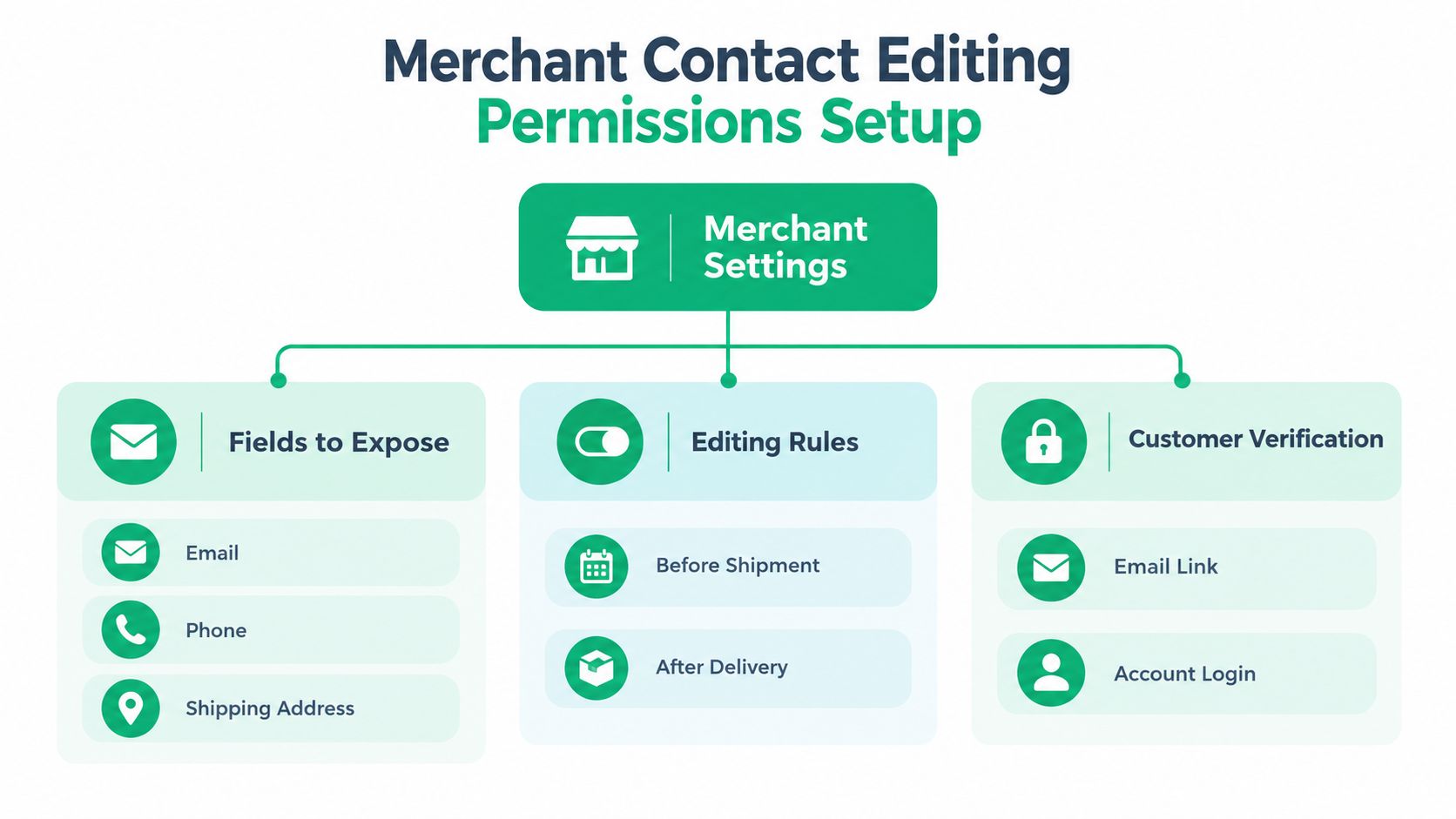
Setting Up Contact Editing Permissions for Merchants
Start with the fulfillment events that can make an edit unsafe. Don't begin by exposing every field because the platform stores it. Decide what a customer may change, under which conditions, and what the system must verify before writing the new value.
Choose fields according to risk
Email and phone updates are usually less disruptive to physical fulfillment, but they still affect notifications, account recovery, and customer identity. Shipping addresses carry higher operational risk because a change may require a new shipping rate, tax treatment, fraud review, pick instruction, or label.
A practical permission model looks like this:
- Email: Allow edits while the order is active, with verification for the replacement address where appropriate.
- Phone: Permit corrections before carrier handoff, and validate the format and country context.
- Shipping address: Keep editing open only while the order can still be safely changed in the fulfillment workflow.
- Order contents: Separate this permission from contact editing. A customer correcting a phone number shouldn't automatically gain access to product or quantity changes.
Connect permissions to real events
Use fulfillment state rather than an arbitrary promise such as “customers can edit for a short time.” An address may be safe to change before a label is printed but unsafe after a warehouse has packed the parcel. Email and phone changes may remain useful later, especially when they control delivery communication, but the store should clearly tell the customer which systems will be updated.
Product-level restrictions matter for stores with special handling. A temperature-sensitive item, customized product, or order routed through a particular warehouse may need stricter rules than a standard parcel. Tag changed orders automatically so warehouse and support teams can see that an update occurred without opening every order manually.
For stores that need a ready-made Shopify workflow, DPP Shopify is one resource to review alongside native settings and other post-purchase tools. The implementation decision should depend on how the store handles fulfillment state, approvals, and downstream synchronization.
Finally, define the permission model in writing. The permission-based access control guidance is useful for separating customer capabilities from staff administration. Configure the widget to match the store's supported languages, place it where shoppers already look for order help, and make every restriction visible before submission.
The Shopper Experience of Updating Contact Information
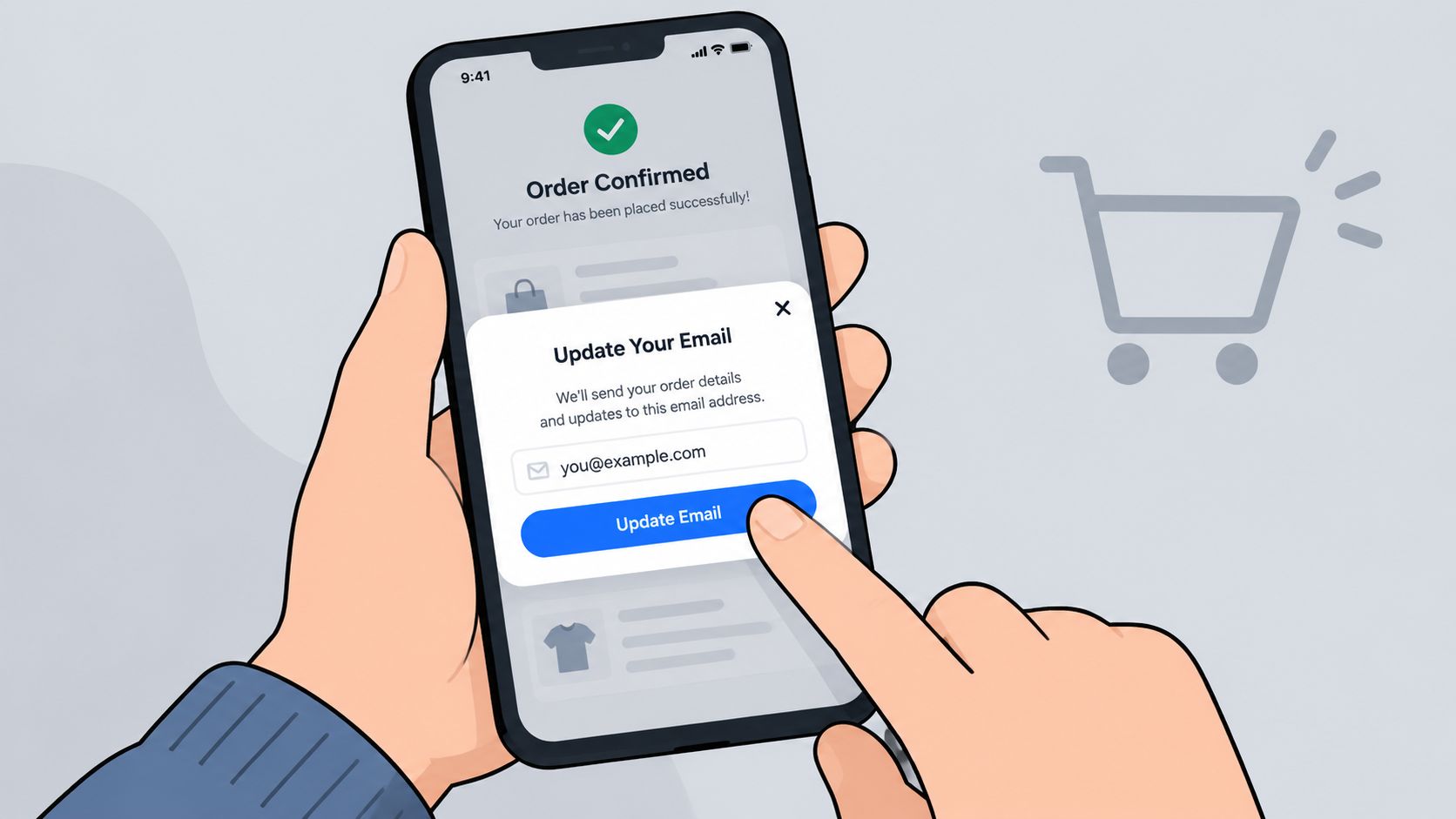
The customer should find the update control where the order already lives, usually on the Thank You page, Order Status page, or customer portal. Hiding the option inside a general account profile creates unnecessary confusion because the shopper is trying to fix a specific purchase, not redesign their account.
The first screen should identify the order and show only the fields that are editable. Each field needs a clear label, the current value, and a short explanation of what the change affects. A customer correcting an email should understand whether the replacement will receive future order notifications, while someone changing a phone number should know whether delivery messages will use it.
Validate before saving
Validation should happen while the shopper edits, not after the value has already entered your operational systems. For addresses, Google Maps autocomplete can help standardize street, city, state, postal code, and country details. It won't replace every deliverability or fraud check, but it prevents common formatting mistakes and reduces the chance that a new error replaces the old one.
Email and phone fields need their own checks. Reject clearly malformed values, normalize where appropriate, and use confirmation for changes that affect identity or account recovery. Don't rely on a green “saved” message if the value hasn't been written to the relevant record.
The confirmation screen should answer three questions:
- What changed? Show the old field category and the new value in a privacy-conscious way.
- Where does it apply? State whether the change affects this order, the customer profile, or both.
- What happens next? Explain whether a confirmation message will be sent and whether any fulfillment restriction remains.
A Logivo customer portal can provide a useful reference point when evaluating how order-specific self-service should present account and delivery actions. For the address-specific workflow, document the customer-facing path in your guide to editing a shipping address, including what happens when the order has already entered fulfillment.
Multilingual support is part of usability, not a decorative setting. The widget should adapt labels, validation messages, and confirmation text to the shopper's language so international customers aren't forced to interpret an English-only error at the moment they need to act.
Timing Windows and Permission Boundaries
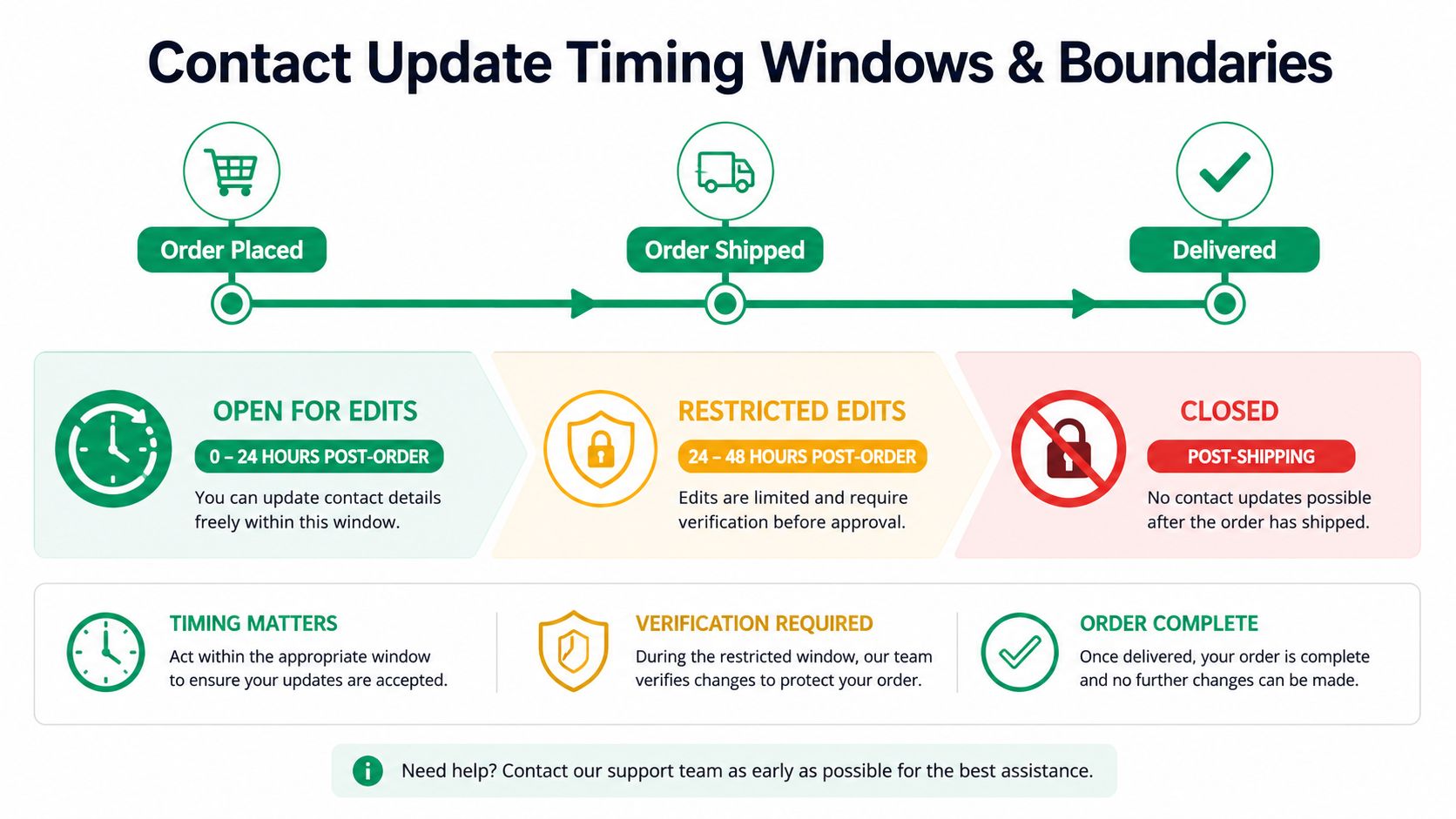
The right editing window is determined by the fastest irreversible event in your operation. If a warehouse prints labels immediately, the safe address window is short. If orders remain in a review queue before picking, the store can offer more flexibility. A generic rule copied from another merchant often fails because the physical workflow is different.
Think of each field as having its own deadline:
| Field | Main operational risk | Boundary to use |
|---|---|---|
| Missed notifications or account confusion | Keep open while the order is active, with verification when identity matters | |
| Phone | Failed carrier or support contact | Allow changes until the relevant communication or handoff point |
| Shipping address | Misrouting, relabeling, or fulfillment failure | Close or escalate after picking, packing, or label creation |
| Multi-order profile data | Unexpected changes to other purchases | Explain whether the edit applies to one order or the broader customer record |
Use operational states, not just elapsed time
Elapsed time is easy to configure, but fulfillment status is usually more accurate. An order can remain unshipped while already being packed, or it can be delayed in a warehouse queue even though the nominal edit window has expired. Expose the current state to the customer and route late requests into an approval queue rather than automatically rejecting them.
Wide-open editing improves convenience but creates a risk that the warehouse acts on stale instructions. Tight restrictions protect fulfillment but push more shoppers toward support. A useful compromise is to keep lower-risk contact fields editable longer, while closing address edits at the first event that makes the physical shipment difficult to change.
Split fulfillment needs special handling. If one line has shipped and another remains at a different warehouse, the customer may need separate rules for each shipment. Don't present one “change address” button if the system can't explain which parcel will be affected.
Practical rule: The customer should see the reason for a restriction and the next available action, such as contacting support or requesting an exception.
Verification should become stricter as the operational consequence increases. A phone or email correction may require confirmation before downstream notifications use it. A late address change may require staff approval, a new label, or a clear statement that the carrier record cannot be changed through self-service.
Troubleshooting Common Contact Update Problems
A successful form submission doesn't prove that the update reached every system. Most failures fall into a few recognizable patterns, and each needs a different response.
The page says saved, but notifications use the old value
The interface may have updated the Shopify order while the fulfillment system, CRM, or notification service still holds the previous contact field. Check the event log and compare the order record with the downstream record. If the integration is asynchronous, show the shopper that the request was accepted and identify where propagation is still pending.
Don't let a retry create duplicate customer records. Google's People API requires the existing contact's etag when updating, while HubSpot supports updates by ID or unique email and can overwrite supplied fields. Its behavior also distinguishes between omitted values and empty strings, with an empty string clearing a value, as described in the Google People API contact update documentation.
The safer write pattern is consistent across systems:
- Read first: Retrieve the current record before editing.
- Preserve identity: Include the record ID and version token where the platform supports one.
- Send only changes: Avoid submitting untouched fields that could overwrite newer data.
- Verify afterward: Read the saved record and confirm the expected value reached the destination.
Legitimate corrections fail validation
A strict validator can reject a valid international number, an apartment format, or an address that doesn't match a narrow postal rule. Review the rejected value, the locale used by the widget, and the validation service response. Let the customer correct the specific field instead of clearing the whole form.
Unknown, catch-all, or unverified contact results should be treated as risky states before the store uses them for important communication. Independent B2B data research reports that unverified lists may retain only 70% to 85% valid addresses, while manually entered records can have invalid rates of 15% to 25% (contact data accuracy research). Real-time validation and a visible “last verified” state are more useful than occasional database cleanup.
The shopper has multiple accounts or cards
A customer may update one order while assuming every linked identity changed. That assumption is unsafe. American Express tells customers to update details for each card separately, and Shopify separates store contact details from customer-facing checkout data, as shown in its store details guidance.
Label the scope explicitly. Say “this order” when the edit affects one purchase, and “your customer profile” only when the broader record will change. If the system detects multiple matching accounts, route the case to an authenticated merge or support process rather than guessing which identity should win.
Security checks can also look like failures. Banks may require SMS or OTP verification after a contact change, and some warn that updates can take time to become active across notifications, billing, and recovery flows, as described in the Co-operative Bank contact update guidance. Tell shoppers why verification is required and what they should do if the code goes to the old number.
For customer-facing email changes, document the notification sequence in the email address change notification guide. A notification to the previous address can help surface unauthorized changes, while a confirmation to the replacement address reassures the legitimate customer.
Your Implementation Checklist for Self-Service Contact Updates
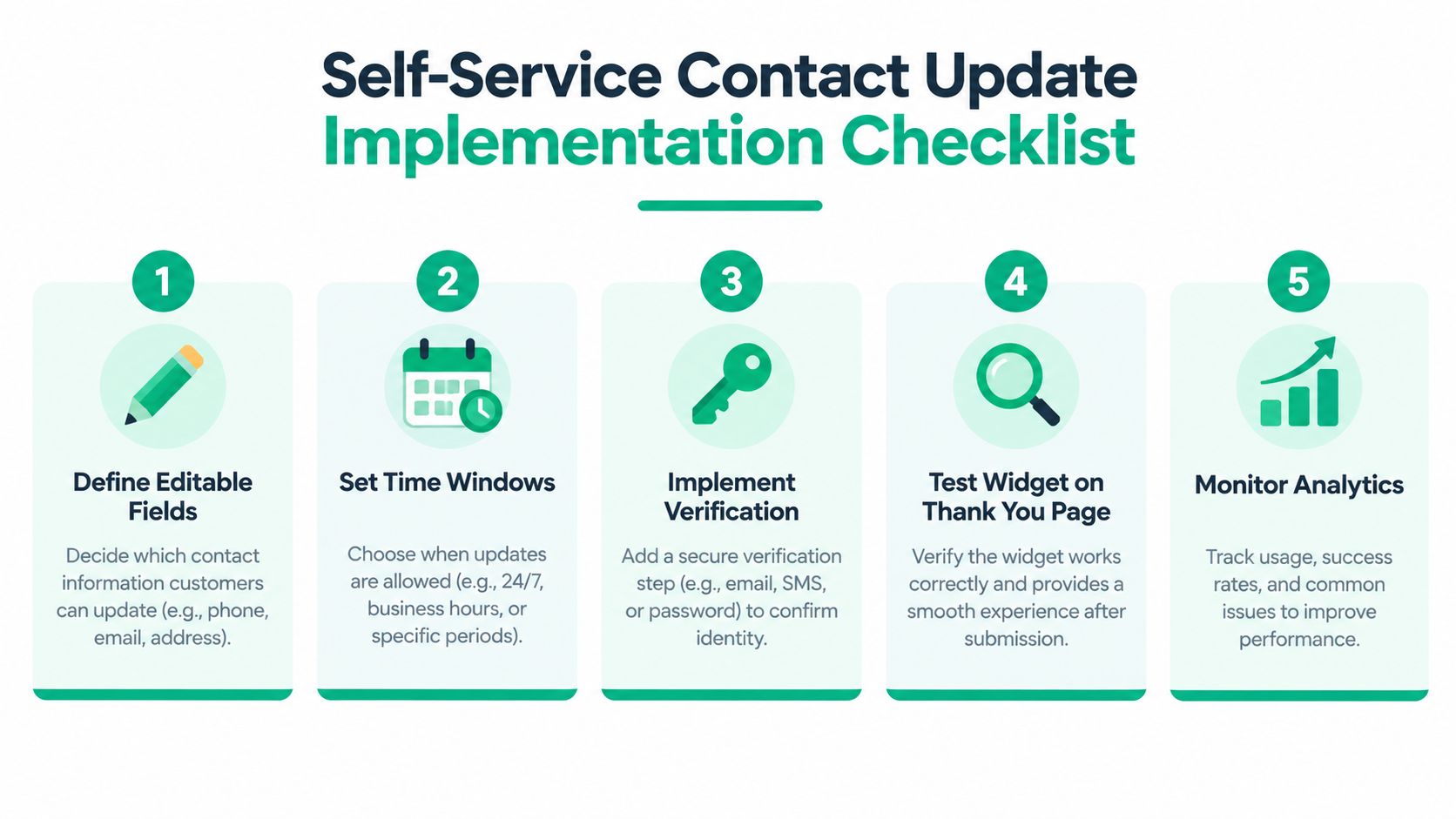
Launch the workflow in three passes. Configuration determines what shoppers can request. Validation proves the request works in the storefront. Optimization keeps the rules aligned with fulfillment rather than assumptions.
Configuration
- Define editable fields: Separate email, phone, and shipping address permissions.
- Set event-based windows: Use fulfillment milestones such as picking, packing, label creation, and shipment.
- Add verification: Require confirmation when an edit affects identity, recovery, or high-risk communication.
- Tag changed orders: Give warehouse and support teams a visible operational signal.
- Place the widget well: Use the Thank You page, Order Status page, or customer portal, with multilingual copy.
Validation
Test a typo, a valid international number, an address with an apartment, a late request, and an order split across fulfillment locations. Confirm that the shopper sees a useful error, a clear success state, and an accurate explanation of what changed.
Then verify propagation outside Shopify. Check the customer record, fulfillment record, notification trigger, and any carrier-facing workflow. A manual test that checks only the front end will miss the failure that creates the next support ticket.
Optimization
Track which fields customers try to change, where requests are blocked, and which edits require manual intervention. Review the results with fulfillment and support teams, then adjust boundaries based on actual warehouse events.
SelfServe is one implementation option for Shopify stores that need configurable post-purchase permissions, multilingual widget behavior, address validation, order tagging, and approval-oriented workflows. It installs through the Shopify App Store and offers a 30-day free trial; higher-tier plans include 3PL or ERP integrations and dedicated account management for Shopify Plus brands. For stores that want conversational escalation alongside self-service, Donely's WhatsApp support agent is another resource to evaluate for customer communication.
A reliable workflow doesn't promise that every change will be accepted. It tells the shopper what can change, validates the replacement, applies it to the right record, confirms the result, and provides a clear path when the order has moved too far for automation.
SelfServe gives Shopify merchants a controlled post-purchase portal for updating contact and shipping details within defined permissions and fulfillment windows. Visit SelfServe to review the workflow, test the 30-day free trial, and give shoppers a faster way to correct order information without sending every request to support.