Address Validation Tool: Stop Failed Deliveries in 2026
You know the pattern. An order clears Shopify. The warehouse picks it. The label prints. Then the carrier scan stalls, the parcel bounces, and support gets the message nobody wants to see: customer entered the wrong apartment number, wrong postal code, or a street that doesn't exist in deliverable form.
That single typo doesn't stay small for long. It turns into a returned shipment, a customer email, an internal Slack thread, a manual address update, and usually a second shipping attempt. If the item was time-sensitive or inventory was tight, the mistake can also trigger cancellation risk and a trust problem that's harder to repair than the label itself.
That's why the right address validation tool isn't just a checkout enhancement. For Shopify brands, it's part of fulfillment risk control. And the most overlooked place to use it is after the order is placed, when the customer finally notices the mistake and wants to fix it before the package leaves the building.
The Hidden Costs of a Single Address Typo
A package comes back to your warehouse with a carrier sticker slapped over the original label. The customer insists they never got it. Your support team opens the order and sees the issue immediately: one bad character in the postal code, or a missing unit number in a multi-unit building.
The financial impact starts before anyone touches the ticket. You've already paid to pick, pack, and ship the order once. If you reship, you pay again. If the item is perishable, customized, or season-sensitive, the error can turn inventory into dead stock. If the customer is frustrated enough, the support interaction can end in a refund or a public complaint.
Melissa reports that approximately 20% of postal addresses entered online contain errors, including spelling mistakes, wrong house numbers, incorrect postal codes, and formatting issues, according to G2's address verification category overview. For operations teams, that's the key point. A typo rate that seems manageable at the form level becomes expensive once it hits shipping volume.
Where the cost actually shows up
Most merchants first notice bad addresses in these places:
- Carrier exceptions: Orders sit in limbo because the destination can't be resolved cleanly.
- Support workload: Agents spend time checking order notes, contacting customers, and coordinating with fulfillment.
- Reshipping decisions: Ops has to choose between eating the cost, delaying delivery, or canceling.
- Customer trust: The shopper doesn't care whether the mistake happened in checkout, ERP sync, or label creation. They just know the brand failed to deliver.
Practical rule: If your team is fixing addresses manually after orders are placed, you already have an address quality problem. You just haven't moved it upstream yet.
An address validation tool is the control layer that catches, repairs, and standardizes address data before it becomes a fulfillment issue. Used well, it reduces preventable delivery failures. Used even better, it gives customers a chance to fix mistakes after purchase, while there's still time to save the shipment.
How an Address Validation Tool Actually Works
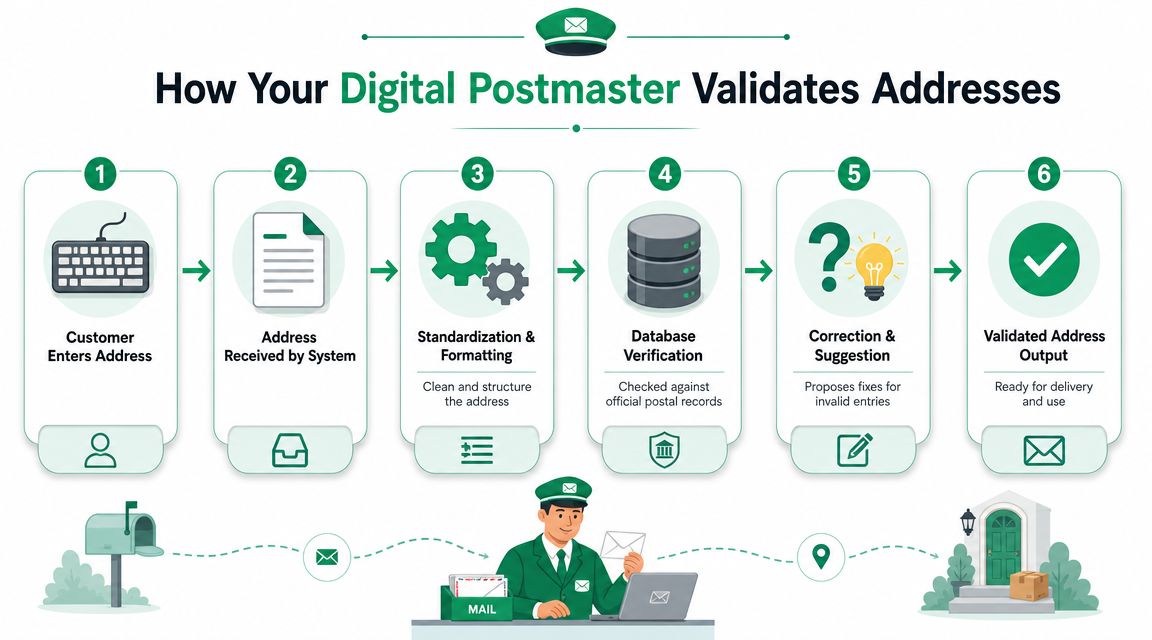
Think of an address validation tool as a digital postmaster inside your store. It doesn't just ask whether an address looks plausible. It checks whether the address can be turned into something a postal system or carrier can use.
At a technical level, strong tools follow a consistent sequence. They parse the input into parts, standardize the format, and then compare it against authoritative postal data. Firstlogic describes this flow clearly in its overview of address verification processing.
Parsing the address
A customer rarely enters an address in a clean postal format. They might type everything into one line, abbreviate the street name, skip a directional, or put the apartment number in the wrong field.
Parsing breaks that messy string into usable components such as:
- Street number
- Street name
- Unit or apartment
- City
- State or province
- Postal code
- Country
Without that step, the tool can't tell whether “12B” is a unit, part of the house number, or a malformed street line.
Standardizing the format
After parsing, the tool rewrites the address into a recognized postal structure. That means cleaning abbreviations, fixing capitalization where needed, ordering fields correctly, and aligning the output to local postal conventions.
Many teams confuse autocomplete with validation. Autocomplete helps users enter data faster. Validation makes the final stored address cleaner and more deliverable. You usually want both. If you're comparing adjacent data quality workflows, this overview of an email address validation tool is a useful reminder that capture quality matters across every customer field, not just shipping addresses.
Verifying against authoritative data
The final step is the one that matters most operationally. The tool checks the standardized address against postal datasets or equivalent reference files. That's how it can identify malformed inputs, fill in missing elements such as ZIP+4 or apartment data when supported, and return a result that's more useful than a generic error.
A weak validator only tells you something is wrong. A strong one tells you what to fix, what it inferred, and whether the business should accept, correct, or confirm the address.
That distinction matters in Shopify flows. Rejection alone creates friction. Intelligent correction helps you save the order without pushing the customer into support.
The Business Case for Address Validation
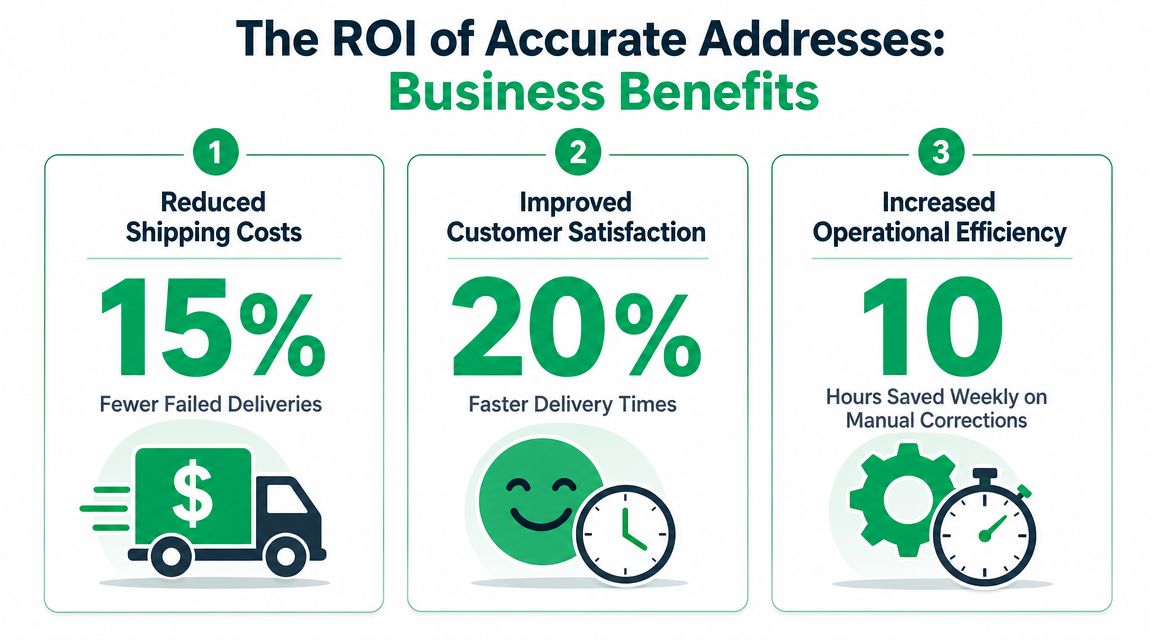
The best reason to buy an address validation tool isn't technical cleanliness. It's an operational advantage. You remove bad data before it becomes a shipment problem, a support problem, and eventually a margin problem.
It protects contribution margin
Every failed or delayed delivery creates extra work that your margin has to absorb. You may pay for return handling. You may pay for a replacement shipment. Your team may issue credits or discounts just to preserve goodwill.
What makes address validation compelling is that it attacks a preventable class of error. This isn't like weather disruption or carrier underperformance. If the customer entered a flawed address and your workflow let it pass untouched, that's a process issue.
A mature market usually signals that the problem is common and costly enough to justify dedicated software. G2 currently lists 86 products in its address verification category on its address verification software page. That breadth tells you this isn't a niche utility for catalog mailers. It's now infrastructure for ecommerce, logistics, and CRM operations.
It cuts manual support work
Teams often don't realize how much address correction happens outside the warehouse. It lives in inboxes, chats, and macros. Agents ask customers to confirm spelling, resend details, or clarify whether “Unit 5” belongs on line one or line two.
That work is expensive because it interrupts the normal support queue. Address issues are time-sensitive. They need action before fulfillment locks the shipment. When agents become fulfillment coordinators, response quality on other tickets drops.
Here's where business leaders usually get the clearest signal:
- Ops sees exceptions pile up before ship cut-off
- Support sees repetitive “please update my address” requests
- Customers see delay, not process complexity
Later in the workflow, a short explainer can help internal teams align on why address quality affects downstream outcomes. This video is useful for cross-functional context:
It improves the customer experience without adding noise
Customers don't want to be punished for small typing mistakes. They want help resolving them quickly. The right tool supports that by offering better suggestions, cleaner formatting, and a clearer path to confirmation.
Stores rarely lose trust because an address needed correction. They lose trust because nobody caught the problem until delivery failed.
That's why the business case goes beyond shipping savings. Accurate addresses reduce fulfillment friction, lower preventable support effort, and make the brand feel more competent at a moment customers notice immediately.
Core Features Every Address Validation Tool Needs
Not every address validation tool deserves production traffic on a Shopify store. Some are good at database cleanup but weak at live customer interactions. Others work well in the U.S. and fall apart on international formats, sub-premise handling, or platform integration.
The right shortlist starts with capabilities that protect both data quality and customer experience.
Postal-grade reference data
This is the essential layer. If the tool isn't anchored to authoritative postal data, it's mostly formatting software with better UX.
Experian states that its address validation uses the latest USPS data, is CASS Certified in the U.S., and is Canada Post SERP certified for Canada on its address validation product page. That matters because certification signals that the tool isn't guessing at postal conventions. It's aligned to recognized delivery standards.
When evaluating vendors, ask:
- Which postal datasets back the validation results
- Which countries have certified or equivalent support
- How often the reference data is refreshed
If you ship across borders, this question becomes more important than flashy autocomplete demos.
Real-time validation plus graceful correction
Real-time validation matters, but the wording can be misleading. Many products say they validate in real time when what they really do is format suggestions during entry.
For ecommerce, the tool needs to do more than block obvious errors. It should also handle incomplete, partial, and nonstandard inputs in a way that doesn't turn checkout or account editing into a dead end. That same principle applies when customers need to edit shipping details after purchase through workflows such as address and contact editing for Shopify orders.
A practical standard is this:
| Capability | Why it matters |
|---|---|
| Autocomplete | Reduces typing mistakes and speeds entry |
| Component parsing | Separates unit, route, city, and code correctly |
| Correction suggestions | Gives the shopper a fix instead of a hard rejection |
| Deliverability signals | Helps ops decide whether to accept or review |
Shopify fit and operational control
A technically strong validator can still fail in practice if it's hard to deploy or impossible to govern. Shopify merchants need an app or integration model that fits the storefront, checkout extensions where applicable, and post-purchase surfaces.
Look for:
- Clear implementation path: Minimal theme risk, predictable setup, and support for Shopify workflows.
- Rule control: The ability to decide when to auto-apply corrections and when to ask the customer to confirm.
- Support for edge cases: PO boxes, military addresses, and apartment-heavy urban deliveries often expose weak tools first.
- Privacy posture: Customer address data touches regulated jurisdictions. Your legal and security teams need to know how it's processed and stored.
The common mistake is buying on autocomplete quality alone. That's visible in demos, but it isn't enough. What protects fulfillment is the combination of certified data, smart correction behavior, and reliable Shopify implementation.
Shopify Implementation and Post-Purchase Best Practices
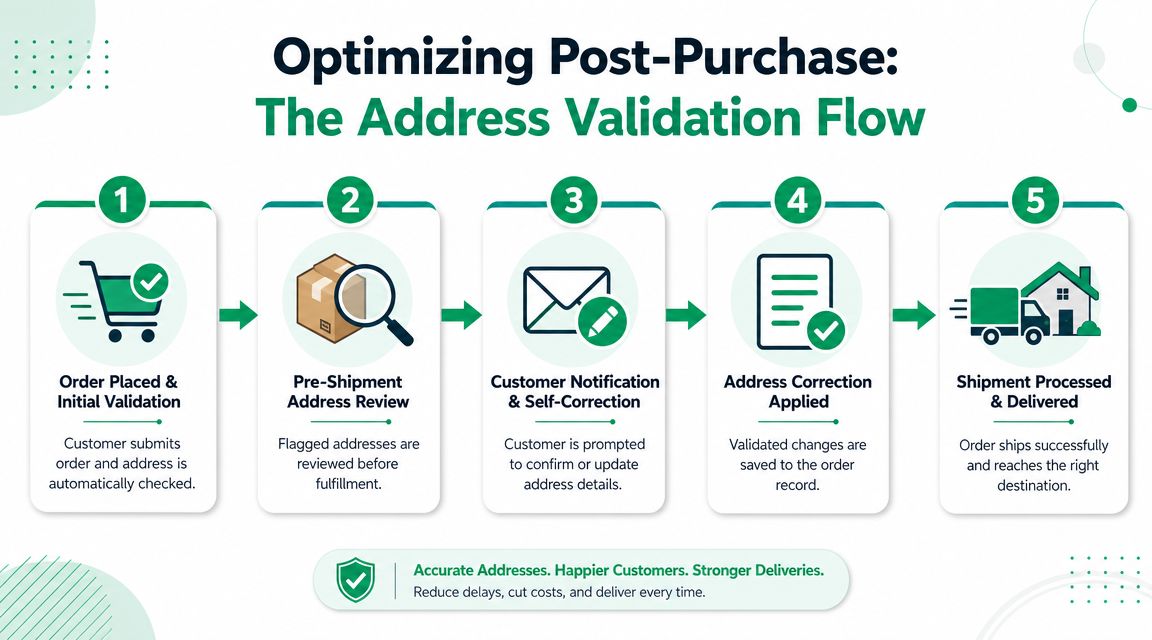
Most merchants think about address validation at checkout. That's useful, but it's incomplete. A lot of address mistakes are discovered after the order is placed, when the customer reviews the confirmation page, checks their email, or realizes they used an old saved address.
That's the post-purchase gap. If you don't have a way to catch corrections before fulfillment releases the order, your support team becomes the fallback system.
Why post-purchase matters on Shopify
Shopify brands often move fast from order creation to pick-and-pack. That's good for fulfillment speed, but it leaves a narrow window for customer corrections. If a shopper notices a bad unit number ten minutes after buying, they shouldn't have to open a ticket and wait for an agent to intervene.
Google's Address Validation API is well suited for this kind of workflow because it can identify address components, infer missing information, and return possible corrections, as Google explains in its Address Validation API overview. That means a post-purchase workflow can do more than reject edits. It can help repair partial customer input before the warehouse acts on it.
For merchants reviewing Shopify app architecture more broadly, UPQODE on Shopify plugins is a useful resource for thinking through how apps should fit the storefront and post-purchase stack without creating operational sprawl.
Best practices that actually work
The strongest implementation pattern is simple: allow the customer to edit the shipping address in a controlled window after purchase, validate the updated input immediately, then apply clear merchant rules about what can still change before fulfillment.
What works well:
- Short edit windows: Give customers enough time to fix mistakes, but not so much time that fulfillment loses control.
- Suggested corrections: Present a corrected version and let the customer confirm it.
- Escalation for risky cases: If the edit materially changes the destination, flag it for review instead of auto-accepting.
- Clear messaging on order status pages: Customers should know whether the order is still editable and what happens after they submit a change.
What doesn't work:
- Hard rejection without guidance: Customers don't know what failed.
- Unlimited edit access: Ops loses confidence in release timing.
- No unit-level logic: Apartment-heavy deliveries need better sub-premise handling than single-family homes.
- Email-only correction flows: They're slow and they invite duplicate tickets.
The implementation checklist for post-purchase flows
If you're rolling out Shopify address validation beyond checkout, use this sequence:
- Map the edit window between order placement and fulfillment lock.
- Decide auto-correct rules for obvious formatting issues versus material address changes.
- Validate on the Thank You page and Order Status page, not just the original checkout form.
- Route edge cases to manual review when the correction changes location significantly.
- Monitor support tags tied to address changes to see whether the self-service flow is effectively reducing intervention.
A deeper look at Shopify address verification workflows can help teams compare where checkout validation ends and where post-purchase protection should begin.
If checkout is your first defense, post-purchase editing is your last chance to save the order before it becomes a shipping exception.
Your Address Validation Tool Evaluation Checklist
Vendor demos tend to look the same. Clean UI, fast suggestions, polished map results. The differences only show up when you compare edge cases, implementation effort, and control over the post-purchase workflow.
Use a scoring sheet. Don't rely on impressions from a sales call.
Questions worth asking in every demo
The most useful evaluation questions are operational, not promotional:
- How does the tool handle incomplete apartment or suite data
- Can it suggest corrections instead of only throwing an error
- Does it support post-purchase edits before fulfillment
- How well does it work on mobile
- Can your team control when a correction is auto-applied versus sent for review
- How strong is country-by-country coverage for your shipping mix
- Will it fit your Shopify setup without heavy theme rework
Address Validation Tool Evaluation Checklist
| Criterion | Question to Ask | Tool A Score (1-5) | Tool B Score (1-5) |
|---|---|---|---|
| Validation accuracy | Does it verify against authoritative postal data and return reliable deliverability signals? | ||
| UX quality | Are suggestions fast, clear, and easy to confirm on desktop and mobile? | ||
| Error handling | Does it gracefully manage partial, malformed, or nonstandard inputs? | ||
| Apartment and sub-premise support | Can it detect missing unit details and guide the shopper to fix them? | ||
| Shopify compatibility | Does it work cleanly with your storefront, apps, and post-purchase surfaces? | ||
| Post-purchase capability | Can customers correct addresses after ordering, within merchant-defined rules? | ||
| International coverage | Does it support your key markets with credible postal logic and formatting? | ||
| Merchant control | Can ops define review rules, edit windows, and escalation paths? | ||
| Reporting | Can you see what was corrected, confirmed, or rejected? | ||
| Privacy and compliance | Is data handling acceptable for your legal and security requirements? |
Don't ask whether the tool “supports Shopify.” Ask where it validates, who can edit, and what happens between order creation and fulfillment release.
A good scorecard forces the vendor to show how the product behaves in real store conditions. That's where the right choice becomes obvious.
Measuring ROI and Avoiding Common Pitfalls
You don't need a complicated financial model to justify an address validation tool. Start with the cost centers you already feel: failed shipments, manual support work, and avoidable order intervention.
A practical ROI model
Track these before and after implementation:
- Failed delivery costs: Returned shipments, reshipments, and write-offs tied to bad addresses.
- Support burden: Tickets involving address corrections, order holds, and delivery exceptions.
- Fulfillment intervention: Time spent by ops reviewing, updating, or rerouting orders.
A simple internal formula works well:
Estimated value = reduction in address-related shipping losses + reduction in support handling effort + reduction in manual ops intervention
You don't need invented benchmark percentages to make the case. Your own exception queue will tell the story fast if you tag address-related issues consistently.
If your team is already reviewing broader ecommerce conversion rate optimization efforts, include address friction in that conversation. Cleaner address capture and better post-purchase correction can improve the buying experience even when the clearest ROI shows up in operations, not front-end conversion reporting.
Mistakes that create new problems
The biggest implementation errors are usually self-inflicted:
- Rules that are too strict: If the tool rejects too many borderline-valid entries, customers abandon the process or flood support.
- Weak mobile UX: Address entry happens on phones all day. If suggestions are clumsy or fields are hard to edit, the validator becomes friction.
- Poor international handling: A tool that works nicely for domestic U.S. addresses can struggle when formats vary by market.
- No post-purchase plan: This is the one teams miss most often. Checkout catches some errors. It won't catch the customer who notices a bad saved address after payment.
- No review logic for risky edits: Not every correction should flow straight through. Significant changes may need merchant approval.
The best setups treat address validation as a control system, not a cosmetic form upgrade. That means balancing customer convenience with fulfillment certainty, especially in the narrow window after purchase and before shipment.
If your Shopify team wants to reduce address-related support tickets and give customers a safe way to correct shipping details after purchase, SelfServe is worth a close look. It helps merchants put controlled post-purchase editing where it matters most, before a typo turns into a failed delivery.