Self Service Customer Support
Most Shopify brands don't have a self-service problem. They have a resolution problem.
Customers clearly want to solve simple issues on their own, but the typical setup still breaks down. Despite 81% of customers attempting to resolve issues themselves, only 14% of issues are fully resolved through traditional self-service channels, according to Gartner as cited by QueryPal's roundup of customer self-service statistics. That gap provides a significant indication. It tells you your FAQ page isn't enough, your order status page isn't enough, and a basic chatbot definitely isn't enough.
For a high-growth DTC brand, self service customer support works best when it handles the messy middle of post-purchase operations. Address changes. Order edits. Tracking questions. Cancellation requests. Product swaps. Delivery friction. Those contacts pile up fast, and they're exactly where support cost, customer effort, and fulfillment risk collide.
The fix isn't more automation for its own sake. The fix is a support design that lets customers finish simple tasks themselves, then hands off the complicated ones cleanly with context intact.
Why Most Self-Service Fails and How Yours Wont
Often, the initial goal is misplaced. Efforts are made to deflect tickets. Customers want to solve problems.
That sounds semantic until you look at what happens in practice. A merchant launches a help center, adds some canned macros to chat, maybe turns on a basic order lookup, and expects volume to drop. Instead, customers bounce between pages, search the same question three ways, and contact support anyway. The ticket still arrives. Now it arrives with frustration attached.
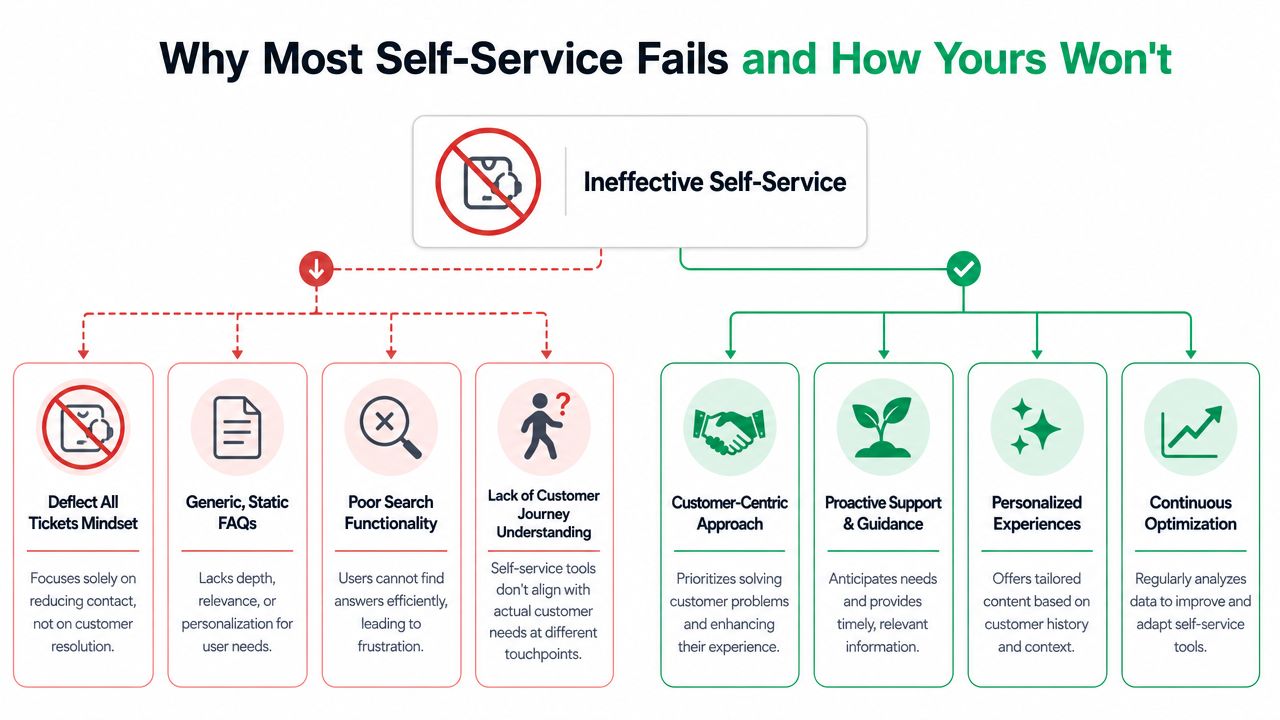
A lot of merchants also define “success” too loosely. A customer reading an article isn't resolution. A customer opening a chatbot isn't resolution. Resolution means the customer finished the task and didn't need to come back through another channel for the same issue.
The old model breaks in post-purchase
Post-purchase support isn't generic. It's operational.
When someone asks “Where is my order?” they usually don't want a policy article. They want tracking, shipment context, and a next step if something looks wrong. When someone wants to update a shipping address, they don't want a support form. They want permission to make the change within the rules your ops team can safely support.
That's why the broad overview in this explanation of customer self-service matters less than the actual workflow design. Self service customer support only works when it maps to the customer's real job to be done.
Practical rule: If a customer has to leave self-service and restart the process from scratch with an agent, the system didn't save effort. It just delayed assisted support.
What to automate and what to route
For Shopify brands, I'd sort incoming support into three buckets:
- Straight-through tasks like order tracking, address edits, or contact detail fixes. These belong in self-service if the system can apply guardrails.
- Guided tasks like cancellation requests, delivery exceptions, or return-policy clarification. These work with automation first, then escalation if risk or ambiguity appears.
- Human-first cases like fraud concerns, damaged packages with emotion attached, VIP exceptions, or anything involving judgment. These need a person early.
This is also where adjacent channels matter. If your phone queue is filled with repetitive order-status calls, tools like AI voice agents for customer support can help cover the routine layer without forcing every customer into email or chat.
A better operating mindset
Use volume and complexity together. High-volume, low-complexity contacts should move first. Low-volume, high-emotion contacts shouldn't be over-automated just because they look repetitive in a dashboard.
A simple decision table helps:
| Request type | Volume pattern | Complexity | Best handling model |
|---|---|---|---|
| Tracking question | Usually high | Low | Self-service first |
| Address correction | Usually high | Low to medium | Self-service with rules |
| Cancellation | Mixed | Medium | Guided flow with approval logic |
| Lost package claim | Mixed | Medium to high | Self-service intake, fast handoff |
| Complaint with nuance | Lower volume | High | Human-first |
That's how yours avoids the usual failure mode. Don't build a wall. Build a system that solves the easy work fast and routes the hard work intelligently.
The Anatomy of High-Performing Shopify Self-Service
Shopify brands need a stack, not a single widget. The strongest self service customer support setup has three working parts that feed each other: a knowledge layer, a post-purchase action layer, and a conversation layer.
That matters because customer preference is already there. 67% of customers prefer self-service over speaking to a company representative, and 60% opt for self-service tools for simple tasks, according to the figures compiled by Deliverect's self-serve systems statistics roundup. If your stack only answers questions but doesn't let customers complete tasks, you're only solving half the problem.
The knowledge base that actually helps
A good Shopify knowledge base isn't a policy dump. It should answer intent-based questions in plain language:
- Order help: tracking, delays, split shipments, gift orders
- Account help: wrong email, login issues, address mismatch
- Product help: sizing, compatibility, care instructions
- Returns and changes: what can still be updated, and when
The structure matters more than article count. Organize around customer goals, not internal departments. “Edit my shipping address” beats “Order management policy.”
What good looks like:
- Search returns task-specific answers
- Articles reflect current fulfillment rules
- Mobile layout is easy to use during real checkout and post-purchase moments
- Every article gives a next step if the issue can't be resolved alone
The post-purchase portal does the heavy lifting
Many brands derive substantial operational value from self-service portals. Instead of asking support agents to manually process the same requests all day, the portal lets customers handle eligible changes on their own.
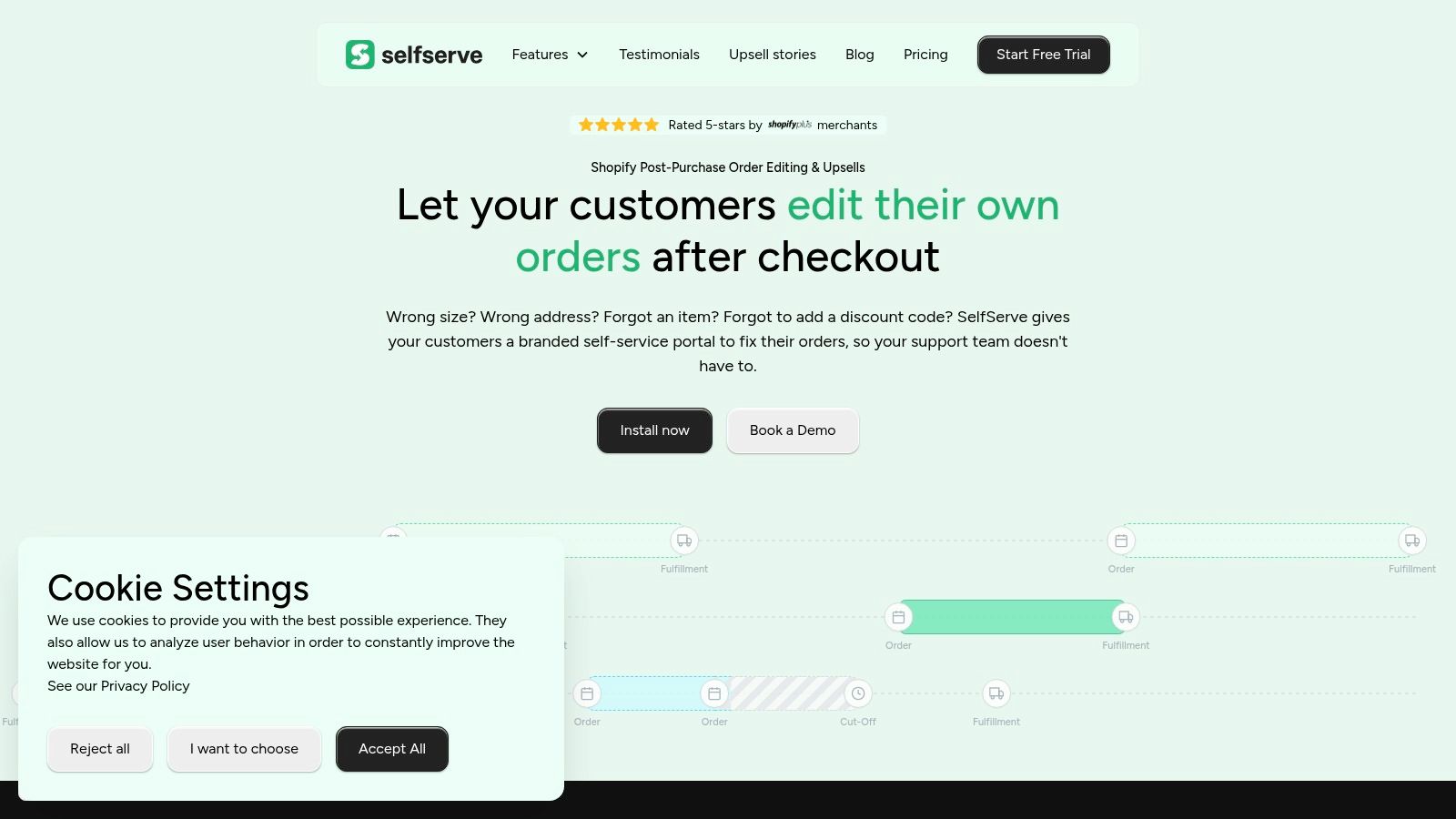
For Shopify, the highest-value functions are usually:
- Order status visibility
- Shipping address edits
- Contact information updates
- Cancellation or change requests with controls
- Post-purchase add-ons and upsells where operationally safe
A portal should connect to real order data. If it only links customers back to a form, it's not a portal. It's a detour.
The best post-purchase portal reduces support load because it removes manual intervention from routine tasks, not because it hides contact options.
The chatbot should route, not ramble
Most ecommerce chatbots fail because they answer with generic text when the customer needs account-specific action.
Use chat for three jobs:
- Intent capture so the customer doesn't hunt through menus.
- Knowledge retrieval for quick factual questions.
- Routing into action such as opening the right order flow, surfacing shipment data, or escalating with context.
If the bot can't access the right content, or can't hand off cleanly, it becomes an expensive layer of friction.
Your non-negotiable checklist
When evaluating self service customer support tools for Shopify, I'd consider these essential:
- Real order context: The tool needs order-aware workflows, not just content hosting.
- Permission controls: Ops teams need to decide what customers can change and when.
- Escalation paths: Every failed path should move into assisted support without restarting.
- Search analytics: You need visibility into failed queries and weak content.
- Mobile usability: Post-purchase requests often happen on phones.
- Localization support: Global brands need the experience to adapt by shopper language.
If one of those pieces is missing, support volume doesn't disappear. It just shifts into a more annoying shape.
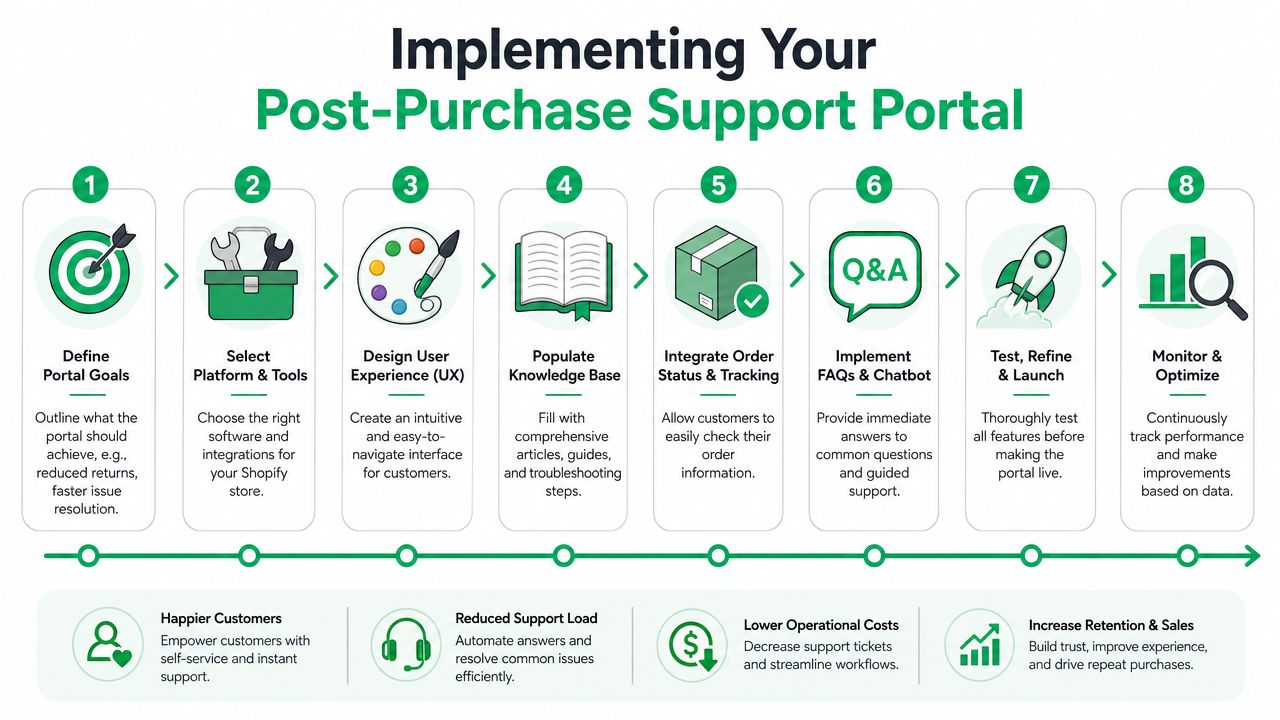
Implementing Your Post-Purchase Support Portal
The fastest way to improve self service customer support on Shopify is to start where support volume and operational friction overlap. For most DTC brands, that's the post-purchase window.
Self-service portals resolve everyday issues three times faster than traditional channels, and companies see an average 45% increase in CSAT after adopting effective self-service solutions, according to CustomerGauge's analysis of why self-service works when it's done right. The key phrase is “when it's done right.” A portal has to be configured with warehouse reality, fraud controls, and customer clarity built in.
Start with your top three ticket types
Before you touch any settings, review recent post-purchase tickets and tag them by request type. Don't overcomplicate it. You're looking for recurring issues that are both common and operationally safe to automate.
For most high-volume Shopify brands, that list usually includes:
- Tracking visibility
- Shipping address changes
- Order cancellation or modification requests
If your team also gets lots of “I used the wrong email” or “Can I add one more item?” contacts, include those too.
Set editing permissions with operational rules
In this context, brands either create trust or create chaos. Customers should be able to make changes only when the order is still in a state your team can support.
Useful rule categories include:
- Time-based rules: Allow edits only during the period before the order is released to the warehouse.
- Product-based restrictions: Prevent changes on regulated items, bundles, pre-orders, or products with fulfillment constraints.
- Payment and risk controls: Hold back self-service changes when the order has risk flags or manual review markers.
- Fulfillment-state logic: Disable certain actions once a shipping label is created or once the order is in a locked status.
Use direct UX copy. Don't make customers decode your internal workflow.
Examples that work well:
- Edit shipping address
- Update contact details
- Request cancellation
- This order can no longer be changed because it's already being prepared for shipment
- Need help with this order? Contact support and we'll review it
For address changes specifically, brands usually benefit from giving shoppers a clean self-service flow instead of asking them to email support. This guide on how Shopify merchants can let customers edit a shipping address after purchase shows the operational logic behind that setup.
Give tracking its own lane
A lot of “Where is my order?” volume isn't really a support issue. It's a visibility issue.
Your portal should pull tracking, carrier status, and order-level context into one place. If an order is split, delayed, or marked delivered, the customer shouldn't need a separate article hunt. Put the explanation next to the status.
A strong tracking experience includes:
- Clear shipment state
- Expected next step
- Guided options if something looks wrong
- Escalation only when the issue crosses a real exception threshold
If your tracking page sends customers back into the inbox for basic interpretation, support is still doing work the portal should handle.
Here's a useful implementation benchmark. Ask a support lead to complete three common customer scenarios using only the portal on a mobile phone. If they get stuck, your customer will too.
Later in the rollout, add richer guidance content or a chatbot layer. But the order data and action paths need to work first.
Build revenue logic into support moments
Post-purchase self-service shouldn't stop at issue prevention. It can also create clean revenue opportunities.
The best place to do this is inside controlled moments where the customer is already engaged with their order:
- on the Thank You page
- on the order status page
- inside an approved order-edit flow
Keep upsells narrow and relevant. Don't turn a support moment into a cluttered merchandising block. Accessories, replenishment items, or complementary products usually fit better than broad catalog pushes.
Launch in phases, not all at once
A practical rollout usually looks like this:
- Phase one covers tracking and address edits.
- Phase two adds cancellation request logic and contact-detail changes.
- Phase three introduces post-purchase add-ons, smarter guidance, and more refined routing.
That phased approach keeps ops in control. It also gives support, CX, and fulfillment teams time to align on exceptions before customers start using the portal at scale.
Designing Intelligent Escalation and Handoffs
Most self-service programs fail at the exact point where they need to become human.
That's the blind spot. Teams obsess over containment, but customers judge the experience by what happens when automation stops helping. A critical gap in most self-service strategies is the lack of intelligent escalation; 15-20% of high-volume tickets require human empathy or complex logic, as noted in Ever Help's discussion of real customer self-service examples. If those customers get trapped, trust drops fast.
Spot frustration before abandonment
You don't need guesswork here. Frustration usually leaves signals.
Common escalation triggers in a Shopify support flow include:
- Repeated failed searches around the same order issue
- Multiple unsuccessful attempts to edit or cancel an order
- Return visits to the same article or portal page without completion
- Conflict between system state and customer expectation, such as “delivered” but not received
- Emotion-heavy topics, including damaged goods, gifting mistakes, and billing anxiety
The mistake is waiting until the customer gives up and writes an angry message. Better to offer a handoff while the context is still clear.
Build the handoff around context
When a customer escalates, the agent should receive the self-service history with the case. Not just the final sentence typed into a form.
Pass through details such as:
- the order number
- the pages viewed
- the search terms used
- the action attempted
- the system reason the action was blocked
- any tracking or fulfillment status visible at the time
That changes the tone of the interaction immediately. The customer doesn't need to repeat the story, and the agent doesn't need to reconstruct it.
Don't ask the customer to explain what your system already knows.
Use a simple escalation framework
A practical operating model looks like this:
| Situation | Best next step |
|---|---|
| Customer can complete the action safely | Keep them in self-service |
| Customer is close but blocked by a rule | Offer guided escalation with the reason shown |
| Customer issue needs judgment or empathy | Route directly to a human |
| Customer has tried and failed multiple times | Escalate with full context attached |
Many brands get the balance right. They don't chase full containment. They chase full resolution with the lowest reasonable effort.
Make the exit visible
A hidden support path makes self-service feel adversarial. A visible exit makes it feel competent.
That doesn't mean “Contact us” should be the first button on every page. It means the customer should know there's a next step if the system can't finish the job. In post-purchase support, that often means a clearly labeled path such as “Need help with this order?” followed by a form or chat entry preloaded with order context.
If your team gets this right, self service customer support stops being a deflection layer and starts acting like a triage engine for better support operations.
Measuring Self-Service ROI and Driving Improvement
If you can't measure resolution, you'll end up measuring activity. Activity is comforting. It's also misleading.
The cleanest definition comes from Umbrex's framework for self-service success rate. True self-service resolution is defined as contained interactions with no recontact. The financial impact is calculated by multiplying successful self-service sessions by the propensity-to-contact to estimate avoided contacts, then multiplying by cost-per-contact.
Measure resolution first
For Shopify brands, the first question is simple: did the customer finish the task without needing support later?
Track these core metrics:
- Self-service success rate: Resolved by the customer without later assisted contact for the same issue.
- Search success rate: Did the search lead to a useful page and then task completion?
- Abandonment points: Where do customers leave a flow or stop progressing?
- Escalation rate by intent: Which request types routinely need a human?
- Customer effort score: How easy was it to get the issue resolved? A practical overview of customer effort score in support operations is useful here because ease matters almost as much as resolution.
Don't rely on article views as a top-line KPI. High views can mean the content is useful, or it can mean customers are lost.
Use a simple ROI formula
For a working ROI model, use this sequence:
- Count successful self-service sessions
- Estimate how many of those would have become assisted contacts
- Multiply by your cost per assisted contact
- Subtract any incremental digital servicing cost
That gets you to avoided cost in a way that's tied to actual operational behavior, not wishful “deflection” math.
A basic worksheet helps:
| Metric | What to capture |
|---|---|
| Successful self-service sessions | Completed tasks with no recontact |
| Propensity to contact | Likelihood that the issue would have become a ticket |
| Cost per assisted contact | Your internal support cost by channel |
| Incremental digital cost | Tooling or servicing cost tied to the flow |
Analyze intent, not just totals
A blended average can hide weak spots. One request type may perform well while another causes unseen frustration for customers.
Break performance down by:
- Intent such as tracking, address edits, cancellation, or delivery issue
- Device because mobile friction often shows up differently
- Language if you serve multiple markets
- Channel entry point such as order status page, help center, or chat
That's where you'll find the operational gaps that matter.
Field note: The most useful self-service report is usually a weekly list of failed searches, blocked actions, and repeated escalations by intent.
Improve in a tight loop
The best teams work a simple loop.
Measure what customers attempted.
Analyze where they got stuck or recontacted.
Improve the content, flow, search ranking, or escalation rule.
Then test again.
That can mean rewriting a help article, changing button copy, relaxing a rule that's too strict, or escalating earlier in one path and later in another. Self service customer support improves when ops, CX, and fulfillment review the same signals together instead of treating the portal as a set-and-forget project.
Your Self-Service Action Plan
Most brands don't need a giant transformation project. They need a disciplined rollout tied to post-purchase pain points.
For the first month, audit your support queue and isolate the post-purchase requests that repeat constantly. Look for the tasks customers should be able to complete without opening a ticket. Then align support, ops, and fulfillment on which changes are safe to automate and which require review.
In the next phase, launch self-service for the top request types that are both common and controllable. Keep the experience tight. Clear buttons. Clear rules. Clear next steps. If a customer can track an order, edit eligible details, and understand when an issue needs review, you've already removed a large amount of avoidable support work.
By the third phase, focus on handoffs and optimization. Review failed searches, blocked actions, and escalations by intent. Tighten the copy, improve the routing logic, and make sure the agent sees the customer's self-service history when a case transfers. That's where self service customer support starts behaving like an operating system for post-purchase CX instead of a pile of disconnected tools.
The biggest shift is mental. Stop asking, “How do we deflect more tickets?” Ask, “How do we let customers finish more tasks with less effort?” When you do that, cost reduction follows, and customer experience improves with it.
If your Shopify team wants to reduce repetitive post-purchase tickets while keeping control over what customers can change, SelfServe is a practical place to start. It gives shoppers a way to manage eligible order changes, supports multilingual experiences, and adds post-purchase upsell capability without turning support into a manual queue. For high-volume brands, that's the kind of self-service that improves both operations and customer experience.