Customer Lifecycle Management: A Shopify Guide for 2026
Most advice about customer lifecycle management is too clean to be useful in a real Shopify operation. It talks about awareness, email nurture, loyalty points, and maybe onboarding. Then it omits the stretch where customers panic, open tickets, change addresses, ask to fix phone numbers, want to add one more item, or blame the brand for a delivery problem that could have been prevented.
That gap is expensive.
According to Klaviyo's overview of customer lifecycle management, 1 in 5 buyers (20%) stop purchasing from a brand entirely after just one failed purchase experience. For a high-volume store, that means customer retention isn't only a marketing problem. It's an operations problem, a support problem, and a post-purchase systems problem.
The stores that handle customer lifecycle management well usually don't win by sending more campaigns. They win by removing friction after checkout. They make order edits easy when appropriate. They catch address issues early. They reduce avoidable support contacts. They create controlled post-purchase upsell opportunities without making fulfillment messy. In other words, they treat the order confirmation as the midpoint of the relationship, not the finish line.
Why Your CLM Strategy Is Probably Missing a Key Piece
Most CLM playbooks are built backward. They start with ad spend, segmentation, and conversion optimization because those are visible and easy to report on. Teams can point to traffic, click-throughs, and first-purchase conversion. The post-purchase experience gets handed off to support and ops, where it often turns into a patchwork of inbox macros, manual edits, and policy exceptions.
That structure looks efficient on a slide deck. In practice, it creates avoidable churn.
A customer doesn't experience your brand in departmental stages. They experience one continuous promise. Marketing makes the promise, checkout confirms it, and post-purchase either validates it or breaks it. When a shopper needs to fix an address, update contact details, or change an order and your team can't respond quickly, the customer doesn't think, "operations had a workflow gap." They think, "this brand is hard to buy from."
Where the usual advice falls short
The common failure mode is simple. Brands obsess over getting the first order, then underinvest in everything that happens immediately after payment.
That creates three predictable problems:
- Support volume rises: Customers contact the team for issues that could have been handled with rules-based self-service.
- Fulfillment risk increases: Manual edits happen late, inconsistently, or not at all.
- Repeat purchase intent drops: Friction in the first transaction weakens trust before retention efforts even begin.
Practical rule: If a customer has to open a ticket for a basic order correction, your lifecycle design is incomplete.
The overlooked revenue window
The post-purchase period isn't just about preventing problems. It's also one of the cleanest moments to increase order value without disrupting the initial conversion. Customers have already committed. Their intent is real. If your systems let them make approved changes or add relevant products before fulfillment locks, support load can go down while order value goes up.
What doesn't work is bolting upsells onto a messy operational process. If the warehouse can't trust the order state, or if customer edits bypass guardrails, the team ends up trading one kind of friction for another. Good CLM in ecommerce depends on controlled flexibility. Customers need room to act, and ops needs clear limits.
Understanding Customer Lifecycle Management
Customer lifecycle management is best understood as a relationship operating system, not a campaign calendar. It connects the full customer experience, from first exposure to repeat buying, and it forces teams to treat each stage as part of one commercial flow.
According to Dock's customer lifecycle management guide, CLM operates as a unified, interconnected system where insights from one stage directly inform the next, creating a loop that drives retention. Dock also notes that this approach can reduce churn by up to 20% when teams identify risks and opportunities early. That matters because lifecycle performance improves when marketing, support, success, and operations stop working from separate definitions of the customer.
Think relationship, not funnel
A funnel is useful for reporting. A relationship is better for decision-making.
Early on, the customer is asking, "Can I trust this brand?" After purchase, the question changes to, "Will this brand make my life easier?" Later, it becomes, "Is this still the best place to buy?" Each answer is shaped by a different team, but the customer experiences all of it as one relationship.
That's why mature CLM programs don't isolate pre-sale and post-sale activity. They pass context forward. The reason a shopper converted, the products they chose, the shipping method they selected, the support issues they encountered, and the behavior after delivery all belong in one lifecycle view.
For a deeper strategic view, Halo AI has a useful piece on mastering consumer lifecycle management that complements the operational lens ecommerce teams need.
What CLM looks like in a Shopify store
In Shopify, customer lifecycle management becomes tangible very quickly:
| Function | What it owns in CLM |
|---|---|
| Marketing | Acquisition, first-purchase intent, reactivation |
| Merchandising | Offer structure, bundles, cross-sell logic |
| Operations | Order accuracy, edit rules, fulfillment timing |
| Support | Exception handling, trust recovery, policy clarity |
| Retention | Repeat purchase journeys, loyalty, win-back |
The mistake is assigning CLM to only one of those teams.
A lifecycle strategy works when each team can answer one question clearly: what customer problem are we preventing at this stage, and what next action are we enabling?
The practical definition
For high-volume ecommerce, customer lifecycle management means designing every touchpoint so the customer can move forward with less friction and the business can respond with less manual effort. That's the standard that matters. If a tactic increases workload, creates inconsistency, or leaves post-purchase gaps, it isn't strong CLM no matter how polished the acquisition side looks.
Mapping the Six Stages of the Customer Lifecycle
The classic lifecycle model gives teams a foundation. As Gainsight's guide to the customer journey and lifecycle notes, the framework was originally developed by Jim Sterne and Matt Cutler, who defined five core stages and tied them to KPIs such as Customer Retention Rate and Customer Lifetime Value. For Shopify brands, it's often more useful to expand that structure into six practical operating stages that match how ecommerce teams operate.
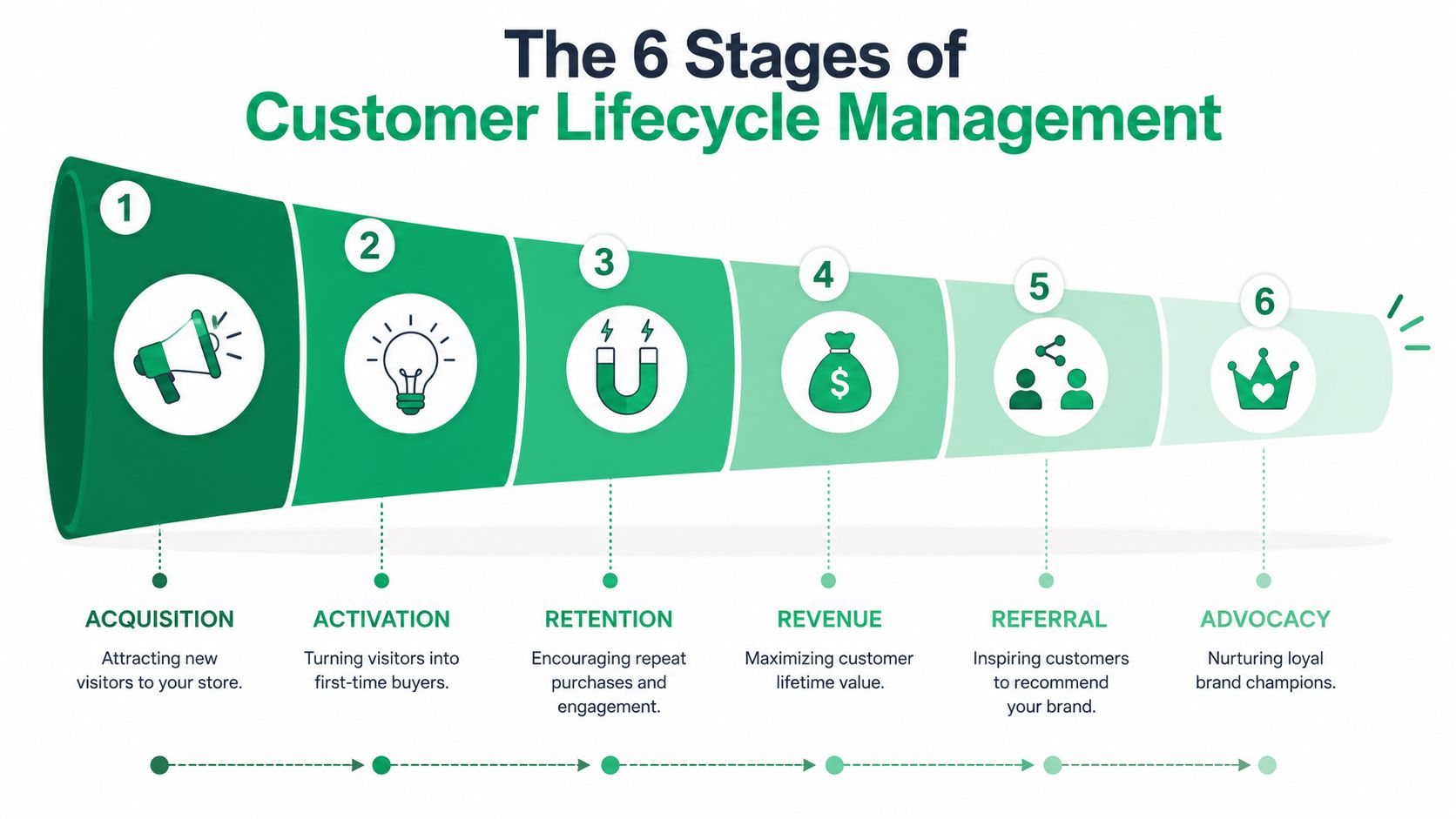
Acquisition
At this stage, a stranger becomes a visitor with intent. The customer's goal is simple: decide whether your store is relevant and trustworthy enough to explore.
Your goal is to attract the right traffic, not just more traffic. In a Shopify context, that means product pages that answer objections fast, landing pages that match ad intent, and merchandising that makes the first click feel coherent. Bad acquisition creates downstream support problems because it brings in buyers who were misled or under-informed.
Activation
Activation starts when the shopper moves from browsing to buying. The customer's goal is to complete the first purchase with confidence.
Your job is to remove hesitation without creating confusion. Checkout friction, unclear shipping promises, and weak order confirmation experiences all hurt this stage. Activation is also where many brands stop thinking operationally. They celebrate the conversion and fail to plan what happens if the customer immediately needs to make a change.
Retention
Retention begins earlier than many believe. It doesn't start on the second order. It starts the moment the first order is placed and the brand has to prove it can deliver a smooth experience.
The customer's goal here is reassurance. They want to know the order is correct, the shipment is on track, and help is available without friction. This is the stage where post-purchase systems do the most quiet work.
Revenue
This stage focuses on growing the value of the relationship, not just preserving it. The customer's goal is to get more value from a brand they already trust.
For ecommerce, revenue growth usually comes from cross-sells, replenishment, better bundles, subscriptions where appropriate, and post-purchase add-ons that fit the original order. If the offer is useful and the operations are controlled, this stage increases value naturally. If the offer feels random, it weakens trust.
A useful companion to this framework is Arlo's DTC founder's digital journey action plan, especially for teams trying to align marketing journeys with real store behavior.
Referral and advocacy
These are related, but they aren't identical.
- Referral happens when customers actively recommend your store to someone else.
- Advocacy is broader. It includes repeat praise, positive reviews, organic mentions, and long-term brand preference.
Strong advocacy usually follows boring excellence. Accurate orders, easy fixes, reliable delivery, and relevant offers create the kind of experience people recommend without being pushed.
Referral programs can help, but they don't manufacture trust. They amplify it once the rest of the lifecycle is working.
Ecommerce KPIs and Tactics for Each Lifecycle Stage
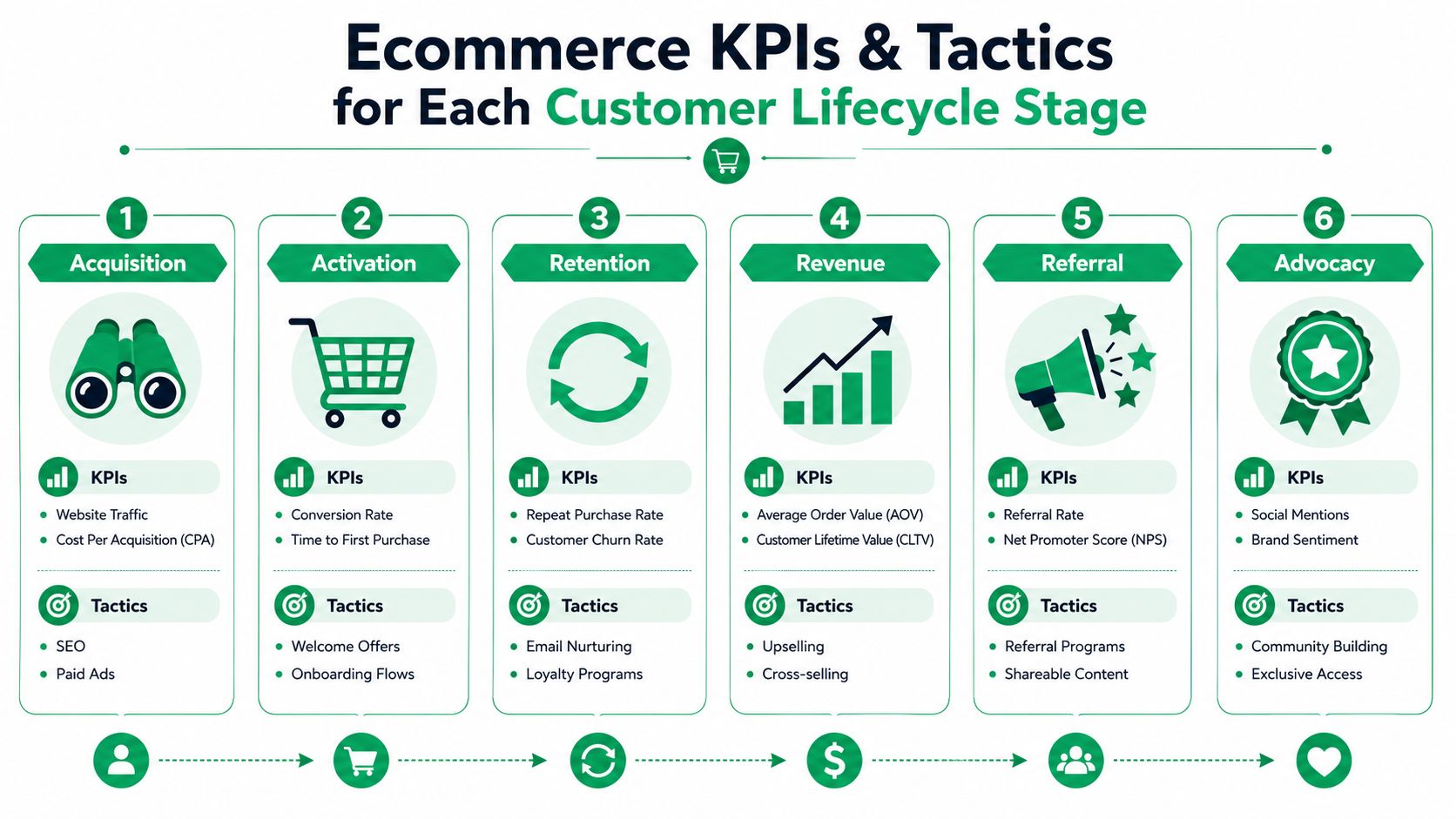
A lifecycle map is useful only if each stage has an owner, a small KPI set, and a defined operating response when performance slips. Too many Shopify teams track everything and act on nothing. A tighter model works better.
Acquisition and activation
At the top of the lifecycle, keep the scorecard simple. Look at website traffic, cost per acquisition, and conversion rate. In practice, those numbers only help when paired with qualitative review of traffic quality, landing-page consistency, and checkout friction.
What tends to work:
- Channel-message match: Paid traffic should land on pages that continue the promise made in the ad.
- Fast product comprehension: Product pages should answer fit, shipping, returns, and use-case questions quickly.
- Welcome structure: Email and SMS flows should reduce uncertainty, not just push discounts.
What usually doesn't work is treating all new visitors the same. First-time buyers need reassurance. Returning browsers need reasons to move now. Existing customers need continuity.
Retention and revenue
For operational ecommerce CLM, at a minimum, track repeat purchase rate, customer churn rate, average order value, and customer lifetime value. If you need a practical guide on the revenue side, SelfServe has a useful resource on how to increase customer lifetime value.
The most effective tactics here usually include:
- Post-purchase nurture: Clear order updates, delivery communication, and issue prevention.
- Loyalty logic: Rewards that reinforce real buying behavior rather than create margin leakage.
- Cross-sell timing: Offers shown when the customer has enough context to evaluate them.
- Replenishment prompts: Especially useful for consumables or repeatable-use products.
A quick comparison helps clarify the trade-offs:
| Stage | KPI focus | Tactic that helps | Tactic that often backfires |
|---|---|---|---|
| Retention | Repeat purchase rate | Helpful post-purchase communication | Generic discount blasts |
| Revenue | AOV and CLV | Relevant add-ons and bundles | Unrelated upsells |
| Retention | Churn rate | Fast issue resolution | Slow manual ticket handling |
Operational note: A retention tactic is only good if the support team can absorb the exceptions it creates.
Referral and advocacy
These later stages need a lighter hand. Monitor referral rate, Net Promoter Score, social mentions, and overall brand sentiment. Those measures tell you whether the experience is worth talking about.
Tactics that tend to hold up:
- Referral prompts after a positive milestone: Ask after delivery success, not during uncertainty.
- Review requests tied to product usage: Better than asking immediately after shipment.
- Community and exclusives: Early access and insider treatment can deepen attachment when the store already has trust.
What doesn't hold up is forcing advocacy before you've earned it. If a customer still needs help with a simple order issue, a referral ask feels tone-deaf.
The Post-Purchase Playbook for Shopify Stores
Most Shopify brands still treat post-purchase as support clean-up. That's the wrong model. The better model is controlled self-service plus targeted monetization. When customers can fix simple issues on their own and see relevant add-ons before fulfillment is final, the store reduces manual workload and creates a better buying experience at the same time.
According to Certinia's guide to mastering customer lifecycle management, advanced CLM frameworks that integrate automation tools with CRM software for post-purchase communication reduce support ticket volume by 30% and improve customer satisfaction scores. For Shopify operators, that finding aligns with what creates support drag: routine changes that should never require a human queue in the first place.
Build around the most common customer requests
A practical post-purchase workflow usually starts with a narrow set of approved actions. Don't begin with unlimited flexibility. Begin with the requests your team already handles repeatedly.
That often includes:
- Address correction: Allow edits within a defined window before fulfillment locks.
- Contact detail updates: Let customers fix email or phone errors without agent intervention.
- Order additions: Offer curated products or collections that can be appended cleanly.
- Cancellation requests: Route exceptions into approval flows instead of allowing uncontrolled cancellations.
The strongest systems add guardrails around each of these actions. Time windows matter. Product restrictions matter. Fulfillment status matters. If an order has already moved too far downstream, the customer should see a clear explanation rather than a broken promise.
Good post-purchase design gives customers freedom inside boundaries that operations can trust.
Use thank you and order status pages as working surfaces
These pages are usually underused. Teams treat them as informational, but they're also high-intent surfaces for action.
The thank you page is useful for immediate reassurance and tightly related add-ons. The order status page is useful for later actions such as approved edits, issue prevention, and secondary merchandising. Both pages work best when they reduce uncertainty first and sell second.
For a deeper look at this area, SelfServe has a practical article on post-purchase customer experience.
A short walkthrough of this operating model is worth watching:
What works and what fails
Here's the candid version.
What works
- Clear permission rules: Customers can edit what you explicitly allow.
- Real-time validation: Address checking catches errors before they become shipment failures.
- Offer curation: Upsells fit the original order and don't create fulfillment chaos.
- Shared visibility: Support and ops can see what the customer changed and when.
What fails
- Manual inbox triage for routine edits: It doesn't scale.
- Unlimited order changes: Warehouse teams lose trust in order integrity.
- Random post-purchase offers: They hurt AOV more often than they help.
- Disconnected tools: If CRM, support, and order logic aren't aligned, customers get mixed messages.
For high-volume stores, this part of customer lifecycle management is where operations stops being backstage work and becomes a direct driver of retention and AOV.
How to Implement Your CLM Strategy
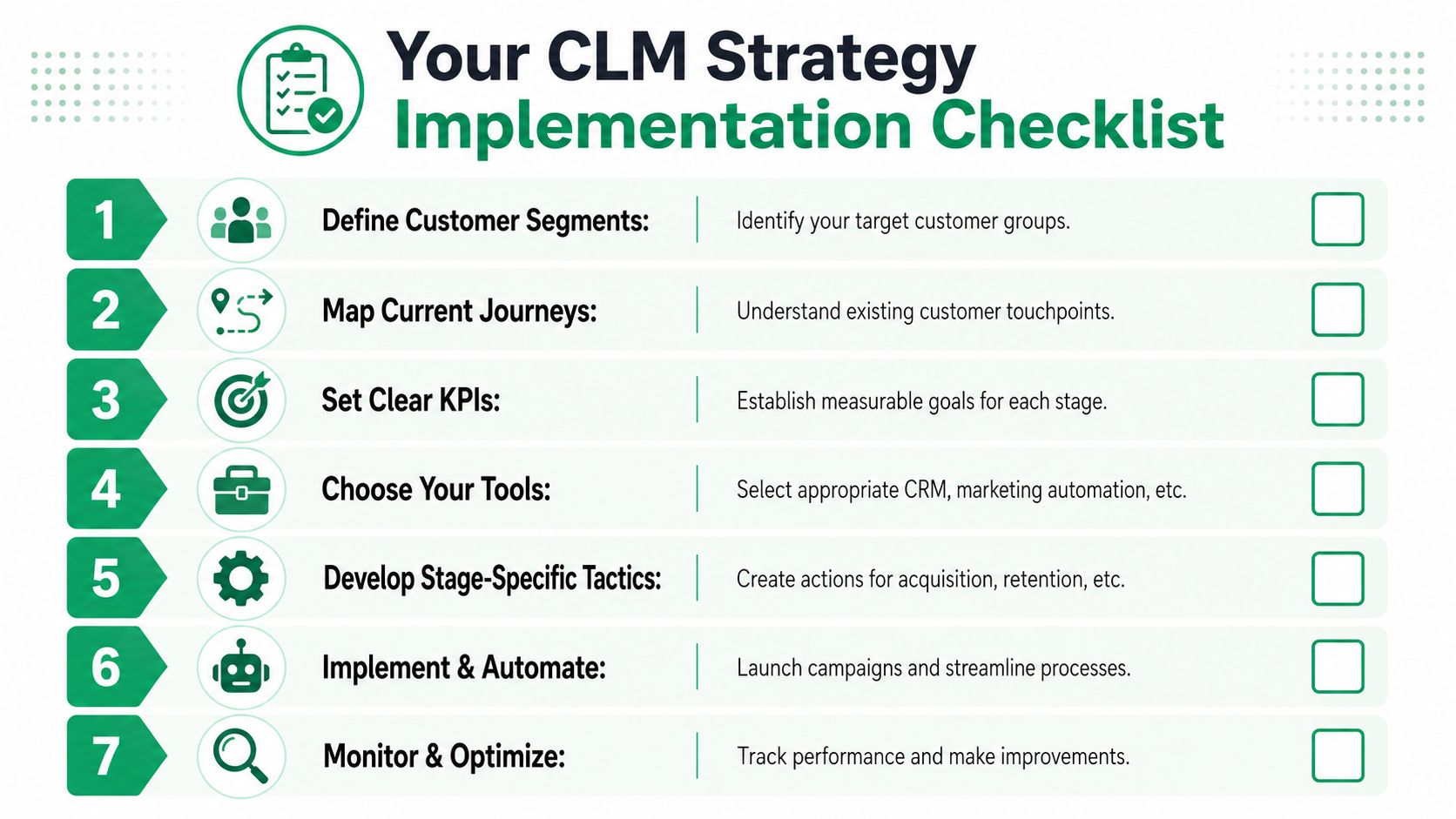
A workable CLM strategy doesn't start with software. It starts with an audit. Most brands already have lifecycle activity in place, but it's fragmented across Shopify, email, help desk workflows, and internal team habits. The job is to turn those fragments into one operating model.
According to Rightpoint's article on optimizing customer lifecycle management for retention, 70% of post-purchase customer service tickets stem from address changes or order modifications. For high-volume Shopify merchants, that's the gap to prioritize first because it sits at the intersection of customer effort, support load, and fulfillment risk.
A practical rollout sequence
Map every touchpoint
Include paid landing pages, product pages, checkout, order confirmation, shipping notifications, support inboxes, and order status experiences.Assign each touchpoint to a lifecycle stage
Keep the ownership visible. If no team owns a stage transition, that handoff will break.Find the highest-friction post-purchase moments
Look for repetitive tickets, late manual edits, and places where customers wait for basic updates.Choose tools that reduce manual work, not just add visibility
A dashboard won't fix a broken process. Your stack should let customers complete approved actions safely. For teams exploring automation, SelfServe's guide to customer retention automation is a useful reference.
Set KPIs that force action
A CLM dashboard should be small enough to manage and specific enough to trigger decisions.
Use a short mix such as:
- Acquisition signals: Traffic quality and conversion trend
- Retention signals: Repeat purchase behavior and support friction
- Post-purchase signals: Order edit requests, exception rate, and workflow resolution speed
- Revenue signals: AOV impact from approved upsells or add-ons
Don't overload the dashboard with vanity reporting. If a metric doesn't change behavior, remove it.
Implementation check: If your support team still handles routine order edits manually after your CLM rollout, the strategy isn't implemented yet. It's only documented.
Iterate by failure point
Review lifecycle performance where customers get stuck, not where reports look healthy. The best improvements usually come from fixing boring problems. Unclear delivery communication. Edit windows that are too rigid or too loose. Upsells that look good in testing but create downstream operational noise. Those adjustments are what make the system work at scale.
Turning Customers Into Lifelong Advocates
The brands that win customer lifecycle management don't rely on a single loyalty tactic. They build trust through consistency. The ad matches the product page. The checkout feels clear. The order stays editable where it should. Support doesn't become the customer's only path to a simple fix. Post-purchase offers feel relevant instead of opportunistic.
That's why the post-purchase phase deserves more attention than it gets. It's where retention, operational efficiency, and revenue expansion meet. If you're thinking seriously about advocacy and long-term value, it also helps to study broader approaches to nurturing profitable customer relationships.
A customer becomes an advocate when the relationship keeps getting easier. In a high-volume Shopify store, that doesn't happen by accident. It happens when customer lifecycle management is built into the way the business runs.
If you want to reduce repetitive post-purchase tickets and give customers a cleaner way to edit orders or add products after checkout, SelfServe is built for that exact workflow on Shopify. It helps merchants put guardrails around order changes, streamline support operations, and create controlled post-purchase upsell moments without turning fulfillment into a mess.