Address Validator Shopify: A Practical Setup Guide
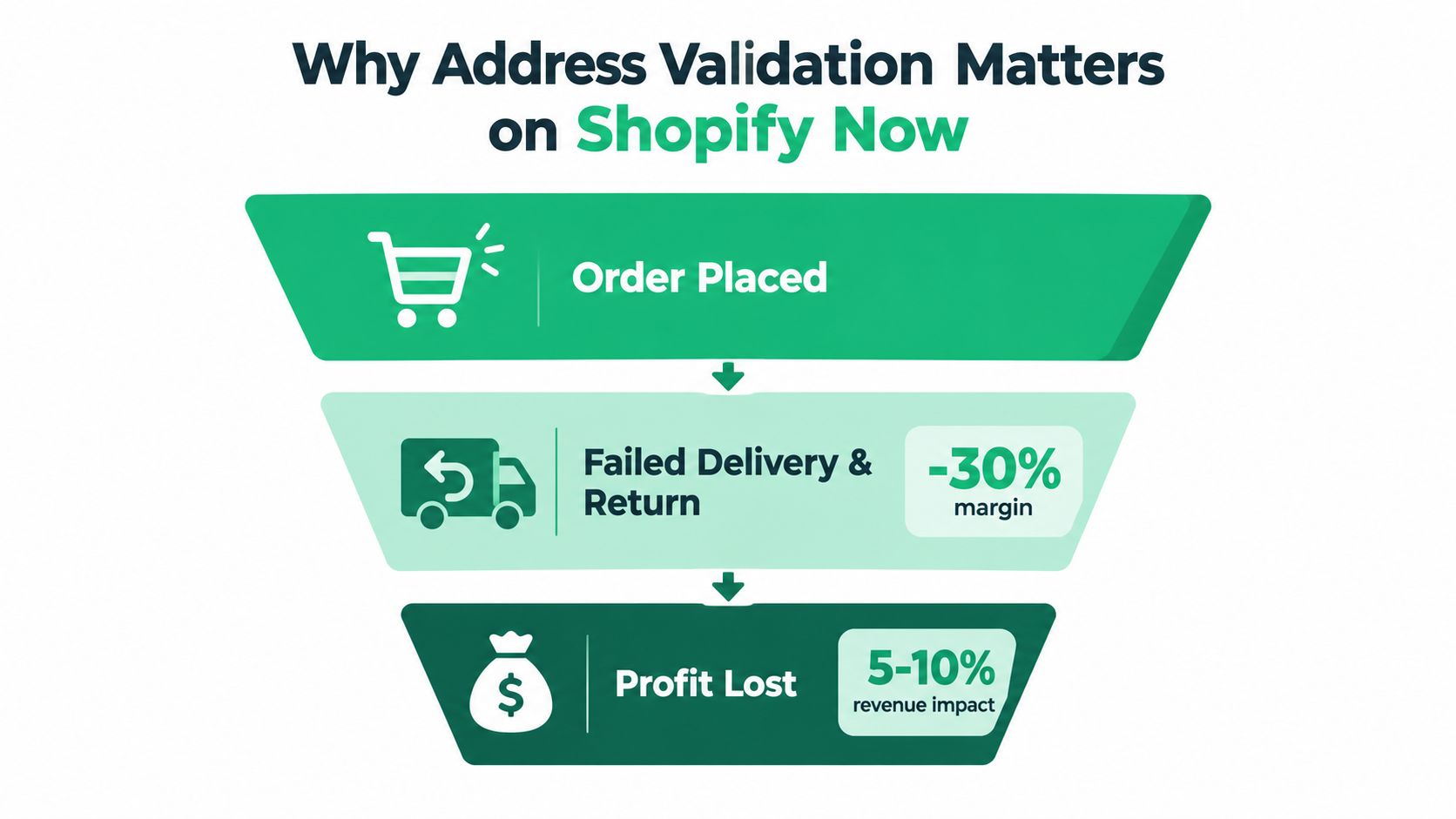
A customer places an order, notices the street number is wrong, and assumes it can be fixed later. Your fulfillment queue sees the order as ready to ship. By the time the carrier rejects the address, the label has been printed, support is involved, and the margin on that order is under pressure.
That's why an address validator for Shopify should be treated as checkout governance, not merely a typo-correction widget. Shopify address data influences shipping rates, tax calculations, fraud decisions, fulfillment workflows, and Shop Pay experiences. A weak address field can therefore create problems well beyond one delivery.
Why Address Validation Matters on Shopify Now
A useful Shopify address validation setup performs three distinct jobs.
First, it catches mistakes while the customer is entering the address. Autocomplete reduces typing, while validation identifies missing or suspicious components before payment. Second, it enforces country- and carrier-compatible formats, including the fields and postal conventions required in the destination market. Third, it preserves a controlled post-purchase editing window, allowing the shopper to correct a genuine mistake without opening a support ticket.
The operational case is substantial. Independent ecommerce analysis reports that nearly 47% of ecommerce sites still lack an address validator at checkout, while address-related problems account for most failed deliveries. Shippo data cited in the same analysis attributes about 30% of delivery failures to insufficient addresses, 28% to nonexistent addresses, and 26% to recipients being unknown at the location, roughly 84% combined. See the ecommerce address validation data for the underlying breakdown.
Checkout friction matters too. The same analysis says around 21% of shoppers abandon checkout because the process is too complicated or lengthy. Validation therefore has to balance data quality against conversion. A blocking rule that rejects every address it can't confidently match may prevent some failures, but it can also stop legitimate customers in rural areas, new developments, apartment buildings, or markets with unusual address structures.
Shopify's native capability has expanded beyond a niche app function. Shopify documentation says address validation is available to all merchants on every plan and remains active on the store, with shipping-address validation supported across major markets including the United States, Canada, Australia, much of Western Europe, and South Korea. The Shopify address validation overview shows why this is now platform infrastructure.
The practical choice is straightforward. Use native controls when your market and failure patterns are simple. Add a dedicated validator when you need richer autocomplete, international reference data, custom rules, or post-purchase self-service.
Configuring Shopify's Native Address Validation
Shopify's native controls are the right starting point because they require no extra app, checkout script, or external service. Set them up first, then add another layer only where your order and delivery data shows a gap.
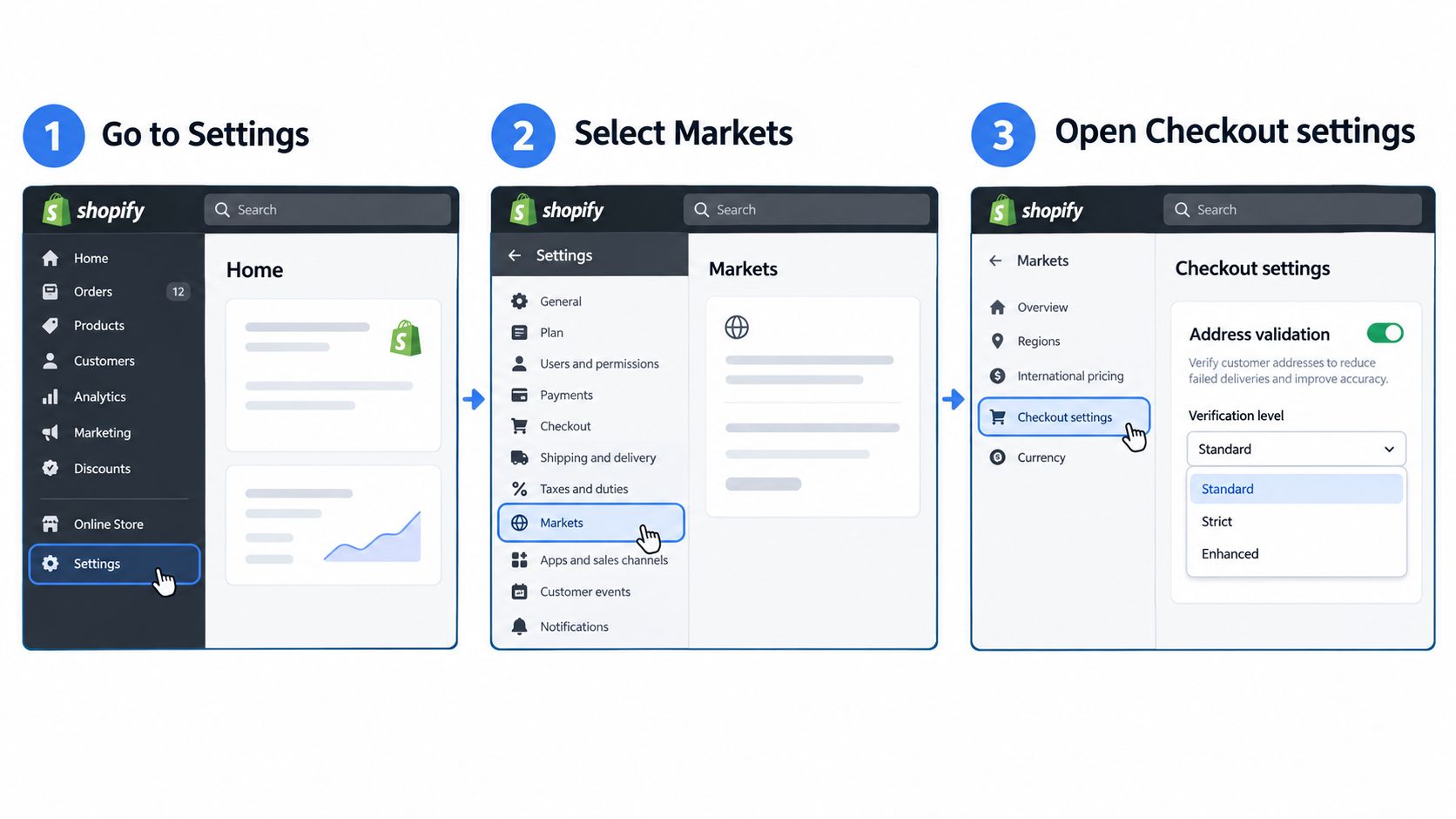
Review the destination markets. Open Settings, then Markets, and confirm that each active market has the correct country and regional configuration. Address rules depend on the destination, so an address that is valid in Canada may be incomplete for a market requiring a different postal format.
Open the address preferences. In Shopify admin, go to Settings, Checkout, and Address collection preferences. Shopify's current documentation describes suggestions before order placement, validation after order placement, and state or province and postal-code matching across regions. Use the Shopify address collection preferences documentation as the reference for the controls currently available in your admin.
Require the fields your carriers need. Make street, city, postal code, country, and phone required where those fields support delivery or carrier contact. Required fields prevent obvious omissions, but they don't prove that the address identifies a unique door, so don't treat completion as deliverability.
Allow Shopify to check formatting. Native validation can evaluate country-specific postal conventions, state or province relationships, and address formatting. When Shopify suspects a problem, it can present a suggested correction before the customer places the order. That prompt should help customers, not force them to accept a change they don't recognize.
Know where native validation stops
Shopify's built-in coverage is strongest in major markets such as the United States, Canada, Australia, Austria, Belgium, France, Italy, the Netherlands, Portugal, Switzerland, and other supported regions. Coverage and address precision are less uniform across Latin America, parts of Asia-Pacific, and Gulf markets, where local formats, transliteration, and incomplete postal references create more exceptions.
Shop Pay also deserves testing. A pre-filled address can reduce entry errors, but merchants should confirm how their specific checkout flow handles validation and edits after a customer selects a saved address.
The older Checkout Blocks Address Blocker is scheduled to sunset on August 31, 2026, according to Shopify's current guidance. If you rely on it, document every rule now and recreate it in native address preferences or, where appropriate, a Shopify Plus checkout extensibility block.
Finish with a controlled test. Place an order using a deliberately misspelled street, an invalid postal relationship, and an incomplete apartment entry. Confirm that the prompt appears before payment where expected, and then test whether the resulting order can be corrected without staff intervention.
Wiring Up Google Maps Autocomplete and Validation
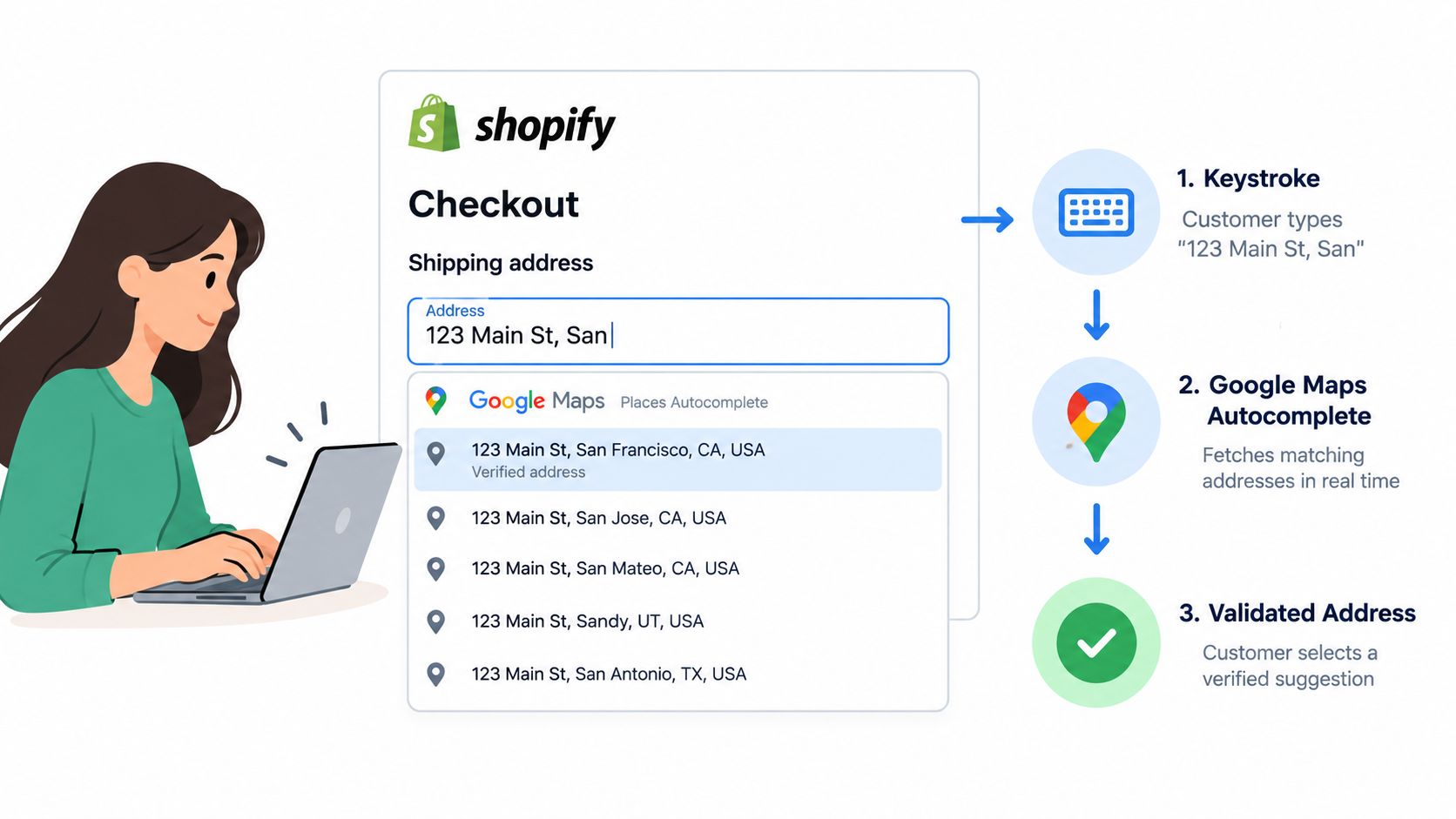
Native validation checks the completed address. Google Maps autocomplete works earlier, while the customer is still typing. The customer enters part of a street, Google returns ranked suggestions with structured address components, and the selected result populates Shopify's address fields.
That reduces keystrokes and limits inconsistent spelling, but autocomplete isn't proof that a parcel can reach a specific door. A suggestion may omit an apartment or unit, return a routing-level location, or represent a business or landmark rather than a residential delivery point.
Configure the typing-time layer
Inside a dedicated validator app such as SelfServe, start by adding a Google Maps API key with billing enabled. Restrict that key to the Places API and the checkout domain, rather than leaving it broadly available. Then configure the countries, address components, and result types the store should return, such as addresses, establishments, or geocoded locations.
Keep the result scope narrow. A customer shopping for home delivery usually needs an address result, not every nearby business or map feature. Country restrictions also make the dropdown more relevant for localized markets and reduce confusing suggestions when the same street name appears in several countries.
The Google Maps address autocomplete guide is useful when you're deciding how the autocomplete layer should connect to a Shopify order-editing flow.
Google's coverage is generally useful across North America, Western Europe, Australia, and Japan. It can be less dependable in rural Latin America and parts of Southeast Asia, where address records may be incomplete or inconsistent.
Operational rule: Treat autocomplete as a faster capture method, not as the final authority on deliverability.
Autocomplete won't reliably solve PO boxes, APO/FPO addresses, newly built subdivisions, or streets that use dual-language naming. It may also select a nearby address without the customer's unit number. The safest flow preserves the customer's typed value, displays the suggestion clearly, and lets the shopper confirm or reject it. A second validation pass can then check postal compatibility, required components, and merchant-specific rules.
Use Google's layer when typing friction is the main problem. Add stronger post-entry controls when the store's failures come from missing units, unsupported formats, or addresses that look plausible but can't be routed confidently.
Setting Merchant Permissions and Editing Windows
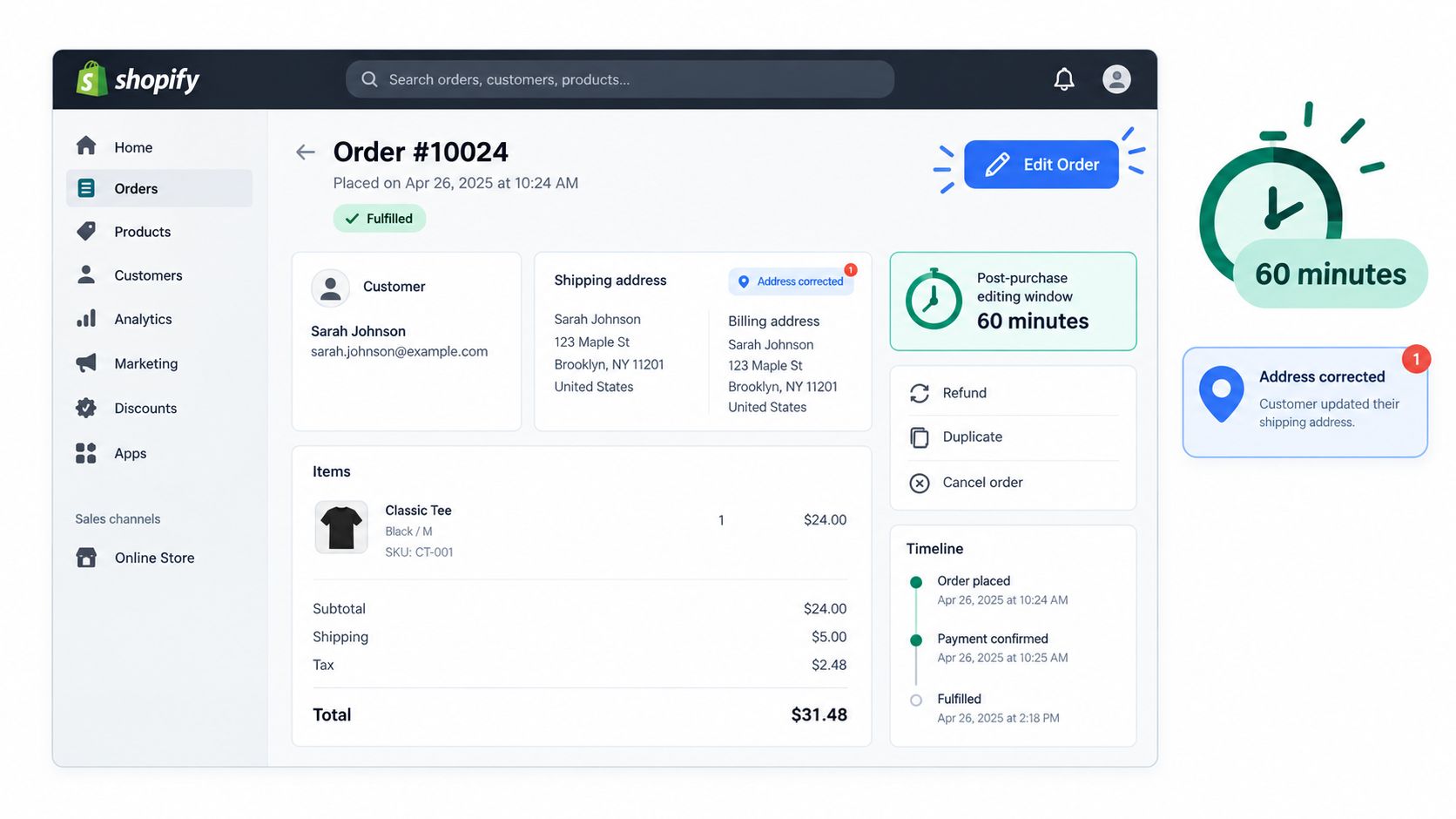
Address errors often appear after checkout, when the fulfillment team is preparing the order. A post-purchase editing window gives the customer a controlled opportunity to correct the record before the warehouse acts.
Start by defining the window in operational terms. Decide how long a customer can edit after purchase, then align that period with your pick, pack, and label process. A store that prints labels immediately needs a shorter window than a store that batches fulfillment later in the day.
Define who can edit what
Configure eligibility separately for guest checkout, logged-in customers, and wholesale buyers. Guests need a secure order-status or confirmation link. Logged-in customers may authenticate through their account. Wholesale orders often require stricter controls because the address may be tied to negotiated shipping terms, tax handling, or an external purchasing system.
Place the edit link in the order confirmation email and on the order status page. The instruction should tell the customer exactly what they can change and when the option closes. Avoid exposing unrelated controls such as cancellation, product changes, or fulfillment actions to a customer who only needs to correct a shipping address.
On Shopify Plus, a tool such as SelfServe can be configured around merchant permissions and post-purchase workflows. Scope approval rights to the support or operations roles that need to review changes, while keeping fulfillment and administrative controls restricted. The SelfServe getting started guide provides the product setup context for this type of workflow.
Add fulfillment guardrails
Block edits once an order reaches a picked, packed, or label-printed state. If the warehouse has already handed the parcel to a carrier, changing the Shopify record won't change the package in transit.
Route country changes, major destination changes, and high-risk orders to manual review. A customer correcting a typo in the same street is a different operational event from switching the order to another country. Keep those paths separate.
Finally, retain an audit log. The record should show the original address, the proposed address, the validation result, the approving user, and the time of the change. Export that history for finance and operations reviews so the team can connect address edits with delivery exceptions, refunds, and support activity.
Native Validation Versus a Dedicated Validator App
Native Shopify validation is a hygiene layer. It checks required fields, formatting relationships, and supported address references through the platform's checkout and order processes.
A dedicated validator app adds another operating layer. Depending on the product, it may combine real-time autocomplete, postal or geocoded reference data, custom blocking rules, order tagging, and customer-led corrections after purchase. The distinction matters because a merchant may need better workflow control rather than just more aggressive rejection.
| Dimension | Native Shopify Validation | Dedicated Validator App, such as SelfServe |
|---|---|---|
| Address accuracy | Good for supported markets, formatting problems, and incomplete required fields | Can add autocomplete, richer reference checks, and custom exception handling |
| Regional reach | Strongest across Shopify's defined major markets | Depends on the provider's data sources and configured countries |
| Checkout friction | Usually limited to Shopify's own prompts and field checks | Can reduce typing through autocomplete, but aggressive blocking may interrupt checkout |
| Custom rules | Platform-level settings and supported checkout controls | Rules can cover apartment requirements, PO boxes, military formats, review queues, and post-purchase edits |
| Post-purchase workflow | Shopify can validate after order placement, but editing scope depends on the store setup | Often adds customer self-service, permissions, order tags, approval paths, and audit history |
| Ownership | No separate validator subscription or API setup for native features | Adds app administration, provider configuration, possible API billing, and monitoring |
The data supports a layered approach. Independent ecommerce guidance describes a three-step flow: capture with autocomplete, normalize against postal or geocoded data, then block or route ambiguous records for review. That analysis reports potential failed-delivery reductions of 60% to 80% and checkout conversion improvements of 2% to 5%, but those figures are benchmarks, not guarantees. See the address validation implementation analysis for the methodology and cautions around over-strict rules.
The same source reports comparative testing in which Google's shipping-specific validation reached 97.0% overall accuracy, while a specialist shipping validator reached 99.8% across 500 addresses. Missing units and nonexistent addresses produced the largest differences. Those results suggest that “valid” is not one universal standard. A platform check may be sufficient for a domestic store with few exceptions, while a global or multi-carrier operation may need specialist data and a manual-review path.
Choose native controls when you ship primarily within one country, have modest complexity, and rarely see delivery exceptions. Choose a dedicated app when cross-border formats, apartment omissions, custom rules, or post-purchase support volume are central problems. Don't buy accuracy at the expense of legitimate orders. The right system identifies uncertainty and routes it intelligently.
Implementation Tips and Troubleshooting Edge Cases
Strict validation breaks carts when it treats unusual as invalid. Configure the rules around the delivery services you use, and give customers a clear path to confirm an address that an automated database doesn't recognize.
Handle the common exceptions deliberately
Apartment and unit numbers: Keep unit fields available by default in dense urban markets. If a building address is recognized without a unit, warn the shopper rather than automatically replacing the entry.
PO boxes: Permit them when the selected shipping service supports them. Block or route them only when the carrier or product requires a street address.
APO/FPO addresses: Don't reject these automatically. Preserve the military format, use the correct country and state conventions, and test the exact structure with the relevant fulfillment service.
New streets: Show a soft warning when a new subdivision or recently renamed street isn't present in the reference database. Manual confirmation can protect a legitimate order that a hard block would lose.
Non-Latin scripts: Test Japanese, Arabic, and Cyrillic input separately. Preserve the customer's original script where possible, and confirm that the carrier and label system can render the resulting address correctly.
Autocomplete can also create a cascade failure. Google may suggest a nearby or formatted version that conflicts with what the customer knows to be correct. Keep the typed value visible, explain the difference, and let the shopper confirm before the system overwrites anything.
Set expectations with support
The real-time address validation guidance is relevant when you're designing the correction path, but no validator replaces operational judgment.
A validator should reduce tickets about spelling corrections, missing postal codes, invalid state and postal combinations, incomplete street fields, and customers asking whether an address change was accepted. It won't reliably resolve a private road, a newly constructed property, an unlisted rural route, a disputed apartment number, an unsupported carrier format, or an address that the customer entered incorrectly but the database recognizes as valid.
Practical rule: A low-confidence result should create a review task, not an automatic refusal.
Record the reason for every manual override during rollout. Those overrides reveal whether the rule is too strict, the reference source is incomplete, or the checkout wording needs improvement.
Rollout Checklist and Metrics to Watch
Launch address validation as an operations change, not just an app installation. Before enabling it for every shopper, verify the complete path from entry to fulfillment.
- Native settings: Confirm Shopify's address-collection preferences are enabled for each active market.
- Autocomplete security: Restrict the Google Maps key to the checkout domain and only the services the app requires.
- Regional rules: Test the countries that generate meaningful orders, including local postal and administrative formats.
- Editing window: Set a customer correction window that ends before picking, packing, or label creation.
- Permissions: Give support the ability to approve address edits without granting fulfillment administration.
- Customer messaging: Update confirmation emails and order-status instructions so shoppers know how to correct an address.
- Fulfillment procedure: Define who reviews flagged orders and what happens before the carrier cutoff.
Measure the result against a two-week baseline comparison window, as recommended in the rollout plan, rather than judging performance from isolated orders. Watch delivery exception rate, address-edit support tickets per 100 orders, shipping-step checkout completion, and the average time between a flagged mismatch and a successful edit.
Tighten rules when recurring failures remain clearly preventable and customers receive accurate suggestions. Relax them when mobile completion drops suddenly, valid edge cases are being blocked, or manual overrides become common. A validator is working when it moves mistakes into a controlled correction path without creating a new class of checkout problems.
Paste this action list into your project tool:
- Review native address settings.
- Audit regional delivery exceptions.
- Configure and restrict autocomplete.
- Set edit permissions and fulfillment cutoffs.
- Test edge-case addresses.
- Record the baseline.
- Monitor exceptions, edits, tickets, and checkout completion.
SelfServe gives Shopify and Shopify Plus merchants a controlled post-purchase address-editing workflow, with Google Maps-powered validation, configurable permissions, customer editing windows, and order-management safeguards. Visit SelfServe to evaluate whether its address validation and self-service controls fit your store's fulfillment process.