Automation in Retail: Boost Shopify Sales in 2026
Retail automation is no longer a future bet. The global retail automation market is projected to reach USD 31.2 billion in 2026 and USD 44.8 billion by 2030, growing at a CAGR of 9.3%, according to Grand View Research's retail automation market analysis.
Most of the conversation around automation in retail still fixates on warehouse robots, smart shelves, and cashierless stores. That's useful context, but it misses where many Shopify and Shopify Plus brands can get the fastest operational win. The lowest-hanging fruit is often post-purchase. That's where support queues swell, fulfillment mistakes become expensive, and small workflow improvements can protect margin, lift AOV, and improve CSAT without a full systems overhaul.
For high-growth DTC brands, that matters. You don't need a moonshot automation program to get value. You need to remove repeatable support work, tighten order accuracy, and create cleaner handoffs between Shopify, support, ops, and fulfillment.
The Growing Imperative for Retail Automation
For DTC operators, automation in retail isn't about chasing trends. It's about protecting contribution margin when volume rises faster than team capacity.
A fast-growing brand usually hits the same wall. Orders increase, support tickets pile up, edits come in after checkout, and operations teams start building manual workarounds inside Shopify, spreadsheets, inboxes, and Slack. That approach works for a while. Then it starts leaking money through delays, errors, and avoidable labor.
Why this has become urgent
Three pressures are pushing brands toward automation at the same time:
- Rising labor pressure: Support and ops teams can't keep absorbing repetitive work indefinitely.
- Higher customer expectations: Buyers expect fast answers, accurate shipping details, and smooth post-purchase experiences.
- More operational complexity: Every app, warehouse handoff, and international order adds another point of failure.
The broad market direction reflects that urgency. The retail automation category is expanding because merchants need better cost control and better supply chain visibility, not because automation is pursued for its novelty.
Practical rule: If a task happens every day, follows clear rules, and still requires a human to copy data between systems, it's a candidate for automation.
For Shopify brands, the question isn't whether to automate. It's where to start so the payoff shows up quickly. In most cases, the best answer isn't a robotics project. It's the part of the business where repetitive tickets, order edits, returns coordination, and post-purchase offers all converge.
What Retail Automation Really Means for DTC Brands
For a Shopify merchant, automation in retail should be understood as a connected operating system, not a collection of flashy tools. The best setups act like a digital nervous system. One customer action triggers the next operational step without a person needing to rekey information, chase approvals, or patch together updates across apps.
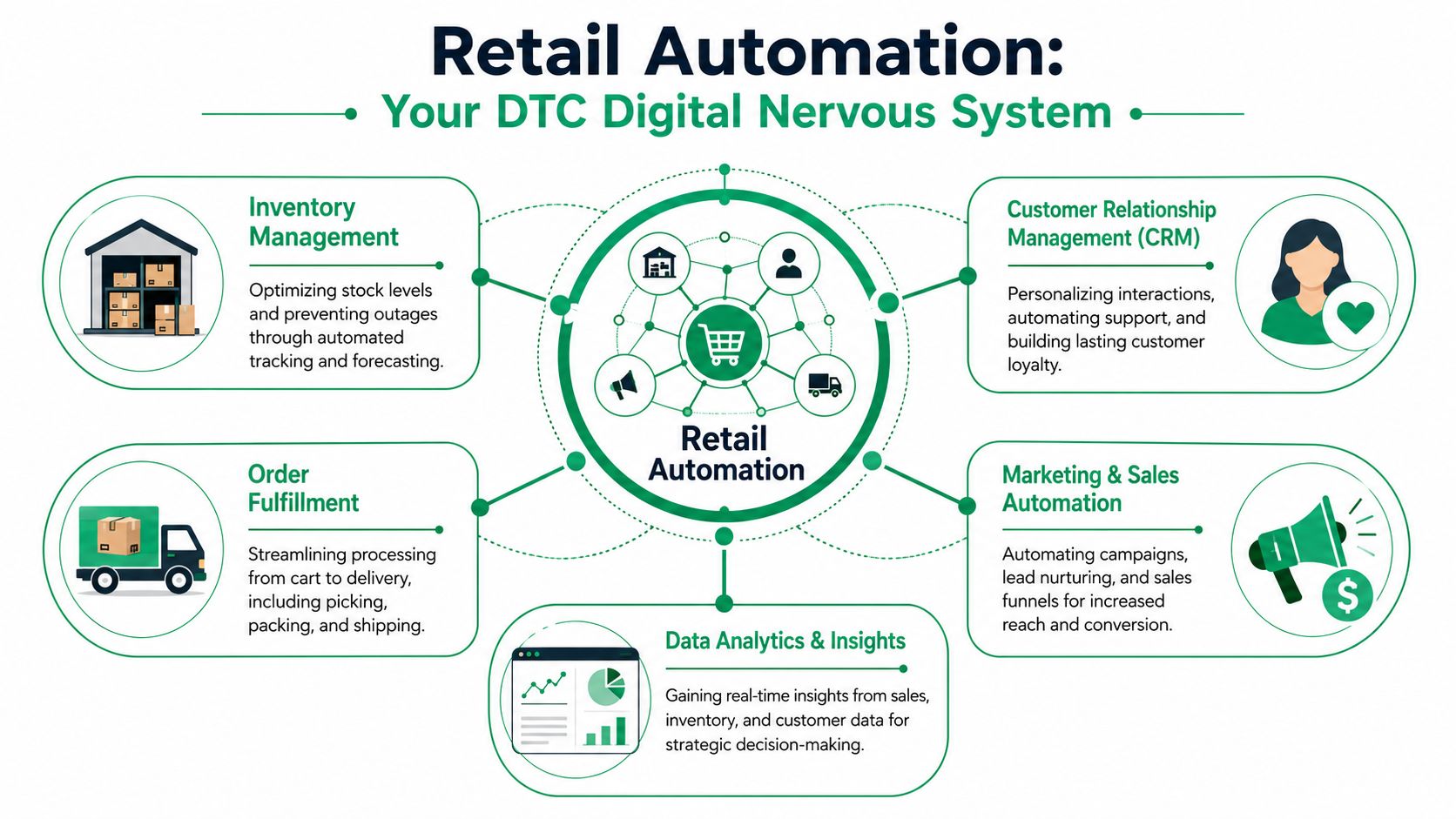
That matters because most DTC pain isn't caused by a lack of effort. It's caused by broken flow between systems. A customer updates an address. Support has to verify the request. Ops checks whether the order is already routed. Fulfillment needs the current shipping data. Finance may need to handle a price difference. None of that is hard work individually. It becomes expensive when the brand repeats it thousands of times.
The better definition
In practice, retail automation means building workflows where:
- Customer actions trigger system actions
- Teams work by exception, not by default
- Data moves once, accurately, across the stack
- Humans step in where judgment matters
The strongest DTC operators don't automate for the sake of automation. They automate handoffs. That's a more useful lens because handoffs are where delays, mistakes, and extra ticket volume usually appear.
Why human oversight still matters
A lot of bad automation strategy starts with the wrong goal. Brands try to eliminate human involvement entirely, especially in support. That usually backfires. Customers don't mind automation when it's fast and clear. They do mind it when they hit a dead end on an issue that needs context.
Research highlighted by the University of Delaware argues that the right model in customer care is “triage and enablement,” where routine edits are automated and people handle the complex exceptions. That approach supports higher trust, repeat purchases, and can contribute to 300 to 500 basis points of margin improvement when automation enables humans to focus on more valuable work, as discussed in this University of Delaware analysis of labor automation in retail.
Automate the request, not the relationship.
That distinction is especially important in post-purchase. Address changes, contact updates, item swaps, and cancellation requests often follow clear rules. Fraud concerns, edge-case fulfillment exceptions, and policy disputes do not. Smart automation handles the first group instantly and routes the second to a person with context already attached.
What this looks like in a DTC stack
A well-run Shopify environment connects customer care, order management, fulfillment logic, CRM, and reporting. When that stack is aligned, the team stops spending time on simple edits and starts spending time on retention, escalation handling, and revenue-generating service.
That's the version of automation in retail that helps a DTC brand grow.
The Core Technologies Powering Modern Retail
The tech behind automation in retail sounds more complicated than it is. For Shopify brands, the useful question isn't “Which buzzword matters most?” It's “Which technologies remove manual work across support, fulfillment, and reporting?”
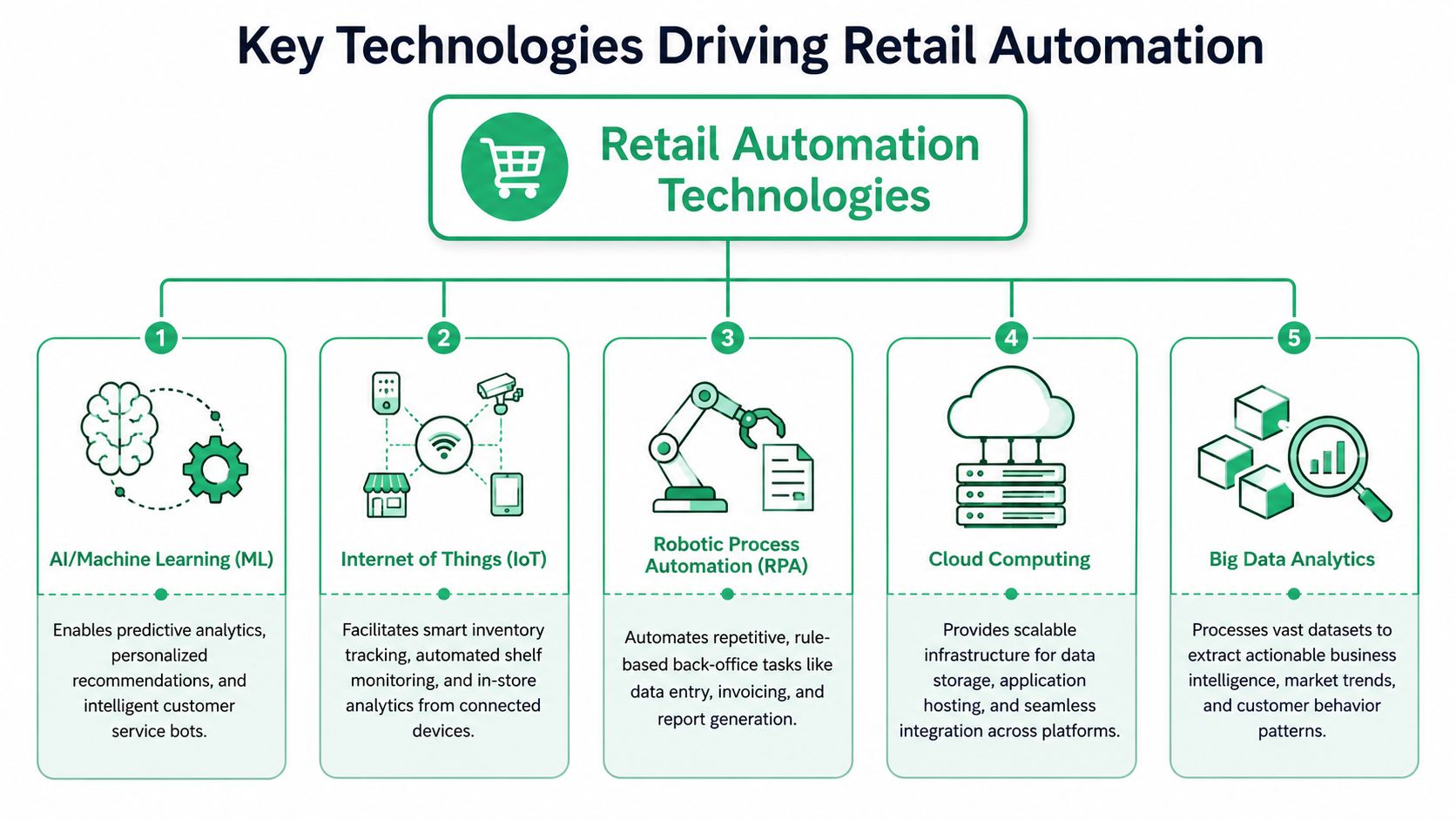
AI and machine learning
What it is: AI and machine learning identify patterns, make predictions, and trigger decisions based on data.
For retail operations, AI becomes useful when it decides what needs attention before a human notices it. The technical model described by Scale Computing is a digital nervous system in which IoT sensors and AI pattern recognition enable real-time decisions, including workflows that respond automatically to changing inventory conditions in this overview of AI, IoT, and automation in smart retail.
For a Shopify brand, AI is often most practical in places like:
- Support triage: Routing order-edit requests differently from refund disputes
- Post-purchase merchandising: Determining which add-on products fit an existing order
- Exception detection: Flagging unusual orders for review rather than forcing a human to inspect everything
IoT and real-time inventory signals
What it is: Internet of Things technology uses connected sensors or devices to send live operational data.
This shows up more in physical retail and fulfillment environments than in a typical Shopify admin workflow, but the concept matters for ecommerce brands too. Scale Computing gives a clear example: IoT-enabled shelf scanners can detect low inventory and automatically trigger reorders through an ERP system without human data entry.
The lesson for DTC operators is straightforward. If your brand still relies on manual stock checks, manual warehouse confirmations, or lagging inventory data, you create downstream support issues. Customers place orders for products that are harder to fulfill. Support inherits the fallout.
If you're evaluating warehouse-side systems, this guide to ecommerce fulfillment automation solutions is a useful resource for understanding how fulfillment workflows connect back to the customer experience.
RPA and rule-based back-office work
What it is: Robotic Process Automation handles repetitive, structured tasks that follow explicit rules.
RPA isn't a robot in a warehouse. It's the logic that moves information between systems and performs the same administrative sequence every time. For Shopify brands, that can include:
| Workflow area | Manual version | Automated version |
|---|---|---|
| Order tagging | Ops team reviews orders one by one | Rules apply tags based on product, shipping method, or exception type |
| Finance handoff | Staff exports and cleans order data | System pushes structured data into downstream workflows |
| Support updates | Agents copy tracking or status details | Triggered messages populate based on order state |
Cloud and analytics
Cloud infrastructure and analytics are less visible, but they keep the whole system usable. Without reliable integrations and reporting, automation becomes a black box. Teams need to know what fired, what failed, and where human intervention is still required.
Operator view: Good automation isn't just execution. It's visibility.
That's why the best retail automation stacks don't stop at triggering workflows. They also make those workflows measurable.
Winning Automation Use Cases for Shopify Stores
The easiest way to spot good automation opportunities is to look for tasks your team repeats every day and customers expect to happen fast. For Shopify brands, the biggest wins usually sit in two buckets: front-office post-purchase workflows and back-office operational cleanup.
Front-office use cases that customers actually feel
A lot of teams spend heavily on acquisition while leaving the post-purchase experience stitched together with inbox macros and manual edits. That's a mistake because the order has already been won. The next step is protecting it.
Self-service order edits
Before: A customer enters the wrong apartment number, notices it after checkout, and emails support. An agent opens Shopify, checks fulfillment timing, edits the order if possible, and sends a confirmation. If the warehouse already touched the order, the team has to coordinate manually.
After: The customer updates eligible order details inside a defined post-purchase window. The system validates the request, applies the change, and only escalates when the order no longer qualifies.
This is one of the cleanest examples of ROI because it removes repetitive tickets without reducing service quality.
Returns and cancellation routing
Before: Customers submit free-form emails. Agents ask clarifying questions, review policy rules, and manually sort requests that should never have landed in the main queue.
After: Structured workflows gather the reason, route the request, and apply the next step based on policy. The support team handles exceptions, not form collection.
Post-purchase upsells
Many brands miss revenue opportunities in the post-purchase moment. The post-purchase moment has high intent and low friction, but teams often treat it only as a service stage. It can also be a merchandising stage, especially when a shopper is still engaged with the order confirmation and status flow.
Useful examples include complementary products, low-risk add-ons, or collection-based offers that fit the original purchase. If you're mapping those flows, this article on Shopify marketing automations for revenue and retention is a helpful reference point.
Post-purchase automation works best when it reduces effort for the customer and creates a second buying opportunity without adding friction.
Back-office use cases that remove hidden drag
Customers may never see these workflows directly, but they feel the results in delivery speed, order accuracy, and support response time.
Order tagging and routing
Brands with complex catalogs, subscriptions, pre-orders, bundles, or international shipping rules often force staff to make the same sorting decisions over and over. Automation can tag and route orders based on product type, shipping constraints, or exception status so the right queue sees the right work first.
Low-stock and fulfillment alerts
When stock visibility lags, customer care inherits avoidable frustration. Automated alerts don't just help warehouse teams. They reduce the number of “where is my order?” and “why was this item unavailable?” conversations that support has to absorb later.
Reconciliation and ops follow-up
Many Shopify teams still rely on exports for checks between order data, fulfillment status, and downstream operational systems. That creates delays and makes issue detection reactive. Automated reconciliation workflows tighten those loops and surface mismatches sooner.
What tends not to work
Not every task should be automated first.
- Complex policy exceptions: These still need human judgment.
- Anything with unclear rules: If your team can't agree on the process, automating it only scales confusion.
- Disconnected tools: A “smart” app that doesn't sync cleanly with your Shopify workflow creates more admin, not less.
For most DTC brands, the best early wins are the places where customers request the same post-purchase actions repeatedly and your team already knows the approval logic.
Quantifying the Business Case for Automation
Most automation projects fail internally for one reason. The pitch stays operational when it needs to become financial.
If you're making the case to leadership, don't lead with convenience. Lead with margin, support load, fulfillment efficiency, and customer retention. A workflow is only worth automating if it changes one of those outcomes in a measurable way.
Here's a broader benchmark that matters. McKinsey found that an extensive automation program across store, supply-chain, and headquarters functions can generate 300 to 500 basis points of incremental margin, and in a grocery setting, automation can reduce labor hours by up to 65%, according to this McKinsey overview of automation in retail.
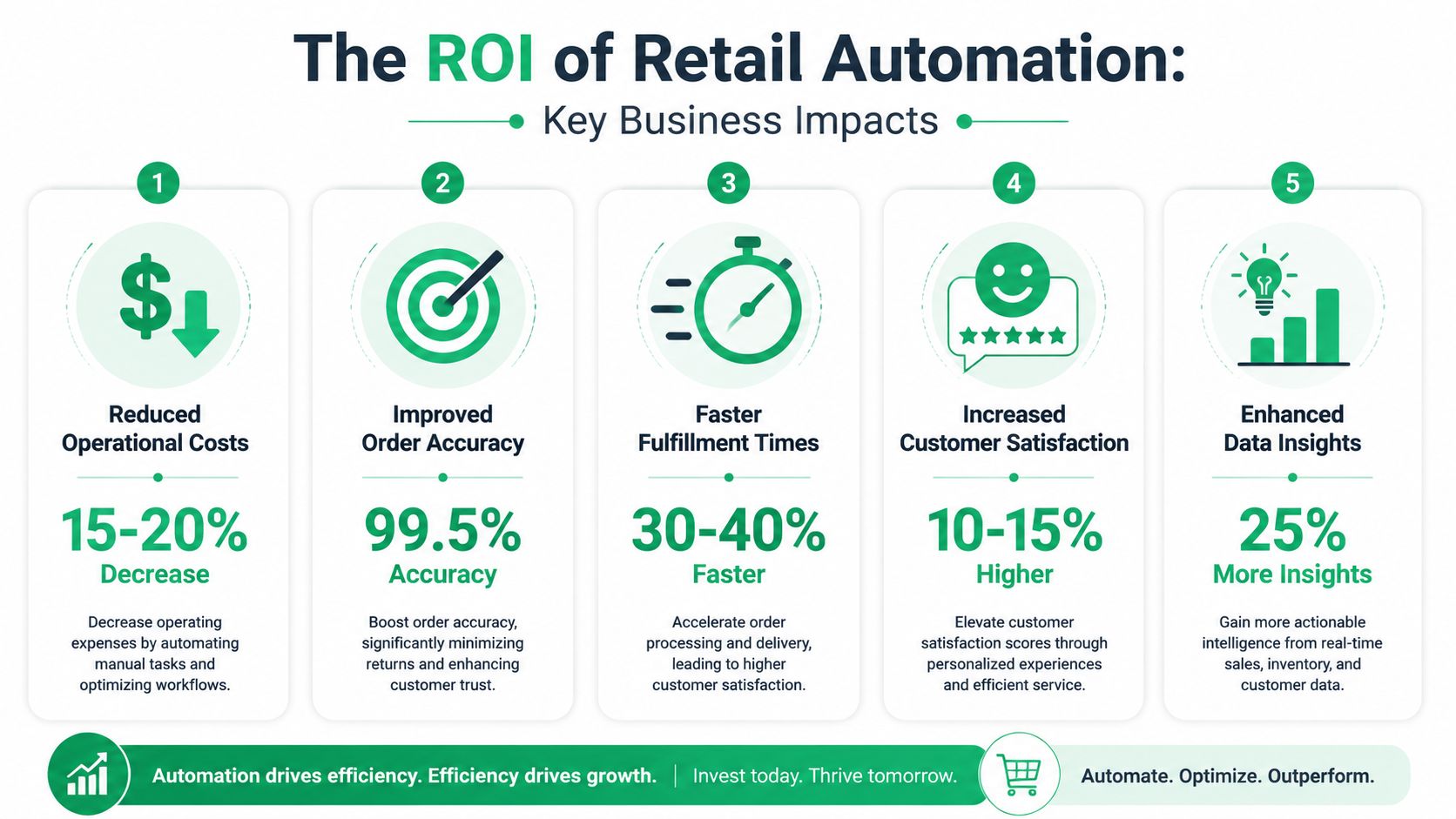
For a Shopify Plus operator, that doesn't mean copying a big-box retailer's playbook. It means translating that logic into DTC economics.
The KPI lens that actually matters
A practical automation business case usually maps to these metrics:
- Support cost per ticket: If routine post-purchase requests move out of the queue, agents spend more time on escalations that protect retention.
- AOV: Post-purchase offers can create incremental revenue from an order you've already acquired.
- CSAT: Fast self-service on simple requests usually beats waiting for an agent.
- Operational efficiency: Cleaner handoffs reduce rework across support, ops, and fulfillment.
- Margin: Labor saved on repetitive work can be redirected toward higher-value tasks.
A lot of teams also benefit from reading adjacent workflow examples outside ecommerce support. This overview of process automation benefits for social ops is useful because it shows how standardized workflows reduce manual coordination in another high-volume function.
A simple principle helps here. If a task doesn't require judgment, it shouldn't consume your best people.
Here's a short explainer that helps frame the financial side of automation:
Build the case from current pain, not abstract potential
Don't model ROI from hypothetical perfection. Use your current operation.
| Business question | What to examine inside the brand |
|---|---|
| Where are agents losing time? | Ticket categories such as address edits, cancellation requests, and order changes |
| Where is revenue being left behind? | Post-purchase moments with no cross-sell or add-on logic |
| Where do errors create downstream cost? | Misrouted orders, stale addresses, and manual approval chains |
| Where are teams duplicating work? | Cases where support, ops, and fulfillment all touch the same request |
For a tighter measurement framework, this guide to operational efficiency metrics for ecommerce teams is worth reviewing.
Finance filter: If automation reduces touches, prevents errors, or creates a second purchase opportunity, it belongs in the ROI model.
Your 5-Step Automation Implementation Roadmap
Most Shopify brands don't need a massive transformation plan. They need an execution sequence that starts small, proves value, and avoids breaking downstream operations.
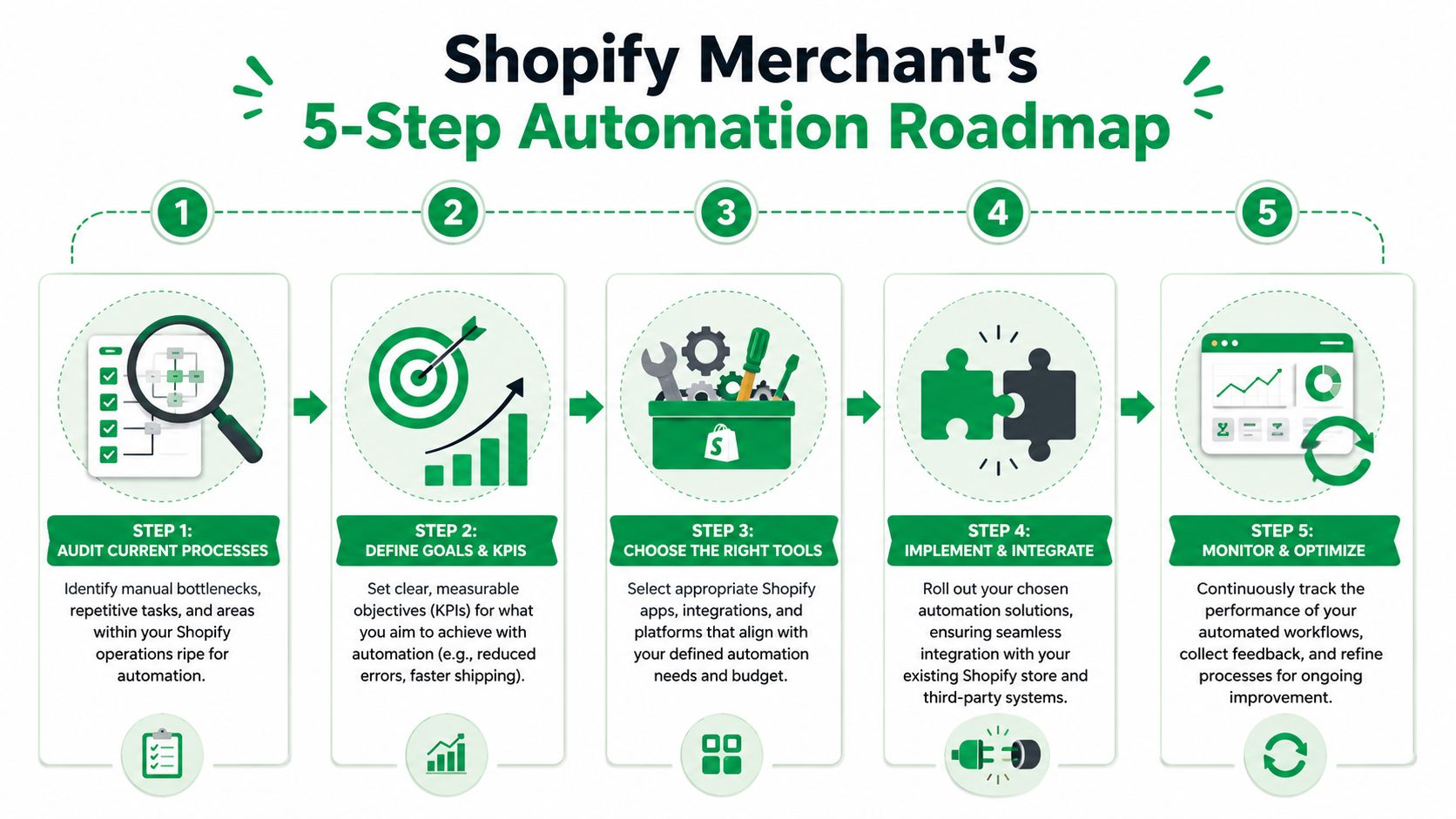
Step 1 Audit current friction
Start with your ticket backlog and ops logs, not your app store wishlist.
Look for repetitive requests with clear rules. In DTC, that usually means address edits, contact detail fixes, order changes, cancellations, return routing, and internal order tagging. If a request appears constantly and follows a consistent policy, it's a strong candidate.
Create a simple inventory of:
- High-volume manual tasks
- Requests with predictable approval logic
- Workflows touching multiple teams
- Pain points that directly affect customers
Step 2 Prioritize the lowest-risk win
The best first automation project isn't the most impressive one. It's the one that removes work quickly without introducing major operational risk.
For many Shopify brands, post-purchase workflows are ideal because the problem is already visible. Support sees the tickets. Ops sees the handoff issues. Customers feel the delay. Fixing that area usually creates value faster than back-end projects that are harder to measure.
If your support team is central to this rollout, a guide on how to automate Shopify customer support can help frame what belongs in self-service and what should still route to agents.
Step 3 Choose tools that fit your stack
Brands often get distracted, but a strong automation tool isn't just feature-rich. It fits your current systems, your policies, and your team's operating habits.
Evaluate tools on criteria like:
| Evaluation area | What to ask |
|---|---|
| Shopify compatibility | Does it work cleanly with your store setup and existing apps? |
| Workflow control | Can you define what customers can edit and when? |
| Escalation logic | Can exceptions route to a human without losing context? |
| Data integrity | Will it reduce duplicate entry and conflicting records? |
| Reporting | Can the team see what was automated and what still needs review? |
For native workflow logic, this overview of Shopify Flow app use cases and setup considerations is a practical starting point.
Step 4 Roll out in phases
Don't automate five things at once. Launch one workflow, test edge cases, and document where intervention is still needed.
A phased rollout often looks like this:
- Single workflow first: Start with one narrow use case such as order edits.
- Tight eligibility rules: Keep the automation window and permissions controlled.
- Internal monitoring: Let support and ops review exceptions closely.
- Expanded scope later: Add adjacent workflows after the first one stabilizes.
This prevents a common failure mode where a brand launches broad automation, discovers policy conflicts, and then loses trust internally.
Step 5 Measure, refine, and keep humans in the loop
Automation isn't a set-and-forget project. It needs clear ownership.
Track metrics tied to the original business problem. For post-purchase workflows, that usually includes ticket deflection, handling time, error reduction, customer satisfaction themes, and post-purchase conversion behavior. Review exception patterns regularly. If the same issue keeps escalating, either the rule needs adjustment or the workflow never should have been automated in the first place.
The goal isn't maximum automation. The goal is the right division of labor between software and people.
When brands follow that discipline, automation in retail becomes a compounding advantage instead of another layer of operational complexity.
Avoiding Common Pitfalls on Your Automation Journey
The biggest automation mistakes usually aren't technical. They're strategic.
The first is automating issues that still need judgment. A customer asking to fix an address is one thing. A customer disputing a high-risk order, a policy edge case, or a time-sensitive fulfillment exception is another. If the workflow needs interpretation, a person should own the final decision.
Where brands go wrong
A few patterns show up repeatedly:
- They automate chaos: If the underlying process is inconsistent, automation only makes the inconsistency faster.
- They buy siloed tools: An app that doesn't fit the Shopify stack creates duplicate work and weakens trust in the system.
- They skip escalation design: Teams need clear rules for when automation stops and a human takes over.
- They stop measuring too early: Early success can hide new failure points if no one reviews exceptions.
The safer operating model
The brands that win with automation in retail usually treat it as an operating discipline, not a one-time implementation. They define what can be automated, what must stay human, and how each workflow is reviewed over time.
That's especially true in post-purchase. The customer experience is too sensitive to hand over completely, but it's also too repetitive to manage entirely by hand. The sweet spot is controlled self-service, clear approvals, and visible exception handling.
Good automation removes friction for the customer and busywork for the team. It doesn't remove accountability.
That's the model worth building.
If you're looking for a practical way to reduce post-purchase tickets, give shoppers controlled self-service, and create new AOV opportunities after checkout, SelfServe is built for that exact layer of the Shopify workflow. It helps brands manage order edits, multilingual customer experiences, address accuracy, and post-purchase upsells without handing over control of operations.