Boost Sales: Marketing Automations Shopify Guide
If you're running a high-volume Shopify store, you're probably already tired of hearing that marketing automation starts and ends with an abandoned cart flow. That's useful, but it doesn't solve the tickets piling up after checkout, the address mistakes that hit fulfillment, or the missed revenue sitting on the Thank You page.
The stores that scale cleanly treat marketing automations shopify as an operating system, not a campaign checklist. Acquisition flows matter. But the bigger wins often sit in the handoff between marketing, support, and operations, where a customer wants to fix an order, add one more item, get a shipping update, or buy again without needing your team to step in.
That's where automation stops being marketing fluff and starts protecting margin.
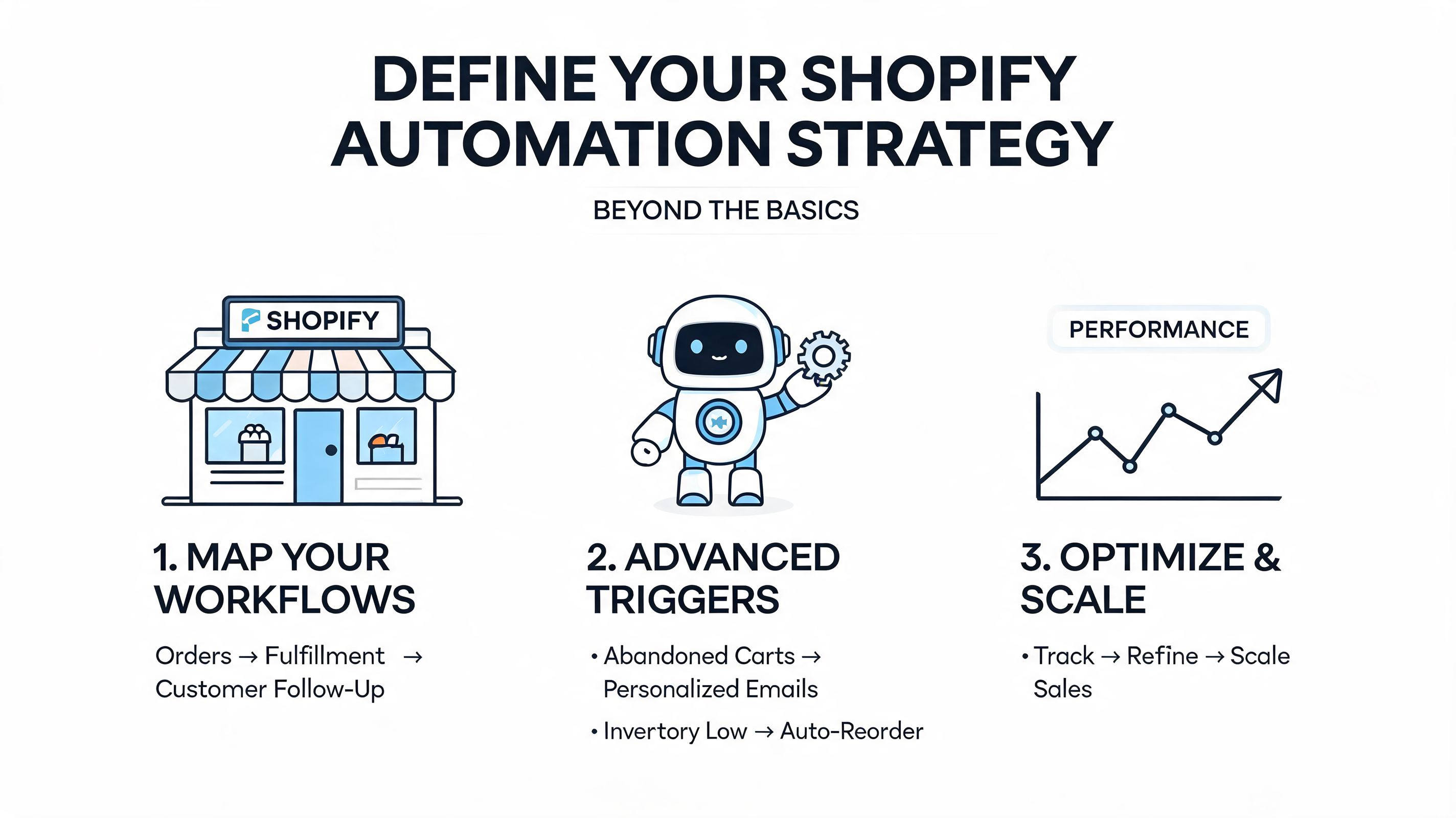
Defining Your Shopify Automation Strategy Beyond the Basics
Most guides start with pre-purchase flows because they're easy to explain and easy to demo. That focus is too narrow for any brand processing serious order volume. The key question isn't which template to turn on first. It's which repetitive problem is costing your team the most time or costing your brand the most revenue.
During Black Friday Cyber Monday 2025, Shopify merchants generated $14.6 billion in sales, with peaks at $5.1 million per minute, and automated campaigns contributed to higher average order values of $114.70 versus the platform's $85 norm. At that scale, automation isn't just a conversion tool. It's a capacity tool.
Start with bottlenecks, not channels
If support spends half the day fixing shipping addresses, don't begin with another top-of-funnel nurture flow. If your warehouse keeps catching special requests too late, don't obsess over email timing before you fix order tagging and routing.
I usually sort automation priorities into three buckets:
Revenue leaks
Cart abandonment, weak browse recovery, missed upsells, poor repeat purchase follow-up.Operational friction
Address changes, contact detail edits, cancellation requests, fulfillment exceptions, manual tagging.Experience gaps
Irrelevant messaging, mismatched localization, duplicate sends, weak post-purchase communication.
Practical rule: If an automation doesn't either reduce manual work, improve customer experience, or create incremental revenue, it probably doesn't belong in the first wave.
A lot of teams need a refresher on the difference between task automation and lifecycle automation. If you want a clean non-technical primer, this guide helps understand marketing automation benefits before you start wiring flows into real store operations.
Map the customer journey against team workload
A useful audit isn't just customer-facing. Put your customer journey beside your support inbox, fulfillment process, and retention calendar. That exposes where automation can remove handoffs.
A simple working map looks like this:
| Journey stage | Customer action | Team pain point | Better automation target |
|---|---|---|---|
| Before first order | Views product, joins list | Generic welcome content | Segmented welcome and browse follow-up |
| Checkout | Starts but doesn't finish | Lost revenue | Cart recovery with suppression rules |
| After purchase | Wants to change address | Support volume and fulfillment risk | Controlled self-service edit window |
| Waiting for delivery | Needs status update | Repetitive WISMO contacts | Triggered update communications |
| Post-delivery | Ready for add-on or review | No retention system | Upsell, review, and winback flows |
For teams comparing tools and categories before they build, this roundup of marketing apps for Shopify is useful because it frames the app stack around actual store functions instead of hype.
Choose KPIs your ops team actually cares about
Vanity metrics create bad automation strategy. Open rate alone won't tell you whether the system is helping the business. Strong goals look more like this:
- Support reduction: Fewer tickets tied to address edits, shipping corrections, and order status requests.
- Fulfillment quality: Fewer manual interventions before orders release.
- Retention quality: Higher repeat purchase behavior from post-purchase engagement.
- Revenue efficiency: More revenue coming from triggered flows instead of one-off campaigns.
The best strategy work happens before a single email goes live. That's where you decide whether your automation stack will just send messages, or run part of the business.
Building Foundational Pre-Purchase Customer Automations
Pre-purchase flows still matter. They just shouldn't be the whole plan. Get these right first, because sloppy foundations create messy data, redundant messaging, and weak segmentation later.
Automated campaigns using dynamic segmentation can produce revenue per email of $0.50 to $2.00 versus $0.10 to $0.30 for manual efforts, and cart recovery automation sees 10% to 20% recovery rates versus 0% to 3% for manual follow-ups. The difference usually isn't the existence of the flow. It's the logic inside it.

Build a welcome series that earns the next click
A welcome flow shouldn't be a single discount email. It needs a sequence with a job for each send. Benchmark guidance points to a four-email structure that outperforms standard campaigns when it's sequenced around intent.
A strong setup usually looks like this:
- Email one sends immediately with the brand introduction and any first-order incentive.
- Email two follows with best-seller recommendations and social proof tied to the category the shopper viewed or signed up from.
- Email three deepens trust with customer stories, product education, or fit and usage content.
- Email four closes the loop with a clear conversion prompt before the flow expires.
The mistake I see most often is making every message say the same thing in different words. Repetition doesn't build trust. It teaches the subscriber to ignore you.
Browse abandonment works when the content is specific
Browse flows fail when they act like weaker cart emails. Someone who looked at a product isn't ready for the same message as someone who started checkout.
Use triggers that reflect product interest, then shape the content around that interest:
- Category-aware recommendations outperform generic featured collections.
- Educational reassurance works better than immediate discounting for considered purchases.
- Merchandising logic matters. Don't recommend a random bestseller when you can recommend adjacent products from the same collection.
Send fewer browse emails than you think you need. A crowded automation calendar ruins relevance faster than weak copy does.
Cart recovery needs suppression logic
Cart recovery gets overcomplicated in some stores and underbuilt in others. The basics still work: timely reminder, clear product recall, low-friction path back to checkout. What breaks performance is overlap.
If a shopper enters cart recovery, they usually shouldn't receive the day's promo blast and a browse abandonment reminder as well. Cross-flow suppression is one of the least glamorous parts of marketing automations shopify, and one of the most important.
A practical cart recovery sequence often includes:
- A first reminder focused on product recall and checkout convenience.
- A second touch that answers common objections, such as fit, shipping, or product use.
- A final push using a selective incentive only where margin and brand position allow it.
If you need additional tactical ideas to recover lost sales on Shopify, that resource is useful as a companion to your own flow logic. For a deeper operational breakdown of sequence design, this guide to abandoned cart recovery for Shopify stores is worth reviewing before you launch.
Unlocking Revenue and CX with Post-Purchase Automations
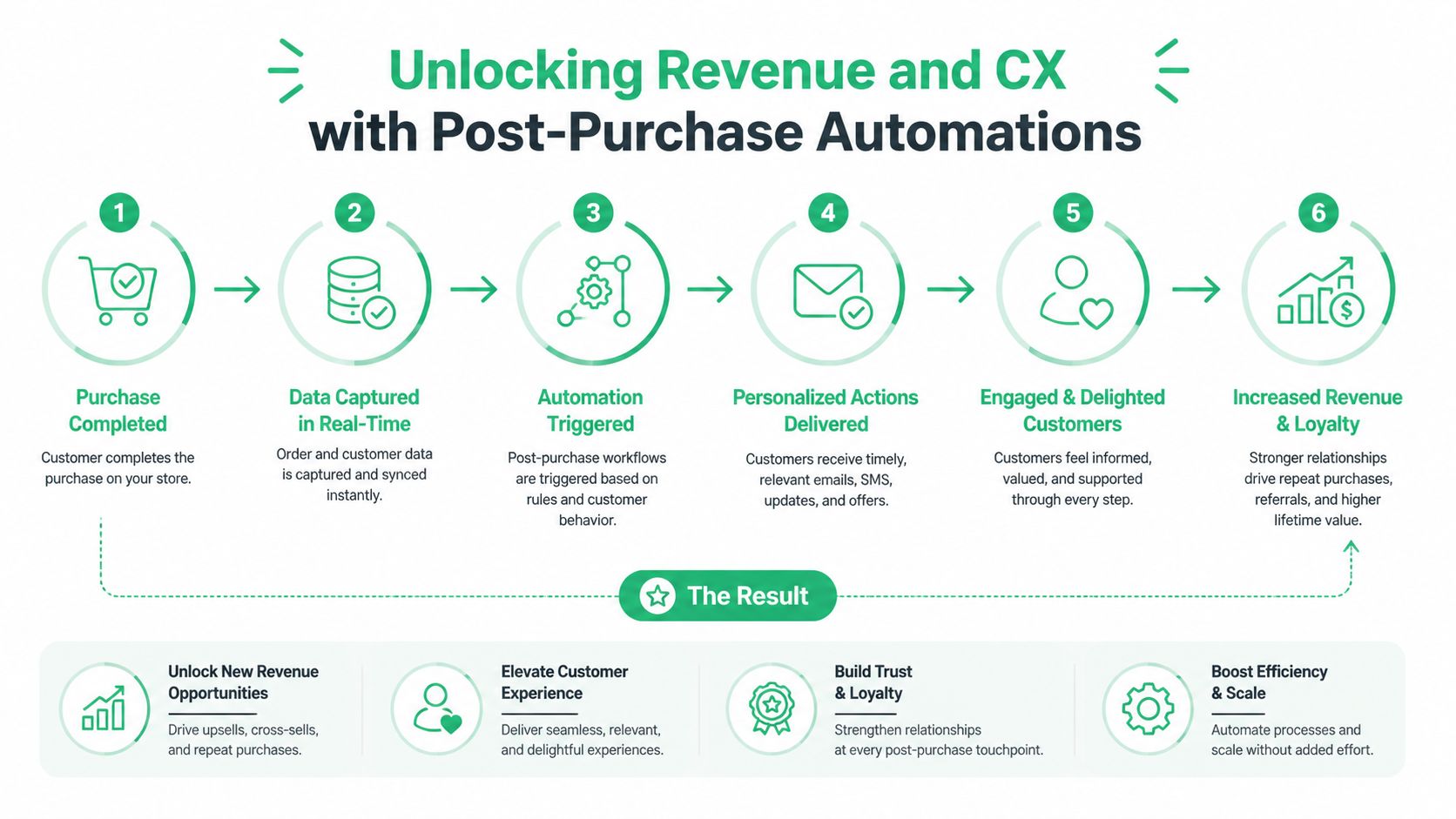
Most stores frequently leave money on the table and create support work they didn't need to create. The order is placed, the customer still has high intent, and the team often hands the whole experience over to a generic confirmation email plus a tracking page. That's a wasted moment.
Current Shopify automation content still leans heavily toward pre-purchase and cart recovery, while post-purchase automation for order modifications, upsells, and customer self-service remains a major gap for high-volume merchants. In practice, that's where operations teams can remove friction fastest.
What the post-purchase journey actually looks like
A customer places an order at night, notices the apartment number is missing, remembers they wanted one more item, then checks delivery progress the next day. Most stores force three support interactions into that journey. Better automation turns it into one controlled, mostly self-serve flow.
The highest-value post-purchase automations usually sit in these moments:
| Moment | Customer need | Better automation response |
|---|---|---|
| Right after checkout | Confirmation and reassurance | Clear order summary and next-step messaging |
| Within edit window | Fix address or contact details | Controlled self-service changes with rules |
| While order is still open | Add complementary item | Dynamic upsell on Thank You or Order Status page |
| Before delivery | Know what's happening | Triggered shipping and delay communications |
| After delivery | Share feedback or buy again | Review request, education, replenishment, cross-sell |
Order edits should be automated with guardrails
The old way is familiar. Customer emails support. Support checks if fulfillment has started. An agent updates the address manually, hopes the format is valid, and adds an internal note. That process doesn't scale.
The better approach is a merchant-defined edit window with explicit permissions. Let customers update the fields that are safe to change. Lock the fields that create financial or fraud risk. Route anything outside the rule set into review.
What works well:
- Time-boxed edit access before the order reaches a fulfillment point you define.
- Field-level permissions so customers can change shipping details without rewriting the whole order.
- Validation before submission to reduce bad address formats and delivery issues.
- Exception queues for requests that need approval.
What doesn't work:
- Opening every order field for unlimited editing.
- Letting edits happen after warehouse processing without any controls.
- Forcing all change requests into support even when the request is simple and repetitive.
The best post-purchase automation doesn't remove control from the merchant. It removes unnecessary manual handling from the team.
Thank You and Order Status pages are revenue surfaces
A lot of brands still treat post-purchase pages like receipts. They're not receipts. They're high-attention moments with context, trust, and payment intent already established.
That makes them ideal for:
- Accessory add-ons tied to the purchased product
- Collection-based upsells for category expansion
- Low-friction bundles that don't require the customer to restart the buying journey
- Contextual offers based on what was just bought, not what marketing wants to push this week
The key is relevance. A generic "you may also like" module underperforms because it ignores the order context. A post-purchase offer should feel like a sensible extension of the order the customer just placed.
If you're building this part of the system, this guide to Shopify post-purchase upsell is useful because it connects upsell placement to the actual order flow instead of treating it like a standard merchandising widget.
Support reduction and retention can run from the same flow
This is the part many teams miss. A good post-purchase system doesn't split service and marketing into separate lanes. It connects them.
A practical sequence might look like this:
- Order confirmation that sets expectations clearly.
- Edit opportunity message during a defined window if the order is still eligible.
- Order-status communication triggered by fulfillment events.
- Post-delivery education for product setup, use, or care.
- Review request only after enough time has passed for a real experience.
- Cross-sell or replenishment follow-up based on what was purchased.
That sequence reduces avoidable tickets and creates better retention inputs. Customers get fewer reasons to contact support, and more reasons to trust the next offer.
Automating Back-Office and Fulfillment Workflows
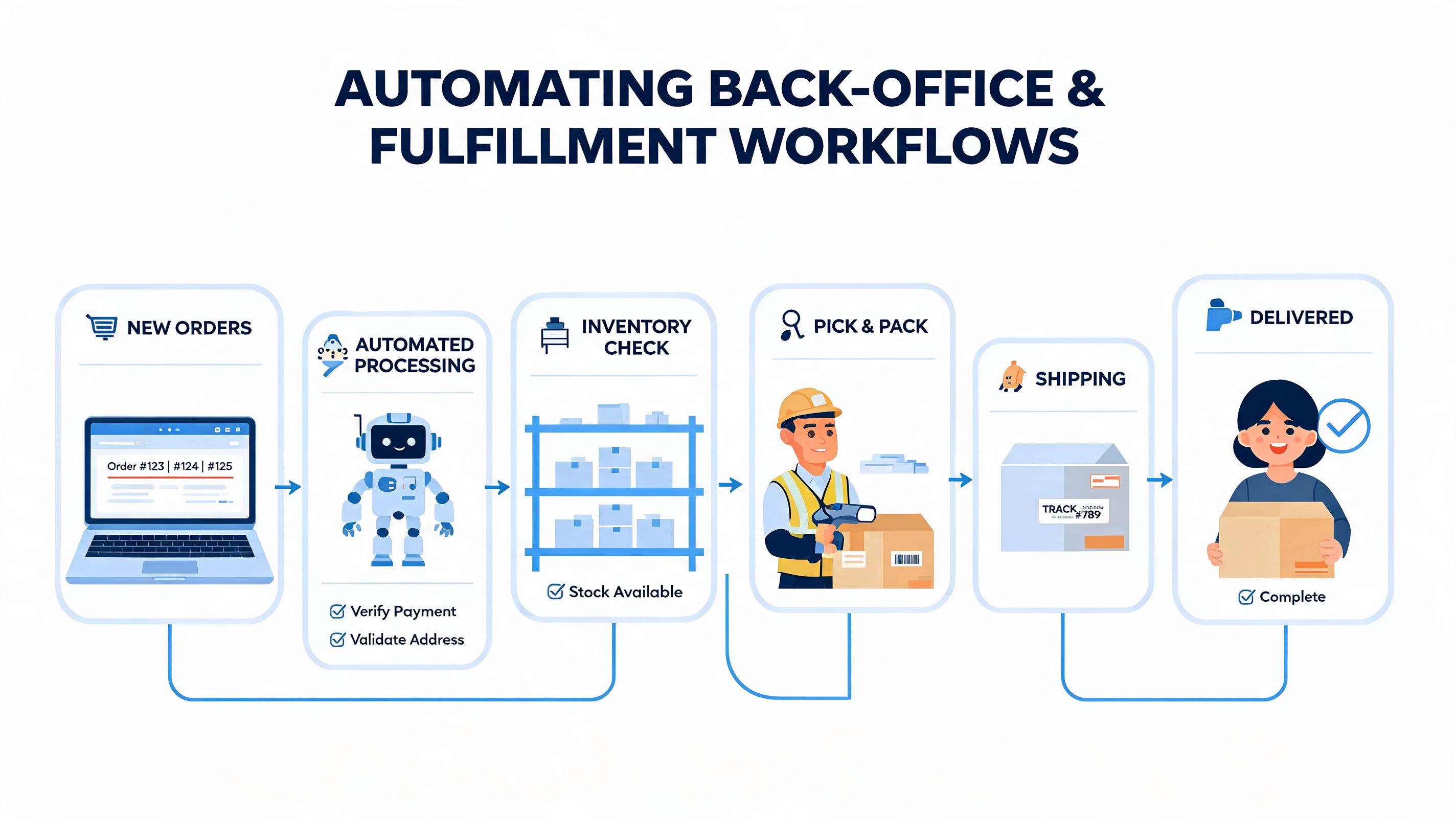
Customer-facing automation gets the credit. Back-office automation keeps the store from breaking under volume. If your team still relies on people to read every order note, spot every exception, and move data between systems by hand, you don't have a scaling problem. You have a process design problem.
The broader market has already moved this way. Over 60% of American online retailers rely on marketing automation, and Shopify revenue grew 63% from 2023 to 2025, with top stores reaching 4.7% conversion through personalization and retargeting. The operational side matters just as much, because those gains collapse if fulfillment and support can't keep up.
Tag orders so downstream teams don't guess
Order tagging is one of the simplest workflows to build and one of the easiest to neglect. Done properly, tags route work. Done badly, they become decoration.
Useful tag logic often includes:
- Shipping method tags that separate expedited orders from standard ones
- Product-type tags that identify hazmat, preorder, oversized, fragile, or personalized items
- Customer-value tags that flag loyalty, VIP handling, or first-order status
- Exception tags triggered by notes, mismatched data, or custom requests
These tags should feed action. A tag that doesn't change routing, messaging, or review priority isn't useful.
Connect store events to your fulfillment stack
Most operational mistakes happen at handoff points. A customer changes an address, support updates one system, the 3PL still holds old data, and the package goes to the wrong place. That's not a marketing issue, but it's exactly where smart automation protects the customer experience.
The right architecture depends on your stack, but the principle is consistent:
| Store event | Automation response | Operational result |
|---|---|---|
| New order created | Apply tags and send structured data to fulfillment system | Faster routing and fewer manual checks |
| Edit request approved | Push updated data to connected systems | Lower mismatch risk |
| High-risk pattern detected | Hold order and notify team | Prevent margin loss and shipment reversals |
| Special note present | Alert support or ops queue | Fewer missed custom instructions |
| Fulfillment state changes | Trigger internal or customer notifications | Better visibility across teams |
Build approval paths for risky actions
Not everything should be fully automated. The strongest operations teams know where to stop.
Three workflows usually need review logic:
High-risk orders
Hold first, release second. Don't let fraud checks become a cleanup project.Manual cancellation requests
Queue them with status visibility so support and ops don't duplicate work.Complex edits
Basic contact updates can be automated. Changes that affect payment, inventory allocation, or compliance often need a human decision.
Automation should handle the repetitive path and highlight the exceptions. If your team still has to inspect every normal order, the workflow isn't finished.
Keep ownership clear across teams
A common failure mode in Shopify Plus operations is that nobody owns the full automation chain. Marketing owns email. Support owns tickets. Ops owns warehouse issues. Engineering owns integrations. Then a broken workflow sits between all four.
The fix is simple and often uncomfortable. Assign one owner per automation, even if multiple teams touch it. That owner should know:
- which trigger starts the workflow
- which systems receive the data
- which states pause or suppress it
- which team handles exceptions
- which KPI proves it's working
That's how marketing automations shopify turns into operational reliability. Not with more flows, but with fewer broken handoffs.
Advanced Strategies for Global and Shopify Plus Stores
Global brands can't run one automation system and swap the currency symbol. That's not localization. That's template reuse disguised as strategy.
Current Shopify automation guidance leaves a real gap here. Existing resources lack frameworks for geographic and language-based workflows, including language-specific email sequences, region-triggered campaigns, and culturally adapted recommendations. For brands selling across markets, that gap creates bad customer experience fast.
One-size-fits-all automation fails in global commerce
A customer in Germany, Japan, and the US shouldn't necessarily receive the same timing, language, offer framing, or compliance treatment. Even when the product catalog is shared, the automation logic shouldn't be.
A scalable setup usually separates workflows by:
- Language preference from browser, market, or profile data
- Region or market for campaign timing and offer logic
- Product availability by destination so you don't recommend what can't ship
- Consent state by jurisdiction so contact rules align with the market
This isn't just a marketing issue. It affects support load too. When customers receive post-purchase instructions or edit options in the wrong language, support becomes the translation layer.
Shopify Plus brands need stricter workflow architecture
Plus merchants usually carry more edge cases. Multiple warehouses. Different carrier rules. Market-specific payment and shipping logic. Wholesale alongside DTC. That complexity punishes generic automation.
A strong Plus setup does a few things well:
| Automation layer | Weak approach | Better approach |
|---|---|---|
| Messaging | One master flow for all markets | Separate branches by language and market |
| Compliance | Same consent assumptions everywhere | Region-aware consent handling |
| Promotions | Shared offers regardless of context | Market and customer-specific logic |
| Post-purchase | Static order messaging | Localized updates and self-service paths |
Localized automation is an operational requirement
For international brands, localized automation isn't a nice extra. It protects clarity at the exact points where customers are most likely to contact support or abandon a next purchase.
That means your system should account for:
- translated transactional and lifecycle content
- region-specific support and shipping messaging
- market-aware product recommendations
- local expectations around timing and contact preferences
Stores that ignore this usually pay for it twice. First in lower relevance, then in support cost.
Measuring and Iterating Your Automation Performance
Automation isn't finished when the flow is live. It's finished when the flow keeps earning its place in the stack.
The cleanest way to measure performance is by separating flows into jobs. A welcome series should create first-order movement. Cart recovery should restore lost checkout intent. Post-purchase flows should reduce service friction, create follow-on revenue, or improve retention signals. If you judge every flow by the same metric, you won't know what to fix.
Look at flow-specific outcomes
Use a simple review rhythm:
- Welcome flows: Are new subscribers moving toward first purchase, or just opening emails and disappearing?
- Browse and cart flows: Are recipients returning to view products, resume checkout, and convert?
- Post-purchase flows: Are customers using self-service options, engaging with upsells, and avoiding unnecessary support contact?
Run narrow tests, not messy redesigns
The best tests are small enough to interpret. Good examples include:
- Subject line tests for welcome and cart emails.
- Delay timing tests between first and second reminders.
- Offer placement tests on post-purchase pages.
- Content framing tests such as product education versus urgency.
- Suppression rule tests to reduce overlap between automations.
If a flow underperforms, don't rewrite everything at once. Change one variable, keep the audience stable, and learn what actually moved.
Audit automation fatigue
A flow can be individually strong and still damage the wider system. Check for customers receiving too many messages across too many triggers in a short window. That's where unsubscribe risk, weak engagement, and brand fatigue start.
The stores that get the most from marketing automations shopify aren't the ones with the most workflows. They're the ones with the clearest logic, the fewest conflicts, and the discipline to keep improving what already runs.
If post-purchase changes, upsells, and support-heavy order edits are slowing your team down, SelfServe is built for that layer of the Shopify operation. It helps merchants give customers controlled self-service options for order updates, adds upsell opportunities on key post-purchase pages, supports multilingual experiences, and reduces manual support work without giving up merchant control.