Flow App Shopify: Automate Shopify with Flow App: 2026 Guide

Every growing Shopify store hits the same wall. Orders are coming in, support is answering the same questions, operations is tagging customers by hand, and someone on the team is still checking edge-case orders manually because “that’s how we catch mistakes.”
That works for a while. Then volume climbs, channels multiply, and post-purchase complexity starts to sprawl. A customer changes an address after checkout. Another qualifies for VIP treatment but never gets tagged. A high-risk order slips through because the right person was busy. The issue usually isn’t effort. It’s that manual operations don’t scale cleanly.
That’s where flow app shopify becomes more than a nice-to-have. Shopify Flow gives merchants a way to turn repeated decisions into rules, so the store reacts the same way every time. For busy teams, that means fewer handoffs, fewer missed steps, and fewer support tickets created by preventable process gaps.
Automation also works best when merchants stop treating it as a back-office project. The strongest setups connect internal operations with what the customer experiences after purchase. If you want a quick primer on the broader mindset behind that shift, this guide on demystifying marketing automation for growth is a useful complement.
Introduction The Automation Tipping Point
The tipping point usually shows up in small failures first. A repeat customer places another order, but no milestone tag gets added. A warehouse team fulfills an order before support sees the address correction request. A VIP buyer gets the same generic flow as a first-time customer.
None of those problems sound dramatic on their own. Together, they create a store that feels slower and less coordinated than it should.
What starts breaking first
High-volume stores rarely struggle because they lack effort. They struggle because too many tasks depend on memory, inboxes, spreadsheets, or tribal knowledge. Once that happens, even good staff spend their day doing mechanical work instead of judgment-based work.
Typical pressure points include:
- Order tagging drift: Teams tag orders or customers inconsistently, which weakens segmentation and downstream campaigns.
- Support queue inflation: Agents handle preventable requests like status clarifications, order updates, and internal follow-ups.
- Fulfillment misalignment: Warehouse decisions happen before the latest customer or fraud context is attached to the order.
- International complexity: Cross-border orders need more consistent handling because language, address quality, and shipping rules are less forgiving.
Why adding people stops working
Hiring can absorb volume for a while, but it doesn’t solve process inconsistency. Two team members may interpret the same situation differently. The more orders you handle, the more expensive that inconsistency becomes.
Practical rule: If a task happens often, follows clear logic, and still requires someone to click through the same steps, it’s a candidate for Flow.
Shopify Flow changes the operating model. Instead of asking people to remember every rule, you encode the rule once and let the store carry it out automatically. For scaling brands, that’s the difference between “we handled it” and “we built a system that handles it.”
What Is a Shopify Flow App
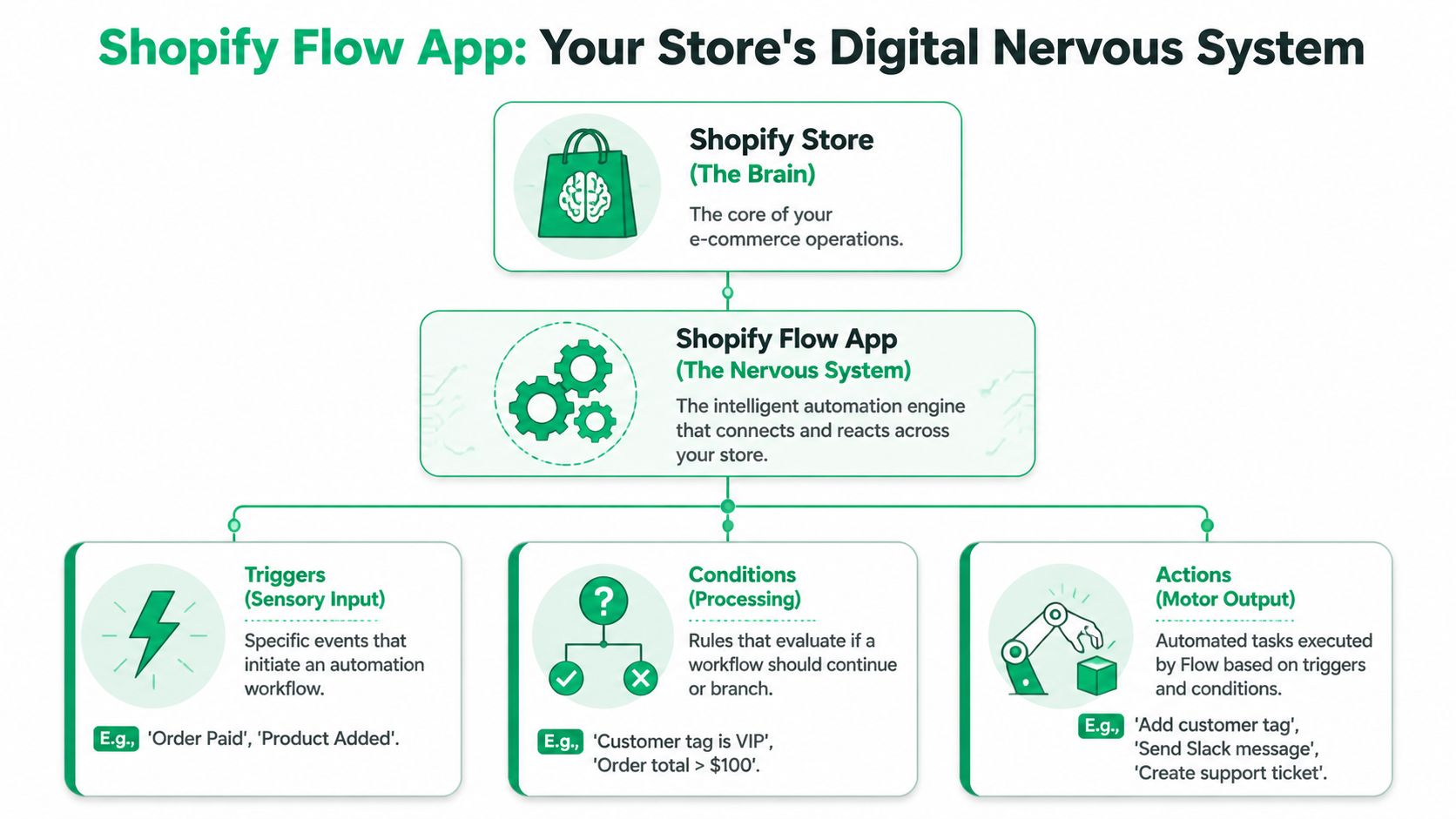
Think of Shopify Flow as your store’s digital nervous system. Events happen across the business, such as an order being paid, inventory dropping, or a new customer account being created. Flow notices the event, checks the rules you’ve set, and responds immediately.
That’s why the tool clicks so well for operators. It doesn’t ask you to become a developer. It asks you to define how your store should react when something specific happens.
For merchants comparing Shopify with other commerce stacks, this kind of native automation is one of the reasons Shopify stays attractive at scale. Four Eyes has a useful breakdown with expert insights on ecommerce platforms if you’re evaluating the broader platform fit.
The three-part logic
Flow runs on a simple structure: Trigger → Condition → Action.
Here’s the plain-English version:
Trigger
Something happens in the store. Common examples include Order paid, New order placed, Inventory levels changed, and Customer account created.Condition
Flow checks whether the order, customer, or product meets your rule. This is the “if” part.Action
If the rule is true, Flow does something. That could be tagging a customer, notifying a team, updating data, or kicking off an app action.
A simple example
Suppose you want to identify valuable repeat customers automatically.
- Trigger: Order paid
- Condition: Customer order count equals 5
- Action: Add the customer tag “Repeat Buyer”
That’s it. You’re replacing a manual review with a consistent store rule.
Why this matters operationally
The power isn’t in the syntax. It’s in the reliability. Technical documentation summarized by Mastroke describes Flow as a real-time, event-driven, no-code system and notes a 40 to 60 percent reduction in manual order processing time for high-volume brands in these automation setups, as covered in this Shopify Flow features analysis.
That matters because most operational mistakes aren’t strategic mistakes. They’re missed routine steps.
Flow is best used for decisions your team makes over and over, especially when the right answer is already known.
What Flow is not
Flow isn’t magic, and it isn’t a substitute for process design. If your rules are messy, Flow will automate messy rules. If teams disagree on what should happen after an order edit, you need to settle the policy before you automate it.
Used well, though, flow app shopify becomes the operating layer between raw store activity and the actions your team would otherwise perform manually.
Why Flow Is Essential for High-Volume Stores
High-volume stores don’t need automation because it’s trendy. They need it because scale exposes every weak process. What feels manageable at lower volume turns brittle once order count, support volume, and fulfillment coordination all rise together.

Shopify’s scale makes that plain. In 2025, merchants on the platform generated $378 billion in GMV, and 16 percent of orders were cross-border, according to the Shopify community summary cited here. The same source notes that marketing automations can yield 544 percent ROI, or $5.44 for every $1 spent. At that level of volume and complexity, manual handling stops being a process choice and becomes a liability.
The problem isn’t speed alone
Most merchants first reach for automation because they want to save time. That’s fair, but time savings are only part of the case.
The larger gain is consistency. The store tags the right customer the same way every time. High-risk orders get routed the same way every time. Internal alerts fire before a human notices a pattern manually.
That consistency matters even more for stores operating across markets. When teams are handling domestic and international orders at the same time, process drift creates support load fast.
Where manual operations start leaking money
The pain usually shows up in familiar places:
- Fraud handling gets inconsistent: One agent escalates, another clears, a third forgets to tag.
- VIP service becomes unreliable: Good customers don’t always get priority treatment because order history isn’t surfaced at the right time.
- Order edits create internal churn: Support, ops, and fulfillment all touch the same issue in separate systems.
- Promotions and loyalty moments get missed: Customers reach milestones, but no one catches it in time to act on it.
These aren’t just workflow annoyances. They affect retention, margin, and brand trust.
Why Plus merchants feel this first
If you’re already operating on Shopify Plus, the case for process automation usually gets stronger with every new market, warehouse, or app you add. That’s also why many operators eventually review whether they’re using the platform to its full potential. This overview of what Shopify Plus is and how it fits scaling merchants is useful if you’re thinking about that layer of the stack.
A high-volume merchant can’t rely on “the team knows what to do.” The team needs systems that make the next step obvious.
The best automation doesn’t remove human judgment. It preserves human judgment for the few moments that actually require it.
Flow helps teams scale without adding equal operational weight
Shopify Flow earns its keep. It reduces repetitive handling, standardizes decisions, and keeps data moving between teams and apps. The result is an operation that can absorb more volume without every increase in orders producing the same increase in support burden.
For merchants who want to see a product walkthrough before building anything themselves, this short explainer is worth a look:
What works in practice
Strong Flow setups usually share the same traits:
- They target repetitive decisions first: Tagging, routing, alerting, and milestone detection are strong starting points.
- They connect teams, not just tasks: A support-triggered event should help ops or fulfillment act faster.
- They focus on failure prevention: Good workflows stop avoidable mistakes before they become tickets or refunds.
- They support global operations: Cross-border orders need reliable automation because the cost of rework is higher.
What doesn’t work is building dozens of clever workflows before defining the business rule behind them. Automation multiplies clarity, but it also multiplies confusion if the underlying process is vague.
Popular Shopify Flow Workflows You Can Build Today
The easiest way to understand Flow is to think in live operational moments, not abstract automation theory. A customer buys again. Inventory drops below a threshold. An order arrives with unusual attributes. You decide what should happen every time that event occurs, then Flow handles it.
One of the most useful examples is milestone tagging. Merchants can use variables like NumberOfOrders to tag customers automatically at their 1st, 5th, or 25th order, which then powers loyalty or marketing actions, as described in this guide to Shopify Flow milestone tagging.
Customer segmentation workflows
These are often the fastest wins because they improve targeting without changing the checkout experience.
A common setup is to tag customer milestones as purchases accumulate. That gives your marketing and retention tools cleaner inputs without requiring anyone to audit order history manually.
Another practical use is spend-based segmentation. If your brand already has internal VIP thresholds, Flow can apply tags the moment a customer qualifies. From there, those tags can be used for customized support handling, loyalty treatment, or message suppression.
Order management workflows
Order operations are where a lot of hidden labor sits. Teams often review edge cases manually because they don’t trust every order to move through the same path.
Good Flow workflows reduce that review burden by surfacing only the exceptions. For example, you can flag orders that require extra attention, pause a downstream handoff, or route information to the right team as soon as the order changes state.
A useful test is simple. If a coordinator is checking the same order fields every day, Flow should probably check them first.
Inventory and fulfillment workflows
Inventory workflows are less glamorous, but they usually pay off quickly. If stock changes, backorder risk changes with it. If a product falls below a threshold, merchandising, support, and fulfillment may all need to react.
Flow can’t fix bad inventory planning, but it can make stock-related decisions visible sooner. That helps teams avoid selling, promising, or messaging as if inventory were healthier than it is.
Risk and exception workflows
Risk handling is one of the strongest uses for automation because consistency matters more than speed alone. A risky order should trigger the same internal process no matter who is working that shift.
You can use Flow to tag orders for review, branch based on risk-related conditions, or notify the people who need to make a judgment call.
Example Shopify Flow Workflows
| Goal | Trigger | Condition(s) | Action |
|---|---|---|---|
| Tag first-time buyers | Order paid | Customer order count = 1 | Add customer tag “First Order” |
| Mark repeat buyers | Order paid | Customer order count = 5 | Add customer tag “Repeat Buyer” |
| Identify deeper loyalty milestones | Order paid | Customer order count = 25 | Add customer tag “Milestone 25” |
| Highlight VIP customers | Order paid | Customer meets your internal VIP rule | Add customer or order tag for VIP handling |
| Flag stock-sensitive orders | Order placed | Product or variant meets your low-stock rule | Add order tag and notify ops |
| Escalate unusual orders | Order placed | Order matches your exception criteria | Tag for manual review |
| Route warehouse-sensitive changes | Order updated | Change requires fulfillment attention | Notify fulfillment team or add handling tag |
| Organize post-purchase upsell fulfillment | Order updated | Order contains a post-purchase add-on | Tag order for priority processing |
A practical way to choose your first workflows
Don’t start with what sounds advanced. Start with what is repeated, rules-based, and painful.
A useful shortlist looks like this:
- Milestone tagging if your retention or loyalty flows depend on order count.
- Exception routing if support or ops reviews too many ordinary orders by hand.
- Low-stock alerts if merchandising and support often find out too late.
- VIP tagging if valuable customers aren’t getting differentiated treatment consistently.
What tends to work best
Merchants get the most value when each workflow has one clear operational purpose. “Tag repeat buyers” is strong. “Handle every customer scenario in one giant workflow” usually becomes hard to debug and harder to trust.
Short, focused workflows are easier to test, easier to hand off to teammates, and less likely to create accidental side effects.
Connecting Flow to Your Post-Purchase Experience
Most Flow content stops at backend efficiency. That’s useful, but incomplete. The bigger operational opportunity is connecting backend automation to what the customer can do after they buy.
That’s where post-purchase systems become interesting. A customer edits an address, requests a cancellation, or adds an upsell after checkout. Those aren’t just support events. They’re triggers that should shape how the store, warehouse, and support team respond.
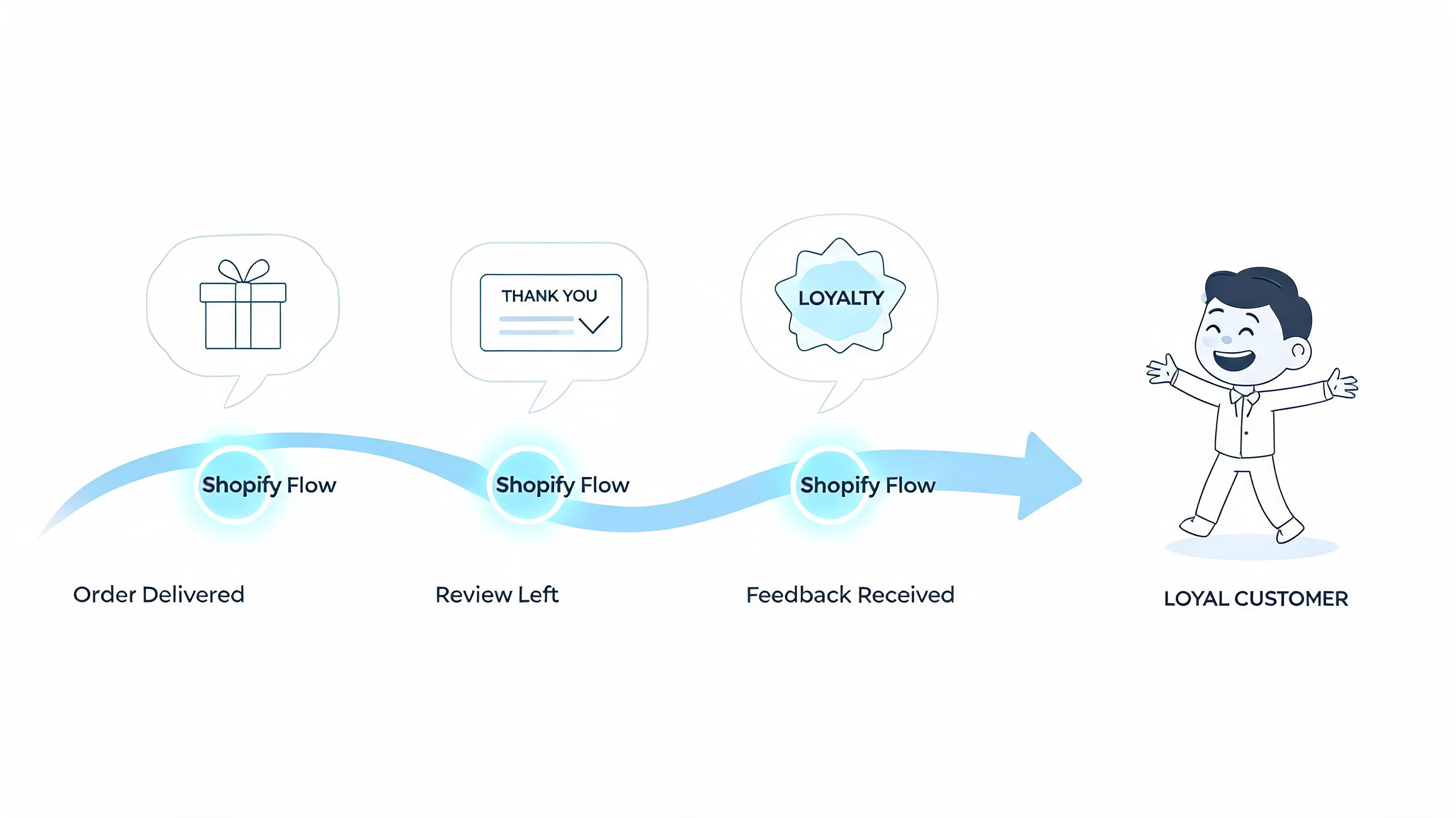
Shopify developer documentation points to this hybrid model as a meaningful strategy. Integrating Flow with customer-facing apps for order edits and upsells can lift AOV by 12 to 18 percent and reduce support tickets by 25 percent in Shopify Plus stores, according to the summary cited in Shopify Flow app development guidance. For merchants focused on the customer layer, this perspective on post-purchase customer experience is also useful.
What the closed-loop model looks like
The simplest way to think about it is this:
- The customer takes an allowed action after purchase.
- That action creates new operational context.
- Flow uses that context to trigger the right internal next step.
Without that handoff, teams end up recreating the same loop manually through tickets, notes, and Slack messages.
Example one address changes without chaos
Suppose a customer updates a shipping address shortly after ordering. In many stores, that becomes a support ticket, then an internal message, then a warehouse check.
A cleaner setup is to treat the address change as an event. Flow can then tag the order, route it for review if needed, and make sure fulfillment doesn’t proceed as if nothing changed.
That matters because address-change requests are one of the most common post-purchase friction points. If the process is manual, speed depends on who sees the ticket first.
Example two post-purchase upsells that don’t break fulfillment
Post-purchase upsells often create friction behind the scenes if the order change isn’t communicated cleanly. The customer experience looks polished, but ops still has to reconcile what happened.
Flow closes that gap. If an item is added after checkout, the order can be tagged for adjusted handling, surfaced to the right team, or routed through a separate processing path. That keeps the customer-facing revenue event from becoming an internal exception mess.
Backend automation is most valuable when the customer never notices it had to happen.
Example three multilingual and international handling
International stores have more to gain from this setup because post-purchase requests often involve address quality, shipping constraints, and support language differences. If customer-facing systems capture the request and Flow routes the operational response consistently, the store feels more coordinated across markets.
The important point is that flow app shopify shouldn’t live in a silo. It performs best when it acts on customer behavior, not just internal data changes. That’s how post-purchase stops being a cost center and starts contributing to retention and additional revenue.
Advanced Integrations with Flow Plus and Webhooks
Native Flow covers a lot of ground inside Shopify, but some brands need automation that extends into ERPs, WMS platforms, loyalty systems, or custom operational tools. That’s where Flow Plus and webhook-based workflows enter the picture.
The practical value is straightforward. Instead of waiting for one system to poll another, an outside system can send a webhook when something important happens, and Flow can react to it.
According to the Flow Plus app description, this setup can deliver 30 to 50 percent faster order syncing compared with traditional API polling for brands with more complex integrations, as outlined in the Flow Plus overview.
Where this helps most
This matters most when Shopify isn’t your only source of truth.
Examples include:
- Warehouse-driven updates: A WMS confirms stock movement, and Shopify workflows react to that update immediately.
- ERP-based financial or returns events: An external system signals a status change, and Flow routes the next store action.
- Store and offline coordination: In-store activity can trigger a Shopify action without manual intervention.
If you’re mapping these broader systems, this guide to Shopify marketing automations and connected workflows gives a helpful lens on how the pieces fit together operationally.
A simple mental model for webhooks
Think of a webhook as a doorbell, not a scheduled check-in. The external system doesn’t wait for Shopify to ask whether anything changed. It rings the bell when something changes.
That changes how operations feel day to day. Data moves because an event occurred, not because someone remembered to sync it.
A few strong use cases
One useful pattern is inventory restoration. If a return is processed in an outside system and inventory becomes available again, that event can trigger Shopify-side actions that put the product back into the right operational state.
Another is returns and refund queues. A physical return or external approval can trigger a Flow process that tags the order or creates the next internal task.
Operator’s note: Webhook-based automation is powerful, but only when payloads and business rules are tightly defined. Loose definitions create noisy workflows fast.
What to watch before you build
Advanced integrations raise the stakes for testing. You need to know what should happen when payloads are incomplete, duplicated, or unexpected. Native automation is easier to reason about because the data model is already familiar. Cross-system automation requires clearer ownership.
Still, for merchants with multiple systems touching the same order lifecycle, Flow Plus can act as the no-code glue between teams and tools.
Flow Limitations and Automation Best Practices
Shopify Flow is strong, but it isn’t frictionless at scale. One of the gaps in public guidance is honest discussion about performance limits during traffic spikes and how merchants should prepare for them.
The Flow app listing itself points to that gap. High-volume merchants report undocumented execution delays and failure-rate issues during surges, and those problems can increase support tickets by 15 to 20 percent if teams don’t anticipate them, as noted in the Shopify Flow app discussion.
Where merchants get into trouble
The first mistake is assuming every workflow will always run instantly under every peak condition. That assumption can lead teams to offload too much business-critical logic into automation without fallback thinking.
The second mistake is building too many workflows without governance. A store may end up with overlapping rules, unclear ownership, and tags that no longer mean what teams think they mean.
Best practices that hold up
A resilient Flow setup is usually boring in the right ways. It’s named clearly, documented lightly, and reviewed regularly.
Use practices like these:
- Name workflows by outcome: “Tag repeat buyers after paid order” is better than “Customer automation.”
- Keep each workflow narrow: One business purpose per workflow is easier to test and maintain.
- Document edge cases: Add notes for exceptions, dependencies, and any step that another operator might misread.
- Review logs regularly: If a workflow starts failing undetected, the downstream ticket volume will tell you later than the logs will.
- Define fallback handling: For critical order scenarios, decide what happens if an automation doesn’t run as expected.
- Audit tags and actions quarterly: Old workflows often leave behind labels and branches that no longer match current operations.
The real trade-off
Automation reduces repetitive work, but it also creates a system that must be maintained. That’s the trade-off. If you treat Flow like a set-and-forget utility, it will drift. If you treat it like part of your operating system, it stays useful.
The mature way to use Flow is not “automate everything.” It’s “automate what your team can define clearly, monitor reliably, and trust under pressure.”
Start Automating Your Shopify Store
The best use of flow app shopify is usually not the most complex use. It’s the workflow that removes a repeated point of friction today, runs reliably tomorrow, and gives your team confidence to automate the next process after that.
For most merchants, the smart first move is small. Pick one task that is repetitive, low-risk, and easy to verify. Customer milestone tagging is a good example. So is routing a narrow order exception to the right team.
Once that first workflow proves itself, the bigger picture becomes easier to see. Flow isn’t just about saving clicks. It helps stores run with more consistency across operations, support, fulfillment, and post-purchase customer experience.
If you want to pair Shopify Flow with a customer-facing post-purchase layer, SelfServe is built for that job. It helps shoppers manage allowed order changes, supports multilingual experiences, validates addresses in real time, and enables post-purchase upsells while giving merchants operational control over what can change and when.