Customer Data Protection: The Shopify Plus Playbook
A single data breach now costs USD 4.44 million globally in 2025, up 12% from the previous year, and 75% of consumers won't purchase from businesses they don't trust with their personal data according to Usercentrics' data privacy statistics guide. For a Shopify Plus brand, that turns customer data protection into an operations issue, a revenue issue, and a retention issue at the same time.
The part many merchants still miss is what happens after checkout. A shopper changes a shipping address, updates a phone number, or edits contact details through a post-purchase workflow. That new data often moves through a different path than the original checkout data. Different app, different permissions, different logs, different encryption scope. That's where risk starts to drift.
Most privacy programs were built around collection at checkout. High-volume stores need to protect the data that changes after checkout too.
Why Customer Data Protection Is Your Competitive Edge
For years, merchants treated customer data protection like a compliance checkbox. Legal owned the policy. IT owned the firewall. Everyone else hoped the stack was fine.
That model doesn't hold up in ecommerce anymore. A Shopify Plus store handles customer names, addresses, phone numbers, order histories, and post-purchase edits in constant motion. If that flow isn't tightly controlled, the cost isn't limited to remediation. It shows up in lost conversion, more support friction, and weaker repeat purchase behavior.
Trust affects revenue before a breach happens
The clearest mistake I see is waiting for an incident before taking privacy seriously. Customers make trust decisions long before they read a policy page or file a complaint. They notice whether edit flows feel secure, whether permissions look sensible, and whether the brand asks for data it doesn't seem to need.
When teams get customer data protection right, buyers feel less hesitation in checkout and after-purchase interactions. When they get it wrong, customers pull back. They abandon self-service, contact support instead, or stop buying altogether.
Practical rule: If a shopper has to guess who can see their edited address, your process is already too loose.
Strong privacy operations create an edge
In crowded DTC categories, product and price are easy to copy. Operational trust isn't. A merchant that can securely support post-purchase changes, explain data use clearly, and limit unnecessary access has a real advantage over competitors still patching together apps and permissions.
That matters even more for international brands. Different markets expect different language support, different consent handling, and different operational discipline. The brands that win don't bolt privacy on later. They build customer data protection into the storefront, support workflows, and partner stack from the start.
A secure post-purchase experience doesn't just reduce downside. It makes the brand easier to buy from.
The Regulatory Wave Driving Data Privacy
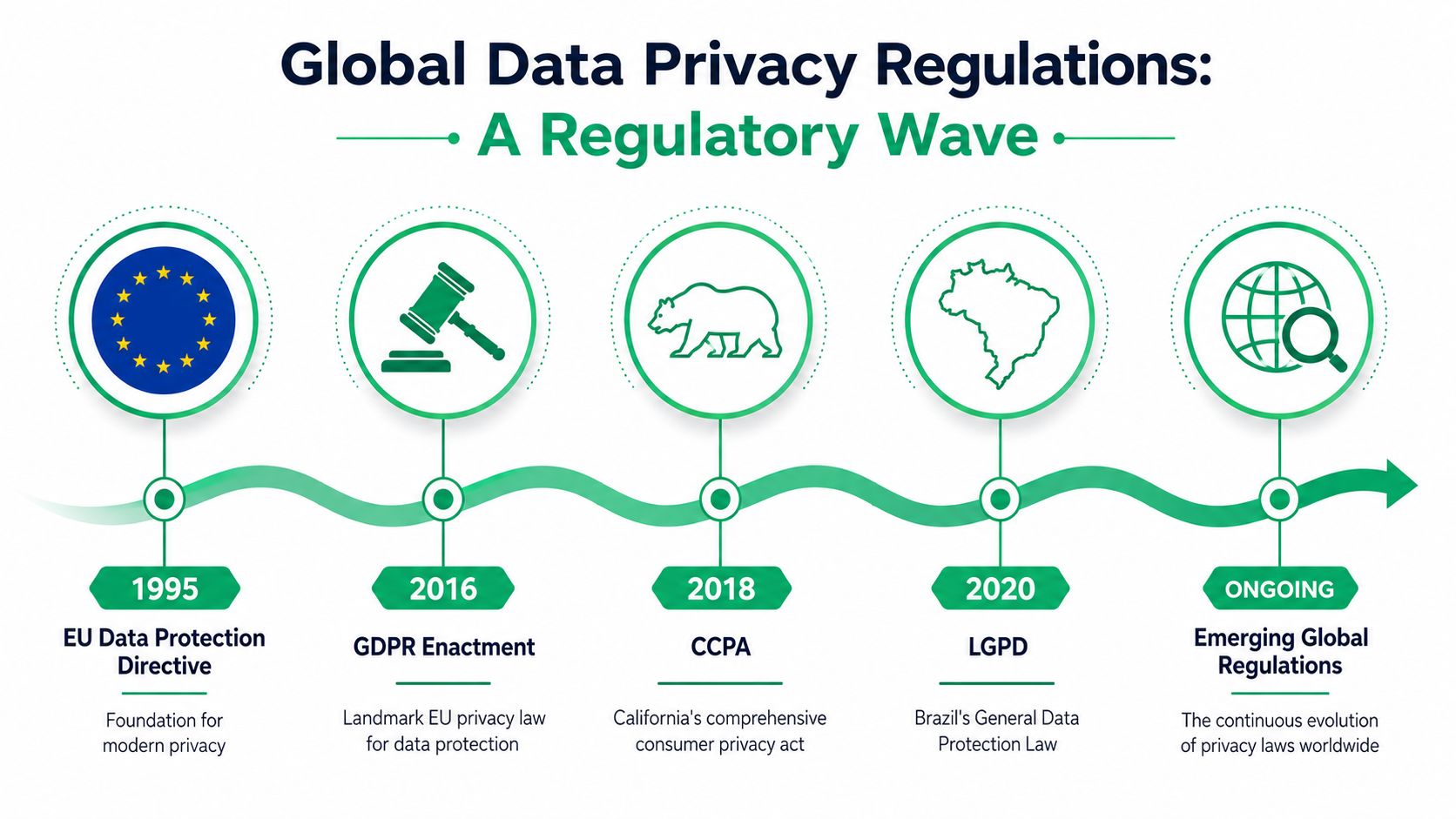
Modern privacy law isn't a niche European issue anymore. It has become the baseline operating environment for ecommerce. As of early 2025, 144 countries have enacted extensive data protection legislation, covering 79% of all UN member states and protecting approximately 6.3 billion people globally, according to SQ Magazine's privacy statistics roundup.
What this means for Shopify Plus merchants
If your store sells across borders, you don't have the luxury of designing privacy operations market by market. The practical move is to adopt a high-standard model across the business. That usually means clear consent handling, disciplined access control, documented vendor responsibilities, and a process for updated customer data after the order is placed.
The common mistake is assuming checkout compliance covers the rest of the order lifecycle. It doesn't. The minute a customer edits an address after purchase, you may be processing data in a new context. If your systems don't treat that update with the same care as original collection, you've created a gap.
The laws differ, but the operating pattern is familiar
The names vary. The obligations differ in detail. But the patterns are consistent:
- Transparency: Customers need to understand what data you collect and why.
- Control: They need workable ways to access, correct, or limit certain uses of their data.
- Security: Merchants have to protect personal information during storage, transfer, and operational use.
- Accountability: Processors, apps, agencies, and logistics partners can't sit outside your privacy responsibility.
For teams that want a plain-English example of how one ecommerce business frames these obligations, PledgeBox's write-up on Pledgebox is useful because it translates regulatory expectations into merchant-facing practice instead of legal jargon.
The safest operating assumption is simple. If a shopper can edit it, export it, or share it through one of your apps, it belongs inside your privacy program.
Regulation has already moved the market. Customers now expect privacy discipline as part of a normal buying experience.
The Shopify Data Protection Blueprint
Without a framework, privacy work turns reactive fast. A ticket comes in about data deletion. A vendor asks for broader access. A support lead wants faster address edits. Security says no. Operations says yes. Nobody is looking at the whole system.
For Shopify Plus, the cleanest way to run customer data protection is through four pillars: policies, technology, lifecycle, and partners. Each pillar answers a different question.
Pillar one and two
Policies answer what you tell customers and what you promise internally. That includes privacy notices, consent language, data rights workflows, and the rules for post-purchase changes.
Technology answers how the store enforces those promises. Permissions, encryption, authentication, logging, and validation all sit here. If your policies say edited address data is protected but your widget sends it through a weak or poorly segmented process, the policy doesn't matter.
Pillar three and four
Lifecycle answers what happens to data over time. Customer data protection breaks down when teams collect information for one purpose, keep it indefinitely, and never revisit whether they still need it. Post-purchase changes make this harder because they create fresh records, overwrites, and sync events.
Partners answer who else touches the data. That includes apps, 3PLs, support tools, fraud tools, ERPs, and agencies. In practice, many privacy failures happen in handoffs rather than in the storefront itself.
Here's the blueprint in working form:
| Pillar | Core question | Common failure |
|---|---|---|
| Policies | Do customers understand what happens to their data? | Legal text that's technically complete but operationally useless |
| Technology | Do systems enforce least access and secure transfer? | Broad staff permissions and weak edit authentication |
| Lifecycle | Do you retain and delete data intentionally? | Keeping edited customer data with no review point |
| Partners | Do vendors match your privacy standard? | Assuming app install equals acceptable security |
A Shopify Plus merchant also needs to align privacy design with platform reality. Storefront apps, checkout extensions, support tools, and post-purchase experiences all create separate processing points. If your team needs a quick refresher on how enterprise Shopify architecture changes those decisions, this overview of what Shopify Plus is is a helpful grounding resource.
How to use the blueprint
Don't try to fix everything at once. Audit one customer journey first. A good starting point is the edited shipping address flow because it touches customer identity, logistics accuracy, support permissions, and app integrations all at once.
Map who can access the change, where the update is stored, which vendors receive it, and when it should be deleted or minimized. If you can't answer those four questions quickly, the blueprint is already showing you where the risk sits.
Crafting Your Data Protection Policies
Most privacy policies fail for one reason. They read like they were written to survive review, not to guide real customer interactions.
That creates friction the moment a shopper wants to do something practical, like change a shipping address after purchase. If the notice is vague, the consent prompt is clumsy, or the language is too broad, customers hesitate. In post-purchase workflows, hesitation turns into tickets.
Write for the moment of action
Policy quality isn't measured by length. It's measured by whether a customer can understand what happens when they submit new information.
CookieYes notes that 43% of customers abandon self-service order edits after encountering complex consent prompts, which directly increases support ticket volume by 22% for stores without efficient edit flows. The same source reports that 65% of cross-border shoppers cite confusing privacy settings as the top reason for not using post-purchase edit widgets in its article on consumer data protection practices.
That should change how merchants write policies. The hard part isn't adding more disclosure. It's making disclosure usable.
What your policy should cover clearly
For post-purchase edits, your privacy language should explain:
- What can be edited: Spell out whether shoppers can update shipping details, contact information, or both.
- Why updated data is collected: Tie edits to concrete operational purposes such as fulfillment, delivery accuracy, fraud review, or customer communication.
- Who receives the update: Name the categories of partners involved, such as logistics providers, support platforms, and operational apps.
- How long edited data is retained: Even if the exact retention schedule varies by system, the policy should explain the logic behind retention and deletion.
- How customers exercise rights: Make access, correction, and deletion routes easy to find.
A strong policy doesn't bury the post-purchase flow inside generic checkout language. It treats edited data as a live processing event.
Reduce consent friction without getting vague
Teams often overcorrect. They simplify so aggressively that the notice stops being meaningful, or they present every legal nuance in the middle of an order-edit flow and destroy usability.
The better approach is layered disclosure. Keep the immediate prompt short, then link to fuller explanations. Use plain labels. Tell the customer what changes after they submit the edit. If re-consent is required for a new use, ask for it in context.
Operational advice: The consent screen should answer three things fast. What you're changing, why the store needs it, and who may receive it.
A useful benchmark is reviewing examples of our data handling practices from service providers that explain processing responsibilities in operational terms. Merchants should aim for the same clarity in their own ecosystem.
For the underlying legal page itself, a public-facing reference like the SelfServe privacy policy is a good reminder that privacy documentation should be accessible, specific, and easy to locate from customer workflows.
A practical policy review test
Use your support team for this. Ask a support lead and an operations manager to read the policy and answer one question: "If a customer edits their address after checkout, what exactly happens to that data?"
If they answer differently, the policy isn't clear enough yet.
Essential Technical Controls for Shopify Plus
Policy sets the rule. Technical controls enforce it. For Shopify Plus merchants, the highest-risk point is often the post-purchase edit flow because that's where convenience pressures security.
A customer wants to correct an address quickly. Support wants fewer manual tickets. Operations wants the warehouse to get clean data. If the store solves that with loose authentication or broad internal access, it has traded one problem for a bigger one.
Protect data in transit and at the point of edit
Real-time address validation is useful, but it has to be implemented securely. For Shopify Plus, real-time address validation should use TLS 1.3 with AES-256-GCM encryption for data in transit, and multi-factor authentication with time-based OTPs for order-edit permissions reduces unauthorized modification attempts by 89%, according to Fortinet's guidance on customer data protection.
That matters because edited customer data is highly actionable. A changed address isn't just another profile field. It's tied to a live shipment, identity verification, and delivery outcome.
The controls that matter most
Start with a short list of controls that directly affect post-purchase risk:
- Role-based access control: Support staff, operations managers, and developers shouldn't all have the same visibility into customer edits.
- Strong authentication for edits: Sensitive order changes should require stronger verification than a basic session alone.
- Encryption during transfer: Every handoff between widget, app layer, and validation service needs secure transport.
- Tokenization or minimization at storage points: Don't keep more raw address detail than a system genuinely needs.
- Audit logging: Teams need a record of who changed what, when, and through which workflow.
What works and what doesn't
What works is narrow permissioning. A support rep can verify a request and approve a permitted change without getting broad account access. A warehouse tool receives the latest fulfillment-safe address, not the entire edit history unless that's operationally required.
What doesn't work is "trusted internal user" logic. I still see stores where a staff member with general admin access can review or alter post-purchase fields far beyond their role. That's convenient until a mistake, account compromise, or process shortcut exposes customer data.
Keep the control close to the action. The more systems that can change an address, the harder it is to prove who did it and why.
A short hardening checklist
Use this during implementation or review:
- Map the edit path: Identify every system that receives updated customer data.
- Limit access by role: Give each team only the minimum visibility needed.
- Require stronger verification for sensitive changes: Address and contact edits deserve more protection than basic browsing.
- Log approvals and exceptions: Manual overrides should leave a visible trail.
- Test multilingual flows separately: Language support shouldn't create a side door for weaker security assumptions.
In Shopify Plus, security isn't a layer you add after the workflow is built. It has to be part of the workflow itself.
Managing Data Retention and Vendor Risk
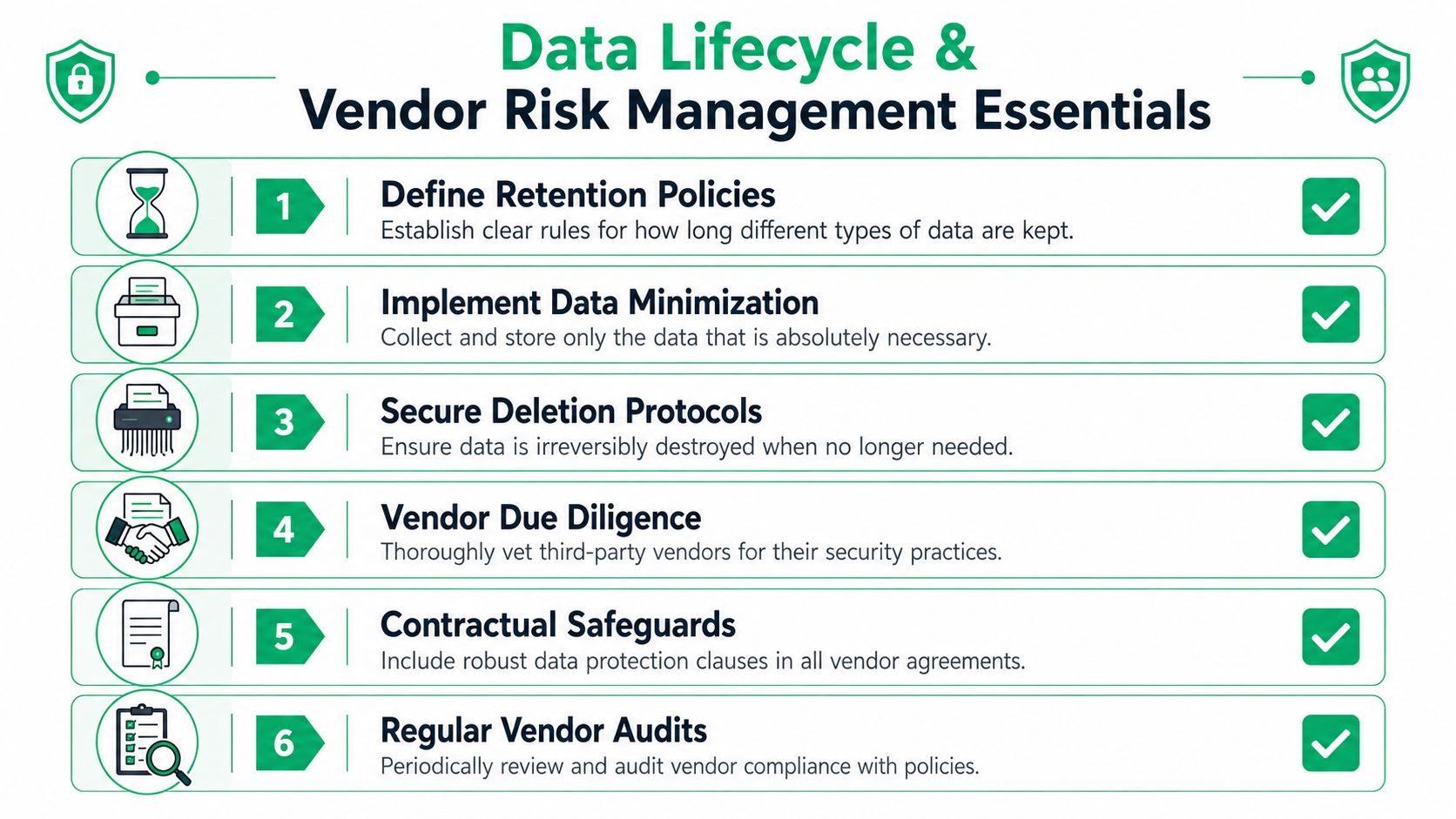
Many merchants still operate on a quiet default. Keep everything, sync everywhere, and sort it out later. That's one of the fastest ways to weaken customer data protection in a modern Shopify stack.
The problem gets worse after checkout. Every edited address, updated phone number, and corrected contact detail can create duplicate records, stale exports, and mismatched retention schedules across apps. That's post-purchase data drift, and it's one of the least discussed privacy failures in ecommerce operations.
Why drift happens
McKinsey highlights the core risk clearly. Edited order data often falls outside original GDPR or CCPA audit trails, and 78% of data breaches in 2024 involved third-party integrations where edited data wasn't covered by the original data processing addendum in its analysis of the consumer data opportunity and the privacy imperative.
That tracks with what happens in real store environments. A customer edits an address in one interface. The new record syncs to a logistics tool, maybe a support platform, maybe a fraud review layer, maybe an ERP queue. One app stores the replacement value. Another stores both old and new versions. A third retains logs far longer than operations expects.
Retention needs active rules
Customer data protection breaks when retention is implied instead of defined. You need a working schedule for each class of data, especially data created after checkout.
A practical retention policy should answer:
| Data type | Key question |
|---|---|
| Checkout data | How long is the original order record operationally necessary? |
| Edited order data | Does the updated field replace the old value or create a separate retained record? |
| Support logs | Are customer-submitted details copied into tickets or notes? |
| Vendor exports | Who deletes files after the operational task is complete? |
Vet vendors for edited-data handling
Vendor review can't stop at security questionnaires. For Shopify merchants, the real test is whether an app or partner handles changed customer data with the same discipline as original collection.
Ask vendors directly:
- How do you log post-purchase edits?
- Do updated fields inherit the same retention and deletion rules as checkout data?
- Can you isolate who accessed edited customer information?
- What happens when data is exported to downstream partners?
- Does your contract clearly cover edited data, not just initial order submission?
For merchants coordinating fulfillment and operational sync, the larger stack gains importance. If you're reviewing logistics dependencies alongside privacy exposure, this guide to third-party logistics software is a useful operational reference because 3PL workflows often become the place where edited customer data spreads fastest.
A vendor isn't low risk because it has a polished app listing. It's low risk when it can explain, in detail, what happens to changed customer data after the first sync.
The better operating posture
Don't think of retention as storage cleanup. Think of it as scope control. The less stray customer data your systems and vendors keep, the fewer places a breach can surface and the easier incident response becomes.
That matters most in post-purchase flows, because those flows create fresh data faster than most privacy programs were designed to handle.
Your Step-by-Step Data Breach Response Plan
Even strong controls don't eliminate risk. What separates resilient merchants from chaotic ones is response discipline. When a breach or suspected exposure happens, speed matters. Clarity matters more.
Start with a written playbook before you need one. The first day of an incident isn't the time to decide who owns containment or how customer notifications get approved.
To ground the sequence, use this response model: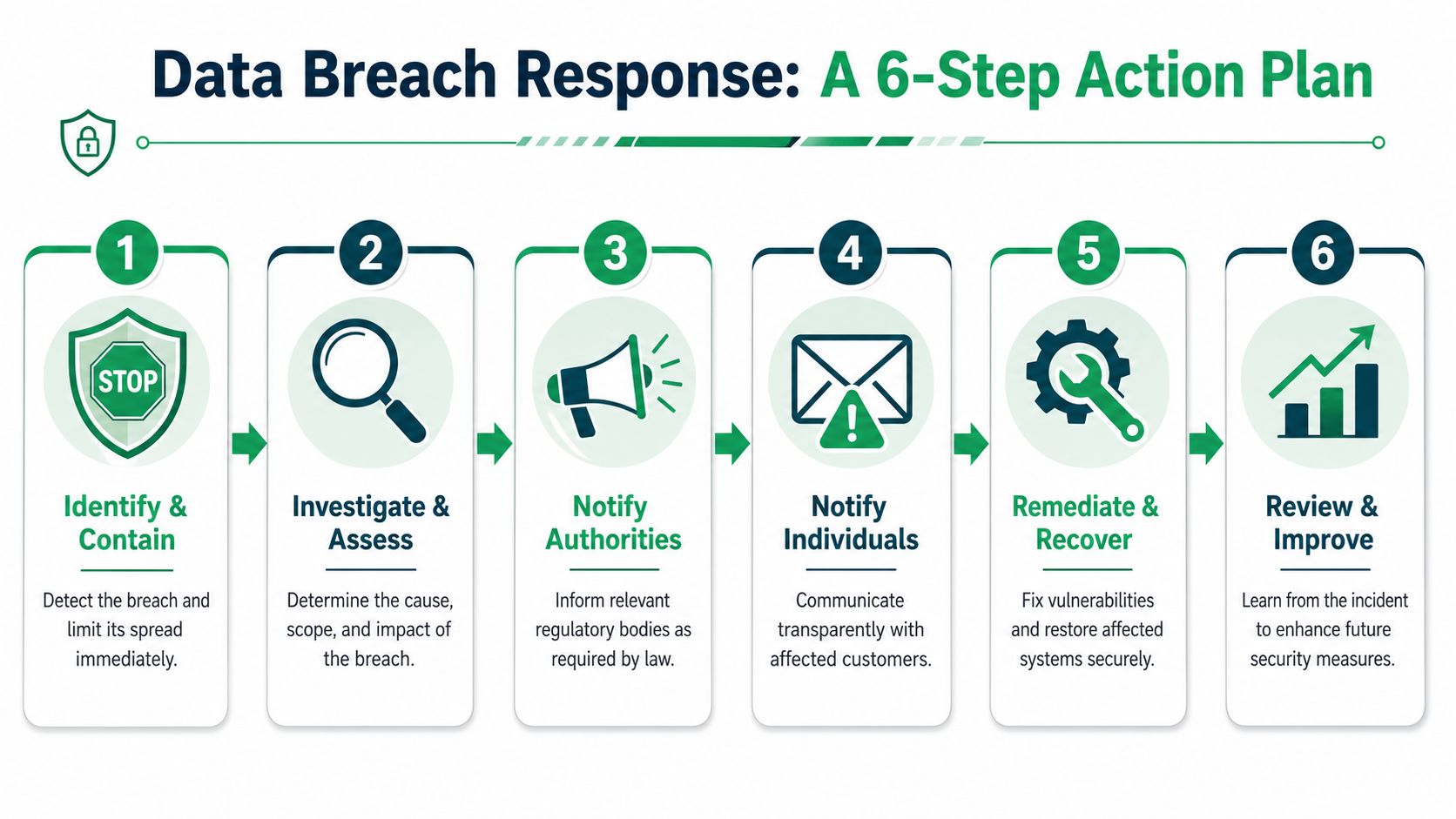
The first moves
Within the first response window, focus on four actions:
Contain the exposure
Restrict access, disable the affected workflow if needed, and preserve logs. If the issue appears tied to post-purchase edits, freeze that path before more changed data moves downstream.Assess scope
Identify which systems, apps, and vendors touched the exposed data. Distinguish between original checkout data and any later edits so the team knows whether post-purchase drift expanded the incident.Notify the right parties
Bring in legal, security, operations, and customer support early. If a vendor was involved, require a documented response from that partner immediately.Prepare customer communication
Write directly. Customers need to know what happened, what information may be affected, what you've done to contain it, and what they should do next.
What teams often miss
The biggest miss isn't technical. It's operational. One team starts investigating while another keeps the workflow live. Support learns about the issue from customers. The vendor sends partial answers. Nobody owns the timeline.
Use a simple incident lead model. One person runs decisions. One person manages evidence. One person handles customer communications. One person coordinates vendor follow-up.
Here's a short explainer worth sharing internally before an incident happens:
Recovery and review
After containment, the real work starts. Review which controls failed, which permissions were too broad, and whether retention or vendor sprawl made the incident worse. If hardware disposal, device turnover, or data-bearing asset handling is part of your wider risk program, Beyond Surplus offers a practical ITAD partner selection guide that can help teams tighten vendor diligence beyond the app layer.
The best breach plan is specific to your stack. Generic templates don't account for Shopify apps, post-purchase edits, or fulfillment syncs.
Run at least one tabletop exercise around an edited-address incident. That's the scenario many stores are least prepared for, even though it touches support, logistics, privacy, and customer trust at the same time.
If your team wants to reduce post-purchase support tickets without losing control of customer data, SelfServe is built for that exact operational gap. It helps Shopify merchants let customers manage approved order changes inside defined rules, with multilingual experiences, real-time address validation, and merchant-side control over what can be edited and when.