How Long Do Shopify Refunds Take? Quick Guide 2026

Most Shopify credit and debit card refunds take 5 to 10 business days to show up for the customer, but there's also a built-in Pending phase of up to 2 business days before the bank transfer is even underway. That baseline changes by payment method, and the customer's bank often determines whether the refund lands near the fast end or the slow end.
If you're reading this, you've probably got the same ticket every ecommerce team sees: “I got the refund email. Why isn't the money back yet?”
That question sounds simple, but the operational answer usually isn't. A refund can be successfully issued in Shopify, look complete to your team, and still be invisible in the customer's bank account for days after that. If support replies with a flat “refunds take 5 to 10 business days,” customers often come back because that answer skips the part they care about most, which is what's happening right now.
For high-volume stores, refund communication either calms things down or creates unnecessary repeat tickets. The stores that handle it well don't just memorize a broad timeline. They understand the refund lifecycle, explain the hidden delay points clearly, and adjust expectations based on the payment method the customer used.
The Inevitable Question Where Is My Refund
A customer writes in on Tuesday morning. They say you approved the return, they got confirmation, and they still don't see the money. Your agent checks Shopify Admin, sees the refund event, and assumes the issue is solved.
It usually isn't solved from the customer's point of view.
Support teams run into trouble when they answer the refund question from the merchant side instead of the banking side. In Shopify, the action may be complete. In the customer's account, the funds may still be moving through card network and bank processing. That gap is where frustration starts.
The customer isn't asking whether you clicked the refund button. They're asking when their bank will post the credit.
That difference matters because “how long do Shopify refunds take” isn't one universal answer. Credit and debit card refunds typically sit in the familiar business-day range, but wallet-based payments and closed-loop methods can move faster. International cards can move slower. Gift cards and store credit behave differently again.
The practical fix is to stop giving one-size-fits-all replies. Your team needs language that reflects the actual refund path, not just the generic estimate printed in help content across the web.
The Three Stages of a Shopify Refund Journey
A Shopify refund works like a three-leg relay. Your team starts it. Shopify processes the refund event. Then the customer's bank or payment provider finishes the last mile.
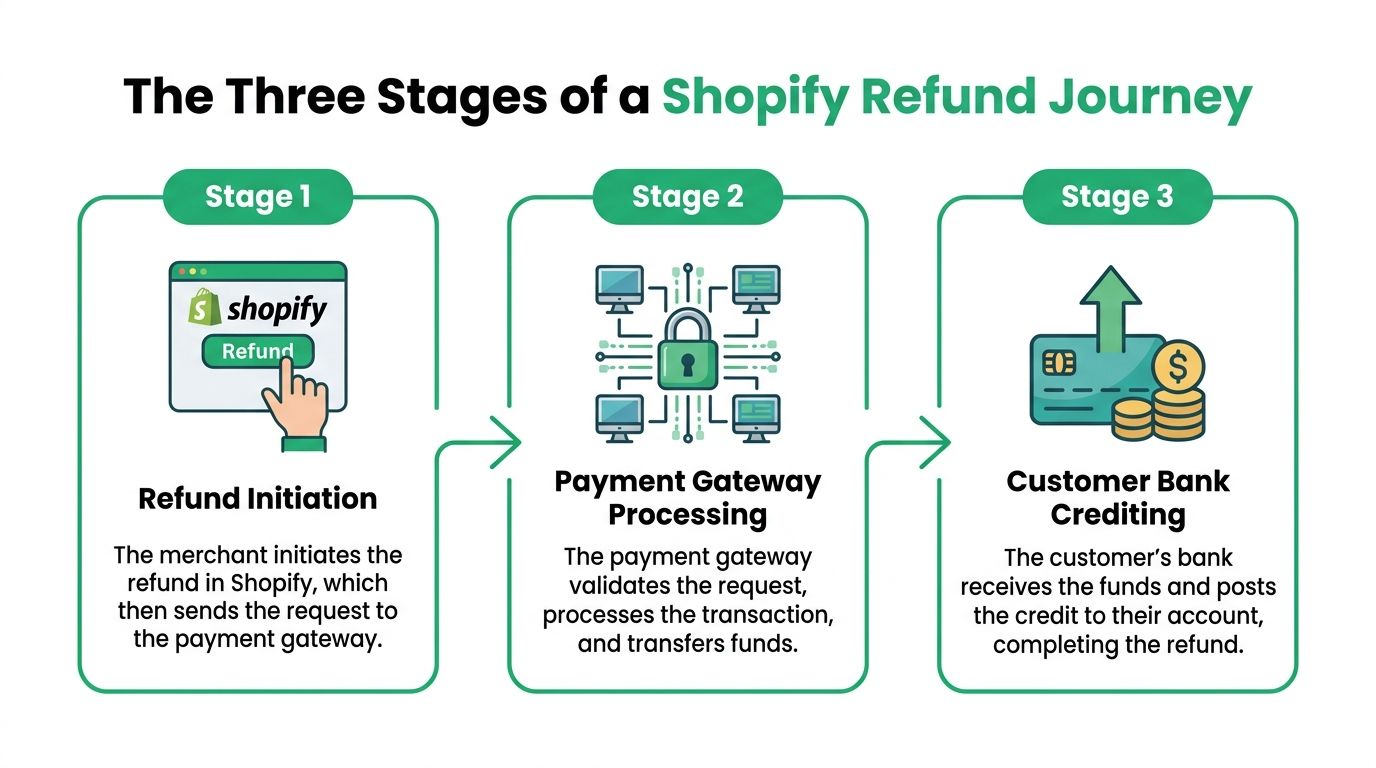
Stage One Merchant Initiation
The first stage is the one your team controls. Someone opens the order in Shopify Admin and issues a full or partial refund. Operationally, this is the easiest part because the action is immediate inside your workflow.
This is also where many teams accidentally overpromise. They tell the customer, “Your refund has been processed,” when what they really mean is, “We initiated the refund.”
That wording sounds small, but it changes the customer's expectation. If they read “processed” as “money back in my account today,” they'll often follow up again.
Stage Two Shopify Processing and the Pending Gap
The most overlooked part of the journey is the Pending phase. Refunds can remain marked Pending for up to 48 hours, or 2 business days, before Shopify initiates the bank transfer, and customers often don't receive the refund confirmation email until that status changes, which creates a real communication gap according to this discussion of Shopify refund pending behavior.
For support teams, this explains a lot of confusion. A customer may contact you during that window believing nothing happened. Your agent may see a refund action on the order and think the customer is mistaken. In reality, both are looking at different stages of the same event.
A useful analogy is a parcel label versus final delivery. Printing the label means the shipment exists in the system. It doesn't mean the package is already on the doorstep.
Stage Three The Bank or Payment Provider Posts the Funds
After the pending stage clears, the last leg belongs to the bank or wallet provider. That final posting step is where timing becomes unpredictable from the merchant's side.
Shopify can register the refund in your admin. The customer's bank can still take additional business days to display the credit. That's why a customer may see movement in order history before they see money in the account they check every day.
Practical rule: Train agents to describe refunds in stages, not as a single event. That one change usually makes support replies sound more accurate and more credible.
Refund Timelines by Payment Method
A customer who paid with PayPal should not get the same refund estimate as someone who used an international Visa card. That mismatch is one of the fastest ways to create avoidable "Where is my refund?" tickets.
The useful way to train support is simple. Start with the payment method, then give the range that fits that method, then explain who controls the last step.
| Payment Method | Typical Refund Timeframe |
|---|---|
| Credit and debit cards through Shopify Payments | 5 to 10 business days |
| PayPal | 1 to 5 business days |
| Apple Pay | 3 to 5 days |
| Store credit or gift card | Immediate |
| International cards | Can exceed the standard card timeline |
Teams handling returns across several systems should keep those rules documented in one place. If you standardize return steps alongside payment handling, a guide on how to create a return label in Shopify helps keep the refund side and the return side aligned. If your team also works across Stripe-based workflows, Mara's Stripe integration is a useful reference point for mapping support operations around payment activity without forcing agents to guess which provider owns which part of the process.
Credit and debit cards through Shopify Payments
Card refunds are the baseline often quoted, but they are also the range customers misunderstand most often. The usual estimate is 5 to 10 business days after the refund starts processing.
For support, this is the safe script: tell the customer the refund has been issued, remind them card refunds post on business days, and avoid promising the short end of the range. If you promise "a few days" and their bank takes longer, you create a second ticket for no operational reason.
PayPal and Apple Pay
PayPal and Apple Pay often move faster than standard card refunds. According to this payment-method-specific Shopify refund guide, PayPal refunds typically arrive in 1 to 5 business days and Apple Pay in 3 to 5 days, while international card refunds can significantly exceed the standard 10-day window.
That difference matters in day-to-day operations. A PayPal customer who hears "wait up to 10 business days" gets an answer that sounds generic. An international card customer who hears "it should be back soon" hears a promise you may not be able to keep.
Store credit and gift cards
Store credit and gift card refunds are the cleanest option operationally because the value is available right away. There is no bank posting delay, no card network timing, and usually much less follow-up from the customer.
That speed is the trade-off. It reduces support load, but it only works if your policy and customer messaging make the option clear before the refund is issued.
Why Some Refunds Take Longer Than Expected
A customer writes in on Tuesday saying, “You said the refund was issued Friday. Why is it still not in my account?” In Shopify, the refund can already look complete while the customer still sees nothing. That gap is where a lot of refund frustration starts.
The biggest source of confusion is the hidden Pending phase. Support teams often treat “refund issued” as the finish line because that is the merchant action. Customers experience it differently. They care about when the credit becomes visible on their statement, and there is usually a handoff between Shopify, the payment network, and the customer's bank before that happens.
The delay usually happens after the merchant action
Once the refund is submitted, the store has usually done its part. The remaining wait is often tied to processor handoff, card network routing, issuer posting rules, and the customer's bank calendar.
That matters for support language. A better reply is: the refund has been initiated, it may still be in the pending processing stage, and the final posting time depends on the payment method and bank. That is more accurate than saying the refund is “still being worked on” if no store-side issue exists.
Business days create false urgency
A refund started late on Friday often triggers a Monday complaint even though very little bank processing time has passed. Customers count calendar days. Operations teams have to count bank business days.
Set expectations in plain language:
- State the start date clearly: Tell the customer the day the refund was initiated.
- Name the pending gap: Explain that there can be a short processing window before the bank begins posting the credit.
- Call out weekends and holidays: They often do not count toward bank processing time.
- Avoid promising the fast case: If you give the shortest possible estimate, support usually gets a second ticket.
Returns can delay the refund decision before processing even starts
Some “slow refunds” are not slow bank refunds at all. They are delayed approval decisions. If your policy requires the item to be received and checked first, the actual delay happens before anyone clicks Refund in Shopify.
This is why return ops and refund ops need to stay separate in your messaging. If the customer is waiting on a label, carrier scan, or warehouse inspection, say that directly. A documented process for creating a return label in Shopify helps your team explain where the order is stuck before the payment side even begins.
International payments add more variables
Cross-border refunds tend to create the longest support threads. Issuer response times vary, currency conversion can add another layer, and the customer may be checking a card statement that updates more slowly than a domestic account would.
For international orders, the safest script is simple: confirm the refund date, confirm the original payment method, and explain that the issuing bank may take longer to post the credit for cross-border transactions. That answer is specific enough to be useful without making a promise your team cannot control.
How to Track Refund Status in Your Shopify Admin
When support asks finance, “Did we refund this order?” they usually need a faster answer than a Slack thread can provide. Shopify Admin already gives you most of what you need if your team knows where to look.
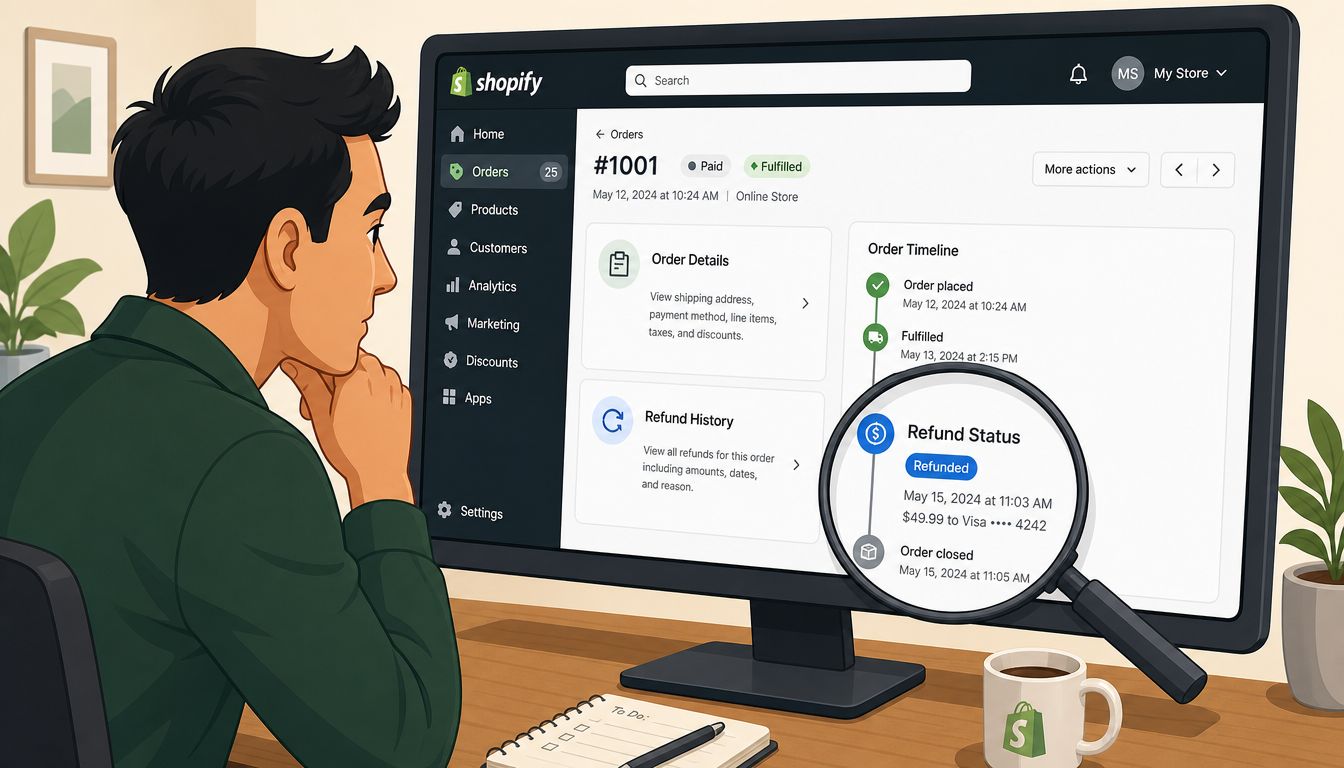
What to check on the order
Open the order first. Then review the timeline and payment section together, not separately. That combination tells you whether the refund was initiated, whether it appears complete in Shopify, and whether the customer is likely waiting on bank posting rather than store action.
A practical review flow looks like this:
- Open the order record: Confirm you're looking at the correct transaction and customer.
- Check the timeline event: Look for the refund action and who triggered it.
- Review the payment details: Confirm the payment method used, since that changes the likely arrival window.
- Look at notification context: If your team sends manual messages, compare them to the actual refund stage before replying again.
If your team needs a more basic walkthrough for newer staff, keep a simple SOP alongside Shopify's native workflow. This guide on how to issue a refund on Shopify can serve as a clean reference for onboarding.
The merchant payout side matters too
Refunds aren't just a customer-experience event. They also affect cash flow. Shopify states that merchants can issue refunds for Shopify Payments orders up to 120 days after the original transaction date, and once issued, the refunded amount is deducted from the merchant's next available payout. If that creates a negative balance, Shopify debits the merchant's bank account within 2 business days in most countries, according to the Shopify help documentation on refunds and payouts.
That matters operationally for two reasons. First, your team needs to know there is a hard window for issuing Shopify Payments refunds. Second, heavy refund volume can affect payout expectations quickly if the next payout doesn't cover the total.
Here's a short explainer you can share with new team members before they start handling refund tickets:
What works in practice
The best ops teams don't leave refund interpretation to guesswork. They build a standard response path.
- Match the status to the message: Don't tell a customer funds have arrived when your admin only confirms initiation.
- Check payment method before replying: A PayPal refund and an international card refund shouldn't get the same canned answer.
- Escalate exceptions, not normal waits: If the timeline is still within the expected window, your job is expectation management. If it moves past that window, then escalate.
Strategies to Reduce Refund Questions and Workload
Reducing refund tickets starts before a refund exists. The stores that keep refund volume manageable don't rely on agents to explain delays one by one. They design the post-purchase experience so fewer customers need to ask.

Fix the communication before the ticket arrives
Most refund frustration comes from silence or vague timing. If your return policy says “refunds are processed promptly,” that doesn't help a customer who expects to see the money tomorrow.
Tighten the communication in three places:
- Policy pages: State that refund timing depends on payment method and bank posting.
- Return approval emails: Tell the customer what happens next after the refund is initiated.
- Support macros: Give agents approved wording for card refunds, wallet refunds, and international payments.
If your team wants to reduce repetitive questions at scale, it's also worth learning from support models outside pure ticketing. A structured resource like how to build a support community can help teams surface repeated refund and return questions in a place customers can find before they contact support.
Prevent avoidable refunds altogether
A surprising number of refund requests begin as something else. The customer entered the wrong address, picked the wrong size, ordered the wrong variant, or panicked after checkout and wanted a quick edit. If you force every post-purchase issue into a cancel-and-refund path, support volume climbs fast.
What works better is giving customers a controlled way to fix simple mistakes before fulfillment moves too far. Teams exploring that model usually start by documenting what customers are allowed to change, when they're allowed to change it, and which edits still require manual approval. This article on a self-service customer portal for post-purchase changes is a good example of how merchants think through that operational boundary.
Operations note: The cheapest refund ticket is the one your team never has to answer because the customer solved the original problem without needing a cancellation.
Build replies your agents can send confidently
Good refund macros do three things. They confirm the action taken, explain the likely timing, and tell the customer exactly when to follow up again if the funds still aren't visible.
Bad macros usually sound polished but unhelpful. They say the refund was “successfully processed” and stop there. That wording creates more tickets because it answers the store-side question but not the customer-side one.
Frequently Asked Questions for Merchants
What if the customer's card is expired
In most cases, the issuing bank handles that on the customer's side. The refund usually routes back through the original payment rails rather than failing just because the physical card changed. Your support team should avoid guessing and tell the customer to check with the card issuer if the expected posting window has passed.
Can a refund be canceled after it's issued
Treat issued refunds as final unless you've confirmed otherwise through the payment provider's workflow. Operationally, it's safer to assume your team can't pull the refund back once it has moved into processing. That's why approval controls matter before the refund is submitted.
Should agents promise a specific arrival date
No. Promise a timeframe, not a date, unless you have a payment-method-specific reason to be more precise. Specific dates turn normal bank variation into a broken promise.
What if the customer says they never got the refund email
Check the order timeline and refund status first. If the refund was in the earlier processing stage, the customer may not have received a confirmation yet. In that case, reply with the status and the expected next step rather than resending a generic note that could create more confusion.
How should merchants handle partial refunds
Use partial refunds when the issue is limited to one item, shipping, or a service recovery gesture. The operational rule is simple. Be explicit about what was refunded and what was not, so the customer doesn't mistake a partial refund for a full order reversal.
If your team is spending too much time on cancellation requests, address edits, and preventable refund tickets, SelfServe can help you shift that work out of the inbox. It lets Shopify merchants give customers controlled post-purchase self-service options while keeping approval rules and operational guardrails in place, which cuts down on unnecessary refunds and the support load that comes with them.