Maximize Shopify Plus Support Value in 2026

A lot of brands hit the same wall right after a good quarter. Orders are up, conversion is healthy, the team is happy, and then support starts breaking under the weight of success. Customers want to fix apartment numbers, swap a size before fulfillment, cancel a duplicate order, or ask why a post-purchase add-on didn't apply.
At that point, most operators start looking at Shopify Plus support as the safety net. That's reasonable. Plus does give merchants a higher support tier than standard plans. But if you treat Shopify's team as the answer to every operational issue, you'll stay stuck in reactive mode.
The brands that scale cleanly use Shopify Plus support for the problems only Shopify can solve. They design their own workflows to prevent the repetitive tickets that keep draining time, margin, and team attention.
When Growing Your Brand Breaks Your Support Team
A familiar scenario looks like this. A DTC brand starts processing more orders, marketing is finally working, and customer expectations rise at the same time. The inbox fills with “I entered the wrong address,” “Can I add one more item?”, “Please cancel before it ships,” and “Why didn't my order update?”
None of those requests are unusual. The problem is volume and timing. They arrive in bursts, they're operationally sensitive, and they often require someone to check fulfillment rules, payment status, fraud review, app behavior, and warehouse timing before replying.
That's when many teams assume they need better agents. Often they need better systems.
Practical rule: If the same post-purchase request appears every day, it isn't just a support issue. It's an operations design issue.
Shopify Plus support matters because larger stores need faster escalation paths and better access when platform issues appear. But even the best external support team won't save you from tickets caused by weak internal workflows, unclear permissions, or brittle app handoffs.
I've seen operations teams improve stability fastest when they separate two questions. First, what should go to Shopify? Second, what should never need a ticket in the first place? That shift usually drives more progress than adding headcount alone.
If your team is already feeling strain, this is the right time to audit efficiency before the next spike hits. A practical starting point is this guide to customer service efficiency, especially for brands trying to reduce repetitive support work without lowering service quality.
What Is Included with Shopify Plus Support
Shopify Plus support gives larger merchants a different support model than standard plans, but the value is uneven if you expect Shopify to cover every operational gap for you.
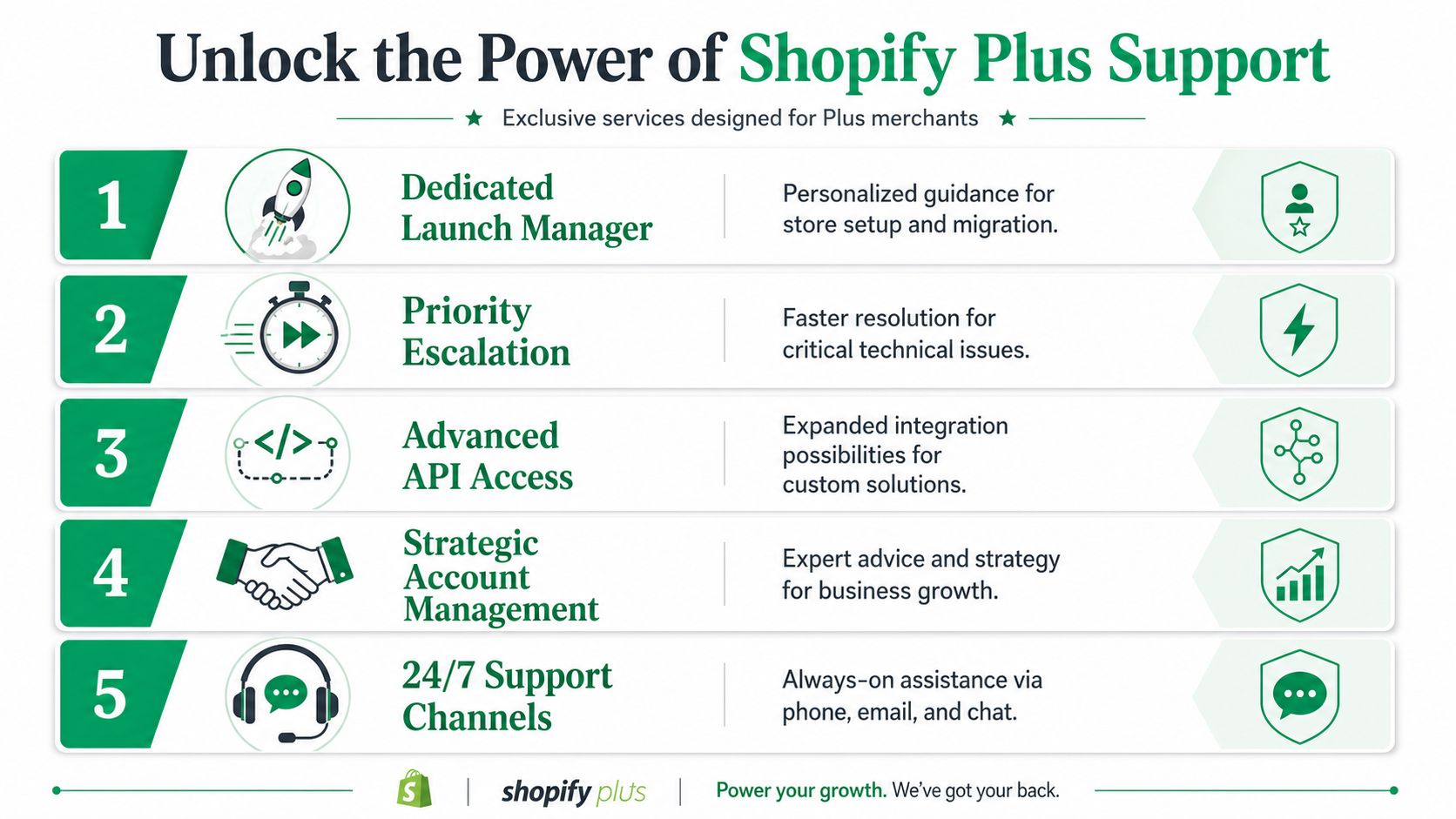
At the platform level, Plus adds faster access paths, launch assistance, stronger escalation routes, and contractual uptime protection. Those benefits matter most when revenue concentration is high. A checkout issue during a campaign, a misfiring app during a product drop, or a payments problem during peak traffic is expensive enough that queue priority and better escalation can justify the tier.
The core support advantages
The first upgrade is access. Plus merchants get 24/7 phone availability through a callback flow in the admin Help Center, priority chat access, and Plus Support Advisors who are trained on Plus-specific features, according to Cleargo's review of Shopify Plus support structure.
The second upgrade is launch support. During a typical migration, Shopify Plus includes a Launch Engineer and may also include guidance aimed at reducing implementation risk, based on Ringly's breakdown of Shopify Plus features. For teams replatforming from a heavily customized stack, that support can help prevent avoidable mistakes around data migration, checkout configuration, and launch sequencing.
The third upgrade is platform assurance. Shopify Plus includes a contractual 99.99% uptime SLA and infrastructure designed for high checkout volume, according to Ontap Group's summary of Plus benefits. That is useful protection for brands running launches, seasonal spikes, and paid traffic bursts where downtime turns into lost contribution margin quickly.
What the Merchant Success Manager does, and doesn't do
The Merchant Success Manager, or MSM, is often misunderstood. It is a strategic support role, not an outsourced ecommerce operator.
Some Plus merchants get significant value from an MSM because the role can help with launch planning, platform best practices, and escalation context. But the MSM does not replace your internal owner for support operations, systems design, or app governance. If your post-purchase flow is fragmented across Shopify, your 3PL, your subscription app, your returns tool, and customer service macros, Shopify will not stitch that together for you.
That distinction matters. A lot of support pain on Plus comes from workflow blind spots after checkout, not from a missing platform contact.
Use the MSM for:
- Platform-specific risk review: launch readiness, traffic planning, and known Plus configuration concerns
- Escalation support: framing platform issues clearly so Shopify can route them faster
- Capability guidance: identifying native Plus features or configuration changes that reduce friction
Do not assign the MSM work that belongs with your operations lead, solutions partner, or CX systems owner.
Shopify Standard vs Shopify Plus support
| Feature | Standard Shopify Plans | Shopify Plus |
|---|---|---|
| Phone support | Typically no phone callbacks on standard plans | 24/7 phone availability via callback through the admin Help Center |
| Chat access | Standard queues | Priority chat access with Plus-trained advisors |
| Email support | More limited by plan | Email support with typical response times around 48 hours |
| Dedicated advisors | General support structure | Dedicated Plus Support Advisors |
| Merchant Success Manager | Not included | Available for qualifying merchants |
| Launch support | Limited migration guidance | Dedicated Launch Engineer during a typical 3 to 6 month migration |
| Uptime SLA | No SLA protection on lower-tier plans | Contractual 99.99% uptime SLA |
| Scale handling | Standard plan limits apply | Designed for high checkout volume with unlimited bandwidth |
Why merchants pay for this tier
Brands usually move to Plus because the cost of failure changes. If a store is running complex promotions, multiple markets, B2B requirements, or high-volume post-purchase operations, standard support queues and general guidance stop being enough.
That said, Plus support should be treated as one layer of protection, not the whole system. It helps with platform issues. It does not solve repetitive address edits, order change requests, warehouse timing conflicts, subscription edge cases, or customer confusion created by your own policies and app stack. The strongest Plus setups use Shopify support for platform escalation, then reduce ticket volume internally through cleaner workflows, better permissions, and self-service options that remove avoidable contact altogether.
The Realities of Accessing Plus Support in 2026
It is 11:20 p.m. Your team is in the middle of a promotion, order edits are failing, and chat keeps routing you back to an automated assistant. That is usually the moment a brand learns the difference between having Plus support and reaching the right human fast enough to matter.
AI triage still slows down urgent cases
Shopify positions Plus as a higher-touch support experience. In day-to-day operations, the first layer can still be automated, and that creates delay when the issue is nuanced or time-sensitive.
Recent reporting from PPC Land's 2026 coverage of Shopify support restructuring describes merchants getting stuck in AI escalation loops before reaching a human agent. For operators, that means ticket quality matters more than plan tier. If the first message is vague, the queue gets longer. If the first message clearly states the failure point, affected workflow, and commercial impact, the odds of a useful escalation improve.
I tell teams to write the first contact like an incident brief, not a help request.
Include four things:
- Failure point: checkout, admin, payout, order management, app conflict, or storefront behavior
- Impact: what customers or internal teams cannot do right now
- Proof: screenshots, timestamps, order IDs, and exact replication steps
- Requested outcome: confirm a platform issue, escalate to the right team, or advise on rollback risk
A weak ticket says, “Orders are broken.”
A useful ticket says, “Order edits are failing on submitted orders after today's theme deploy. Ops reproduced the issue on the order status page across multiple orders. We need confirmation whether this is a platform issue or app conflict before we roll back.”
Plus support is strongest on platform issues, not workflow cleanup
This is the gap many teams miss. Shopify support can help with platform incidents, checkout behavior, permissions, infrastructure, and issues that require internal Shopify access. It is less useful for untangling your app stack, fixing unclear policies, or redesigning post-purchase work that your team is still handling manually.
That distinction matters because some of the highest-volume support pain on Plus stores starts after the order is placed. Address changes, item swaps, cancellation windows, subscription exceptions, fraud review holds, and warehouse timing conflicts often sit between systems. Support agents become the connector because the workflow was never designed to resolve those requests cleanly.
If that sounds familiar, stop treating every recurring ticket as a staffing problem. Use platform support for the cases only Shopify can address, then reduce internal dependence on chat by mapping the flows that break most often. Shopify Flow can help remove some of that manual handoff if you set it up deliberately. This guide to the Shopify Flow app for post-purchase automation is a practical place to start.
Prepare for support friction before you need support
The strongest Plus teams assume access will have some friction and build around it.
Keep a current escalation playbook. Define who owns theme incidents, app incidents, checkout issues, and account access problems. Store repeatable evidence templates so agents are not drafting from scratch during a live issue. For high-risk events such as launches, major promotions, or market expansions, pre-assign an internal incident lead who can separate platform problems from configuration mistakes.
This is also where conversion work and support design start to overlap. Teams investing in 2026 e-commerce CRO strategies often increase order volume faster than they improve post-purchase operations. Better conversion is good. It also exposes weak handoffs faster.
Plus support still matters. It just works best as one layer in a broader operating model. Use it for escalation, then fix the workflows that keep sending your team back into the queue.
Shifting from Reactive Support to Proactive Systems
Friday at 4:30 p.m., a campaign is working, orders are climbing, and support is suddenly buried in address fixes, cancellation requests, duplicate orders, and "can you add one more item?" messages. Nothing is technically broken. Your operating model is.
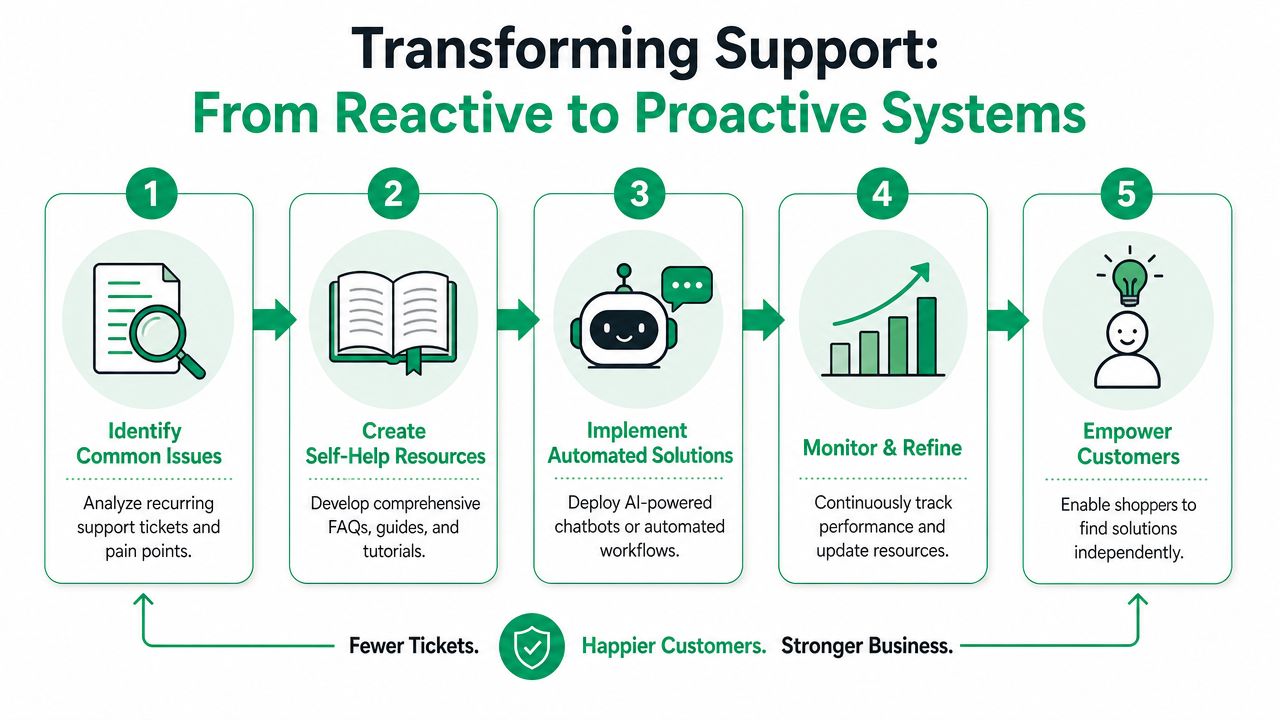
Most support strain on Shopify Plus starts after checkout, not inside the support inbox itself. Agents end up acting as manual connectors between checkout, fraud review, fulfillment rules, ERP logic, and 3PL cutoffs. As order volume rises, that handoff gets expensive fast.
More conversion creates more post-purchase pressure
A higher-converting checkout increases order count. It also increases the number of customers who need to make a change after they buy. Brands often celebrate the top-of-funnel win and notice the post-purchase cost later, once support queues and ops exceptions start stacking up.
I see this pattern often with growth-stage Plus merchants. They invest in faster checkout, subscriptions, bundles, and promotional testing, then keep a support process that still assumes an agent can manually triage every exception. That setup holds for a while. Then one promotion, one peak week, or one warehouse delay exposes the gap.
The better question is not "How do we answer tickets faster?" It is "Which requests should never become tickets in the first place?"
The operating shift that matters
Strong Plus teams define post-purchase rules before they add more headcount. They decide which customer changes are safe, how long those changes stay available, what requires approval, and what must sync across downstream systems.
A workable model usually includes:
- Address edits with validation: Let customers fix shipping details before the order reaches a fulfillment lock point.
- Time-boxed cancellations: Accept requests within a clear window, then route edge cases for review.
- Order change controls: Allow selected item adds, swaps, or removals only when inventory, payment, and fulfillment logic can support them.
- Exception routing: Tag edited orders so operations can review the right subset instead of reading every ticket.
If you are mapping those rules in automation, this guide to Shopify Flow app workflows for post-purchase automation is a useful reference.
Where Shopify Plus support usually stops being enough
Official Plus support can help confirm platform behavior, identify symptoms, and escalate some issues. It rarely owns the full chain when a post-purchase workflow fails across apps, custom logic, and external systems.
That gap matters in 2026 because many support failures are no longer simple "store issues." They sit in the gray area between checkout extensibility, app conflicts, fulfillment timing, fraud rules, and customer communication. AI-assisted support can speed up simple answers, but it can also trap teams in loops when the underlying problem is a workflow dependency no frontline advisor can see.
Post-purchase blind spots are common. A customer edits an address, the app accepts the request, the 3PL never receives the update, and support only finds out after the parcel ships incorrectly. Shopify did its part. The app may have done its part. Your process still failed.
That is why support design needs an internal owner. Someone has to own the logic across systems, not just the ticket queue.
Measure system health, not just response time
First-response time still matters. It just should not be the main KPI for this layer of operations.
For post-purchase support, better indicators are usually:
- Ticket deflection rate: How many routine requests customers complete without agent help?
- Exception rate: How many orders still require manual intervention after a customer request?
- Workflow failure rate: How often does a valid change fail to sync correctly to fulfillment or downstream tools?
- Post-purchase revenue impact: Are order-edit and add-on flows increasing value without creating new ops debt?
Teams working on 2026 e-commerce CRO strategies should review these metrics alongside conversion gains. More completed checkouts are good. More completed checkouts with weak post-purchase controls usually create extra labor, more customer friction, and preventable fulfillment mistakes.
The practical goal is simple. Use Shopify Plus support for platform-level issues. Build your own system so routine post-purchase work does not depend on getting a fast answer from Shopify in the first place.
How to Implement Self Service on Shopify Plus
The practical way to reduce reliance on Shopify Plus support is to remove avoidable post-purchase tickets from the queue. That doesn't mean opening the gates and letting customers change anything at any time. It means setting controlled permissions that match how your operation operates.

Start with rules, not features
Before you configure any app or customer-facing workflow, write down your operational boundaries.
Ask four questions:
What can a customer change safely?
Address fields, contact details, selected line items, or cancellation requests.When can they change it?
Use a defined window based on fulfillment timing, fraud review, and warehouse cutoffs.Which changes need approval?
Not every cancellation or item swap should process automatically.What downstream systems must stay in sync?
ERP, 3PL, OMS, and custom tagging logic are critical.
That planning step prevents the most common failure mode. Teams launch “self-service,” then discover the workflow conflicts with fulfillment rules or breaks a third-party integration.
Build the post-purchase flow around common tickets
Most stores should implement self-service in layers, not all at once.
A strong first rollout usually looks like this:
- Address edits first: These are frequent, time-sensitive, and easy to understand.
- Contact detail updates next: Useful, low-friction, and often safe within a limited window.
- Cancellations after that: Add approval logic if finance, fraud, or fulfillment requires review.
- Upsells last: Once the operational path is stable, add revenue logic.
There's a reason to go in that order. Address correction and contact updates are usually support drains. Upsells are valuable, but they work best when the underlying order-editing flow is already reliable.
Plan for the integration edge cases
Many teams still encounter difficulties. Shopify's own support documentation leaves limited practical coverage for post-purchase workflow failures tied to theme incompatibilities or 3PL/ERP integration problems, and merchants report standard support channels don't adequately resolve those issues, as reflected in Shopify's support documentation and the practical gaps around support scope.
In practice, that means you should test for:
- Theme conflicts: Especially on order status or customer account touchpoints.
- 3PL timing issues: Orders may become uneditable sooner than your storefront implies.
- ERP sync lag: Edited data may not map cleanly if fields are transformed downstream.
- Tagging failures: Automation rules can break unnoticed if order state changes unexpectedly.
The best self-service flow is conservative. It offers customers fast control inside a narrow, well-tested lane.
A helpful implementation reference is this guide to a self-service customer portal for Shopify, especially if you're thinking about the customer experience and the operational controls together rather than as separate projects.
Add multilingual and validation logic early
International stores should not treat language support as a later enhancement. If customers can edit orders, they need to understand exactly what they're changing and whether the update has been accepted.
Address validation also matters more than many teams expect. Preventing a bad address at the moment of change is much cleaner than asking support to untangle a failed delivery later.
Once the basic workflow is in place, it helps to review a live implementation pattern. This walkthrough shows the moving parts in action:
Use post-purchase offers carefully
Post-purchase upsells can be valuable, but they should follow operational logic, not fight it. If the order can still be modified safely, an additional offer can improve order value. If fulfillment is already locked, forcing another option into the flow creates confusion and extra tickets.
The cleanest implementations use product restrictions, approval flows, and order tagging so operations stays in control. The rule is simple. If support will need to clean up the offer after the fact, the upsell logic isn't ready yet.
Building a Resilient Support Ecosystem
The mature way to think about Shopify Plus support is as one layer in a broader operating model. It's useful, valuable, and in some cases essential. It just shouldn't be your frontline answer to every preventable issue.
A resilient setup has three parts. First, Shopify Plus support handles platform-level problems, escalations, and enterprise access. Second, your internal team owns workflow design, app coordination, and exception policy. Third, customers get controlled self-service for the repetitive tasks that don't need an agent.
That structure protects your team in two ways. It reduces ticket load, and it preserves human attention for the cases where judgment matters. That's where support builds loyalty.
For brands that need implementation help beyond the platform itself, working with a specialist can make sense. If you're evaluating partners for storefront, integration, or operational architecture work, a vetted Shopify expert in Australia can be a practical starting point.
The primary value of Shopify Plus support isn't that Shopify will solve every issue for you. It's that Plus gives you stronger infrastructure and escalation while you build a system that needs less rescue in the first place.
If your team wants to reduce post-purchase tickets, give customers controlled order editing, and turn operational friction into a cleaner customer experience, SelfServe is worth a look. It helps Shopify brands manage address edits, cancellations, multilingual workflows, validation, and post-purchase upsells without forcing every request through support.