Customer Journey Optimization for High-Volume Shopify Stores
You're probably staring at the same mess a lot of high-volume Shopify teams face. Support is getting peppered with “can I change my address?” and “can I update this order?” while the merch team keeps pushing new products into the catalog, but the post-purchase surface stays ignored. That's exactly where customer journey optimization starts paying rent, because the customer journey doesn't end at checkout, it keeps going through edits, confirmations, self-service, and the first moments after payment.
Most guides stop at the point where the card is charged. That misses the part where shoppers still want control, ops wants fewer tickets, and merchandising wants a place to add incremental revenue without creating more friction. If you've ever watched a clean checkout flow get undone by a clunky post-purchase experience, this is the part that matters. For a broader framing on conversion work, Million Dollar Sellers has a useful breakdown on improve ecommerce conversion rates, but the bigger win is treating the whole lifecycle as one connected system.
Why Post-Purchase Is Where Shopify Merchants Actually Win
A lot of teams celebrate checkout improvements and then leave the rest of the journey alone. That's usually where the hidden cost starts. The order is placed, the customer notices a typo, shipping details are wrong, or they want to add one more item, and the store forces a support ticket or a manual exception.
That's not just a service problem. It's a control problem. Once a shopper has paid, the brand often behaves like the relationship is finished, while the customer still expects a live, editable experience. Industry guidance on customer journey optimization already frames the discipline as mapping the full lifecycle, not a single conversion event, and it ties improvement to metrics like conversion rate, abandonment, retention, and customer effort score (Top Analytics Tools).
The post-purchase window is where those metrics converge. If customers can self-correct shipping or contact details, support doesn't get buried in avoidable tickets. If you place relevant offers on the Thank You or Order Status pages, you get a chance to lift order value after the decision has already been made. That's why I treat those pages like revenue and operations surfaces, not receipts.
Practical rule: if a customer can solve a problem without writing in, the journey is healthier and the team gets time back.
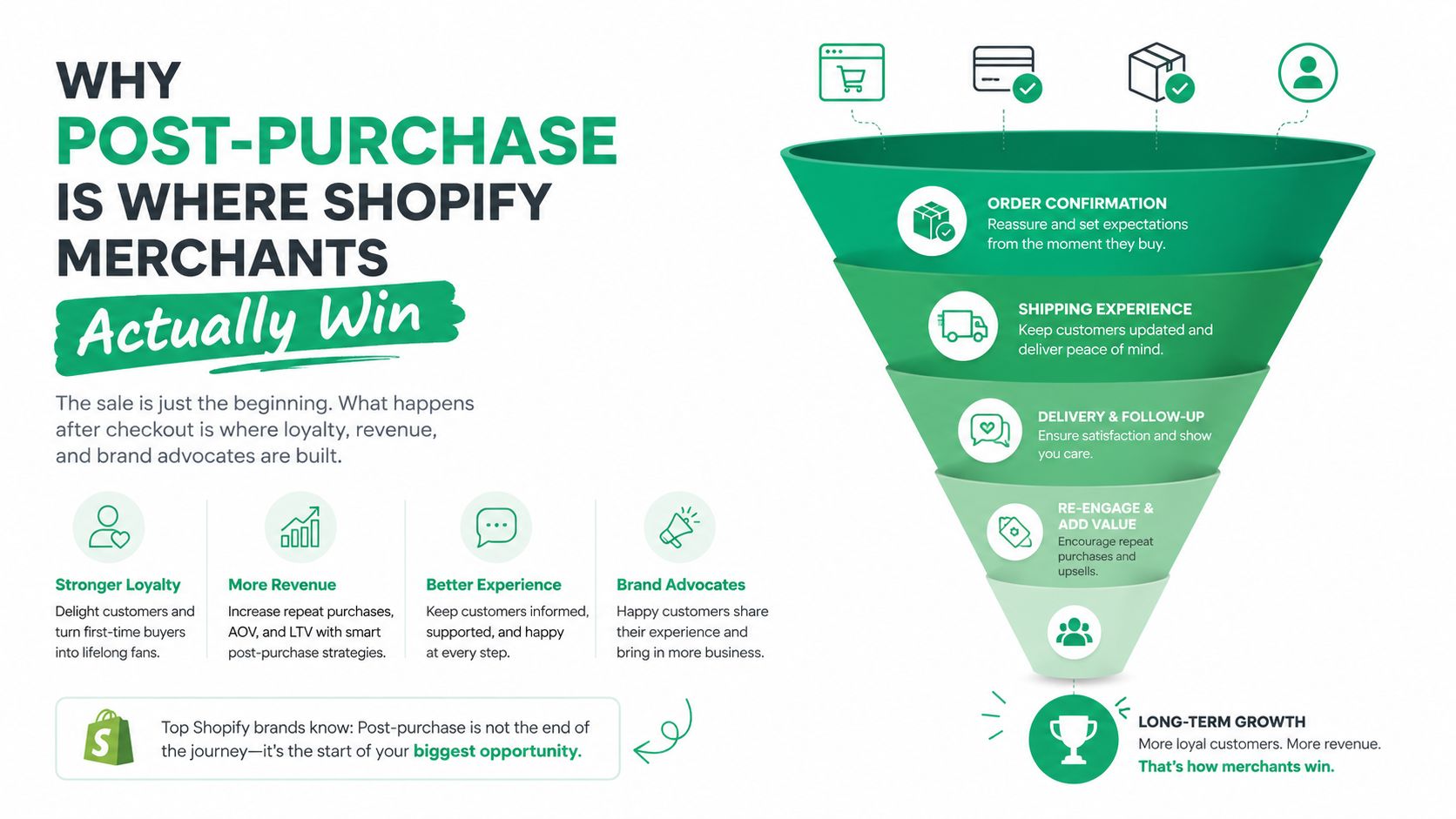
The strongest merchants stop thinking in handoffs and start thinking in control loops. A shopper lands, buys, edits, receives, reorders, and refers, all within one connected journey. A useful reference for the post-purchase layer itself is this guide on post-purchase customer experience, because that's where the levers live once the checkout form is already done.
Mapping Touchpoints and Finding the Real Friction
A journey map that only reflects the website is incomplete. Friction shows up across analytics, recordings, surveys, and the support queue, and those signals need to be stitched together before anyone starts changing flows. The operational mistake I see most often is teams making decisions from one source, usually page analytics, when the loudest pain is hiding in customer questions or repeated edits.
Build the map from behavior and voice of customer
Start with web analytics, heatmaps, and session recordings to spot hesitation, repeated clicks, and exits. Then bring in surveys and ticket tags so you can tell whether a drop-off is caused by confusion, policy, technical failure, or missing information. Practitioner guidance recommends exactly this mix, combining behavioral and qualitative data to identify where users abandon tasks and where high-impact journeys deserve experimentation (Tremendous).
The point isn't to create a prettier map. It's to attach each friction point to a stage and a KPI. That way, you can separate a product-page issue from an order-edit issue, even if both show up as “bad experience” in a Slack thread.
A simple field-level checklist works better than a broad workshop:
- Analytics events: capture checkout starts, order edits, self-service clicks, and Thank You page interactions.
- Session recordings: watch where shoppers hesitate, backtrack, or repeat actions before opening a ticket.
- Survey prompts: ask immediately after a purchase, support interaction, or order edit, while the context is still fresh.
- Support tags: label contacts by intent, such as address correction, item addition, cancellation, or delivery status.
Tag the contact reason before you try to solve it. If the queue is unlabeled, the team ends up fixing whatever feels loudest instead of what happens most.
The customer effort score concept is useful here because it forces the team to ask how hard the journey feels, not just whether the final outcome happened. If a shopper has to jump between email, chat, and the help center to fix one order detail, the problem is already visible even if the order ships on time. A practical overview of that lens is available in this customer effort score guide.
Where the Revenue Leaks Hide
Acquisition teams usually get the budget, but the easiest money to lose is often buried in post-purchase operations. The leaks are rarely dramatic. They show up in small moments where the customer wants to make a change, add value, or get clarity, and the store makes that hard enough that the issue turns into a ticket.
Editable shipping details are the first obvious leak. If a customer spots an error after checkout and cannot fix it, support absorbs the request and fulfillment gets pulled into a manual exception. Address accuracy is the second. Bad addresses create avoidable friction in fulfillment and turn a simple purchase into a recovery task.
Five quiet failure points in the post-purchase journey
- Shipping detail edits: shoppers need a safe window to correct mistakes without opening a ticket.
- Address validation: the store should catch obvious delivery issues before fulfillment starts.
- Pre-fulfillment cancellation: when a buyer changes their mind, a controlled self-serve path prevents back-and-forth.
- Thank You upsells: the order confirmation page is often left blank when it could carry incremental revenue.
- Order status communication: silence after checkout creates more “where is my order?” contacts than many teams expect.
The other leak is more strategic. Most stores leave the Thank You and Order Status pages untouched, which means they miss the highest-intent place to offer an add-on or accessory. That does not mean every store should stack aggressive offers after purchase. It means the page should be intentional, with product rules and order logic that protect margin and avoid junk upsells.
There is also a support cost angle that generic journey advice often misses. A guide on how to diagnose ecommerce support issues is useful here because it pushes teams to look at the root cause of recurring tickets, not just ticket volume. In practice, the recurring categories are usually the same, order edits, address problems, status requests, and post-payment changes.
The biggest trade-off is speed versus control. If you let everything be editable without rules, operations can get messy fast. If you lock everything down, support load grows and customers lose trust. The right answer is a constrained self-service layer that gives shoppers enough control to fix routine issues while keeping fulfillment protected.
Running Experiments That Survive Contact With Reality
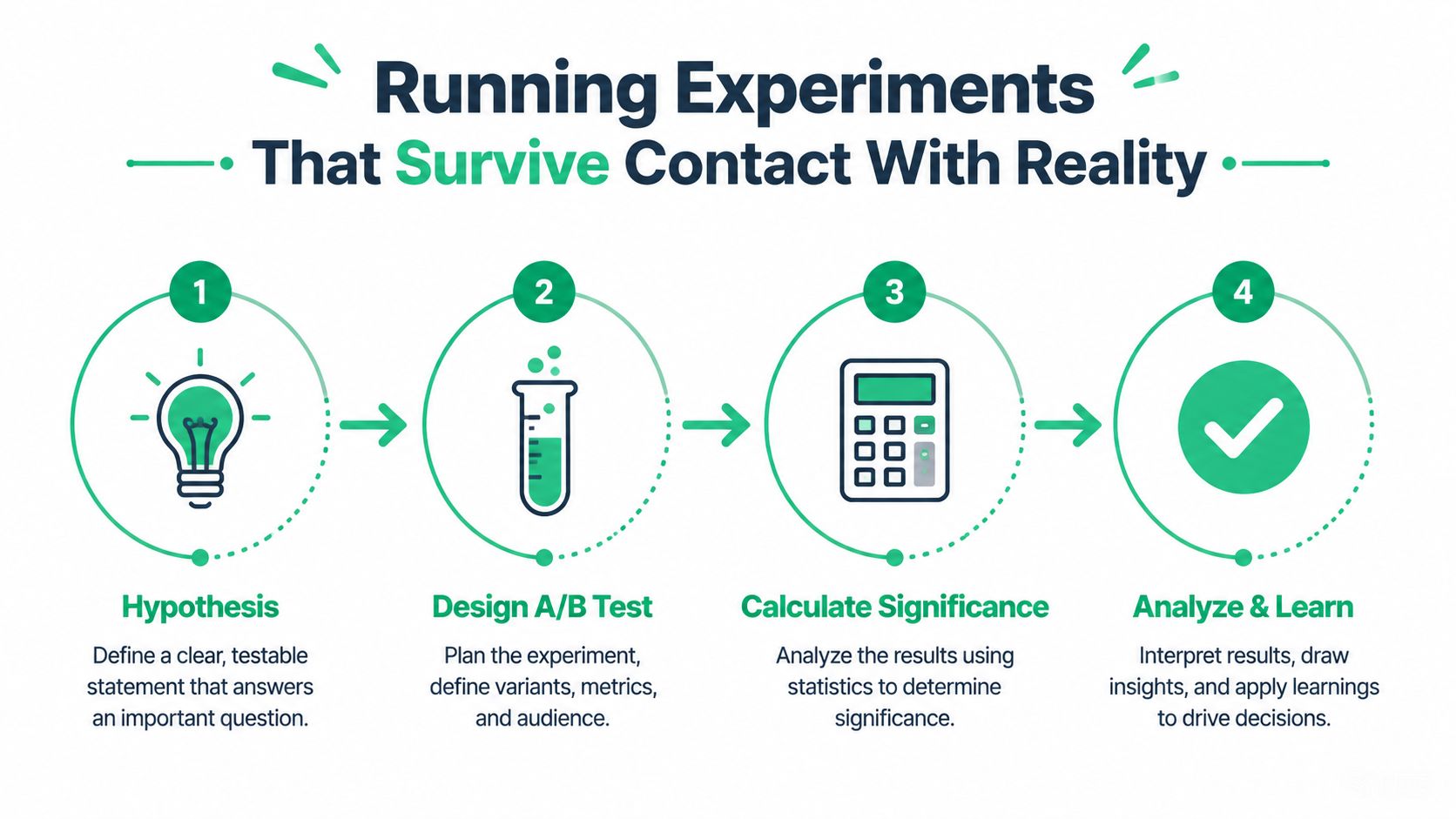
Good ideas die fast when they aren't tested against actual order flow. Journey-level experimentation has to be designed around the whole path, not a single screen. That means choosing a clear success metric, defining variants that matter, and keeping the test open long enough to see what happens after the initial click.
Test the journey, not just the page
A practical A/B test starts with one question. Does this change reduce friction or create more value at the post-purchase stage? From there, pick a primary metric that matches the hypothesis, such as order edits completed without support, upsell acceptance on the Thank You page, or fewer ticket submissions tied to a specific order issue.
Expert guidance on customer journey testing recommends building 2 to 3 meaningful journey variants, calculating sample size before launch, and running the experiment long enough to capture the full journey window. One source specifically notes that if a journey lasts 14 days, the test should run at least 14 to 28 days to avoid reading the result too early (Markopolo AI on Medium).
That matters because post-purchase behavior doesn't always happen immediately. A customer may edit an order hours later, message support the next day, or ignore an upsell until they've read the confirmation page. If you stop the test too early, you're measuring curiosity, not impact.
A simple scoring rubric helps when the team is stretched:
- High reach, high friction: prioritize first.
- High reach, moderate friction: test next.
- Low reach, high revenue upside: keep in the queue, but don't let it block the obvious fixes.
- Low confidence, high effort: defer until the instrumentation is cleaner.
If you're using automation to help draft variants or prioritize hypotheses, keep it as an assistant, not a decision-maker. A solid overview of AI-powered conversion rate optimization can give your team ideas, but the test design still needs merchant judgment. AI can suggest patterns. It can't tell you whether an upsell will annoy a customer in a specific fulfillment flow.
Don't greenlight a test because it's clever. Greenlight it because the failure mode is measurable and the ops team can absorb the rollout if it wins.
Implementing Self-Serve Order Editing and Upsells With SelfServe
The cleanest implementation I've seen on Shopify Plus starts with controlled editing, then adds upsells after the operational guardrails are in place. Let shoppers fix shipping and contact details inside a defined window, keep address validation active, and tag edited orders so ops can trust what changed and when. SelfServe is one option in that category, and its feature set centers on editable windows, permission rules, real-time address validation, and post-purchase offers.
What to configure first
Begin with what customers are allowed to change, and keep the scope tight. Shipping address, contact details, and other routine fields should be editable only inside the window your team is prepared to support. That keeps the store from opening risky changes after fulfillment has already started. For the full setup details, see the order editing configuration guide.
Then set the validation layer. Real-time address checks, backed by Google Maps in SelfServe's case, are meant to catch obvious delivery errors before they turn into a support issue or a failed shipment. After that, decide what gets tagged automatically so the rest of the team can see which orders were edited, which offers were accepted, and which cases need review.
Here's the configuration logic in plain terms:
| Setting | What it controls | Primary KPI affected |
|---|---|---|
| Editable window | How long shoppers can make self-service changes | Edit rate before fulfillment |
| Permission rules | Which fields can be changed | Support tickets per order |
| Address validation | Whether bad addresses are caught in flow | Delivery success rate |
| Upsell placement | Where add-on offers appear | AOV contribution from post-purchase upsells |
| Product restrictions | Which items can be offered together | Margin protection |
| Order tagging | What the team can track downstream | Fulfillment and reporting accuracy |
The upsell layer should stay curated. Offer a relevant product or collection on the Thank You or Order Status page, but block combinations that create margin problems or fulfillment noise. Product restrictions matter more than enthusiasm here. If the offer is too broad, you end up with operational exceptions instead of incremental revenue.
Manual cancellation queues and approval flows are worth keeping if your brand handles sensitive inventory, custom packs, or high-risk changes. They slow the system down slightly, but they stop the store from treating every order as equally safe to edit. A higher-tier setup can also connect to ERP or 3PL workflows when the order path gets more complex, which matters once the post-purchase layer is no longer just a plugin.
The trade-off is straightforward. More self-service lowers support load, but only if the merchant keeps control over what can change. Too much freedom, and fulfillment loses predictability. Too much lock-down, and the support queue becomes the edit interface.
Localizing the Journey for Multilingual and Cross-Border Shoppers
Translation alone doesn't solve global friction. A shopper in one market may need different address rules, different shipping timing, or a different upsell catalog than a shopper in another market. If the post-purchase experience doesn't reflect those differences, it looks polished on the surface and brittle underneath.
The most practical global adjustment is language-aware self-service. A widget that adapts to the shopper's language lowers the chance that they abandon a correction flow halfway through. But language is only the first layer. Region-specific editable windows matter too, because fulfillment rules and delivery expectations aren't identical across markets.
Global consistency needs local rules
International orders are where address validation earns its keep. An incomplete or malformed shipping address can create a failure that's hard to recover once it reaches the warehouse, so real-time validation is more than a UX flourish. It's a guardrail for cross-border execution.
Upsells need the same treatment. A product that makes sense in one catalog may not be stocked, priced, or shipped the same way in another region, so the offer logic should respect local assortment and fulfillment reality. That's where tagging and manual approval flows help, because they let ops teams handle exceptions without turning the global journey into a bottleneck.
A global store doesn't need one universal post-purchase flow. It needs one operating model with local rules attached.
That fits the broader direction of customer journey optimization, which has moved from isolated touchpoints to cross-channel continuity and journey effectiveness. It also lines up with practitioner guidance that customers expect smoother experiences across channels and regions, not just prettier checkout screens (Glassbox). In ecommerce terms, the win is consistency, but not uniformity.
This is also where multilingual editing and post-purchase self-service become retention tools. A customer who can correct an address, understand the flow, and receive a local offer without writing to support is more likely to feel the brand is operationally competent. That feeling is hard to measure directly, but it shows up later as fewer recovery contacts and fewer avoidable handoffs.
Scaling Optimization Without Burning Out the Team
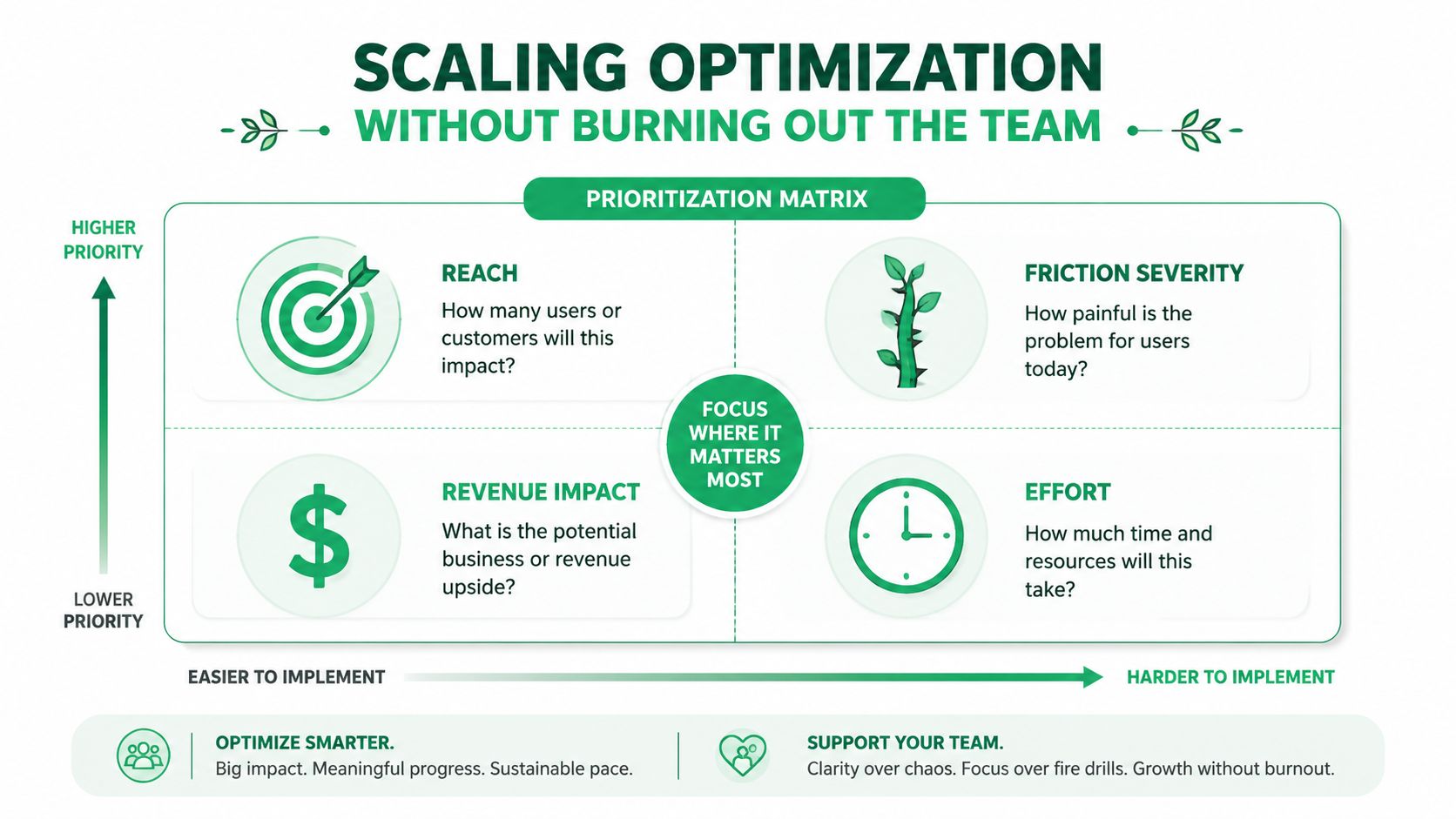
The program gets easier once the team stops treating every issue as equally urgent. I use a simple ranking model, reach, friction severity, revenue impact, and effort. If a journey touches a lot of orders, causes repeated complaints, and has a clear link to revenue, it goes to the top. If it's clever but narrow, it waits.
The dashboard that actually gets reviewed
A Shopify Plus ops team doesn't need fifty metrics. It needs a small weekly view that answers whether the post-purchase layer is getting cleaner or messier.
- Support tickets per order: tells you whether self-service is reducing avoidable contacts.
- AOV contribution from post-purchase upsells: shows whether the Thank You and Order Status pages are earning their keep.
- Edit rate before fulfillment: indicates whether shoppers are using the self-serve path.
- Delivery success rate: reflects whether validation and data quality are doing their job.
- Repeat purchase rate: gives the broadest read on whether the post-purchase experience is helping retention.
The point of the dashboard isn't to admire it. It's to decide what ships next. If edit rate is low but tickets are high, the flow probably isn't discoverable enough. If upsell revenue is flat but order tagging shows engagement, the offer logic needs work. If delivery problems persist, the address checks or permission rules need tightening.
When the store outgrows a self-serve app, that usually shows up in 3PL complexity, ERP rules, or approval logic that can't stay manual forever. At that point, higher-tier plans, dedicated account management, and integrations stop being nice extras and start becoming operational requirements.
Keep the backlog tight, ship the obvious fixes first, and review the post-purchase KPIs every week with support, ops, and merchandising in the same room. If you want a single place to start, pick the journey that creates the most tickets and the most missed revenue, then make it self-serve, measurable, and safe to run. A good next step is to trial SelfServe on one high-volume flow, compare the results against your current ticket load and post-purchase AOV, and use that read to decide whether it deserves a wider rollout.