Your Guide to the Ecommerce Contact Center

Let's face it, the term "call center" probably brings a specific image to mind: rows of agents in headsets, stuck in a department completely separate from the rest of the company. That model is a relic. Today’s top ecommerce brands run on something far more powerful: an ecommerce contact center.
This isn't just a new name for the same old thing. It's the command hub for all your customer conversations, weaving together every channel—phone, email, live chat, and social media—into one unified system. It connects your support team directly to your sales, marketing, and fulfillment data to create a single, seamless experience for your customers.
What Is an Ecommerce Contact Center

Think of it like an air traffic control tower for your customer experience. In the old call center days, each channel was its own separate runway, operating in total isolation. An agent answering a phone call had no idea that same customer just abandoned their shopping cart or was tweeting about a shipping delay. This led to clumsy, frustrating conversations that made customers feel like they were talking to a different company each time.
The modern ecommerce contact center is a completely different beast. It’s an integrated ecosystem where every customer interaction is part of a single, ongoing conversation. When someone emails you, then opens a live chat, and finally calls in, your agent sees the entire history. For any high-volume Shopify store managing hundreds or thousands of daily interactions, this unified view isn’t a luxury—it’s essential.
Traditional Call Center vs Modern Ecommerce Contact Center
The shift from a traditional call center to a modern contact center is fundamental. It's a change in technology, mindset, and ultimately, business goals. Here’s a quick breakdown of the key differences:
| Aspect | Traditional Call Center | Modern Ecommerce Contact Center |
|---|---|---|
| Primary Channels | Phone, maybe email. | Omnichannel (phone, email, chat, social media, self-service). |
| Agent Focus | Resolve tickets as quickly as possible (efficiency). | Solve the customer's problem and build a relationship (effectiveness). |
| Customer Data | Siloed; limited to past call records. | Integrated 360-degree view (order history, browsing, past tickets). |
| Business Role | Seen as a necessary cost center. | Positioned as a revenue driver and loyalty engine. |
| Operational Style | Reactive; waits for customers to report problems. | Proactive; identifies and solves issues before they escalate. |
As you can see, the modern approach is about playing offense, not just defense. It's about using support as a tool to deepen customer relationships and grow the business.
From Cost Center to Revenue Driver
For years, C-suites viewed customer support as a cost center—a line item on the budget that needed to be minimized. An ecommerce contact center flips that script entirely, turning your support team into a surprisingly effective engine for revenue and retention.
When service is fast, personal, and genuinely helpful, you build the kind of trust that keeps customers coming back. For example, an agent who can see a customer's entire order history might suggest a complementary product or proactively fix a shipping address error before it causes a delay. They just turned a potential problem into a moment that strengthens brand loyalty.
The numbers back this up. Research has shown that improving customer retention by just 5% can increase profits by anywhere from 25% to 95%. That's the power of great service.
The goal of an ecommerce contact center isn't just to close tickets. It’s to create a connected journey that eliminates frustration and makes customers feel valued. It’s the difference between just answering a question and actually building a relationship.
The Shift to Proactive, Integrated Support
Moving from a reactive call center to a proactive contact center is a major operational upgrade. It means getting all your tech to talk to each other—your helpdesk, your CRM, and your ecommerce platform like Shopify all need to be in sync.
This integration gives your team superpowers:
- True Omnichannel Support: Customers can start a conversation on chat and finish it over the phone without ever having to repeat their issue.
- 360-Degree Customer View: Agents see everything—past orders, returns, support tickets, and even recent browsing activity—to provide incredibly personal and relevant help.
- Proactive Problem-Solving: Your system can flag a potentially fraudulent order or an invalid shipping address, allowing an agent to reach out before the customer even knows there’s a problem.
- Self-Service That Actually Works: A huge piece of the puzzle is giving customers the tools to solve common issues themselves, which frees up your agents for more complex problems. You can learn more about this in our guide on what customer self-service is.
Ultimately, a well-run ecommerce contact center acts as the central nervous system for your brand. It ensures every customer-facing part of your business works together to deliver an experience that sets you apart from the competition.
The Core Channels Shaping Customer Conversations
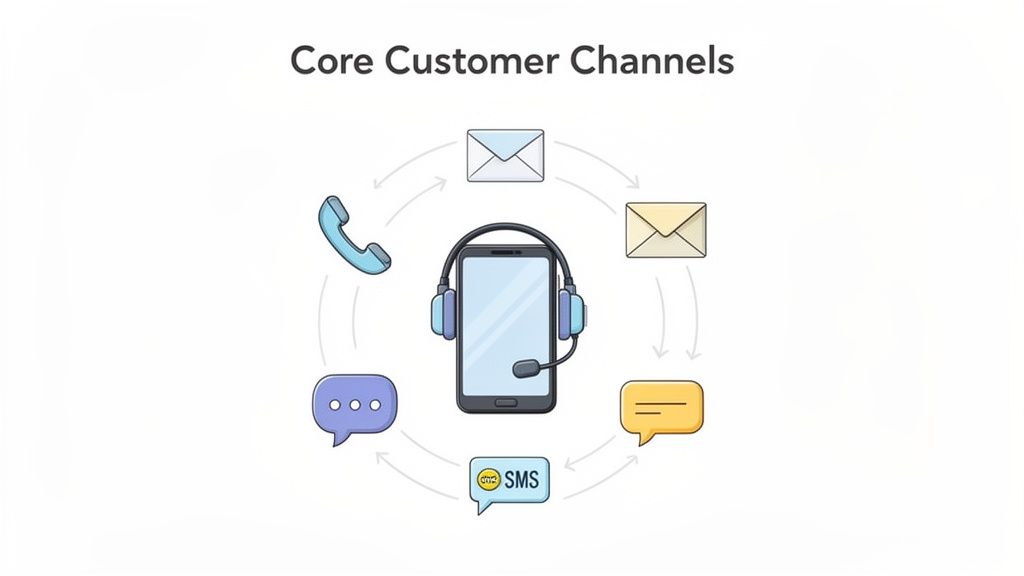
Think of your contact center as the central hub where all customer conversations happen. But not all conversations are the same, and your customers will want to connect on their own terms. The channels you offer are the doors to that hub, and knowing which ones to open is key to a support strategy that actually works.
It’s not about being everywhere at once. It’s about being effective where it matters most. For instance, if you sell high-end electronics, phone support might be your MVP for handling complex troubleshooting. But if you’re a fast-fashion brand, your customers probably live in your social media DMs and expect instant answers via live chat.
The Enduring Power of Phone Support
Even in our digital-first world, never underestimate the power of a simple phone call. When an order is seriously wrong, a payment won’t go through, or a customer is just plain frustrated, hearing a calm, helpful human voice is often the only thing that will de-escalate the situation.
For urgent problems, the phone is still king. In fact, over half of retail customers will pick up the phone when the stakes are high. Text-based channels are great, but they can’t always deliver the same level of empathy and immediate reassurance.
Digital Channels Built for Speed and Convenience
While the phone is for fires, your digital channels are for the everyday flow of questions and updates. Live chat, SMS, and social media DMs are all about giving customers quick, convenient answers that fit into their busy lives.
- Live Chat: This is your on-site problem solver. It’s perfect for answering a quick product question or helping a customer who’s stuck at checkout, making it a fantastic tool for preventing lost sales.
- SMS & Social Media DMs: These channels meet customers right where they are—on their phones. They feel personal and are ideal for sending out order confirmations, shipping updates, and quick replies to support questions.
- Email: Email is still the reliable workhorse for issues that aren't urgent but need a clear paper trail. It’s perfect for handling return instructions, complex inquiries, and documenting everything for both you and your customer.
We're seeing a clear shift in habits. While email support is slowly tapering off, channels like live chat, social media, and SMS are gaining ground every year. A 2025 Plivo report on contact center trends dives deeper into these changes.
The Non-Negotiable Omnichannel Experience
Here’s the thing: just having these channels isn’t enough. They have to talk to each other. This is what we mean by an omnichannel strategy. A customer journey might start with a live chat, move to an email with screenshots, and end with a phone call to finalize a return.
In a true omnichannel ecommerce contact center, the agent handling that phone call can see the entire conversation history from the chat and email. The customer never has to repeat themselves. It’s a seamless, respectful experience that builds incredible brand loyalty.
When your channels are stuck in silos, customers are forced to start over at every turn, which is incredibly frustrating. Getting this right is a huge competitive advantage, especially since only 36% of contact center leaders feel they have a truly unified omnichannel setup.
With so many support requests revolving around "Where is my order?", streamlining this process is a must. You can get a head start by learning how to choose the right track package software for your business.
Key Metrics That Define Contact Center Success
If you're only tracking how many tickets your support team handles, you're flying blind. Raw ticket volume tells you how busy your agents are, but it says nothing about whether they're actually helping your customers or protecting your bottom line.
Think of it this way: ticket count is just your speedometer. It shows you're moving, but it doesn't tell you anything about your engine's health, your fuel level, or if you're even headed in the right direction. To get the full picture, you need to look at the metrics that measure what truly matters: efficiency and effectiveness.
Gauging Your Team's Efficiency
Efficiency metrics get down to how well your team is using its most valuable resource: time. While speed for speed's sake is a trap, a slow, clunky support process is a guaranteed way to frustrate customers and drain your profitability.
Two classic metrics are worth watching here:
- Average Handle Time (AHT): This is the total time an agent is occupied with a customer issue, from "hello" all the way through their after-call notes. Everyone wants a low AHT, but there's a catch. If agents are rushing just to hit a number, they might be giving half-baked answers that lead to follow-up calls.
- Agent Utilization: This shows you what percentage of an agent's paid time is spent actively helping customers. While you want this number to be healthy, pushing for 100% utilization is a direct path to agent burnout. It leaves no room for coaching, team meetings, or breathing room between tough calls.
The real goal is to find a balance. A low AHT is fantastic, but only if the customer's problem is actually solved. That’s where the most important metrics come into play.
Measuring What Really Matters: Effectiveness and Impact
Effectiveness metrics tell you the most important part of the story: are you solving problems and making customers happy? These KPIs have a direct, measurable impact on customer retention and revenue.
In an ecommerce contact center, success isn't just about closing tickets faster. It's about resolving issues completely on the first attempt, creating an experience that encourages customers to come back and spend more.
Here are the metrics that should be on every ecommerce leader's dashboard:
- First-Call Resolution (FCR): This is the holy grail. It’s the percentage of issues you solve in a single conversation, with no follow-up needed. The average FCR for ecommerce call centers hovers around 75%, and for good reason. According to call center statistics from Sprinklr, when a customer’s issue is solved on the first try, they are 2.1x more likely to recommend your brand.
- Customer Satisfaction (CSAT): The most straightforward way to take the customer's pulse. A simple post-interaction survey asking, "How satisfied were you with your support?" gives you immediate feedback on agent performance and the overall experience.
- Net Promoter Score (NPS): This metric zooms out from a single interaction to gauge overall brand loyalty. By asking customers how likely they are to recommend you to a friend, you get a powerful read on long-term customer health and your brand's reputation.
At the end of the day, all these numbers are connected. A great FCR almost always drives a higher CSAT score. When you resolve issues quickly and effectively, customers notice. In fact, when wait times are satisfactory, consumers are 2.6x more likely to buy from you again.
On the other hand, the cost of getting it wrong is steep, with 53% of bad experiences causing customers to cut their spending with a business. When you focus on FCR and CSAT, your contact center stops being a cost center and becomes a powerful engine for protecting your revenue.
Building Your Ecommerce Tech Stack
Think of your contact center's technology stack like a chef's kitchen. You can have the most talented chefs in the world, but if they're stuck with dull knives, mismatched pans, and a broken oven, the food just won't come out right. The same goes for your support team. A well-built tech stack puts the right tools in their hands, all working together perfectly.
The entire point is to get rid of that dreaded moment when an agent has to say, "One moment while I look that up." A truly connected system brings every customer detail—from their first visit to their most recent return—into a single, unified view. This is the bedrock of fast, intelligent customer support.
The Essential Tech Trio
At the center of any great ecommerce support operation are three core platforms. They act as the brain, heart, and hands of your customer service, each with a specific job but all working in sync.
- Helpdesk Platform: This is your command center. It pulls every customer conversation from every channel—email, chat, social media, phone—into one organized place. It's where the day-to-day work of talking to customers happens.
- Customer Relationship Management (CRM): If the helpdesk handles the conversation, the CRM handles the relationship. It’s the long-term memory, tracking things like a customer's total spending, their marketing preferences, and their entire interaction history.
- Ecommerce Platform: For most online brands, this means Shopify. It's the ultimate source of truth for everything transactional: orders, products, inventory, and fulfillment. A rock-solid integration here isn't just nice to have; it's non-negotiable.
Key Integrations That Power Performance
The real magic happens when these core systems connect and share information with the other critical tools your business relies on. Without these connections, your agents are stuck juggling a dozen browser tabs, slowing them down and creating opportunities for mistakes. A core piece of this puzzle is powerful call centre software, which acts as the hub for your voice communications.
These are the integrations that truly make a difference:
- Shopify Integration: This is the big one. It lets agents see a customer's full order history, process refunds, and check on shipping, all without leaving their helpdesk.
- Third-Party Logistics (3PL) Integration: By connecting to your fulfillment partner's system, agents get a direct line of sight into warehouse inventory, package tracking details, and estimated delivery dates.
- Enterprise Resource Planning (ERP) Integration: For larger, more complex brands, linking to an ERP gives your team access to deeper business data, from supply chain logistics to detailed financial information.
Success isn't just about having the tools; it's about how they help you hit your goals. Balancing key metrics like Customer Satisfaction (CSAT), First-Contact Resolution (FCR), and Average Handle Time (AHT) is what separates good contact centers from great ones.

As you can see, these metrics are all interconnected. Improving one often has a positive effect on the others, leading to overall success.
The Role of Self-Service Technology
A truly modern tech stack doesn't just make your agents' lives easier—it gives power directly to your customers. Adding a self-service tool is one of the smartest moves you can make to cut down on repetitive questions and give customers the instant answers they expect. This is exactly where a tool like SelfServe shines.
By placing an automated order management widget on your order confirmation and tracking pages, you let customers help themselves. They can fix a typo in their shipping address, update their phone number, or even cancel an order—all on their own, no agent required.
This strategy pays off in two huge ways. First, it kills a massive chunk of your "Where is my order?" (WISMO) tickets and other simple requests. This frees up your agents to handle the tricky, high-stakes problems that actually require their expertise.
Second, it delivers the instant, 24/7 experience that customers now demand. Instead of waiting hours for an email response, a customer can solve their own problem in seconds. That’s how you turn a moment of potential frustration into a positive brand experience.
How Automation and AI Are Reshaping Customer Support
For a long time, customer support was seen strictly as a cost center—a necessary expense. But that mindset is changing, fast. With the smart application of automation and Artificial Intelligence (AI), ecommerce contact centers are evolving into strategic assets that not only solve problems but also boost revenue.
Think of AI less as a robot replacement and more as a superpower for your human agents. It works in the background, making your team faster, smarter, and more effective. For instance, AI can instantly read and understand incoming support tickets, automatically tagging them ("return request," "shipping question") and routing them to the perfect agent for the job. This simple act of intelligent sorting ensures your senior agents tackle the tricky issues, while common questions get answered in a flash.
Making Your Agents More Productive
When agents are equipped with AI-powered tools, the results speak for themselves. The system can surface the right answers, pull up a customer's entire order history, and handle the tedious copy-pasting, freeing up the agent to focus on the actual conversation.
This isn't just theory; the numbers back it up. Contact centers using AI report a 14% increase in issues resolved per hour and a 9% drop in the time it takes to handle each ticket. With the conversational AI market expected to rocket from $17.05 billion in 2024 to nearly $50 billion by 2031, it's clear this is no passing trend. You can find more data like this in these call center statistics from Xima.
AI isn't here to replace your support team. It’s here to augment them. It gives your agents the context and tools they need to solve problems faster, with less manual work, which ultimately creates a far better customer experience.
The Power of Letting Customers Help Themselves
While AI is great for your agents, its biggest impact might come from empowering your customers. Today's shoppers are resourceful. They don't always want to wait in a queue or for an email reply; they want instant answers and the ability to manage their own orders.
This is a massive shift in consumer expectations. A recent study found that 40% of leaders see growing customer demand for 24/7 support. It's no surprise, then, that 51% of contact centers now offer self-service options, with another 35% planning to launch them soon.
A perfect use case is automating post-purchase requests. Think about simple order edits or cancellations. Instead of forcing a customer to file a support ticket for a small change, why not let them do it themselves, instantly?
Here’s what a modern self-service portal, built with a tool like SelfServe, looks like in action:
This clean interface lets a customer update their shipping address or contact info on their own, right from the order tracking page. The problem is solved in seconds, with zero agent involvement.
By adding a simple, intuitive widget like this to your site, you can deflect a huge volume of repetitive tickets. This move is a win-win: customers get the instant gratification they crave, and your highly-trained agents are freed up to handle the complex, high-value conversations that truly require a human touch. To learn more about setting this up, read our guide on how to automate customer service.
Your Implementation Checklist for 2026
Alright, let's get practical. Moving from the idea of a modern contact center to actually having one up and running takes a solid plan. This isn't just about buying new software; it's about building a system that genuinely serves your customers and makes your team's life easier.
Think of it like building a house. You need a blueprint before you start swinging a hammer. We'll walk through this process step-by-step, starting with the foundation and adding the features that will make your support experience stand out.
Phase 1: Define Your Core Strategy
Before you even look at a single piece of software, you have to define what success means for your brand. This is all about understanding who your customers are, what they need from you, and how you’ll measure your performance.
- Audit Your Current Support: Get your hands dirty and dig into your existing support tickets. Where are you spending the most time? The answer to that question reveals your biggest opportunities for improvement and automation.
- Define Your Support Channels: Who are you talking to? A younger audience might live on social media and chat, while customers with complex, high-value orders might need the reassurance of a phone call. Choose the channels that meet your customers where they are.
- Set Key Performance Indicators (KPIs): Decide what winning looks like by setting clear targets. Aim for specific numbers on metrics like First-Call Resolution (FCR) and Customer Satisfaction (CSAT) so you know if you're moving in the right direction.
Phase 2: Build Your Technology Foundation
With a clear strategy in hand, it's time to choose the tools that will bring it to life. The name of the game here is integration. You want a single, unified view for your agents, not a dozen disconnected tabs.
- Select a Helpdesk Platform: Your helpdesk is your command center. Pick one that brings email, chat, phone, and social media into one clean interface. Make sure it has a rock-solid integration with Shopify.
- Integrate Your Ecommerce Platform: This is non-negotiable. Connecting your helpdesk directly to Shopify gives agents instant access to order history, customer data, and the ability to process refunds without ever leaving their workflow.
- Connect Other Key Systems: Loop in your 3PL for live shipping updates and your ERP or CRM for a complete picture of the customer journey. The more connected your systems are, the faster your team can solve problems.
Phase 3: Implement Self-Service and Automation
This is where you'll see the biggest wins in reducing ticket volume and boosting team efficiency. By giving customers the power to solve their own problems, you free up your agents to handle the truly complex issues.
Don't treat self-service as an afterthought. Integrating a tool like SelfServe from day one immediately takes pressure off your team. Customers can handle their own order edits, like changing a shipping address or canceling an order, without ever needing to create a ticket.
Automating common post-purchase requests is a huge lever for efficiency. This checklist breaks down how to get started with a self-service tool.
Post-Purchase Workflow Automation Checklist
| Step | Action Item | Key Benefit |
|---|---|---|
| 1. Configure Order Edits | Set rules in SelfServe for what customers can change (e.g., address, contact info) and for how long after purchase. | Reduces manual data entry for agents and prevents costly shipping errors. |
| 2. Enable Address Validation | Activate real-time address validation to catch typos and formatting issues as customers enter their information. | Dramatically lowers the rate of returned-to-sender packages. |
| 3. Create Post-Purchase Upsells | Set up curated product recommendations on the order status page, allowing customers to add items to their existing shipment. | Generates new revenue from existing orders and increases Average Order Value (AOV). |
| 4. Automate Chat Responses | Use chatbots to answer common questions like "Where is my order?" by pulling tracking data directly from your integrated systems. | Provides instant, 24/7 answers to your most frequent inquiries. |
Automated chat is a powerful tool for instant support. For a comprehensive outlook on future trends, consult this 2026 guide on AI chatbots for ecommerce. By following these steps, you build a support engine that’s not just reactive, but proactive.
Frequently Asked Questions
As you build or scale your ecommerce support, you'll inevitably run into some big questions. How many people do I hire? What numbers actually matter? Is this even worth the investment? Let's get straight to the answers every ecommerce operator is looking for.
How Many Support Agents Do I Need?
This is the million-dollar question, and the honest answer is: it depends. There's no one-size-fits-all number. The right headcount comes down to your ticket volume, how complex your customer issues are, and which channels you're covering.
The best way to get a realistic estimate is to start with your own data. Let's do some quick back-of-the-napkin math. Dig into your helpdesk and find your average monthly ticket volume and your agents' Average Handle Time (AHT).
If you’re getting about 2,000 tickets a month and it takes an agent 10 minutes to resolve each one, that’s roughly 333 hours of work. A full-time agent usually spends about 140-150 hours a month actively working on tickets. Based on that, you'd need at least two, maybe three, agents to handle that volume without everyone burning out.
Pro-Tip: Don't staff for your Black Friday peak all year long. That's a recipe for overspending. Instead, staff for your normal, average volume. You can always use automation or bring in temporary help to manage the seasonal rushes during holidays and big sales. This keeps your core team sharp and avoids paying for downtime.
What Is the Most Important Metric to Track?
Every team lead talks about CSAT and Average Handle Time, and yes, they're important. But if you have to pick just one KPI to obsess over, make it First-Call Resolution (FCR). This metric tells you what percentage of customer problems are solved in the very first contact, with no follow-up needed.
Why is FCR the king of metrics?
- It creates loyal customers: Nailing a solution on the first try instantly turns a frustrating problem into a surprisingly positive brand experience.
- It slashes operational costs: Every "just checking in" email or follow-up call costs you money and drains your agents' time. A high FCR plugs that leak.
- It’s a health check for your whole operation: A strong FCR score is a clear sign that your agents have the right training, your tools are properly integrated, and your processes actually work.
Focusing on FCR forces you to get everything else right, from how you train your team to how well your helpdesk talks to your other systems.
How Do I Calculate the ROI of a Contact Center?
Thinking of your contact center as a "cost center" is an outdated approach. To see the real picture, you need to calculate its Return on Investment (ROI) by measuring its impact on both savings and revenue.
The classic formula still applies: (Gain from Investment - Cost of Investment) / Cost of Investment.
Here’s how to break that down for your support team:
- Cost of Investment: This is the straightforward part. Add up your agent salaries, software subscriptions (like your helpdesk or self-service tools), and any training expenses.
- Gain from Investment: This is where the magic happens. Your "gain" comes from a few places: ticket deflection (every ticket solved by self-service is a direct cost saving), higher Customer Lifetime Value (LTV) from happy, loyal customers, and even direct revenue from post-purchase upsells your team or tools facilitate.
Think about it this way: if a self-service widget costs you $300 a month but stops 500 tickets from ever being created—tickets that would have cost you $5 each to handle—you just saved $2,500. Suddenly, that $300 looks like a fantastic investment, and your contact center is a proven value-driver, not a cost.
Ready to reduce support tickets and increase AOV with a powerful self-service solution? SelfServe empowers your customers to manage their own orders, from editing shipping details to adding post-purchase upsells, all on their own. Start your free trial at https://getselfserve.com.