A 2026 Guide to Processing Sales Orders on Shopify at Scale

If you're running a growing Shopify store, you already know the pattern. Orders come in fast, support asks for address fixes, a customer wants to cancel before fulfillment, inventory looks right in Shopify but wrong in the warehouse, and someone on the team starts editing orders by hand just to keep shipments moving.
That kind of scramble feels normal when volume rises. It isn't. It's a sign that your order workflow hasn't caught up with your growth.
Processing sales orders at scale isn't just about getting boxes out the door. It's about controlling exception volume, protecting margin, and giving customers a smoother post-purchase experience without burying support and ops in repetitive work.
The Hidden Costs of Manual Order Processing
Monday morning order ops usually fails in small ways before it fails in big ones. A wrong apartment number. A stale shipping address saved in Shop Pay. A cancellation request buried in an inbox. A warehouse hold because one line item didn't sync correctly. None of those issues looks catastrophic on its own.
The problem is volume. Once you process enough orders, small mistakes stop being noise and start becoming a system.

Manual work doesn't stay contained
A lot of teams still treat manual order fixes as a normal cost of doing business. That's the wrong assumption. According to Erplain's write-up on sales order processing, citing a 2023 McKinsey report, manual order entry in SMEs leads to error rates of 1-5% per order, and those issues can amplify into 20-30% of total support tickets being tied to post-purchase changes like address edits or cancellations.
That matters because support, fulfillment, and finance all end up paying for the same bad data.
- Support pays first: agents spend time on edits that customers could handle themselves.
- Ops pays next: the warehouse gets last-minute changes through Slack, email, or comments.
- Finance pays later: refunds, reships, and preventable returns chip away at margin.
Manual processing rarely breaks in one dramatic moment. It breaks through repeated exceptions that teams start accepting as normal.
The real cost is workflow instability
The biggest hidden cost isn't labor alone. It's unpredictability. When order edits happen in inboxes, spreadsheets, or side conversations, nobody has a clean source of truth. That creates hesitation at fulfillment handoff, especially when a team is trying to ship same day.
I've seen fast-growing brands add more people to absorb this chaos instead of fixing the workflow. That works briefly. Then volume grows again, and the same team spends more time coordinating than processing.
A stronger foundation starts with the order itself. If your current stack doesn't make validation, edits, approvals, and fulfillment status visible in one system, your team is patching leaks. A useful starting point is understanding how a proper Shopify order management system should structure those handoffs before you add more headcount.
The Modern Order Processing Workflow for Shopify
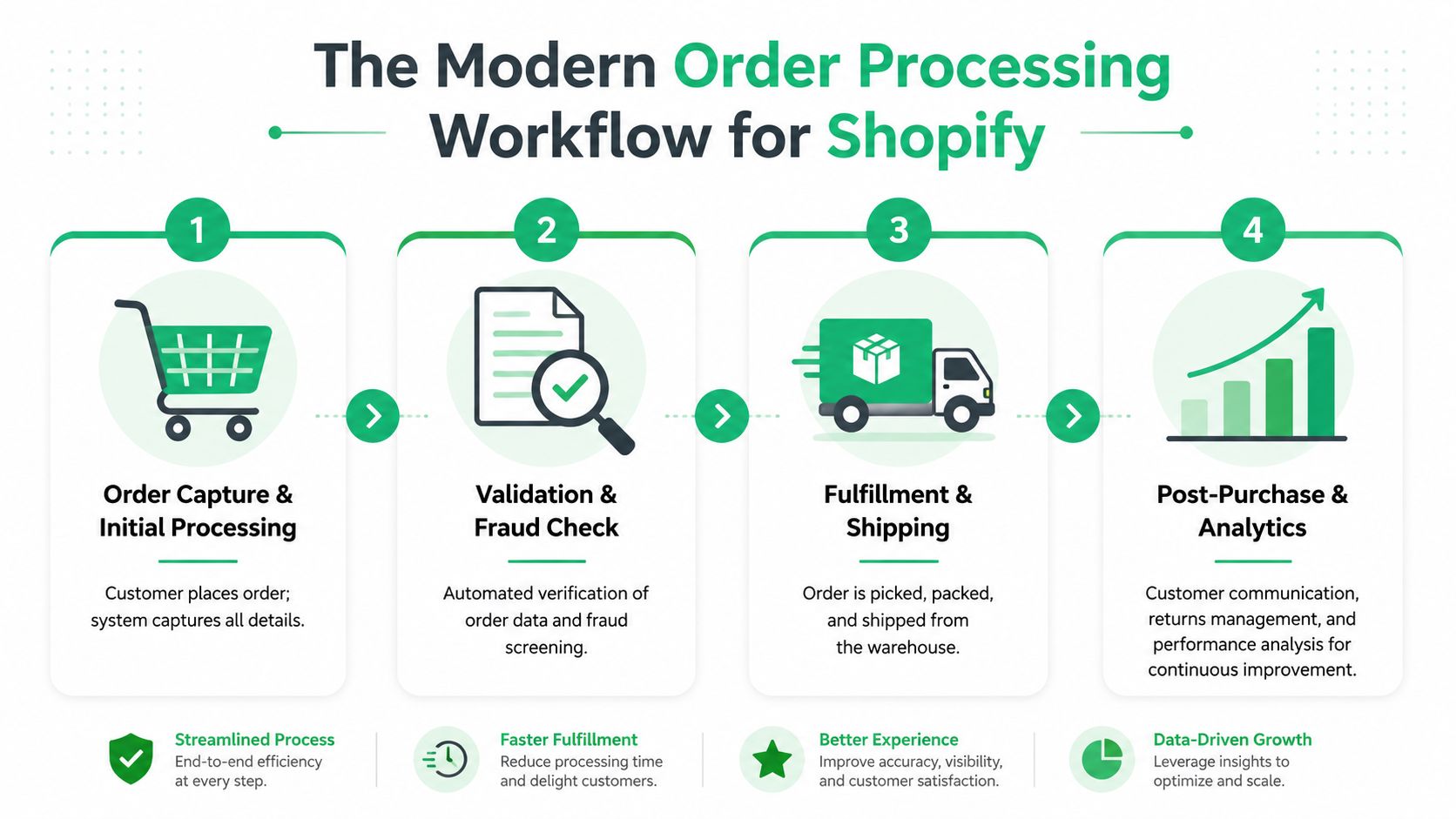
A customer places an order at 2:07 p.m. By 2:10, the payment is cleared, the address is checked, inventory is reserved, and the order is either released to the warehouse or held with a clear reason code. That is the standard high-growth Shopify brands should build toward.
A modern workflow does two jobs at once. It moves clean orders through fast, and it creates controlled points where customers can still make approved post-purchase changes without forcing support to mediate every request. That second part matters. If order processing and self-service live in separate systems, teams end up creating exceptions by hand.
Order capture and validation
The first stage is capture, but the main work starts the moment Shopify creates the order event.
Every order needs a fast validation layer before release. That includes payment status, fraud review, SKU normalization, shipping method checks, address quality, tax handling, and any rules tied to subscriptions, bundles, or restricted products. Analysts at IBM on order management systems describe this well. Strong order workflows depend on accurate data and coordinated handoffs across systems, not just fast checkout.
A practical setup usually follows this sequence:
- Receive the order in real time: Use Shopify events or app triggers so the workflow starts immediately.
- Run validation rules: Check whether the order is safe to release, hold, or route for review.
- Assign a status with a reason: Approved, held, edited, fraud review, inventory issue, or shipping exception.
- Open a controlled customer action window where appropriate: Let customers fix low-risk issues, such as address details, inside a post-purchase self-service customer portal instead of sending those changes through support.
Teams get into trouble when they skip the reason codes. A held order without a clear cause usually turns into Slack messages, duplicate reviews, and delayed shipments.
Practical rule: If your team has to open each order to decide what happens next, the workflow is still manual.
Inventory sync and fulfillment handoff
Once an order passes validation, release control matters more than raw automation volume.
Inventory, routing, and fulfillment status need to stay aligned across Shopify, your WMS, any ERP in the stack, and your 3PL. If one system updates late, the warehouse acts on stale information. That is how brands end up with oversells, avoidable splits, and customer edits arriving after pick and pack has already started.
The handoff should include a few concrete controls:
- Reservation logic: hold stock only after the order is approved for release
- Routing rules: send orders by warehouse, geography, carrier promise, or SKU constraints
- Edit protection: pause release if a customer is still inside an approved edit window
- Exception quarantine: prevent flagged orders from reaching fulfillment until the issue is resolved
Self-service must connect directly to operations. If a customer updates an address or adds an item after checkout, that action should update the order workflow directly, not create a side conversation for support to relay later. Done well, self-service reduces tickets and protects the warehouse from late manual changes at the same time.
If you're reviewing stack decisions as order volume grows, this perspective from Wonderment Apps digital product engineering is useful because it treats fulfillment architecture as an operating model decision, not just a platform feature checklist.
Customer communication and feedback loops
The best workflows keep customers informed without making support the delivery mechanism.
Order confirmation, hold notifications, edit windows, release status, and shipment updates should all be tied to system events. Customers should know whether the order is locked, still editable, under review, or already handed to fulfillment. That clarity reduces "where is my order?" tickets, but it also creates room for revenue. A customer who can still add an item or correct delivery details through the workflow is easier to serve than one who has to contact support and wait.
Good communication here is operational, not cosmetic. It keeps the order moving, sets expectations early, and makes post-purchase changes manageable at scale.
Empowering Customers with Post-Purchase Self-Service
A customer places an order at 11:42 p.m., then notices the apartment number is missing. If the only fix is opening a ticket, your team is now racing the warehouse clock. At scale, that is an expensive way to handle a common mistake.
For Shopify brands shipping meaningful volume, post-purchase self-service reduces that pressure. It gives customers a controlled way to fix routine issues, add to an order, or request a cancellation before fulfillment locks the shipment. That matters for support costs, but it also matters for revenue because the same workflow that captures an address correction can also present a relevant add-on while the order is still editable.

Self-service creates better control, not less
Ops teams usually worry that customer edits will create fulfillment chaos. The opposite is true when the rules are clear. A permission-based flow is easier to control than email because it limits what can be changed, for how long, and which updates need review before release.
That structure is especially useful for international orders. Address formats differ by country, transliteration introduces errors, and customers often catch problems only after checkout. Instead of asking support to retype details and hope the warehouse sees the note in time, the system records the change directly on the order and keeps an audit trail.
A good setup usually allows customers to:
- Correct shipping details: especially apartment, postal, and local address fields.
- Update contact information: useful when tracking and delivery messages would otherwise fail.
- Request a cancellation: not auto-approved in every case, but routed into an approval queue.
- Add approved items: limited to products your team can append without changing the fulfillment plan.
- See status clearly: so they know whether the change is accepted, pending review, or locked.
Teams lose control when edits happen outside the workflow. They gain control when edits happen inside rules.
International order edits need structure
Cross-border orders expose weak process design fast. A support inbox is slow, language differences increase the chance of bad manual updates, and carrier cutoffs leave little room for back-and-forth.
That is why I prefer a structured customer-facing layer over ticket-based fixes. A self-service flow with validation, permissions, and order-state awareness handles these requests more cleanly than email. If you're mapping the operational design, this guide to a self-service customer portal is a useful reference.
For teams looking at the support model from a wider angle, Halo AI's perspective on achieving autonomous customer support is useful because it frames repetitive order requests as a workflow design problem.
A mature self-service setup should include:
- Defined edit windows: changes are allowed only before fulfillment reaches a lock point.
- Address validation: bad input should be caught before it reaches the warehouse.
- Approval queues for risky actions: cancellations and some line-item changes may still need review.
- Order-state logic: editable orders can accept changes, while packed or handed-off orders cannot.
- Audit trail visibility: ops and support should see who changed what and when.
The trade-off is straightforward. The more flexibility you give customers, the tighter your rules need to be behind the scenes. I usually recommend starting with address edits, contact updates, and a short list of post-purchase add-ons that do not create pick-and-pack complexity. Expand only after the workflow proves reliable.
A quick product walk-through helps make this concrete:
Customers do not need unlimited freedom. They need a safe way to fix common mistakes and extend an order while your operation stays in control.
Turning Order Processing into a Revenue Generator
A customer places a $68 order, notices a matching refill or travel-size add-on after checkout, and adds it in one click before the order is released to the warehouse. If your workflow handles that change cleanly, order processing does more than protect margin. It creates new revenue without adding support tickets or slowing fulfillment.
Why post-purchase outperforms another checkout interruption
Checkout should stay focused on finishing the sale. Every extra choice at that stage adds risk. Post-purchase offers work differently because payment is already captured and customer intent is still high.
The upside is not just conversion. It is operational fit. A good post-purchase offer lets the customer increase basket size inside the same order flow, instead of creating a second order, a second pick ticket, and a second chance for support to get involved. That is one reason brands keep investing in post-purchase experience and automating core operations for scalability.
I have seen this go wrong when teams launch upsells before they define guardrails. The offer converts, then ops has to untangle appended SKUs, updated packing slips, and confused warehouse releases. Revenue gained at the thank-you page gets eaten by rework fast.
Revenue only counts if fulfillment can absorb it
The best post-purchase offers are operationally boring. They append products that are easy to pick, easy to understand, and easy to merge into an order that has not hit a lock point.
Use tight rules:
- Offer products that fit the original purchase: accessories, consumables, gift wrap, and low-complexity add-ons tend to create the least friction.
- Set a hard acceptance window: if the warehouse starts picking in 20 minutes, the offer should close before that.
- Update the order record automatically: fulfillment, support, and the customer should all see the same final order contents.
- Keep the offer narrow: one to three relevant add-ons usually outperform a crowded thank-you page and create fewer handling mistakes.
A post-purchase offer should behave like a controlled order edit, not a separate sales channel.
That distinction matters. If the workflow already supports approved changes before release, then a post-purchase upsell is another governed event in the same process. Teams that use order tagging to route post-purchase changes automatically usually handle this better because the warehouse can see what changed and what action is required without reading notes or waiting on support.
Treat AOV growth and support reduction as the same project
This is the part many Shopify teams miss. Post-purchase revenue does not sit apart from customer self-service. The same system that lets a customer fix an address or correct contact details can also let them add a relevant item before fulfillment locks the order.
That gives you two gains from one workflow. Support volume drops because customers do not need to email for simple changes. Average order value rises because the same controlled edit window can carry approved add-ons.
The trade-off is real. More flexibility requires tighter product eligibility, clearer cutoffs, and better warehouse visibility. Get those pieces right, and order processing stops being a back-office function that only prevents errors. It starts contributing revenue while keeping the operation easier to run.
Automation, Tagging, and Measuring What Matters
At 300 orders a day, a missed edit is annoying. At 3,000, it turns into reships, WISMO tickets, and a warehouse queue full of preventable exceptions.
That usually starts with poor order visibility. Shopify reflects one state, support logs another, and the 3PL receives a release feed with no clear signal that the order changed after checkout. The result is familiar. An address update gets missed, an upsell item never makes it into the carton, or a hold stays in place longer than it should.
Automation helps, but only if the order state is clear at every handoff.
Tagging should control action, not just add labels
Inside Shopify, tags work best when they mark a specific operational state with a defined next step. A picker should know what changed. A support agent should know whether the customer can still edit the order. Middleware should know whether to sync, hold, or reroute the order.
Useful tag categories include:
- Review tags: hold orders that need fraud, inventory, or policy review before release
- Edit tags: mark post-purchase changes to shipping details, contact data, or item quantities
- Upsell tags: flag orders with approved add-on items so fulfillment packs the current version
- Routing tags: send orders to the right warehouse, carrier rule, or handling lane
The standard matters more than the label itself. If one team uses "edited" and another uses "address-change," reporting breaks and warehouse handling slows down.
Teams that use automated order tagging for post-purchase changes and routing usually see faster handoffs because staff are not translating notes, Slack messages, and inbox threads into operational decisions by hand.
The same principle shows up in broader operations work. This piece on automating core operations for scalability gets the main point right. Automation saves time only when the trigger, status, and owner are obvious.
Measure the points where orders stall or get reworked
A useful KPI set should tell you four things. How many orders flow through untouched. Where manual work enters the process. What that extra handling costs. Whether customers feel the fallout.
I track a small set of numbers because too many dashboards hide the actual problem. Analysts at Docparser note that manual sales order processing drives higher per-order costs, while automation cuts handling time and reduces error rates. For a Shopify brand, that matters most in the edit window between checkout and fulfillment lock, where customer self-service can either remove support work or create warehouse confusion if the workflow is loose.
Here are the KPIs worth watching:
| KPI (Key Performance Indicator) | What It Measures | Good | Excellent |
|---|---|---|---|
| OTIF delivery | Whether orders arrive on time and in full | Consistent service with few misses | High enough that late or incomplete orders are rare |
| Order cycle time | Time from order receipt to delivery | Predictable for your fulfillment model | Tightly controlled with little variation |
| Order exception rate | Share of orders needing manual intervention | Low enough that the team is not working from a constant exception queue | Routine orders pass straight through with minimal review |
| Cost per order | Processing cost across validation, edits, and release | Lower than a manual workflow | Reduced further through automation and fewer reworks |
| Support ticket share tied to order edits | How much support time goes to address changes, contact fixes, and add-ons | Falling over time | A large share of common edit requests handled by the customer without agent help |
One metric deserves more attention than it gets. Support ticket share tied to order edits. If that number is high, the problem is not only support staffing. It usually means your order processing workflow still depends on humans to handle changes that should be governed by rules, time windows, and tagged states.
Good measurement changes queue design
If exception rate rises, tighten validation and review which edits should be accepted automatically. If OTIF slips, inspect release timing, cutoffs, and whether changed orders are being resent correctly to the 3PL. If cost per order stays stubborn, look for hidden touches such as address correction, duplicate order checks, or manual review of simple post-purchase add-ons.
The best operators measure rework, not just throughput.
That is what turns order processing into a controllable system. Clear tags drive clear actions. Clear actions produce cleaner reporting. And once the edit window, self-service events, and warehouse signals are measured together, you can reduce support load and protect fulfillment accuracy while still getting more revenue out of the same order stream.
Creating Your Sales Order Processing SOP
A strong workflow isn't finished until the team can follow it the same way every day. That's where an SOP matters. It turns tribal knowledge into repeatable execution.
Most brands overcomplicate this. Start with short, practical checklists for the scenarios that cause the most friction.
Standard order workflow
SOP template
- Shopify captures the order and triggers the validation workflow.
- System checks payment status, shipping details, SKU integrity, and routing rules.
- If the order passes validation, release it to inventory allocation.
- Sync order data to fulfillment systems.
- Send customer confirmation and shipment status updates automatically.
- Log exceptions separately for review rather than mixing them into the main queue.
Customer address edit workflow
SOP template
- Customer submits an address change within the allowed edit window.
- System validates the updated address before acceptance.
- If the order hasn't reached fulfillment lock, update the order record.
- Apply an internal review or edit tag if your warehouse needs a visible signal.
- Notify the customer whether the change was accepted or routed for review.
- Confirm that the updated order is the version sent to fulfillment.
Post-purchase upsell workflow
SOP template
- Present a limited set of approved add-on products after checkout.
- Accept additions only while the order is still eligible for modification.
- Append the new item to the existing order rather than creating a disconnected manual request.
- Apply the correct fulfillment signal so the packing team sees the revised contents.
- Reconfirm the updated order with the customer.
- Prevent release if the added item triggers any exception rule that needs review.
Cancellation request workflow
Keep cancellations out of email whenever possible. Use a structured request path, route edge cases to approval, and make the final order state visible to support, ops, and fulfillment at the same time.
Documenting these flows does two things. It protects the customer experience, and it stops your team from improvising under pressure. That's what scalable processing sales orders really comes down to. Fewer judgment calls, cleaner rules, and a workflow that can absorb volume without creating chaos.
If your team is spending too much time on address fixes, cancellations, and post-purchase order changes, SelfServe gives Shopify brands a controlled way to let customers manage those requests themselves while keeping ops in control. It also adds post-purchase upsell capability and automated tagging, so you can reduce support workload and turn the order workflow into a smoother revenue channel.