The Ultimate Shopify Order Management System Guide

Think of an air traffic controller for your online store—someone safely guiding every single order from the moment a customer checks out to the second it lands on their doorstep. In a nutshell, that’s what a Shopify order management system (OMS) does. It’s the central command center that organizes and automates everything that happens after the buy button is clicked.
Why Your Growing Store Needs More Than Basic Order Tracking
When you’re just starting out on Shopify, handling a few orders is simple enough. A basic spreadsheet or the standard Shopify admin panel gets the job done. But as your brand takes off, that manual approach quickly turns into a massive bottleneck, paving the way for costly mistakes and unhappy customers.
This is exactly where a real Shopify order management system comes into play. It’s not just another app; it’s the operational backbone of your entire business. Picture it as the central nervous system that links your storefront, inventory, warehouse, and shipping partners into one seamless, functioning unit. It handles all the tedious workflows that would otherwise eat up hours of your team's day.
The Tipping Point for Merchants
Sooner or later, most merchants hit a wall. It’s a clear tipping point where not having a proper system starts to seriously damage the bottom line. The signs might be small at first, but they snowball into major operational headaches. This isn't about hitting a specific number of orders; it's about when the complexity of managing them becomes too much to handle.
Here are the common growing pains that tell you it's time for an upgrade:
- Soaring Support Tickets: Your inbox is flooded with customers asking for order updates, wanting to change a shipping address, or needing to cancel an order.
- Costly Fulfillment Errors: The wrong items get packed. Orders are shipped to the wrong place. All of this leads to expensive returns and even more expensive reshipments.
- Inventory Nightmares: You accidentally oversell a hot product during a flash sale because your inventory didn't sync fast enough across all your sales channels.
- Workflow Breakdowns: Your team is spending way more time putting out fires and manually updating order statuses than they are on tasks that actually grow the business.
The scale of this challenge is huge. In 2023, Shopify's platform handled over 199 million orders every month. During peak sales events like Black Friday Cyber Monday, that number rocketed to $5.1 million in sales per minute. This kind of volume makes it crystal clear why a powerful Shopify order management system isn't a "nice-to-have"—it's essential for survival. You can dig deeper into Shopify's transaction volume stats on Red Stag Fulfillment's blog.
A modern OMS shifts your post-purchase process from being a reactive, money-draining headache into a proactive, strategic advantage. It stops you from just managing orders and helps you start optimizing the entire customer journey, from validation and fulfillment all the way to retention and repeat business.
At the end of the day, a dedicated system gives you the visibility and control you need to scale without breaking a sweat. It ensures that as your order volume multiplies, your operational quality and customer experience don't just keep pace—they actually get better.
What to Look For in an Order Management System
As your Shopify store picks up speed, you'll quickly discover that the built-in order tracking just can't keep up. The basic tools that got you here will start to crack under the pressure of higher volume and more complexity. To really scale your business, you need a system with specific features designed to handle the real-world headaches of a growing brand.
Think of it like this: Shopify's native order list is a simple to-do list. An actual Shopify order management system (OMS), on the other hand, is your mission control. One tells you what needs to be done; the other orchestrates the entire operation, manages all the moving parts, and flags potential problems before they derail your business.
Let’s get past the generic checklists and dig into the features that really move the needle. A modern OMS serves as the central brain for your entire operation, tying together orders, inventory, and customer data into one cohesive system.
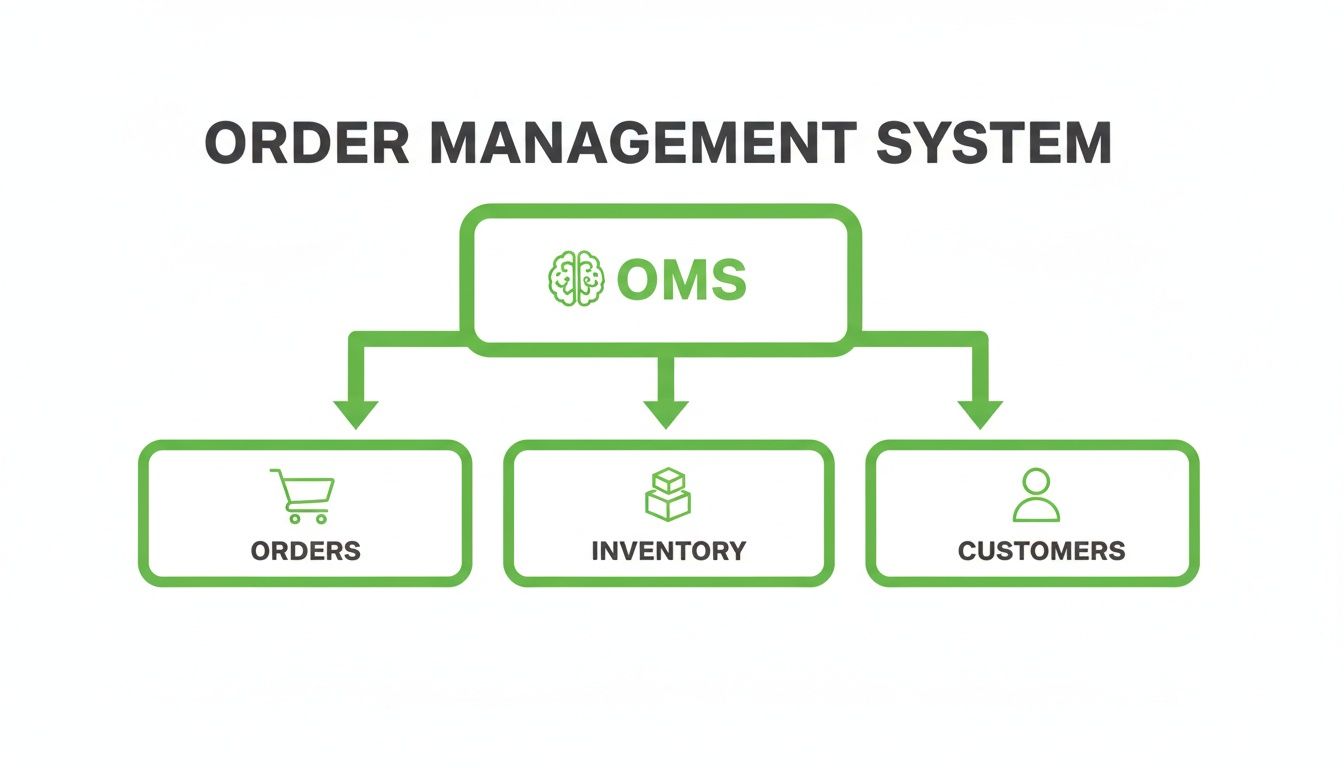
As the diagram shows, a good system isn't just a funnel for processing orders. It connects all the critical data points to help you make smarter, faster operational decisions.
Centralized Order Processing
At its core, an OMS must provide a single source of truth for every single order. Once you start selling on other channels—like Amazon, TikTok Shop, or even a pop-up store—orders come flying in from all directions. Without a central hub, your team is stuck toggling between different dashboards, which is a perfect recipe for missed orders and painful fulfillment delays.
The Problem: Your team spends hours manually exporting order data from three different platforms, trying to stitch it all together in a spreadsheet. It’s slow, full of human error, and gives you a view of your business that's already out of date.
The Solution: A centralized OMS pulls every order into one unified dashboard automatically. You get instant visibility and complete control, no matter where the sale happened.
Real-Time Inventory Syncing
Overselling a popular product during a flash sale is a rite of passage for many growing brands—and it's a nightmare. This happens when your inventory levels don't update instantly across every place you sell. The fallout is always the same: canceled orders, unhappy customers, and a hit to your brand's reputation.
A solid OMS makes this a non-issue with live inventory synchronization. When an item sells on your Shopify store, the system immediately updates the stock count on Amazon, in your retail POS, and anywhere else it's listed. For any brand selling on more than one channel, this feature is absolutely non-negotiable.
Automated Fulfillment Workflows
When you're dealing with hundreds or thousands of orders, manually deciding how to fulfill each one is simply impossible. An advanced OMS takes this off your plate by using automation to route orders based on rules you create. This logic can be surprisingly sophisticated, always finding the most efficient path for every package.
Here’s what that looks like in practice:
- Location-Based Routing: An order is automatically sent to the warehouse or 3PL closest to the customer, cutting down on shipping costs and delivery times.
- SKU-Specific Fulfillment: Orders with fragile items or custom products are routed to a specialized fulfillment center that knows how to handle them.
- Inventory Balancing: If one warehouse is low on stock, the system can split the order or send the whole thing from another location that has everything on hand.
Getting these workflows right is a huge part of scaling efficiently. If you want to dive deeper, you can explore more of these shipping and fulfillment best practices for Shopify merchants.
Customer-Facing Order Management
The best order management systems don't just work behind the scenes; they empower your customers, too. Think about it: why force a customer to open a support ticket just to fix a typo in their address? A modern OMS gives them the tools to solve these small problems themselves.
Features like customer-facing order editing and automated address validation are total game-changers. They let shoppers correct their own shipping info, swap a T-shirt size, or even add another product to their order after they've already checked out. This not only stops costly shipping errors before they happen but also takes a huge load off your support team, freeing them up to handle the truly complex issues.
The table below breaks down the key differences between what Shopify offers out of the box and what a dedicated OMS brings to the table.
Essential OMS Features vs Traditional Shopify Functionality
Ultimately, while Shopify provides a solid foundation, an OMS is the framework you build on top of it to support true, sustainable growth without the operational chaos.
The Untapped ROI in Post-Purchase Management
For most Shopify merchants, the moment a customer hits “Complete Order” feels like the finish line. The sale is in the bag, revenue is counted, and the team’s focus snaps right back to acquiring the next customer.
But that’s a huge mistake. This mindset completely overlooks one of the most valuable—and frankly, neglected—parts of the customer journey: the post-purchase window.
This period isn't just about the operational grunt work of shipping and tracking. It's a goldmine for both saving serious cash and generating brand-new revenue. A modern Shopify order management system flips this phase from a passive waiting game into an active, engaging experience that directly beefs up your bottom line.

From Cost Center to Profit Center
Let’s be honest, post-purchase interactions are traditionally seen as a cost center. A customer types in the wrong address, and boom—a support ticket is born. The package gets returned to sender, forcing you to eat the cost of reshipment. Someone needs a different size, tying up your team with manual order edits. Each one of these little scenarios bleeds time, money, and sanity.
Now, imagine a different way. A customer realizes they fat-fingered their zip code just minutes after checkout. Instead of frantically digging for a support email, they just click a link on their order status page, fix the mistake themselves, and get an instant confirmation. No panic, no hassle.
Business Case Example: Self-Service vs. Manual Support
- The Old Way (Manual Fix): A single customer support interaction costs, on average, around $15. A returned package and the subsequent reshipment can easily pile on another $10-$20. You’re looking at a total cost of $25-$35 per simple error.
- The Smart Way (Self-Service Fix): The customer solves their own problem in seconds. The cost to your business? $0. Your support team is free to handle complex issues, and a costly mistake is stopped dead in its tracks.
This simple shift from reactive fire-fighting to proactive self-service delivers an immediate, tangible return on investment. You're not just saving money on support tickets and shipping fees; you're building a more resilient, efficient operation and giving customers a smoother experience they’ll remember.
Turning Order Status Pages into Revenue Engines
Saving money is just one side of the coin. The post-purchase window is also the perfect time to boost a customer's lifetime value. Think about a customer’s mindset right after they buy from you. They're excited, highly engaged, and you can bet they’re refreshing their order status page over and over again.
This makes that humble order status page one of the most valuable pieces of digital real estate you own. Instead of just displaying a tracking number and a pat on the back, a forward-thinking Shopify order management system turns this page into a dynamic, personalized storefront.
By strategically placing post-purchase upsells and cross-sells, you can present super-relevant offers to a customer who has already proven they trust your brand.
- Complementary Products: "Getting our best-selling coffee beans? Add our signature mug to your order with one click."
- Product Bundles: "You bought the shampoo. Complete the set with the matching conditioner and save 15%."
- Subscription Offers: "Love that new shirt? Subscribe and get a fresh design delivered every month."
This strategy taps into existing buyer excitement when it's at its absolute peak. In fact, research shows that offering bundles or subscriptions can increase average order value by 20-30%. What’s more, 84% of customers say that seeing a clear delivery timeline influences their decision to buy again. It’s clear: a modern OMS has the dual power to meet customer expectations and drive more sales.
Ultimately, optimizing this phase means fundamentally changing how you see the journey after the checkout. Want to dive deeper? Read our guide on creating an excellent post-purchase customer experience. By empowering your customers and creating new sales opportunities, you can unlock a powerful stream of ROI that most brands are completely ignoring.
Integrating an OMS with Your Shopify Tech Stack
The thought of adding a new system to your tech stack can feel daunting. But a modern Shopify order management system (OMS) isn't meant to cause disruption; it's designed to connect. Think of it less like a massive renovation and more like installing a smart-home hub that gets all your separate gadgets talking to each other.
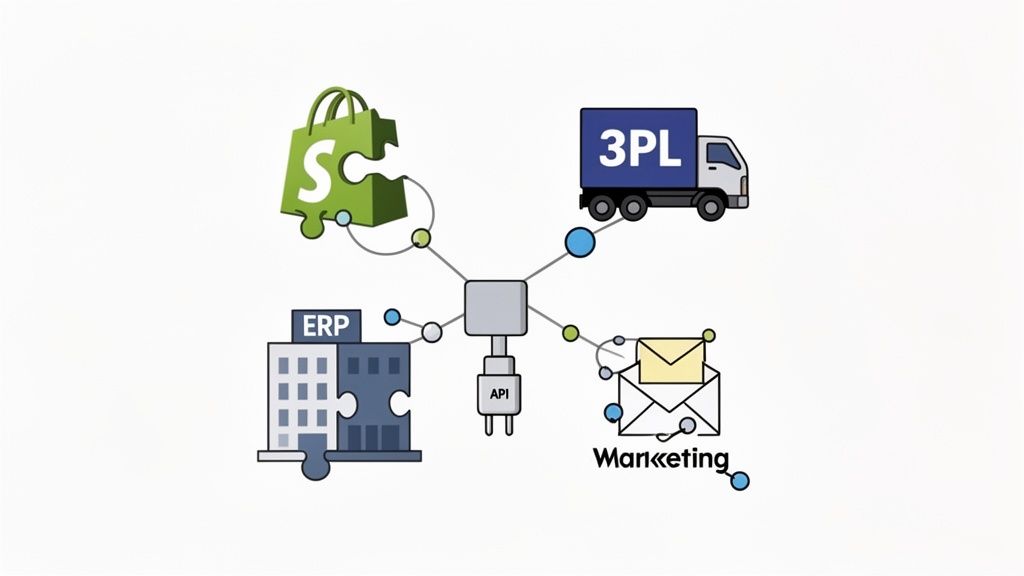
These platforms are built with what’s called an API-first approach. In plain English, that means they're engineered from the ground up to communicate with the other tools you already use every day. This is what makes the integration so smooth.
Your OMS becomes the central nervous system for your entire operation. It creates a single, unified ecosystem where your Shopify store, third-party logistics (3PL) provider, Enterprise Resource Planning (ERP) software, and even your marketing platforms are all sharing data in real-time. Suddenly, everyone is working from the same playbook.
A Practical Roadmap for Implementation
A successful integration doesn't just happen on its own. It follows a logical, step-by-step path that lets you roll out a powerful new tool without throwing a wrench in your day-to-day business.
Start by auditing your current workflows. I mean really map them out. Follow an order from the second a customer clicks "buy" to the moment the package lands on their doorstep. This simple exercise will shine a spotlight on all the friction points and manual bottlenecks that are quietly costing you time and money. This gives you a concrete list of problems for the OMS to solve.
Your goal isn't just to plug in a new piece of software. It’s to fundamentally improve the flow of information and eliminate the manual workarounds that are holding back your growth. The integration process is your opportunity to redesign your operations for maximum efficiency.
Once you have a crystal-clear picture of your needs, you can move on to configuration. This is where you start teaching the OMS your specific business logic and turning it into automated rules.
Key Implementation Steps
- Connect Your Core Systems: First things first, you'll connect the OMS to your Shopify or Shopify Plus store, which is usually as straightforward as installing an app and granting permissions. From there, you'll link up your 3PL, warehouse management system (WMS), and any other critical platforms using their APIs.
- Configure Custom Business Rules: This is where the real magic happens. You get to set up automation based on what your business actually needs. For example, you can build a rule that automatically routes all international orders to a specific fulfillment partner. Or maybe you want to tag any order containing a particular SKU for special handling. You can even set specific time windows for post-purchase edits, giving customers a set amount of time to change an address or swap a product before the order is locked.
- Onboard and Train Your Team: Get your customer support and operations teams familiar with the new system. A good OMS will have a user-friendly interface, but you still need to walk them through it. The key is to show them how this new tool directly solves their biggest daily headaches, like manually fixing typos in shipping addresses or processing endless cancellation requests.
Following a structured plan like this makes the whole process strategic instead of chaotic. For brands juggling complex inventory across multiple locations, you can take things a step further and learn how to simplify inventory management and avoid stockouts with more advanced tactics. By carefully planning the rollout of your Shopify order management system, you’re building a foundation for much more scalable and profitable operations down the road.
How to Choose the Right Shopify OMS
Picking a Shopify order management system (OMS) isn't just about buying new software. It's a foundational decision that will dictate how your store operates for years to come. Get it wrong, and you’re stuck with clunky workflows and a frustrated team. But get it right, and you've just installed a powerful engine for growth, efficiency, and happier customers.
The trick is to look past a simple feature checklist. You need to evaluate any potential system based on how it will perform under real-world pressure. This means digging into three critical areas: its ability to scale, how well it can be customized, and the experience it creates for both your team and your customers.
Evaluate for Future Growth and Scalability
Your OMS has to handle your business not just on an average Tuesday, but during its absolute busiest moments. Think about your biggest sales day last year. Now, what if you doubled that volume? A truly scalable system is built to manage those massive order surges without breaking a sweat.
This is more important than ever. Today’s customers shop globally and on the go. In fact, Shopify data shows that a whopping 79% of all traffic and up to 69% of all orders now come from mobile devices. With stores in over 175 countries, cross-border sales also made up 16% of all BFCM transactions. Your OMS has to be built for this reality. You can dig into more stats on the global scale of Shopify's operations on Ecommercetrix.
Prioritize Customization and Flexibility
Every Shopify store runs a little differently. You have your own operational quirks and business rules, and a one-size-fits-all OMS will just get in the way. Your goal should be to find a system that bends to fit your business—not the other way around.
The real power lies in creating custom, rule-based automations. This is what separates a simple tool from a strategic asset.
- Custom Order Routing: Can you set up a rule to automatically send all international orders to a specific 3PL?
- Time-Based Permissions: How about giving customers a 60-minute window to edit their own shipping address before the order locks for fulfillment?
- Product-Specific Workflows: Could you automatically tag any order containing fragile items so your warehouse team knows to give it special handling?
Flexibility is everything. Without it, you're just trading one set of problems for another, and your team will be stuck creating the exact manual workarounds you were trying to eliminate.
Consider the Experience for Every User
A system packed with features is useless if it’s a nightmare for your team to use. When you’re looking at an OMS, put yourself in the shoes of the people who will be using it day in and day out. Different roles have different needs, and a great OMS will make everyone's job easier.
The best Shopify order management system is one that solves distinct problems for different parts of your team. It should reduce friction for your operations manager, lower stress for your support lead, and deliver a clear financial return for your ecommerce director.
To build a strong business case, think from these three perspectives:
- The Operations Manager: They live and breathe efficiency and accuracy. They need a dashboard that gives them a clear, real-time view of every single order. They’ll be looking for features like automated routing, reliable inventory syncing, and analytics that help them spot bottlenecks before they turn into disasters.
- The Customer Support Lead: Their world revolves around reducing ticket volume and keeping customers happy. A system that empowers customers with self-service options—like editing their own shipping address or canceling an order—is a game-changer. It frees up their team to focus on meaningful conversations instead of repetitive data entry.
- The Ecommerce Director: They’re focused on the bottom line: ROI and strategic growth. They'll want to see how an OMS directly contributes to profitability. Features that drive revenue, like post-purchase upsells, or cut costs, like reducing shipping errors and improving customer retention, are what will get their attention.
By looking at each potential Shopify order management system through these different lenses, you can move beyond a surface-level comparison. You'll start to see which platform is truly the right long-term partner for your brand.
Your Top Questions About Shopify Order Management, Answered
Even when you see the potential, bringing a new system into your operations is a big decision. It’s only natural to have a few questions. Let's walk through some of the most common ones we hear from merchants to help you get a clear picture and make the right call for your brand.
Can I Use Multiple Apps, or Does One OMS Do Everything?
The smartest Shopify merchants are moving away from trying to find one single, massive system that does it all. Instead, they're building a "best-of-breed" tech stack. Think of it like building a championship team—you want a specialist for each position, not a jack-of-all-trades who's a master of none.
This means you might use one dedicated app for your warehouse management and another, like SelfServe, to specifically nail the post-purchase customer experience with things like order edits and upsells. This approach gives you way more power and flexibility than any single, one-size-fits-all platform ever could.
How Much Does a Shopify Order Management System Cost?
The price tag on an OMS can swing wildly, from a simple app with a low monthly fee to a complex, enterprise-level system that costs thousands. The final cost really boils down to your order volume, the specific features you need, and how much custom work is involved.
Many of the best modern solutions use a tiered pricing model that grows with your business. The real trick is to stop thinking of it as a cost and start looking at the return on investment (ROI). Just think about the money you'll save on support tickets, the costly shipping errors you'll avoid, and the new revenue you'll bring in from features like post-purchase upsells.
A well-chosen OMS should absolutely pay for itself. If it prevents just a handful of expensive shipping mistakes or adds a few extra sales each day, the investment quickly becomes a no-brainer.
Will an OMS Slow Down My Shopify Store?
This is a huge—and valid—concern, but you can relax. A well-built, cloud-native Shopify app will not slow down your storefront. Most modern order management tools are designed to work in the background, communicating with Shopify through APIs and running on their own servers.
These systems are built for high performance and integrate smoothly without ever touching your site speed or bogging down the checkout process for your customers. Any elements a customer might see, like an order editing portal or an upsell offer, are usually shown on the Thank You page or Order Status page, long after the initial purchase is complete.
Ready to turn your post-purchase experience from a cost center into a profit engine? SelfServe gives your customers the power to edit their own orders, catches costly address errors before they happen, and boosts your average order value with compelling one-click upsells.