Shipping Confirmation Emails That Convert: A 2026 Guide
Shipping confirmation emails are one of the few messages customers want. They often see 65 to 70% open rates and an 85% higher click-through rate than regular promotional email, according to ShipStation's summary of shipping confirmation email performance. That should change how Shopify merchants treat them.
Most stores still use them like receipts with tracking pasted in. That's a waste. A strong shipping confirmation email reduces support friction, sets expectations before problems turn into tickets, and creates a controlled place to guide the customer back into your ecosystem. For high-volume teams, it also becomes an operational tool. You can use it to surface the right tracking context, direct customers to self-service, and avoid creating confusion when fulfillment data is incomplete.
Why Shipping Confirmations Are a Hidden Superpower
Transactional emails routinely outperform standard campaigns because customers are already waiting for them. Shipping confirmations sit at the center of that behavior. They arrive at the exact moment a buyer wants certainty, not marketing.
That makes them more than a status update. For a Shopify merchant, this email does three jobs at once. It answers the immediate delivery question, prevents avoidable support tickets, and gives the customer one reliable place to self-serve after the order leaves the warehouse.
The operational value gets clearer at scale. A basic confirmation that says “your order has shipped” works when every package moves on time, every tracking event scans correctly, and every customer is domestic. Real stores do not operate in those conditions. Carriers miss scans. Orders split into multiple packages. International shipments stall in customs. Delivery dates change after handoff. If the email does not prepare customers for those realities, support absorbs the confusion.
The best shipping confirmations reduce uncertainty
Customers open this message to answer one question: where is my order?
Strong brands answer that fast, then reduce the follow-up questions that usually come next. Is everything in one box? When should I expect movement? Who is delivering it? What should I do if tracking looks stuck? That is the difference between a notification and an actual post-purchase tool.
A practical framework:
- Resolve the immediate question: show shipment status, carrier, and tracking first
- Set expectations: explain split shipments, scan delays, delivery windows, or customs review when relevant
- Route customers to self-service: send them to a tracking page, order portal, or help flow before they contact support
- Add commercial content carefully: cross-sells and referrals only work after the logistics are clear
Practical rule: If tracking is present but the customer still has to contact support to understand what is happening, the email is underperforming.
This matters well beyond email metrics. Shipping confirmations shape the wider post-purchase customer experience. They are often the first message customers revisit more than once after checkout, especially when delivery feels uncertain. A clear confirmation lowers anxiety. A vague one creates “Where is my order?” tickets, repeat tracking checks, and avoidable distrust.
I have seen the same pattern repeatedly in Shopify operations. Stores treat shipping confirmations as an automated receipt, then wonder why support volume spikes during carrier delays. The fix usually is not more support headcount. It is better communication. Give customers shipment context early, acknowledge uncertainty where it exists, and make the next action obvious.
That is why shipping confirmations are a hidden superpower. They help stores protect trust when fulfillment goes right, and they matter even more when fulfillment gets messy.
Anatomy of a Perfect Shipping Confirmation Email
A strong shipping confirmation email is standardized for a reason. Customers don't want surprises here. They want immediate confirmation that the right package is moving to the right place, with a clear way to track it.
Industry guidance has largely settled on a consistent structure: order number, item summary, pricing, billing and shipping addresses, estimated delivery date, and a tracking link. ExpertSender's breakdown of confirmation email standards reflects that common baseline.
The must-have fields
Use this as an audit list for your current template.
- Order number: Make it easy to spot. Support agents use it, customers reference it, and it reduces back-and-forth when someone needs help.
- Tracking link and tracking number: This is the center of gravity. If you're on Shopify, pair this with a clear route to your own last-mile carrier tracking experience rather than forcing the customer into a dead-end handoff.
- Estimated delivery date: Don't hide it in body copy. Put it near the shipment status so the customer can gauge timing immediately.
- Item summary: Include product names and, if your template supports it cleanly, thumbnails. Customers use this to verify what's in this shipment, especially when orders split.
- Shipping address: Show the recipient and destination in full enough detail to catch mistakes.
- Support contact path: Give people a next step if something looks wrong.
What merchants often leave out
A lot of templates technically include the right fields but still feel incomplete. The problem is usually hierarchy, not missing data.
Here's what improves the email in practice:
| Element | What works | What doesn't |
|---|---|---|
| Status line | “Your order is on the way” plus shipment context | Generic “Shipping update” with no action |
| Delivery timing | A visible estimate near tracking | ETA buried below the fold |
| Order contents | Clear item list tied to this shipment | Full order recap with no split-shipment context |
| Help path | Specific support route for issues | “Reply to this email” as the only fallback |
Customers don't read shipping confirmations line by line. They scan them under mild stress.
A simple structure that consistently works
Use this order:
- Shipment headline
- Tracking button
- Delivery estimate
- Order number
- Items in this shipment
- Shipping address
- Support or next steps
- Secondary brand content
That layout respects the customer's mental sequence. First confirm shipment. Then show movement. Then answer timing. Everything else supports those three decisions.
UX and Writing Best Practices That Build Trust
The content of a shipping confirmation matters. The presentation matters just as much.
Customers usually open these emails in a hurry. They may be on a phone, standing in line, or checking whether a package will arrive before they leave home. If the layout forces them to decode your message, trust drops fast.
Put the tracking action where the eye lands first
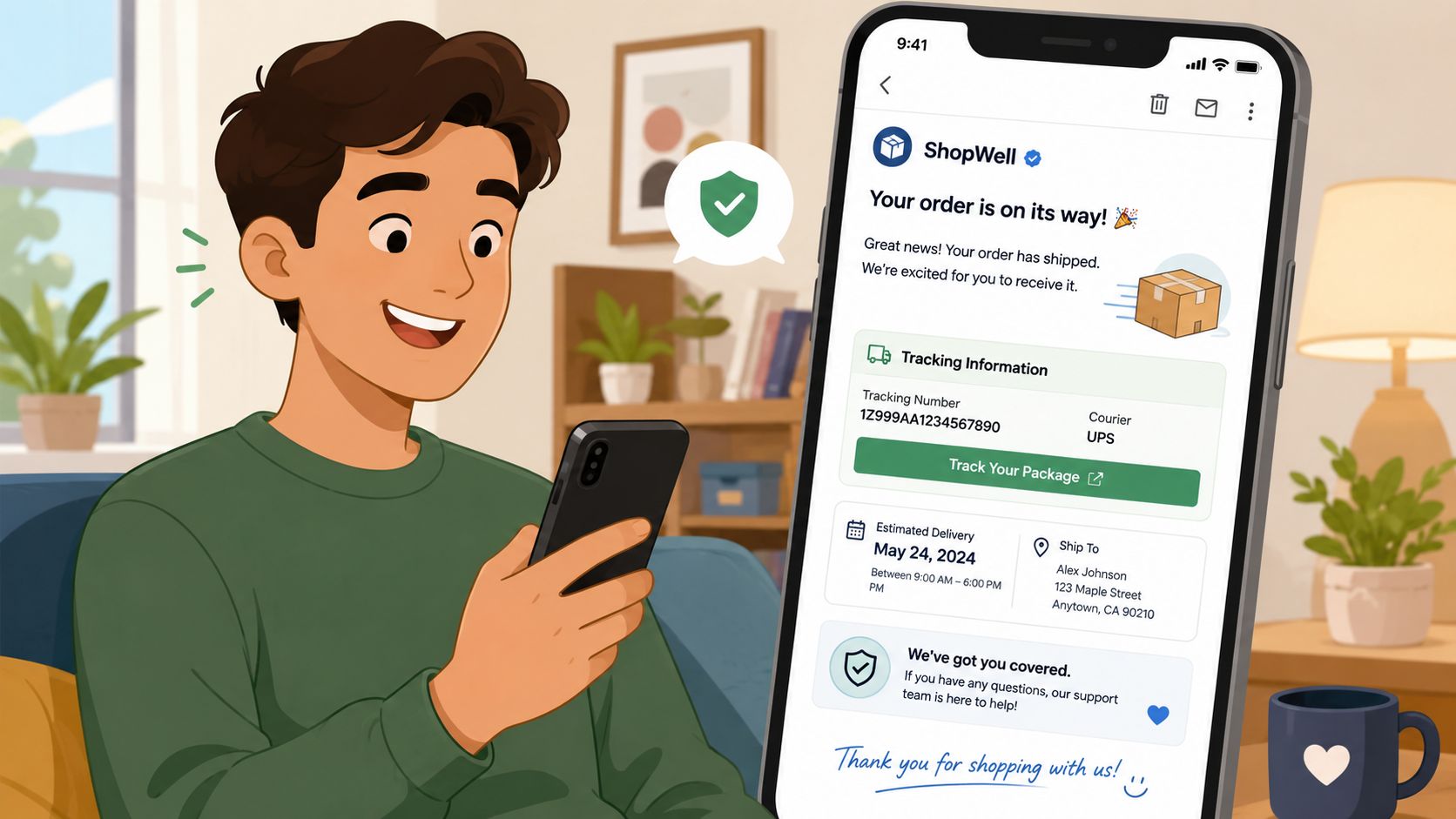
The best guidance here is simple. The tracking number and tracking link should sit at the top of the shipping section, followed by the rest of the order details, according to MailerSend's shipping email recommendations. That ordering works because it answers the customer's first question before they start scrolling.
A common mistake is opening with a large brand banner, then a friendly paragraph, then a shipment summary, then the tracking CTA. That may look polished in a design review. It performs poorly in real use.
Good copy sounds human and specific
Shipping emails shouldn't read like system logs. They should read like clear operational communication from a competent brand.
Compare these approaches:
- Weak: “Your fulfillment has been processed successfully.”
- Better: “Your order is on the way.”
- Best when needed: “Your order has shipped. Track it below and check the estimated delivery date before you contact support.”
The strongest copy does three things well:
- Names the current state: shipped, partially shipped, delayed, awaiting carrier scan.
- Sets the next expectation: track here, watch for scan updates, contact us if the address looks wrong.
- Avoids false precision: don't promise certainty you can't support operationally.
Design for scanability, not decoration
A trustworthy shipping email usually has a restrained layout. That means strong spacing, obvious buttons, readable type, and clean grouping of details.
Use this checklist during review:
- Mobile layout first: Make sure the tracking CTA appears early on small screens.
- Visual hierarchy: Headline, CTA, ETA, then supporting details.
- Short labels: “Track package” is clearer than “View fulfillment progress.”
- Address formatting: Break lines cleanly so customers can verify destination quickly.
- Brand tone control: Keep personality in the headline or footer, not in the critical status language.
If your branded flourish makes shipment status harder to understand, remove it.
Teams often over-index on style and under-invest in expectation-setting. A plain, direct message builds more trust than a beautiful email that leaves room for doubt.
Shipping Confirmation Templates and Examples
The fastest way to improve shipping confirmation emails is to stop treating them like one template. Different order states need different treatments. A single “your order shipped” design doesn't hold up when orders split, when one item is backordered, or when the carrier hasn't scanned the parcel yet.
Example one, the clean baseline template
This is the version every store should be able to ship today.
Subject line: your order is on the way
Header: order shipped
Primary CTA: track package
Below that: estimated delivery, order number, items in this shipment, shipping address, support link
Why it works:
- The customer sees the shipment state immediately.
- The CTA appears before secondary content.
- The item list is tied to the actual shipment, not just the original order.
Where merchants get this wrong is by mixing service and marketing too early. Don't place product recommendations above the tracking button. Don't put loyalty copy between the headline and the shipment details. The email should solve the logistical question first.
Example two, the split-shipment template
At this stage, many Shopify stores create unnecessary support tickets.
The customer ordered three items. Two shipped now. One will follow later. If your email says “your order has shipped” and then lists all three items without context, customers assume something is missing. A better template explicitly says which items are in this shipment and which are not.
Use language like this:
Two items in your order are now on the way. The remaining item will ship separately.
That one sentence prevents confusion because it aligns the email with operational reality. The customer doesn't need to contact support just to confirm whether the box is incomplete.
Example three, the lightly monetized template
This version can drive value without undermining trust.
A practical structure:
| Email area | Purpose | Safe use |
|---|---|---|
| Top section | Shipping information | No promotional clutter |
| Mid section | Order verification | Item summary and address |
| Bottom section | Brand or revenue module | Accessory recommendation, referral invite, care guide |
The key is restraint. A shipping confirmation can carry a secondary action, but it should feel relevant to the order state. For a skincare brand, a care guide or routine tip fits naturally. For an electronics merchant, a setup resource or compatible accessory works. For a fashion brand, a referral or style guide can work if it stays below the logistics block.
The best template doesn't look “optimized.” It looks obvious.
That's the standard to aim for. If a customer can glance at the message and know what shipped, where it's going, and what to do next, the template is doing its job.
Automating and Tracking Your Confirmation Flow
A shipping confirmation email is only as good as the event that triggers it. If the underlying data is wrong or late, the email amplifies the problem.
On Shopify, the usual trigger is fulfillment. When tracking is added, Shopify can automatically send “Order Shipped” notifications as part of the fulfillment workflow. Merchants can also choose to notify the customer during label purchase in some cases. That automation is useful, but it needs guardrails.
Trigger on shipment truth, not admin convenience
The biggest operational mistake is sending the email before the data is customer-ready. If the label exists but tracking won't resolve yet, customers click through to a dead or vague carrier page. That creates support demand instead of reducing it.
A better workflow looks like this:
- Fulfillment event occurs in Shopify.
- Tracking number is attached and validated.
- Notification logic checks whether the shipment data is ready to present.
- Email sends with customer-facing details in a clean format.
- Tracking clicks and support outcomes are monitored.
For teams with more fragmented carrier or warehouse setups, treating this as a data pipeline helps. Mailparser's automation workflow for shipping confirmation emails shows one implementation pattern: carrier notifications can be routed into a unique inbox, parsed from plain-text email bodies using rules like start and end text matching, and exported as XLS, CSV, JSON, or XML for downstream workflows.
What to monitor after launch
You don't need a massive reporting stack to spot issues. Watch a small set of signals consistently.
- Open behavior: Useful for subject line clarity and deliverability sanity checks.
- Tracking click activity: This tells you whether customers can find the primary action.
- Support ticket themes: Look for WISMO, wrong address, split shipment confusion, and “tracking not working.”
- Operational exceptions: Track flows where fulfillment happened but notification quality was poor.
If your team is extending Shopify automation with tools such as Shopify Flow app workflows, keep the logic simple enough that support and ops can audit it without engineering every time a rule changes.
A useful governance habit
Review a sample of live shipping confirmations every week. Don't just review the template. Review actual sends from recent orders. That's how you catch broken variables, carrier naming issues, split-order confusion, and accidental delays in notification timing.
Advanced Strategies for High-Volume Stores
High-volume shipping programs break in predictable places. The email itself is rarely the issue. Timing, carrier data quality, split-order logic, and market-specific presentation create most of the confusion customers see.
That is why advanced optimization starts after the trigger fires, not before it.
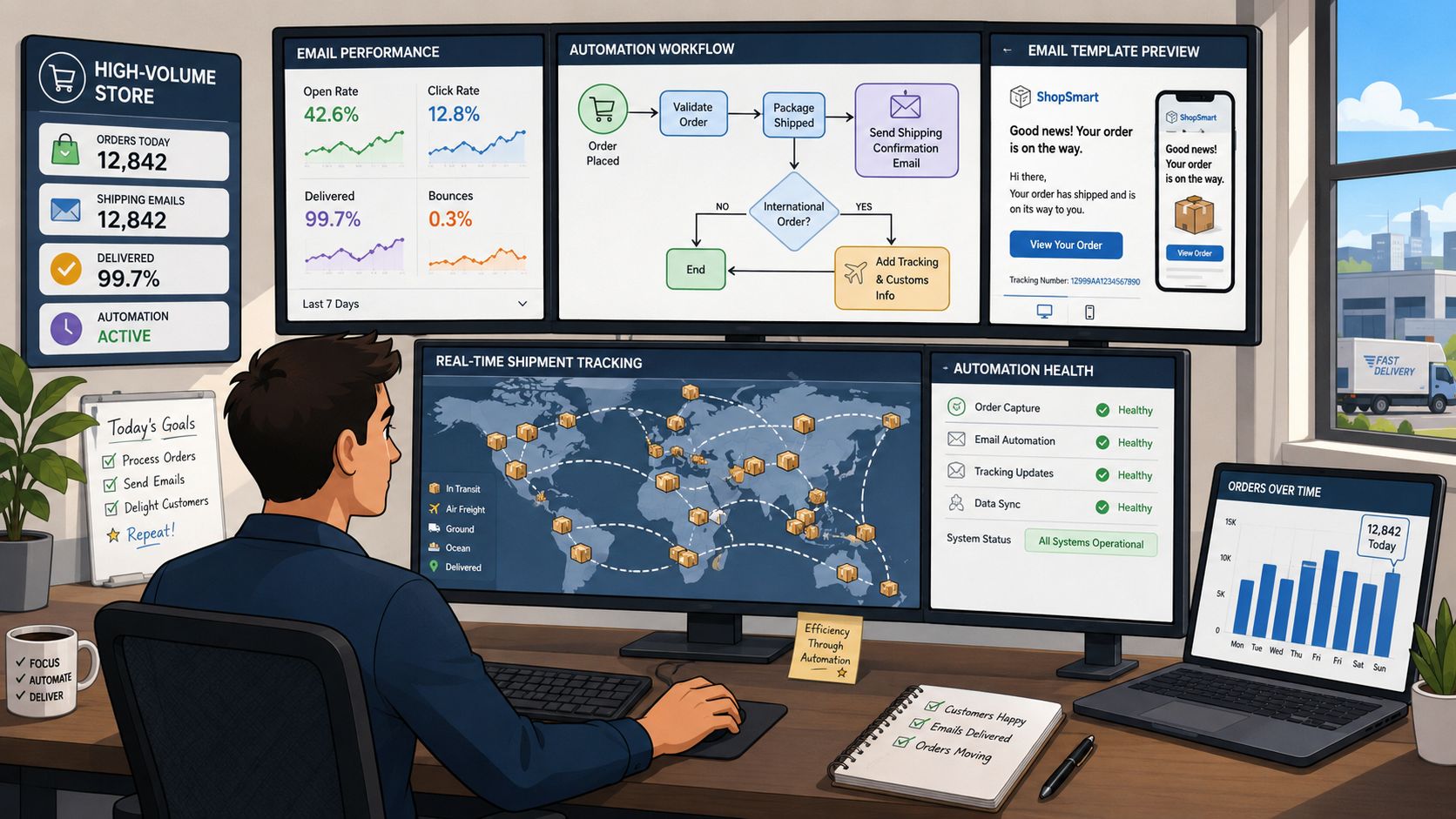
Delivery uncertainty is the most significant post-send problem
A shipping confirmation can be technically correct and still create support volume. The common failure is sending on label creation when the customer expects movement. Red Stag Fulfillment calls out this gap in its discussion of delivery uncertainty and “label created” scenarios. In practice, WISMO tickets often originate here.
The fix is operational, not cosmetic. Set rules for when a shipment is ready for customer-facing communication, and treat carrier scan lag as part of the workflow.
Teams that handle this well usually do four things:
- Hold the email if tracking is not likely to resolve soon: A short delay often produces a better first customer impression than an instant but confusing send.
- Write copy for scan lag and carrier delay states: If the message must go out, explain that tracking updates can take time to appear.
- Separate label-created events from in-transit events: These states should not share the same customer language.
- Send customers to a branded order status page: That page can explain split shipments, delays, and next steps more clearly than the email can.
I have seen stores reduce avoidable “where is it?” contacts by delaying the first shipping confirmation until the tracking page showed usable information.
Internationalization needs operational localization
Translation alone does not solve the problem for global stores. Customers also need shipping details presented in familiar formats, with wording that matches local expectations.
The practical issues are usually small, but they affect trust fast:
| Global email element | What to localize |
|---|---|
| Carrier presentation | Translate or clarify carrier naming where needed |
| Address display | Match local address conventions |
| Delivery window language | Use familiar date and time formats |
| Support options | Offer the right contact path for the market |
| Status wording | Avoid phrases that don't translate cleanly |
Braze raises this point in its guidance on transactional email and order confirmation personalization. For Shopify merchants, the takeaway is simple. Build localization rules into the notification flow itself, not just the template. A tracking message that reads naturally in English can feel vague or even misleading once carrier names, dates, and fulfillment states hit another market.
Turn the email into a self-service hub
For high-volume stores, the shipping confirmation should do more than announce dispatch. It should route the customer into a controlled post-purchase experience that answers routine questions before they become tickets.
A useful destination page should let customers:
- verify current shipment status
- see whether the order was split into multiple parcels
- confirm the delivery address on file
- understand what to do if tracking stalls
- get support through the right channel
- access approved post-purchase actions when your policy allows them
This setup improves conversion, too. Keeping the shopper inside your branded post-purchase flow creates more chances to reinforce confidence, surface relevant offers, and reduce abandonment on future orders, which is one reason Reddog Consulting Group's conversion guide is worth reviewing alongside your email program.
At scale, shipping confirmations work best as part notification, part routing layer, and part support deflection tool. Stores that treat them that way give customers clearer expectations, give support fewer repetitive tickets, and keep operational edge cases from turning into trust problems.
Testing and Optimization for Continuous Improvement
Most merchants never revisit their shipping confirmation emails after launch. That's a mistake. These emails touch live customer anxiety, so small improvements in clarity compound quickly.
The best testing discipline here is narrow and operational. Don't test everything at once. Pick one variable that affects trust, scanning, or the next action.
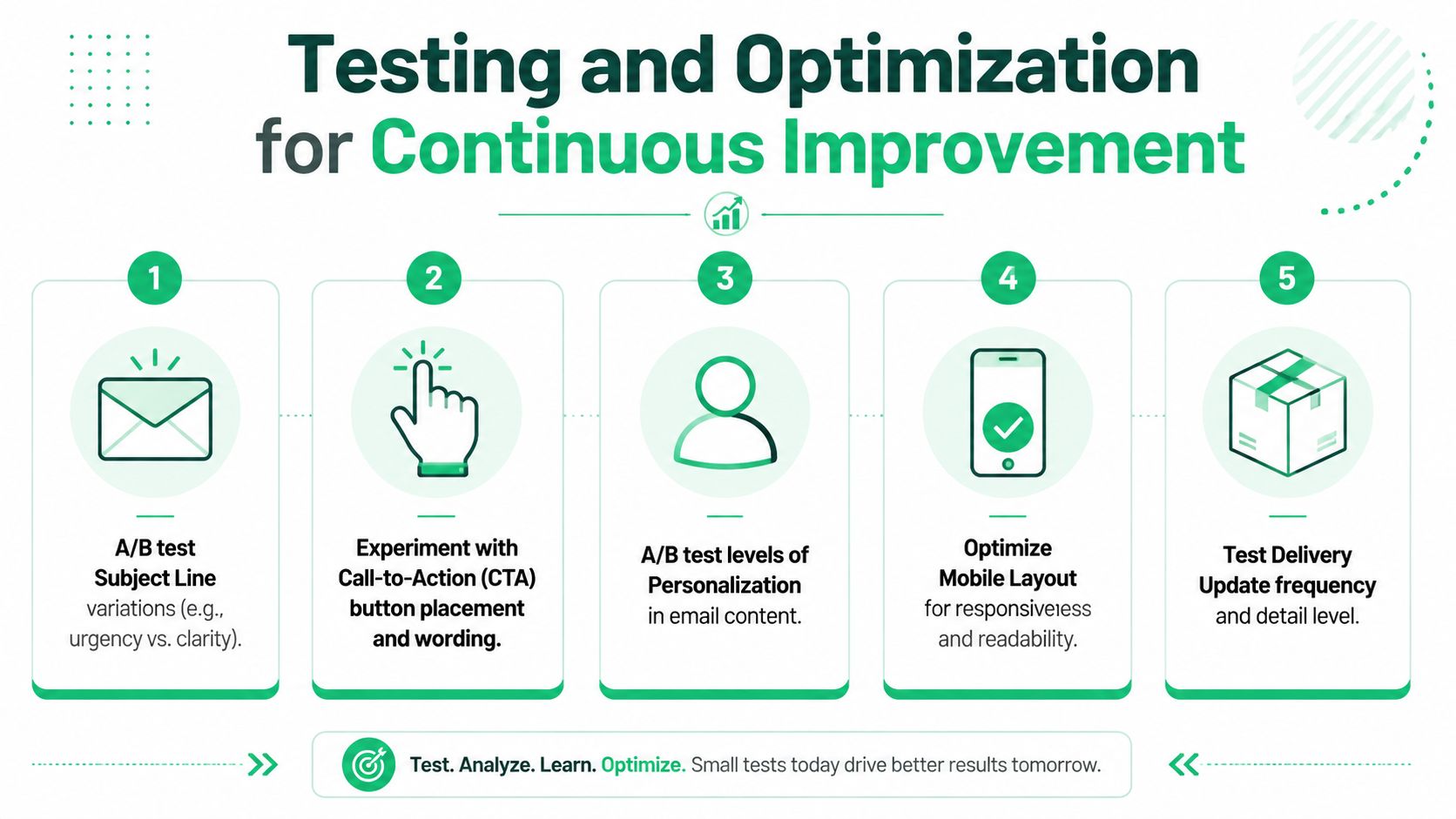
High-impact tests worth running
- Subject line clarity: Test direct formulations such as “Your order has shipped” against versions that include the order reference.
- CTA wording: Compare “Track package” with more specific language if your audience responds better to plain operational copy.
- CTA placement: Keep testing how early the primary action appears, especially on mobile.
- Status language: See whether customers respond better to “on the way,” “shipped,” or more explicit shipment-state wording.
- Detail density: Some audiences want a compact summary. Others need more visible order detail to feel confident.
- Update handling: For global stores, test whether localized carrier names, address formatting, and delivery windows improve comprehension. Braze points to these localization questions in its discussion of clarity and trust in order-related emails across markets.
How to evaluate the results
A better shipping confirmation doesn't just produce more clicks. It reduces confusion.
Use a simple review lens:
- Did customers find the tracking path faster?
- Did support see fewer avoidable shipment questions?
- Did the email read more clearly on mobile?
- Did the added merchandising block stay out of the way of service content?
If you want a broader framework for testing customer journeys beyond email alone, Reddog Consulting Group's conversion guide is a useful companion read because it pushes teams to tighten friction across the full conversion and retention path, not just one message.
Optimize for confidence first. Revenue gains usually follow cleaner customer experience, not the other way around.
If your Shopify team wants to turn post-purchase emails into real self-service, SelfServe helps customers manage allowed order changes, supports multilingual experiences, and adds upsell opportunities on the Thank You and Order Status pages without creating more support work.