Last Mile Carrier Tracking: A Shopify Merchant's Guide
Peak week exposes weak tracking fast.
Orders are moving, carriers are scanning, and your support team is still drowning in messages that all mean the same thing: where is my order, is it coming today, and why does the tracking page tell me nothing useful. For a Shopify brand manager, that queue is not just a support problem. It is a visibility problem, a process problem, and usually a systems problem.
Most stores think they have tracking handled because they send a tracking number. Customers do not see it that way. They want timely updates, clear status changes, and enough confidence to stop contacting support. That expectation is now standard. 95% of online shoppers prioritize last-mile tracking and 91% actively track their packages according to Elite EXTRA’s overview of last-mile carrier tracking.
The brands that manage this well do one thing differently. They treat post-purchase operations as part of the product experience, not an afterthought delegated entirely to carriers.
The End of 'Where Is My Order?'
A typical failure pattern looks like this.
A customer places an order on Monday. Your store sends the confirmation email immediately. A label gets created later that day. The carrier does not scan the parcel until Tuesday afternoon. By Tuesday evening, the customer has checked the order page twice, clicked the carrier link once, and opened a support ticket because the status still feels vague.
Nothing is technically wrong. But the experience feels broken.
That is why last mile carrier tracking matters far beyond logistics. It is the layer that turns carrier movement into customer reassurance. If your post-purchase flow only says “shipped” and then goes silent until “delivered,” customers fill the gaps themselves. They assume delay, loss, or neglect.
What WISMO really signals
WISMO tickets usually point to one of three issues:
- Poor event visibility. The carrier has data, but your customer is not seeing it clearly.
- Slow status communication. Updates exist, but they arrive too late to prevent anxiety.
- No customer action path. A shopper spots a problem and has no way to fix it without contacting support.
The third issue is the one most merchants miss. Visibility helps, but visibility alone does not stop every ticket. A customer who notices a bad apartment number or realizes they will not be home still needs a path to act.
What good tracking changes
When a store gets this right, support sees fewer repetitive contacts and can spend time on exceptions that require judgment. Customers also stop treating delivery as a black box.
Good tracking does not eliminate delivery problems. It makes problems visible early enough that your team can manage them before trust breaks.
That shift matters most during peak periods, product launches, and subscription replenishment cycles. In those moments, the order status page becomes one of the most visited surfaces in your business. Treat it like an operational tool, not just a confirmation page with a carrier link.
Defining the Most Expensive Part of Shipping

The last mile is the final handoff from a carrier’s local network to the customer’s door, mailbox, front desk, parcel locker, or pickup point. It sounds like a small portion of fulfillment. In practice, it is where cost, complexity, and customer emotion all converge.
If the supply chain is a relay race, the last mile is the final runner taking the baton into the stadium. It is the most visible leg, the hardest to recover when something goes wrong, and the part the customer remembers.
Last-mile delivery accounts for 53% of total shipping costs, making it the most expensive segment of the supply chain according to LastMily’s delivery statistics roundup.
Why this stage costs so much
Upstream fulfillment is structured. Inventory is picked in batches. Labels print in sequence. Parcels move through hubs designed for volume.
The last mile is different. Every package breaks out into a separate real-world scenario with its own constraints.
- Every destination is unique. Apartments, gated communities, office towers, campuses, and rural routes all create different delivery conditions.
- Customers are unpredictable. They move, mistype addresses, forget gate codes, or change availability after checkout.
- Carriers operate under local variables. Traffic, route density, weather, parking access, and handoff rules all affect execution.
A warehouse can optimize around repeatable processes. Drivers and dispatchers in the last mile deal with exceptions all day.
Why Shopify operators should care
For Shopify brands, this is not just a carrier performance issue. It touches margin, support, retention, and review quality.
A promotion can increase order volume overnight. That same promotion can also multiply downstream delivery contacts if your tracking layer is weak. Operations teams then pay twice. Once in shipping spend, and again in support time.
Here is the practical frame I use with new brand managers:
| Last-mile issue | What it causes inside the business |
|---|---|
| Vague tracking events | More WISMO tickets |
| Address errors | Failed handoffs and manual support work |
| Delivery exceptions | Refund pressure and replacement decisions |
| Weak proof of delivery | More disputes and claim handling |
| Poor status communication | Lower trust after purchase |
The operator’s view
The last mile is not expensive only because trucks move through expensive geography. It is expensive because every breakdown at this stage is customer-facing.
A bad pick in the warehouse can often be caught before shipment. A bad final handoff lands directly in the customer’s day. That is why operationally mature brands monitor the last mile with the same discipline they apply to paid acquisition or inventory planning.
How Last Mile Carrier Tracking Works
At the technical level, last mile carrier tracking is just a chain of digital events. At the business level, it is your best attempt to turn a messy physical process into something understandable and actionable.
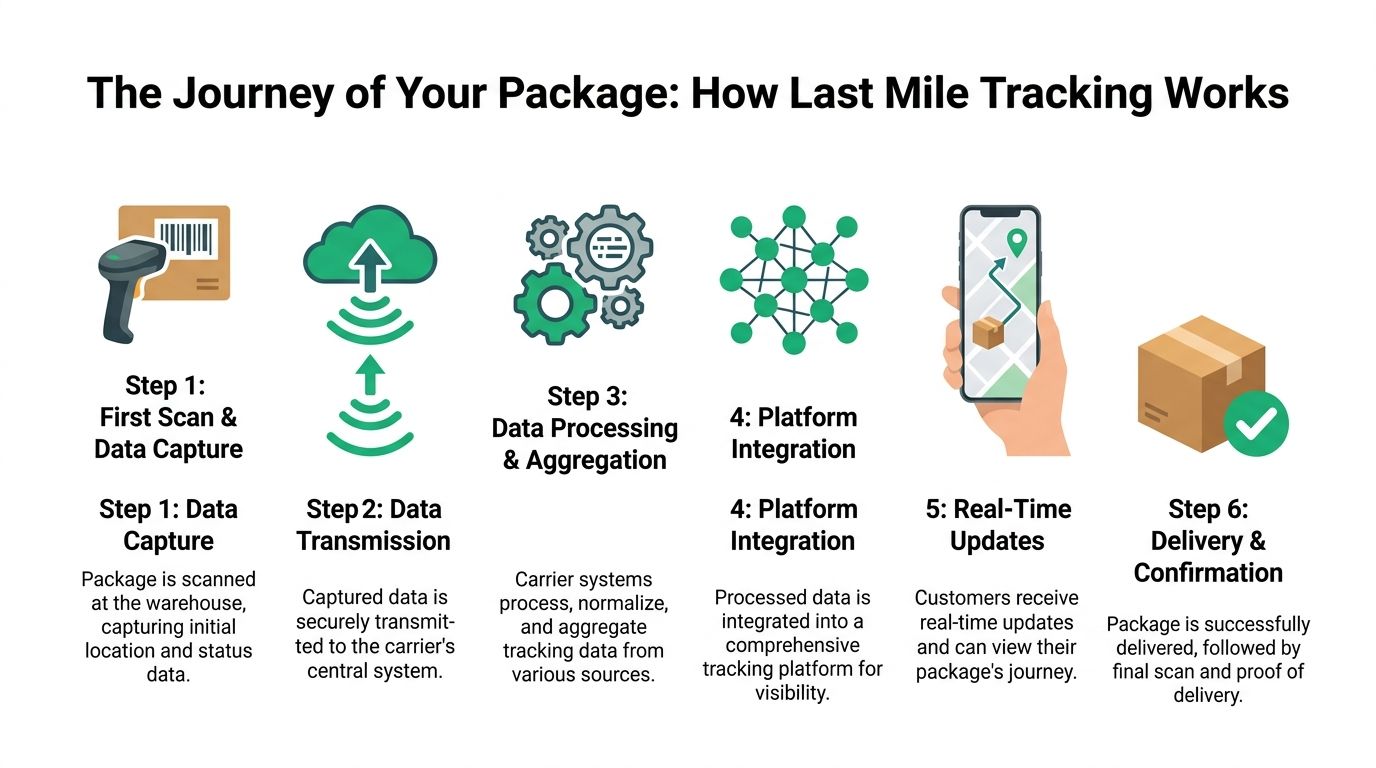
A useful way to think about it is as a custody record. Each scan, GPS ping, and status update answers a simple question: where is this order now, and what happened since the last confirmed event?
The core data sources
Most tracking experiences are built from a few components working together.
Scans and package events
A barcode or QR code on the label acts as the package identity. Each time a facility worker or driver scans it, the carrier system records an event such as accepted, in transit, arrived at local facility, out for delivery, or delivered.
These scan events are still the backbone of customer-facing tracking. If a package is not scanned consistently, every downstream experience gets weaker.
GPS and telematics
Scans tell you what happened at a moment in time. GPS and telematics help estimate what is likely to happen next.
Real-time GPS and telematics integration enables dynamic route optimization, addressing traffic patterns that cause up to 30% of delivery delays in urban areas, as noted by Fleet Solera’s analysis of last-mile delivery challenges.
That matters because static route planning breaks quickly in dense urban delivery. A driver leaves the depot with a plan, then loses time to congestion, construction, or access problems. With live vehicle data and route recalculation, dispatch teams can adjust instead of waiting for the route to fail.
Teams evaluating the operational side of this stack often benefit from reviewing broader categories of fleet management software for trucking, especially when they need more than branded tracking and want driver, route, and vehicle visibility in one place.
How the data reaches your storefront
Carrier data does not appear in Shopify by magic. It usually flows through an integration layer.
- Carrier APIs pull event data from UPS, FedEx, DHL, USPS, regional carriers, or a 3PL system.
- Webhooks push updates when a status changes, which is better for timely notifications.
- Aggregation platforms normalize different carrier formats so your store does not need separate logic for each one.
This normalization step is more important than many teams realize. One carrier might say “delivery attempted,” another might say “exception,” and a third might bury the same meaning under an internal event code. If you want clean customer communication, someone has to translate those events into a consistent language.
What customers see
The customer sees only the top layer:
- a branded order status page
- milestone emails or SMS
- a map or ETA in some cases
- proof of delivery or delivery confirmation
Behind that simple interface is a lot of event handling. If the interface is clear, customers feel informed. If it is vague, they open tickets.
Tracking works best when you design around event clarity, not raw data volume. More status updates are not always better. Better-labeled updates are.
Where the system usually breaks
In practice, breakdowns happen in a few predictable places:
- Label created, no acceptance scan
- Carrier handoff without synchronized events
- Out-for-delivery updates that never refresh
- Delivered status without usable proof
- No workflow for exceptions back into support or CX
When merchants understand these failure points, integration conversations improve immediately. You stop asking, “Can this app show tracking?” and start asking better questions about event quality, latency, normalization, and exception handling.
Measuring the Business Impact of Tracking

A tracking project fails when the team launches it and then measures nothing except whether the page loads.
If you want better decisions, measure tracking like an operations program, not a design improvement. The right question is not “Do customers have tracking?” It is “Which delivery contacts disappeared, which exceptions became manageable, and which carrier behaviors became visible enough to improve?”
For teams building that measurement layer, it helps to review examples of track package software so you can see how different platforms present events, notifications, and reporting.
The KPIs that matter
I would start with four metrics and ignore vanity reporting until these are stable.
WISMO ticket volume
This is the clearest signal. Track how many contacts include delivery-status intent before and after you improve status communication.
Break it down by channel if possible. Email, chat, and phone tell different stories. Phone contacts usually indicate customers feel the issue is urgent or the existing information is too vague.
First-attempt delivery success
This metric exposes whether visibility is helping execution or only helping perception.
If first attempts fail often, you likely have one of these problems: address quality, building access, poor ETA communication, or weak exception handling between carrier and customer.
On-time in-full performance
Tracking becomes operational here, not cosmetic. You need a view of which orders arrive when promised and without downstream recovery work.
A better tracking stack will not force carriers to perform better on its own. But it will show where promises, handoffs, or routing assumptions break.
Delivery-related customer sentiment
Most brands already collect some post-purchase feedback. Separate delivery feedback from product feedback. If you merge them, you will miss a lot.
A customer may love the product and still be furious about the delivery experience. Those are different problems with different owners.
How to read the numbers correctly
A common mistake is expecting tracking to improve all delivery metrics immediately. It will not.
Tracking tends to create value in stages:
- Stage one. Fewer avoidable support contacts.
- Stage two. Better visibility into repeat carrier issues.
- Stage three. Better exception workflows, including address corrections and delivery interventions.
- Stage four. Stronger customer trust because post-purchase communication feels competent.
That sequencing matters because many teams quit too early. They implement a branded tracking page, see only a modest support change, and conclude the effort was overhyped. Often the problem is that they stopped at visibility and never connected tracking data to action.
What to audit monthly
Use a simple review routine with support, operations, and retention in the same room.
- Top delivery complaint types. Group by address issue, delay, marked delivered, no movement, and damaged or missing package.
- Carrier-specific exception patterns. One regional carrier may be fine overall but terrible for apartment handoffs.
- Status-page engagement. If customers visit often and still contact support, your page is not resolving uncertainty.
- Manual touches per exception. Count how many orders required a human to translate a carrier event into a customer answer.
If your team still has to interpret carrier statuses manually, your tracking stack is not finished. It is only installed.
The strongest programs use tracking data to decide where to negotiate with carriers, where to tighten address validation, and where to give customers more control before a failed delivery becomes a ticket.
Shopify Integration Approaches Compared
Shopify merchants usually reach the same crossroads once order volume rises. Keep stitching together direct carrier connections, invest in a more event-driven architecture, or use an aggregator that handles normalization for you.
All three can work. The right choice depends on order volume, carrier mix, internal technical capacity, and how much control you need over the order status experience.
If your team is still sorting through the broader post-purchase stack, this overview of Shopify shipping apps is a useful companion because tracking rarely lives in isolation.
The three common paths
Direct carrier API integrations
This approach connects your store or middleware directly to each carrier you use. It gives you the most control over event handling and often the fastest route to carrier-specific features.
It also creates maintenance overhead. Every carrier structures data differently. Every new market or 3PL relationship adds more integration work.
This works best when your volume is high enough to justify custom logic and your operations team wants granular control over what customers see.
Webhook-driven event updates
Webhooks are not a separate strategy so much as a more responsive way to process tracking changes. Instead of polling for updates on a schedule, your systems receive them as they occur.
For merchants with more complex automation, webhooks help trigger emails, support tags, or internal alerts faster. They are especially useful when timing matters, such as out-for-delivery events or delivery exceptions.
The trade-off is reliability engineering. If your endpoint fails or your event mapping is sloppy, you can create as much confusion as clarity.
Carrier aggregators and tracking platforms
Aggregators sit between your storefront and many carriers. They normalize events, reduce integration workload, and usually provide dashboards, notification templates, and branded tracking pages.
This is the fastest route for many Shopify brands. It is also the safest option when you operate across several carriers or international markets.
The downside is abstraction. You get simplicity, but sometimes lose carrier-specific nuance. That can matter when you want custom exception logic or need to preserve a particular event detail for support.
Shopify Tracking Integration Methods
| Method | Best For | Complexity | Cost | Key Advantage |
|---|---|---|---|---|
| Direct carrier APIs | High-volume brands with technical resources and specific carrier needs | High | Variable and often higher in internal effort | Maximum control over data and experience |
| Webhooks | Teams that need fast event-triggered workflows and internal automation | Medium to high | Variable | Better timing for notifications and exception handling |
| Aggregators | Brands using multiple carriers or wanting faster deployment | Low to medium | Subscription-based in many cases | Faster normalization across carriers |
The trade-offs that matter in Shopify
A new brand manager often focuses first on setup cost. That is understandable, but not sufficient. In Shopify, I would weigh four operational questions first.
How many carriers do you support
One national parcel carrier and one regional courier is manageable. A blend of domestic, international, same-day, and 3PL-driven handoffs changes the calculus. Once carrier count rises, normalization becomes more valuable.
Who owns exception messaging
If support owns it manually, your integration can be lighter, but labor costs rise and consistency drops. If operations wants system-generated clarity, you need cleaner event mapping and tighter timing.
How much branding control matters
Some teams are fine sending customers to the carrier site. Others want the order status page to stay branded, explain statuses in plain language, and create consistent communication across carriers. Those goals usually push you beyond a bare-bones setup.
How often order details change after purchase
This is the key Shopify-centric question. If customers frequently need address help, delivery notes, or post-purchase edits, passive tracking will feel incomplete no matter how polished the page looks.
What works and what does not
What works:
- A normalized event layer that turns messy carrier codes into customer language
- Fast update processing for out-for-delivery and exception events
- A branded status page that reduces the need to leave your ecosystem
- A workflow owner inside ops or CX who reviews exception patterns regularly
What does not:
- Relying on label-created events as proof of movement
- Sending customers directly to multiple carrier portals with inconsistent messaging
- Treating integration as finished once the tracking number appears in Shopify
- Ignoring address-related contacts because they “belong to support”
Merchants do not need the most advanced architecture on day one. They do need an architecture that can grow from visibility into action.
Best Practices for a Superior Tracking Experience
The best tracking experience does not feel like tracking. It feels like competent follow-through.
Customers should not need to decode carrier jargon, guess whether a delay matters, or wonder if “delivered” means front door, mailroom, side gate, or somewhere in the building they have not checked yet.
Design the communication around moments, not statuses
A status by itself is often too abstract. “In transit” is technically correct and operationally useless.
Instead, build communication around the moments when customer confidence changes:
- Order accepted by carrier
- Arrived in local area
- Out for delivery
- Delivery exception
- Delivered with confirmation
The message tone should also change with the moment. An out-for-delivery message should be short and practical. An exception message should explain what happened and what the customer can do next.
Make proof of delivery usable
Proof of delivery matters most when something goes wrong. Automated proof-of-delivery logs mitigate 25% to 35% of delivery disputes from poor handoff and human errors, according to Trackonomy’s discussion of last-mile tracking visibility.
That only helps if your internal team can access and interpret the proof quickly. A buried carrier image in a separate portal is better than nothing, but it is not operationally elegant.
Good practice looks like this:
- Store POD near the order record so support can verify without hunting across tools.
- Show clear delivery context such as timestamp, handoff location, or photo when available.
- Create a dispute workflow for “marked delivered but not received” cases, rather than improvising every time.
A proof-of-delivery asset is only useful if your support team can find it within the first minute of handling the ticket.
Keep the status page on-brand and useful
This page gets more traffic than many merchants expect. Treat it like a customer account surface, not a dead-end utility page.
That means:
- plain-language statuses
- clear next steps when a problem occurs
- mobile-first layout
- helpful support escalation only when self-resolution is not possible
For smaller brands still choosing their broader stack, comparing the best ecommerce platforms can be helpful because post-purchase flexibility varies a lot by platform. Shopify’s advantage is not just storefront speed. It is the ecosystem around extensible order and post-purchase workflows.
Build exception playbooks before peak season
Do not wait until the holiday surge to decide what happens when a package stalls, a carrier marks an order delivered incorrectly, or a customer realizes the shipping address is wrong.
Write playbooks for the recurring cases:
- No movement after label creation
- Delivery attempted
- Marked delivered, not received
- Address issue discovered after fulfillment
- Local delay caused by carrier exception
The strongest playbooks define owner, response window, customer message, and when to escalate to carrier claims or replacement review.
Turn Tracking into Action with SelfServe
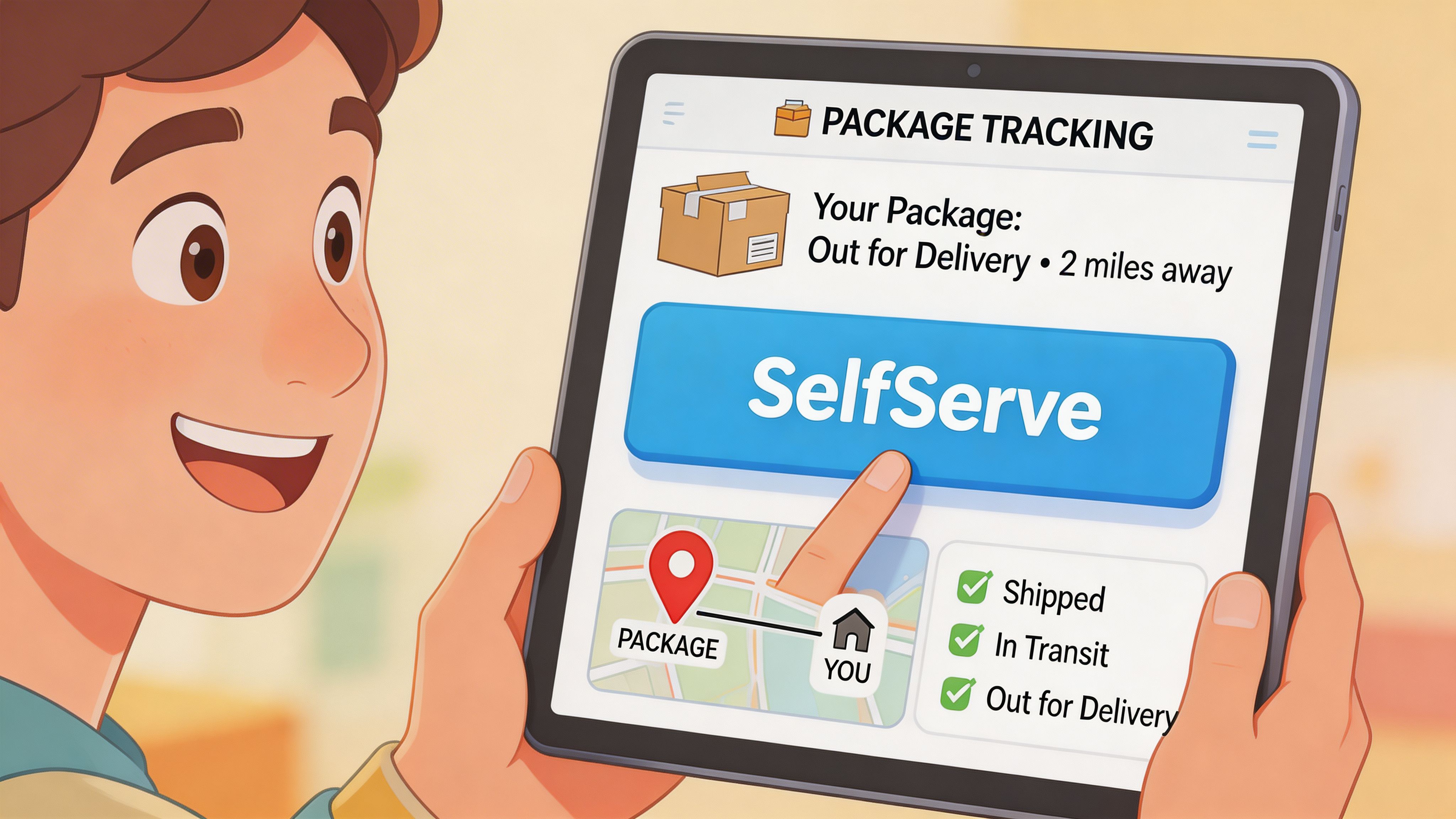
Most last mile carrier tracking setups stop at visibility. They answer the question “where is it?” but ignore the more important follow-up question, “what can the customer do now?”
That gap is bigger than it looks. A shopper sees the package is headed to an old apartment. Another realizes the office will be closed at the expected delivery time. A third notices the contact number is wrong. Static tracking pages surface the issue but provide no operational path to resolve it.
That is why the self-service layer matters. The primary underserved angle in this space is the lack of integration with self-service portals, preventing customers from proactively editing addresses or rescheduling deliveries, as described in ABI Research’s perspective on perfecting last-mile carrier tracking.
Why visibility alone falls short
A branded tracking page can reduce uncertainty, but it does not automatically reduce preventable exceptions.
When customers must contact support to request simple changes, three things happen:
- the customer waits
- the support team becomes a manual routing layer
- the carrier clock keeps moving
For Shopify brands, that delay is costly because fulfillment and carrier handoff do not pause while the ticket sits in queue.
What actionability looks like in practice
A stronger model gives customers controlled ways to manage their order from the same post-purchase environment where they check status.
That can include:
- Address edits within defined windows
- Contact detail correction
- Delivery-related requests routed through merchant rules
- Post-purchase upsells tied to the order status flow
- Multilingual interfaces for international customers
A practical example is a self-service customer portal that sits on top of the order experience and turns passive tracking into a managed workflow. Merchants exploring that model can review what a self-service customer portal can do inside a Shopify post-purchase stack.
The Shopify trade-off
More customer control is not always better. Unrestricted editing creates risk for fraud, fulfillment confusion, and warehouse rework.
The right setup gives customers bounded flexibility. Let them fix the issues that support would otherwise handle manually, but only inside rules that your operations team controls. Time windows, field-level permissions, approval steps, and validation all matter.
The goal is not unlimited change. The goal is reducing preventable tickets and failed deliveries without introducing new operational chaos.
Many Shopify brands leave value on the table here. They invest in tracking visibility, but not in the systems that let customers respond to what they see.
The Future of Post-Purchase Is Self-Service
Last mile carrier tracking starts as a visibility project. Mature brands turn it into an operating model.
The progression is straightforward. First, customers need clear shipment visibility. Then your team needs reliable event data and exception reporting. After that, the primary benefit comes from letting customers resolve simple issues themselves within rules your business controls.
That is the shift that separates a functional tracking experience from a modern post-purchase experience. Visibility reduces uncertainty. Self-service reduces avoidable work.
For Shopify merchants, this matters because post-purchase is no longer a quiet back-office zone. It is part of retention, part of support efficiency, and part of brand trust. The order status page is not just a status page anymore. It is a decision point for the customer and an efficiency lever for the business.
The stores that win from here will not be the ones with the most tracking emails. They will be the ones that combine clean last mile carrier tracking with controlled customer action, better exception handling, and a post-purchase flow that feels as polished as checkout.
If you want to give customers a practical way to edit order details, correct addresses, and manage post-purchase changes without flooding support, take a look at SelfServe. It helps Shopify brands turn order status pages into self-service workflows that are easier for customers and easier for operations teams to manage.