Shipping Shopify App: Cut Costs & Boost Sales

Unexpected shipping costs are one of the fastest ways to lose an order. On Shopify Plus, they also create a second problem after checkout: support volume.
That broader operational impact gets missed in many conversations about a shipping shopify app. Teams usually compare checkout rate accuracy, label printing speed, or carrier coverage first. Those are valid buying criteria, but they do not tell you how shipping setup affects margin recovery, customer service workload, or fulfillment error rates once the order is already in the system.
The result is that many brands move past basic shipping tools once order volume rises and exception handling becomes constant. A customer enters the wrong apartment number. Another wants to upgrade delivery after purchase. Someone notices a typo in the city field five minutes after placing the order. If the only answer is a support ticket, an admin edit, and a manual handoff to the warehouse, the process still depends on labor.
That post-purchase layer is where modern shipping apps start to show real ROI. The strongest setups do more than return rates at checkout. They also control what happens after the buy button, including customer-driven address fixes, service changes, and carrier rule enforcement before a bad shipment turns into a reshipment, delay, or WISMO ticket. Brands evaluating a multi-carrier shipping solution for Shopify operations should measure that downstream impact, not just the checkout experience.
Beyond Native Shopify Shipping
Returns, reships, and support tickets usually expose the limits of native Shopify shipping before checkout conversion data does. On Shopify Plus, the actual cost of a basic setup often shows up after the order is placed, when customers need to correct an address, change a service level, or fix a delivery detail before fulfillment releases the shipment.
Native tools work for simple shipping models
Shopify’s native shipping tools fit early-stage operations with one origin, predictable parcel sizes, and limited exceptions. They are easy to launch, easy to train on, and often good enough when the catalog is narrow.
That changes once shipping rules need to match how the business fulfills orders.
A lightweight product can still trigger oversized carrier charges. One order may need to route from a U.S. warehouse, while the next should ship from a European 3PL to protect margin and delivery speed. Some SKUs need service restrictions, hazmat logic, or manual handling fees. Native settings can cover part of that, but they do not give operations teams much room to model those conditions cleanly across checkout, fulfillment, and post-purchase changes.
Practical rule: If finance keeps finding a gap between collected shipping revenue and carrier invoices, the shipping setup is no longer doing its job.
Shipping complexity usually arrives in layers
Brands rarely outgrow native shipping all at once. The pressure builds across several teams.
Checkout needs more accurate rate logic tied to products, destination, and origin. Fulfillment needs consistent routing and label rules that do not depend on tribal knowledge. Support needs a controlled way to handle customer requests after purchase, especially address fixes that arrive minutes after the order is submitted but before the label is created.
That last point gets overlooked in many app evaluations. Teams spend weeks comparing rate accuracy, then leave post-purchase edits to email queues and admin work. The result is avoidable labor, delayed releases to the warehouse, and more reshipment risk than most operators realize.
For brands reviewing architecture options, a multi-carrier shipping solution for Shopify operations is usually the right starting point because single-carrier logic tends to break once catalog complexity and destination mix increase.
Where native shipping fails first
The first warning signs are operational.
Support asks whether an address can still be updated. Finance sees margin leakage on certain zones or product types. Merchandising launches a shipping promotion that creates edge cases ops now has to clean up by hand.
Common failure points include:
- Complex catalogs: Bundles, oversized products, mixed parcel dimensions, and freight items need shipping rules beyond basic profiles.
- Multi-origin fulfillment: Brands shipping from stores, warehouses, and 3PLs need logic tied to inventory position and geography.
- Promotional shipping offers: Threshold-based offers are easy to market and harder to execute profitably without tighter controls.
- Limited post-purchase control: Native shipping handles rate presentation at checkout. It does not solve the customer who spots a bad apartment number right after paying.
For a Plus brand, that gap matters. Every manual address correction or service change creates handoffs between support, ops, and fulfillment. A shipping app starts paying for itself when it reduces those exceptions, contains carrier-related margin loss, and gives customers a better way to fix mistakes before they become claims, delays, or WISMO tickets.
The Three Tiers of Shipping Shopify Apps
The Shopify app ecosystem makes more sense when you sort it by job-to-be-done instead of by app store category. Most shipping tools fall into three practical tiers. The mistake is assuming one tier replaces the others.
Tier 1 rate calculation and checkout
Tier 1 apps sit closest to conversion. Their job is to present accurate shipping choices before the customer pays.
Many of these tools rely on Shopify’s CarrierService API. In practice, that means the app can receive order details at checkout, inspect line item weights from req.body.rate.items, total the grams, and apply custom shipping logic. According to FDG Web’s technical guide to custom Shopify shipping modules, this kind of real-time, localized rate calculation can reduce cart abandonment by 15% compared with flat estimates.
That sounds technical, but the operational value is straightforward. Customers stop seeing rates that feel arbitrary. Ops teams stop overcharging in some lanes and undercharging in others.
Tier 1 apps are usually the right fit when a merchant needs:
- Real-time carrier rates: Better than static tables when destinations, weights, and service levels vary.
- Rule-based checkout logic: Useful for exclusions, surcharges, thresholds, or product-specific handling.
- More accurate delivery promises: Particularly important when standard settings oversimplify transit logic.
Tier 2 fulfillment and automation
Tier 2 apps pick up after the order is placed and before the package leaves the warehouse. These tools focus on labels, batch processing, customs workflows, and carrier management.
They usually matter most when the pain isn’t checkout conversion but internal throughput. If your team exports orders, rekeys shipping data into carrier portals, or uses spreadsheets to manage service selection, you’re in Tier 2 territory.
These tools commonly support:
- Label generation and batching
- Carrier account management
- Customs documentation
- Workflow automation across warehouses and 3PLs
They don’t usually improve checkout directly. They improve labor efficiency, consistency, and control inside operations.
If your warehouse team has a workaround for something “the app doesn’t quite do,” that workaround will eventually become your real system. Choose tools that eliminate side processes, not ones that depend on them.
Tier 3 post-purchase experience
Tier 3 is where the market still feels underbuilt. These apps focus on what happens after the customer pays but before delivery is complete.
That includes:
- Customer-driven address edits
- Shipping detail changes within controlled windows
- Order status widgets
- Branded tracking experiences
- Returns workflows
- Post-purchase upsells
This tier matters because the order isn’t operationally stable just because checkout succeeded. Customers still make mistakes. They move. They notice a typo. They realize they sent the order to the office instead of home. Without post-purchase tooling, support becomes the manual correction layer.
Shipping app tiers and core functions
| Tier | Primary function | Key features | Ideal for merchants |
|---|---|---|---|
| Tier 1 | Checkout rate accuracy | Real-time carrier rates, rule engine, service-level display, delivery estimates | Brands with conversion issues tied to shipping price or service presentation |
| Tier 2 | Fulfillment efficiency | Labels, batching, customs workflows, carrier selection, warehouse automation | Teams handling larger order volumes and operational complexity |
| Tier 3 | Post-purchase control | Address edits, order changes, tracking portals, returns, upsells | Brands with meaningful support load after checkout and a need for customer self-service |
The tier model helps prevent bad buying decisions
A lot of app evaluations fail because the merchant is shopping in the wrong tier. They buy an advanced rate engine when their primary pain is support burden after purchase. Or they install a post-purchase tool expecting it to fix bad shipping logic at checkout.
A mature Plus stack often spans all three tiers. What changes by brand is where the sharpest ROI sits first.
For a fast-growing DTC merchant, Tier 1 might pay back quickly by improving rate precision at checkout. For a brand with a large support team and frequent address-change requests, Tier 3 may solve the larger operational leak first.
Evaluating Shipping Apps for Shopify Plus
On Shopify Plus, the decision isn’t just feature comparison. It’s systems design. The app has to fit how your brand fulfills, promotes, escalates exceptions, and grows into new regions.
A shipping shopify app that works for a low-complexity store can fail quickly in a Plus environment because Plus merchants don’t just need rates. They need control over how shipping logic interacts with operations.
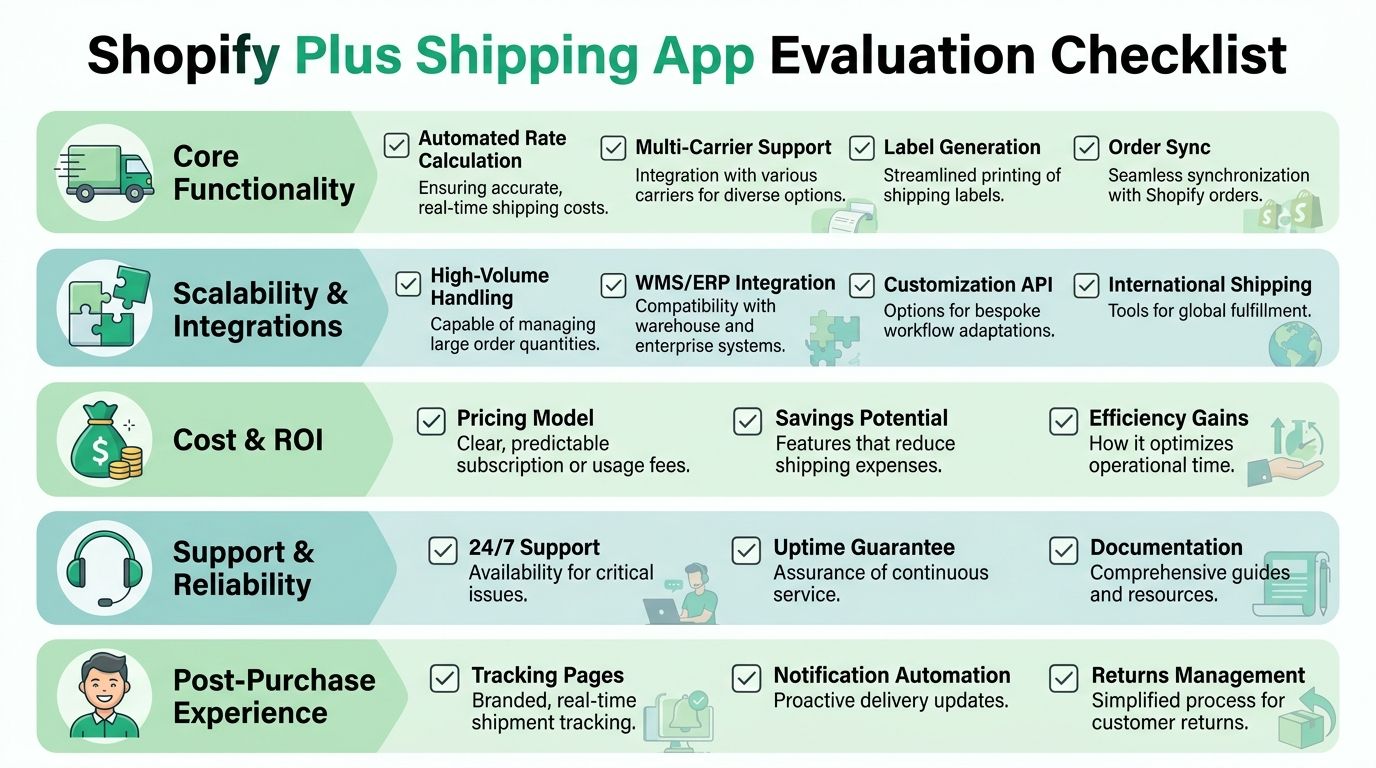
For brands assessing platform fit more broadly, this overview of what Shopify Plus is helps frame why enterprise-level shipping decisions need a different standard than SMB app selection.
Start with operational reality
The cleanest demo rarely reflects your actual order mix. Test the app against the ugly cases first.
That includes orders with mixed weights, multi-origin inventory, promotional thresholds, international destinations, and orders that need exception handling. If the app only looks good on a simple one-item domestic cart, you still don’t know if it fits your business.
A practical evaluation checklist should include:
- Origin logic: Can the tool handle multiple warehouses, stores, or 3PL origins without manual workarounds?
- Carrier flexibility: Can you compare services and present sensible options by destination and cart makeup?
- Rule depth: Can merchandising run shipping promotions without forcing ops to absorb margin damage?
- Integration readiness: Does it connect cleanly with ERP, WMS, or fulfillment partners?
Watch the threshold trap
Free shipping rules often look profitable in a spreadsheet and messy in production.
The trade-off is real. Intuitive Shipping’s app listing context notes that a 2025 A/B test found higher free shipping thresholds can increase AOV, but they also risk cart abandonment. That’s why the more capable tools pair threshold rules with real-time rate shopping, so the customer still sees believable alternatives when they miss the threshold.
That matters more on Plus because small shifts in conversion ripple through larger revenue volume. A threshold rule shouldn’t operate in isolation. It needs to work with actual rate logic, product margins, and service levels.
Evaluation lens: Don’t ask whether the app supports free shipping thresholds. Ask whether it lets you control what happens when the threshold isn’t met.
Performance and architecture matter
Shipping logic sits close to checkout and order orchestration. Poorly designed apps create latency, brittle workflows, or support dependencies that won’t scale.
When evaluating, dig into these questions:
How does the app calculate and return rates?
You want predictable behavior during peak traffic and clean fallbacks when a carrier response fails.What happens when an order needs an exception?
Every shipping app handles the happy path. The difference shows up when a customer changes an address, a destination is invalid, or a promotion conflicts with service rules.Can your team own the rule set?
If every shipping rule change needs developer help or vendor support, the app will slow down campaign execution.
What works better in Plus environments
In practice, the strongest apps for Plus merchants share a few traits:
- They expose enough configuration to match real workflows
- They support integration, not just interface
- They separate business rules from one-off hacks
- They give operations and support teams visibility, not just admins
That’s usually the dividing line between a tool that survives scale and one that becomes another system your team has to manage around.
The Untapped ROI of Post-Purchase Workflows
A large share of shipping work starts after checkout, not at rate selection. For Shopify Plus brands, that matters because the cost sits in payroll, rework, delayed fulfillment, and avoidable delivery exceptions.
A customer who spots a wrong apartment number five minutes after ordering should not trigger a manual chain across support, operations, and the warehouse. Yet that is still how many teams run it. Support confirms the request, ops checks whether the order is released, someone edits the order, and fulfillment has to trust that the update reached the right system before a label prints. The customer sees a simple correction. Internally, it is queue management and risk control.
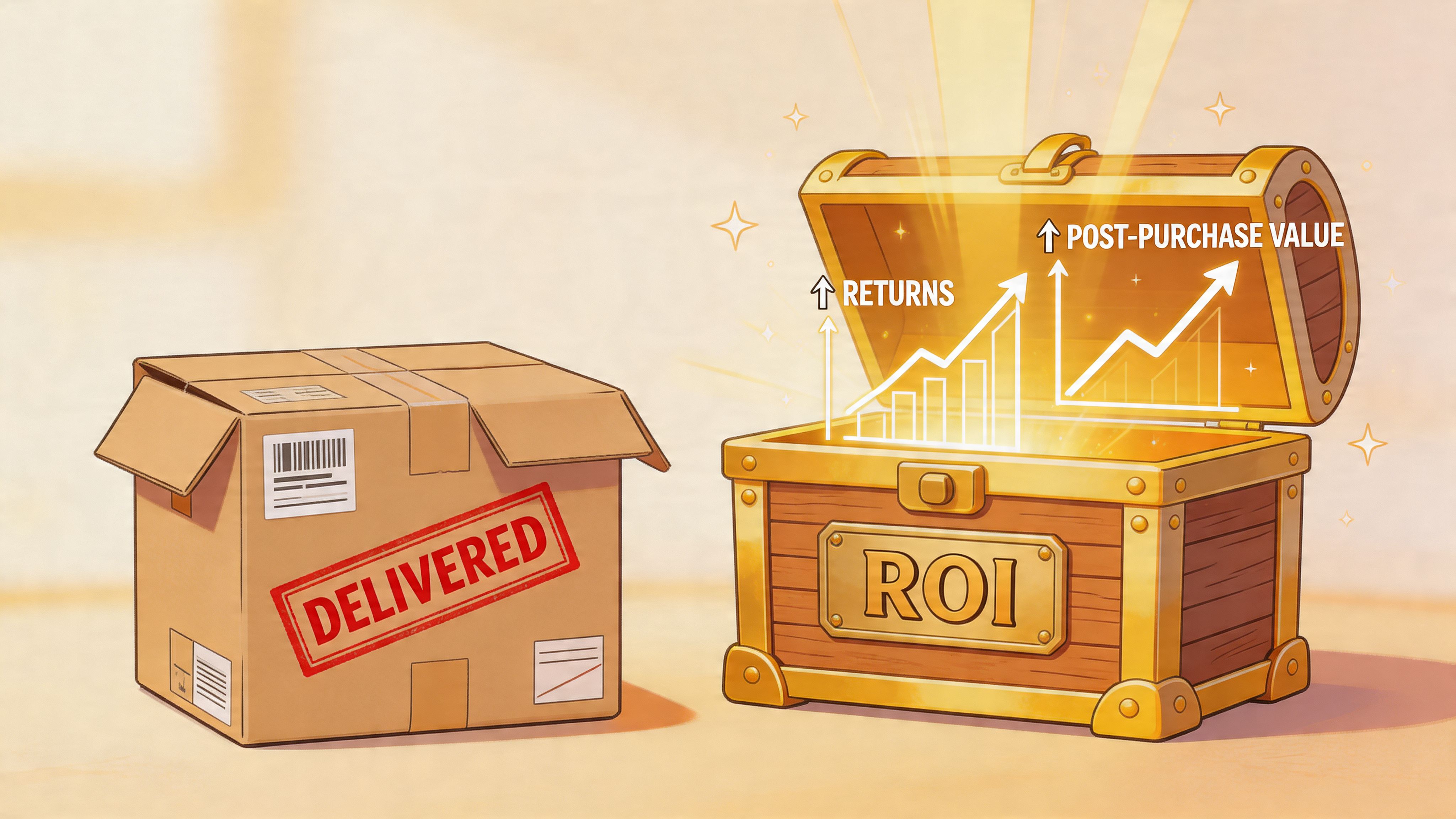
Post-purchase shipping issues are operational work
This is the part many app evaluations miss. Teams spend weeks comparing carrier rates and checkout rules, then leave post-order exceptions to inboxes and Slack messages.
The recurring problems are familiar:
- Address corrections arrive after payment but before pick and pack
- Shipping method changes need policy checks, not agent guesswork
- Warehouse handoffs create errors when edited data does not sync cleanly
- Customer follow-ups keep growing because nobody can see whether the change applied
On high-order-volume stores, these are not edge cases. They are daily workload.
Why architecture determines whether self-service is safe
Post-purchase editing only works if the app can apply business rules in real time. The customer experience has to reflect fulfillment status, allowed fields, fraud controls, and order restrictions at the moment the request is made.
That is why the architecture matters. Shopify Engineering’s discussion of server-driven UI in Shop App shows how Shopify handles dynamic interfaces where the server controls what the customer can see and do. That model fits post-purchase workflows because permissions change fast. An order may be editable for 20 minutes, locked after routing, and partially editable again if a support agent intervenes.
Static widgets are weak here. They can collect requests, but they do not reliably enforce policy.
A practical example is SelfServe, which offers configurable editing windows, multilingual widgets, Google Maps address validation, and upsell modules on the Thank You and Order Status pages.
Brands that want to examine the broader post-purchase customer experience on Shopify should treat shipping changes as one part of a larger service design problem.
The best post-purchase workflow removes tickets before they enter the queue.
Controlled self-service beats manual exception handling
The goal is not open-ended editing. The goal is controlled self-service that reduces support volume without creating fulfillment risk.
In practice, that usually includes:
- Time-based edit windows tied to fulfillment release timing
- Field-level controls so customers can change approved data only
- Address validation before the update is accepted
- Review paths for requests that should pause for human approval
That structure matters because every field carries different risk. Letting a customer fix a misspelled street name is very different from letting them reroute a high-value order after fraud screening.
Here’s a product walkthrough that shows how this kind of post-purchase editing experience can appear in practice:
The ROI is bigger than support savings
Labor reduction is the obvious gain, but it is not the only one.
Fewer manual edits mean fewer bad labels, fewer carrier adjustment disputes, and fewer orders that require expensive interception after dispatch. Support leaders usually notice the time savings first. Operations teams usually notice the downstream effect on fulfillment accuracy and exception volume.
There is also a revenue angle. Some post-purchase apps let merchants present tightly controlled add-on offers after checkout, then pass the revised order into fulfillment without creating a manual mess. That only works when catalog rules, edit permissions, and fulfillment sync are already tight. Otherwise, the upsell creates more operational cost than margin.
For Plus brands, that is the primary opportunity in post-purchase shipping apps. They do more than calculate rates or print labels. They reduce avoidable service work after the order is placed, which is often where the hidden cost sits.
Implementation and Avoiding Common Pitfalls
Implementation usually breaks at the handoff between teams, not in the app settings.
On Shopify Plus, shipping logic touches checkout, fraud review, ERP sync, warehouse routing, customer service, and carrier compliance. A new app exposes every weak policy you already had. If the brand has never defined who owns address changes, when an order becomes locked, or how exceptions flow back to support, rollout gets messy fast.
Start by mapping the operating model before anyone changes configuration.
Audit the current process before install
Trace the order path from checkout through label creation, pick-pack, carrier handoff, and delivery issue handling. Include the post-purchase moments that brands often ignore, especially customer-initiated address fixes, shipping method changes, and requests that arrive after the order is paid but before it is fulfilled.
Document four things:
- Checkout logic: Which rules control methods, thresholds, surcharges, exclusions, and destination-specific restrictions?
- Fulfillment routing: How orders move across warehouses, stores, 3PLs, and backorder flows.
- Support ownership: Which team can approve shipping edits, which team only triages them, and when fulfillment has the final say.
- Failure points: Where bad addresses, carrier service mismatches, or customer edits still force manual intervention.
That last point matters more than teams expect. A shipping app can reduce manual work, but it can also create a new exception queue if the rules stop at checkout and ignore what happens after purchase.
Configure around policy, not preference
Good configuration starts with operating rules.
Set the app around clear decisions the business has already made. An order should be editable until a defined fulfillment event. Certain fields, such as a typo in the street line, may be safe for customer self-service. A reroute to a new city, a change that affects duties, or an edit on a high-risk order may need review.
Three decisions usually determine whether the rollout holds up:
When does the order lock?
Tie this to fulfillment status, SLA cutoff times, and fraud checks.Which changes can happen automatically?
Separate low-risk edits from edits that can change carrier cost, tax treatment, or fraud exposure.Where do edge cases go?
Multi-origin orders, hazmat items, subscriptions, and restricted SKUs need a fallback path before launch.
Teams often blame the app for inconsistent behavior. In practice, the app is following unclear rules.
Test the ugly scenarios
Vendor demos rarely show the situations that create support tickets.
Build a test matrix around the orders your team struggles with. Include international shipments, oversized items, mixed carts that split across locations, orders close to a free-shipping threshold, and customer corrections submitted minutes before batch fulfillment begins. Test bad address formatting. Test PO boxes. Test apartment numbers that break validation. Test what happens when an edit changes the available service level or pushes the order into a different warehouse.
Also test the human workflow. Support should know what the customer can edit alone, what creates an approval task, and what must be denied because the package is already in motion.
Launch discipline: If support, fulfillment, and any 3PL partner have not tested the exception flow, the app is not ready for production.
The most common mistakes
The biggest mistake is scope. Teams spend weeks on rate logic, then treat post-purchase shipping changes as a support problem. That is expensive. Customer-driven edits after checkout can either be absorbed by the app with controlled rules or pushed into tickets, refunds, re-labeling, and carrier intercepts.
Other common mistakes are more operational:
- Ignoring app conflicts: Shipping apps often overlap with subscriptions, bundling tools, ERPs, WMS connectors, and order-status customizations.
- Skipping training: Support agents and warehouse leads need a clear decision tree, not a vendor demo recording.
- Launching without customer messaging: Customers need to know what they can change, how long they have, and what happens after the cutoff.
- Judging success by installation alone: A working integration is only the starting point. The true test is whether manual intervention drops without creating fulfillment errors.
One more caution. If your team introduces post-purchase editing, do not open every field on day one. Start with the changes that produce high ticket volume and low operational risk.
Rollout sequence that works better
A phased rollout gives operations room to learn.
Start with one stable use case. That might be a narrow address-correction window before fulfillment release, or a limited set of rate rules on a single market. Run it long enough to see where orders stall, where support still intervenes, and whether warehouse teams trust the new flow. Then expand to more destinations, carriers, or editable fields.
This approach protects margin in two ways. It limits fulfillment errors during launch, and it shows whether the post-purchase workflow is removing labor instead of shifting the work to another team.
For Plus brands, that is the standard to use. A shipping app should lower exception handling cost across the full order lifecycle, not just produce cleaner checkout rates.
Measuring Success and Future-Proofing Your Strategy
A shipping app earns its keep when it changes operating metrics, not when it adds another dashboard. On Shopify Plus, the right measurement framework should connect shipping logic to conversion quality, support load, and fulfillment stability.
The important part is picking metrics your team can act on.
KPIs that actually matter
Most brands already track shipping cost in aggregate. That’s not enough. You need metrics that show whether the app is improving decisions.
Useful operational KPIs include:
- Shipping cost variance: Compare what the customer paid with what the carrier charged.
- Time to fulfill: Measure whether routing, labeling, and exception handling are getting faster.
- Shipping-related support ticket rate: Track how often customers contact support about addresses, methods, tracking, or delivery confusion.
- Manual order intervention rate: Count how often a person still has to step in.
- AOV from post-purchase offers: Useful if your post-purchase layer includes controlled upsells.
Look at those weekly after launch. Trends matter more than one-off spikes.
Read outcomes by team, not only by channel
The same app can succeed for one team and fail for another. Finance may see healthier shipping recovery. Support may still drown in address-change tickets. Warehouse staff may spend less time fixing label issues but more time handling new exception states.
That’s why post-implementation reviews should include operations, CX, fulfillment, and merchandising. Each group sees a different part of shipping ROI.
A simple way to structure that review:
| Team | What to check | Good sign |
|---|---|---|
| Support | Shipping-related ticket themes | Fewer repetitive correction requests |
| Operations | Exception queues and routing issues | Clearer rules, fewer manual overrides |
| Fulfillment | Label and address error patterns | Less rework before dispatch |
| Merchandising | Threshold and offer performance | Shipping promos that don’t create downstream chaos |
Future-proofing means flexibility
Shipping keeps changing. Customer expectations shift, carriers change pricing logic, and brands add new markets, nodes, and service promises.
The safest long-term approach is to choose apps that are configurable and integration-friendly. In practice, that means:
- Rule engines that can evolve with promotions
- APIs or connectors that fit your ERP and 3PL stack
- Post-purchase controls that support new workflows
- Support for international and multilingual customer journeys
A rigid tool might solve today’s shipping setup and block tomorrow’s.
Choose shipping systems the way you choose warehouse processes. Assume your catalog, channels, and constraints will change.
The strategic view
Shipping used to be treated as a necessary cost center. For Plus merchants, it’s closer to a control surface. It affects whether customers convert, whether they trust delivery promises, whether support can scale, and whether operations can stay efficient as the brand expands.
The mature approach is to stop viewing shipping apps as isolated utilities. Checkout rates, fulfillment automation, and post-purchase editing are part of the same commercial system. When those parts line up, the merchant gets cleaner margins, fewer preventable tickets, and a better customer experience without adding headcount every time order volume rises.
If your team wants to reduce manual shipping edits after checkout, SelfServe is a practical option to review. It lets merchants set controlled post-purchase editing permissions, validate addresses with Google Maps, support multilingual shoppers, and add curated upsell modules on Thank You and Order Status pages without handing full order control to customers.