Fixing Shopify Cart Abandonment and Recovering Lost Sales
It's the classic e-commerce headache: a customer loads up their cart, gets right to the finish line, and then... vanishes. This is Shopify cart abandonment in a nutshell. While there are a handful of reasons this happens, two stand out as the biggest deal-breakers: surprise shipping costs and a clunky, complicated checkout process.
Why Do Customers Really Leave Their Carts?
Every abandoned cart is more than just a lost sale; it's a clear signal that something in your buying process is causing friction. To fix it, you need to get inside your customer's head and understand the psychology behind their decision to walk away.

This isn’t a new problem. Across the e-commerce world, the average cart abandonment rate hovers around a stubborn 70.19%. What’s fascinating is that this number hasn't really budged in years. This tells us that fancy new tech isn't the solution; understanding buyer behavior is.
The stakes are high. Research suggests a staggering $260 billion in lost sales could be recovered in the US and EU alone just by optimizing the checkout experience. If you want to dig into the numbers, you can explore detailed Shopify data here to see just how common this issue is.
The Three Core Reasons for Abandonment
Instead of getting overwhelmed, it helps to break down the "why" into three main buckets. Thinking this way makes it much easier to pinpoint exactly where things are going wrong on your store.
Cost and Pricing Friction: This is almost always the number one reason. We're talking about those nasty surprises at the end—unexpected shipping fees, taxes that pop up out of nowhere, or a final price that just feels higher than they were expecting.
User Experience (UX) and Technical Glitches: A confusing or slow checkout is a conversion killer. Are you forcing people to create an account? Is your site a nightmare to use on a phone? Does it load at a snail's pace? These are all major roadblocks. In fact, a slow site is a huge offender. If you think that might be you, check out our guide on how to speed up your Shopify store for some quick wins.
Trust and Security Worries: People are rightfully cautious about where they put their credit card details. If your site looks unprofessional, lacks security seals (like SSL), or makes your return policy hard to find, you're eroding the trust needed to make a purchase.
Don't think of an abandoned cart as a failure. Think of it as direct feedback. Each one is telling you a story about a specific point of friction. Your job is to find that friction and smooth it out for the next person.
To help you get started, here's a quick-reference table that connects common abandonment reasons to what they mean for your store and the first step you can take to fix them.
Common Cart Abandonment Triggers and How to Address Them
This table isn't exhaustive, but it covers the biggest culprits I see when working with Shopify stores. By addressing these core issues, you're not just plugging a leak; you're building a better, more trustworthy experience that turns browsers into buyers. Once you know why people are leaving, you can start putting the practical, powerful fixes we'll cover next into action.
How to Pinpoint Your Checkout Funnel's Weakest Links
Before you can start fixing the leaks in your sales funnel, you have to find them. The first step in tackling Shopify cart abandonment is playing detective—you need to walk in your customer’s shoes and use data to see exactly where they’re hitting a wall. This isn't about guesswork; it's about making smart, targeted fixes based on real behavior.
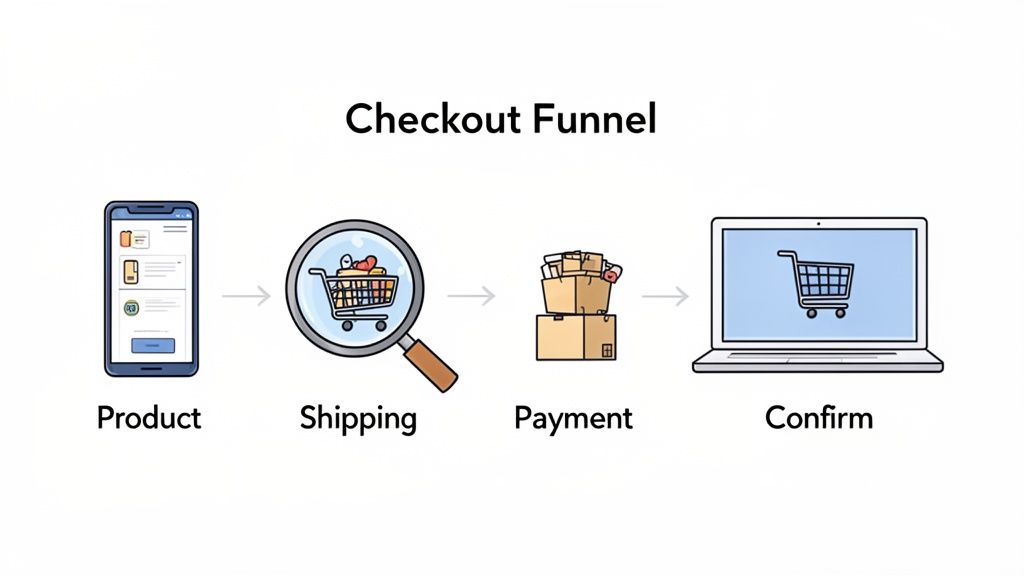
Your first stop should always be Shopify Analytics. It gives you a great high-level view of your checkout process, clearly showing how many people move from adding a product to their cart, to reaching the checkout page, and finally, making a purchase. This funnel visualization is the quickest way to spot your biggest drop-off points. Is the problem getting people from the cart to checkout, or are they bailing when they see the shipping options?
Perform a Manual UX Audit
Data tells you what is happening, but a manual audit is how you figure out why.
It’s simple: open an incognito browser window and go through your entire checkout process as if you were a brand-new customer. This is where you have to be brutally honest and pay attention to all the little things that create friction.
As you go, ask yourself these questions:
- Is Guest Checkout Obvious? Forcing someone to create an account is a classic conversion killer. Make sure the guest checkout option is front and center.
- How Many Form Fields? Are you asking for a phone number when it's not even required for shipping? Every extra field is another reason for someone to give up and leave.
- Is It Genuinely Mobile-Friendly? Most of your traffic probably comes from mobile, but so many checkouts still feel clunky and designed for a desktop. Test it on your own phone. Are the buttons easy to tap? Is the text readable without pinching and zooming?
The goal of a UX audit isn't to find what you like; it's to find what might frustrate a first-time, slightly impatient buyer. Think of every click, every form field, and every page load as a potential exit door.
Use Session Recordings to See What Your Customers See
Analytics and manual audits are fantastic, but nothing beats watching real users interact with your store. Session recording tools like Hotjar or the completely free Microsoft Clarity let you anonymously watch recordings of actual user sessions. It’s like looking over their shoulder.
You’ll see where their mouse hovers in confusion, where they rage-click a broken button, or where they repeatedly try to enter a discount code that just won't work. This unfiltered view gives you insights that raw data could never provide. You might discover a shipping calculator that’s confusing everyone or a payment button that’s nearly invisible on certain devices.
If you want to go even deeper on this, our guide on how to improve your Shopify checkout experience offers more detailed steps.
By combining the hard numbers from analytics with the human insights from an audit and session recordings, you get a complete picture of your funnel’s weakest links. This diagnostic work is crucial—it ensures your efforts to reduce cart abandonment are focused, effective, and backed by data.
Proactive Strategies to Prevent Cart Abandonment
Once you've diagnosed the leaks in your checkout funnel, it's time to start plugging them. The best way to reduce your Shopify cart abandonment rate is to smooth out the customer journey before a shopper even thinks about leaving. This is all about removing friction and building trust from the very first click.
The number one reason people abandon carts? Unexpected costs. It’s a trust-breaker. You can get ahead of this by being completely transparent about shipping fees right from the start. Never make a customer wait until the final checkout step to see their grand total.
Here's how to display those costs upfront on your product and cart pages:
- Shipping Calculator: Add a simple tool where shoppers can pop in their zip code for an instant shipping estimate.
- Announcement Bar: Use a site-wide banner at the top of your page to broadcast your shipping policy, like "Free shipping on all orders over $75."
Prioritize the Mobile Experience
A flawless desktop experience is great, but these days, the mobile checkout process is where you either win or lose the sale. Mobile devices are notorious for high abandonment rates, with some studies showing them as high as 73-85%. This is a huge deal, especially when you consider that mobile traffic now accounts for over 60% of all e-commerce visits.
Slow performance is the main culprit here. Research shows that mobile sites taking longer than three seconds to load can see a 44% spike in abandonment. If you want to dig deeper, you can discover more insights about mobile abandonment rates to see just how big this challenge is.
To fight back, your focus needs to be on speed and simplicity. First, get your site loading lightning-fast on mobile. Then, make paying ridiculously easy by enabling one-click options.
Activating accelerated checkouts like Shop Pay, Apple Pay, and Google Pay is one of the highest-impact changes you can make. It lets repeat customers and anyone using these services fly past the tedious process of entering their address and credit card info, turning a multi-step chore into a single tap.
Build Unshakeable Trust and Credibility
Let's be honest, online shoppers are cautious. They need to feel certain that your store is legitimate and that their payment information is safe. You can build this confidence visually throughout their entire journey.
A great place to start is by displaying security badges prominently. Logos from trusted names like Norton, McAfee, or even Shopify's own secure checkout badge provide instant reassurance. I recommend placing them near your "Add to Cart" buttons and in your website's footer where people expect to see them.
Beyond security symbols, social proof is your most valuable asset. Weaving customer reviews and star ratings directly onto your product pages is a game-changer. When a shopper sees that other people have bought and loved a product, it instantly lowers their perceived risk and makes hitting that "buy" button feel a whole lot safer.
Simplify the Path to Purchase
Think of it this way: every extra click, every unnecessary form field, is another chance for your customer to leave. Your job is to create the most direct, effortless path from cart to confirmation.
One of the most critical tactics is to always offer a guest checkout option. Forcing a first-time buyer to create an account is a massive source of friction. Let them make their purchase with the bare minimum of information. You can always invite them to create an account on the thank-you page after you've already secured the sale.
Next, take a hard look at your checkout forms. Do you really need their phone number if you only ship with standard mail? Is that "Company" field just taking up space for residential orders? Get rid of every single non-essential field. Shortening the process helps maintain the customer's forward momentum.
Finally, you can use an exit-intent popup as a last line of defense. When a user's cursor moves toward the browser's back button or to close the tab, a popup can appear offering a small, time-sensitive incentive—like 10% off—or a quick link to your live chat. Sometimes, that little nudge is all it takes to bring a hesitant shopper back from the brink.
Using Shopify's Native Tools to Recover Sales
Before you even think about third-party apps, your first stop for tackling Shopify cart abandonment should be your own admin dashboard. Shopify has some surprisingly powerful tools built right in to help you automatically win back customers who drift away at checkout. Getting these native features dialed in is the fastest, cheapest way to start plugging that leaky revenue bucket.

The system works by automatically sending emails or texts to shoppers who start the checkout process—giving you their contact info—but don't finish the sale. The default templates are okay, but you'll see a real lift once you customize them to match your brand's voice and personality.
Setting Up Your Abandoned Checkout Emails
Your best bet here is a multi-step email sequence. A single "you forgot something" email is easy to ignore, but a thoughtful series of reminders can gently guide a distracted shopper back to their cart.
A three-part sequence is a proven winner, and I’ve seen it work wonders for many stores. Here's a quick blueprint to get you started on crafting an effective email flow.
A Winning Abandoned Cart Email Sequence
This structure gives you multiple chances to reconnect without being annoying. Each email serves a different purpose, moving the customer from a simple reminder to a final, compelling offer.
Don't just send a generic "You left items in your cart" message. Infuse your brand's personality! If you're a fun, playful brand, crack a joke. If you're a high-end brand, keep the tone helpful and exclusive. The email should feel like a personal note from you, not an automated message from a robot.
Leveraging SMS for Immediate Impact
Email is a workhorse, but abandoned cart text messages are your secret weapon for speed. With open rates that crush email, SMS cuts right through the inbox clutter to deliver a message that’s almost guaranteed to be seen.
When you're setting up SMS recovery in Shopify, keep a few things in mind:
- Be Brief. Texts should be short and sweet. Use their name, mention their cart, and give them a direct link to complete their purchase. That’s it.
- Timing is Everything. SMS feels more personal and immediate than email, so be respectful. Sending a text at 2 AM is a great way to get an unsubscribe.
- Stay Compliant. Make sure you have clear permission to text your customers. Shopify has tools to help, but you're ultimately responsible for following regulations like the TCPA.
Both email and SMS are fantastic built-in tools for fighting Shopify cart abandonment. By taking the time to move beyond the defaults and create a recovery strategy that feels authentic to your brand, you’ll turn more of those "almost" sales into happy, loyal customers.
If you're looking to really level up your contact list, we've got more tips on how to build an email list that actually buys from you.
Level Up Your Recovery with Advanced Tech and Smart Testing
With your standard Shopify recovery automations humming along, you're catching the low-hanging fruit. But to really move the needle on lost sales, you need to bring in the specialists—third-party apps—and adopt a ruthless testing mindset. This is how the best stores turn good results into great ones.
The Shopify App Store is packed with powerful tools built to do one thing: recover abandoned carts better than the default setup. These apps unlock a level of control and sophistication that Shopify's native features just can't match.
So, what should you look for? Focus on apps that give you more firepower, like:
- Smarter Segmentation: Go beyond a one-size-fits-all message. Target shoppers based on their cart value (a $500 cart deserves a different offer than a $50 one), the specific items they abandoned, or whether they're a brand new visitor versus a loyal returning customer.
- Unique Coupon Codes: Generic codes like "SAVE15" always end up on coupon sites. The right app can generate dynamic, single-use codes for every abandoned cart, protecting your margins and making the offer feel exclusive.
- Web Push Notifications: This is a fantastic way to reach shoppers who ignore email. A timely, clickable browser notification can pull them right back to their cart, even hours after they’ve left your site.
Stop Guessing and Start A/B Testing
Tools are only one part of the equation. The real secret weapon of top-performing stores is a relentless dedication to testing. They don't just "set and forget" their recovery flows; they constantly poke, prod, and optimize them through A/B testing.
The concept is simple: you create two versions of a single message, changing just one thing, to see which one performs better.
An A/B test is the most honest conversation you can have with your customers. You're not asking them what they might do; you're watching what they actually do. It’s the difference between guessing and knowing.
Don't overcomplicate it. Start with simple tests that can have a huge impact. Take your first abandoned cart email, for example.
- Version A (The Control): This is your current email. Don't change a thing.
- Version B (The Variant): Copy the entire email, but write a completely different subject line.
Set up the test to send each version to 50% of your audience. After a week or so, check the open rates. If Version B's subject line got way more clicks, you've found a winner. Make it the new control and start testing something else.
Once you've nailed your subject lines, move on to other high-impact elements. The possibilities are endless:
- The Offer: Does 15% off pull in more people than free shipping? What about a free gift with purchase?
- The Call-to-Action (CTA): Test the button text. Does "Return to Your Cart" work better than "Claim Your Discount"? A simple color change can even make a difference.
- The Copy: Pit a short, punchy email against a longer one that reminds customers why they wanted the product in the first place.
This cycle of testing, learning, and implementing is what drives continuous improvement. It’s how you’ll slowly but surely maximize your Shopify cart abandonment recovery rate and turn abandoned carts into a reliable revenue stream.
Your Action Plan for Reducing Cart Abandonment
Alright, we’ve covered a lot of ground. Now it's time to put that knowledge into practice and start reclaiming those lost sales.
The key to successfully tackling Shopify cart abandonment is to approach it methodically. You can't—and shouldn't—try to fix everything at once. Instead, break your efforts down into manageable phases. This isn't a sprint; it's about building a solid, long-term recovery strategy.
I've put together a visual timeline to help you map out a practical approach, starting with the essentials and moving toward more advanced optimization.
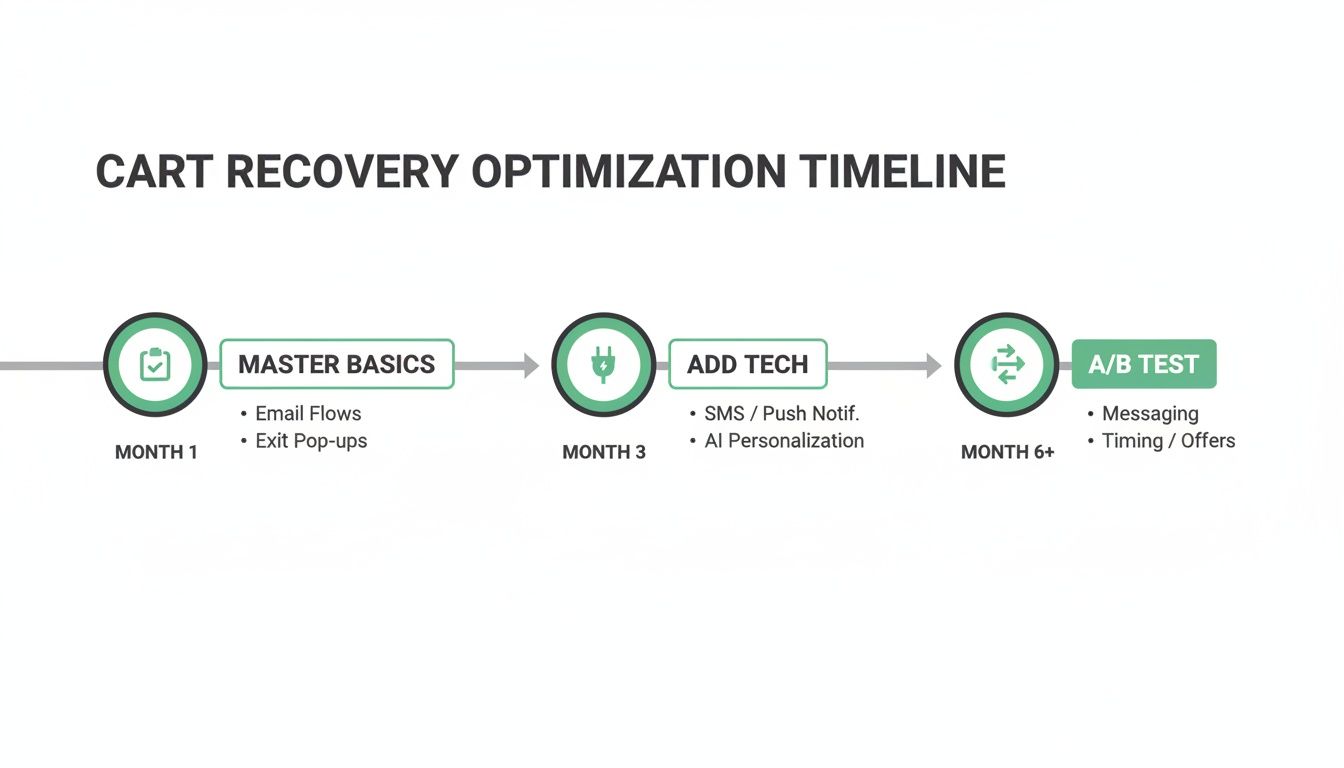
As you can see, the path to sustained success is all about layering your efforts. First, you secure the quick wins by mastering the fundamentals. Then, you introduce powerful recovery tech. Finally, you commit to continuous, data-driven A/B testing to fine-tune your approach.
This phased strategy is designed to deliver immediate improvements while you build a powerful, automated recovery engine that works for you around the clock.
Got Questions? We've Got Answers
When you're trying to figure out Shopify cart abandonment, a few questions always seem to pop up. Here are the straight answers to the most common ones I hear from store owners.
What’s a Good Cart Abandonment Rate on Shopify?
I get this one a lot. While the e-commerce average often cited is around 70%, what's "good" really depends on your industry and products.
For most stores on Shopify, getting your rate below 60% is a solid goal to aim for. If you can get it down closer to 50%, you're in fantastic shape. Honestly, though, the most important metric isn't some universal number—it's your own rate. Focus on making consistent, incremental improvements month over month. That's how you really win.
Should I Slap a Discount on Every Recovery Email?
Tempting, but no—this can backfire badly. If your customers figure out they can get a coupon just by leaving their cart, they'll start doing it on purpose. You'll be training them to expect a discount every single time.
A much smarter approach is to use a multi-email sequence. Your first email should be a friendly, no-pressure reminder. The second can add a bit of urgency or highlight product benefits. Only if they still haven't bought by the third email should you consider offering a small, time-sensitive discount as a final nudge.
This way, you capture the customers who just got distracted without needlessly cutting into your margins on every recovered sale.
Does Guest Checkout Really Matter That Much?
Yes, it absolutely does. Forcing a potential customer to create an account is one of the quickest ways to kill a sale. It’s a huge point of friction.
Think about it: they're ready to give you money, and you're putting a roadblock in their way. Countless studies have shown that a clear, easy guest checkout option dramatically lowers abandonment rates. The goal is to make buying as painless as possible. You can always ask them to create an account on the "Thank You" page after the sale is locked in.
Ready to take control of your post-purchase experience and reduce support tickets? With SelfServe, you can empower customers to manage their own orders, from editing shipping details to adding upsells, all while you stay in control.