Shopify 3PL Integration: The Complete Guide for 2026
If you're shopping for a 3PL right now, you're probably looking at the obvious promises first. Orders sync automatically. Inventory updates in real time. Tracking flows back to Shopify. On paper, most providers sound interchangeable.
The trouble starts after the order leaves Shopify.
A customer changes their apartment number. Another fixes a typo in the shipping address. Someone cancels an order ten minutes after checkout. Another adds an item through a post-purchase flow. In these scenarios, a Shopify 3PL integration either behaves like a real operating system or falls apart into Slack messages, manual holds, and support tickets.
I've seen teams evaluate 3PLs almost entirely on warehouse footprint, pick fees, and shipping zones, then get blindsided by edit handling after launch. The integration looked fine in demos because demos focus on happy-path flows. Real operations live in the exceptions. If your store allows customer-driven changes after checkout, your integration design has to account for what happens when the warehouse has already received, routed, or started picking the order.
Planning Your Integration and Choosing a Partner
A good Shopify 3PL integration starts with a blunt question. What problem are you trying to solve?
For some brands, the answer is labor. Internal teams can't keep packing in-house. For others, it's delivery speed, inventory positioning, or retail compliance. Those are very different operational needs, and they lead to different partner choices.
Define the operating model first
Before comparing vendors, write down the workflows your fulfillment partner must support:
- Order profile: Single-line DTC orders behave differently from bundles, subscriptions, or kits.
- Catalog complexity: Variant-heavy catalogs create more mapping risk than simple SKU sets.
- Exception volume: Stores with frequent address edits, cancellations, and return-to-sender issues need stronger state handling.
- Channel mix: A DTC-only operation isn't the same as one also shipping wholesale or retail orders.
A lot of merchants skip this step and jump straight into a 3PL sales process. That's how you end up buying a provider that can ship boxes but can't support your actual workflows. If you're still narrowing the field, this guide on choosing a fulfillment provider is useful because it forces the conversation back to operational fit instead of surface-level promises.
One practical way to keep the selection process honest is to create a requirements document with plain-language scenarios. Not features. Scenarios. "Customer updates address after release." "Bundle contains one quarantined component." "Order is canceled after label creation but before carrier scan." Those are the moments that expose weak integrations.
You should also review examples of how different 3rd party fulfillment companies structure their services, because fulfillment capability and integration maturity are not the same thing.
Use certification as a screening filter
For higher-volume brands, Shopify Plus Certified status matters. A Warehousing & Fulfillment guide on Shopify-focused 3PLs notes that this designation guarantees deep, near-real-time synchronization, and identifies ShipBob as an example of a certified partner supporting a multi-center network and affordable two-day ground shipping across the continental US.
That doesn't mean a non-certified partner is automatically wrong for your business. It does mean certified partners should be your benchmark when you're evaluating sync depth, inventory updates, and fulfillment status return to Shopify.
Practical rule: If a 3PL can't clearly explain how data moves between Shopify and its WMS, treat that as a product limitation, not a communication issue.
Questions that separate strong partners from risky ones
Ask these early, not after contracts are signed:
- How do you register as a fulfillment location? You want a provider that understands Shopify's fulfillment model, not one improvising around it.
- What happens to inventory when receiving, picking, returns, and restocks occur? Ask for the exact system behavior, not a generic "real-time" answer.
- Who owns exception handling? If a label fails, a SKU doesn't map, or an order can't be modified, someone needs a documented process.
- Can your support team trace an order state end to end? If they can't, your ops team becomes the middleware.
The best partner isn't always the cheapest or the biggest. It's the one whose warehouse process, software model, and exception handling fit how your Shopify store operates.
Mapping Data for Flawless Order and Inventory Sync
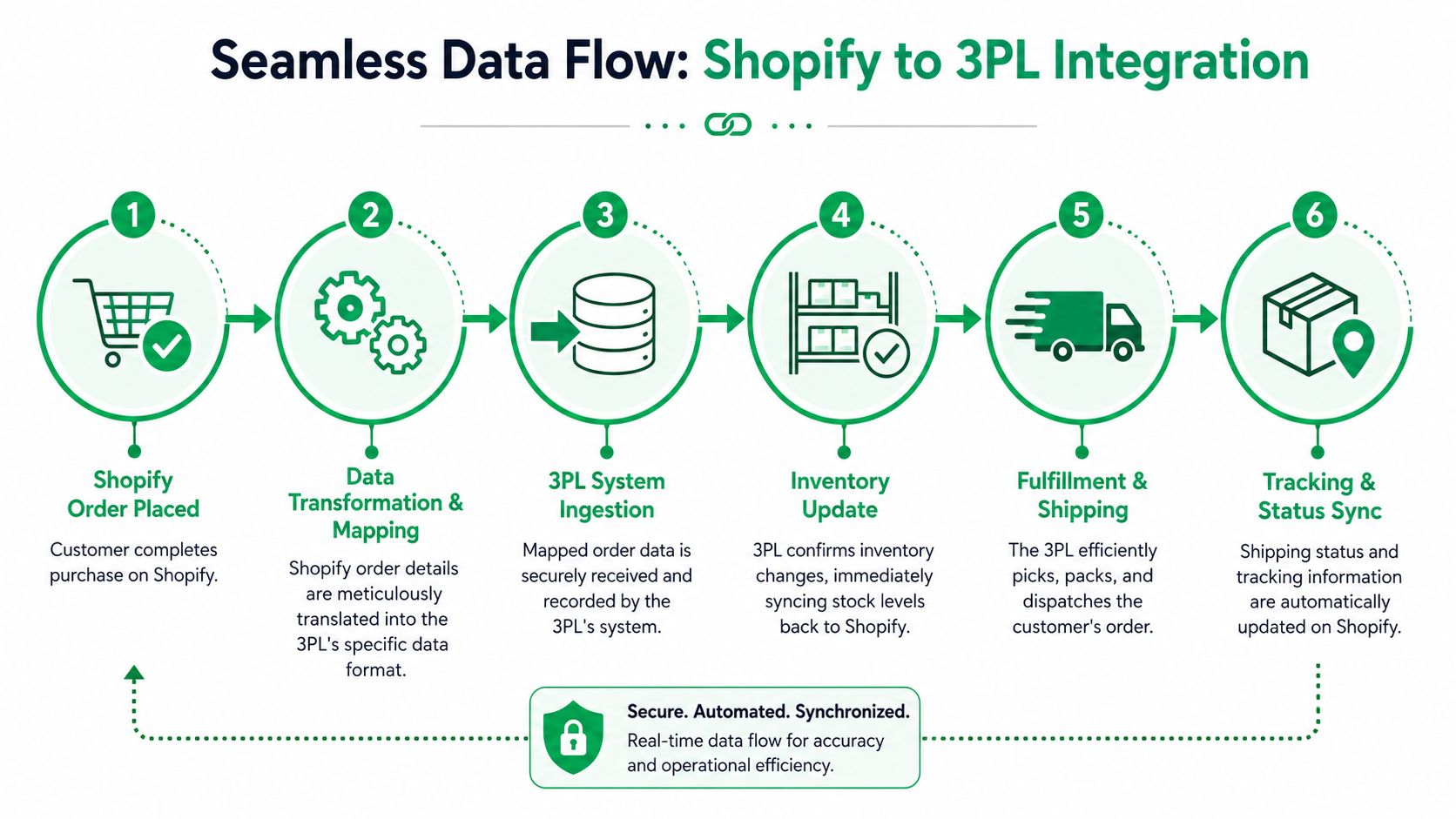
A Shopify order can look clean at checkout and still arrive at the warehouse missing the one field that determines whether it should ship, wait, split, or hold for review. That is how stores end up shipping an order a customer tried to edit ten minutes later, or canceling an order in Shopify that is already on a pick cart in the 3PL.
Data mapping decides whether Shopify and the warehouse are operating from the same order record.
Orders need release logic, not just order details
An order sync is not complete because the 3PL received an order number, line items, and a shipping address. The warehouse also needs the fields that control release.
That usually includes fulfillment location, shipping method translation, fraud or payment review status, tags, gift-note handling, bundle expansion rules, and any hold reason that should stop the order from being waved into picking. If those fields are missing or loosely defined, post-purchase edits become messy fast. Support changes the address in Shopify. The 3PL keeps the original address because that field was only sent on order creation. A customer removes one item. The warehouse still picks the full order because line-level edits do not sync after release.
JIT Transportation notes in its Shopify 3PL integration best practices that teams should validate with real orders before launch and confirm exact handling for bundles, returns, and label exceptions. That advice matters because the same weak spots tend to break edit and cancellation flows later.
One rule saves a lot of pain. Map every field that affects whether an order can be released, changed, or stopped after purchase.
Inventory is state, not a single quantity
The biggest disconnect usually shows up in inventory. Shopify may show sellable stock while the WMS has already carved part of that inventory into reserved, damaged, quarantined, or return-pending buckets.
If the integration compresses those states into one available number, storefront availability stops matching warehouse reality. The result is not just an occasional oversell. It also creates bad cancellation logic. A support agent thinks inventory was returned to stock after canceling an order in Shopify, while the 3PL still has units reserved against the original allocation.
Shopify's article on 3PL ecommerce operations explains why real-time visibility matters, but the practical question for operators is narrower: which inventory states exist in the WMS, and which of those states update Shopify?
Ask for the exact field mapping. Ask whether updates are event-driven or batch-based. Ask what happens when a return is received but not yet graded. Those answers tell you whether your store can safely allow customer-driven order changes.
For merchants comparing systems, this overview of third-party logistics software is useful because it shows which platforms expose enough control over sync rules and exception handling.
"Real-time" only matters if the right inventory state is being sent.
Stop relying on SKU strings alone
SKUs are useful for people on the warehouse floor. They are a weak primary key for an integration.
Teams rename SKUs. Merchandisers add suffixes. Similar variants end up with nearly identical strings. That is how a size or color mismatch slips through mapping and turns into the wrong pick, the wrong cancellation, or a failed edit after purchase.
Shopify's developer documentation for the Admin GraphQL API object model shows that each variant has a stable global ID. In practice, using the Shopify variant ID as the system identifier and keeping the SKU as an operational label reduces ambiguity, especially for stores with bundles, duplicate supplier SKUs, or frequent catalog updates.
That is the safer model if your support team allows order edits after checkout. A customer changing from medium to large is not just a SKU swap. It is a change to a specific variant record that has to remain consistent across Shopify, middleware, and the WMS.
A simple mapping model looks like this:
| Data area | What to map | Common failure |
|---|---|---|
| Order data | Shipping method, holds, tags, fulfillment location, editable status | Warehouse receives the order but misses release conditions or keeps processing after a store-side change |
| Inventory | Available, reserved, damaged, quarantined, return-pending states | Shopify sells units the warehouse cannot allocate or restocks canceled units too early |
| Product identity | Variant ID plus SKU discipline | Similar variants get fulfilled incorrectly or order edits fail to map cleanly |
Teams that avoid ugly launch-week surprises usually do one thing well. They define how the integration behaves after the order is created, not just at the moment it is sent.
The same principle shows up in other revenue systems too. If you have seen how billing records drift when identifiers are inconsistent, the trade-offs in these HubSpot Stripe integration options will feel familiar.
Choosing Your Connection Method API Middleware or App
The connection method shapes how much control you have, how fast you can launch, and how painful future changes will be. There isn't a universally right answer. There is only the right answer for your operating complexity.
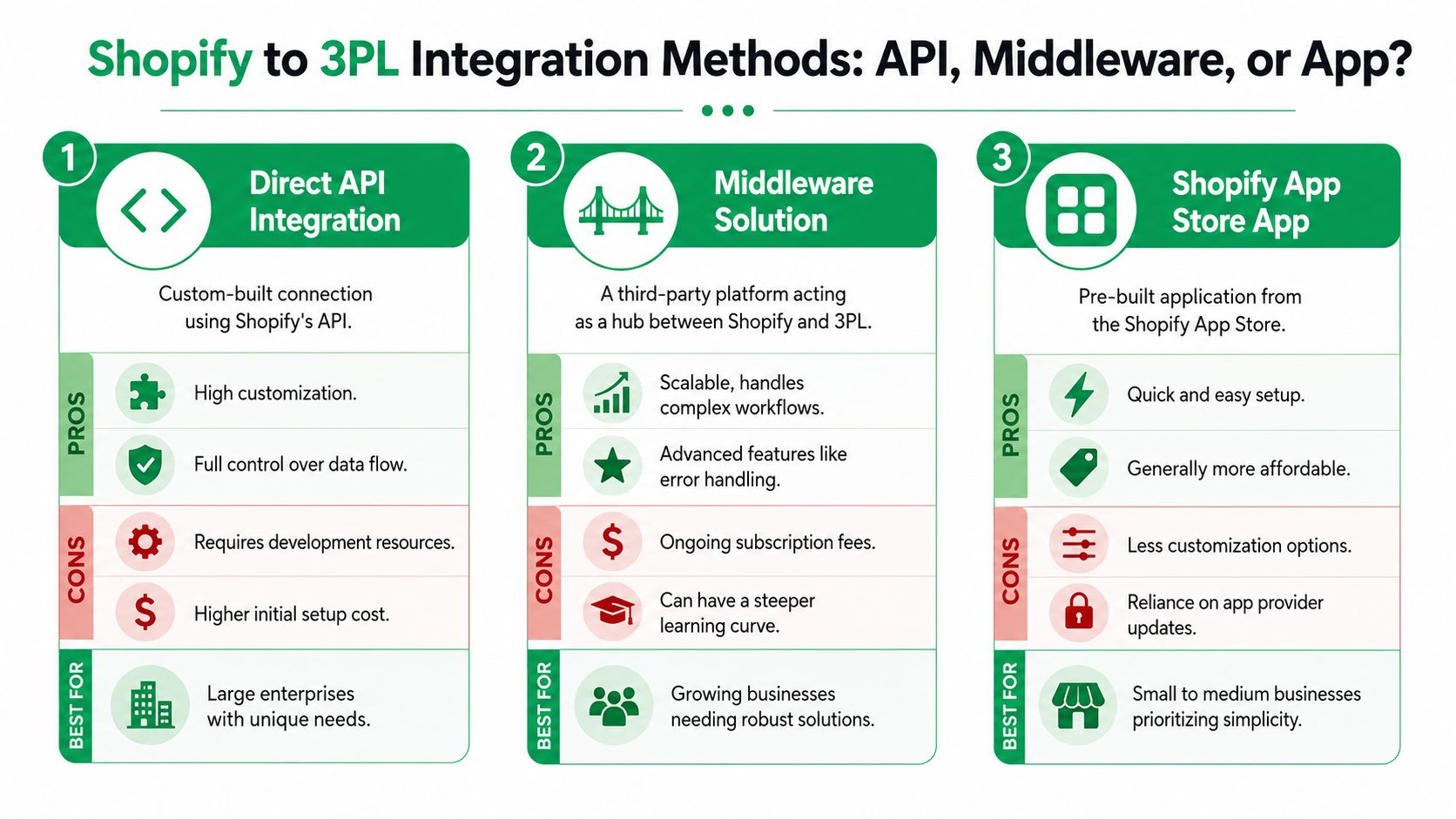
Direct API for maximum control
A direct integration usually makes sense when your business has unusual workflows and a technical team that can own them over time.
Using Shopify's fulfillment APIs gives you the most control over field mapping, order state handling, routing rules, and custom logic. It also gives you the most responsibility. Every edge case, retry rule, and error state belongs to your team.
This route works when you already know your warehouse process well and don't want to squeeze it into an app's assumptions. It doesn't work well when you're still figuring out your own requirements.
Middleware for orchestration and visibility
Middleware sits between Shopify and the 3PL. This can be the cleanest option for brands that need stronger monitoring, transformation rules, and exception handling without building every connection from scratch.
It becomes especially useful when Shopify is only one part of the stack and you also need to coordinate a WMS, ERP, returns platform, or multiple fulfillment partners. The trade-off is operational overhead. Middleware gives you more levers, but someone has to manage them.
A useful mental model is to compare it to other commerce systems where the integration path changes the long-term maintenance burden. This breakdown of HubSpot Stripe integration options is from a different category, but the decision logic is similar. Native connection for speed, middleware for flexibility, custom build for control.
Here's the side-by-side version most ops teams need:
| Method | Best fit | Strength | Main risk |
|---|---|---|---|
| Direct API | Complex operations with internal dev resources | Full control | Maintenance load |
| Middleware | Growing brands with multiple systems | Better orchestration and error handling | More moving parts |
| Shopify app | Standard workflows with one main 3PL | Fastest launch | Limited customization |
After you pick a path, you still need internal process clarity. This list of order management apps is useful because it highlights how much order-state complexity often sits outside the 3PL itself.
A quick walkthrough helps illustrate the trade-offs in a more visual format:
App-based integrations for speed
Apps are the fastest route when your workflows are straightforward. One Shopify store, one 3PL, clean SKU discipline, and not much custom routing.
That simplicity is the point. You install, connect, map, test, and go. But the convenience comes with boundaries. If your post-purchase flows, inventory states, or release rules get more complex, you'll hit those boundaries sooner than you think.
Choose the method that matches the business you run now, but don't ignore the business you'll be running after the next operational change.
Handling Post-Purchase Order Edits and Cancellations
This is the failure point most integration guides treat like a footnote. It shouldn't be a footnote.
Once an order is released to a 3PL, that order enters another system with its own timing, statuses, and pick logic. If a customer changes the address in Shopify after release, Shopify may show the new address while the warehouse is still packing against the original one. Your support team sees one truth. The picker sees another.
Why the sync breaks
National Freight Hub's guidance on moving inventory to a 3PL calls this out directly. A critical gap in most guidance is post-purchase edit handling, and brands should explicitly ask, "How are order edits, address changes, and cancellations handled after release?" because middleware or custom WMS layers often break these syncs, causing support tickets and shipping errors, as noted in its article on what to ask a 3PL before moving inventory.
That problem usually comes from one of four places:
- Release timing: The order leaves Shopify quickly, often before the customer change window ends.
- One-way assumptions: The integration pushes orders downstream but doesn't support meaningful update events after creation.
- WMS constraints: Some warehouses can edit addresses pre-pick but not swap line items after allocation.
- Human fallback: The "process" is really an email to the warehouse team.
What to ask your 3PL in plain language
Don't ask whether they support edits. Ask what happens in specific moments.
- Address changes after release: Can the WMS accept an address overwrite before pick, after pick, and after label generation?
- Cancellations in progress: What status blocks cancellation? Allocated, waved, picked, packed, labeled?
- Item swaps or adds: Can the warehouse reopen an order, or does it require cancellation and recreation?
- Mapping failures: If a SKU or shipping method doesn't map, where does the order go and who gets alerted?
The right question isn't "Do you support order changes?" It's "At which warehouse states do changes stop being safe, and how is that enforced in the system?"
Build a clear intervention workflow
For high-volume stores, the answer can't be "support will figure it out."
A safer model looks like this:
- Define an editable window in Shopify. Orders can be changed only before a release event or within a controlled time window.
- Separate change types. Address edits, contact detail edits, item changes, and cancellations should not all follow the same path.
- Create warehouse cutoffs. Once an order reaches a certain WMS state, the system should stop promising that customer-driven changes will apply automatically.
- Route failures visibly. If a change can't sync, ops needs an exception queue, not a hidden mismatch.
Teams that get this right don't eliminate exceptions. They make exceptions operationally visible before they become shipping errors.
Your Go-Live Checklist for a Smooth Launch
At launch, the integration usually looks fine right up until the first customer changes an order that has already been released to the warehouse. Support says the address was updated. Shopify shows the cancellation. The 3PL still ships the original order. That is the kind of failure that turns a technically working integration into an expensive operational mess.
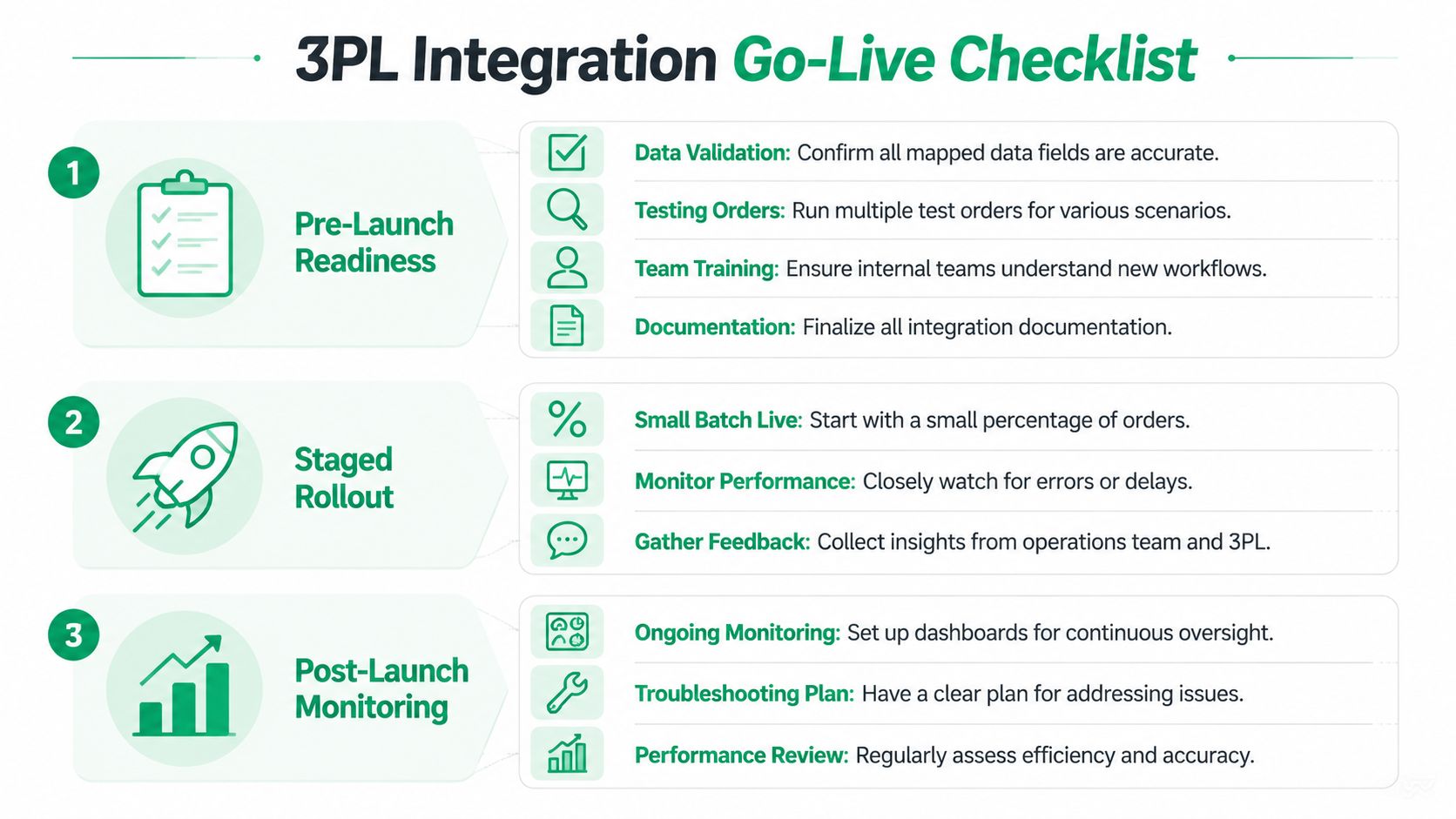
Treat launch like a controlled rollout
Start with a staged release.
Send a small batch of real orders first and watch each one through the full lifecycle. I want to see order creation, allocation, pick release, fulfillment, tracking writeback, and any hold or exception states. If the store allows customer-driven edits, at least one test order should be changed after submission but before fulfillment. Another should be cancelled near the warehouse cutoff so the team can confirm what occurs, not what everyone assumes happens.
The point of a staged rollout is simple. It gives ops, support, and the warehouse time to catch state conflicts while the volume is still manageable.
What to validate before you open full volume
Test the messy orders, not just the clean ones.
- Standard order path: Single SKU, normal shipping, no hold.
- Bundle or kit order: Check component allocation and inventory decrement behavior.
- Multi-line order with a post-purchase edit: Remove or swap an item after the order enters the 3PL flow.
- Cancellation scenario: Test before release, after release, and after label creation if your partner supports those states differently.
- Return and restock flow: Confirm inventory comes back to the right location and status.
- Shipping edge case: Verify service mapping for heavier parcels, PO boxes, remote zones, or signature-required orders.
Shipping logic deserves extra scrutiny because it can fail unnoticed. The order still ships. The customer still gets tracking. Margin gets hit on every parcel because the wrong service or packaging assumption was applied.
A practical launch checklist
Use a checklist that reflects how your team will run the operation on day one:
- Data signoff: Finalize SKU, location, shipping method, and order status mappings.
- Editable-state confirmation: Document the exact statuses where address edits, item edits, and cancellations still sync correctly.
- Exception ownership: Assign one team to monitor failed syncs, held orders, and warehouse rejects during launch week.
- Controlled order batch: Release a small sample first and inspect every status transition manually.
- Tracking verification: Confirm Shopify receives the right fulfillment events, carrier, and tracking numbers.
- Customer support script: Give support a clear rule for what they can promise once an order reaches each warehouse state.
- Rollback plan: Define how to pause releases, reroute orders, or switch to manual handling if a serious issue appears.
One check matters more than it looks. Make sure everyone agrees on the system of record at each step. If Shopify says cancelled but the WMS says allocated, the warehouse will follow the WMS unless you've set up a hard stop.
Launch standard: If your team cannot trace one edited order and one cancelled order from checkout to final warehouse outcome, you are not ready to send all volume through the integration.
The cleanest launches I have seen were not the fastest. They were the ones where the team tested the awkward cases before customers did.
Monitoring Health and Solving Common Pitfalls
A Shopify 3PL integration usually looks healthy right up until the first edited order ships with the original items, or a cancelled order gets picked because the warehouse never received the stop signal in time. That is the failure pattern to watch. Standard order flow can hide a weak integration for weeks. Post-purchase changes expose it fast.
Monitor the states where money, inventory, and customer promises can split apart. In practice, that means checking more than order volume and tracking uploads. You need visibility into edit success rate, cancellation stop rate, inventory reconciliation, and the time it takes for status changes to move from Shopify into the WMS.
Watch the signals that reveal real risk
The first question is simple. Can the operation still handle exceptions without manual heroics?
Healthy integrations show a clean path for these events:
- Orders stuck in created, submitted, or hold states: Usually caused by release rules, missing mappings, or a warehouse-side validation failure.
- Cancelled orders that still move to allocated or picked: This is a system-of-record problem. Shopify accepted the cancellation, but the WMS had already claimed the order or never received the update.
- Edited orders that split into duplicates or ship with old line items: Often caused by weak edit logic after routing, or by a 3PL that only supports pre-release changes.
- Inventory drift between Shopify and the WMS: Common after returns, delayed receipts, partial fulfillments, or manual warehouse adjustments.
- Wrong shipping service or packaging applied: Usually a method mapping issue, bad carton rules, or untested carrier rate logic.
Support tickets help here. If customer support keeps asking the warehouse whether an address change "went through," the workflow is not dependable enough.
Solve the failure at the rule level
Manual fixes keep orders moving, but they also hide repeat problems.
If one cancelled order still shipped, check the exact cutoff point for cancellation requests. Some 3PLs treat "submitted" as still editable. Others lock the order the moment a wave is built. If edited orders fail only after fraud review clears, inspect the event sequence and ask whether the integration sends a fresh payload or just a status change. If one SKU mismatch caused a bad shipment, audit the related variants, bundles, and aliases across both systems.
Shipping logic deserves the same scrutiny. Shopify's documentation on testing carrier-calculated shipping rates is a useful reference because many fulfillment issues start upstream with packaging assumptions, service mappings, or rate conditions that were never tested with real order mixes. What looks like a warehouse problem is often a bad rule in the checkout-to-3PL handoff.
Build a review cadence that catches drift
I like a simple operating rhythm.
Check failed syncs and held orders daily. Reconcile inventory variance on a set schedule. Review edited and cancelled orders every week until the failure rate is boringly low. Then keep spot-checking them anyway, especially after catalog changes, new bundle launches, carrier updates, or warehouse process changes.
Ask your 3PL blunt questions during these reviews. At what exact status is an order no longer editable? What happens if Shopify sends a cancellation after allocation but before pick confirmation? Will the WMS reject the update, ignore it, or require a manual warehouse intervention? Those answers matter more than a polished onboarding deck.
The integrations that hold up over time are the ones with clear ownership, visible exceptions, and hard rules for post-purchase changes. Everything else looks stable until customers start changing their orders.
If your store wants to offer customers more flexibility after checkout without creating chaos for support and fulfillment teams, SelfServe is worth a look. It helps Shopify merchants control post-purchase order edits, address updates, cancellations, and upsell flows inside defined rules, so customer convenience doesn't turn into warehouse confusion.