App Performance Monitoring: Boost Shopify Revenue 2026
A customer places an order, reaches the post-purchase page, and tries to fix a shipping detail before your warehouse starts picking. The widget loads slowly, hangs for a moment, then throws a vague error. The customer opens a support ticket. Your team scrambles to find the order. Operations loses time, support absorbs frustration, and the customer leaves with less confidence in your brand than they had five minutes earlier.
That's why app performance monitoring matters in e-commerce. It isn't just a developer concern. It sits directly inside revenue protection, customer satisfaction, and repeat purchase behavior. If a storefront, checkout extension, or post-purchase app feels unreliable, customers don't separate the app from the brand. They blame the store.
For Shopify merchants, this gets more important as more of the customer journey depends on scripts, APIs, third-party apps, and post-purchase experiences. The stack can look simple from the outside. Underneath, it's a chain of dependencies. App performance monitoring gives operations and engineering a shared way to see where that chain is getting weak before customers feel it.
Why a Slow App Is a Silent Revenue Killer
The common failure pattern isn't a dramatic outage. It's a small delay in a moment that should feel effortless.
A shopper finishes checkout and notices a typo in their apartment number. They try to update it in a post-purchase widget. The page spins. The address lookup lags. They click twice because nothing seems to happen. Now they're unsure whether the request went through, so they email support. If the fix misses the fulfillment window, the problem gets bigger. You may end up with a shipment issue, a return, or a cancellation request.
That chain reaction is why slow apps drain margin. The initial symptom looks technical. The business impact lands in support queues, fulfillment exceptions, customer trust, and repeat purchase risk.
Where the damage actually shows up
A slow app usually creates problems in places managers watch every day:
- Support workload rises: Customers ask for help when self-service feels risky or broken.
- Operational friction increases: Teams manually validate edits, chase exceptions, and coordinate with warehouse or 3PL partners.
- Brand confidence drops: Customers remember the stress of fixing a simple issue after purchase.
- Upsell opportunities disappear: If the post-purchase flow feels unstable, customers stop engaging with offers.
Practical rule: Customers don't care whether the slowdown came from your theme, an API call, a third-party script, or a backend timeout. They care that your store felt unreliable.
A lot of teams still treat performance as a storefront-only issue. That's too narrow. The order confirmation page, order status page, account area, shipping update flow, and post-purchase widgets all shape the experience after money has already changed hands. In many stores, that's where customer lifetime value is either reinforced or weakened.
If you're already working on speeding up your Shopify store to improve conversion rates, extend that thinking beyond product and collection pages. Post-purchase performance deserves the same discipline, because customers don't stop judging the experience after checkout.
Understanding the Pillars of App Performance Monitoring
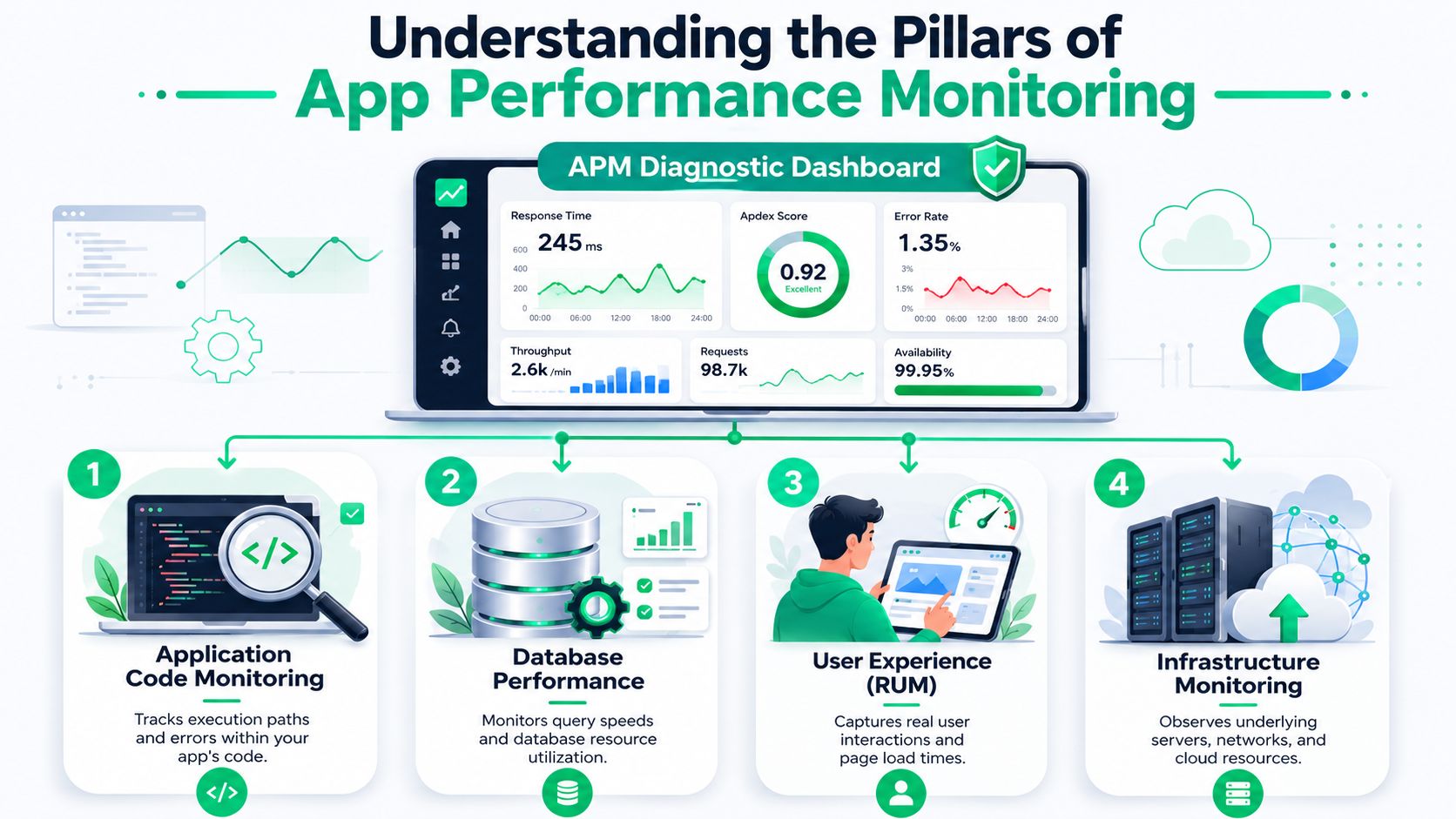
Think of app performance monitoring like a dashboard in a delivery van. A simple on-off light tells you the vehicle exists. A real dashboard tells you speed, fuel level, engine temperature, warning conditions, and whether something is about to fail. That's the difference between basic uptime checks and modern APM.
For an operations manager, the useful part is this. APM doesn't just tell you that the app is up. It helps you understand whether customers can use it without friction.
Real user monitoring
Real User Monitoring, or RUM, captures what actual shoppers experience in the browser. It shows load behavior, slow screens, device-specific problems, and errors during real sessions.
This is the closest thing to hearing directly from the customer without waiting for a ticket. If mobile shoppers on certain devices struggle with a post-purchase widget, RUM surfaces that pattern. It also helps answer a question operations teams ask all the time: “Is this one complaint, or is this happening broadly?”
RUM is especially valuable in Shopify environments because theme code, app embeds, and third-party scripts can behave differently across devices and regions.
Synthetic monitoring
Synthetic monitoring runs scripted tests against important flows, such as loading the thank-you page or submitting an address update, even when no customer is active.
RUM tells you what happened to real users. Synthetic tests tell you whether a critical path is healthy right now.
That makes synthetic monitoring good for early detection. You can test a checkout-related flow after a deployment, overnight, or before a campaign goes live. If a script blocks rendering or an API dependency slows down, the test can catch it before support hears about it.
Distributed tracing
Distributed tracing follows a single request across services and dependencies so teams can see where time is being spent and where failures begin.
Tracing often provides non-technical teams with the most clarity during incidents. Without tracing, the response to a slowdown is usually blame ping-pong. The frontend team says the backend is slow. The backend team says the database is fine. Someone else points at the app partner.
Tracing shows the path. If the browser is waiting on an external API, or a backend service is stuck on a database query, you can see the sequence instead of arguing about it.
Logs and metrics
Logging and metrics turn raw application behavior into patterns you can act on. Metrics show trends. Logs show event detail.
Metrics answer questions like whether error rates are climbing or response times are drifting. Logs help explain specific failures, such as validation errors, permission issues, or failed requests from a particular integration.
Used together, the four pillars create a complete view:
| Pillar | Best for | Typical business use |
|---|---|---|
| RUM | Real shopper experience | Confirm whether customers actually felt the slowdown |
| Synthetic | Proactive testing | Detect breakage before peak hours or launches |
| Tracing | Root cause analysis | Find which service or dependency caused delay |
| Logs and metrics | Trend spotting and diagnosis | Track recurring issues and support incident review |
A team that relies on only one pillar usually gets partial answers. Uptime without user data misses broken experiences. Logs without tracing create guesswork. Synthetic tests without RUM can say “all green” while real mobile users still struggle.
Core KPIs Every E-commerce Manager Should Track
At 2:15 p.m. on a promotion day, orders are still coming in, but support tickets start to rise. Customers cannot update a shipping address after checkout. A post-purchase upsell loads late on mobile. Revenue does not stop all at once. It leaks through missed add-ons, avoidable refunds, and weaker repeat purchase behavior.
That is why KPI selection matters. The right APM metrics show where app performance is cutting into conversion, average order value, and customer lifetime value. The wrong ones fill a dashboard without helping anyone decide what to fix first.
The KPIs that matter most
For Shopify merchants, I would start with five KPIs that connect directly to customer experience and margin:
- Load time on revenue-critical surfaces: Measure how quickly the thank-you page, order status page, and self-service widgets become usable. A post-purchase offer that appears too late is not just a performance issue. It is a missed upsell.
- API response time for key actions: Track latency for address validation, order edits, shipping lookups, inventory checks, and offer logic. These calls often sit behind customer-facing actions, so a slow dependency turns into a support problem fast.
- JavaScript error rate: Watch browser-side failures by device, browser, and page type. Mobile Safari issues on a post-purchase extension can suppress acceptance rates while desktop dashboards still look healthy.
- Conversion movement after releases: Compare order conversion, post-purchase offer acceptance, and self-service completion rates before and after app changes. Comparing these rates allows operations and engineering to see whether a release created friction or removed it.
- Friction signals near purchase and after purchase: Track cart abandonment, failed interactions, retry behavior, rage clicks, and drop-off during order edits or address changes. Slow or broken flows reduce confidence, and confidence matters for both the current order and the next one.
Keep the scorecard tight. A smaller set of KPIs gets reviewed. A giant report gets ignored.
Teams running custom storefronts or post-purchase flows on a headless commerce platform should also split these metrics by channel and experience layer. Storefront speed can look fine while an app block, extension, or backend dependency is dragging down the part of the journey that drives incremental revenue.
Here's a useful explainer for teams that need a quick visual walk-through before setting up dashboards:
Tie each KPI to a business owner
Performance KPIs work best when someone outside engineering cares about the outcome. If operations owns order exception rates, they should see the latency and error metrics that create those exceptions. If lifecycle marketing owns post-purchase revenue, they should see whether app slowdowns are cutting offer acceptance.
A shared ownership model usually looks like this:
| KPI | Primary owner | Business question |
|---|---|---|
| Load time on key journeys | Engineering + e-commerce ops | Can customers complete the action without hesitation? |
| API latency on critical actions | Engineering + app or integration owner | Which dependency is slowing order-related tasks? |
| Frontend error rate | Engineering | Where are customers hitting broken interactions? |
| Conversion behavior after releases | E-commerce manager + product | Did the release help revenue or create friction? |
| Abandonment and self-service drop-off | E-commerce ops + lifecycle teams | Are technical issues reducing trust at high-value moments? |
If a KPI has no owner, it rarely changes behavior.
For Shopify teams, the best dashboard is tied to the workflows that affect revenue and retention. Track the moments that trigger support contacts, suppress upsells, delay order changes, or frustrate repeat buyers. Teams that resolve SaaS issues with observability usually do one thing well. They connect technical symptoms to a business owner who can act on them.
Architecting for Observability in Shopify
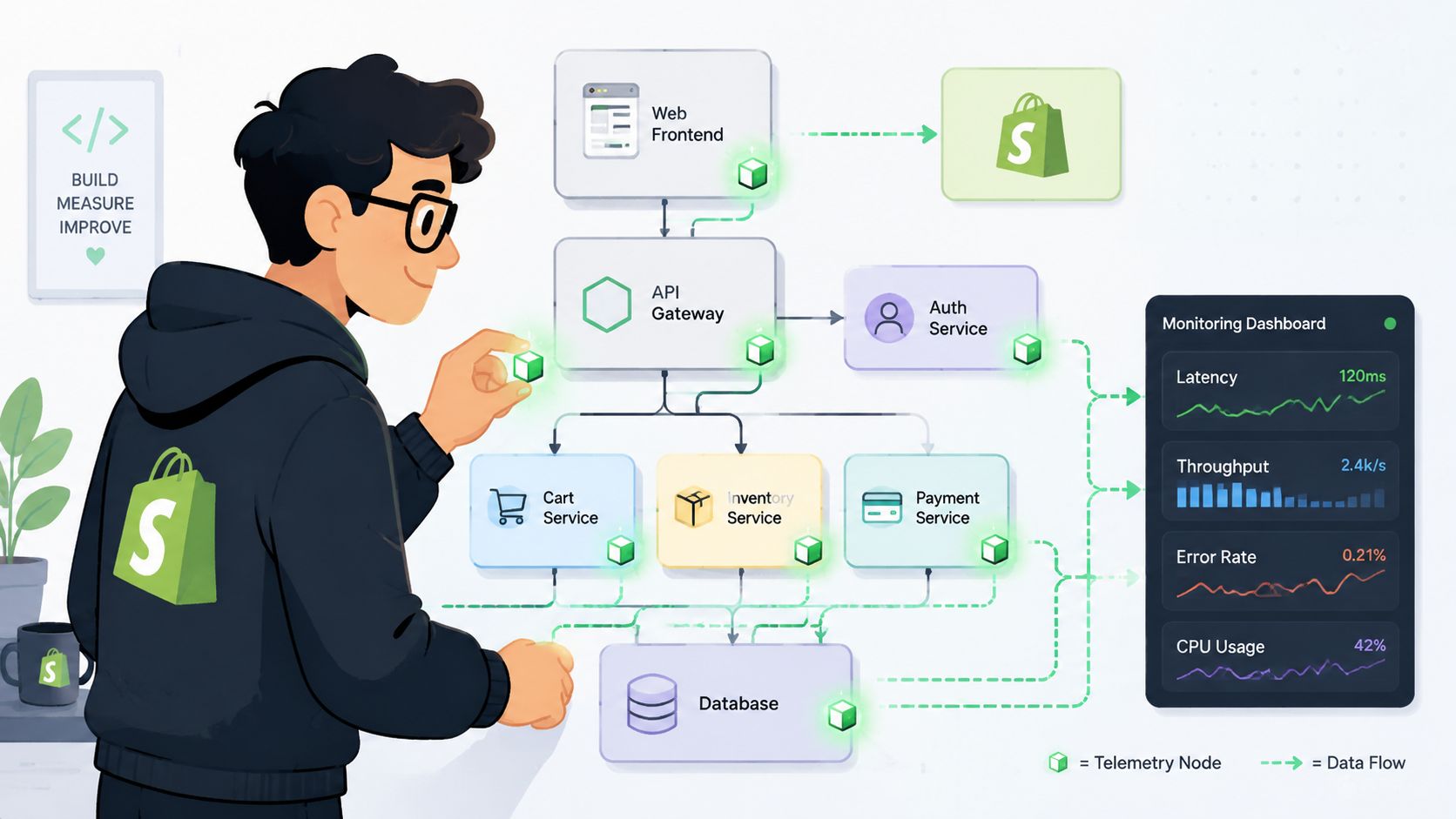
Shopify performance work gets messy when teams think only in page templates. The customer experience is broader than the storefront. It includes theme assets, app blocks, scripts, APIs, post-purchase extensions, external services, and operational systems behind the scenes.
That means observability has to be designed as part of the architecture, not added after customers report problems.
Instrument the journey, not just the app
A useful monitoring plan starts with critical user journeys. For most Shopify brands, that list includes:
- Storefront browsing: Page render behavior, search, product pages, cart interactions
- Checkout-adjacent experiences: Any extension, upsell element, or script that affects confidence near payment
- Post-purchase actions: Address changes, order edits, cancellation requests, and offer acceptance
- Operational handoffs: Calls that touch ERPs, 3PLs, fraud systems, or tax and shipping services
Many teams underinvest. They monitor server health and app uptime, but they don't instrument the business process itself. When a customer can't change a shipping detail, the issue may involve browser rendering, app logic, API latency, and warehouse timing all at once.
Third-party apps are part of your performance envelope
In Shopify, third-party apps aren't external to the customer experience. They are the experience.
That changes the standard for evaluation. When you install an app, ask four questions:
- What code runs in the browser?
- What external APIs does it depend on?
- What happens when one dependency slows down or fails?
- Can we monitor its effect on key flows, not just whether it loaded?
Teams that want to resolve SaaS issues with observability tend to do better when they treat vendors, integrations, and internal services as one connected system. That's the right mindset for Shopify too.
A green status page from a vendor doesn't tell you whether your customers had a smooth experience inside your store.
For merchants moving toward headless commerce architecture on Shopify, this becomes even more important. More flexibility means more responsibility for tracing requests across frontend layers, APIs, middleware, and third-party services. Without observability discipline, headless setups can hide problems behind multiple abstraction layers.
What good observability looks like in practice
A practical setup usually includes:
- Frontend instrumentation: Browser timing, errors, interaction delays
- Backend tracing: Request paths across services and integrations
- Event tagging by business flow: Separate metrics for browse, purchase, edit-order, and post-purchase upsell actions
- Release markers: So teams can connect incidents to deploys quickly
The goal isn't more telemetry. It's faster answers when revenue-critical experiences degrade.
Setting Smart Alerts and Managing SLAs
Most alerting fails for one reason. It tells the team that infrastructure is noisy, not that customers are struggling.
An alert for high CPU can be useful to engineers during diagnosis. It's a poor first signal for an operations team trying to protect revenue. A smart alert starts with customer impact and works backward to technical cause.
Bad alerts versus useful alerts
Bad alerts tend to sound like this:
- High memory usage on service
- Database utilization spike
- Error log volume increased
- Container restarted
Those may matter, but they don't tell anyone whether the buying journey or post-purchase flow is at risk.
Useful alerts sound more like this:
- Thank-you page widget failed to become usable
- Address update request error rate rising on mobile
- Order edit API latency affecting customer submissions
- Post-purchase offer render delay after deployment
The difference is accountability. The second list points to a customer-facing outcome.
Build SLAs around business-critical flows
Internal SLAs work best when they define what “good enough” means for a specific action. In e-commerce, that might include:
| Critical flow | SLA focus |
|---|---|
| Customer updates shipping details | Completion without visible failure |
| Post-purchase offer appears | Loads consistently within an acceptable user experience window |
| Order edit request reaches backend | Successful handoff without retry loops |
| Support fallback experience | If self-service fails, agents can recover the case quickly |
This doesn't need legal language. It needs operational clarity. If a flow misses its SLA, the issue gets prioritized like revenue protection work, not a vague technical debt item.
One useful habit: Route alerts to the team that can act, but report SLA misses to the team that owns the business outcome.
Reduce noise before you add more notifications
Noisy alerting trains teams to ignore real problems. The fix isn't more alerts. It's better thresholds, clearer scoping, and tighter ownership.
A few practices work well:
- Alert on symptoms customers feel: broken interaction, slow usable state, failed submission
- Separate warning from incident: not every regression needs a fire drill
- Use deployment context: if errors spike right after a release, surface that relationship
- Review alert quality regularly: retire alerts that never drive action
Good alerting is retention work. When customers can complete sensitive actions smoothly, they stay confident. When the first sign of trouble comes from support tickets, you're already behind.
Using Performance Budgets and Optimization Tactics
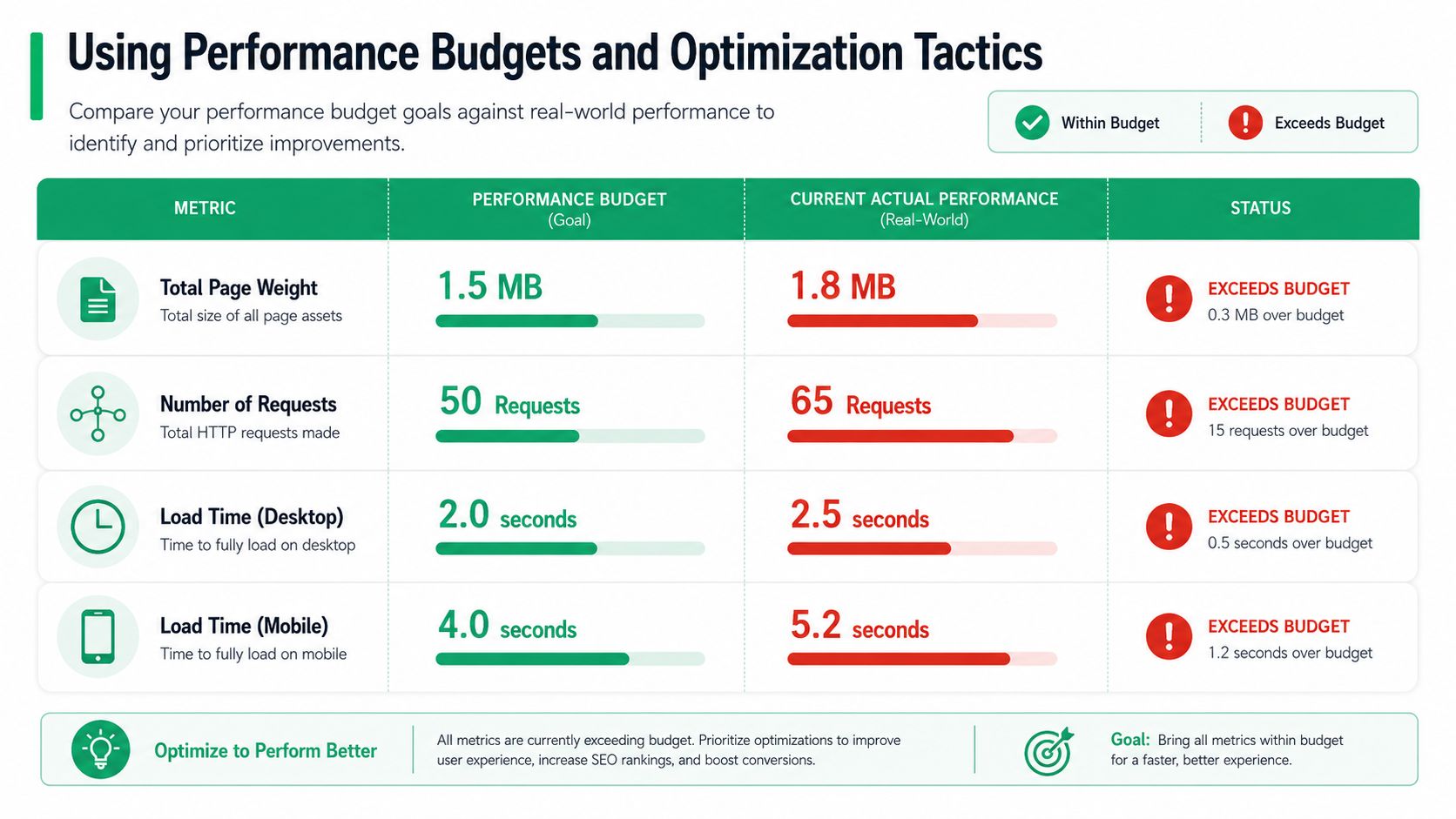
A performance budget turns speed from an aspiration into a constraint. That's why it works.
Without a budget, every new app, tracking script, personalization layer, and visual feature gets added on its own merits. Nobody owns the total cost. With a budget, teams have to ask a harder question: is this addition worth the performance trade-off on a revenue-critical page?
What to include in the budget
A performance budget can cover:
- Page weight: Total asset size delivered to the browser
- Request count: How many files and calls the page depends on
- Script cost: Time spent parsing and executing JavaScript
- Critical path load behavior: How quickly core UI becomes usable
- Third-party impact allowance: A cap for external scripts and widgets
The strongest budgets are attached to specific templates or flows, not the whole site in the abstract. Product pages need one standard. Checkout-adjacent and post-purchase surfaces need another, usually stricter one.
Optimization tactics that usually pay off
You don't need a heroic rewrite to improve app performance monitoring results. In Shopify stores, the wins often come from disciplined cleanup and stricter review of third-party code.
- Compress and defer assets: Ship less code up front, especially JavaScript that isn't required for first interaction.
- Lazy-load non-critical elements: Don't force below-the-fold content, recommendation modules, or secondary widgets into the initial render path.
- Audit third-party apps before and after install: Measure their browser cost, API dependency pattern, and failure behavior.
- Use CDNs effectively: Static assets should be delivered as close to the shopper as possible.
- Trim duplicate functionality: Multiple apps often inject overlapping scripts for tracking, personalization, chat, reviews, or offers.
- Review scripts after campaigns end: Temporary additions have a habit of becoming permanent drag.
If your store has accumulated years of apps, snippets, and one-off experiments, a structured Shopify performance cleanup and audit process usually reveals more opportunity than teams expect.
The trade-off teams need to accept
Every feature has a cost. Some deserve it. Many don't.
The teams that protect revenue best aren't anti-feature. They're anti-unpriced complexity. They require each new addition to justify its place in the budget, especially on pages tied to conversion, order confidence, and post-purchase engagement.
Choosing Your APM Strategy and Tools
The right APM setup depends less on feature checklists and more on store complexity.
A smaller Shopify team might do fine with a lightweight stack made up of browser monitoring, uptime checks, logs, and one dashboard everyone can read. A larger Shopify Plus brand usually needs deeper tracing, better release correlation, stronger alert routing, and cleaner visibility across third-party services.
A practical way to decide
Use these criteria when comparing tools or building your stack:
| Need | What to prioritize |
|---|---|
| Lean team | Fast setup, simple dashboards, low maintenance |
| Multiple apps and integrations | Distributed tracing, dependency mapping, usable logs |
| High support volume | Real user monitoring and session-level error visibility |
| Frequent releases | Release markers, regression detection, alert tuning |
| Complex post-purchase flows | Browser metrics, API timing, and flow-specific dashboards |
Don't buy for the most advanced feature set if nobody will maintain it. Don't stay too basic if every incident turns into a multi-team investigation.
What to watch in post-purchase monitoring
For any post-purchase app or widget, the useful questions are operational:
- Does the widget become usable quickly on real devices?
- Do address-related API calls succeed consistently?
- Are customers seeing frontend errors during edit flows?
- Does the app add visible delay to the thank-you or order status page?
- Can you separate performance by device, geography, and release version?
That's how you evaluate ROI realistically. Not by whether the app has a dashboard, but by whether you can connect its behavior to support reduction, cleaner operations, and a smoother customer experience.
If you want a post-purchase layer that helps customers manage order changes and gives merchants more control over upsells and support load, SelfServe is worth a look. It's built for Shopify brands that want post-purchase actions to feel fast, clear, and operationally safe.