Customer Profile Management for E-commerce: Practical Guide
Monday morning, the support inbox is already a mess. Half a dozen customers want to change shipping addresses, two are asking to cancel, one is furious because the parcel is already on the truck, and three messages are written in a language your team doesn't handle cleanly. The ugly part is that the CRM shows these people as “active customers,” but that label doesn't tell your ops team who can still edit an order, which address is current, or whether a post-purchase upsell should even be shown.
That's the core job of customer profile management in e-commerce. It's not a deck full of personas or a static contact card, it's a living operational record that decides what happens after checkout, in support, in fulfillment, and on the order status page. In Shopify and Shopify Plus stores, the profile that matters most is the one that keeps shipping accurate, permissions tight, and downstream workflows moving without more tickets.
The Post-Purchase Profile Problem
A support lead doesn't feel a “profile gap” in a strategy meeting. She feels it when the same order comes back three times, first for an address change, then for a cancellation request, then for a re-ship after the parcel bounces. If those requests sit in separate systems, the team ends up reading email threads and hunting for order details that should already live in one place.
That's why the traditional marketing view of a customer profile falls short. Demographics, last email open, and funnel stage may help with campaigns, but they don't tell you whether a shopper already moved apartments, whether they can still edit shipping details, or whether they prefer to self-serve in their own language. A support team needs a profile that reflects what's happening after purchase, not just before conversion.
Practical rule: if the profile doesn't change when an order changes, it isn't operational enough for e-commerce.
A working profile system changes the tone of that inbox fast. Address updates stop being free-form support requests and become structured edits with a clear permission window. Cancellation pleas can be routed into a merchant approval queue instead of becoming noisy, untracked exceptions. Multilingual shoppers can see the same workflow in their own language, which cuts down on confusion and back-and-forth.
The point is simple. The merchant's profile problem gets decided on the order status page, not the landing page. A profile only matters when it can tell the store what the customer is allowed to do right now, what the system should validate, and what needs a human review before fulfillment moves forward.
What Customer Profile Management Means in E-Commerce
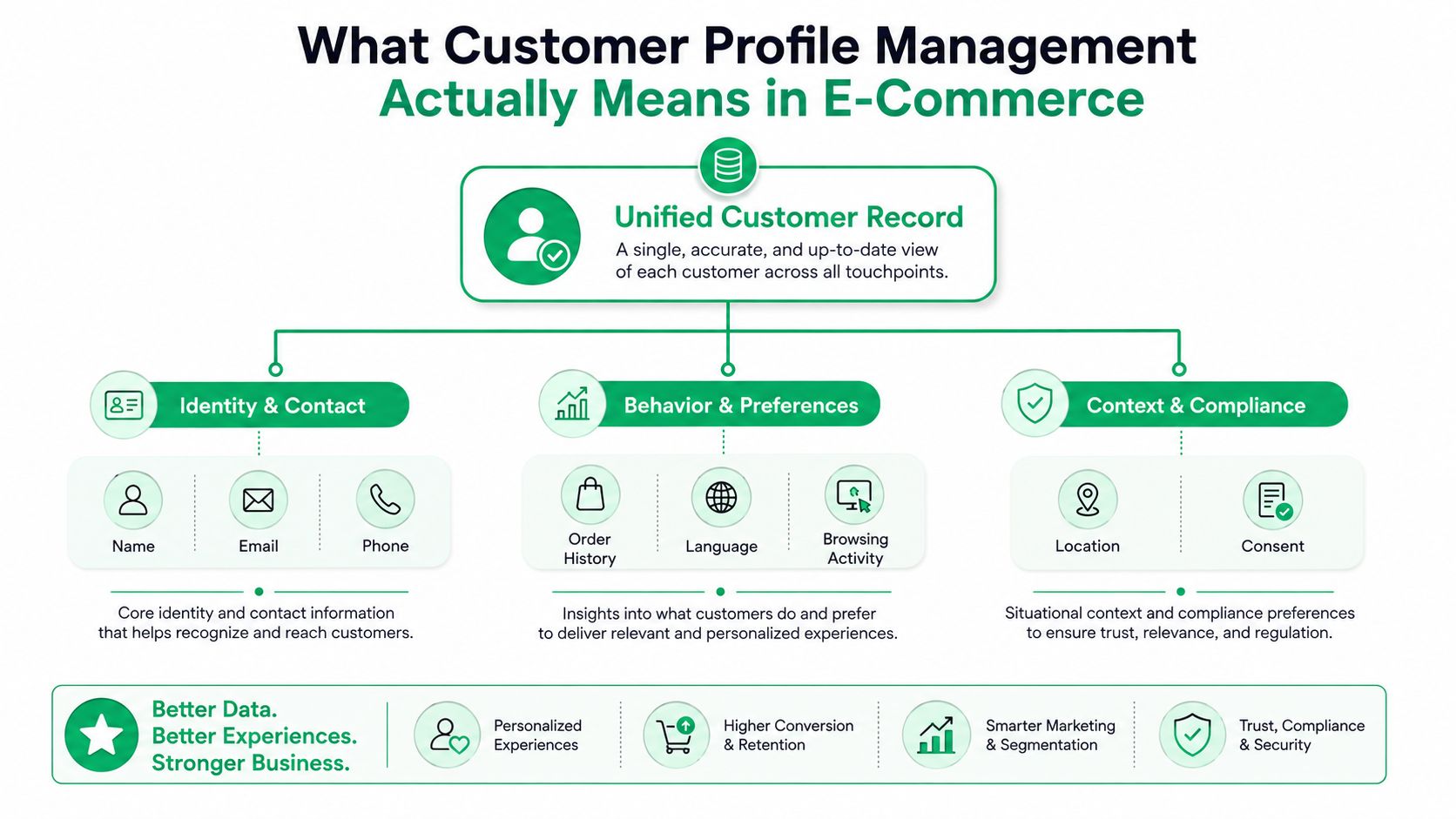
In e-commerce, customer profile management means keeping one unified record current across identity, order history, preferences, permissions, and post-purchase actions. That is different from a marketing segment, which groups people for messaging but usually does not control what a shopper can edit or what a support rep can approve. The operational version answers a more concrete question, what should happen next for this exact customer and this exact order?
The reason this matters is scale. The customer data platform market has grown around systems that unify customer data into usable profiles, because merchants need records that support real workflow decisions, not just campaign targeting (G2 customer data statistics). That shift shows up in the day-to-day work after checkout, where address changes, cancellation requests, and language preferences need to be resolved against live order data.
The five functions that make a profile usable
A working system has five pieces, and each one maps cleanly to Shopify reality.
- Data ingestion: pull in email, phone, shipping address, language, order ID, and edit events from checkout, accounts, and post-purchase widgets.
- Identity resolution and linking: connect one shopper's login, email, and order history so support does not treat them like three different people.
- Profile storage: keep a persistent record that does not vanish when an order syncs to a 3PL or ERP.
- Profile sharing: let support, fulfillment, and automation tools read the same truth instead of recreating it in separate dashboards.
- Profile activation: use that record inside a post-purchase widget, a thank-you upsell, or a cancellation queue when the customer takes action.
The come together media llc strategy is a useful reminder that first-party data only pays off when it is organized for action, not just collection. That is the mindset shift merchants need. A profile matters the moment it can be updated continuously and consumed by downstream systems without a manual handoff.
The CDP Institute's architecture view is the clearest technical framing here, because it treats profile management as a system of data ingestion, identity resolution, storage, sharing, and activation, with real-time updates and privacy enforcement built in. In Shopify terms, that is the difference between a list of customers and a workflow engine. For teams setting up permissioned customer actions, permission-based access control for post-purchase changes needs to sit inside the profile layer, not as an afterthought in support settings.
Building the Data Model and Permission Layer
The data model should look like something an ops team can use, not a whiteboard sketch from a vendor demo. Start with a persistent customer ID, then attach the fields that change the next action, shipping address snapshot, contact info, language, order ID, and the current edit window for that order. If a field doesn't change a decision, don't include it just because it's easy to collect.
Put permissions inside the profile
Edit windows are not just a setting buried in admin. They should be first-class profile attributes because they determine whether a customer can self-serve, whether support should intervene, and whether an order can still be safely changed. The same logic applies to allowed actions, if the shopper can edit shipping details but not item quantities, that permission belongs in the profile record the widget and the support agent both read.
The practical value shows up fast. A customer who opens the order status page sees only the actions that are currently valid. A support rep sees whether the request came in inside the allowed window. The merchant sees a clean queue of exceptions instead of a stream of loosely defined tickets.
Here's a simple checklist for the data model.
| Profile field | What it stores | Workflow it unlocks |
|---|---|---|
| Persistent customer ID | One durable identifier across sessions and orders | Identity stitching across tools |
| Shipping address snapshot | The current deliverable address tied to the order | Address edits and fulfillment review |
| Contact info | Email, phone, and preferred contact route | Support follow-up and notifications |
| Language | The shopper's language preference | Multilingual widget rendering |
| Edit window | The time range when the shopper may make changes | Self-service order edits |
| Allowed actions | Which fields can be changed | Permission-based editing |
| Order tag history | Edits, approvals, and exceptions | Audit trail for support and ops |
If you're deciding how much control to expose, the internal guide on permission-based access control is a good reference point for thinking about who can edit what and when. The rule I use is straightforward, if the field creates fulfillment risk, it needs a permission layer, not a free-text support pathway.
If permissions live outside the profile, your team will fight the same ticket twice, once in support and once in fulfillment.
The profile shouldn't just say who the customer is. It should also say what they're allowed to do, which system owns the truth, and how that truth gets passed downstream without another human being forced to clean it up.
Multilingual UX and Address Validation as Accuracy Levers
Multilingual rendering and address validation are the same problem in practice. If a shopper sees the wrong language, they're more likely to mistype a field. If the address field accepts sloppy input, fulfillment inherits the error later, and support pays for it with a ticket, a delay, or a reshipment.
That's why I treat address validation as profile enrichment, not a polished UX flourish. A widget that detects language and renders correctly reduces friction at entry. A validation layer catches formatting issues before the record becomes operational. A normalized address should overwrite the raw field for workflow purposes, while the original input stays attached for audit.
The SelfServe setup reflects that approach well, because it uses Google Maps-powered address validation and auto-complete to help shoppers submit a deliverable address before the order leaves the queue. If you want a practical walkthrough of the mechanics, the internal overview on international address validation is worth a look.
A few edge cases matter in real stores. Shoppers may transliterate their names or street addresses. Some regions don't use formal postal codes. Language and currency can drift apart at checkout, especially in cross-border stores where the storefront language and the shipping destination aren't the same. A good profile system doesn't panic at those cases, it preserves the raw input, normalizes what it can, and flags what still needs review.
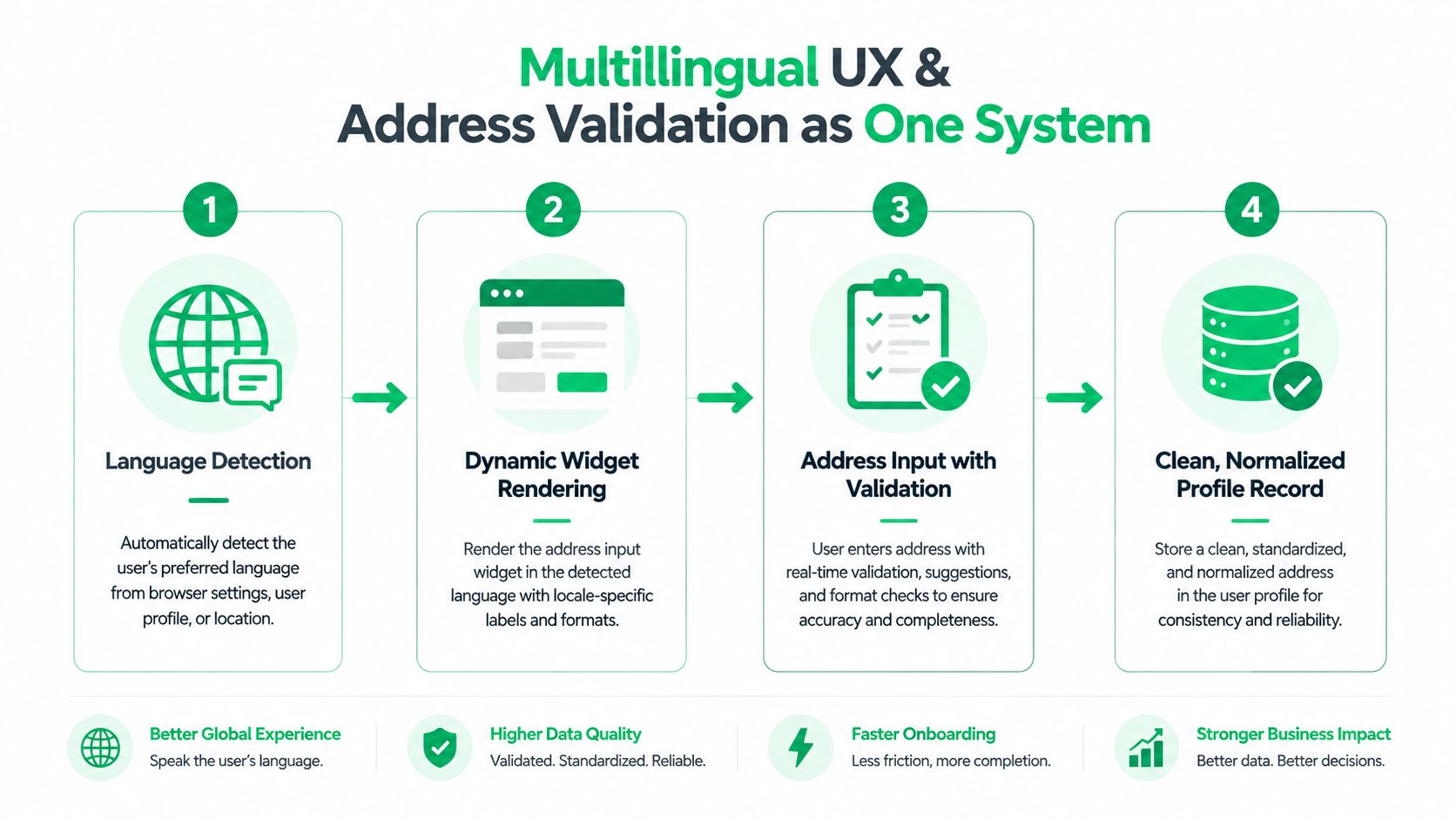
The workflow is simple, but the payoff is practical. Language detection feeds the right widget, validation cleans the address before fulfillment, and the normalized record becomes the version other systems trust. Every validation that fires before shipment is one less support email and one less delivery failure.
Driving Incremental Revenue Through Profile-Aware Upsells
Post-purchase upsells work when they read the profile, not when they spray the same banner at everyone. A thank-you page offer should consider language, country, items already in the order, and whether the customer is even a fit for more product right now. If the offer ignores those signals, it's just a coupon wearing a recommendation badge.
Eligibility comes before persuasion
The cleaner stores I've worked on don't show every upsell to every order. They exclude high-risk fulfillment situations, regions with awkward shipping constraints, and SKUs with no real bundling headroom. That's not being conservative for its own sake, it's avoiding a bad experience where the customer adds an item that slows the order or breaks the packing logic.
A profile-aware upsell flow also depends on history. If the shopper repeatedly ignores offers, the system shouldn't keep pushing the same category. If the customer is already bilingual and the page rendering isn't, the conversion rate dies before the product even gets considered. The profile should steer both the offer and the timing.
That logic is the heart of post-purchase revenue. The Shopify post-purchase upsell guide shows the mechanics of building those flows, but the operational point is broader, upsells belong in the profile activation layer, not in a generic promo block. On higher-tier setups, product restrictions, curated collections, and custom flows make more sense than blanket banners because the offer can match the order context.
In practice, I'd map these fields directly to the workflow.
- Language: render the offer copy in the shopper's language.
- Address country: decide whether the product can still ship cleanly.
- Items already in cart or order: suppress duplicate or incompatible add-ons.
- Order risk state: exclude orders that need human review first.
- Prior upsell behavior: vary the offer instead of repeating the same one.
The most important part is restraint. Good profile data narrows the offer set, it doesn't flood the page with more choices. When the upsell layer reads the profile properly, it feels like a relevant add-on. When it doesn't, it feels like a random coupon that happens to appear after checkout.
Security, Compliance, and Operational Workflows
A customer profile only matters if the merchant can trust it in day-to-day operations. That trust comes from governance, not from piling on more fields. Consent capture, role-based access, and a clear audit trail for every change are required, especially when a shopper edits information that can affect fulfillment, refunds, or support decisions.
Keep the data footprint tight
Minimum necessary data is the right standard for post-purchase workflows. If the widget only needs shipping address, contact info, and the actions a shopper is allowed to take, then extra fields should stay out of scope. A smaller data footprint lowers the risk surface when a customer logs in, edits a record, or asks support to step in.
Manual approval flows can strengthen profile integrity when they are used well. A cancellation queue with merchant approval gives the ops team one place to inspect edge cases instead of letting sensitive changes spread across email threads and chat replies. Shopify order tagging helps here, because every approval, edit, and exception can be labeled and reviewed later instead of disappearing into inbox history.
Permissions and edit windows also work as security controls. A shopper who can only edit inside a defined window, only for allowed fields, and only after authentication presents a much smaller threat surface than a system that accepts any request through support. The profile should carry the facts that matter for governance, who changed what, when they changed it, whether the merchant approved it, and whether the original data was overwritten or only normalized.
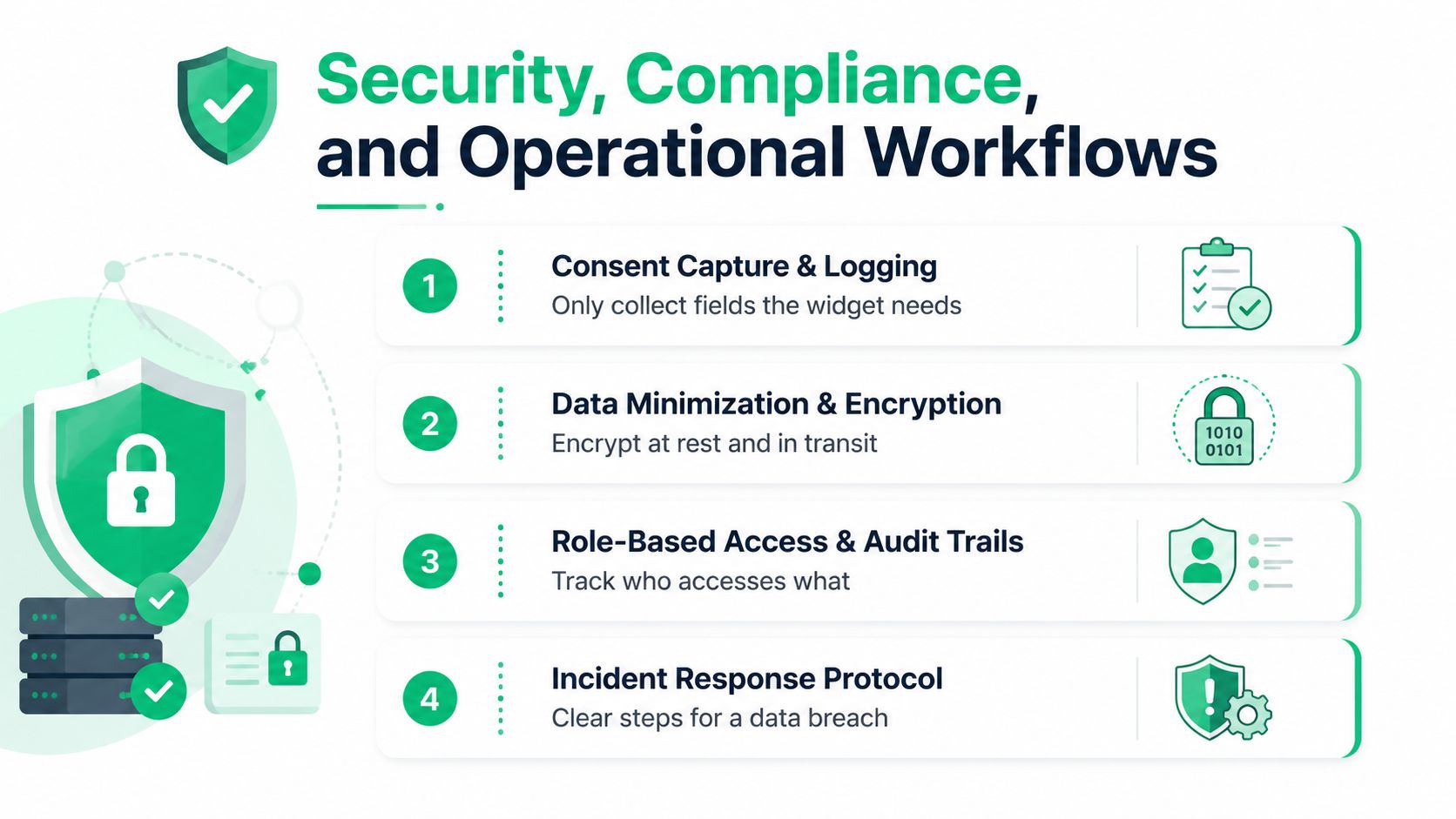
Privacy enforcement has to sit inside the workflow, not beside it. That is the right mental model for Shopify ops, because governance is what keeps the profile system safe enough to scale. If the platform can preserve consent history, permission changes, and field-level edits cleanly, support, finance, and fulfillment can reconcile problems without guessing.
The profile is only as trustworthy as the audit trail behind it.
If you are evaluating a platform or plugin, ask whether it preserves change history clearly enough for support, finance, and fulfillment to reconcile later. That question matters more than any feature list.
Metrics That Prove the System Is Working
Vanity metrics don't tell you whether the profile system is earning its keep. Profile completeness can look impressive and still miss the point if tickets stay high and orders are still going out with bad data. The four numbers that matter are ticket deflection rate, address-validation catch rate, upsell attach rate, and edit-window adherence.
Here's how I read them together.
- Ticket deflection rate: if the widget handles common post-purchase requests before they reach support, the profile and permissions layer are doing real work.
- Address-validation catch rate: if bad addresses are flagged before fulfillment, the validation step is wired into the right moment.
- Upsell attach rate: if thank-you and order status offers are getting accepted, profile-aware activation is matching the right customers to the right offers.
- Edit-window adherence: if shopper edits land inside the approved window, the rules are clear and the UI is enforcing them well.
The most useful signal is the relationship between them. High ticket deflection with weak upsell attach usually means the profile is accurate but the activation layer is thin. Low address catches with low ticket volume can mean you're validating too late, or not at the step where shoppers make mistakes. A clean-looking profile dashboard can still hide bad workflow design.
The performance view I trust is the one that connects support, fulfillment, and revenue. If the four metrics move in the right direction together, the system is doing more than collecting data. It's reducing friction and creating usable revenue moments.
Your First 30 Days With a Profile-Driven Post-Purchase Workflow
Start with the basics in week one. Capture a persistent customer ID, define the edit window, turn on address validation, and tag every edit event so the record stays traceable. In week two, enable thank-you and order status upsells with product restrictions, then set up the manual cancellation approval queue.
By day thirty, connect the profile to your 3PL or ERP if that matters for your operation, then review the four core metrics together instead of in separate dashboards. Don't over-customize before the data starts moving. A working system is built from a handful of controlled decisions, not a massive build that no one wants to maintain.
If you want a post-purchase workflow that gives shoppers controlled self-service, keeps shipping edits auditable, and opens up room for upsells without creating chaos for support, take a look at SelfServe. It's built for Shopify teams that need profile-driven order edits, validation, and approval flows in one place. If that's the operational problem on your desk right now, visit SelfServe and see how it fits your stack.