Headless Commerce Platform: The 2026 Merchant's Guide
Marketing wants a campaign page live this week. The ecommerce team wants a new bundle flow, localized content blocks, and a cleaner mobile experience. Engineering looks at the current storefront and sees brittle theme logic, app conflicts, and checkout dependencies nobody wants to touch before a major launch. That tension is where most Shopify Plus brands start thinking seriously about a headless commerce platform.
For some merchants, headless is the right architectural move. For others, it becomes an expensive detour dressed up as innovation. The difference usually comes down to one question: are you solving a real customer and operating problem, or just chasing frontend freedom?
That matters more now because headless isn't niche anymore. One industry synthesis reports that 73% of businesses now operate on headless architecture, up 14% from 2021 and nearly 40% since 2019. The same analysis says 98% of non-adopters plan to evaluate headless within 12 months, and it estimates the global headless commerce market at $1.74 billion in 2025 with a projection to $7.16 billion by 2032, a 22.4% CAGR according to Swell's roundup of headless commerce trends and statistics.
A Shopify Plus brand evaluating headless in 2026 doesn't need another glossy overview. It needs a practical answer. What improves, what gets harder, and where the true return often shows up after checkout, not just before it.
The Modern Challenge with Traditional Ecommerce
Traditional ecommerce stacks break down in familiar ways. Merchants don't usually say, "We need a decoupled architecture." They say, "Why does every landing page request become a development project?" Or, "Why can't we launch a mobile-first experience without touching the whole site?"
In a tightly coupled setup, the storefront and core commerce logic are bound together. That can be fine when your store mostly needs standard merchandising, straightforward content, and predictable release cycles. It gets painful when merchandising, growth, CRM, and support all need different things from the same platform at the same time.
Where monoliths start to strain
A few patterns show up again and again for high-volume brands:
- Marketing moves faster than the platform. Campaign teams want custom landing pages, richer storytelling, and faster experimentation than a theme-led workflow comfortably supports.
- International complexity creeps in. Different regions need different content, navigation, merchandising, and support experiences.
- New channels expose architectural limits. The website may be workable, but mobile apps, kiosks, or other touchpoints often force awkward duplication.
- Operations get ignored. The pre-purchase experience gets all the budget while post-purchase workflows stay fragmented.
Headless isn't a trend response. It's often a response to organizational friction that the storefront has started to expose.
The key shift is strategic, not cosmetic. A headless commerce platform gives teams more freedom to change customer-facing experiences without constantly risking core order, catalog, and checkout functions. That's the part many merchants care about most. Not novelty. Control.
What Exactly Is a Headless Commerce Platform
The simplest way to understand a headless commerce platform is to think of a restaurant.
The kitchen handles operational work: inventory, orders, payments, customer records, fulfillment signals. The dining room is the customer experience: branding, layout, menus, service style, device-specific presentation. The waiters carry requests and responses between the two.
In headless commerce, the kitchen and dining room are separated on purpose.
The formal definition
Technically, headless commerce is a decoupled frontend and backend, where the customer-facing presentation layer connects to commerce services through APIs instead of living inside a tightly coupled monolith, as defined in Wikipedia's headless commerce overview.
That sounds abstract until you translate it into day-to-day work.
If your team wants to redesign a product page, launch a campaign microsite, rebuild navigation logic, or create a different experience for mobile users, they can work on the frontend separately from core commerce operations. The backend still manages products, carts, pricing, and orders. The frontend requests what it needs through APIs.
What that changes for a Shopify Plus merchant
For a Shopify Plus brand, headless usually means Shopify keeps doing what it's good at on the commerce side while another layer handles presentation. That presentation layer might be built in Next.js, Hydrogen, or another frontend framework. A CMS like Contentful or Sanity may manage editorial content. Search, identity, reviews, and post-purchase tools often become separate services too.
Here's the practical outcome:
- Frontend teams gain design freedom. They're no longer boxed into the constraints of a theme architecture.
- Commerce operations stay centralized. Product, order, and customer logic still lives in the backend systems you trust.
- Multiple touchpoints can share the same commerce engine. Web, mobile, and other channels don't need separate commerce logic.
A short visual explainer helps if you're socializing the concept internally:
What headless is not
Headless is not automatically better UX. It doesn't guarantee faster launches. It doesn't remove operational complexity.
It gives your team architectural freedom. Whether that turns into business value depends on execution, governance, and whether your brand needs that freedom badly enough to justify the extra moving parts.
Headless Architecture vs Traditional Monoliths
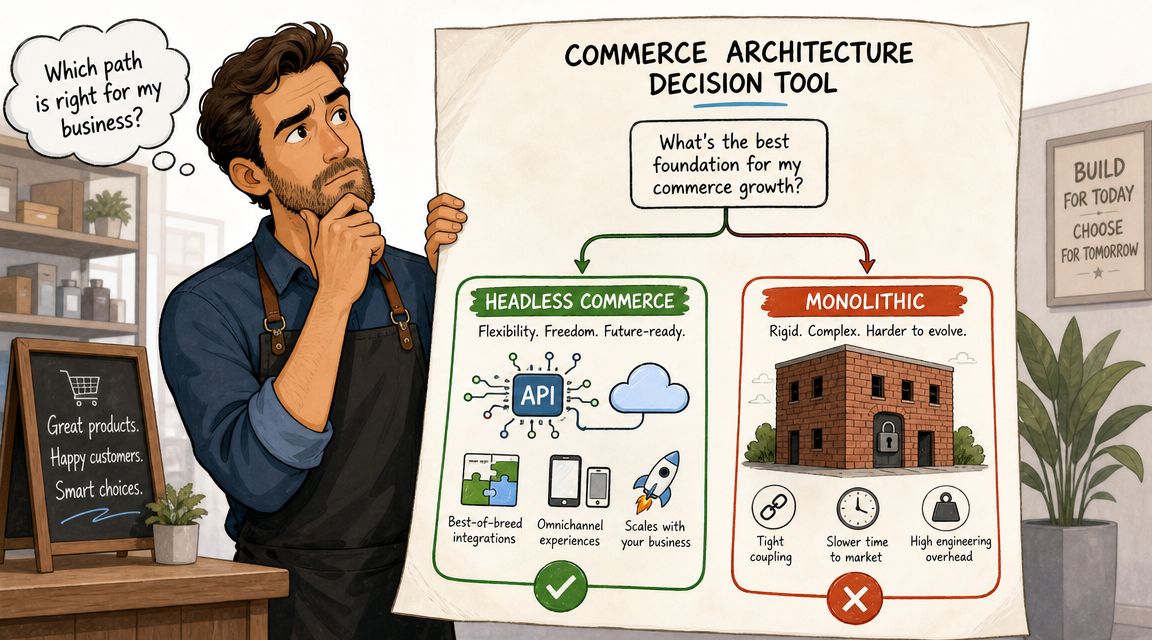
A headless commerce platform and a traditional monolith solve different problems. One optimizes for flexibility and control. The other optimizes for simplicity and tighter out-of-the-box cohesion.
Neither is universally better.
Headless vs Traditional Commerce at a Glance
| Attribute | Traditional (Monolithic) Commerce | Headless Commerce |
|---|---|---|
| Frontend control | Limited by platform themes and templates | High control with custom frontend architecture |
| Speed of simple launches | Faster for standard storefronts | Slower at first because more pieces must be built |
| Omnichannel support | Usually web-first | Better suited to multiple touchpoints |
| Content flexibility | Often constrained by theme structure | Easier to model rich, custom content experiences |
| Operational complexity | Lower, because more functions live in one system | Higher, because teams manage integrations and orchestration |
| Vendor lock-in | Stronger platform dependence | More freedom to swap parts, if integrations are designed well |
| Governance needs | Simpler release and ownership model | Requires clearer ownership across systems |
| Best fit | Straightforward commerce needs | Brands with differentiated experience requirements |
Where monoliths still win
A monolithic setup is often the better choice when your business gets most of its value from efficient execution, not custom experience design.
That includes merchants who:
- Sell through a primary website only
- Run a lean team without dedicated frontend engineers
- Need fast deployment over architectural flexibility
- Don't need distinct experiences across channels or markets
For those merchants, headless often adds cost and decision overhead without fixing a meaningful problem.
Where headless earns its keep
Headless starts to make sense when the storefront has become a strategic product, not just a website.
That usually means your brand needs one or more of the following:
- a custom content model that doesn't fit neatly into theme sections
- multiple presentation layers across web, mobile, and other surfaces
- deeper control over performance and rendering behavior
- a cleaner way to separate release cycles between marketing and backend operations
Practical rule: If the main complaint is "our theme is annoying," don't go headless. If the main complaint is "our architecture is blocking revenue, experimentation, or channel expansion," then it's worth serious evaluation.
For Shopify Plus merchants, there's often a middle ground before full headless. Teams can improve key moments inside the existing stack first. If checkout and post-purchase friction are larger problems than homepage flexibility, a more targeted approach usually pays back sooner. This is why it's worth understanding options for modifying the Shopify checkout page before assuming a full architectural shift is the next move.
When to Choose a Headless Commerce Strategy
Most brands shouldn't choose headless because it's modern. They should choose it because the current setup keeps creating the same expensive constraints.
Neutral guidance gets this part right. Headless requires API orchestration across CMS, commerce, identity, and other services, and that creates more implementation and governance burden than traditional setups. It also argues that the strongest business case is usually incremental experience gains, not a universal need for full replatforming, as outlined in BetterCommerce's discussion of headless ecommerce pros and cons.
Signals that headless is a strong fit
A headless commerce platform tends to make sense when several of these conditions are true at once:
- You need more than one serious customer touchpoint. If web is only one surface and mobile apps, in-store devices, or other interfaces matter, decoupling becomes easier to justify.
- Your marketing team is blocked by development queues. If campaign execution depends on code changes every time the brand wants something new, the operating model is already under strain.
- Content is central to conversion. Brands that sell through education, storytelling, editorial merchandising, or rich landing pages often hit the ceiling of theme-driven systems faster.
- You operate across markets with distinct experience needs. Region-specific merchandising, language, and support flows can become awkward in a coupled setup.
- You have the engineering maturity to own the stack. Headless doesn't remove work. It redistributes it into frontend engineering, QA, release management, observability, and integration maintenance.
Signals that it probably isn't
There are also clear reasons to stay closer to Shopify's native model.
- Your store is successful with standard templates and apps
- Your team relies on agency support for most technical changes
- Your biggest friction is operational, not experiential
- You don't yet have clear ownership for CMS, frontend, APIs, and QA
That's the underappreciated issue. Many merchants say they want flexibility, but what they need is cleaner order management, easier returns handling, better support workflows, or smarter merchandising ops. Headless won't fix poor process design by itself.
A useful decision filter
Ask these three questions before approving a headless build:
- What exact business problem can't we solve well in our current stack?
- Which team will own each service after launch?
- If we don't go fully headless, what smaller changes could solve most of the problem?
If the answers are vague, wait. If the answers are specific and tied to customer experience, release velocity, or channel expansion, headless deserves real consideration.
Understanding the Composable Commerce Stack
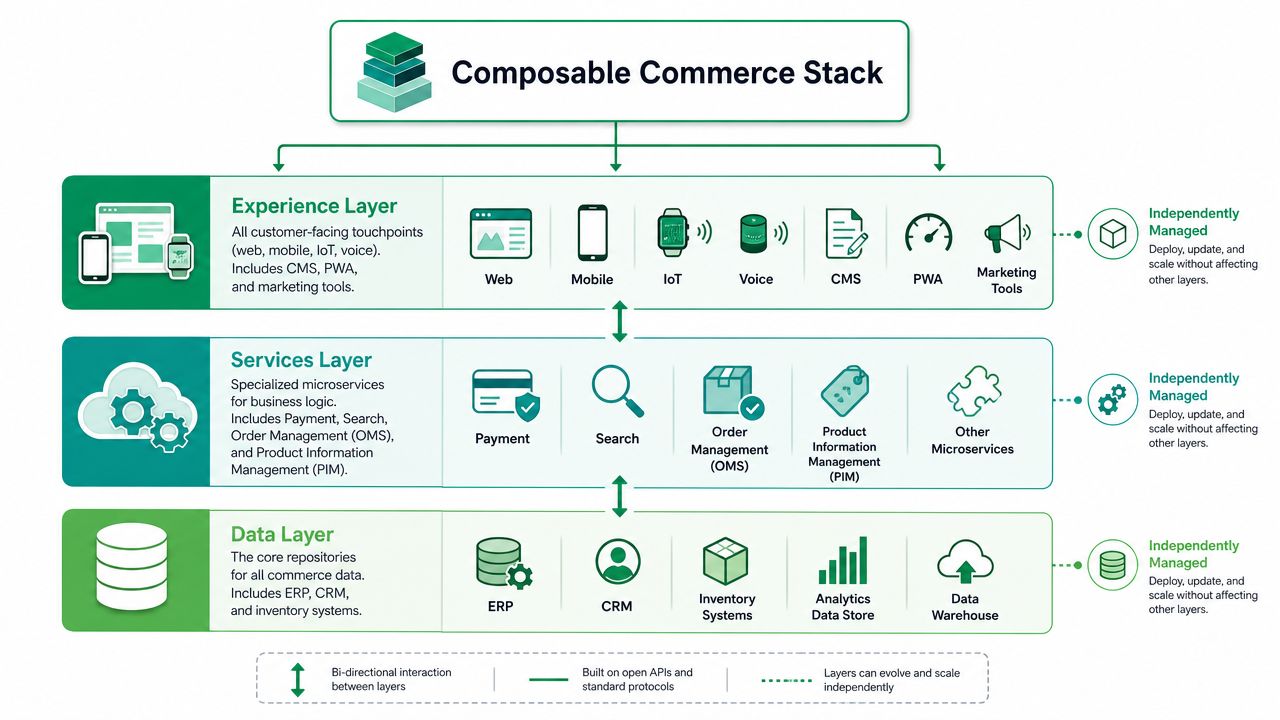
Once a merchant decides to evaluate headless seriously, the next challenge is architectural literacy. A headless commerce platform isn't one product. It's usually a stack of products and custom logic that need to work together cleanly.
In practice, a headless implementation usually follows a multi-layer architecture with frontend, API or middleware, and backend commerce services. REST or GraphQL APIs act as the integration layer, and that structure lets one backend serve web, mobile, kiosks, and other channels, as described in Virto Commerce's explanation of headless architecture.
The layers that matter most
For a Shopify Plus merchant, the stack usually breaks into a few practical layers.
Experience layer
This is what customers touch. Your storefront might use Next.js, Hydrogen, or another frontend framework. A mobile app could sit beside it. A CMS such as Contentful or Sanity often handles non-product content, landing pages, and editorial modules.
This layer determines how much freedom marketing and design teams gain.
Services layer
Composability finds its practical application. Search, personalization, identity, reviews, subscriptions, and order management can all live here as separate services. Some merchants also add automation tools and AI platforms for e-commerce businesses to support merchandising, customer service workflows, or content operations.
Every added service can improve capability. Every added service also adds another contract, another API dependency, and another failure point.
Data and system layer
Shopify may remain the commerce engine for products, carts, and orders. ERP, CRM, PIM, and inventory systems often sit adjacent to it. Such adjacencies are quick to reveal data quality issues if ownership is weak.
What merchants often underestimate
The hard part isn't choosing a modern frontend. It's managing the seams between systems.
A composable stack works well when teams define:
- System ownership for customer, order, catalog, and content data
- Fallback behavior when an API or downstream service fails
- Publishing workflows between commerce and CMS teams
- Observability and support processes when something breaks outside business hours
The strongest headless builds don't just look better. They fail more gracefully because someone planned the handoffs.
For many merchants, the most important service outside the storefront is order lifecycle tooling. If your architecture stops at discovery and checkout, you'll leave meaningful customer experience gaps untouched. That's why platform teams evaluating composability should think beyond search and CMS and also map the role of ecommerce order management software early in the design phase.
The Overlooked Post-Purchase Headless Experience
Most headless discussions end at checkout. That's a mistake.
Customers don't experience your architecture in neat categories like storefront, middleware, and commerce engine. They experience the full journey. They buy, then they need to change an address, update contact details, fix an order mistake, request a cancellation, or understand delivery status in their own language. If that part is clumsy, the polished frontend loses a lot of its value.
Existing coverage often focuses on storefront experience and underexplains how order edits, address validation, and localized self-service fit into a headless setup. That leaves merchants with a practical question: should headless stop at the storefront, or should it extend into the order lifecycle where multilingual self-service may deliver more ROI, as noted in Ping Identity's article on headless commerce.
Where post-purchase friction shows up
In a headless Shopify environment, post-purchase friction usually comes from one of three gaps.
- The storefront is decoupled, but the order journey isn't designed. Teams build a beautiful buying experience, then rely on email support for basic order changes.
- Customer self-service is fragmented. Tracking may live in one tool, account editing in another, and cancellation handling in a manual support queue.
- Localization stops at the storefront. The shopping experience is translated, but post-purchase flows remain inconsistent across regions.
That isn't just a UX issue. It affects support workload, operational visibility, and how confidently customers buy from you again.
Common Shopify Plus stack patterns
A few stack combinations show up repeatedly for merchants going headless on Shopify Plus.
Shopify Plus plus Next.js plus Contentful
This is a common choice for brands that need editorial flexibility and strong frontend control. It works well for content-rich merchandising and custom campaign experiences. The trade-off is that content modeling, preview workflows, and deployment discipline need real ownership.
Shopify Plus plus Hydrogen
This route appeals to teams that want a Shopify-aligned developer workflow. It can reduce some integration friction compared with a more open-ended stack. The downside is that you still own the complexity of a decoupled architecture, especially once additional services enter the mix.
Shopify Plus plus Next.js plus Sanity
This is a good fit for teams that want structured content and fast editorial iteration. It can be particularly effective for brands with frequent landing page changes and modular storytelling. The trade-off is governance. Flexible content systems need strict editorial standards or they turn messy fast.
The practical takeaway
A mature headless strategy should include storefront performance, content operations, and post-purchase self-service from the start.
If customers still have to contact support for routine order changes, the architecture is only solving half the journey.
For merchants reviewing the order lifecycle, it's worth studying what strong post-purchase customer experience looks like before locking the stack.
Frequently Asked Questions About Headless Commerce
Does headless help SEO or hurt it
It can do either. Headless gives you more control over how pages are rendered, structured, and optimized, but it also gives your team more ways to make mistakes. The architecture itself isn't the SEO strategy. Execution is. If your developers handle rendering, metadata, internal linking, structured content, and performance well, headless can support strong SEO outcomes. If they don't, headless exposes the gaps faster.
Is headless only for enterprise brands
No, but it's still not a casual decision. Some mid-market Shopify Plus merchants are good candidates because they have unusual content needs, multiple channels, or a capable technical team. Smaller or less technical businesses can make headless work, but they usually feel the maintenance burden sooner.
How long does a headless migration take
It depends on scope. A focused rebuild of the storefront is one thing. A broader composable rollout with CMS, search, identity, and post-purchase workflows is another. The honest answer is that migration time depends less on framework choice and more on how many systems, teams, and business processes are being changed at once.
Is headless really about the storefront only
No. That's one of the most limiting assumptions in commerce architecture.
A key opportunity is to connect the customer journey from discovery through post-purchase service. If your team decouples presentation but leaves order changes, address correction, cancellations, and customer self-service as support-only tasks, you've improved the visible layer while leaving operational friction untouched.
What's the biggest mistake merchants make
They approve a headless build before defining ownership.
Someone has to own frontend releases. Someone has to own CMS governance. Someone has to own API reliability, fallback behavior, and customer-facing issues after launch. Without that, a headless commerce platform becomes a collection of tools instead of a coherent operating model.
Should Shopify Plus merchants go headless now
Only if the business case is real and specific. If your current stack blocks experimentation, omnichannel delivery, or differentiated customer journeys, headless can be the right move. If your main pain is post-purchase support burden, solve that directly too. The best architecture decisions improve both customer experience and operational control.
If your Shopify team wants to reduce support workload while giving customers more control after checkout, SelfServe is worth a close look. It helps merchants manage post-purchase changes such as order edits, address updates, cancellations, multilingual self-service, and upsell opportunities without forcing everything back into manual support queues.