Approval Workflow Software for Shopify Post-Purchase Ops
A customer notices a typo in their shipping address ten minutes after placing an order. Another wants to cancel before the warehouse picks it. A third asks support to add a product, apply a discount, and confirm that the parcel will still leave today. Your agents open Shopify, search the order, check fulfillment status, look for fraud signals, and then switch to Gorgias or Zendesk to explain the decision.
Multiply that queue across a busy Shopify Plus store and post-purchase support becomes a manual control room. Customers expect immediate answers, while your team has to protect inventory, margin, delivery accuracy, and fraud controls. Approval workflow software creates the missing operating layer between the storefront, support desk, and fulfillment systems. It can approve routine requests automatically, send exceptions to the right person, and record every decision without forcing an agent to coordinate each step.
Why Post-Purchase Operations Need Approval Workflow Software
A support agent starts the morning with a queue full of address-change requests. Some are harmless, such as a customer correcting an apartment number before fulfillment. Others involve a high-value order, an international delivery, or a destination that doesn't match the original customer details. The agent can't safely approve every request, but manually investigating every one keeps simple cases waiting beside risky ones.
That delay creates more than an unpleasant support experience. A warehouse may pick the wrong order before an address change reaches Shopify. A cancellation may arrive after inventory has been allocated. A refund may be approved without checking whether the order has shipped, whether a promotion affected the margin, or whether the customer has already received compensation.
The queue is usually the real problem
Approval work often feels slow because requests sit untouched in inboxes. A study covering 18 organizations found that 71% of decision time was waiting rather than human judgment, according to the research on decision latency. In the same study, routine approvals fell from a median of 2.4 days to 18 minutes after autonomous workflow adoption.
That finding maps closely to ecommerce. The agent's judgment may take a few minutes, but the request can spend hours waiting for assignment, context, a manager response, or a fulfillment-status check. Routing alone won't fix that. The workflow needs timers, clear ownership, escalation, and a way to remove low-risk requests from the human queue.
Practical rule: Let software make the predictable decision, and reserve human review for the request that contains actual risk.
Guardrails without blocking self-service
Post-purchase operations are unusually sensitive because the customer is asking to change a transaction that already exists. A storefront can offer self-service, but the merchant still needs rules around what may change, during which window, and under which conditions.
A useful approval layer can:
- Auto-approve routine edits: For example, it can accept a corrected address when the order hasn't entered fulfillment and the destination passes validation.
- Route exceptions: High-value orders, international redirects, unusual discount requests, or fulfillment conflicts can move to a manager or fraud-trained agent.
- Stop unsafe actions: A request can be rejected when the order is already too far through fulfillment or when the requested change violates product restrictions.
- Record the outcome: Shopify, support, and operations teams can see what changed, who approved it, and which rule determined the path.
The result isn't automation for its own sake. It's controlled self-service. Customers get a faster path for ordinary requests, while merchants retain a decision boundary between convenience and operational exposure.
What Approval Workflow Software Actually Does for Ecommerce
Approval workflow software captures a request, evaluates its context, and chooses an outcome. That outcome can be an automatic approval, a human review, or a rejection with a customer-facing explanation. The system also preserves the request, the rule evaluation, the approver, and the final action in an audit trail.
For Shopify merchants, the request usually begins with an order event or a customer action. The workflow then reads live order data, checks business conditions, and sends an approved action back to the relevant system.
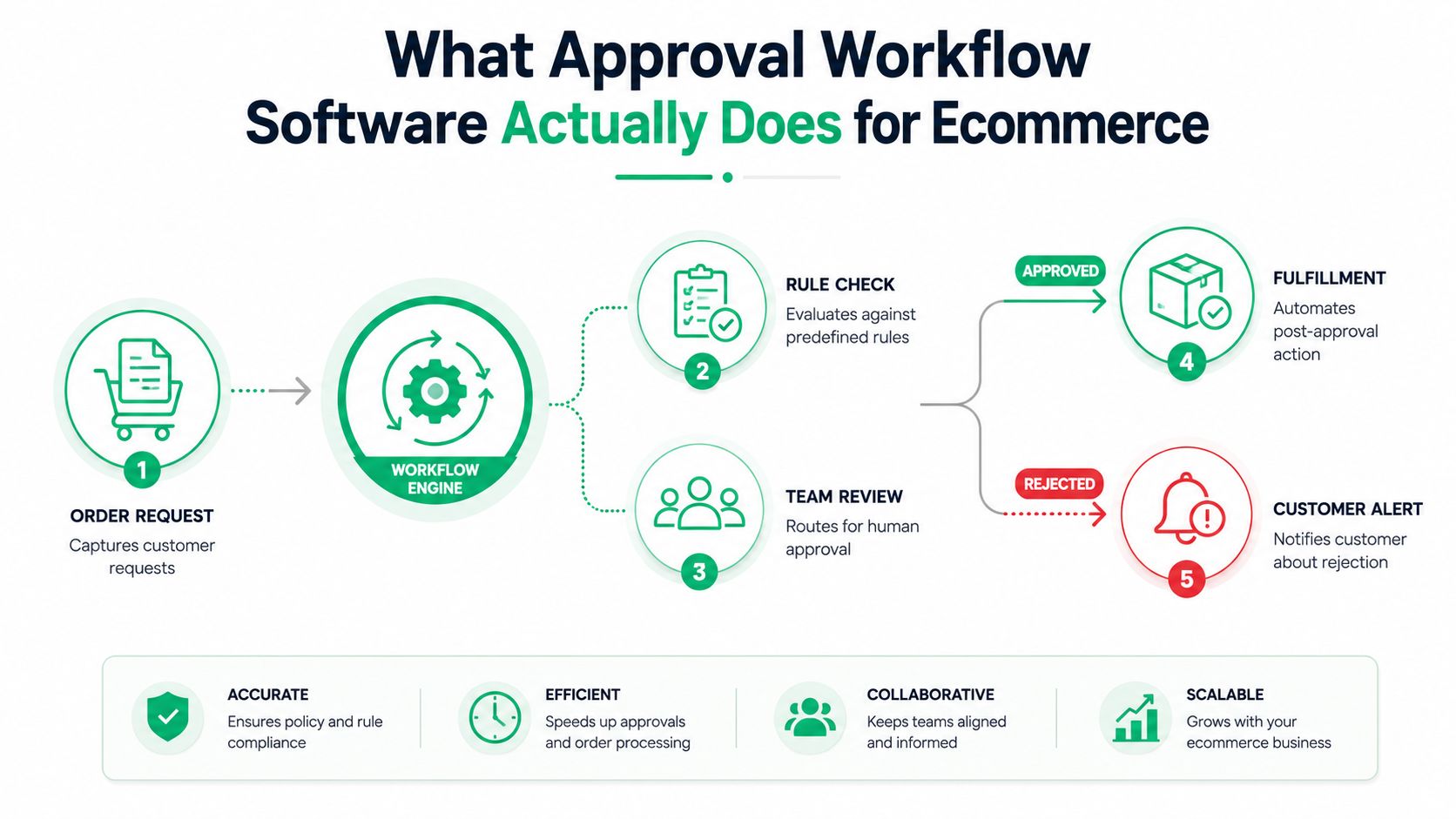
A practical ecommerce decision path
- Capture the request. The customer asks to edit an address, cancel an order, request a refund, or add a product. Required fields should prevent incomplete requests from reaching an approver.
- Collect current context. The workflow checks order value, customer history, fulfillment state, payment status, shipping destination, inventory, and any relevant tags.
- Apply the rule tree. Low-risk requests can move directly to approval. Exceptions can branch to support, operations, finance, or a supervisor.
- Execute the result. The system updates the order, adds a tag, creates a support note, sends a notification, or leaves the request unchanged.
- Log the decision. The record should show the trigger, conditions, approver, timestamp, and final state.
A generic document tool might route a form from an employee to a manager. Ecommerce needs more than that. An address edit must consider carrier deliverability and fulfillment timing. A cancellation must account for pick status and inventory. A refund decision may depend on payment data, customer history, and margin rules.
That difference makes integration depth more important than a long feature list. The workflow should connect to Shopify and, where necessary, the support desk, ERP, warehouse, and 3PL. It should give the customer a simple request experience while keeping the logic behind a controlled operational boundary. Merchants evaluating this model can also review automation patterns for ecommerce before choosing which requests deserve automation first.
Core Features That Reduce Decision Latency
A workflow that only forwards tickets is an organized inbox, not a decision system. The strongest setups reduce waiting by deciding which requests need people, giving those requests complete context, and escalating them before fulfillment deadlines pass.
The first requirement is a conditional logic engine. It should evaluate more than one field at a time. For an address edit, that might mean order value, fulfillment status, customer tier, destination, and fraud indicators. A low-risk request can complete automatically, while an exception can go to an agent with the relevant facts already attached.
Where the time disappears
Queue controls matter as much as branching logic. Every pending request needs an owner, an age, a service-level timer, and a visible next action. Aging alerts should identify requests that are approaching a fulfillment cutoff, not merely display a static “pending” label.
Escalation rules then handle the cases that still don't move. If an approver doesn't respond within the defined window, the request can move to a backup approver or a senior operations queue. That removes the need for agents to chase managers in chat and gives the customer a predictable response path.
The decision-latency research cited earlier explains why these controls have value. Since 71% of decision time was waiting, reducing queue dwell can matter more than making the review screen slightly faster. The workflow should attack idle time first.
| Feature | Function | Latency Reduction |
|---|---|---|
| Conditional logic | Separates low-risk requests from exceptions | Removes unnecessary human review |
| Queue ownership | Assigns each request to a named team or person | Prevents unowned waiting |
| SLA timers | Measures age against an operational deadline | Makes stalled work visible |
| Escalation rules | Promotes unanswered requests automatically | Reduces manager bottlenecks |
| Audit trail | Stores decisions, changes, and rule outcomes | Avoids repeated investigation |
| Live integrations | Reads current Shopify, ERP, and 3PL state | Prevents decisions based on stale data |
Auditability and live state
An audit trail isn't just for compliance. It helps support answer a customer dispute without reconstructing events across email, Shopify notes, and chat. Version history is equally useful when a request changes after review. The record should distinguish the original request from the approved modification.
Integration quality determines whether the logic can be trusted. A workflow that reads fulfillment status only once may approve an action that became unsafe moments later. For higher-throughput environments, event-driven designs, asynchronous transitions, and concurrency controls become important. One production orchestration implementation reported transitions as low as 120 milliseconds from submission to review and 180 milliseconds from review to approval, with 95th-percentile latencies of 250 and 320 milliseconds and support for 500+ concurrent workflows, as documented in this workflow-orchestration implementation. Those figures describe a specific implementation, not a universal benchmark, but they show the architecture required when approval volume grows.
Three Shopify Approval Workflows You Can Build Today
The best first workflows aren't theoretical. They sit on requests your support team already handles repeatedly, and each one has a clear trigger, decision boundary, escalation owner, and final order state.
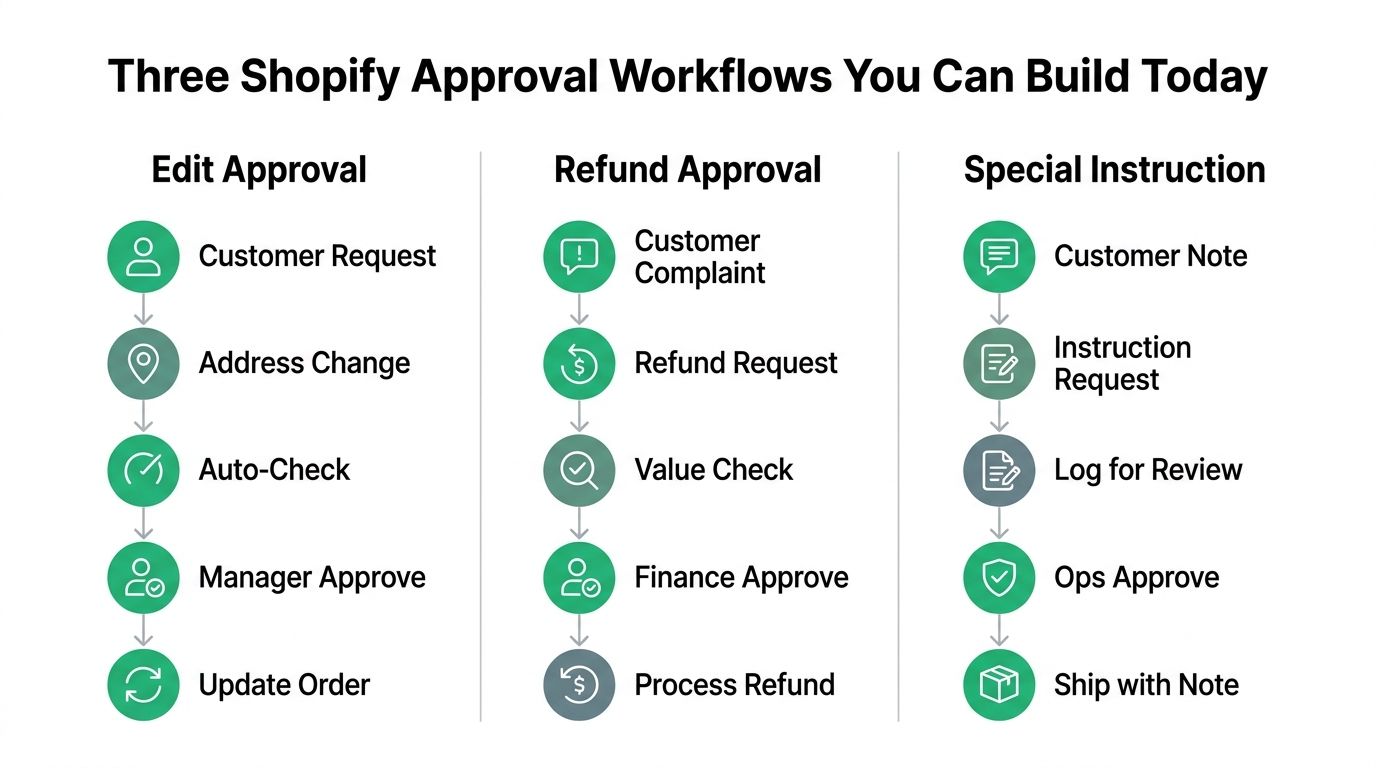
Address edit approval
Trigger: A customer submits a shipping-address change after checkout.
Logic: First check whether the order is still editable and whether the destination passes address validation. Then evaluate risk signals such as a mismatch between the original and new destination, an international redirect, or an unusually valuable basket. A routine correction can be approved automatically. An exception goes to support or operations with the original address, requested address, fulfillment state, and risk flags in one view.
Escalation: If the request approaches the warehouse handoff without a decision, send it to the senior operations queue. The final state should update Shopify only after approval, then notify the customer and add an internal audit note.
This path saves handling time by eliminating repeated lookups, but the exact time saved depends on the merchant's current queue and integrations. Don't promise a fixed reduction before measuring your baseline.
Cancellation approval
Trigger: A customer asks to cancel an order.
Logic: Check fulfillment status, payment state, inventory implications, customer value, and any cancellation policy. A pre-pick cancellation can often follow a simpler path. A post-pick request may need supervisor review because the warehouse has already committed labor or inventory. A VIP customer's request might receive a different escalation path, but the rule should still respect what the fulfillment system can safely reverse.
Escalation: Route requests that conflict with pick, pack, or shipment status to operations. The outcome should be one of three explicit states: cancelled, declined with an explanation, or held for manual handling.
Post-purchase upsell approval
Trigger: A customer adds a complementary item through a post-purchase offer or asks support to modify the order.
Logic: Standard bundles and approved product combinations can proceed automatically. Discount exceptions, restricted products, and changes that affect shipping or fulfillment should route to a manager. The workflow can also apply order tags so the warehouse knows the order was modified and which fulfillment instruction applies.
Outcome: The approved item is added, the customer receives confirmation, and the order record retains the decision. A request that can't be fulfilled should produce a clear alternative rather than leaving the customer waiting.
The same logic can support special shipping instructions or refund requests, but don't combine every branch into one giant workflow. Separate workflows are easier to test, monitor, and disable when one policy changes.
A short walkthrough can show how these branches translate into Shopify automations. Review Shopify Flow examples for post-purchase operations and compare the logic with your own order states.
The customer-facing experience should remain simple even when the internal tree isn't. This video provides another visual reference for structuring request and approval paths.
Implementing Approval Workflows on Shopify
Start with the data path, not the screen. Map which event creates the request, which system owns the decision, and which system performs the approved action. For most Shopify Plus merchants, that means combining the Shopify Admin API, webhooks, and Shopify Flow with support, fulfillment, or enterprise systems.
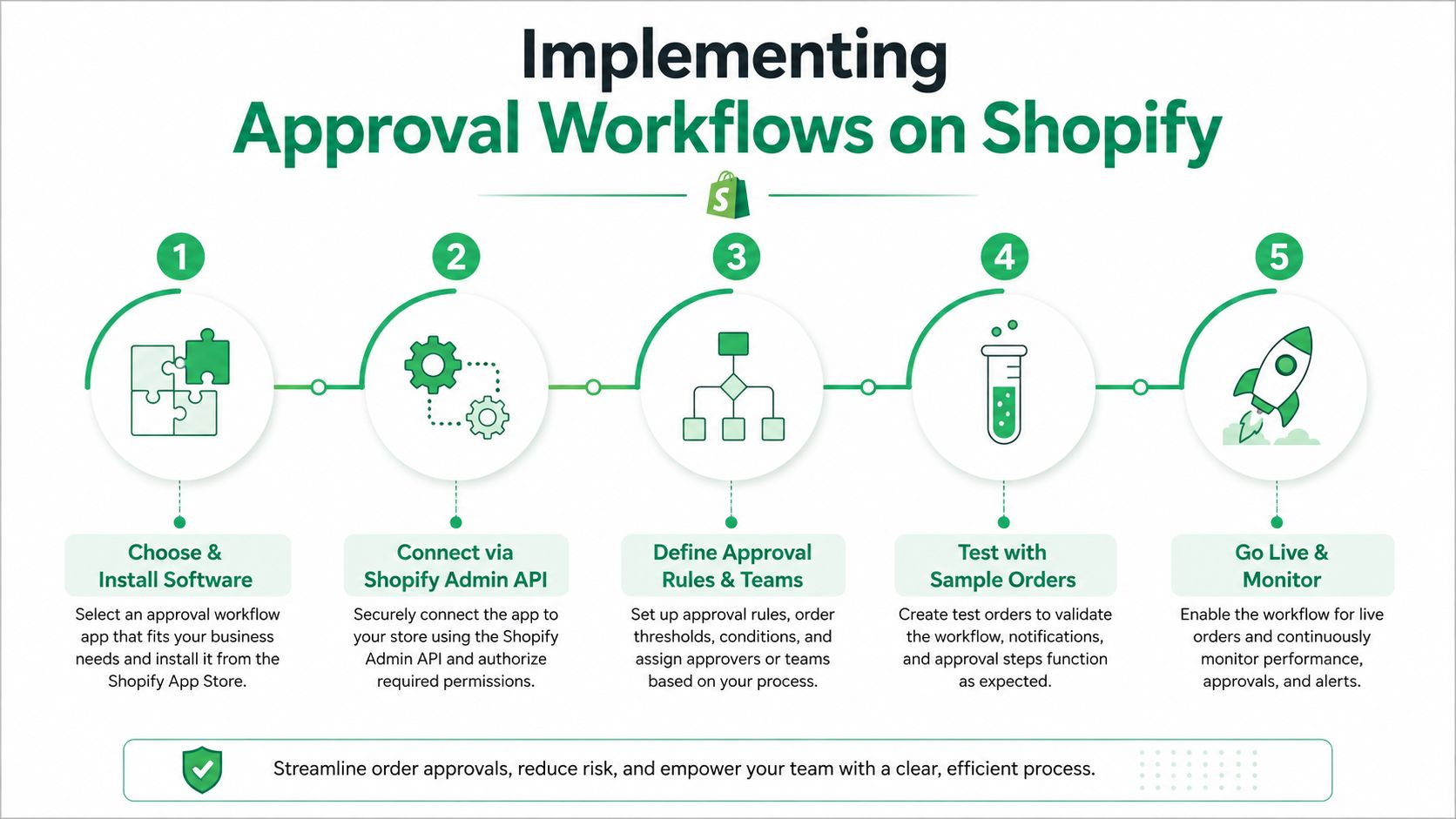
Build the connection carefully
- Define the event. Use order creation, order updates, fulfillment creation, or a customer-submitted request as the starting signal. Specify what happens if events arrive twice or out of order.
- Scope permissions. Give the workflow only the access required to read and modify relevant resources. Separate read access for audit logs from write access for orders or customers, and document who can change the rules.
- Create the rule tree. Write the approval conditions in plain language before configuring them. Include the normal path, exception path, rejection message, and manual override.
- Set the timing window. Define when the request expires, when fulfillment should pause, and when escalation should occur. The timer must reflect the warehouse's real cutoff, not an arbitrary inbox target.
- Test before production. Use a Shopify development store with sample orders that cover normal edits, duplicate events, fulfilled orders, international destinations, restricted products, and rejected requests.
Global stores need two notification paths
Customer notifications should match the shopper's locale, while internal escalation should route to the team responsible for the destination or fulfillment region. Keep those concerns separate. A translated customer message doesn't mean the approval belongs with the same team that handles the merchant's default market.
Permission design deserves its own review. An approver may be allowed to accept a request but not edit workflow rules. An agent may need to view customer context without changing a financial outcome. A documented permission-based access control model helps keep those responsibilities distinct.
Run test orders through every branch, inspect the audit record, and confirm that Shopify, the support desk, and the warehouse receive consistent states. Production rollout should begin with monitoring enabled and a manual path available for anything the workflow can't classify confidently.
Buyer's Checklist for Choosing the Right Tool
Don't choose approval workflow software because its demo contains the largest number of features. Choose it because it can handle your Shopify event model, make a reliable decision with current order data, and give your team a safe fallback when the rules don't cover a request.
| Feature Tier | Feature | Demo Question to Ask |
|---|---|---|
| Must-have | Native Shopify integration | Can you read and update the order states we use without custom middleware? |
| Must-have | Webhook-based triggers | Which Shopify events can start a workflow, and how are duplicate events handled? |
| Must-have | Branching logic | Can one request route differently based on value, fulfillment, destination, and customer status? |
| Must-have | SLA timers and escalation | Can an unresolved request move automatically to a backup approver? |
| Must-have | Audit logging | Can we see the rule path, approver, change history, and final action? |
| Strong nice-to-have | Shopify Flow compatibility | Can our operations team manage selected automations in Shopify Flow? |
| Strong nice-to-have | Multilingual notifications | Can customer messages follow the shopper's locale while internal routing follows region? |
| Strong nice-to-have | Role-based queues | Can support, finance, and operations see different approval work? |
| Strong nice-to-have | Mobile approvals | Can managers approve a request securely without opening a desktop portal? |
| Future-proofing | Suggested decisions | Can the system surface patterns without approving risky requests automatically? |
| Future-proofing | Support-platform connectivity | Can it connect with Zendesk or Gorgias without losing the audit record? |
What to test during the demo
Ask the vendor to demonstrate a real address edit, not a generic form approval. The request should check fulfillment state, show the original and new address, route a risk exception, and return a clear status to Shopify.
Then test failure behavior. Disconnect an integration, submit duplicate events, remove an approver, and create a request that violates a product restriction. A mature tool should show what failed, preserve the request, and provide a controlled retry or manual override.
Be cautious with platforms that need custom middleware for basic Shopify connectivity. Middleware can be useful for a complex stack, but it adds another place for credentials, retries, monitoring, and state mismatches. Also question pricing based on individual approval events, especially if routine customer requests are frequent. Finally, don't accept a production-only implementation. Without a sandbox or development-store testing path, your team is forced to discover rule errors on live orders.
KPIs That Prove Your Workflows Are Working
Workflow count is not an outcome. A merchant can build dozens of automations and still leave customers waiting if the rules route every request to an agent. Measure the customer result, the operational speed, and the cost of resolving the request.
Ticket deflection rate shows how many eligible post-purchase requests finish without agent intervention. Compare support tags for address edits, cancellations, returns, or order additions with workflow completion logs. Keep the definition stable, because a request that receives an automated message but still needs an agent shouldn't count as fully deflected.
Use a small, connected dashboard
Track these measures together:
- Decision latency: Measure the time from customer request to final resolution, then compare the manual baseline with each automated path. The earlier decision-latency research makes this the clearest indicator of queue reduction.
- Approval-path completion: Count requests that reach a valid final state without manual recovery. Review failed paths separately from customer rejections.
- Upsell acceptance: For approved post-purchase additions, compare offers shown with offers accepted and connect the result to order-value records. Treat this as an operational measure, not proof of causation by itself.
- Cost per resolution: Divide support-team costs by resolved requests, using a consistent cost method across the baseline and the automated period.
- Exception rate: Monitor how often requests leave the normal path. A high exception rate usually means the rule is too narrow, the intake form lacks context, or the customer experience is inviting requests the business can't safely automate.
Shopify Flow logs, Gorgias or Zendesk ticket data, and order modification records can feed a simple reporting layer. Review metrics by workflow, destination, product category, and approver queue. Averages can hide a serious problem if one region or one fulfillment partner creates most of the delays.
Set qualitative targets before launch, such as fewer agent touches, faster resolution, and fewer fulfillment corrections. Don't label a workflow successful because it ran often. It earns its place when customers get clearer outcomes and agents recover time for the cases that need judgment.
Best Practices and Mistakes to Avoid
Start with high-volume, low-risk approvals. Address corrections before fulfillment, straightforward cancellation requests within the merchant's operational window, and standard return initiations usually provide a cleaner test than complex refund exceptions or cross-border changes.
The common failure is over-approval. If every address change, cancellation, and standard bundle needs a manager's sign-off, the software has recreated the queue with better branding. Human review should exist where the business faces meaningful risk, not where the team hasn't written down a rule.
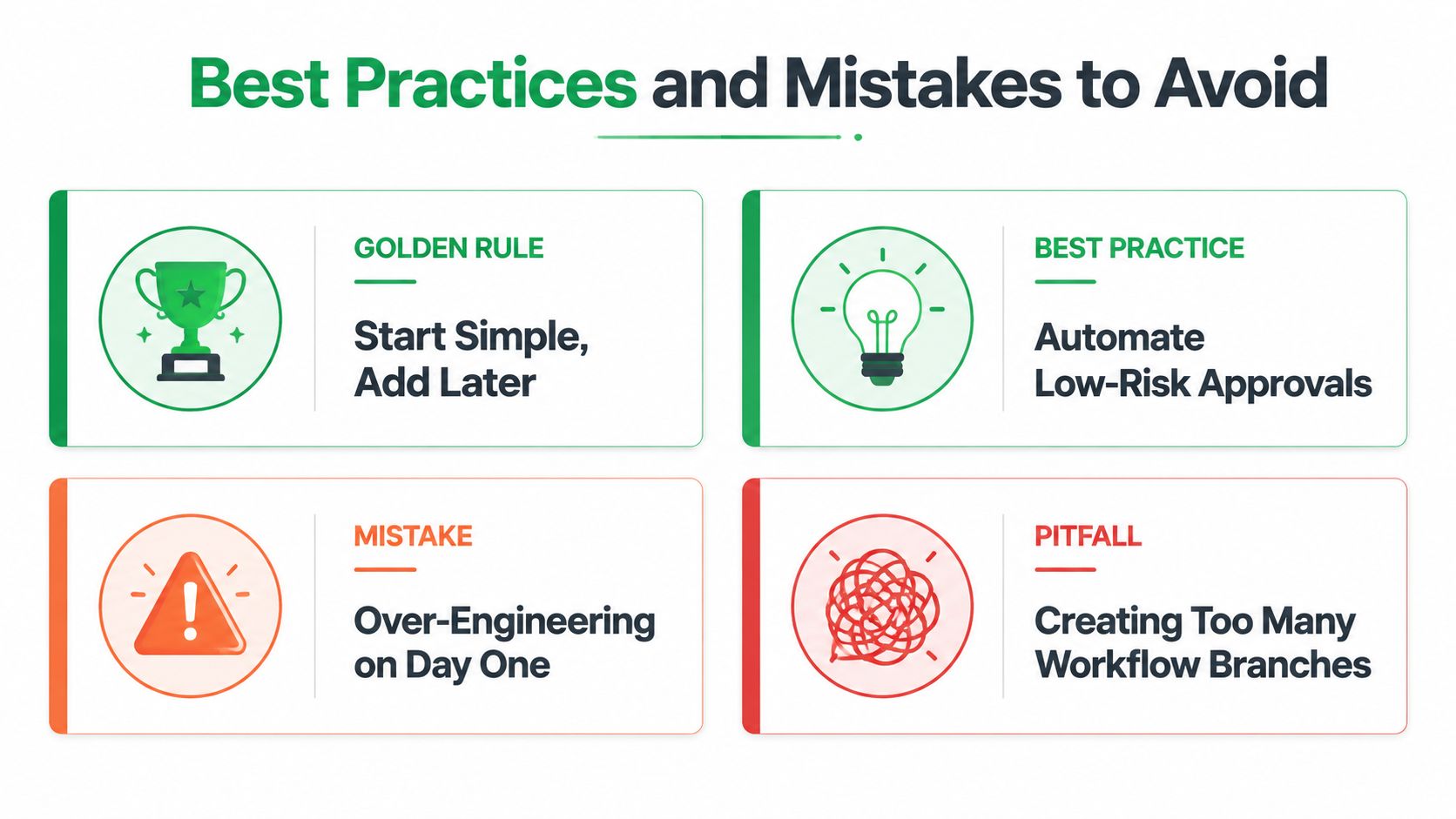
Keep the first release deliberately small
Choose one request type, define its safe boundary, and document the exception path. Give the workflow a kill switch that stops automatic actions without deleting open requests. Keep a manual override available so support can resolve an edge case while preserving an audit note.
Multilingual support also needs operational testing. English-only rule labels or customer messages can create confusion for international shoppers, even when the underlying Shopify action works correctly. Test the request form, approval notice, rejection message, and escalation alert in the locales your store serves.
Permission hygiene is another frequent source of failure. An approval can be recorded successfully while the final Shopify update fails because the executing account lacks the required permission. Test the entire action, not just the approval button.
Design principle: A workflow should fail safely, explain what happened, and give a trained operator a way to recover.
Review performance on a regular operating cadence. Retire branches that create noise, refine rules that send too many normal requests to humans, and expand only after the current path is stable. Keep a written change log for policy edits so the team can connect a later increase in exceptions to the rule change that caused it.
Merchants can also compare their design against the broader shift toward cloud-led deployment, low-code customization, and integrated process automation described in market coverage from DataHorizzon Research and DataIntelo's market assessment. Those reports use different market estimates, but both frame approval workflow software as an established business operations category rather than a narrow document-routing utility. For Shopify teams, the practical lesson is simpler: buy for integration, control, and maintainability, not for an impressive workflow canvas.
SelfServe helps Shopify merchants let customers manage defined post-purchase changes, validate addresses, route cancellation requests for approval, and add relevant products through controlled upsell flows. If your support queue is full of address edits, cancellations, or order additions, visit SelfServe to see how its Shopify-focused workflows can fit your operation.