How to Improve Support Ticket Deflection

A Shopify brand can process a steady stream of orders and still spend much of the day answering the same questions: “Where's my package?”, “Can I change the address?”, “When will my refund arrive?” Each avoidable conversation consumes agent time, delays responses to customers with difficult problems, and can undermine a purchase before the order is even placed. A customer who can't get a clear answer about delivery or returns may abandon checkout rather than risk a frustrating experience.
The answer isn't to make the support inbox look quieter at any cost. Support ticket deflection works only when the customer reaches a correct outcome without being pushed into a later contact. That requires more than a chatbot or a larger help center. It requires coordinated post-purchase UX, safe automation, intent-based routing, and measurement that accounts for re-contacts.
Rethinking Support Ticket Deflection
A shrinking ticket queue can mean several different things. Customers may have solved their problems through self-service, or they may have abandoned a form, failed to understand a bot, switched to social media, or contacted the business again through another channel. If the dashboard counts every avoided agent interaction as success, it can reward friction instead of resolution.
Raw article views and link clicks are especially weak signals. A customer might open an order-tracking article, fail to find a shipment-specific answer, and then email support the next day. The article view looks like deflection, but the customer still owns the original problem.
A practical measurement model defines true deflection as self-service resolutions minus re-contacts within 48 hours, divided by total help-seeking attempts. The methodology becomes more useful when results are segmented by intent before benchmarking, because a tracking request behaves differently from a technical troubleshooting request. The benchmark discussion at Support Ticket Deflection Rate Benchmarks also warns against treating raw clicks or a single blended rate as proof of resolution.
Operational rule: A customer who avoids your queue but returns with the same unresolved issue hasn't created a successful deflection.
For a Shopify operation, this distinction changes what the support team builds. The team should fix the delivery estimate on the product page, expose a returns action from the order-status page, and route a damaged-in-transit claim to an agent with the order context already attached. A knowledge article can help, but it shouldn't substitute for an action when the customer needs to change, cancel, or verify something.
Reviewing support ticket system KPIs can help operations leads connect queue performance with service quality, rather than treating ticket count as the only health signal. The useful question is not “How many contacts did we avoid?” It's “Which customer problems did we solve, through which path, and what happened afterward?”
That operating model protects human capacity without hiding complexity. Simple order questions can resolve themselves, while chargebacks, safety concerns, and exceptions reach trained agents quickly. Deflection becomes a customer-resolution system, not an AI deployment project.
Finding the Right Tickets to Deflect
Start with the ticket data, not the tool. Export conversations from Gorgias, Zendesk, or Re:amaze, then combine those tags with Shopify order and fulfillment data where the workflow needs account context. Read enough transcripts to understand how customers phrase the problem, because the label used by an agent often differs from the words typed by a shopper.
Tag each conversation by intent, then score that intent across four dimensions:
| Dimension | Low Score Example | High Score Example |
|---|---|---|
| Frequency | An unusual wholesale exception | Repeated “where is my order?” requests |
| Ambiguity | A customer asks for a tracking link | A vague complaint about a missing package |
| Customer risk | Applying an available discount code | A safety, allergy, or regulated-product question |
| Transaction complexity | Viewing an order status | Changing an address after a shipping label is created |
Frequency tells you where the workload sits. Ambiguity tells you whether a system can reliably identify what the customer wants. Risk determines whether an incorrect answer could create financial, legal, safety, or trust problems. Complexity shows whether the request needs permissions, multiple systems, or human judgment.
For example, order status is often a strong starting point because the customer's intent is clear and the answer can come from shipment data. Discount code troubleshooting can also be suitable when the rules are explicit. Address changes are more conditional. Before fulfillment, a controlled workflow may be safe. After picking or label creation, the request may require an approval gate or manual intervention.
Returns and refund-policy questions sit between those cases. A self-service flow can explain eligibility and collect the necessary information, but exceptions, disputed outcomes, and unusual item conditions should route to an agent. Technical troubleshooting usually deserves a narrower scope, because a generic article may not account for device, product version, configuration, or prior failed steps.
Independent benchmarks cited by Customer Support Trends show the difference between intent types. Order status and tracking can reach a 64% median deflection rate, with a 78% top-quartile rate in about 14 days. Returns and refund policy can reach a 58% median and 71% top-quartile rate in 21 days, while technical troubleshooting is much lower, at a 23% median and 34% top-quartile rate over 90–120 days. Those figures are useful for prioritization, not promises across an entire support operation.
Build a backlog that ranks intents by volume and suitability. A high-volume, low-risk, low-ambiguity request should usually come first, even if it offers less strategic excitement than a conversational assistant. The safest launch is the one that proves customers can complete a narrow task without returning.
Building Self-Service That Resolves Issues
A self-service experience should mirror the customer's task, not your internal taxonomy. Customers say “my tracking hasn't moved,” “I typed the wrong address,” or “the discount won't apply.” They don't usually search for the name of your warehouse status, fulfillment state, or promotion rule.
Design around the actual Shopify task
For order tracking, place an order lookup directly in the support entry point and order-status experience. Ask for the order email and postal code, or use an authenticated account session, then show the current shipment state, tracking link, and a plain-language explanation of what the next status means.
For address changes, explain the eligibility window before asking the customer to edit anything. The flow should check whether the order has entered picking or shipping, verify the shopper's identity, validate the proposed address, and disable the action once the merchant's rules no longer permit it. Don't present an edit button that appears available but fails after submission.
Use a static FAQ when the answer is stable and doesn't depend on customer data. Shipping-policy language, sizing guidance, and basic discount-code instructions can work well as searchable content. Use a guided flow when the customer needs an order lookup, eligibility check, permission decision, or action completion.
A strong self-service system combines searchable guidance with account-aware actions. The principles in customer self-service benefits are most valuable when they lead to a completed task rather than redirecting the customer to more reading.
Keep escalation inside the same experience
Every flow needs a visible fallback. If a shipment is marked delivered but the customer can't find it, offer the approved next step, such as a missing-package request or human review. If a return falls outside policy, explain why and provide a route for an exception request when the merchant supports one.
Before launch, test each experience with real order states and failure paths:
- Identity checks: Confirm that the flow validates the right customer and order details.
- Permission boundaries: Test edits before fulfillment, during picking, and after shipment.
- Policy variations: Include eligible, ineligible, partial, and exception cases.
- Mobile behavior: Verify the lookup, buttons, error messages, and escalation path on a phone.
- Language clarity: Replace internal terms with the phrases customers use in tickets.
- Failure recovery: Make sure a failed lookup tells the shopper what to try next.
- Agent handoff: Pass the order, intent, attempted steps, and relevant conversation history to the support team.
The final test is behavioral. Give the flow to someone who didn't build it and watch where they hesitate. If the shopper must guess what happens next, the system isn't ready to deflect the request safely.
Automating High-Volume Shopify Requests
Automation should follow a permission model. Some requests only retrieve information, some change a customer's order, and others create financial or operational commitments. Treating those categories alike is how a convenient workflow turns into an expensive correction queue.
A delivery-status flow is a good example of read-only automation. The customer enters the order email and postal code, the system authenticates the order, retrieves the current tracking link, and explains the latest carrier event. If the parcel appears lost in transit, the flow can collect a pickup request for review instead of promising a replacement automatically.
Address changes before fulfillment can use a controlled action window. After a label has been created, the workflow should stop and route the request for review, because the operational state may no longer match what Shopify displays at the order level. Subscription skips and pauses can be automated when the account permissions, cutoff rules, and next-charge conditions are explicit.
Returns initiation can be guided through eligibility questions and item selection. Refund execution deserves more care, particularly where merchant policy requires approval, where the amount is unusual, or where the request conflicts with fulfillment and payment records.
| Request Type | Automation Level | Required Safeguards |
|---|---|---|
| Order status lookup | Fully automated | Authenticate the order, show current data, and provide a human route for exceptions |
| Address change before fulfillment | Automated within a defined window | Validate identity and address, check fulfillment state, and log the edit |
| Address change after label creation | Human approval | Prevent silent edits, display the reason for review, and preserve the request |
| Subscription skip or pause | Automated when rules are clear | Confirm permissions, dates, and the resulting next action |
| Return initiation | Guided automation | Check eligibility, capture item details, and escalate exceptions |
| Refund request outside policy or above a merchant approval threshold | Approval-gated | Require review, record the decision, and communicate the next step clearly |
| Chargeback, safety, allergy, or regulated-product question | Human-led | Route immediately with the complete customer context |
Prompt and flow design matter as much as the integration. Ask for one piece of information at a time, state why it's needed, and avoid making the customer repeat information already supplied. When the system can't proceed, say what happens next, who owns the next step, and what the customer should expect.
The workflow also needs an audit trail. Merchants should be able to see which automation ran, which data it used, what action it took, and whether an agent later changed the outcome. The guidance in how to automate customer service is useful here because automation needs operational controls, not just conversational polish.
Stop or escalate when the customer asks for a human, sentiment becomes clearly negative, the request falls outside the supported order window, or the system lacks reliable data. A graceful handoff is part of deflection quality. It prevents a failed automation attempt from becoming a longer human conversation.
Preventing Tickets Through Better UX
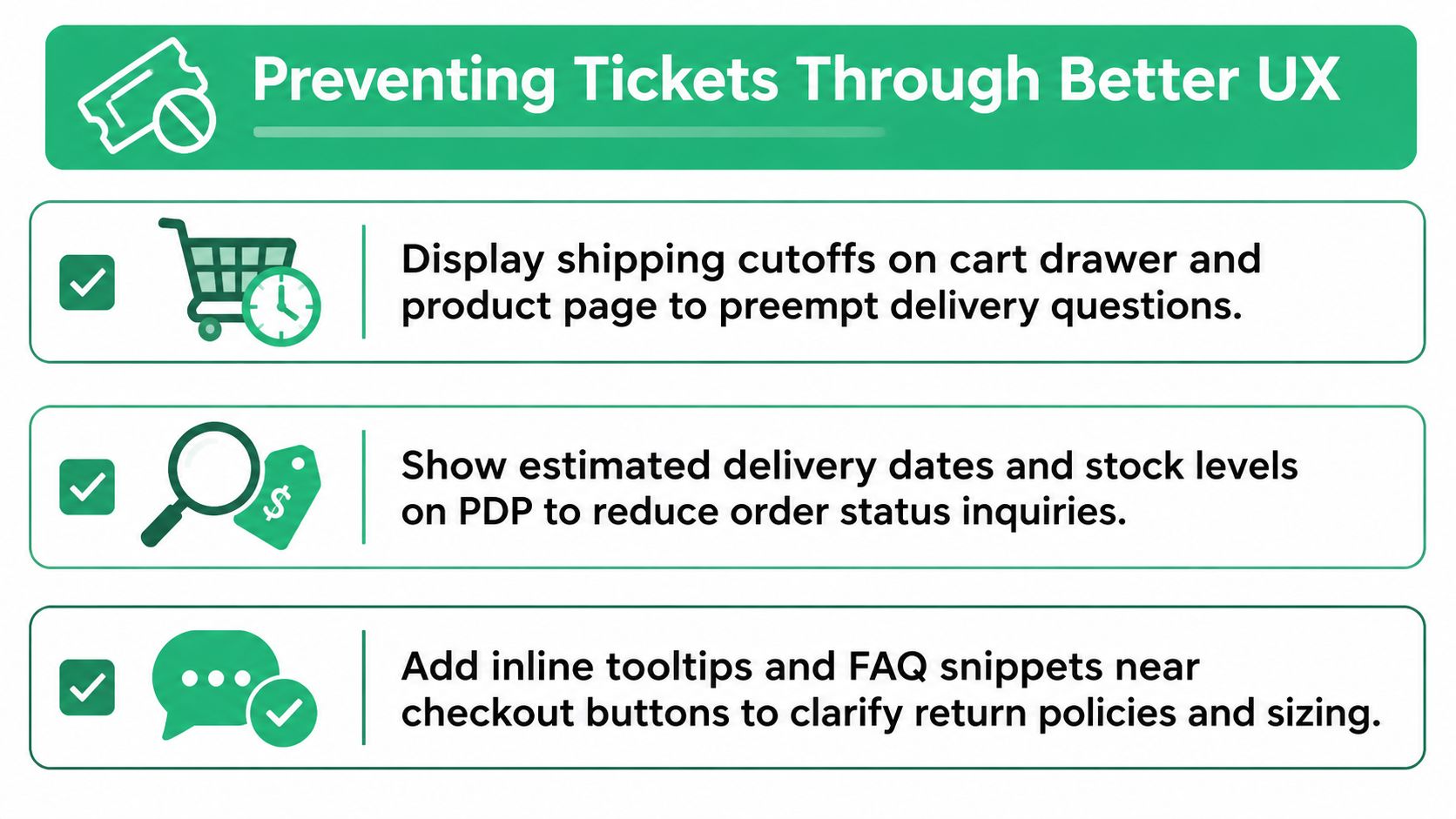
A support team shouldn't have to explain information that the storefront could show at the moment of need. If a shopper asks whether an order will arrive before a holiday, put the shipping cutoff in the cart drawer and on the product page. If delivery depends on postal code and carrier mix, show an estimated window that reflects those inputs rather than hiding a general promise in a FAQ.
A returning customer may not need a help article about subscriptions. They need visible controls to skip, swap, or pause. Put those actions in the account area, show the next relevant date, and confirm the change immediately. A returns portal in the order-confirmation email can remove another predictable “how do I send this back?” contact.
Some questions come from trust gaps rather than missing features. A clearer charge description on a bank statement can reduce payment confusion, while an order-status page that explains fulfillment stages can prevent customers from interpreting “processing” as a failed order.
Visibility and action are different problems
A hidden FAQ solves a visibility problem only if the customer finds it and understands it. An action problem requires an in-product path. A customer who wants to change an address shouldn't have to read a policy explaining that changes may be possible. They should see an address action, learn whether the order is eligible, and complete the request or receive a clear handoff.
For stores that need structured address lookup and validation, an address lookup tool can support a more direct post-purchase experience. The design principle matters more than the widget: the best prevention is an action that completes the customer's goal, not a tooltip that describes why the goal is difficult.
Test these journeys with returning customers, subscribers, and shoppers on mobile. First-time buyers reveal discoverability problems, but repeat customers expose the operational gaps that create recurring contacts.
A short walkthrough can show how a post-purchase flow fits into the broader operating model:
Measuring Real Deflection and Resolution
A dashboard needs to separate queue avoidance from problem completion. The practical formula is:
True deflection = (self-service resolutions minus 48-hour re-contacts) ÷ total help-seeking attempts
Calculate it by intent, not only as one store-wide rate. A tracking flow may perform well while a technical troubleshooting flow generates repeat contacts, and a blended number can hide that difference. The benchmark framework at Support Ticket Deflection Rate Benchmarks places mature knowledge-base programs without AI at 30–50%, and programs using AI with account or billing context at 40–70%, but those ranges matter only when the result is re-contact-adjusted and intent-segmented.
The measurement window should match the customer journey. Track immediate failures, re-contacts through every channel, and later escalations. A recent distinction between deflection and resolution emphasizes that avoiding the human queue isn't the same as solving the underlying issue, and describes a framework that treats a request as durable only when the customer doesn't reopen, escalate, or resubmit it within 7 days. See AI support deflection and resolution measurement for that resolution-layer perspective.
Pair the headline with operational evidence
| Metric | Definition | Watch-out Threshold |
|---|---|---|
| True deflection | Self-service resolutions minus 48-hour re-contacts, divided by help-seeking attempts | Any intent where repeat contact erases the apparent gain |
| Re-contact rate | Customers returning with the same issue within the chosen window | A rising rate after a flow launch |
| Time to resolution | Time from the initial help request to a completed outcome | Longer journeys hidden by instant bot replies |
| Containment by intent | The share of each intent completed without human intervention | A blended rate that masks weak categories |
| Customer effort score | Customer-reported difficulty after self-service | Low effort scores paired with poor outcomes or escalations |
Slice these metrics by intent, device, customer type, and order value. A mobile-only failure may indicate a usability issue, while a high-value-order pattern may justify a faster human handoff. Add sentiment checks, minimum completion signals, and post-deflection CSAT sampling so the system can't improve its headline rate by abandoning frustrated customers.
Consider two hypothetical dashboards. A 38% raw deflection rate can look healthy until repeat contacts reduce true deflection to 22%. Conversely, a 25% raw rate may be healthier than 50% if customers finish the task, report lower effort, and rarely return. The numbers are illustrative, but the operating lesson is concrete: leadership should review avoided volume beside durable resolution.
Rolling Out and Improving Deflection
Roll out one intent at a time. Start with the highest-volume, lowest-risk category, usually a shipping-status lookup, and define three controls before launch: the success threshold, the rollback trigger, and the human handoff path.
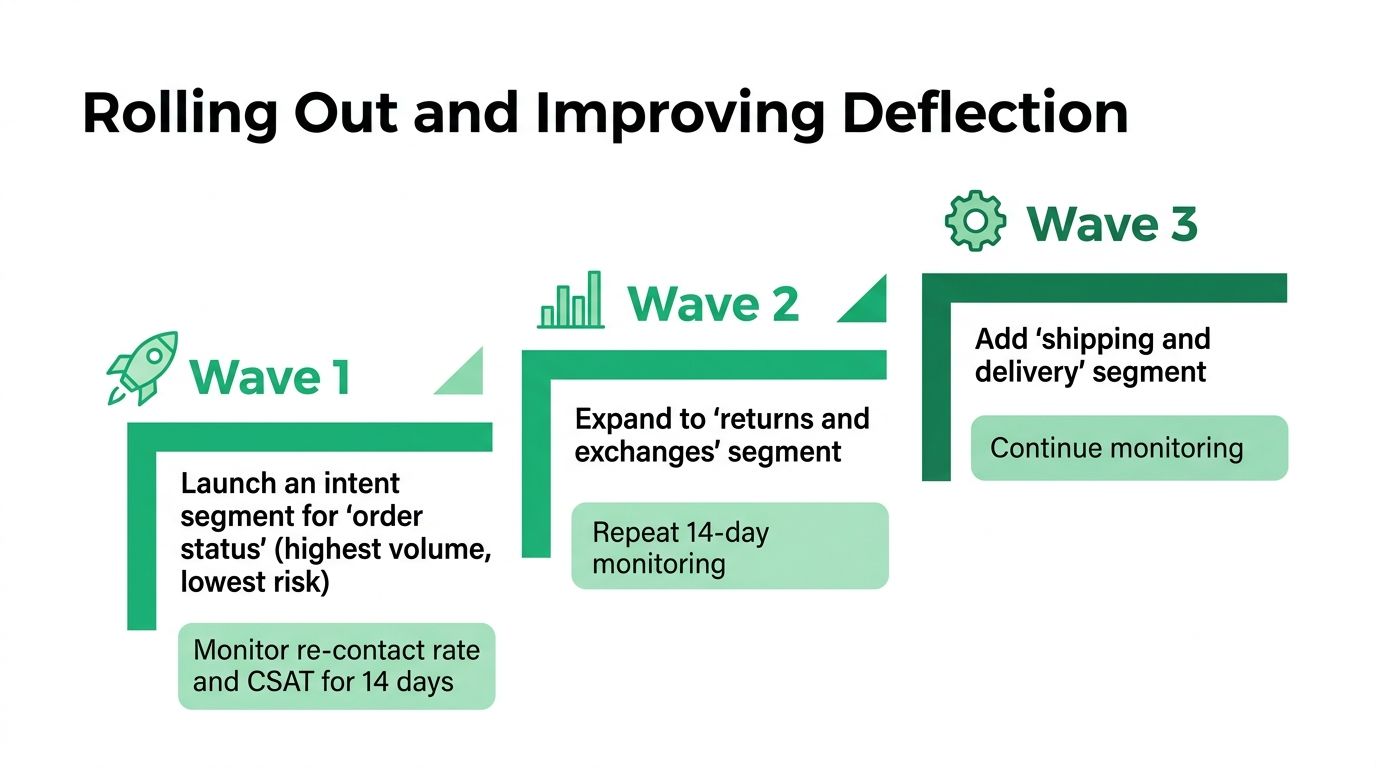
Monitor re-contacts and CSAT for 14 days after each wave, then decide whether to expand. Add returns and exchanges only after the first flow behaves reliably. Introduce more complex shipping and delivery cases later, with explicit exception handling rather than broad automation.
Launch discipline: If you can't explain when the workflow stops, who receives the request, and how you'll detect a repeat contact, it isn't ready for production.
Run a weekly intent review after launch. Inspect new ticket language, failed searches, escalations, policy changes, and agent corrections. Retire flows that no longer match Shopify operations, update content when fulfillment or returns rules change, and send recurring failure patterns to product, UX, and merchandising owners.
SelfServe provides Shopify workflows for post-purchase actions such as address edits and cancellations, with merchant-defined permissions and completion tracking. For a high-volume store, that type of controlled action layer can complement a help center and support platform, especially where customers need to change an order rather than read about the policy.
SelfServe helps Shopify merchants give customers controlled post-purchase options for address changes, cancellations, and related order actions while keeping approval boundaries visible to operations teams. Visit SelfServe to see how its self-service workflows can fit into a resolution-focused support ticket deflection program.