Calculating UPS Charges: A Merchant's Guide
You're probably in the same spot I see with a lot of fast-growing DTC brands. Shipping costs looked manageable when volume was lower, then invoices started landing higher than the checkout estimate, and nobody could explain exactly why. The usual answer is “DIM weight” or “fuel,” but that's only part of it.
The bigger problem is that UPS pricing is full of thresholds. A box can be fine at one size, then cross a packaging or weight trigger and pick up a surcharge that wrecks contribution margin on that order. If you're calculating UPS charges without watching those thresholds, you're not really calculating the full cost.
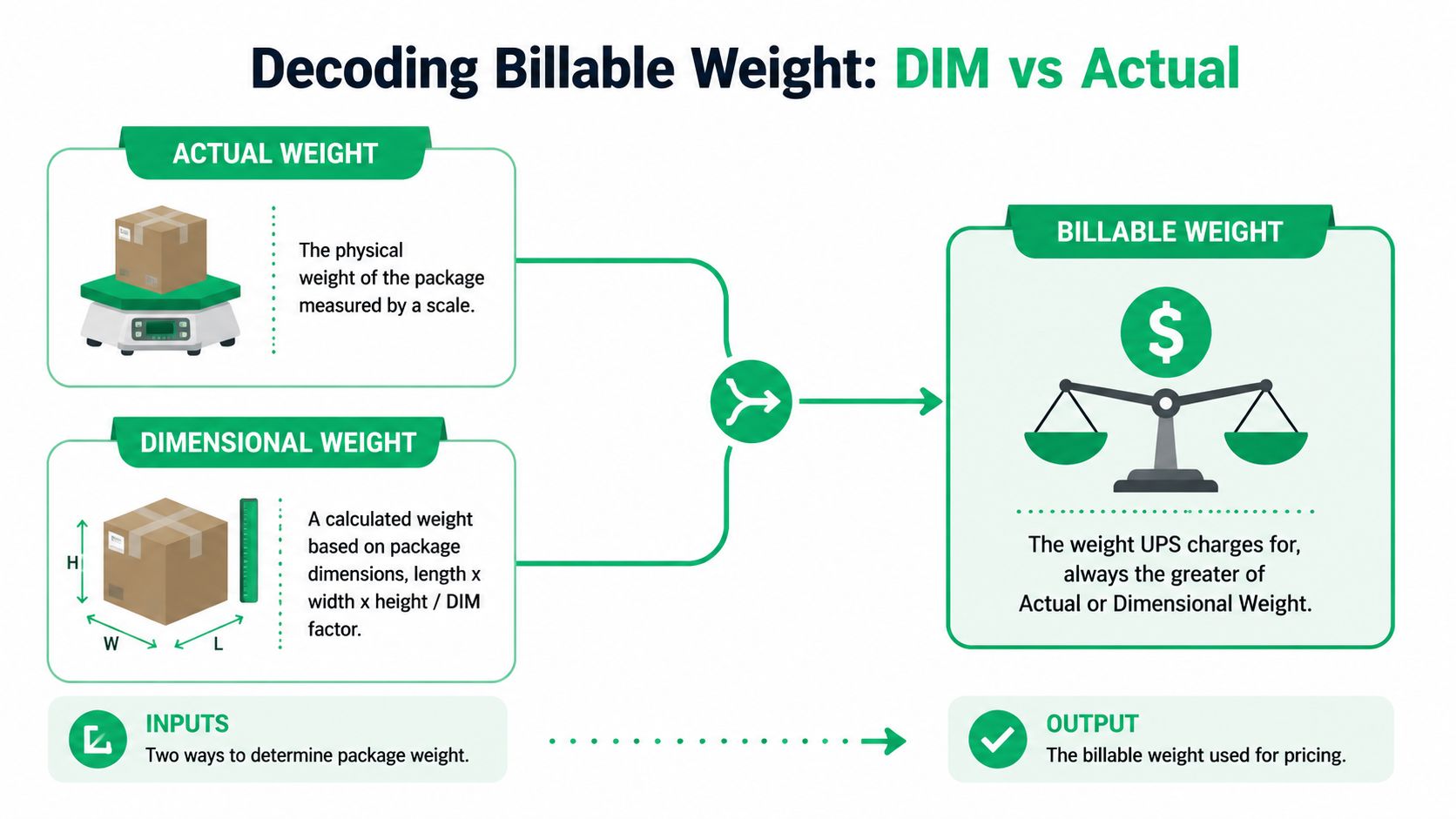
Decoding Billable Weight DIM vs Actual
A box that looks cheap to ship can turn into a margin leak as soon as it hits the wrong threshold.
UPS rates a shipment on billable weight, which is the higher of actual weight or dimensional weight, as explained in 3PL Center's overview of calculating UPS shipping costs. If your team only checks the scale weight, you are missing the number UPS may price.
Actual weight is the easy part
Actual weight is the packed shipment on a scale. Product, dunnage, inserts, tape, and the carton all count.
This part rarely causes confusion inside the warehouse. The dispute usually starts when the invoice reflects a higher billed weight than the pack station expected.
DIM weight is where packaging decisions start costing real money
DIM weight is based on cubic size, not density. UPS commonly calculates it like this:
- Daily account rates: (L × W × H) ÷ 139
- Retail or drop-off rates: (L × W × H) ÷ 166
For brands shipping on a UPS account, the lower divisor usually means a higher DIM result. That is why a box redesign often saves more than shaving a few ounces off the product.
Run the math before you approve the carton
Take a carton that measures 12" × 12" × 6".
- Multiply dimensions: 12 × 12 × 6 = 864 cubic inches
- Divide by the daily-rate divisor: 864 ÷ 139 = 6.2
- Round up to the next whole pound: 7 lb billable weight
If the packed box weighs 4 lb, UPS still rates it at 7 lb. That gap is where a lot of DTC brands lose money, especially on apparel, footwear, kits, and giftable products with low physical weight but bulky packaging.
Store this in your rate logic, not just in ops tribal knowledge. If checkout only knows product weight and ignores final carton dimensions, your quoted shipping cost can be wrong before the label is even printed.
The threshold issue is what really matters
The usual DIM explanation is incomplete because cost jumps happen at thresholds.
Dropping a carton by an inch can lower DIM weight enough to move from one billed pound to the next one down. Going the other direction can do more damage. A slightly larger box may raise billable weight and also move the shipment closer to surcharge territory tied to package dimensions or total weight. That is the budget blowout merchants feel on the invoice.
This is why packaging review has to be threshold-based. Do not just ask, “Can we make it lighter?” Ask:
- Does this new carton change the rounded billable weight?
- Does it push any side close to a length threshold?
- Does the packed shipment move near a weight trigger for handling fees?
If you compare carriers during that review, it helps to check how other networks structure their pricing thresholds too, including these DHL courier rate considerations.
Small packaging changes can produce very different cost outcomes
A common mistake is approving packaging based on cube efficiency alone. Finance sees a box that is only slightly larger. Ops sees easier packing. UPS may see a heavier billed shipment.
That trade-off needs math. A carton change that improves pick-pack speed can still hurt contribution margin if it pushes enough orders into a higher billable-weight band. The same goes for heavier inserts, promotional bundles, or protective packaging added during peak.
Billable weight is the starting point, and the final cost also depends on surcharges triggered by specific size and weight thresholds.
How Zones and Service Levels Set Your Base Rate
A shipment can look profitable at checkout and turn thin on the P&L once it travels a few zones farther than expected. That happens all the time with fast-growing DTC brands that hold inventory in one node and assume packaging is the main cost problem. Often, the bigger issue is where the order is going and which service level the team selected.
Zones are set by ZIP code pairs
UPS shipping zones are based on origin and destination ZIP code pairs, which map shipping distance rather than simple state lines, as explained in Sifted's overview of UPS shipping zones.
That matters because the same box at the same billable weight can price very differently depending on the lane. A merchant shipping a 6 lb billed package from New Jersey to Pennsylvania is playing a different cost game than shipping that same package from New Jersey to Washington state.
Here is the clean way to read the base rate:
| Factor | What it changes | Operational takeaway |
|---|---|---|
| Billable weight | The rated weight UPS uses | Keep packaging under the next billed-pound threshold |
| Zone | The distance between origin and destination | Reduce long-zone exposure with better inventory placement |
| Service level | The transit speed and network priority | Pay for speed only when margin or promise requires it |
The math is straightforward. The cost impact is not.
If a package is billed at 6 lb, you then look up the rate for 6 lb + destination zone + selected service. Change any one of those three inputs and the base rate changes. Change two at once, and cost can jump faster than many teams expect.
Service level adds the speed premium
Ground is usually the control point for DTC brands. It keeps transportation cost in line for standard orders and gives you fewer margin surprises than premium air services. Faster services cost more because you are buying priority capacity in the network.
The mistake I see is treating service upgrades as isolated customer experience decisions. They are margin decisions. A 2 Day shipment to a higher zone can erase the contribution profit on an order that looked healthy under Ground.
Thresholds matter here too. Teams usually watch weight breaks closely, but service rules create their own pricing cliffs. An order that misses a Ground delivery promise by a few hours may get bumped into a much more expensive air product. The package did not change. The lane did not change. The service selection did, and that one choice reset the base rate.
A simple example
Say two customers order the same SKU packed in the same carton:
- Order A ships from Dallas to Houston via Ground
- Order B ships from Dallas to Seattle via Ground
Billable weight is identical. Packaging is identical. Pick and pack labor is identical.
The base rate is still different because Order B crosses more zones. If the Seattle customer also receives an expedited service at checkout, the gap widens again. That is why shipping analysis has to go beyond carton design and into zone mix by destination and by service used.
For brands selling cross-border, that logic gets more complex. Different services, customs workflows, and destination rules all affect the final transportation price. This guide to UPS international shipping cost factors is a useful reference if part of your volume goes outside the U.S.
What to watch in practice
What works
- Review zone mix by SKU: Large, lower-margin products usually suffer most when they travel farther.
- Stock inventory near demand clusters: A second node can lower zone exposure enough to offset added fulfillment complexity.
- Set guardrails on premium services: Approve upgrades only for orders that protect retention, AOV, or a clear customer promise.
What fails
- Using blended shipping averages: Averages hide the expensive lanes.
- Treating all orders as if they have the same service need: They do not.
- Focusing on packaging only: Packaging matters, but network design and service selection often decide whether the base rate is manageable.
Strong cost control comes from combining all three inputs correctly. Billable weight gets you into the rate table. Zone and service level determine how expensive that table entry becomes. For many merchants, the effective fix is not shaving another ounce. It is preventing too many orders from falling into higher-zone, higher-service combinations that were never modeled tightly enough.
Uncovering Common UPS Surcharges and Fees
A SKU can look profitable at checkout and still lose money on the invoice. The usual culprit is not the base transportation charge. It is the stack of accessorial fees that hit after the label is created.
That is where fast-growing DTC brands get blindsided. Teams model weight, zone, and service level, then miss the exact package thresholds that trigger a different fee class. Once that happens, margin drops fast, especially on products with thin contribution profit.
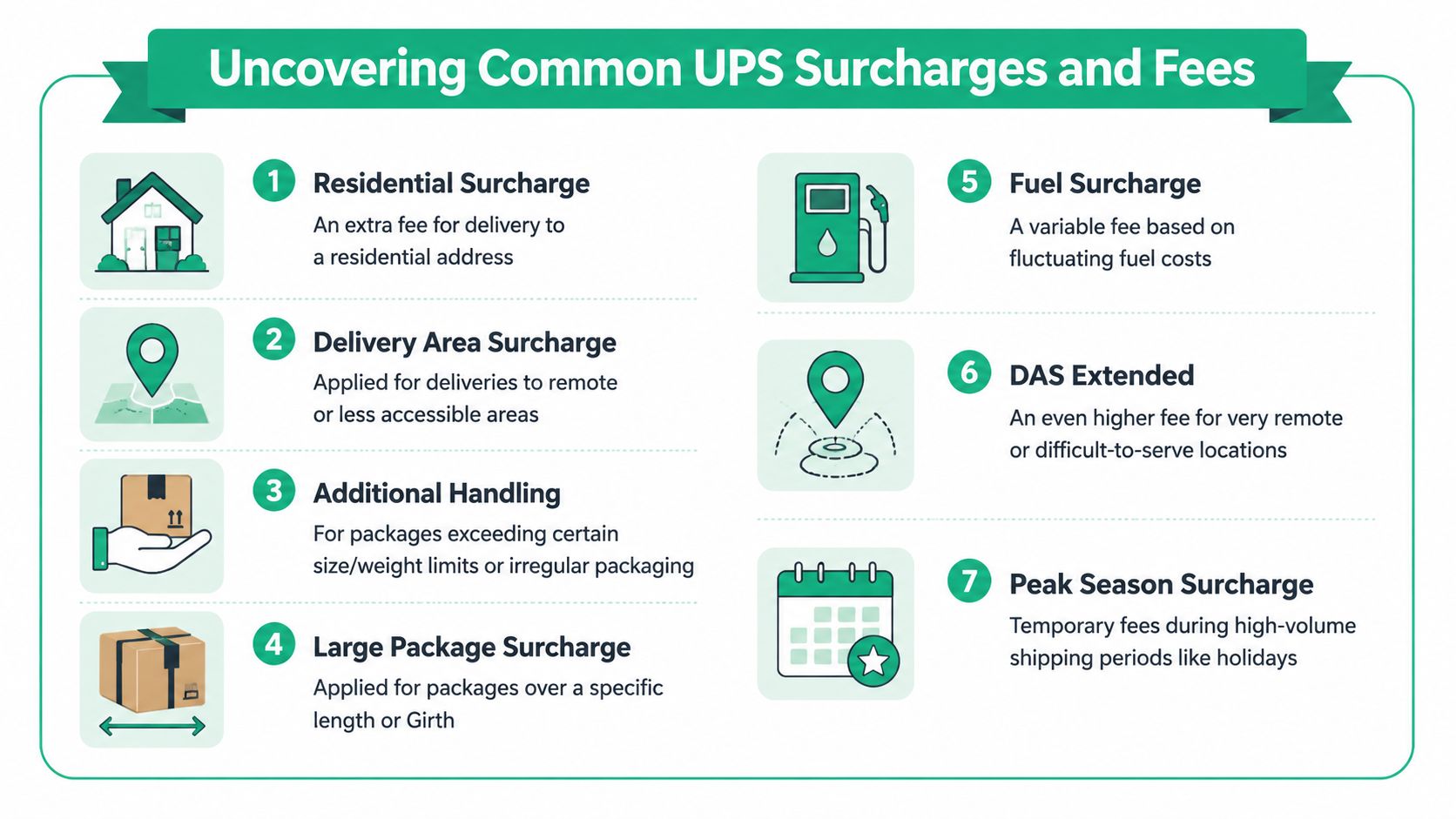
The charges that eat margin
Several surcharge types show up again and again in ecommerce operations:
- Residential delivery fees: Common because DTC orders usually ship to homes
- Delivery area fees: Applied when the destination costs more to serve
- Fuel surcharges: Variable and easy to underestimate if you only watch base rates
- Peak-season fees: Temporary, but they hit when volume is highest
- Additional Handling and Large Package charges: Usually the most expensive surprise because they are tied to specific size or weight triggers
If part of your volume ships across borders, the fee stack gets more complicated. Duties, customs handling, brokerage, and service exceptions can all change the final landed cost. This guide to UPS international shipping cost considerations is a useful cross-check.
A short explainer is useful here:
The threshold shift merchants need to pay attention to
Thresholds matter more than intuition.
According to AlixPartners' analysis of UPS announcements, UPS replaced the older Length + Girth threshold for some accessorials with cubic-inch limits of 8,640 in³ for Additional Handling and 17,280 in³ for Large Package surcharges. AlixPartners also noted that UPS added the Large Package Surcharge to shipments over 110 lb.
That changes day-to-day packaging decisions. A carton can look manageable on the pack table and still cross a cubic threshold once dunnage, inserts, or a slightly taller box gets used. The problem is not whether the box looks oversized. The problem is whether one side of the carton, or the final packed weight, pushes the shipment into a more expensive surcharge category.
Here is the kind of math operations teams should run before a packaging change goes live:
- Box A: 20 x 18 x 24 = 8,640 in³
- Box B: 20 x 18 x 25 = 9,000 in³
That one extra inch can move the shipment past the Additional Handling cubic threshold. On a high-volume SKU, a small packaging drift like that can erase margin for the entire line.
Peak periods punish loose packaging control
Peak season turns minor errors into expensive habits.
AlixPartners found that UPS's 2025 peak-season surcharges increased by roughly 7% to 9%, with residential and air packages rising by about $0.40 to $2.05 per package. The same analysis noted that some large shippers faced as much as $7.50 per Ground package and $8.75 per Air package during peak weeks.
That means a carton that is barely acceptable in February can become a problem in November. If a package already triggers residential fees, fuel, and delivery area charges, adding peak surcharges on top can wipe out the contribution margin you thought you had.
What to audit on every problem SKU
When one SKU keeps showing up as “shipping too expensive,” run a threshold audit before you blame the carrier or renegotiate rates.
Measure the final packed carton
Use ship-ready dimensions with inserts, tape, void fill, and the actual outer box.Calculate cubic volume
Multiply length x width x height. If the result is near a known threshold, test a smaller carton before that packaging choice spreads across more orders.Check packed weight against surcharge triggers
Weight can trigger handling logic even when the carton dimensions look normal.Pull invoice data by fee type
Break out residential, area, fuel, Additional Handling, and Large Package charges separately. If they are all rolled into one “shipping cost” line, root-cause work becomes guesswork.Review threshold exposure by order count
A surcharge that hits 3% of orders is a packaging exception. A surcharge that hits 30% of orders is an operating model problem.
The assumption to drop
Shipping cost is not just weight plus zone. For many DTC brands, a significant budget blowout happens when a shipment crosses a surcharge threshold and nobody catches it until the UPS invoice lands.
Teams that control parcel cost well track two things at the same time. They know the transportation rate, and they know the size and weight breakpoints that can reprice the shipment completely.
Calculating a Shipment from Start to Finish
A merchant quotes $14 at checkout, ships the order, and gets billed closer to $24 after UPS applies the package logic. That gap usually comes from one of two problems. The carton data was incomplete, or the package crossed a threshold that changed how UPS rated it.
The fix is a disciplined rating process. Start with the exact shipment inputs, calculate billable weight, pull the available services, then check whether the package profile trips any fee threshold that changes the economics of the order.
Start with the full input set
A reliable UPS estimate depends on complete shipment data: origin and destination ZIP or postal codes, ship date, package dimensions, package weight, service level, declared value, and any add-on services or payment method, according to Gori.ai's UPS calculator guide.
Missing dimensions are a common failure point. Weight-only estimates break down fast on bulky cartons, and that is exactly where margin gets eaten.
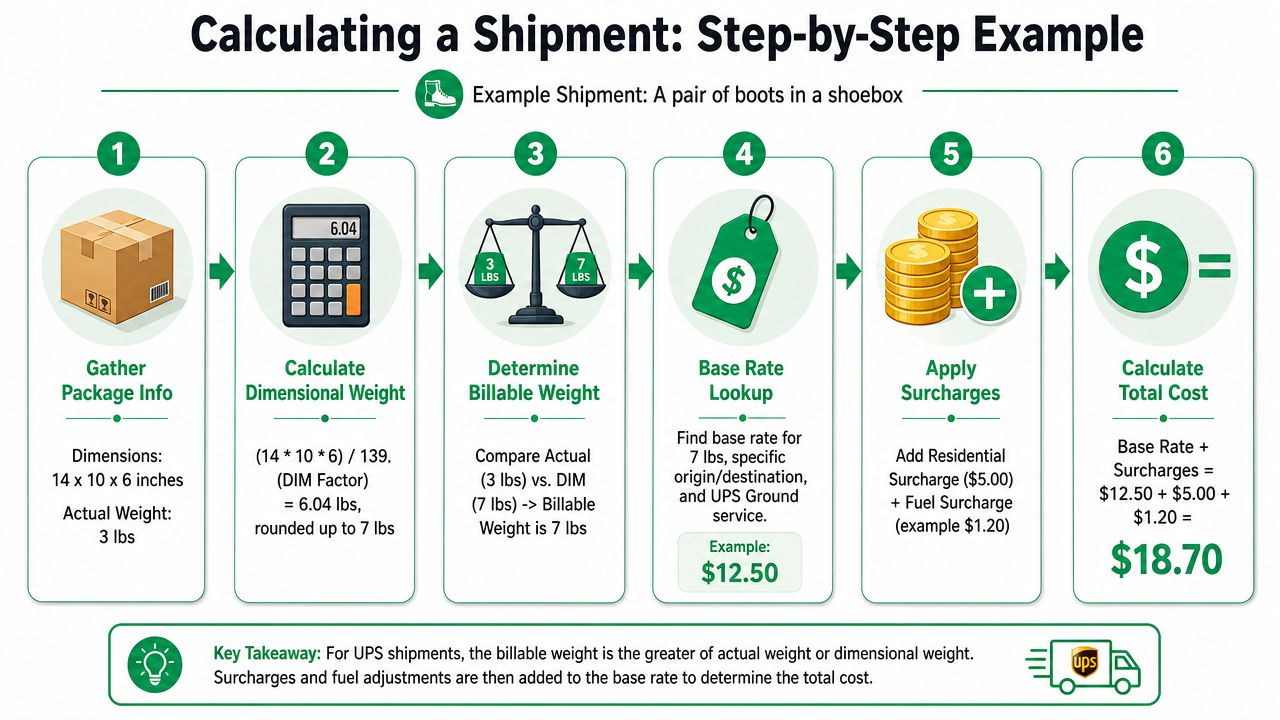
The operating workflow that holds up on invoices
Use the same sequence every time so quoting, checkout, and invoice review all match.
Capture the exact lane
Enter the correct ship-from and delivery ZIP or postal code. That determines the zone, service availability, and base transportation rate.Measure the final packed carton
Use the outer box after inserts, dunnage, and tape. Then calculate dimensional weight and compare it to actual weight. Billable weight is the higher of the two.Choose the service level on purpose
Expedited service can make sense for a high-AOV order, a replacement shipment, or a late fulfillment day. It does not make sense as the default for every cart.Add declared value and any accessorials
Signature options, billing choices, and declared value can change the total. If they are omitted at quote time, the estimate is already off.Check threshold exposure before approving the carton
Experienced teams catch cost blowouts at this stage. If the package is close to a size or weight breakpoint, test a different carton before the order flow hardens around the wrong packaging choice.
A simple shipment example with real math
Take a lightweight home goods order packed in a carton that measures 20 x 16 x 12 inches and weighs 8 lbs.
First, calculate cubic volume:
20 x 16 x 12 = 3,840 cubic inches
Next, calculate dimensional weight using the divisor that applies to your rating context:
3,840 / 139 = 27.6
Round up. The DIM weight is 28 lbs.
Now compare that to actual weight:
- Actual weight: 8 lbs
- DIM weight: 28 lbs
- Billable weight: 28 lbs
At that point, pull the UPS service options for the lane and ship date. The returned transportation rate is only the starting point. The carton still needs a threshold check. If a small packaging change pushes one side over a surcharge trigger, the shipment can move into a much more expensive category even though the product itself did not change.
That is the part many teams miss.
Where this breaks in Shopify
In Shopify setups, product weights are often maintained well enough for checkout, but carton definitions are vague, outdated, or missing entirely. That creates bad estimates and bad decisions.
If the system knows an item weighs 3 lbs but does not know whether it ships in a 12 x 10 x 8 carton or an 18 x 14 x 12 carton, the quoted rate is built on assumptions instead of package reality. For DTC brands, that usually means undercharging customers on larger items and discovering the margin loss later on the UPS invoice.
If your package data is loose, your shipping margin is loose.
The checkpoint that protects profit
The clean calculation is straightforward. Gather the shipment data, calculate billable weight, rate the available services, and review the package against surcharge thresholds before release.
That last step matters most. Base rate math explains the quote. Threshold math explains why the invoice is higher.
Advanced Strategies for Lowering Your UPS Costs
A fast-growing DTC brand can ship the same SKU profitably one week and lose money on it the next, because the packed carton crossed a threshold. The base rate did not suddenly become the problem. The carton did.
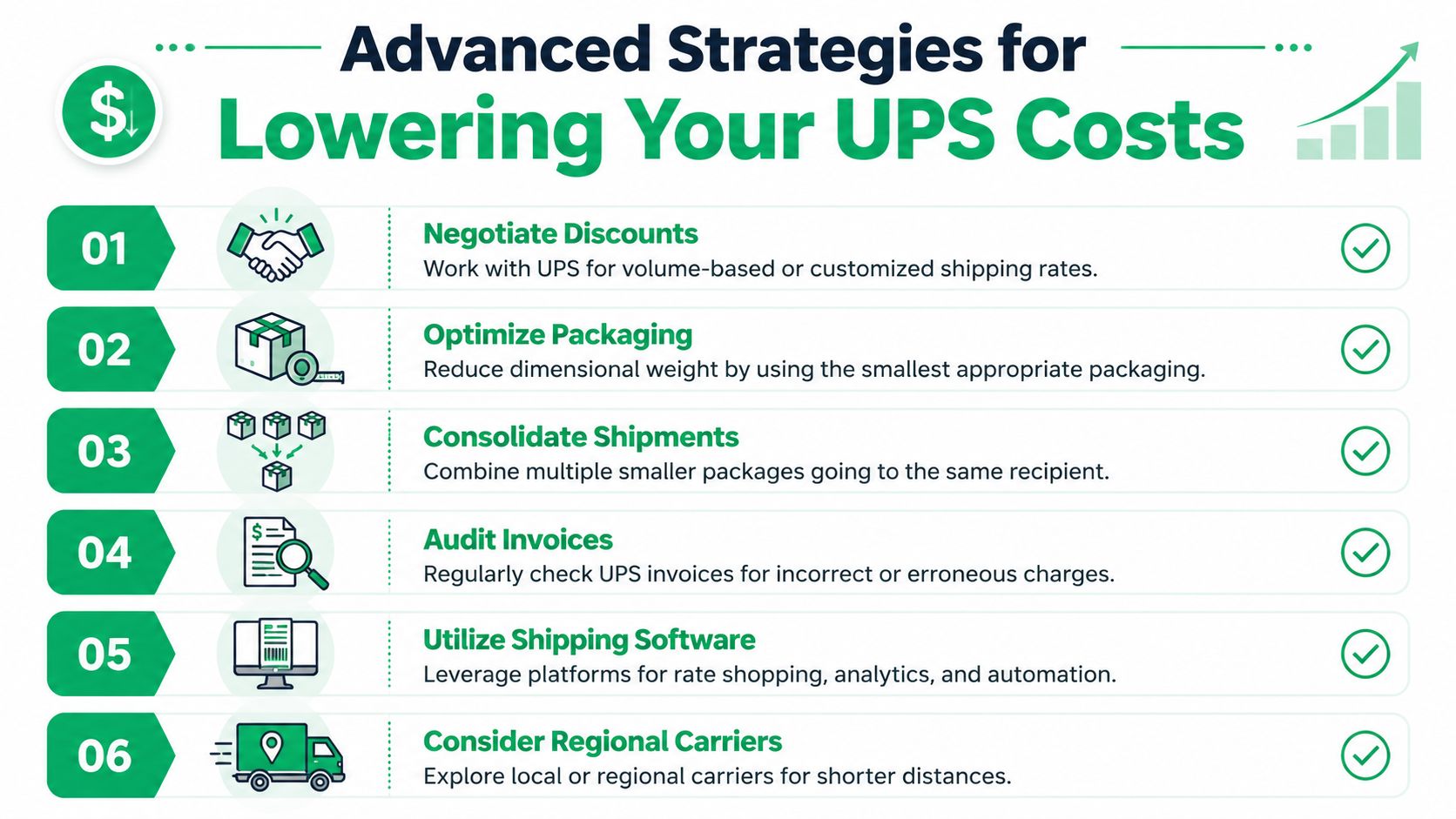
The strongest cost-control work happens before the label is printed. Teams that manage parcel spend well do not just chase lower rates. They map the package thresholds that trigger extra charges, then design packaging and operating rules to stay below them whenever the product allows it.
Design around thresholds
Generic shipping advice usually stops at DIM weight. That misses where many margin leaks start.
Red Stag Fulfillment's summary notes that UPS Large Package Surcharge rules can also be triggered by cubic volume above 17,280 in³ and actual weight above 110 lbs, and that the surcharge carries a 90 lb minimum billable weight. That means a shipment can price like a much heavier package even when the item inside is nowhere near that billing level.
That is the trap.
If a box redesign takes a carton from just over a threshold to just under it, the savings usually beat small improvements in pick efficiency or corrugate cost. A few inches can matter more than a few ounces.
Where merchants usually have opportunities
Few brands can change their network overnight. Most can tighten packaging rules, carton data, and routing decisions within a quarter.
Packaging optimization
Start here, because threshold control is most direct here.
- Reduce empty space: Oversized cartons create DIM exposure and increase the odds of crossing size-based surcharge triggers.
- Build carton rules by SKU family: Apparel, shoes, kits, and fragile bundles need different packaging logic if you want accurate cost control.
- Measure the packed shipment: Vendor box specs are not enough. UPS charges based on the carton that enters the network.
- Flag near-threshold cartons: Any package profile that regularly ships close to a size or weight trigger deserves review before peak season.
A practical method is to sort shipped orders into three groups: safely below threshold, close to threshold, and consistently over threshold. The middle group usually holds the easiest savings because small packaging changes can keep those orders out of a more expensive fee category.
Rate and contract hygiene
Carrier agreements matter, but they do not fix a bad package profile. If operations keeps sending cartons that trigger large package or additional handling fees, the invoice will still punish the margin.
Review billed dimensions and billed weight against what your system expected. When those numbers do not match, the problem is usually one of three things: poor carton setup, inconsistent packing on the floor, or bad data flowing from the cart to the warehouse. Each one is expensive in a different way, but all three are fixable.
Carrier mix and routing choices
UPS does not need to win every shipment.
Some package profiles are better fits for another carrier or service. Brands with enough volume should test lanes and carton types, then route based on package characteristics instead of habit. A multi-carrier shipping solution for ecommerce operations helps teams make that decision with current rates and service options instead of guesswork.
| Strategy | Best use case | Why it helps |
|---|---|---|
| Packaging redesign | Bulky lightweight SKUs | Lowers DIM exposure and reduces threshold risk |
| Negotiated UPS rates | Stable shipping volume | Improves transportation pricing on repeat lanes |
| Regional carrier testing | Dense local demand | Can cut cost on shipments that do not fit UPS well |
| Invoice audits | Recurring surcharge surprises | Finds process errors and billing drift |
The cheapest shipment is often the one that stays below the next surcharge trigger.
What not to do
Teams waste time when they optimize the wrong variable.
- Do not manage parcel spend only by average order weight
- Do not use product-page dimensions as shipping dimensions
- Do not assume a good base discount will offset repeated surcharge triggers
- Do not ignore the 90 lb minimum billable effect tied to the Large Package Surcharge rule noted earlier
The brands that control UPS spend best treat packaging review like margin review. They check actual packed dimensions, watch threshold exposure by SKU, and fix the cartons that keep pushing orders into a more expensive category.
Moving Beyond Manual Calculations
Manual rating is fine when you're learning the mechanics. It's not fine as a long-term operating model for a busy Shopify store.
The issue isn't just time. It's consistency. When staff pull rates by hand, dimensions get skipped, service assumptions drift, and add-on charges get missed. That's how checkout estimates and final invoices separate.
Automation is where accuracy scales
The strongest setup uses your ecommerce platform and shipping tools to carry product, package, and service data through the order flow automatically. That reduces reliance on memory and tribal knowledge.
For Shopify brands, the key is making sure item-level data and default packaging data are clean enough for real-time rating. Then layer in shipping software that can rate shop, apply account pricing, and surface exceptions before labels are purchased.
A multi-carrier stack also gives ops teams options when one network becomes too expensive for a specific package profile. In such scenarios, a multi-carrier shipping solution for ecommerce operations becomes practical, not theoretical.
Know the math, automate the execution
You still need to understand how UPS charges are built. That knowledge helps you spot bad assumptions, challenge invoice issues, and redesign packaging around thresholds.
But once you know the logic, software should do the repetitive work. Your team should spend time fixing costly shipment profiles, not recalculating them one order at a time.
For Shopify brands that want fewer support tickets and cleaner post-purchase operations, SelfServe is worth a look. It lets customers manage eligible order edits themselves, including shipping detail changes within the rules you set, which helps reduce avoidable address issues, lower support workload, and keep operations tighter as order volume grows.