Customer Empowerment for Ecommerce Growth
Most advice about customer empowerment gets it backward. Merchants are told to “give shoppers more control,” as if opening every action to the customer automatically reduces friction. In ecommerce operations, uncontrolled control usually creates the opposite, bad edits, broken fulfillment handoffs, and support threads that start with confusion and end with distrust.
The better model is simpler and harder to sell. Customer agency works when it is treated as a permissioning and governance system, not a UX checkbox. Customers need real agency inside defined rules, because the business still owns inventory integrity, warehouse timing, and exception handling. That's why the strongest post-purchase experiences don't remove guardrails, they make them usable.
Rethinking What Customer Agency Really Means
The phrase customer agency has been around long enough to feel overused, but the shift behind it is real. Accenture's The Empowered Consumer captured an early inflection point, when buyers became more informed, more connected, and more willing to switch brands based on experience rather than price alone. That same change was later described in terms of how and why customers are more in control, with digital access, comparison tools, and social channels giving buyers more control over the journey than earlier retail eras. The commercial logic is straightforward. Better customer experience is tied to stronger revenue outcomes and higher employee engagement when companies invest in CX improvement initiatives. Those signals point to a structural shift, not a passing service trend. Accenture's historical framing of the empowered consumer
The mistake most stores make
The mistake is treating a self-service surface like actual autonomy. A button that lets a shopper “edit order” sounds useful until it accepts an invalid address, collides with fulfillment timing, or sends work into a queue nobody is watching. Customers do not feel in control when the system accepts bad input and fails later. They feel stuck inside an error they cannot see.
Practical rule: if a customer can make a change, the system has to tell them what changed, what did not, and who owns the next step.
A governed model works better. The merchant defines editable fields, timing windows, review rules, and escalation paths. The customer gets meaningful control, while the operation keeps predictable boundaries. That is the difference between a checkout plugin and a real operating model.
Why governance matters more than volume of options
The business goal is not to maximize the number of things a shopper can touch. It is to make the right actions easy and the risky ones controlled. That means mapping each post-purchase action to a business rule, like whether an order can be edited before pick, whether a cancellation needs approval, or whether a shipping address must pass validation before the order can move forward.
Good self-service also depends on visible guardrails. This overview of customer self-service is useful because it keeps the focus on customer action instead of marketing language. In practice, the merchants that do this well stop thinking in terms of “letting customers do more” and start thinking in terms of what customers can safely do on their own. That shift reduces avoidable support contacts without handing the operation to the customer.
The Four Dimensions of Empowered Customers
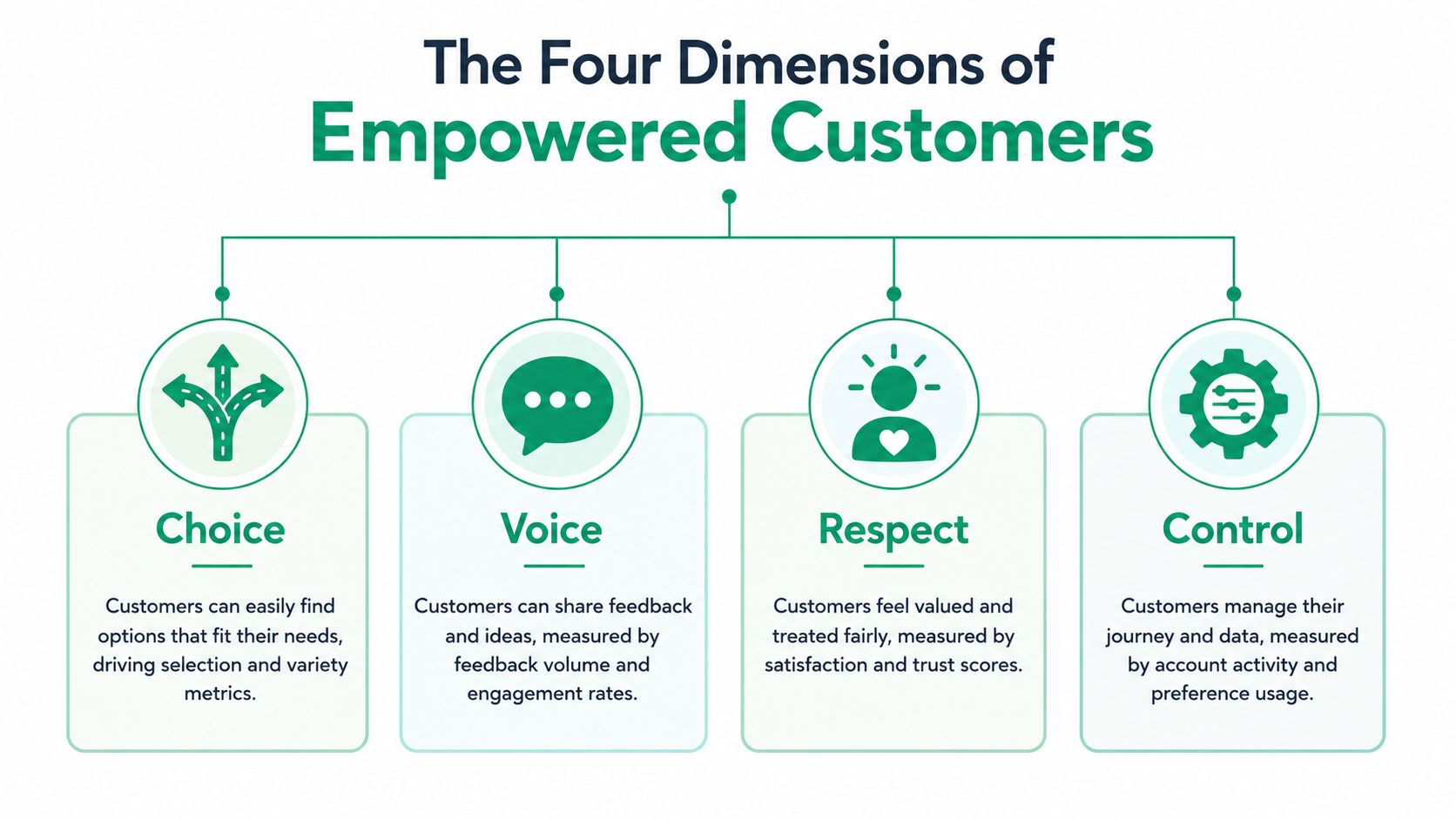
A useful way to operationalize customer empowerment is the four-part model used in development finance, choice, voice, respect, and control. That framework matters in ecommerce because it turns a broad CX ideal into something a team can design, test, and inspect. It also forces a more honest question. Are you giving customers a path to act, or just a form that creates more work?
Choice and voice in post-purchase flows
Choice means customers can edit the right things within a clearly defined window. For a Shopify Plus merchant, that might include shipping address corrections, quantity adjustments, or swapping a product before fulfillment starts. The point isn't unlimited freedom, it's usable discretion with rules attached.
Voice is the part many stores skip. Customers need a way to explain a problem, flag a special case, or request help without getting forced through an opaque support maze. A simple feedback field, a structured reason picker, or an escalation option can be the difference between a resolved issue and a canceled order. The CGAP guidance on customer support emphasizes this broader view, where voice is a measurable dimension rather than a soft sentiment.
Respect and control as operational design
Respect shows up in the details. CGAP's guidance recommends tailoring information to customer capability, speaking the customer's language, and using multiple channels so instructions are easier to absorb. In ecommerce, that translates into multilingual order editing, plain-language prompts, and a flow that doesn't assume every shopper understands warehouse jargon or policy shortcuts. Respect is not decorative, it lowers avoidable friction.
Control is about transparency and predictability. Customers should know whether an edit is immediate, pending review, or blocked by a fulfillment cutoff. If the system accepts a request but the state of the order doesn't update clearly, control is fake. The practical test is simple. Can the shopper understand what happened without contacting support?
Customers trust systems that make the rules visible. They stop trusting systems that make them guess.
A quick audit helps. If your current post-purchase experience gives customers a form but no clarity, you have partial choice and almost no control. If it offers support contact but no self-direction, you have voice without efficiency. The strongest setups balance all four dimensions, because each one solves a different kind of friction.
The Business Case for Post-Purchase Self-Service
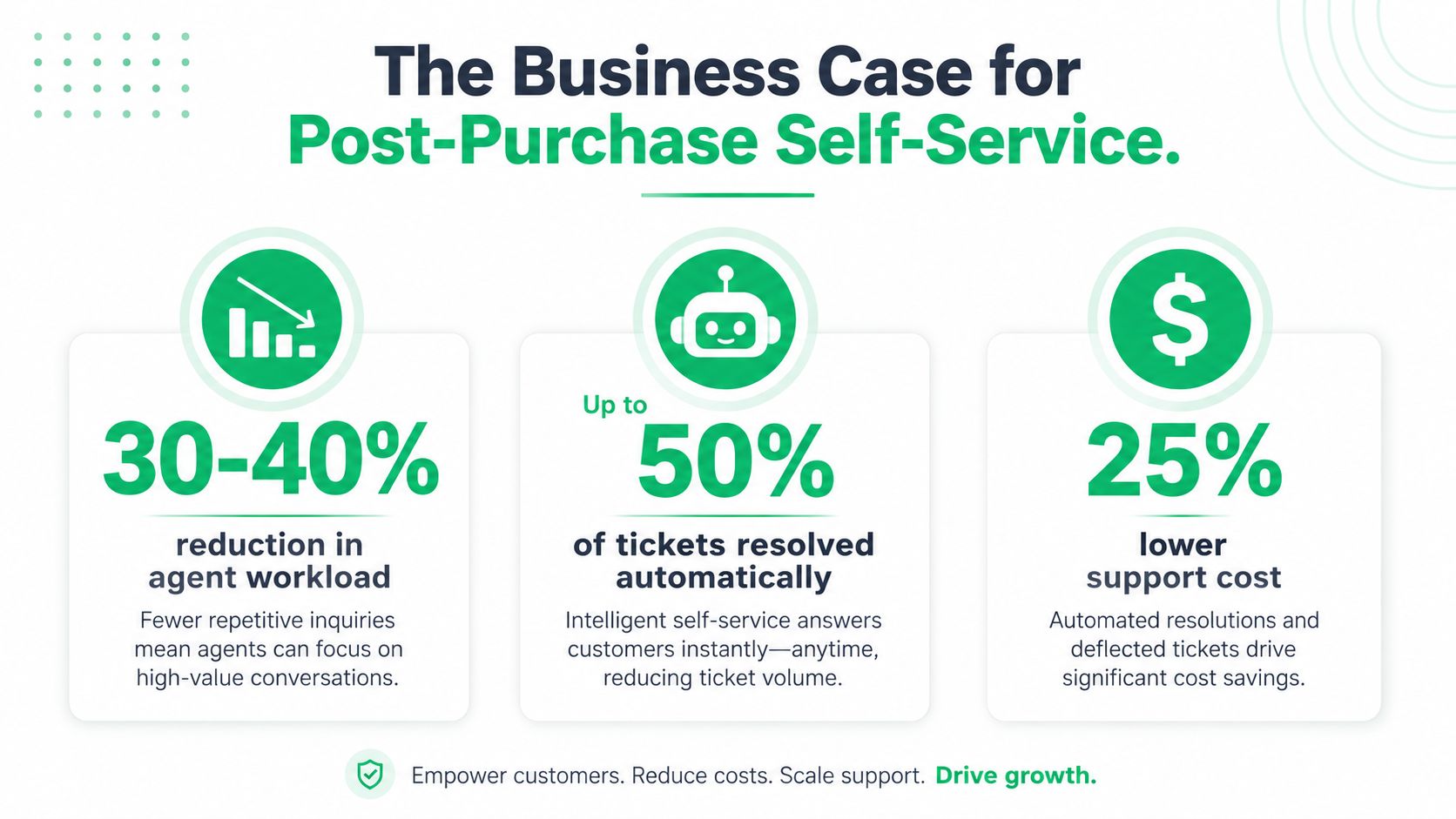
The economics of post-purchase autonomy are stronger than the phrase usually suggests. According to the customer self-service benchmarks and loyalty data, customers consistently prefer self-service options when they are available, and many use those channels to resolve routine issues quickly. The same source also reports that self-service can reduce agent workload and handle a large share of routine inquiries, while Forbes notes that customer service plays a major role in loyalty and that many consumers will pay more for brands known for good service. The business case is straightforward, self-service is not just a support cost lever, it shapes whether a customer keeps trusting the store after payment.
Why post-purchase matters so much
Pre-purchase friction usually ends with a bounce. Post-purchase friction becomes support load, warehouse rework, or cancellation risk. That is why order editing, address correction, and status self-service deserve more attention than generic help-center content. They intercept the issues that most often generate tickets after payment, when expectations are highest and the margin for error is lowest.
The business case also includes revenue protection. Forbes cites organizations that prioritize customer experience as seeing revenue increases, and customer experience improvement initiatives are tied to higher employee engagement in that same referenced research. Those findings matter because ticket deflection alone understates the value of better post-purchase tools. A cleaner experience can preserve repeat orders, protect trust, and reduce the internal drag that comes from manual exception handling.
What to baseline before launch
Before you add self-service, track the current state. Measure how many tickets are tied to address changes, cancellations, order edits, and “where is my order” requests. Then separate issues that are resolvable from the ones that need human judgment. That distinction matters because the goal is not to hide support, it is to reserve human time for the cases that need it.
If you are building the business case for leadership, connect those post-purchase metrics to retention, order accuracy, and handling time. A support queue that shrinks without improving fulfillment accuracy is a false win. The point is to reduce avoidable contacts while keeping outcomes reliable.
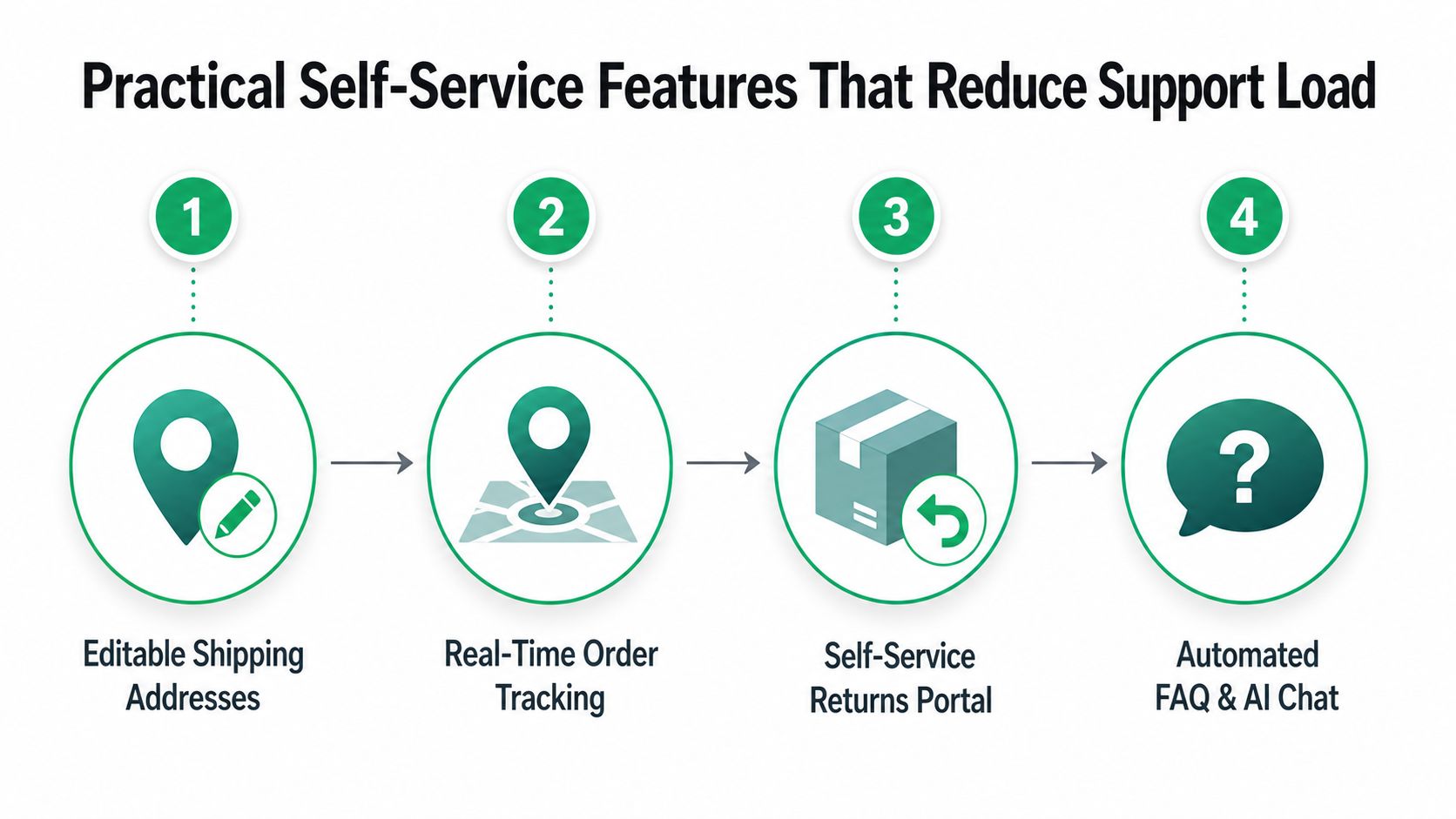
Practical Self-Service Features That Reduce Support Load
The highest-value tools are the ones that reduce uncertainty before it becomes a ticket. That usually starts with editable shipping details, real-time order tracking, a return flow that customers can complete without emailing support, and a structured FAQ or chat layer for repetitive questions. These features work because they absorb the common post-purchase issues that otherwise hit your team first.
Editable shipping fields with validation
Address changes are the easiest place to create expensive mistakes, so validation matters most here. A self-service flow should use real-time address validation and autocomplete, especially when customers are typing on mobile and trying to correct an address quickly. The point is to catch bad input at the source, not after the label is printed.
Operational rule: don't let the customer “save” an address if the system can already tell it won't ship cleanly.
That kind of guardrail is where governance shows up in practice. If the edit window is open, the customer can act. If the address fails validation, the system explains why and prompts a correction before the order proceeds.
Status visibility and order movement
For shipping visibility, customers need an order status flow that doesn't force them to ask support what should already be visible. If you want a deeper logistics context for shipment progress and last-step delivery complexity, final mile tracking explained is a useful reference because it clarifies why delivery visibility matters after the package leaves the warehouse. In practice, status self-service lowers inbound “where is my order” volume when the customer can see movement clearly.
Returns and controlled cancellations
Returns portals and cancellation flows need stricter rules than teams might expect. A customer should be able to start a return or request a cancellation, but that doesn't mean every request should auto-execute. Manual approval queues are useful when you need to protect packed orders, subscription cycles, or fulfillment commitments. The right design here avoids accidental order kills while still giving the shopper a direct path.
For merchants looking at structured post-purchase tooling, this customer portal overview is a practical reference point because it keeps the focus on editable actions, not just support deflection. The feature set matters less than the rules around it.
FAQ and chat as triage, not theater
Automated FAQ and chat should answer the repetitive questions that don't need a human. If the bot can't resolve the issue, it should route cleanly into the correct human workflow with the context intact. Anything else just adds another dead end.
Real Merchant Scenarios and Implementation Patterns
A high-volume DTC apparel brand usually runs into the same problem first, shipping corrections. Customers spot the mistake fast, support gets the email later, and the warehouse may already be moving the order. The winning pattern is a validated self-edit window that opens briefly after purchase and closes before fulfillment starts. The team keeps the order editable long enough to solve the common problem, but not so long that it disrupts picking and packing.
A subscription box merchant faces a different tension. Mid-fulfillment changes can break warehouse logic, especially if orders are batched for recurring cycles. In that environment, permission windows matter more than broad edit access. The operator can let customers change contact details or future preferences while locking sensitive order fields during the active fulfillment stage. That preserves consistency in the warehouse while still giving subscribers a sense of control.
An international merchant has a separate issue, language and comprehension. Multilingual order editing matters because control breaks down when customers can't find or understand the option in the first place. CGAP's guidance on tailoring information to customer capability fits that reality well, since the customer needs the flow in a language they can use, not a translated afterthought.
What these merchants had in common
- They defined editable fields early. The successful teams didn't expose every order attribute, they chose a short list that customers could safely change.
- They tied edits to workflow states. Orders stayed editable only until a clear point in the process, which reduced surprises for fulfillment.
- They kept review paths visible. If a request needed approval, the customer could see that it was pending rather than assuming the system ignored them.
The trade-off is always the same. More flexibility increases customer freedom, but it also raises operational risk unless the rules are explicit. The merchants that handled this well treated exceptions as part of the design, not as a failure of the rollout.
A practical tool can help here, and SelfServe is one example of a Shopify app that lets merchants control editable fields, multilingual order editing, validation, and approval flows in one place. That doesn't remove the need for good operations, but it does make the operational rules visible to customers instead of hidden inside support macros.
Measuring Empowerment Success with the Right KPIs
Support ticket volume is too blunt to judge customer empowerment on its own. A ticket drop can mean customers solved more issues independently, but it can also mean they gave up. The better measurement framework starts with completion rate for customer-initiated changes, then checks for downstream correction events, manual review load, and incremental revenue from post-purchase upsells. Those four signals tell a more honest story about whether the system is working.
KPI framework for empowered post-purchase flows
| KPI Category | Specific Metric | Target Benchmark | Business Impact |
|---|---|---|---|
| Customer action | Completion rate for edits and self-service requests | High enough to show customers can finish common tasks | Measures real adoption |
| Error control | Downstream correction events after self-service | Low and trending down | Shows whether guardrails are working |
| Operations | Manual review load | Manageable, not constantly rising | Indicates whether permissions are too loose or too strict |
| Revenue | Post-purchase upsell revenue | Growing without adding friction | Ties empowerment to monetization |
| Support | Routine ticket reduction | Sustained decline | Confirms deflection on repetitive issues |
For a broader reporting view, master dashboard reporting for growth is a useful way to think about how operational and revenue metrics should sit together instead of in separate spreadsheets.
How to read the signals
If completion rate is high but correction events are also high, the flow is too permissive or too confusing. If manual review load stays heavy, your permissioning is probably too tight, and customers are getting funneled into exceptions that should be automated. If support volume drops but fulfillment errors rise, the system is pushing work downstream instead of removing it.
The right internal dashboard should connect the post-purchase flow to broader operational KPIs, not isolate it from them. Fulfillment accuracy, customer satisfaction, and support handling time should move together if the design is healthy. For a focused view on the customer side, these customer satisfaction metrics are a good companion reference because they help separate convenience from genuine trust.
The signal of success is simple. Customers complete more changes on their own, your team handles fewer routine exceptions, and the warehouse sees fewer avoidable corrections. If those three don't line up, the support structure needs another round of tuning.
Implementation Roadmap for Shopify Merchants
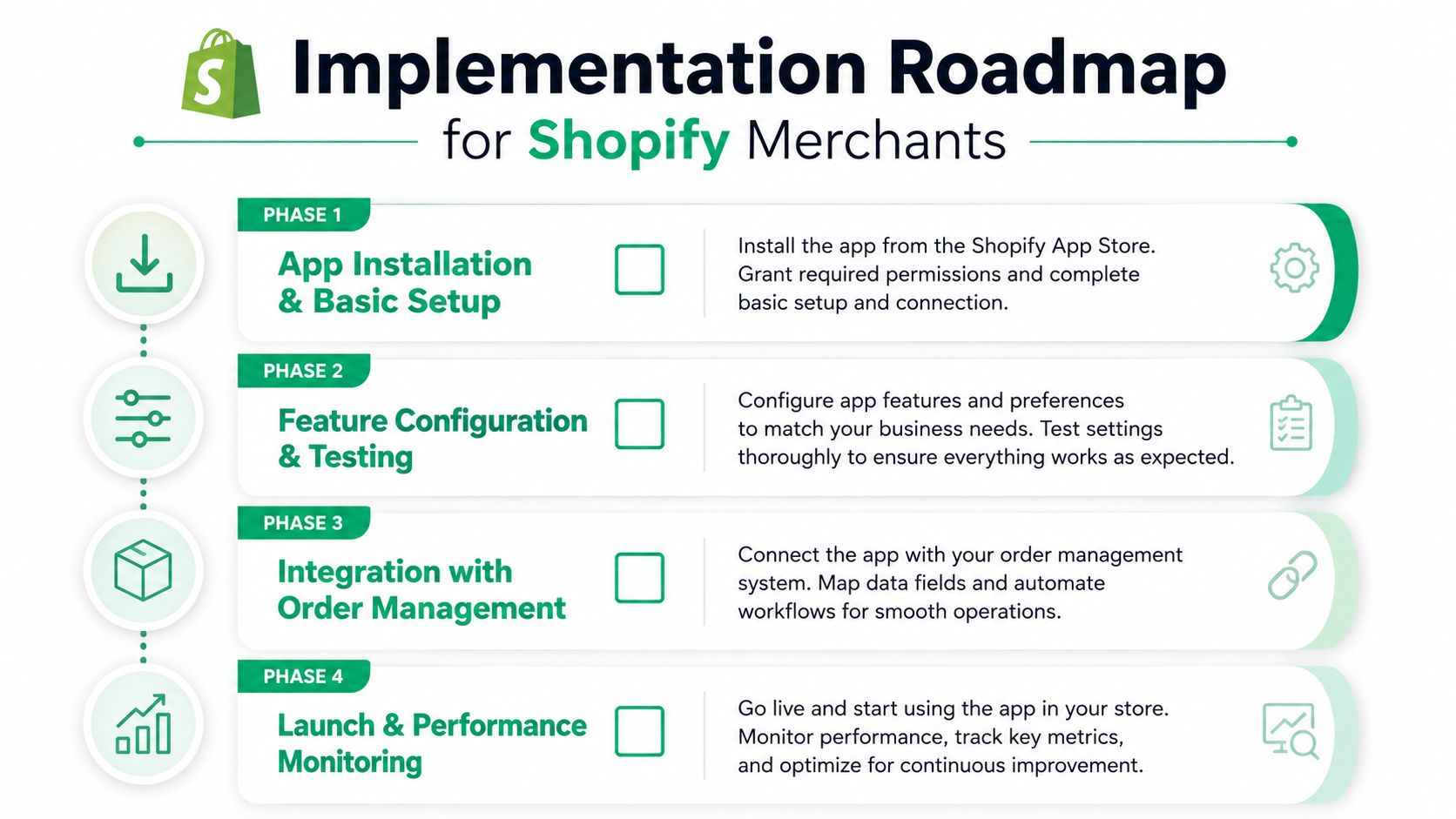
The fastest way to launch customer control on Shopify is to treat it like an operations project, not a theme tweak. Start with the app installation and base configuration, then decide which fields are editable, which states lock an order, and which requests need review. From there, connect the tool to the order flow, test the edge cases, and only then push the customer-facing copy live.
Phase by phase rollout
- App installation and basic setup. Install the tool, confirm theme compatibility, and decide where the customer will see the post-purchase controls.
- Feature configuration and testing. Set editable fields, permission windows, and validation rules, then test invalid addresses, duplicate changes, and cancellation edge cases.
- Integration with order management. Connect the flow to your OMS, 3PL, or ERP processes so edits reach the teams that fulfill the order.
- Launch and performance monitoring. Watch completion rate, correction events, manual review volume, and support volume during the first live cycles.
What usually breaks
The first failure is usually timing. Merchants assume a change window can stay open longer than the warehouse can tolerate. The second failure is messaging, when customers think a request is instant but the order needs review. The third failure is missing integrations, which leaves support with the burden of manually reconciling what the customer changed and what the warehouse received.
Roll out the customer experience only after the internal state changes are reliable.
For international stores, multilingual copy and localized instructions need to be live before launch, not added later. For Shopify Plus teams with more complex order logic, approval flows should be tested against the same real-world scenarios that hit support every day, not just clean demo orders. That's how the system stays governed instead of becoming another source of exceptions.
If you want to turn post-purchase self-service into a governed, revenue-aware operating layer, SelfServe is built for that kind of workflow. It gives Shopify merchants controlled edits, validation, multilingual customer actions, and approval paths that fit real fulfillment rules. Visit SelfServe if you're ready to make customer control safer for operations and easier for shoppers to use.