How to Create Return Labels for Shopify
Your returns inbox usually gets messy before anyone admits it's a process problem.
At first, it looks manageable. A few customers need labels. Someone on support opens Shopify, someone else logs into FedEx or UPS, and labels go out one by one. Then volume climbs, partial returns show up, customers ask where their label is, and your team starts burning time on work that shouldn't require this much attention.
If you're trying to figure out how to create return label workflows that reliably hold up under volume, the clicks inside Shopify are only the starting point. The core effort involves choosing a method your team can run consistently, controlling shipping spend, and removing friction for customers who just want to send something back without opening a ticket.
Why Manual Return Labels Are a Hidden Growth Killer
A lot of teams treat return labels like routine admin work. That mindset causes problems.
One label isn't a big deal. Fifty labels spread across a day is different. Support agents stop solving exceptions and spend their time copying addresses, checking order lines, confirming weights, and resending emails customers can't find. Operations managers end up patching the same issues every afternoon instead of improving the flow.
Where the bottleneck actually shows up
The damage doesn't start with shipping cost. It starts with delay.
A customer asks for a return label. The request sits in queue. By the time an agent replies, the customer has already followed up once. If the wrong item quantity gets selected or the wrong return address is used, the package gets misrouted and the team has another ticket to clean up.
That cycle creates three expensive habits:
- Support becomes a label desk. Agents spend their shift on repetitive work instead of order issues, policy exceptions, or save attempts.
- Customers wait on a simple request. Waiting for a return label feels worse than waiting for a refund because the customer can't even start the process.
- Manual entry creates avoidable errors. Wrong origin, wrong weight, wrong carrier service, wrong warehouse address. None of these are rare when the process lives in inboxes and spreadsheets.
Practical rule: If your team needs a person to touch every standard return, you don't have a returns process. You have a queue.
Returns are an experience problem, not just a cost line
High-volume brands sometimes accept return friction because they assume easier returns will only increase return volume. In practice, poor return handling creates a different kind of cost. Customers remember the hassle. Support gets dragged into repetitive work. Warehouse receiving gets inconsistent packages with missing context.
The better way to think about return labels is this: they are part of post-purchase operations. They affect customer confidence, internal workload, and how quickly returned inventory gets back into the building.
Manual creation still has a place. You'll always need a fallback for edge cases, policy overrides, damaged shipments, and VIP exceptions. But if your default process depends on a person generating every label by hand, your growth will expose that weakness fast.
What scaling teams learn the hard way
Most stores don't hit a wall because they lack a shipping account. They hit a wall because their return label workflow doesn't match their order volume.
The warning signs are usually obvious:
- Repeated “where is my label” tickets
- Slack messages asking who sent what
- Different agents using different carrier services
- No consistent rule for partial returns
- Refunds held up because the label flow is unclear
When that happens, the issue isn't whether you know how to create return label files inside a tool. The issue is whether the process is designed for throughput, accuracy, and customer self-service.
The Standard Playbook Creating Labels in Shopify and Carrier Portals
A customer asks for a size exchange at 4:45 p.m., your warehouse cutoff is at 5, and support needs the label out before the day ends. That is when the manual process earns its keep. Every returns lead should know how to create a label inside Shopify and inside the carrier portal, because edge cases do not wait for your automation roadmap.
Creating a single return label in Shopify
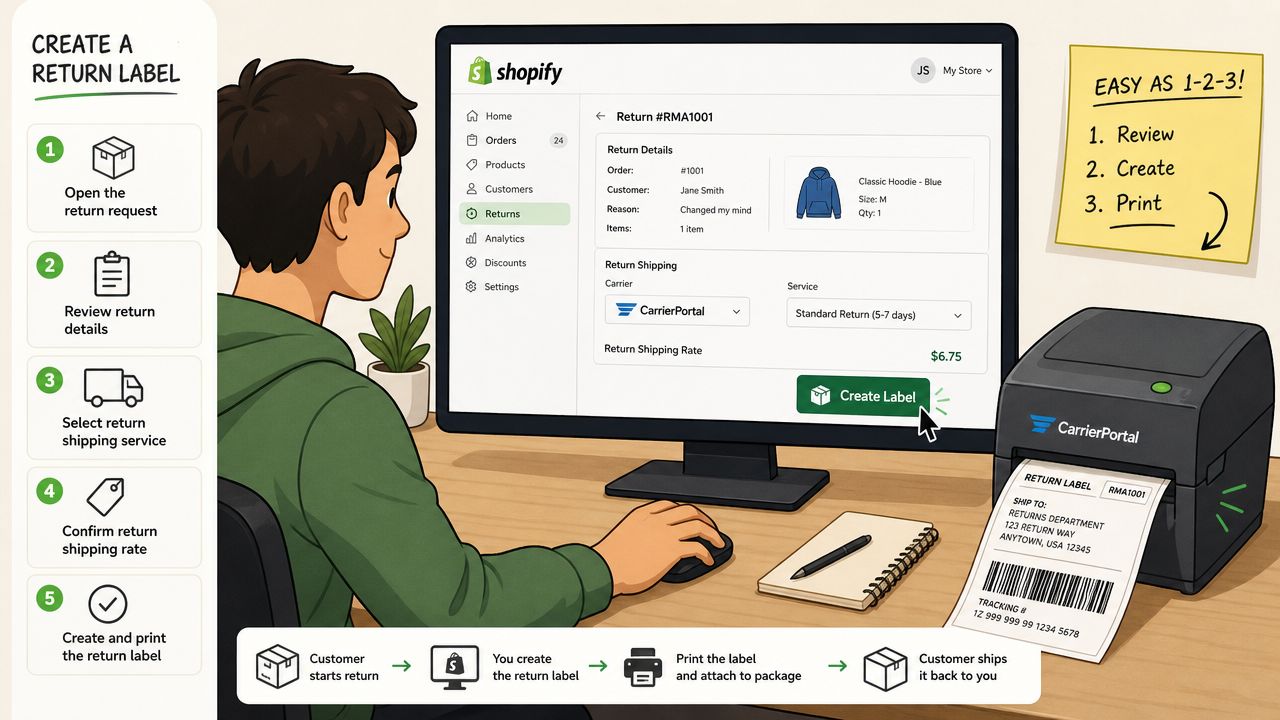
For a one-off return, Shopify is usually the fastest manual option. The workflow is outlined in this Shopify return label walkthrough:
- Open the order in Shopify admin.
- Click Return on the order.
- Enter the quantity coming back.
- Under return shipping options, choose Create a return label in Shopify.
- Add shipping details, including return address, package weight, dimensions, and service.
- Generate the label.
- Send it by email, share a copy link, or print it.
- Click Done.
This works well for standard returns, especially when a supervisor is training a new agent or clearing a small queue. It also keeps the label tied to the order record, which matters later when finance, support, and the warehouse need to confirm what was sent.
The common failure point is bad return-address control. If one agent uses the main warehouse, another uses a 3PL, and a third copies an old address from notes, the package may still move, but receiving gets messy fast. Returned inventory can land in the wrong building, RMAs go unmatched, and refund timing slips.
Creating labels in carrier portals
Carrier portals give you more control than Shopify, but they also create more room for operator error. Use them when you need a service Shopify does not expose, when the merchant account requires carrier-side billing rules, or when the return needs a specific format such as a printable PDF or a mobile-friendly option.
In FedEx Ship Manager, the manual flow is straightforward. Start a return shipment, enter the customer address as origin, enter your return location as destination, choose the service level, add package details, and generate the label in the required format. Teams that need a repeatable SOP often document the steps with a FedEx-specific reference such as this guide to creating a FedEx return label.
The origin and destination fields matter more than they seem. New agents reverse them all the time. That mistake does not just slow down one return. It creates avoidable support contacts, relabeling work, and warehouse confusion.
If your team still handles returns through inbox requests, pair the label SOP with a clear intake process. A simple support ticket system guide can help standardize who approves exceptions, who creates labels, and how requests get tracked.
A quick reference video helps when you're training staff on the manual flow:
What manual creation is good for, and where it breaks
Manual label creation still makes sense in a few situations:
- Low-volume stores with occasional returns
- Exception handling for VIP customers, damaged shipments, or policy overrides
- Carrier-specific services that are easier to set up outside Shopify
- Training and QA, so staff understand the inputs that affect cost and routing
The trade-off is throughput. Manual work gives control, but it does not scale cleanly for high-volume merchants, especially once partial returns, exchange logic, and multiple warehouse destinations enter the picture.
That is the practical limit of the standard playbook. It handles individual cases well. It creates bottlenecks when label creation depends on an agent opening every order, checking policy by hand, and retyping shipment details all day.
Scaling Your Returns with Automation and Self-Service
The fastest way to overload support is to make customers ask permission for a standard return.
That's why high-volume teams move away from inbox-based label creation and toward automation and self-service. The shift isn't cosmetic. It changes who does the work, when the label gets created, and how consistently policy gets applied.
According to Claimlane's discussion of prepaid return labels, 78% of DTC brands with over 500 monthly orders still rely on manual carrier portals, which creates an average 4.2-hour daily support burden solely for label generation. The same source says platform-based returns systems generate 3.1x faster label issuance than manual methods, yet only 12% of mid-market Shopify stores have adopted them.
That's the gap. Teams know the manual route is slow, but many still haven't replaced it.
What automation changes operationally
With a self-service return flow, the customer initiates the request, selects the item, confirms the reason, and gets the right next step immediately. Your rules determine whether the return is accepted, which carrier method is used, and what label format gets delivered.
That matters because it removes three recurring sources of waste:
- Support triage disappears for standard cases.
- Policy enforcement becomes consistent.
- Label generation happens at the moment of intent, not hours later when an agent gets to the ticket.
For a team lead, this is a genuine upgrade. You stop managing a stream of repetitive requests and start managing the rule set behind them.
What a scalable setup usually includes
The best self-service return systems aren't just label generators. They connect policy, order data, and customer communication.
Look for these capabilities:
- Rule-based eligibility so final sale, exchange-only, or window-based returns don't need agent review by default
- Carrier and service selection logic based on item type, destination, or return reason
- Instant label delivery by email, link, or scan-based method
- Status visibility so customers can see progress without asking support
- Exception routing that sends only true edge cases to a human
If a customer qualifies under policy, they shouldn't need a support agent to unlock a label.
There's a support-side payoff too. Once returns no longer dominate your queue, your team can handle complex requests better. If you're cleaning up your broader support operation at the same time, this support ticket system guide is a useful reference for structuring queues, ownership, and escalation.
Where teams overcomplicate automation
A common mistake is assuming you need a custom-built workflow before you can automate. Most brands don't.
They usually need clear return rules, a defined warehouse destination, approved carrier methods, and a customer-facing entry point that doesn't require staff intervention. The complexity lives in your policy decisions, not in writing code for every branch.
Another mistake is automating too little. Some teams create a self-service request form but still require agents to issue the label manually behind the scenes. That lowers friction for the customer, but it doesn't fix the internal bottleneck.
If you're comparing delivery options for UPS-based workflows, this guide on the UPS electronic return label is a helpful reference point when you're standardizing methods across carriers.
What works in practice
For high-volume Shopify Plus brands, the strongest setup is usually:
- customer-initiated return request,
- policy validation before approval,
- automatic label generation,
- clear instructions on where and how to drop the package,
- and limited human review only for exceptions.
What doesn't work is pretending the manual process will somehow stay manageable if you add one more agent. That only scales payroll. It doesn't scale the operation.
Choosing Your Return Label Delivery Method
A return label can be technically correct and still fail in practice.
The problem usually shows up after the customer opens the return email, realizes they need a printer, closes the tab, and forgets about it for three days. At low volume, that looks like normal delay. At high volume, it turns into slower item recovery, more support follow-up, and less inventory back in sellable stock.
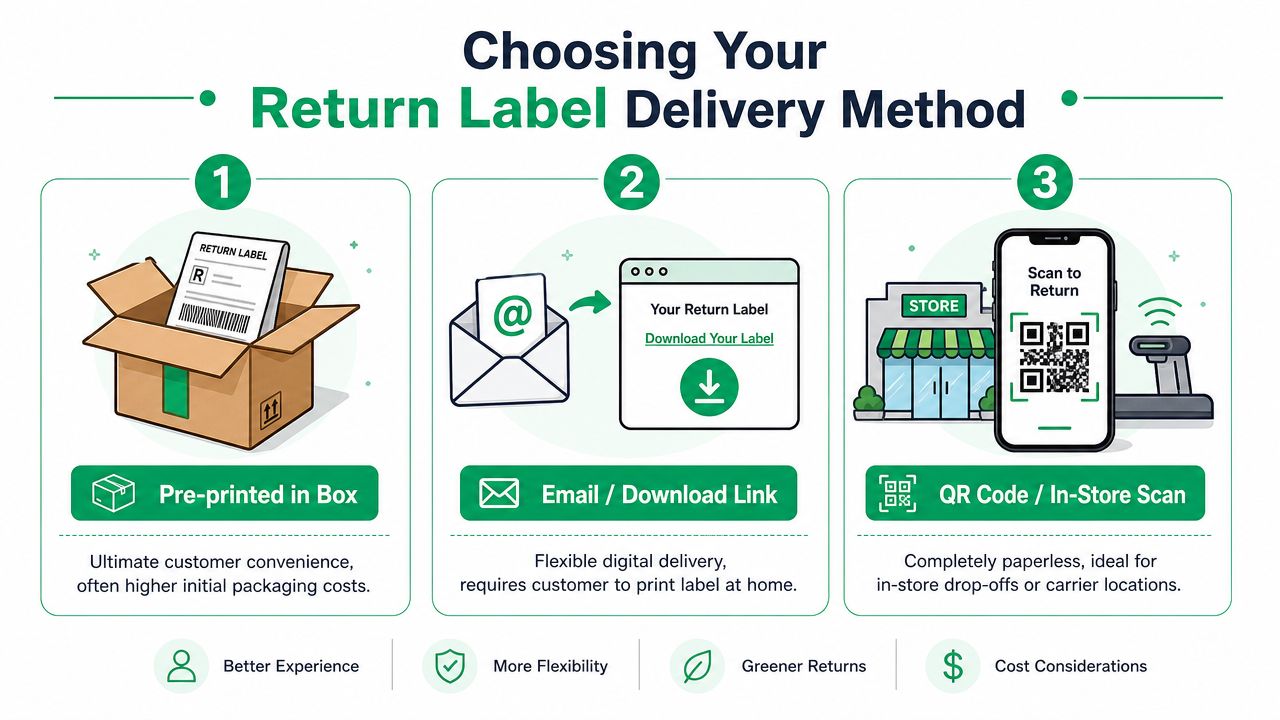
The right delivery method depends on two things: how often customers return items, and how much operational friction your team can afford.
| Method | Customer experience | Operational trade-off | Best fit |
|---|---|---|---|
| Pre-printed in box | Very easy. The label is already there. | Higher packaging complexity and more label waste if returns are never started | Brands with predictable return patterns |
| Email or download link | Familiar and flexible | Customer needs printer access and may lose the email | Standard ecommerce workflows |
| QR code or in-store scan | Low effort for the customer | Only works if your carriers and locations support it, and instructions must be clear | High-volume brands focused on return completion |
Email and download links
Email is still the default because it is easy to set up and easy to explain. The label is generated only when needed, which helps control waste and keeps the process simple for finance and ops.
It also creates a predictable failure point. Customers lose the message, open it on a phone with no printer nearby, or postpone the return until it falls off their radar. If your support team spends time resending PDFs, this method is costing more than it looks on paper.
For teams documenting the basics, this guide explaining what a return label does in the return workflow is a useful reference.
Pre-printed labels in the box
Pre-printed labels remove a step and can improve the experience for categories with frequent fit or style returns. Apparel brands use this method more often because the return intent is already high, and reducing effort can speed inventory recovery.
The trade-off is control. You are printing labels that may never be used, adding pack-station work, and locking in routing details earlier than some operations teams should. If warehouse destinations, carrier service levels, or return rules change often, pre-printed labels become a maintenance issue fast.
Physical inserts also need clean execution. Teams ordering packaging inserts or e-commerce and logistics labels in bulk should treat return-label stock as an operational asset, not just a packaging accessory.
QR code returns
QR code returns are often the best fit for merchants trying to reduce support contacts and increase completion rates without mailing paper labels. The customer shows a code at an eligible drop-off point, and the carrier prints the label on site.
That setup removes the home-printer problem entirely. It also cuts down on the "can you resend my label?" ticket volume that grows once return volume picks up.
There is a constraint. QR-based returns only work well when carrier coverage is strong for your customer base and your instructions are specific about where to go, what to bring, and whether packaging is required. If those details are vague, customers still contact support.
For many merchants, the best system is a tiered one. Offer QR code returns where carrier coverage supports it, keep email labels as the fallback, and use in-box labels only for categories where convenience justifies the extra handling. That mix scales better than forcing every return through one method.
Managing Return Label Costs and Your Return Policy
Return labels are never just a shipping decision. They are a policy decision.
When merchants ask how to create return label workflows profitably, they're usually deciding between two models: prepaid labels paid by the merchant or customer-paid return shipping. Neither is automatically right. The right choice depends on margin, category behavior, and how strongly returns influence repeat purchase behavior for your brand.
The core trade-off
Prepaid labels reduce effort for the customer. That tends to produce a smoother return experience and fewer support conversations about instructions. Customer-paid returns protect margin more directly, but they introduce friction and often require clearer policy communication.
Here's the practical comparison:
| Factor | Prepaid Labels (Merchant Pays) | Customer-Paid Labels |
|---|---|---|
| Customer experience | Smoother and easier | More friction at the point of return |
| Support load | Lower when process is clear | Higher because customers ask what to do |
| Cost control | Merchant carries shipping cost | Customer carries shipping cost |
| Policy complexity | Easier to explain | Needs precise wording to avoid disputes |
| Best use case | Competitive categories, loyalty-focused brands | Tight-margin products, selective return policies |
What works better than blanket generosity
Many teams swing too far in one direction. They either offer free prepaid labels for everything or make every customer arrange their own shipping.
A more durable approach is conditional policy design. For example:
- Use prepaid labels for damaged items or fulfillment errors
- Offer prepaid labels but deduct the shipping cost from the refund
- Limit free returns to specific products, memberships, or order values
- Require customer-paid shipping for discretionary returns while covering genuine service failures
That structure keeps the policy fair without giving away margin where you don't need to.
How to write the policy so support doesn't have to interpret it
The biggest policy mistake isn't being strict. It's being vague.
Customers should be able to answer these questions without contacting support:
- Who pays for the return label
- When a prepaid label is provided
- Whether label cost is deducted from the refund
- What items are excluded
- What happens if the customer uses their own carrier
If your warehouse team uses physical tags or custom label stock for internal processing, this resource on e-commerce and logistics labels can help when you're standardizing the offline side of returns handling.
Sample policy language that reduces confusion
Short policy language usually performs better than legal-sounding paragraphs. For example:
Clear version: "If your return is approved, we'll send you a prepaid return label. For discretionary returns, the return shipping cost may be deducted from your refund. Items marked final sale can't be returned."
That wording does three useful things. It tells the customer what happens next, who pays, and which exceptions exist.
Another good pattern is separating merchant-fault scenarios from customer-preference scenarios. If the item arrived damaged or the wrong product was shipped, say you cover return shipping. If the customer changed their mind, say whether shipping is deducted or paid by the customer.
The operational rule behind the policy
Your written policy should match what your systems can enforce.
If the site says prepaid labels are automatic, but support still has to manually approve every request, customers will feel the disconnect immediately. If the policy says customers pay, but some agents waive the cost ad hoc, you create inconsistency and future disputes.
The best return label policy is one your support team doesn't need to reinterpret every day. Clear language, consistent rules, and a delivery method your customers can use will do more for cost control than any clever wording on its own.
Troubleshooting Common Return Label Headaches
A returns process usually looks fine until volume hits. Then the same few label problems start chewing through agent time, refund margin, and warehouse capacity.
Partial returns and weight mismatches
This issue shows up fast in high-volume operations because the return package often no longer matches the outbound shipment. According to this guide on creating a return label, partial order returns or multi-carton shipments account for 34% of reverse logistics cases in high-volume DTC brands. The same Infoplus guide says 62% of return label errors stem from incorrect weight or carrier mismatches in partial returns. That same Infoplus resource also reports an average shipping cost overrun of $18.5 per label when those errors happen.
The pattern is familiar. A customer keeps one item, repacks the rest in a smaller box, and the team still generates the label from the original order data. That works at low volume if agents catch mistakes manually. It breaks down once returns stack up.
Use a tighter process:
- Weigh the package being sent back, not the original outbound parcel
- Choose the carrier service for the return carton, not the service used on the original shipment
- Confirm box count before issuing labels for split shipments
- Make line-item selection the first step so the label reflects what is being returned
If only part of the order is coming back, treat it as a new shipment with old order context. That is the safer assumption.
Wrong addresses and failed label generation
Label generation failures usually start with routing data, not software. Support teams often check the customer address first and miss the return destination, carrier permissions, or warehouse mapping rule that is causing the failure.
A short checklist prevents a lot of repeat tickets:
- Verify the return-to address first
- Confirm the carrier account supports return labels
- Check shipment direction settings so the customer is the origin and your facility is the destination
- Lock approved return locations so agents are not choosing warehouses ad hoc
I have seen teams lose days to a "system issue" that turned out to be one outdated warehouse address in the returns platform. Standardizing destinations fixes that faster than retraining agents to troubleshoot every ticket from scratch.
A return label error is usually a data problem before it is a tool problem.
Customer says they never got the label
This is less about whether the label was sent and more about whether the customer can use it. Email attachments get buried. Links expire. Messages land in spam. At scale, delivery method matters as much as label creation.
Use a simple recovery sequence:
- Resend the label in a different format, such as a fresh portal link instead of the original attachment
- Verify the order email address
- Send plain-language drop-off instructions
- Note the resend in the ticket or order history so the next agent does not duplicate work
If this happens often, the process needs redesign, not more follow-up. Self-service portals and carrier-generated QR options usually create fewer repeat contacts than PDF attachments passed around by support.
When to stop patching and redesign the workflow
Recurring label issues are process defects with a support wrapper. If the same problem keeps appearing, the actual fix is usually one of three things: automate label rules, tighten return routing logic, or remove agent decisions that should have been system-controlled.
That matters most for merchants handling partial returns, multi-box orders, and high ticket volume. Manual review feels manageable until it becomes the bottleneck. Once exceptions become routine, redesign the workflow before the workflow redesigns your support queue.
If your team is trying to reduce post-purchase tickets before they become return-label tickets, SelfServe is worth a look. It helps Shopify merchants give customers more control over common order changes, which cuts manual support work and keeps operations from getting buried in repetitive requests.